Repository navigation
Self hosting
Run Contrack on your own machine or server. This page covers the install, your data, remote access, backups, upgrades, health, and fixes for common problems. Every variable is in the Configuration reference.
-
With Docker: Docker Engine or Docker Desktop. The image runs on
linux/amd64andlinux/arm64. - Without Docker: Node.js 26.10 or later, npm 11.19 or later, and Git.
- Disk space for the data folder, which grows with your contacts, attachments and snapshots. AI is optional (see AI).
docker run -d --name contrack \
  -p 127.0.0.1:3210:3210 \
  -v "$PWD/contrack-data":/app/data \
  --restart unless-stopped \
  ghcr.io/arvarik/contrack:latest
Open http://localhost:3210.
- The port is published on this machine only. Sign-in is off by default, so read Remote access before you publish it wider.
-
/app/dataholds everything that must survive a restart. Mount only that folder, never a folder over/app, which holds the app itself. - The image holds the two local search models, so the container downloads nothing.
-
latestfollows the main branch. A release also gets the tagsX.Y.Z,X.YandX, and every image gets a tag with its short commit hash. - Each image carries a list of its packages (an SBOM) and a signed record of the build. Verify the Docker image says how to check it.
- Add settings with
-e, such as-e GEMINI_API_KEY=your-key, or set them in the app.
On Linux, the container runs as user ID 1000. When Docker creates
contrack-data on the host for you, root owns it and the container cannot
write there. Create the folder first:
mkdir contrack-data && sudo chown 1000:1000 contrack-data (or use a named
Docker volume -v contrack-data:/app/data, which needs no chown).
docker ps shows healthy once the app answers. docker logs -f contrack
shows the log, and docker stop contrack shuts Contrack down cleanly.
To run the published image with Compose, save this as docker-compose.yml and
run docker compose up -d:
services:
  contrack:
    image: ghcr.io/arvarik/contrack:latest
    container_name: contrack
    restart: unless-stopped
    ports:
      - "127.0.0.1:3210:3210"
    volumes:
      - contrack-data:/app/data
    environment:
      - AUTH_REQUIRED=false # Set to true before exposing beyond localhost

volumes:
  contrack-data:
To build the image from the source code instead, use the docker-compose.yml in
this repository:
git clone https://github.com/arvarik/contrack.git
cd contrack
cp .env.example .env
mkdir -p data   # On Linux: sudo chown 1000:1000 data
docker compose up -d --build
The data goes to ./data, and the port is published on 127.0.0.1:3210. Put
settings in .env. Compose passes most of them to the container
(Environment Variables names the
seven that it does not). The first build installs the dependencies and
downloads the search models, so it takes a few minutes.
git clone https://github.com/arvarik/contrack.git
cd contrack
npm install
npm run models:fetch
npm run dev
Open http://localhost:3210.
-
npm run models:fetchputs the two search models (about 29 MB) inmodels/and checks each file. Without it, the first start downloads them from huggingface.co. The script reads.env, so aDATA_DIRorMODEL_DIRset there moves the folder for the script and the server together. -
npm run devruns the server in development mode, with the Vite dev server. It listens on this machine only, and it refuses to start whenHOSTis not127.0.0.1,::1orlocalhost. For other machines, run the production build below. - To change a setting, run
cp .env.example .envand edit.env. The server reads it from the folder you start it in. A variable set in the shell wins.
For production, or to serve other machines, build the app and start it in production mode. Run it under a service manager, such as systemd, that stops it with SIGTERM.
npm run build
NODE_ENV=production node server.ts- Contrack creates the database, or applies the migrations that a newer release added. A database that it did not create, such as one from Contrack 1, stops the start, and nothing in it changes.
- It checks
PUBLIC_URL,CONTRACK_SECRET_KEYandTRUST_PROXY_HOPS. A bad value stops the start with a message. - It limits its data files to its own user.
- It starts to listen, and logs
Contrack CRM running on http://localhost:3210. - In the background, it loads the search models and indexes your contacts, places addresses on the map, loads the AI model lists, starts connector syncs and scores contacts. About 15 seconds after the start, it takes a snapshot.
The app is usable while this runs. With AUTH_REQUIRED=true and no account
yet, the first visit shows the setup screen. The first account is an admin,
and it takes over the contacts already on the instance.
All data lives in one folder, DATA_DIR: the folder you start the server in,
or /app/data in Docker.
| Path | What it holds |
|---|---|
curator.db |
The database: every account's contacts, notes and settings |
curator.db-wal, curator.db-shm
|
SQLite's working files while the server runs. They belong with curator.db
|
uploads/ |
Photos, attachments and link-preview images, in one folder per account, and company logos |
backups/ |
Snapshots of the database, each with a .json file that records its check |
models/ |
Search models from npm run models:fetch. The Docker image keeps its own in /app/models
|
.cache/ |
Model files that the server downloaded itself, when DATA_DIR is set |
secret.key |
The key that encrypts stored credentials, unless CONTRACK_SECRET_KEY is set |
- At start, Contrack limits these files to its own user: files
0600, folders0700. When it cannot change one, the log names it. - The database is not encrypted. Anyone who can read
curator.dbor a snapshot can read every contact. Use disk encryption when that matters. -
secret.keyencrypts AI keys, the mail password, connector credentials and the Google client secret. Without it, you must enter them again. Keep it with your backups.
Sign-in is off by default, and then anyone who can reach the port has full access. Turn on sign-in before other devices can reach Contrack.
- Set
AUTH_REQUIRED=trueand restart Contrack. Create the admin account on the first visit (see Turn on sign-in). - Open the port. Without Docker, run the production build (see
Install without Docker) and set
HOST=0.0.0.0. Withdocker run, publish-p 3210:3210. With Compose, change"127.0.0.1:3210:3210"to"3210:3210"indocker-compose.yml. - From outside your network, use HTTPS through a reverse proxy, or a private network such as a VPN. Contrack itself serves plain HTTP.
The server logs a warning when it listens beyond this machine with sign-in off.
While sign-in is off, and until the first account exists, Contrack answers
only to local names. These are an IP address, localhost, a name with no dot,
a name under a local suffix such as .lan or .local, and the PUBLIC_URL
host. This stops a web page from using DNS rebinding to act as you. For any
other name, add it to ALLOWED_HOSTS (see
Contrack does not answer to a name).
/healthz answers to every name.
Set two variables:
TRUST_PROXY_HOPS=1
PUBLIC_URL=https://crm.example.com-
TRUST_PROXY_HOPS=1makes Contrack trust the proxy'sX-Forwarded-*headers. Rate limits and the audit log then see the real client address. HTTPS requests count as secure, so the session cookie is markedSecureand the server sends HSTS. -
PUBLIC_URLis the address people open, with no path. Passkeys, invitation links and the Google connector use it. Mail sends no sign-in, reset or invitation link without it (see Outgoing mail). - A signed-in change must come from a page at this server's own address: the
Hostheader the proxy forwards, orPUBLIC_URL. Otherwise it gets403 CROSS_SITE_REQUEST.
With the proxy on the same host, keep the port on 127.0.0.1. Caddy gets a
certificate and sends the forwarded headers by itself:
crm.example.com {
    reverse_proxy 127.0.0.1:3210
}
nginx needs the headers set, and a body limit for attachments and imports of up to 50 MB:
server {
    listen 443 ssl;
    server_name crm.example.com;
    ssl_certificate     /etc/ssl/crm.example.com.crt;
    ssl_certificate_key /etc/ssl/crm.example.com.key;
    client_max_body_size 50m;

    location / {
        proxy_pass http://127.0.0.1:3210;
        proxy_http_version 1.1;
        proxy_set_header Host $host;
        proxy_set_header X-Forwarded-For $proxy_add_x_forwarded_for;
        proxy_set_header X-Forwarded-Proto $scheme;
    }
}
Contrack keeps idle connections open for 65 seconds. Keep the proxy's keep-alive to Contrack shorter than that.
Contrack compresses its answers with brotli or gzip, so the proxy needs no
compression setting. Ask Contrack's results and the progress of an import, a
duplicate scan or contact research arrive as streams, one line at a time.
Contrack sends those uncompressed and with X-Accel-Buffering: no, so each
line shows as soon as it is written, also behind nginx's default buffering. If
you turn on compression in the proxy anyway, leave out text/event-stream and
application/x-ndjson.
These assistants call Contrack from their own servers on the internet, and they sign in with OAuth. Your computer is not the one that connects. So they need three things:
- Sign-in is on (
AUTH_REQUIRED=true). -
PUBLIC_URLis thehttpsaddress of Contrack. - That address answers from the public internet, through a reverse proxy with a certificate, or a tunnel such as Cloudflare Tunnel or Tailscale Funnel. An address on a VPN or your home network only is not enough.
Then add https://<your address>/api/mcp in the assistant, as
Connect Claude or ChatGPT says, and sign
in to Contrack when it asks. The OAuth routes are /.well-known/oauth-*
and /oauth/*, so a proxy that forwards only /api must forward those too.
Claude's servers connect from the address range 160.79.104.0/21. To allow
only that range at the proxy, limit /api/mcp, /oauth/token,
/oauth/register and /oauth/revoke to it. Leave the rest open to your
own browser: it opens /oauth/authorize, the consent page and the sign-in
page itself.
Claude Code, Claude Desktop (local), Cursor, VS Code, Codex and Gemini CLI run
on your own computer. They can sign in with OAuth too, and they need only an
address that computer can reach. For a local test,
PUBLIC_URL=http://localhost:3210 turns OAuth on for them.
By default, Contrack takes a snapshot of the whole database every 24 hours, and one about 15 seconds after each start. It keeps the newest 7. It checks each snapshot at once. The file must pass SQLite's integrity check, hold every table, and hold rows in each table that has rows in the database. At start, the log warns when no snapshot has passed its check, or when the newest one that passed is older than two intervals.
- Settings → Administration → Backups lists each snapshot with its check: Verified, Failed or Not checked. Snapshot now takes one at once, and the download button on a row saves that snapshot to your computer. The audit log records each download, because a snapshot holds every account's contacts.
-
Settings → Administration → General sets Backups (Off, 6 hours, 12
hours, 24 hours or 7 days) and Snapshots to keep (3, 7, 14 or 30).
BACKUP_INTERVAL_HOURSandBACKUP_KEEPset them from the environment. - The files are
DATA_DIR/backups/curator-<date>T<time>.db, in UTC. Scripts can callPOST /api/backupsas an admin (see the REST API reference).
A snapshot on the same disk is not a backup, and it holds only the database. Download one from Backups, or copy these to another machine on a schedule:
- the newest verified snapshot from
backups/ - the
uploads/folder -
secret.key, or a copy ofCONTRACK_SECRET_KEY
To copy the whole data folder at once, stop Contrack first. Each account can also export its own contacts.
- Stop Contrack:
docker stop contrack, or stop the server process. - Copy the current
curator.dbaside, in case you need it again. - Copy the snapshot over
curator.db. - Delete
curator.db-walandcurator.db-shmwhen they are there. They belong to the old database. - Keep the
secret.keythat the snapshot was taken with. - Start Contrack, and check
/healthzor Instance health.
cd contrack-data
cp curator.db curator.db.before-restore
cp backups/curator-2026-09-28T02-00-00.db curator.db
rm -f curator.db-wal curator.db-shm
In Docker on Linux, the file must belong to user ID 1000:
sudo chown 1000:1000 curator.db.
Contrack applies new migrations when it starts. Back up first: choose Snapshot now, and copy the snapshot or the data folder to another machine. The changelog lists what each release changes.
# Docker: pull, remove the container, then run the same docker run command
docker pull ghcr.io/arvarik/contrack:latest
docker stop contrack && docker rm contrack

# Docker Compose
git pull && docker compose up -d --build

# Without Docker: update, build for production, then restart the server
git pull && npm install && npm run models:fetch && npm run build
After the start, /healthz shows the last migration that the database applied
(schema.migration) beside the last migration that the build holds
(schema.expects). They match when the upgrade is complete. A migration that
fails stops the start, keeps nothing it changed, and names itself in the log.
A build refuses to start on a database that a newer build has migrated:
restore the backup that you took before the upgrade.
Contrack 2 is a new start. It does not open a data folder from Contrack 1:
it stops with a message and changes nothing. Give Contrack 2 an empty
DATA_DIR, and keep the old folder if you may go back to 1.x.
Contrack works on a machine with no internet access, with a few limits.
-
Search models. The Docker image holds them. Without Docker, run
npm run models:fetchonce while online, then setMODEL_DOWNLOADS=false. The script reads.envas the server does, so it fills the folder that the server reads.npm run models:fetch -- --checkchecks the files,npm run models:fetch -- <folder>fills another folder, andHF_ENDPOINTpoints the script at a mirror. -
npm install. On Linux x64,
ONNXRUNTIME_NODE_INSTALL=skip npm installskips GPU files that Contrack does not use. - These need the network: AI providers (an OpenAI-compatible server on your network works), the basemap tiles (unless you host your own), placing addresses on the map, company logos, link previews in notes, the weather, connectors, and outgoing mail.
Model files and offline installs lists the folders and the order in which the server reads them.
-
GET /healthzanswers200with"status":"ok"when the server and the database respond, and503when the database does not. It needs no sign-in, so an uptime monitor can call it. The Docker image calls it every 30 seconds, and gives the first start 60 seconds. -
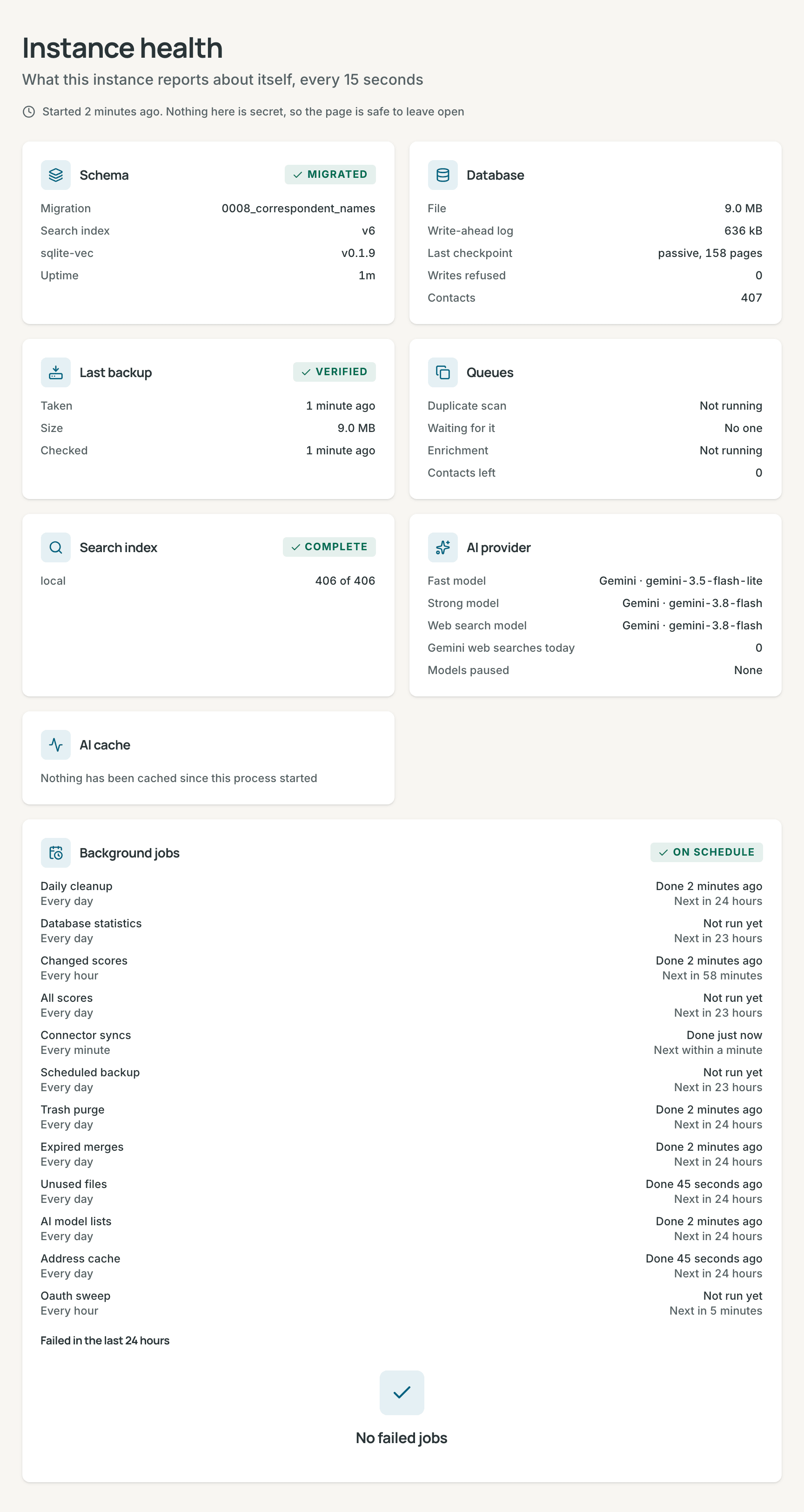
Settings → Administration → Instance health shows the schema and the
uptime, the database and its write-ahead log, the last backup, the
duplicate scan and research queues, the search index, the model for each
task, and the AI cache. It refreshes every 15 seconds.
- Its Background jobs card lists each recurring job with its last run,
its result and its next run: connector syncs, the two score sweeps, the
scheduled backup, the daily cleanup, the trash purge, expired merges,
unused files, the address cache, the AI model lists, the database
statistics and the OAuth sweep. It also lists the jobs that failed in the
last 24 hours, with their errors.
JOB_CONCURRENCYsets how many jobs run at once.
- Its Background jobs card lists each recurring job with its last run,
its result and its next run: connector syncs, the two score sweeps, the
scheduled backup, the daily cleanup, the trash purge, expired merges,
unused files, the address cache, the AI model lists, the database
statistics and the OAuth sweep. It also lists the jobs that failed in the
last 24 hours, with their errors.
- The server writes its log to standard output: the terminal, or
docker logs contrack. Each line has the time, the level and the area, such as[WARN] [Auth]. Colors appear only in a terminal. -
LOG_LEVELsets how much it writes:error,warn,info(the default) ordebug. Each request is oneinfoline, with the path and no query string. In production, the line also has the client's IP address. - An error line carries the request id that the client got in
X-Request-Id, so a reported error leads to its line. - The log says what happened, to which record id, how many and how long. It never holds a name, an email address, a phone number, a street address, a note or its title, a search or an Ask question, a file name, a pasted link or what a model wrote.
- Docker Compose keeps the log in three files of 10 MB. When they are full,
Docker drops the oldest lines, so the log reaches back about 30 MB, however
many days that is. Change
max-sizeandmax-fileunderlogging:indocker-compose.yml. Withdocker run, add--log-opt max-size=10m --log-opt max-file=3, because Docker otherwise keeps every line for as long as the container exists. - On SIGTERM or SIGINT (
docker stop, orCtrl+C), the server finishes open requests, closes the database and exits. After 8 seconds it forces the close. A second signal exits at once.
- Turn on sign-in before anything but this machine can reach the port.
- Keep Anyone can create an account off, and use Invitations (see Administration).
- Serve remote access over HTTPS, with
TRUST_PROXY_HOPSandPUBLIC_URLset. - Protect
secret.keyand the snapshots like the database. Together they open every stored credential. - Encrypt the disk that holds the data folder, and run Contrack as its own user.
- Leave
CONNECTORS_ALLOW_PRIVATE_HOSTSoff when the internet can reach Contrack. - Use a Gemini key from a Cloud project with billing (see Privacy).
- Pull new images. A rebuilt image takes the latest Node 26 security release.
The log shows EADDRINUSE, and the server exits. Stop the other program, or
use another port: set PORT, or with Docker change only the host side, as in
-p 127.0.0.1:3310:3210.
The log names the variable:
-
DATA_DIRholds tables that Contrack 2 did not create: start with an empty folder. A data folder from Contrack 1 is one of these. - The database has a migration that this build does not have: a newer Contrack wrote it. Run that version, or restore a backup from before it.
-
PUBLIC_URL: use anhttporhttpsorigin with no path, such ashttps://crm.example.com. -
TRUST_PROXY_HOPS: use a whole number from 0 to 10. -
CONTRACK_SECRET_KEY: use 64 hex characters, fromopenssl rand -hex 32.
With MODEL_DOWNLOADS=false, the log names the missing model, the folder, and
the fix. Search keeps working on keywords. Run npm run models:fetch in the
folder that you start the server in, or set MODEL_DOWNLOADS=true for one
start.
To check that both models load and run, use npm run models:smoke, or
docker exec contrack node scripts/model-smoke.ts in a container. It embeds
one sentence and scores one pair, and fails with the reason when a model or
its runtime is missing.
The browser shows "Contrack does not answer to "crm.example.com" while sign-in
is off", and the API answers 403 HOST_NOT_ALLOWED. While sign-in is off, and
until the first account exists, Contrack answers only to local names (see
Remote access). Do one of these:
- Turn on sign-in, and create the first account at an IP address,
localhost, or thePUBLIC_URLaddress. - Set
PUBLIC_URLto the address people open. - Add the name to
ALLOWED_HOSTS, such asALLOWED_HOSTS=nas.tail1234.ts.net.
Behind a reverse proxy, the proxy must also pass the original Host header.
A save with the session cookie must come from a page at this server's own
address. The message names the page's address. Set PUBLIC_URL to the address
people open, and make the proxy pass the original Host header.
Passkeys need a domain name or localhost. On an address such as
http://192.168.1.50:3210, Contrack says "Passkeys require a domain name or
localhost (IP addresses are not supported)." Serve Contrack under a host name
with HTTPS, and set PUBLIC_URL (see Passkeys).
Mail sends no sign-in, reset or invitation link until PUBLIC_URL is set, and
the server logs a warning at start. Set PUBLIC_URL and restart.
The session cookie is not marked Secure, passkeys see the wrong address, or
the audit log shows the proxy's address. Set TRUST_PROXY_HOPS to the number
of proxies, and make the proxy send X-Forwarded-Proto and X-Forwarded-For.
The reset command takes a username or an email address and prints a temporary password. It also ends the account's sessions and revokes its API tokens (see Reset a password). Without Docker, run it in the folder that you start the server in, so that it opens the same database.
# Without Docker
npm run reset-password <username>

# Docker
docker exec -it contrack node scripts/reset-password.ts <username>Accounts with a password exist, so Contrack enforces sign-in and logs an error
at start. Set AUTH_REQUIRED=true to match.
Root owns the host folder, and the container runs as user ID 1000. Run
sudo chown -R 1000:1000 contrack-data, then start the container again.
nginx accepts 1 MB by default. Add client_max_body_size 50m; to the server
block, and reload nginx.
secret.key is missing or different, or CONTRACK_SECRET_KEY changed. The
log says that a saved key "cannot be decrypted". Put the old secret.key
back. Or enter the credentials again in Administration → AI, in
Outgoing mail, and in each connector.
The project needs Node 26.10 or later and npm 11.19 or later. Install them,
and run npm install again.
The health check got no answer, or 503. Read docker logs contrack. A 503
from /healthz means that the database does not answer.