Repository navigation
Smart Lists
A Smart List is a saved view defined by rules, not by hand. It always shows exactly the issues that currently match its conditions — add a matching book to your library and it appears in the list automatically.
Open Smart Lists from the navigation rail.
The sidebar ships with ready-made lists (e.g. recently added, unread, in progress), plus a collapsible Maintenance group:
- Missing Files — issues whose file can't be found on disk.
- Duplicate Candidates — issues that look like duplicates of each other.
-
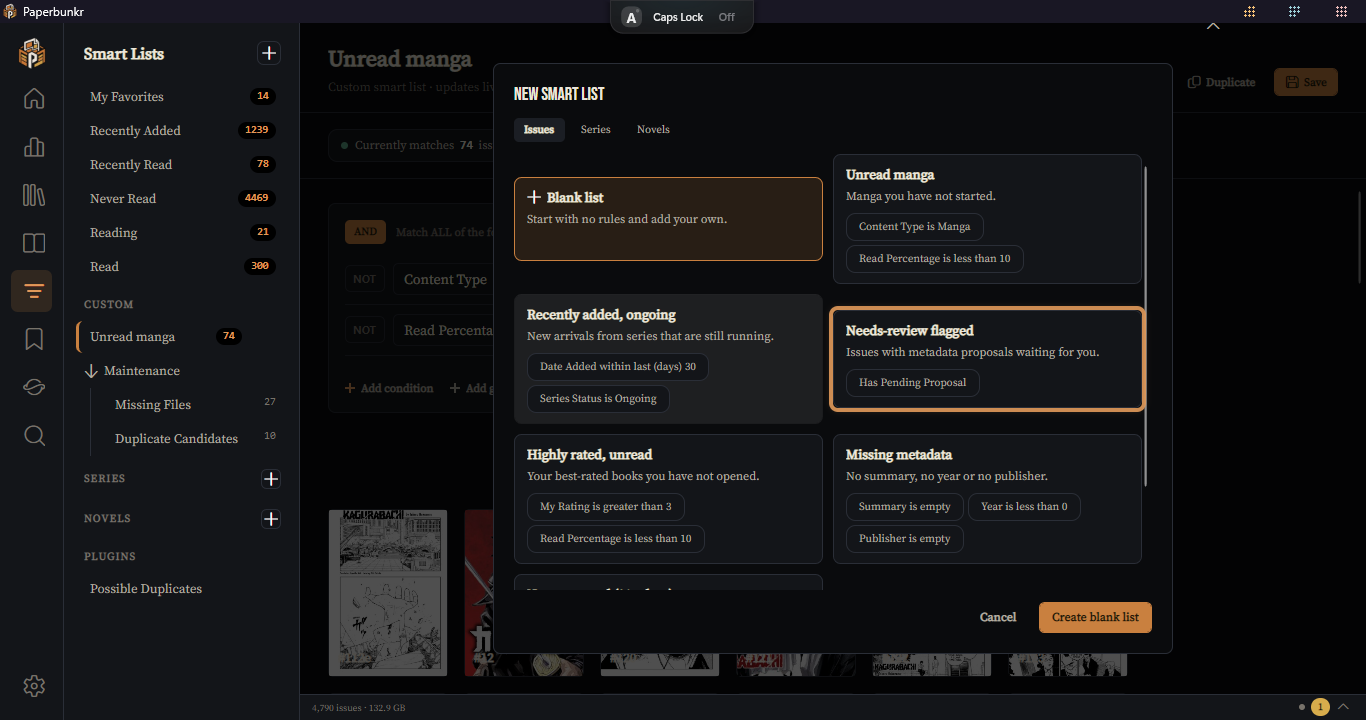
Click New Smart List in the sidebar. A gallery of templates opens, with Issues, Series and Novels tabs. Pick a template to start from its rules (for example Unread manga, Recently added, ongoing or Missing metadata), or choose Blank list and add your own.
-
Give it a name.
-
Under Match ALL of the following, click Add condition.
-
For each condition pick a field, an operator, and a value:
- Text fields (Series, Writer, Genre, Tags, Publisher, Story Arc, …): is / is not / contains / contains any of / contains all of / starts with / ends with.
- Number fields (Year, Page Count, Rating, Read %, Bookmark count, File size, …): is / is not / greater than / less than / in range.
- Toggle fields (Read, Missing, Linked, Black & white, Has custom values): is / is not.
- Date fields (Added, Opened, Released, Modified): is / after / before / in range / within last N days.
-
Currently matches N issues updates live as you edit. Click Apply, then Save.
The condition list matches ComicRack CE's matcher catalog field-for-field, so lists you relied on in CE can be rebuilt here.
- Selecting a list shows its results using the same grid, sort, group, and display controls as the Library — and remembers that layout per list.
- Duplicate a list to use it as a starting point for a variation.
- Delete from the sidebar (with a confirm step).
Instead of CE's fixed VirtualTag01–20 slots, PaperBunkr lets you define named virtual tags — computed labels you can then filter on with the Virtual Tag condition field.