Repository navigation
Multiplayer
Up to four TACT devices can play one game together: one host and up to three devices that join it. Each device plays for one team colour.
Multiplayer has so far only been tested on a single device. Expect rough edges until it has been tried with several.
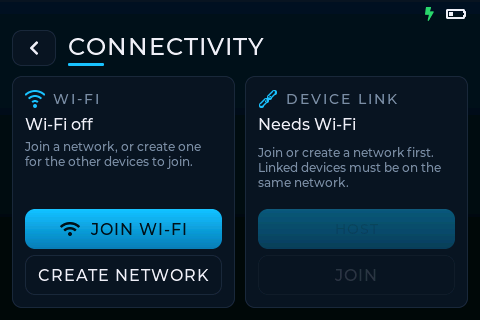
Open CONNECTIVITY → WI-FI on each device. Either:
-
JOIN WI-FI: pick a network from the list and enter its password. Other TACT devices' networks
(named
TACT-<device name>) are joined without a password prompt. - Saved passwords: leave SAVE ticked when entering a password, and that network joins without asking next time (it shows SAVED in the list). Press and hold a saved network to forget it.
-
CREATE NETWORK: this device makes its own network,
TACT-<device name>. Useful on a field with no Wi-Fi: create it on one device and join it from the others. The screen shows the network's password, for joining from a phone or laptop.
In CONNECTIVITY → DEVICE LINK:
- On one device choose HOST. It lists the devices that join, with their colours. Tap a colour to change a device's team, or ✕ to remove a device.
- On the others choose JOIN A HOST and pick the host from the list.
Devices can join while the host is on the CONNECTIVITY screen. A session holds 4 devices: the host and 3 more. A device that tries to join a full session is told so (Session full, or Network full on the host's own network). While hosting, you can also run the game from a phone: see Phone remote.
Give each device a recognisable name first (Settings → SYSTEM → Device name); that's what the others see.
- Pick a game mode marked SOLO / MULTI, and set the GAME DURATION.
- On PLAYERS, tap the devices that should play this game. The host always plays. Pick nobody for a solo game on the host; devices left out stay linked but aren't sent this game.
- Finish the mode's setup. Everything is chosen on the host.
- On READY, tap SYNC to send the setup to every device, then START GAME. Every device counts down to the same moment and starts together.
While linked, joined devices can't start games of their own: their GAME MODES screen is covered until the host sends a game.
Each joined device reports its result to the host. The host shows WAITING FOR RESULTS until every device has reported, then shows the combined result and saves it to Stats.
If a device can't reach the host (out of range, switched off), the host can choose END WITHOUT WAITING FOR DEVICES; that device is shown as having no result.
- A game carries on if a device loses the connection mid-game. Its result is sent once it's back.
- A device that drops out of the session rejoins it by itself, with the same colour, when the network is back. The host keeps showing it (as offline) in the meantime.
To save battery, TACT switches its Wi-Fi radio off whenever it isn't needed, and back on by itself when it is. The Wi-Fi icon at the top turns grey while the radio rests.
- Joined devices keep Wi-Fi on all the time, ready for the host.
- The host turns it on when you pick a game mode, and keeps it on through the setup, the game and the results, so the other devices are reconnected by the time you reach READY. In the menus it rests; the joined devices show that they're waiting for the host to set up a game.
- On its own (no session), a device only uses Wi-Fi on the CONNECTIVITY screens and when checking for updates.
- On the host: CONNECTIVITY → END SESSION ends the session for everyone.
- On a joined device: CONNECTIVITY → DISCONNECT.
| Mode | Each device is… | Result |
|---|---|---|
| DETONATION | A bomb | Infiltrators win if any bomb detonates |
| DOMINATION | A control point with every team | Each team's time is added up across points |
| KING OF THE HILL | A hill with every team | Each team's points are added up |
| PASSCODE | A lock with its own code | How many codes were cracked |
| RESPAWN WAVES | A spawn point, all on the same waves | The wave each spawn point reached |
| SEQUENCE | A bomb (DISARM ONLY: each with its own random sequence) | Infiltrators win if any bomb detonates |
| TEAM DEATHMATCH | One team's respawn point | Last team standing, or fewest deaths |
| UNDERWORLD COMMANDOS | A terminal with its own random steps | How many devices completed the mission |