Repository navigation
Settings
SETTINGS has four tabs. Changes are saved straight away and kept when the device is switched off.
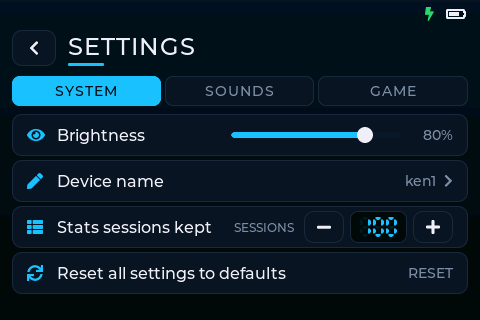
| Setting | Range | Default | What it does |
|---|---|---|---|
| Brightness | 5–100 % | 80 % | Screen brightness, applied as you drag |
| Flip screen | on / off | off | Turns the picture and touch upside down, straight away |
| Device name | up to 16 characters | UNIT-xxxx |
How other devices see this one in multiplayer |
| Stats sessions kept | 10–200 | 100 | How many sessions Stats keeps |
| Check for updates | — | — | Looks for a newer version and installs it (Updating) |
| Clearance | — | — | Device ID, CLASSIFIED missions and whether they're cleared, SYNC (Clearance) |
| Reset all settings to defaults | — | — | Tap twice. Resets every tab; the device name is kept |

All volumes are sliders in 5 % steps. Letting go of a slider plays a sample at the new level.
| Setting | Range | Default | What it controls |
|---|---|---|---|
| System sounds | OFF–100 % | 60 % | Device sounds |
| Game announcer sounds | OFF–100 % | 80 % | Spoken game announcements (coming in a later release) |
| Game sound effects | OFF–100 % | 80 % | In-game sounds: captures, points, respawns, the bomb, wrong codes |
| Location beep | OFF–100 % | OFF | A beep during games so the device can be found on the field |
| Beep every | 5–240 s | 30 s | How often the location beep sounds |
Location beep: when turned up, the device beeps every Beep every seconds during game time, starting one interval after the game begins, and keeps going on the result screen until you leave it. It has its own volume, independent of the other sounds.

| Setting | Range | Default | What it does |
|---|---|---|---|
| Default game time | 1–99 min | 10 min | Where GAME DURATION starts in every mode's setup |
| Game start countdown | 0–60 s | 10 s | The countdown before a game starts (can be changed on READY) |
A picture of the controller. Tap a button (or highlight it and confirm) to set its job (CONFIRM, BACK, HOME, EXTRA or NONE) and its colour, to match your controller. The defaults are right CONFIRM, bottom BACK, top HOME and left EXTRA. Team colours follow the button colours. See Controller.