Repository navigation
Section 1 feature overview
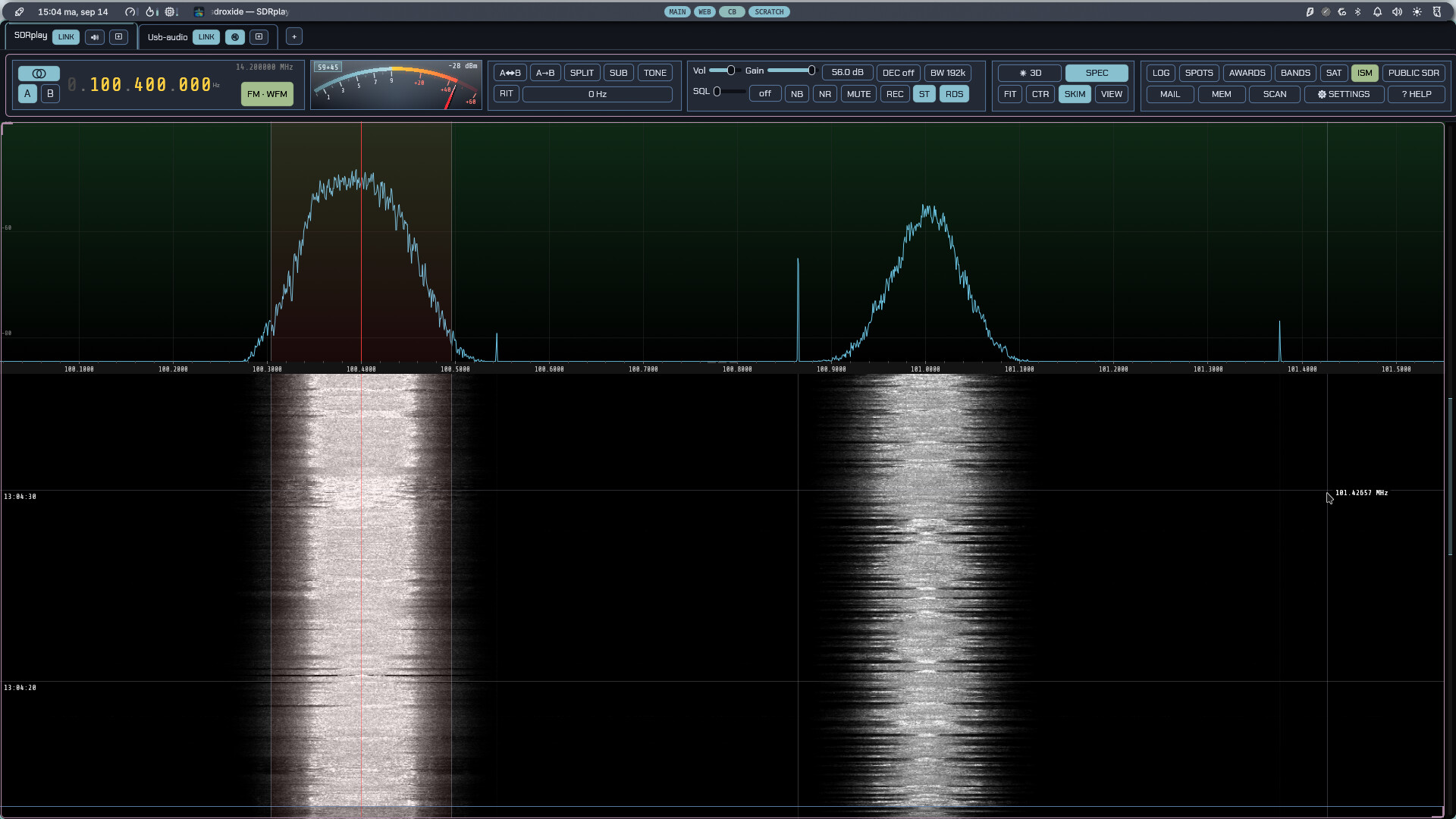
- Panadapter and waterfall with click/drag tuning, scroll-to-zoom, a draggable filter passband, a colour-coded band-plan strip, and eight selectable waterfall colour schemes (including an Icom-style palette).
- Dual VFO (A/B) with split operation, VFO swap/copy, and an independently tunable sub-receiver with its own mode and filter.
- All the common modes: LSB, USB, CW, AM, SAM, C-QUAM, NFM, WFM, DRM, HD Radio, DIGU, DIGL, DSB, ISB (independent sideband — two services on one carrier, one in each ear), a spectrum-only mode (SPEC), the automatic digital modes FT8, FT4 and FT2, the keyboard modes PSK31, RTTY, Olivia, THOR and FSQ, the image modes SSTV, weather fax and RIFP (draft-dulaunoy-rifp-00, a packetised image protocol on its own FSK modem), the transmit-only RF Paint (spectrum-painting) mode, AX.25 packet on HF and VHF, and APRS — with a live map of every station heard, drawn with its own symbol, and messages you can send and answer. ADS-B decodes the aircraft overhead on 1090 MHz onto a radar display — see §3.13 — and AIS does the same for the ships on 162 MHz, onto a marine chart with the vessels drawn as hulls pointed the way they are heading (§3.16). HFDL reaches the aircraft that no VHF receiver can — the shortwave ground network airliners use over the oceans and the poles, one assigned channel at a time, with a decode log and a map of the positions it carries (§3.19). AtCHAT NET is a multi-station keyboard and file mode with dynamic master election, a shared roster, and block-CRC-ARQ file/image transfer alongside the chat (§3.17). HFDL decodes the HF aircraft datalink — ground stations across the shortwave band talking to aircraft over the ocean — into a decode log with an aircraft map (§3.19).
- Receive controls: AGC (Off/Slow/Med/Fast), volume, mute, squelch, an impulse noise blanker, an adaptive auto-notch (constant-tone canceller), noise reduction (five engines, three strengths each), front-end decimation (trade span for resolution, processing gain and CPU on any IQ radio), RIT, and a draggable filter passband. On NFM, the CTCSS tone or DCS stream under the signal is decoded and shown, and can be made a condition of the squelch. On WFM, broadcast stereo and RDS/RBDS are decoded automatically — the station name, programme type, radio text, what is playing, and the station's clock.
- Transmit (on TX-capable rigs): PTT, TUNE, drive and tune-drive levels, mic gain, XIT, and a transmit meter (the rig's ALC over power output, or over SWR where the rig has no power meter). A ham-band-only transmit lockout is on by default — on digital modes it vets the emission, dial plus offset, not just the dial — as is an SWR guard that stops the over and latches transmit out when the rig reports a bad match — with a looser limit and a five-second grace while you are tuning an ATU. While transmitting, the panadapter shows a monitor of your own signal: wideband IQ rigs display it at its on-air frequency in the full span; CAT rigs and digital modes show a narrow transmit-sideband scope (an approximation built from the outgoing audio).
- CW decode and keyboard sending — a Morse decoder that finds the speed, the threshold and the spacing for itself rather than being told them, with a waterfall cursor that picks the signal to copy (and the frequency to answer on), and a type-ahead keyboard that sends as you type. The same decoder drives the wideband CW skimmer.
- Repeater operation — a transmit shift (manual, or taken from the band plan as you tune), a CTCSS tone or DCS code sent under the voice, and the 1750 Hz burst that opens a carrier-access repeater — from a button, or at the start of every over. A memory stores the whole set-up with the channel.
-
Voice keyer — ten recorded messages, transmitted from a button, a numpad
key, a MIDI pad or a Hamlib
send_voice_memcommand; works in the voice modes and in RADE digital voice. - QSO recorder — one button records both sides of the contact to an MP3: what you hear as the receiver delivered it, before the volume control, and what you send as it goes to the transmitter. Split into an ear each where a second receiver or a stereo broadcast is using both channels, centred where nothing is.
- FT8 / FT4 / FT2 with a live decode list, automatic QSO sequencing, a world map, a transcript, and automatic logging.
- Integrated logbook for digital and manual QSOs, with contest and QSL fields, a worked-before check, ADIF import/export and text export.
- Live spotting — a DX cluster (telnet) plus POTA, SOTA, PSK Reporter and FreeDV Reporter feeds shown as clickable markers on the panadapter and world map; click to tune and pre-fill a log entry.
- FreeDV Reporter — report your station to qso.freedv.org and see who else is on FreeDV, including callsign exchange in the RADE End-of-Over frame.
- Callsign lookup and QSL upload — QRZ/HamQTH name/QTH/grid auto-fill, and one-click (or automatic) upload to eQSL, QRZ Logbook, HamQTH, Club Log, World Radio League and the 11 m LOG11DX logbook, with LoTW ADIF export and confirmation download. Each service's credentials can be tested against it from the settings, without logging anything.
- Award tracking — live DXCC / WAS / WAZ / grid tallies, worked vs confirmed.
- Winlink radio email — a native client for the amateur store-and-forward email network: B2F/FBB forwarding, LZHUF compression and the secure login, with a mailbox, compose and reply, and attachments (§11).
- Wideband skimmers — a CW skimmer plus PSK31 and RTTY skimmers that decode many signals at once and label them on the waterfall.
- ISM band decoder — reads the unattended 868 MHz traffic around you and lists each device with its readings in real units. See ISM band decoder.
- Zoom out past the I/Q — on a receiver that publishes a full-band spectrum as well as its I/Q (a KiwiSDR, a SpyServer, an RX-888), the main panadapter keeps widening past the streamed passband and draws those spans from the full-band bins. See §2.8.
- QO-100 beacon plugin — tracks the 10489.750 MHz narrowband beacon, measures how far your LNB is off, and (with AUTO) keeps correcting the converter offset as it drifts. In the SAT window's QO-100 tab; see §2.22.
-
Many radio backends: SoapySDR devices, OpenHPSDR (Hermes/Metis) Ethernet
SDRs, a TCI server (ExpertSDR3/Thetis), a SmartSDR radio (FlexRadio
FLEX-6000/8000), RTL-SDR, RX-888, Airspy HF+ and SDRplay RSP receivers over
USB, an Airspy R2 or Mini over USB, a HydraSDR RFOne over USB, a RigExpert
Fobos SDR over USB, a HackRF
transceiver over USB, an RTL-SDR
published over the network by
rtl_tcp, a PlutoSDR, or a CAT-controlled radio with audio over a USB sound card (demodulated audio or stereo IQ) — plus a USB audio radio: a handheld or walkie with no control port at all, reachable only through the sound card, keyed by its own VOX (§15.22). A DIY isolated FTDI + optocoupler interface puts a commanded PTT on such a radio too, e.g. the Luiton LT-310SDR (§15.23, experimental). - Several radios at once — each in its own tab with its own tuning, mode, panadapter and audio, sharing your memories, logbook and a station-wide transmit interlock. Multi-receiver hardware serves one tab per receiver from a single connection: a TCI rig's RX2, an HPSDR Protocol 2 board's DDCs, a 2R2T PlutoSDR's second chain.
- One radio as another's panadapter — give a CAT transceiver a real wideband display by lending it an SDR's receiver, on the shared antenna or from the rig's I.F. output (with a per-mode offset for a rig whose I.F. moves with the mode). The dial, mode and transmitter stay with the transceiver, and you listen to whichever of the two you choose.
- Memory channels and per-band memory of your last frequency/mode/filter.
- Solar system 3D view — the Sun, the Earth and the Moon, the other seven planets and eighteen of their moons with their orbits, live NASA SDO solar imagery, sunspot regions and CME trajectory cones, an arrival estimate when one is headed our way, the live auroral oval standing over the globe with a Kp forecast for tonight, live amateur-satellite orbits with click-through pass predictions, your FT8 contacts arcing between stations, a propagation panel with MUF, Kp/A, F10.7 and the current GOES X-ray level, and a bar chart of how open each band is right now.
- Spoken announcements: the radio reads itself out — frequency, mode, band, split, AGC, the transmit levels, band-edge warnings, the SWR while you tune up, and FT8/JS8 messages addressed to you — so it can be operated without seeing it. The voice ships with the program and runs on your own machine. The window is also exposed to NVDA, Orca and VoiceOver. See 6.3.
- Remote and web operation: run headless as a server and control it from a browser or from a second sdroxide instance over the network, behind a username and password. A station reached that way opens as a radio tab beside your own ones — enter its address on Settings → General and press CONNECT.
From the User Manual. Home.