Repository navigation
Section 4 skimmers
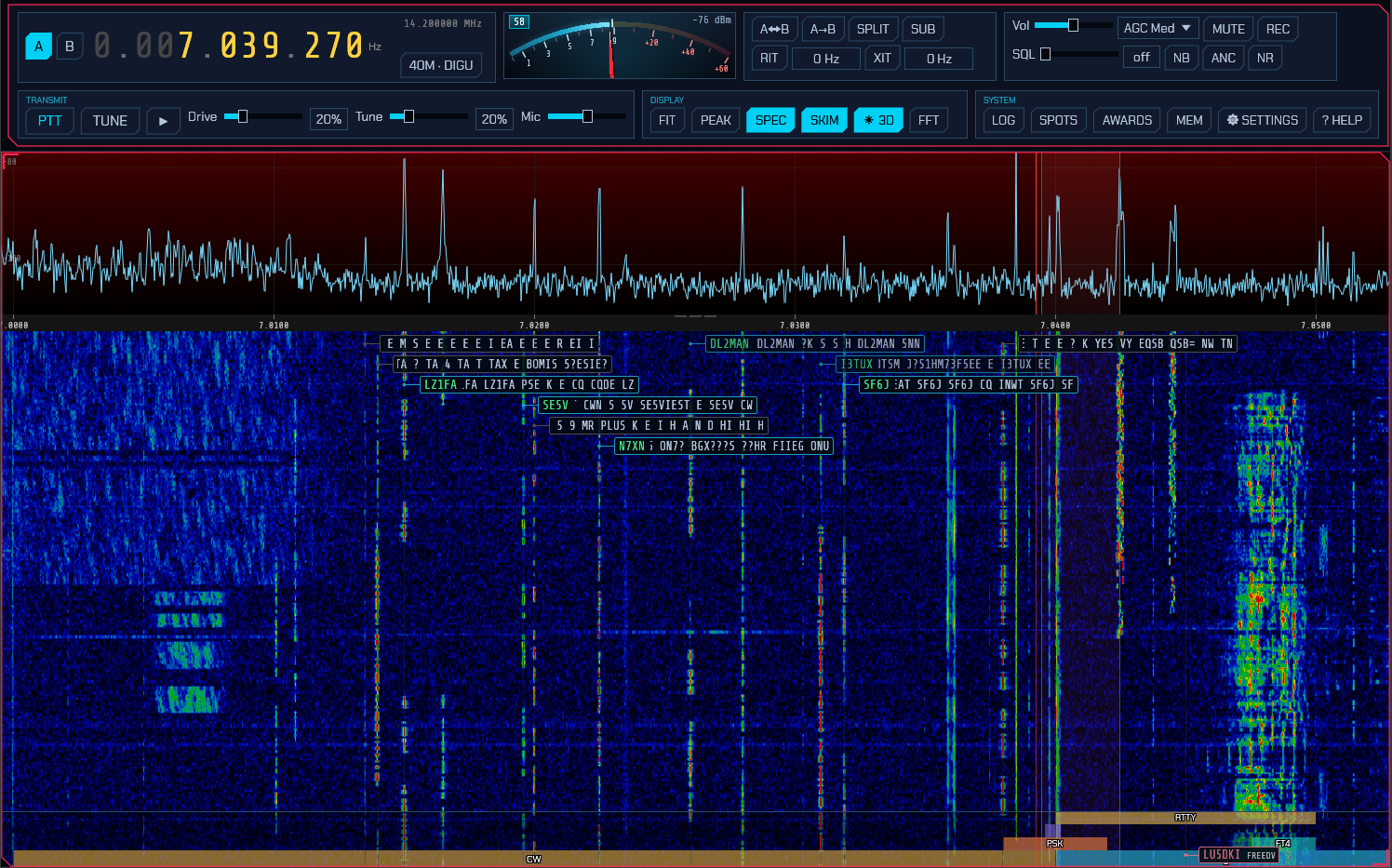
The skimmers decode many signals at once across a wide (~192 kHz) window and label each one on the waterfall. There are three: CW, PSK31, and RTTY.
Where they listen. The window follows the waterfall: it is placed on the part of the band you are looking at, and only signals actually on screen are tracked and decoded. On a narrow receiver that is the whole span and there is nothing to choose, but a wide front end — an RX-888 handing over megahertz at a time — delivers far more band than a skimmer's window covers, and the window goes where you are rather than sitting in the middle of the span. Pan across the band and it follows, once the pan has left the window it was on; zoom out past 192 kHz and it keeps your dial covered, so the part of a band-wide view that gets skimmed is the part you are tuned into.
- The SKIM button in the Display module opens the skimmer popup: one row per skimmer (CW, PSK, RTTY), each with an on/off button and its own squelch — the minimum SNR (dB) a decoded signal must reach before it earns a box. The SKIM button stays lit while any skimmer runs, and a skimmer you switch off stops decoding entirely (it costs no CPU) and its boxes disappear. Like the band/mode popup, this one fades away by itself after a few seconds; keep the pointer on it to hold it open.
- On a SoapySDR (IQ) source all three skimmers are on by default, with
squelch at
0 dB— everything that decodes is spotted. Raise a squelch to keep only the stronger signals of that mode on the waterfall. - Each decoded signal appears as a box next to its trace on the waterfall, showing the callsign (once resolved, for CW) and a rolling tail of decoded text. Boxes fade out a few seconds after a signal stops.
- Click a skimmer box to tune to that signal and switch to its mode — CW for a CW spot (which lands it on the CW panel's cursor, 2.14), PSK or RTTY for a digimode spot (which also opens the messaging panel, 3.3).
Band-aware gating. To avoid noise and false decodes — and to avoid paying
for either — each skimmer only runs where its mode is used: the CW skimmer in CW
sub-bands, and the PSK and RTTY skimmers in each band's PSK/RTTY calling
sub-bands — with the FT8, FT4, FT2, WSPR, and QRSS watering-holes excluded so
their signals aren't mistaken for PSK or RTTY
(the WSPR window and the slow-CW/QRSS beacons just below it sit inside the RTTY
sub-band on several bands, so they're carved out explicitly). A skimmer whose
window holds none of its own sub-bands stands down completely and costs nothing
until you tune back onto one — so an SDR parked on the broadcast FM band, the air
band or any other non-amateur allocation is not running a neural CW decoder over
it. Which frequencies count is the band plan's to say
(bandplan.json), and it ships with the HF allocations
only. The skimmer-decoded text is a coarse best-effort copy; switch to the mode (click a box) for a clean
decode — the CW skimmer runs the same decoder as the CW panel, but over hundreds
of signals at once and re-reading each one only twice a second, so a signal you
care about is always better copied on the panel.
Note: the skimmers are a wideband feature and work only with true IQ/SDR sources (SoapySDR, HPSDR, TCI). They are unavailable when a CAT radio is feeding demodulated audio (see settings), because that mode has only a narrow audio slice rather than a wide IQ span.
From the User Manual. Home.