Repository navigation
Section 3 12 aprs
Choose APRS from the DIGITAL row. This is the Automatic Packet Reporting System: 1200 baud AX.25 on one shared FM channel per region, carrying positions, weather, telemetry, objects and short messages. It is not a QSO mode — almost everything on the channel is a broadcast that nobody answers — so the panel is a map, a station list and a message pane rather than a sequencer.
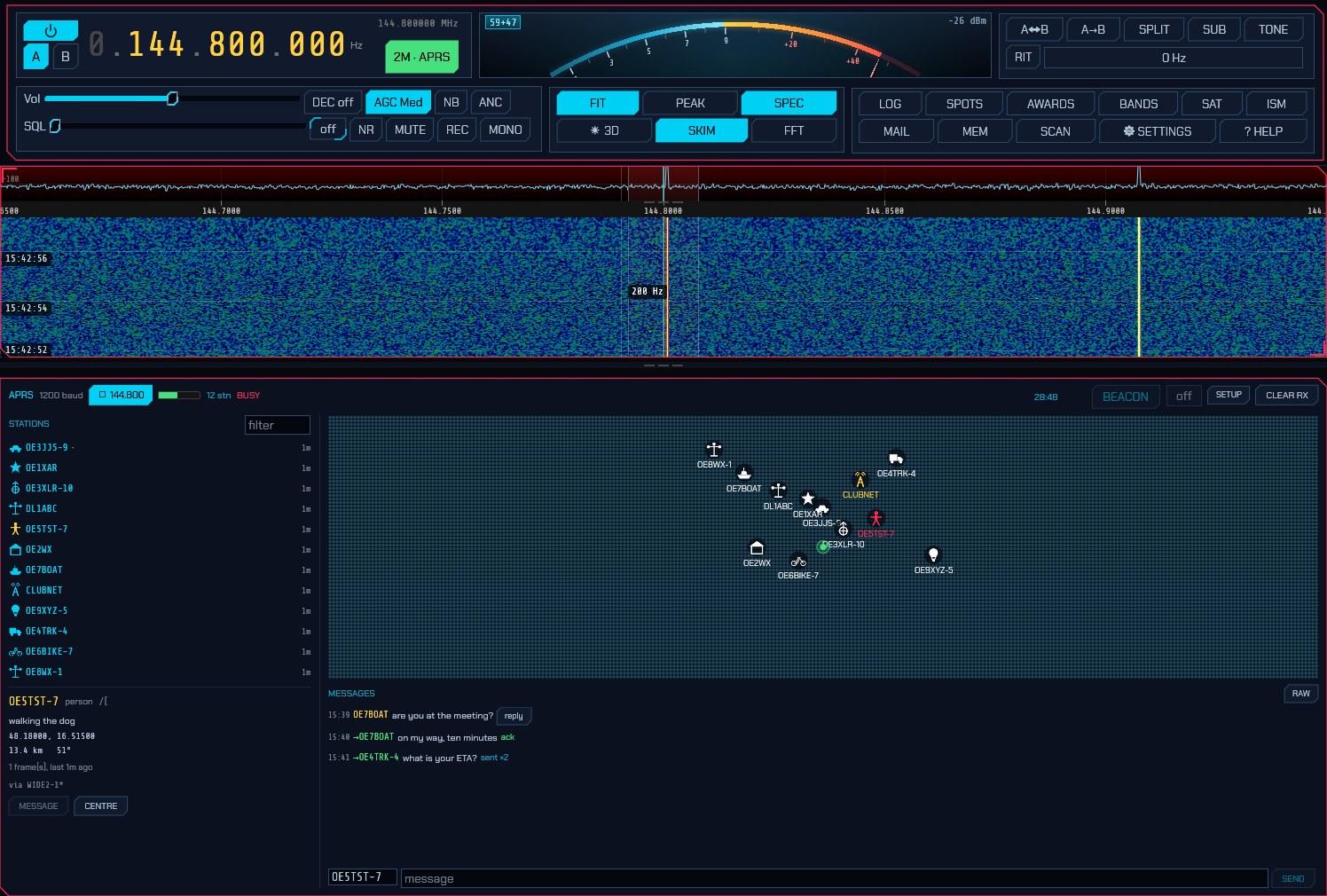
The frequency is chosen for you. APRS is a channel, not a band segment, and which channel depends on where you are. Selecting the mode tunes to your region's:
| Region | Channel |
|---|---|
| 1 — Europe, Africa, Middle East, Northern Asia | 144.800 MHz (70 cm: 432.500) |
| 2 — the Americas | 144.390 MHz (70 cm: 445.925) |
| 3 — Asia-Pacific | 145.175 MHz (Japan and China: 144.640; South-East Asia: 144.390) |
Set your region under Settings → General. If the dial is already on any region's APRS channel — you tuned Japan's 144.640 by hand — it is left alone, and so is any move you make once you are in the mode. The ⇵ FREQ button beside the frequency lists the other regions' channels.
Unlike the slotted modes, the waterfall is not narrowed to the channel. APRS occupies about 12 kHz of a 2 m band you have every reason to be watching — the repeater outputs above it, the simplex calling frequency below — so the view opens on 300 kHz around the channel and zoom and pan stay live from there. It is re-framed only when you change mode or retune far enough to take the channel off the screen.
The panel header carries the channel itself: the receive level, how many stations are on the map, whether the channel is busy, and — on the right — the beacon interval and the buttons.
STATIONS is everything heard, most recent first: a table of icon, callsign, whatever the station last said, and how long ago. The bar down the left edge of each row is green for a station heard direct — no digipeater repeated it — which on a channel where almost everything is digipeated is how you tell who is actually within range; amber marks an object somebody else put on the map, and grey one that has been cancelled. Type in the filter box to narrow the list by callsign or comment. Clicking anywhere on a row selects that station.
Click a station and its card opens underneath: what it is, what it said, where
it is, how far away and on what bearing, its course, speed and altitude, its
weather if it sends any, how many frames it has sent, and the digipeater path
the last one came through (a * marks a digipeater that actually repeated it).
Selecting a station also addresses the message box to it.
The map places everything with a known position, on the same coastlines, borders, rivers and cities as the FT8 panel's (the world map) — which matters more here than there, because an APRS map is usually zoomed in far enough for a river and a town name to be what tells you where a station is. It auto-frames what it can hear; drag to pan, wheel or pinch to zoom, and double-click to hand it back to the auto-fit. Icons fade as a station goes stale, over the same window the station list keeps, so a position that has not been refreshed in an hour visibly is an hour old. Anything that has moved leaves a trail behind it. A station that reported an ambiguous position — the protocol lets a sender blank out the last digits of its coordinates on purpose — is drawn inside the square it actually described rather than as a point in the middle of it.
Objects and items (a net control point, a storm, an event, put on the map by some other station) are drawn in a different colour and named after themselves. An object its owner has cancelled is greyed rather than removed: an object vanishing without trace looks like a receiver problem.
MESSAGES is the one part of APRS that is a conversation. Pick a station, or type a callsign in the to box, write in the message box and press SEND or Enter. A message carries an identifier, so the far end acknowledges it and sdroxide retries until it does — five attempts, thirty seconds apart to begin with and doubling, because the far end is usually a mobile behind a hill rather than somebody who is slow to answer. The mark beside your message says where it has got to:
| Mark | Meaning |
|---|---|
… |
Queued, waiting for the channel to clear. |
↑ / ↑3
|
On the air, waiting for an acknowledgement (and which attempt). |
✓ |
Acknowledged by the far end. |
✗ |
Refused, or no answer after every retry. |
Messages addressed to you are answered with an acknowledgement automatically —
switch that off under Setup if this station has no antenna on transmit.
Bulletins (addressed BLN…) are shown and never acknowledged: a hundred
stations acknowledging one bulletin would take the channel down. Other people's
messages stay out of this pane and go in the raw log instead.
RAW swaps the pane for every frame on the channel as it arrived, with what
the decoder made of each — position, weather, message, object, or the
reason it made nothing of it. That last one is how you find out that something
on your channel is sending a format this build does not read.
SETUP in the panel header opens the APRS settings.
-
APRS call — the callsign this station beacons under, with its SSID:
-9for a car,-10for an I-gate,-5for a phone,-7for a handheld. Leave it empty and your station callsign from Settings → General is used as it stands; the field exists because an APRS station conventionally carries an SSID that distinguishes it from the operator, not because you should have to type your callsign twice. The dialog shows what will actually go on the air underneath it. With neither filled in nothing is transmitted at all — not a beacon, not a message, not an acknowledgement, because an APRS frame with no callsign in it is an unidentified transmission — and the panel says so in red rather than leaving you pressing a button that does nothing. -
Symbol — what you are, as a row of icons for the ones an amateur station usually is, with the two characters editable beside them for the other 170. A digit or a letter in the first position is an overlay, drawn on top of the icon:
Sover a digipeater is a digipeater that also runs an I-gate. -
Path — how far you ask to be repeated, and the most consequential setting on the whole channel.
WIDE1-1,WIDE2-1— one local fill-in hop then one wide one — reaches almost anywhere. Every extra hop multiplies the transmissions the whole network makes on one shared frequency, so a long path does not get you further out; past three hops it stops other people being heard. sdroxide says so in the dialog if you ask for one, and transmits it anyway: local practice varies, and a path that is wasteful in a European city is reasonable in the outback. -
Position — from your Maidenhead locator by default, reported with the ambiguity a locator actually has (a six-character one is a couple of kilometres across, and saying so is honest). The Latitude and Longitude boxes below it always show what will go out; while the locator is in charge they are greyed and read from the locator. Untick From my grid and they become yours to type — decimal degrees, negative for south and west, and they start from wherever the locator had you so you are never editing from zero.
-
Comment — free text sent with every beacon, up to 43 characters.
-
Beacon — minutes between beacons, the same setting as the interval in the panel header.
off, which is the default, never beacons: selecting a mode must not put a station on the air. Thirty minutes is the convention for a fixed station once you turn it on, oftener for a moving one, and the first goes out one interval from now rather than immediately. Compressed sends the compact position format — a third of the air time and more precise — which every receiver since the 1990s reads. -
Messages → Acknowledge — answer messages addressed to you. An acknowledgement is a transmission this station makes without you asking, so a receive-only setup should turn it off; the beacon then stops claiming to be reachable too.
-
TX delay — flags sent ahead of every frame so the far end's modem hears the carrier and locks its clock before the data starts. It has to outlast everything between pressing transmit and actually radiating: sdroxide alone spends 165–240 ms of it on a CAT rig, and a radio taking its audio over a network buffers more on top of that. Too little and the far end never locks — the transmission is on the air and nothing decodes it. Shared with the packet mode, since it is a property of the radio rather than of the protocol.
-
TX audio — APRS's own deviation, in dB below full scale, into a radio that modulates the audio we hand it: a CAT rig on its sound card, a FLEX, an Icom on its network port. A radio sdroxide modulates itself always gets full scale, because there the modulator and Drive own the level instead.
An FM transmitter turns audio level into frequency swing and has no ALC to catch it: 1200 baud packet wants about 3 kHz where voice wants 5, so full scale into a data input set for voice over-deviates. An over that over-deviates sounds completely normal to anyone listening and decodes for nobody, so this is the first thing to try when your frames are clean and still nothing acknowledges them. The radio's own input level is the other half of it.
The level belongs to APRS alone — every mode keeps its own, so a deviation set for 1200 baud never lands on your FT8. The same control is on the transmit strip, in the Mic rail's place, where you can reach it without opening this window; 2.10 has the full description and the sideband half of the story.
-
Keep stations — how long a station stays on the map after it was last heard, and what the map's fade is measured against.
BEACON in the header sends one position report now, without waiting for the
timer, and the box beside it is how often to beacon unattended — off by
default. Both go through the channel-access rules like everything else: they
wait for the channel to be clear, so a busy channel delays a beacon rather than
doubling on somebody.
The bar beside 1200 baud is the audio actually reaching the modem, and it is
the first thing to look at. Flat means nothing is arriving at all — the radio's
data output is not the one sdroxide is listening to. It lights green while the
modem hears a carrier, and BUSY appears beside it for the same reason.
If the bar is moving and the map stays empty, switch the message pane to RAW
and watch the counts beside it. Frames arriving and failing their check sequence
(N bad) mean the modem is reading the channel and the signal is marginal.
Nothing at all, with a healthy level, usually means one of:
- the squelch is closed. A transceiver's FM squelch takes a moment to open and eats the start of every burst, which is the whole preamble. Open it fully, or take the audio from the radio's data socket, which is not squelched.
- the audio is from the loudspeaker path rather than the data socket, and something in between — a tone control, a de-emphasis network, an audio processor — is doing to 2200 Hz what it does not do to 1200 Hz.
- the rig is not in FM. APRS is an FM channel; selecting the mode commands FM over CAT, but a radio that is not being commanded (no CAT cable, or a control port nothing answers on) has to be put in FM by hand.
- the radio is not in its data mode. sdroxide asks for FM-D (or whatever the rig calls FM with DATA on) over CAT, because plain FM puts the microphone path's speech processing and pre-emphasis on the way out — and pre-emphasis alone tilts the 1200 and 2200 Hz tones about 6 dB apart, which sounds like packet to a listener and is unreadable to a modem. A rig nothing is commanding has to be put in it by hand.
If your transmissions are the ones nobody can decode, the audio itself can be ruled in or out without another operator. Record an over (the REC button captures transmit audio as well as receive), extract the right-hand channel, and run it through an independent decoder:
ffmpeg -i <recording>.mp3 -af "pan=mono|c0=c1" -ar 44100 tx.wav
atest tx.wav          # from Direwolf
A frame printed there is a frame that left sdroxide correctly, and anything still wrong is between the radio's modulation input and the air — the TX audio level above, the radio's own input level, or its data-mode setting.
The log line to look for
is digital transmit audio is being rate-matched to the radio. Some radios
receive at one sample rate and transmit at another — an Icom on its 12 kHz IF
output receives a stream decimated to 24 kHz while taking transmit audio at 48 —
and the modems are built for the receive rate, because a digital mode keeps one
clock for both directions. sdroxide rate-matches the transmit audio for you and
says so once per over; before it did, a packet burst went out at exactly twice
its baud rate, which is structurally perfect and readable by nothing.
Everything a station is likely to send: uncompressed and compressed positions, Mic-E (the format every commercial APRS radio transmits, which hides half the position in the AX.25 destination address), objects and items, status reports, Maidenhead grid reports, telemetry, queries, weather both attached to a position and standing alone, and messages, acknowledgements, rejections and bulletins. Weather is converted from the miles per hour, degrees Fahrenheit and hundredths of an inch the protocol carries.
From the User Manual. Home.