Repository navigation
Section 2 3 tuning
The frequency readout is a ten-digit display. Hover over any digit and:
- Scroll the mouse wheel to tune that decade up or down.
- Click the upper half of a digit to increment it, the lower half to decrement it.
The smaller grey number below the readout is the inactive VFO's frequency.
On the panadapter:
- Scroll the wheel to zoom in and out around the cursor.
- Press F to reset the view to the full receiver span.
- Left-click tunes the active VFO to the clicked frequency. Shift+click places the second receiver: the sub-receiver when SUB is on, VFO B otherwise. Unlike a plain click, it means the same thing everywhere — over a spot box it takes the spot's frequency, and in FT8/FT4/FT2 it still tunes rather than moving the transmit offset.
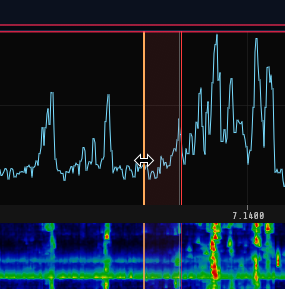
- Left-drag grabs the spectrum and slides it (the tuning moves with the content). Drag past the end of the span the receiver is capturing — which, zoomed all the way out, is from the first pixel — and the receiver itself follows: the window slides across the band under your hand instead of stopping at its own edge, so on a wideband receiver such as the RX-888, where retuning costs nothing, you can drag from one end of HF to the other. The picture stops where the front end runs out of range. A rig whose I/Q output is its own dial (a transceiver on a sound card, an Icom sending its 12 kHz IF) has one synthesiser for both, so there the drag moves the window by moving the dial, as it always has. Let go while the pointer is still moving and the dial keeps turning, coasting to a stop like a weighted VFO knob — the faster the flick, the further it runs. A slow, careful drag lands exactly where you release it, and pressing anywhere on the panadapter catches a coasting dial and stops it dead (that press does not tune). The sub-receiver's tuning drag has the same flywheel.
- Right-drag pans the view only, without changing tuning — and only inside the captured span, since moving the window means moving the receiver.
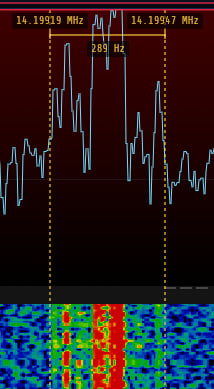
- Shift+drag measures bandwidth: a horizontal ruler with dotted vertical markers appears between where you pressed and the current pointer, showing the start and end frequencies at the markers and the frequency span (e.g. a signal's width) below. It works on both the spectrum and the waterfall. When you release the button the measurement lingers and fades out over about five seconds, so you can read it after letting go. The same ruler works on the full-band strip (see WIDE in §2.8), where it measures in megahertz.
Keyboard tuning (ignored while typing in a text field):
- Left / Right arrow: ±100 Hz (with Shift, ±10 Hz).
- Up / Down arrow: ±1 kHz.
- Page Up / Page Down: ±10 kHz.
Each of these lands on a multiple of its own step, so a dial left on an odd frequency by a drag is put back on a round one by the next key press. Wheel tuning does the same, and one notch of the wheel is one step of it.
Band-plan strip. A colour-coded strip along the bottom of the waterfall (its top when the waterfall is flipped — see §2.8) labels the allocations. Zoomed out it shows coarse bands (ham, broadcast, CB, AM); zoomed into a ham band it splits into the CW / digital / SSB / beacon sub-segments, or an all-modes block where the plan gives one. When you zoom in close (a span of ~100 kHz or less), the digital sub-band is broken out into the individual popular modes — FT8, FT4, FT2, JS8, WSPR, QRSS, PSK, RTTY, SSTV, RIFP, FREEDV — each in its own colour.
Everything on the strip follows the IARU region on the General tab (6.1) — the ham blocks, their sub-segments, and the shortwave broadcast blocks that overlap an amateur band in one region and not another (3.900–4.000 and 7.200–7.300 are broadcasting in Regions 1 and 3 and amateur in Region 2).
Memory marks. Every stored memory whose frequency falls on the visible span
is labelled just inside the band-plan strip, reading Mem: folder / name — or
Mem: name for one that is not filed in a folder — on a thin green line drawn
at the frequency itself. Channels close together stagger into stacked rows
rather than overprinting; a name too long for its label is cut short with an
ellipsis, and anything that would need a fifth row is left out.
Click a mark to recall that memory — dial, mode and filter together, exactly as pressing it in the memory list does; the label brightens as you point at it. Shift-click one to put the second receiver on its frequency instead, as shift-clicking anywhere else on the panadapter does. §2.12 is where a channel is stored, renamed and filed.
From the User Manual. Home.