Repository navigation
Section 3 6 sstv
Choose SSTV from the DIGITAL row to send and receive pictures. The panel has a received-image gallery on the left and a transmit compositor on the right, with a row of mode buttons across the top: Auto, Scottie 1, Scottie 2, Scottie DX, Martin 1, Martin 2, Robot 72, Robot 36, SC2-180, SC2-120, and the PD family — PD50, PD90, PD120, PD160, PD180, PD240 and PD290.
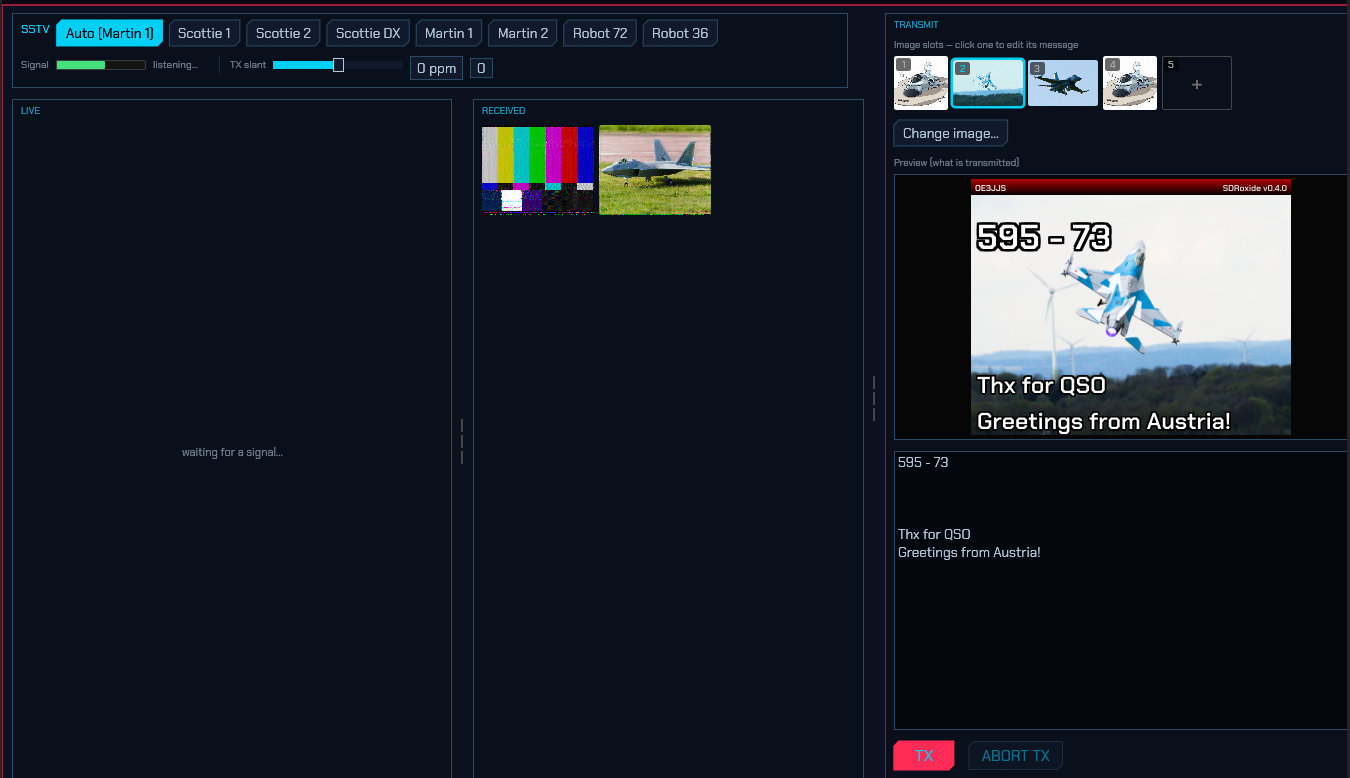
Auto (the default) auto-detects the mode on receive — from the VIS header, or, if you tune in mid-picture, from the sync cadence — and transmits in Martin 1 until a mode has been detected. Selecting a specific mode instead pins both the receive decoder and the transmit compositor to that mode.
The PD family is worth knowing about if you have only ever used Scottie and Martin: it sends the colour information for two lines at once, which buys a bigger picture for the same air time. PD120 and PD180 are 640×496 and PD290 is 800×616, against 320×256 for everything else — and PD120 is one of the two or three modes you are most likely to meet on 3.730 and 14.230. Wraase SC2-180 is the other, at 320×256 in three minutes. The transmit compositor follows the mode's size automatically, so picking PD180 gives you a 640×496 canvas to crop into.
If a mode arrives that sdroxide does not have, the panel says so where it
would otherwise say listening… — for example Pasokon P3 — not decoded. That
is not a fault at your end: the header was read perfectly and there is simply no
decoder for that one. Before 1.6.9 nothing was said at all, which made an
unimplemented mode look exactly like a broken receiver (issue #421).
Band buttons tune to that band's common SSTV calling frequency, staying in SSTV. 14.230 MHz on 20 m, 21.340 on 15 m and 28.680 on 10 m are the same the world over; 80 m and 40 m split by region and follow the IARU region setting (6.1) — 3.730 and 7.165 in Region 1, 3.845 and 7.171 in Regions 2 and 3. Above HF, 144.500 on 2 m and 432.500 on 70 cm, the narrow-band SSTV activity centre.
Which sideband: SSTV is a phone emission and follows phone practice rather than the other digital modes' fixed USB — LSB on 160, 80 and 40 m, USB on 20 m and up. sdroxide switches for you: the passband flips to the other side of the dial as you tune across the boundary, and a CAT-controlled rig is commanded into the matching sideband. Nothing to set, and nothing to undo when you go back up — a picture sent on the wrong sideband arrives at everyone else inverted.
Plain sideband or the rig's data mode: the picture is modulated here and
reaches the radio through its sound card, exactly as FT8 does, so SSTV obeys the
Digimode mode setting (6.2)
like every other digital mode. Leave it on DIGI and a rig with a DATA
position is put in USB-D above 40 m and LSB-D at and below it, which is what
takes the transmit audio from the USB/data input rather than the microphone. On
USB the rig is put in the plain sideband instead — the right answer for a
radio whose SSB modulation source is already set to USB, or one with no data
mode at all.
On VHF and UHF, use SSTV-FM instead. Above 30 MHz a picture is normally sent on an FM carrier rather than a sideband, so the DIGITAL row has a second entry — SSTV-FM — beside SSTV. Everything about the picture is the same: the same transmission modes, the same decoder, the same gallery and the same compositor. What differs is the radio underneath. SSTV puts a CAT-controlled rig in USB (or LSB); SSTV-FM puts it in FM, and the dial is the centre of a channel rather than the foot of a passband.
Its band buttons are the FM image channels: 50.510 on 6 m, 144.500 on 2 m and 433.400 on 70 cm — the IARU Region 1 plan's own, the last of which it names as SSTV (FM/AFSK). Region 2's plan appoints no image channel at all (the ARRL 2 m plan calls 145.50–145.80 "miscellaneous and experimental modes"), so a Region 2 station is offered 145.500 marked as common practice rather than as something a plan says. Region 3 names none, and none is offered.
Pick by what the other station is doing, not by the band alone: 2 m SSTV on sideband is a thing people do, and both modes are available everywhere. If a picture is audible but decodes as noise, the usual cause is being in the wrong one of the two.
Receiving:
- Incoming pictures decode scanline-by-scanline and appear in the LIVE view as they arrive, then land in the RECEIVED gallery (newest first).
- The Signal meter shows the receive audio level so you can confirm audio is reaching the decoder and set your input gain.
- In Auto, the mode is identified from the VIS header (or the sync cadence if you tuned in mid-picture) and pre-selected for your next transmission — no need to pick it.
- Restart RX abandons the picture being received and starts listening for the next header. Once the decoder has locked on it is committed for the whole length of that mode, and the slow ones are long — Scottie DX runs four and a half minutes — so a header misread as a slow mode takes the receiver off the air until it runs out. On QO-100, where one station follows another over the same transponder, that is the next few pictures gone. Press this and the half-picture is dropped and the receiver is hunting again. It is a receive control only: it does not touch a transmission in progress (that is ABORT TX) and it does not put the mode selection back to Auto.
- Received images are saved as PNG under
~/.config/sdroxide-brown/sstv_rx/and reload into the gallery next time. - Deleting. Most of what a night on 20 m leaves behind is noise. Right-click a thumbnail and choose Delete this picture, or open one and use Delete… in the enlarged window — which asks a second time, because the file goes for good and there is no undo. The picture is removed from the store on the machine the radio is plugged into, so it is gone from every screen attached to it, and a browser client can clear the collection down without going near that machine. Deleting the picture you are looking at leaves the window on the next-older one, so a run of blank frames can be thrown away in a sequence of clicks.
Transmitting:
-
The TRANSMIT side has five image slots that work like tabs. Click a slot to make it the active tab (highlighted with a cyan border and its number); the message box below then edits that slot's message. Use the Load image… button (or double-click a slot) to pick an image file, which is automatically cropped and scaled to the current mode's dimensions and stored under
~/.config/sdroxide-brown/sstv_tx/. -
Type a message for the active slot. Each slot keeps its own message — switching slots swaps the text — and the messages are saved to
~/.config/sdroxide-brown/sstv_messages.json, so they persist across restarts. The lines are drawn over the image in bold with a black outline for readability; the first line is rendered at double size as a title. A live preview shows exactly what will be transmitted, banner and all. -
Banner… opens the editor for the strip across the top of every picture this station sends. Out of the box it is the one sdroxide has always drawn: a red→black strip with your callsign at the top left and
SDRoxide+ the version at the top right. All of it is yours to change:-
Top left and Top right are free text, with three placeholders
substituted when the picture is composed —
{call}(your callsign, put into capitals),{grid}(your locator) and{version}(the sdroxide version). Anything else in braces is printed as you typed it, so a mistyped placeholder shows up in the preview instead of quietly printing nothing. Leave a field empty to print nothing at that end. - Colours — the strip at its top edge (it fades to black at the bottom), and the colour both texts are printed in.
- Height — how tall the strip is, in pixels of the transmitted picture (8–64, default 16). The text is sized from it, so this is the control that matters: an SSTV frame is only 320 pixels across and lands on the other operator's screen as a small window, and a 16-pixel banner is hard to read there.
- Untick Draw the banner to send the picture and its message with nothing over the top, and Reset puts the whole thing back to the callsign and the version.
The banner belongs to the station, not to the slot and not to the screen: it is drawn into the picture that goes on the air, so it is saved with the rest of your digital-mode settings and every screen attached to the radio — the console and the browser tab — composes the same slot identically. (Your callsign itself is set on the General settings tab, or in the FT8 setup dialog.)
-
Top left and Top right are free text, with three placeholders
substituted when the picture is composed —
-
Press TX to transmit the composed image; ABORT TX stops a transmission in progress.
-
TX slant trims the transmit clock (in ppm) to remove slant seen on a receiver whose sound-card clock differs slightly from yours — nudge it until a test picture decodes straight on the far end; 0 resets it. It applies to the next transmission and is persisted. (Received pictures are auto-deslanted by sdroxide, so this is only for the transmit direction.)
-
FSK ID sends your callsign as tones for about two and a half seconds after each picture, in the format MMSSTV published and every SSTV program and unattended repeater reads. This is the identification a machine can act on: a repeater logs and announces the station that just sent, which no banner drawn into the picture can give it. It is on by default and sends nothing at all until you have set a callsign (§6.1). sdroxide reads them too — a callsign heard this way appears as ID beside the mode readout, and stays there until another station sends one. A receiver that tuned in halfway through a picture still gets it, because the ID does not depend on having caught the header.
-
TX lead is how long sdroxide sends silence after keying the transmitter before the picture's own leader and VIS code go out — 500 ms by default. That header is what tells the far end a picture is coming and which mode it is in, and a decoder that misses part of it does not draw a late picture, it draws nothing at all. On a CAT-controlled rig the moment PTT is asked for and the moment RF is really on the air are not the same one — sdroxide alone spends 165–240 ms getting there, and the rig's T/R relay, PLL and PA settling come on top — so the header goes out into the gap unless something covers it. Turn it up if a WebSDR or OpenWebRX on the far end hears your transmission but shows no image; turn it down to 0 on an SDR that keys in milliseconds.
Note: SSTV decode/encode runs in the server engine, so the panel works the same in the native app and the browser client. RX quality depends on signal conditions — clean signals decode well; weak or drifting signals may slant or show noise (ongoing refinement).
From the User Manual. Home.