Repository navigation
Section 3 5 hellschreiber
Choose HELL from the DIGITAL row for Hellschreiber — the oldest digital mode still in regular amateur use, and the only one you read with your eyes instead of a decoder.
Hell does not send characters. It sends pictures of characters: the transmitter scans a 7-column by 14-row dot matrix per letter, top to bottom then left to right, switching the carrier on and off as it goes. The receiver simply free-runs at the same dot rate and paints whatever it hears onto a scrolling strip. There is no synchronisation, no framing and no error correction — which is exactly why Hell stays readable in conditions that break real decoders. A burst of noise smudges a few dots instead of corrupting a whole character, and your eye does the rest.
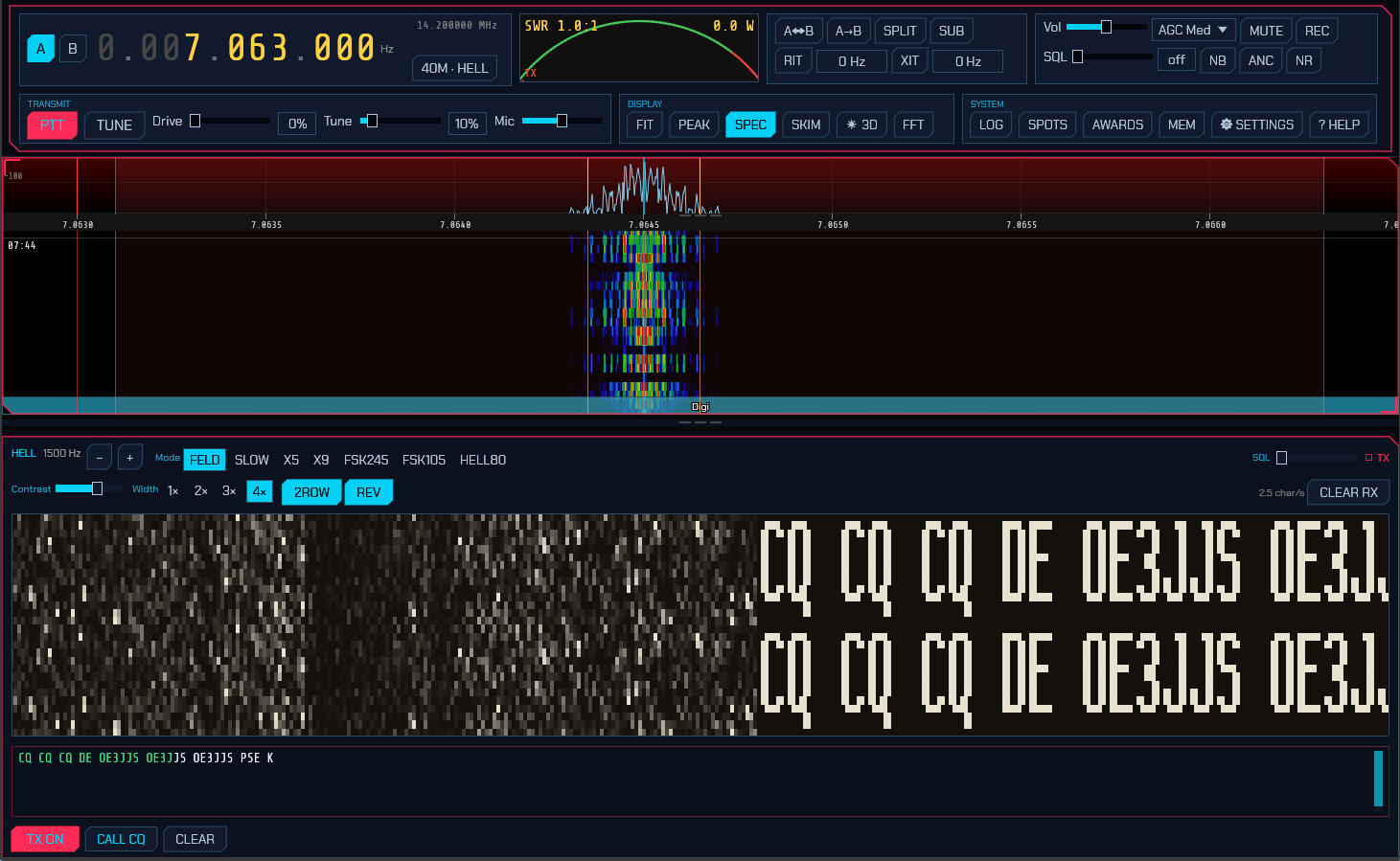
Reading the strip. Received text scrolls in from the right. Because nothing synchronises the vertical position, a character can straddle the top and bottom of the strip — so, like fldigi, sdroxide draws every column twice, stacked. Whatever the alignment happens to be, one complete legible copy of the text is always on screen. That is what the 2ROW button controls; turn it off for a single-height strip and drag the raster up or down to line the text up yourself.
Panel controls. The header carries the audio-tone readout with −/+ nudges, the variant buttons, and the decode squelch. Below that:
- Contrast — hardens or softens the dots. It redraws the entire scrollback, not just what arrives next, so you can rescue text that has already gone by.
-
Width —
1×to4×screen pixels per received column. Square dots would fit only about eighteen characters across the panel; the default2×shows around sixty. - 2ROW — the doubled display described above (on by default).
- REV — reverse video: light dots on dark paper instead of the classic look.
- CLEAR RX — wipe the strip.
Transmitting works like the other keyboard modes: type in the box and press TX. Characters already sent turn green. CALL CQ loads a CQ using your callsign, and CLEAR empties the buffer and stops. While TX is held with nothing to send, Hell transmits blank paper rather than dropping the carrier, which is how it holds a channel between overs — so press TX again to release. Your own transmission is painted onto the same strip as it goes out, which is the only confirmation Hell offers that your timing and font are right.
SEND ON RETURN (3.3) applies here too, and Hell is the mode where the difference is plainest: a correction typed live is already on the paper — the receiving operator watched you make it — while one made before you press Return never existed. The strip then ends with the line: transmit releases once the text has been painted, rather than holding the channel with blank paper for as long as you take to type the next one. Pressing TX over an empty box still holds it, so the between-overs habit is there when you want it — it is simply no longer what composing a line does. The break itself has no glyph, so it goes out as one blank cell, which is the gap you would have typed between lines anyway.
Variants. Seven, matching fldigi's set:
| Variant | Speed | Bandwidth | Keying |
|---|---|---|---|
| FELD | 2.5 char/s | 295 Hz | on/off keyed |
| SLOW | 0.3 char/s | 35 Hz | on/off keyed |
| X5 | 12.5 char/s | 1470 Hz | on/off keyed |
| X9 | 22.5 char/s | 2645 Hz | on/off keyed |
| FSK245 | 2.5 char/s | 490 Hz | frequency-shifted |
| FSK105 | 2.5 char/s | 220 Hz | frequency-shifted |
| HELL80 | 5 char/s | 1200 Hz | frequency-shifted |
FELD (classic Feld Hell) is what essentially all on-air activity uses; the others are worth knowing about but you will rarely meet them. SLOW trades speed for a 35 Hz bandwidth that survives conditions nothing else will. X5 and X9 are fast but wide — X9 occupies nearly the whole SSB passband, so the tune control clamps it near the middle where it fits. The FSK variants keep the carrier up and shift it instead of keying it, which suits a linear amplifier better and gives a noticeably cleaner raster.
Hell transmits on USB. The band buttons are preset from the hellschreiber.com narrow-band digimode band plan (18 March 2019), using its common calling and operating frequencies:
| Band | Preset | Band | Preset |
|---|---|---|---|
| 160 m | 1.840 | 17 m | 18.104 |
| 80 m | 3.574 | 15 m | 21.063 |
| 60 m | 5.3515 | 12 m | 24.924 |
| 40 m | 7.040 | 10 m | 28.063 |
| 30 m | 10.144 | 6 m | 50.286 |
| 20 m | 14.073 |
These are IARU Region 1 values where that band plan splits by region, and — unlike the band plans and the other modes' calling frequencies — they do not follow the IARU region setting: Hell has no per-region table published to follow. Region 2 and 3 differ on 160 m and 80 m in particular. Bands quoted as a range use its low edge, so tune up from the preset to find activity. 6 m is not in that band plan and comes from the Feld Hell Club.
On 15 m and 10 m the presets are 21.063 and 28.063 rather than the 21.074 / 28.074 the band plan names as calling frequencies, because those two sit squarely in the FT8 sub-band — and fall outside the operating ranges the same table lists beside them.
Hell is a "fuzzy mode" (J2B), so it may be sent in either the CW or the phone segments; band plans are recommendations, and listening before you key matters more here than the numbers do. Check them against a current plan for your region.
From the User Manual. Home.