Repository navigation
Section 3 9 js8
Choose JS8 from the DIGITAL row. JS8 uses FT8's waveform — the same eight tones in the same 79-symbol frame — but carries a conversation instead of a contest exchange: free text, questions you can ask another station, and a periodic "I am here" heartbeat. Because it is slotted like FT8 it decodes far below the noise floor, and because it is a conversation it is slow. A sentence takes about a minute. That is the trade. Selecting it puts the dial on the band's JS8 frequency — 14.078 on 20 m, and the traffic in the 3 kHz above it (3.1).
Speeds. Four of them, on buttons in the panel header:
| Speed | Slot | Width | Use |
|---|---|---|---|
| SLOW | 30 s | 25 Hz | The weak-signal end |
| NORMAL | 15 s | 50 Hz | The band convention; nearly all traffic |
| FAST | 10 s | 80 Hz | Good conditions, shorter waits |
| TURBO | 6 s | 160 Hz | Local and VHF work |
They are drawn in that order — slowest and narrowest first, fastest and widest last — because that is what they are: one dial, not four unrelated choices.
Both stations must be on the same speed to work each other — they are different waveforms on different slot clocks, not different settings of one receiver, so a station transmitting NORMAL is not something a TURBO receiver can hear. Normal is what you want unless you have agreed otherwise.
MULTI, the chip set apart to the right of the four speeds, decodes all of them at once (issue #358). All four speed buttons then light, because all four are being listened to, and a small ▸ marks the one you transmit at — click another to move it. Everything on the band is decoded whatever speed it is on, so a station calling you from another one appears in the heard list instead of not existing, and you can drop onto its speed to answer. In the conversation list each message then carries a one-letter tag after its time — S, N, F or T — saying which of the four it came in on; hover it for the name. Without it there is nothing on screen to tell a quiet band from three quarters of a busy one. It costs about four times the receive CPU — four separate decodes on four separate slot clocks — which is why it is off by default; a slot that arrives while the decoder is still behind is dropped rather than queued, so a machine that cannot keep up loses decodes instead of falling further and further behind the band.
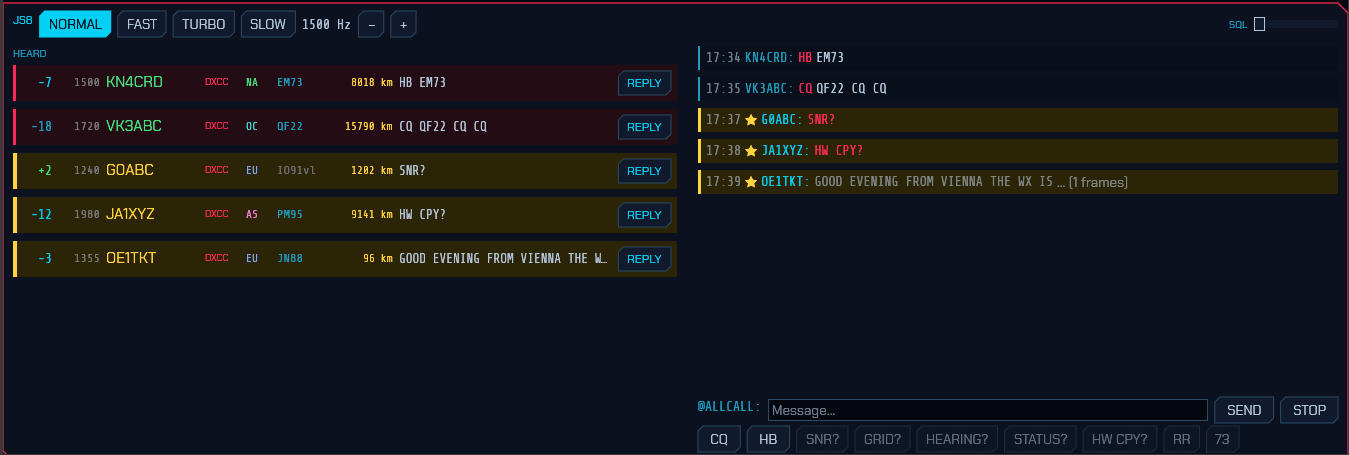
The panel. Under the header is the slot bar, the same one FT8 has (3.2.2) — how far through the current turn the clock is, dim cyan receiving and pink transmitting. Here it also shows what the speed buttons actually do: the bar takes six seconds to cross on TURBO and thirty on SLOW.
Stations heard are listed on the left in the same rows the FT8 decode list uses — report, frequency, callsign, what they would be worth (DXCC / BAND / GRID / NEW / DUPE), the country's flag, continent, grid, distance, and the last thing they said — so a band you have learned to read in FT8 reads the same way here. Hovering a row brings up the full station card: entity, zones, bearing, and whether you have worked them before. A row addressed to you is boxed in gold; a heartbeat or a CQ, which are invitations, get the red CQ background.
The conversation is on the right, newest at the bottom, with anything addressed
to you marked ★. Each line reads sender · recipient · command · text —
OH8STN answering KN4CRD shows as OH8STN: KN4CRD HEARTBEAT SNR -02 — because
on a busy channel half a dozen stations answer the same beacon inside a minute
and the report alone does not say which of them was being answered. The heard
list summarises the same way. A message still arriving is shown greyed with a
frame count, because a half-received sentence should not read like a complete
one.
CLEAR RX, at the end of the button row, empties the conversation, and is
greyed while there is nothing in it. The heard list is left alone — it is a
separate pane, and it is what HEARING? is answered from.
Replying. Clicking a message — or a station's REPLY button — aims the
composer at that station and drafts the reply the exchange expects. A heartbeat
or a CQ is asking "can anyone hear me?", so it drafts a signal report; SNR?,
GRID?, STATUS? and HEARING? draft their answers; HW CPY? drafts a
report; RR and QSL draft 73; AGN? puts back the last thing you sent. It
is only ever a draft — it lands in the text box and you are free to rewrite it,
because most of JS8 is conversation and there is no standard answer to "good
evening from Vienna". Free text drafts nothing and only selects the station.
Clicking a row rather than its REPLY button selects without touching what you
have already typed.
Sending. Nothing goes on the air until you press SEND or Enter. The
buttons under the conversation only fill the text box, so what is about to be
transmitted is always on screen first, and you can still change it. Beside the
send button is an estimate — 3f · 45s — of how many frames the message needs
and how long it will be on the air. Watch that number before you press send; it
is the thing newcomers to JS8 find most surprising. The message goes to whoever
the label in front of the box names: the selected station, or @ALLCALL when
there is none.
With a station selected, the query buttons draft a question for it: SNR?
for a signal report, GRID?, HEARING? for what it is copying,
STATUS? for its status message, HW CPY? for "how do you copy me", and
RR / 73 to acknowledge and sign off. With nothing selected they are
greyed. CQ drafts a general call and HB a single heartbeat, and both
stay addressed to everyone even while a station is selected — selecting someone
never turns a CQ into a message for them. Typing CQ or HB yourself does the
same. CLEAR TO, past the rule at the end of the row, forgets the selected
station and puts the composer back on @ALLCALL; it is greyed while nothing is
selected.
Anything addressed to a callsign — typed, drafted or from a button — goes out as a JS8 directed frame, so the station at the other end sees a message meant for them rather than words that happen to name them. When the message opens with a command the mode knows, that command travels in the frame too; when it carries more than the frame can hold (a grid, a status line, a sentence) the rest follows as free text. The framing is byte-identical to JS8Call's own, which is what the tests check it against. Relay and message-store commands are the exception: this station does not act on them, so it does not originate them either, and they go out as ordinary text.
On the map. Heard stations appear on the 3D globe (3D in the DISPLAY
row) exactly as FT8 decodes do, and the station the composer is aimed at gets
the contact arc from your QTH. Most JS8 traffic carries no locator — only
heartbeats, CQs and GRID replies do — so if callsign lookup is configured
(⚙ SETTINGS → Network → Uploads) the rest are resolved through it, one at a
time, and their grid is shown greyed to mark it as looked up rather than heard.
Because JS8 beacons every ten or fifteen minutes rather than every slot, a
station stays lit far longer here than in FT8.
Answering automatically. In ⚙ SETUP, Auto-reply answers SNR?, GRID?, STATUS? and HEARING? queries addressed to you or to @ALLCALL — with the answer, not just the acknowledgement: a report rides in the frame itself, and a grid or a status line follows it as text. This is what makes a JS8 station worth leaving switched on, and it is on by default. It never answers another station's traffic, and never answers itself.
Heartbeat reply answers a heard heartbeat with a signal report, so the station beaconing learns who copied them and how well. It is off by default, and deliberately hedged about: a busy band carries a heartbeat every slot, and a station that answered all of them would flood exactly the band heartbeats exist to keep quiet. So it answers a given station at most once every 15 minutes, never while a multi-frame message is still arriving, and never while you have something of your own queued to send — an answer that waited behind a long message would carry a stale report anyway. A CQ is never answered automatically at all: it asks for a contact, and starting one is your decision.
Beaconing. Heartbeat transmits your callsign and grid on an interval so others know you are receivable — off, 10, 15, 30 or 60 minutes, the choices JS8Call offers. It is off by default: an unattended beacon is something you should choose, not something a mode switches on for you. HB AUTO in the panel header turns it on and off without opening SETUP, and the countdown beside it says when the next one goes out — a transmitter that keys itself should say so where you are already looking.
The first heartbeat is a whole interval away rather than immediate, so choosing an interval never keys the radio before you can change your mind. Each one is scheduled with up to a slot of jitter, because stations that share an interval and started together would otherwise collide on every beacon. Turbo does not beacon at all, and cannot acknowledge one: it is the local and VHF speed, and an unattended transmitter there spends a lot of a small band to reach nobody far away.
Where beacons go. Not on your working frequency. Heartbeats and their acknowledgements move to a free slot in the 500–1000 Hz sub-band, the same convention JS8Call follows: it is where stations watching for beacons look, and it keeps an unattended transmitter off somebody else's QSO. The slot is chosen at the moment the beacon goes out — a beacon can wait behind a long message for minutes, and a frequency picked when it was queued would be somebody else's by then. A slot counts as taken if anything was decoded within one signal width of it in the last half-minute (longer at Slow, whose transmissions are longer than that), and if the whole sub-band is busy the beacon takes whichever slot has been quiet longest.
So a beacon appears on the waterfall somewhere other than your transmit marker.
The panel header says where the last one went — HB 750 Hz beside the
countdown — so you can tell your own beacon from a stranger's. If you would
rather keep everything you transmit in one place, ⚙ SETUP → Beacon frequency
→ Working freq switches it off.
Relayed messages and stored-message requests are decoded and shown, but this station will not act on them — forwarding traffic on someone else's behalf is a decision for the operator.
From the User Manual. Home.