Repository navigation
Breakable Props
New in 4.0.0. Read from the code, not tested live.
Prop tiles break in a fight: barrels, crates, pots, bottles, furniture, lanterns, braziers, statues, webs and bushes. Doors and windows can break too, locks can be picked, walls you mark can be breached, and a region's painted decorations can break like props (see Decorations). A broken prop's own picture comes apart into pieces that stay on the floor, with a mark for the damage and whatever it held spilled round it. With Fire spreads on, fire moves on from what it lights (see Fire and Smoke).
Nothing breaks until you turn it on for a scene. Animater never damages a creature: when a keg explodes or a statue falls on someone, the GM can see who was there and decides.
Where: Scene configuration → Animater → This place.
| Field | Default | What it does |
|---|---|---|
| Breakable props | Off | Prop tiles on this scene break from spells, shoves and missed swings, and leave wreckage. |
| Fire spreads | Off | A burning prop sets fire to what stands next to it, round by round. New in 4.4.0. See Fire and Smoke. |
| Fires fill rooms with smoke | Off | With Fire spreads on, a fire indoors fills its room with smoke. New in 4.4.0. See Fire and Smoke. |
| Chance a miss breaks a prop (%) | 25 | The chance a plain miss breaks the prop or window beside its target. A critical failure always breaks it. |
| Doors and windows break | On | With Breakable props on, doors and breakable windows can break and locks can be picked, and walls marked Breakable wall can be breached. |
| Spells wear doors down | Off | PF2e only. A spell's area takes HP off a door or breakable wall instead of breaking it outright. New in 4.5.1. See Spells wear doors down. |
| Ask me what a success does | Off | A won Force Open or lockpicking roll waits for the GM to say what happens. New in 4.5.1. See Ask me what a success does. |
| Rubble is difficult terrain | Off | A toppled statue or pillar leaves rubble that costs double to walk through. Each tile can say otherwise. It's read when the statue falls, so changing it later leaves rubble already there as it is. |
| Repair | The Repair broken props button. GM only. See Repairing. | |
| Doors and windows | Two GM buttons, Make all doors and windows breakable and Make none breakable. See below. |
The switches only decide new breaks. Wreckage already on the map stays until you repair it.
Every door and window at once. Make all doors and windows breakable sets every door on the scene to Automatic and every window to Yes. Make none breakable sets every door to Never and every window to No. Windows here means Foundry's own windows and any Animater window. Each button first asks, naming how many doors and windows it will change. Plain walls, and doors or windows already broken, are left alone, so neither button ever marks a breakable wall.
A GM has to be connected for anything to break. A player's break is asked of the GM's screen, which checks it again before it happens.
Where: Tile configuration → Overhead tab → Breakable prop.
| Field | Choices | What it does |
|---|---|---|
| Material | Automatic, Wood, Glass, Clay, Metal, Stone, Plant, Won't break | What it's made of decides what breaks it. Automatic guesses from the file name and shows its guess, such as "Automatic (wood)". |
| Breaks as | Automatic, Shatter, Collapse, Topple, Burn away | How it comes apart. Automatic: furniture collapses, stone statues and pillars topple, plants burn away, the rest shatter. |
| Rubble is difficult terrain | Scene default, Yes, No | Shows only while it breaks as Topple. |
| Contents | Automatic, Nothing, Water, Wine, Oil, Grain, Loose goods, Books, Potions, Lamp oil, Black powder | What spills when it breaks. |
| Burst (squares) | 1 to 4, default 2 | Shows only for Black powder. How far its explosion reaches. |
| Light prop | Automatic, Yes, No | Whether the lights on it go out when it breaks. |
| Tips over instead of breaking | Automatic, Yes, No | A shove knocks it over instead of breaking it, as with a brazier. |
Automatic reads whole words from the file name, so Old_Barrel.webp and OldBarrel.webp both say "barrel". Folders and the extension are ignored.
| Words in the name | Guess |
|---|---|
| table, chair, bench, stool, shelf, bookshelf, bookcase, desk, bed, cabinet, wardrobe | Wood, and it collapses. A furniture word wins over any other, so "Shelf_Potions" is a wooden shelf. |
| barrel, crate, box, chest, cart, keg, plank, wood, wooden, torch | Wood |
| bottle, glass, jar, vial, potion, flask, window, lantern, lamp | Glass |
| pot, vase, urn, amphora, ceramic, clay, jug | Clay |
| metal, iron, steel, cage, brazier, candle, candelabra, chandelier | Metal |
| stone, rock, statue, pillar, column, obelisk | Stone. A statue, pillar, column or obelisk of stone topples. |
| web, cobweb, spiderweb, vine, ivy, bush, shrub, hedge, thicket, brambles | Plant, and it burns away |
Some words only match in one form. "barrel" matches but "barrels" doesn't, so a tile that shows Automatic (won't break) may just need its material picked by hand.
The other guesses:
- Contents: Books for book, bookshelf, bookcase or library. Potions for potion, apothecary, alchemy or alchemist. Lamp oil for lantern or lamp. Black powder for powder, gunpowder or explosive.
- Light prop: Yes for brazier, lantern, lamp, candle, candelabra, torch or chandelier.
- Tips over: Yes for brazier.
With Material on Automatic, a tile isn't a prop when:
- nothing in its name gives a material,
- it's more than 3 squares on its longer side (6 for a plant), since that is more likely a floor or roof piece, or
- it's an overhead tile or a roof.
Picking a material by hand makes any of these a prop. A hidden tile never breaks.
| Cause | What happens |
|---|---|
| An area spell | When its animation lands, every prop whose middle is inside the placed area breaks, if one of the spell's own damage types breaks its material (a Fireball's fire). No damage roll is needed. The area has to be placed on the map for that spell first. See When it breaks. |
| A missed melee strike | The prop beside the target nearest the line of the swing can break, never one on the attacker's side, if the weapon's damage type breaks it. A critical failure always breaks it. A plain miss breaks it by the scene's chance. It breaks as the swing lands. |
| A creature forced into it | A finisher's knockback, a push, or an Energy blast that shoves. The creature smashes through, and the prop's walls don't stop it. |
| A charge | An animation's charge, roll, dodge or lunge that carries a token through a prop breaks it as the token gets there. A leap goes over. |
| A powder keg | Its blast breaks every prop in its burst, whatever the material. |
| An Energy blast | The GM's Energy blast breaks what its own energy breaks, by the same material rules as a spell's area: fire burns a bush and lights lamp oil, force shatters stone, psychic breaks nothing. Nearest first. New in 4.5.0. |
| The GM's hammer | The tile's HUD has a button to break it where it stands. New in 4.5.0. See Breaking a prop by hand. |
With Fire spreads on, a fire area or a fire blast sets alight what will burn instead of breaking it. See Fire and Smoke.
A creature only breaks a prop ahead of it. One it starts out standing on, or one beside it that it moves away from, stays whole.
A missed ranged Strike never breaks a prop, only a window (see Windows). A spell attack roll breaks nothing on its own: only the spell's area does.
An Energy blast breaks what it catches while the world setting Energy blasts break what they catch is on, which it is by default. A force or sonic blast only shoves creatures into things while Force and sonic blasts really push is on. Without that the push is only a look, and nothing breaks from a creature being thrown. See Settings.
New in 4.5.0. Right-click a prop tile for its HUD. The GM sees a hammer, Break it (Animater), which breaks the prop at once, as an ordinary blow that breaks its material would: a crate smashed, a stone statue toppled by force, a bush burnt away. On a broken prop the button is an arrow, Put it back (Animater), which shows the tile again and gives back its walls and lights, as unhiding it does.
The button shows only for the GM, only on a scene with Breakable props on, and only on a tile that is a prop with a material that breaks (not Won't break).
Breaks follow the animation, so the barrel bursts as the blow arrives rather than when the dice are rolled.
| Cause | When it breaks |
|---|---|
| An area spell | When its animation lands, with the spell's own damage types. A spell with no damage type breaks nothing. |
| A melee strike | At the swing's impact. |
| An arrow, bolt or thrown weapon | When it gets there, so a window breaks as the shot reaches the glass. |
| A charge, roll, dodge or lunge | As the token gets to the prop. |
The damage roll is the fallback. With animations off, or no animation for that spell, an area breaks things when its damage is rolled (click Roll damage on its chat card), and a strike right after its dice. A spell whose damage type is chosen as it is cast, or a kineticist impulse, always breaks things from its damage roll, and the GM's screen reads the types from the roll itself.
Each thing breaks once per area, whichever comes first. If the GM's screen turns down the animation's break, the damage roll still tries.
An area only counts when it was placed on the map for that spell (its template or region), by that player or a GM, in the last 10 minutes, on the same level. The GM's screen checks this, also for an area placed before the GM's screen loaded, so a player can't break a door or set off spilled powder without a real area over it.
| Material | Damage that breaks it | A creature forced into it |
|---|---|---|
| Wood | Bludgeoning, slashing, fire, electricity, force | Any size |
| Glass, Clay | Bludgeoning, piercing, slashing, fire, cold, electricity, acid, sonic, force | Any size |
| Metal | Bludgeoning, force, acid | Large or bigger |
| Stone | Force | Large or bigger |
| Plant | Fire. Slashing too, for a web or vine. | Never |
| Won't break | Nothing | Never |
A creature's size here is its token's width in squares: 2 or more is Large or bigger.
| Style | What you see |
|---|---|
| Shatter | The picture breaks into pieces that fly a little way from the blow and stay where they land. Glass and wood break into many shards, clay into a few, metal and stone into two or three. |
| Collapse | Furniture folds into long planks along its length, keeping its outline. Tables, chairs, benches, stools, desks and beds leave leg stubs at the corners. |
| Topple | Needs force, or a shove big enough to break stone. Otherwise it shatters. See Statues. |
| Burn away | Needs fire, and burns across from the side it came from, leaving ash. Otherwise it shatters. |
The mark on the floor shows the damage: a scorch for fire, frost for cold, a stain for acid, a burn for electricity, and dust for anything else. Fire also darkens the pieces, and cold frosts them. Thrown pieces, spills and burning oil stop at the first wall in their way.
Each break has a sound for its material, plus a splash for water, wine or oil, and falling books for books.
- Water, Wine, Oil, Grain, Loose goods: spill round the wreck.
- Books: pages and books slide off.
- Potions: coloured glass and stains.
- Lamp oil: spills, and catches when the break was fire or put out a lit light on the prop. It burns for about a minute as a real light, with flames and smoke, then leaves a scorch. With Fire spreads on, burning oil sets light to what stands beside it.
- Black powder: see Powder kegs.
A prop set as a Light prop puts out the visible lights standing on it, within a quarter square of its edge, on its level. Repair lights them again.
A prop that Tips over instead of breaking is knocked over by any shove, of any size. Its lights go out (a brazier is a Light prop too), its hot coals scatter and glow for about 10 seconds, and it clatters as metal does. Spells and blows still go by its material.
A keg holding Black powder explodes from fire, electricity or another blast. Every prop, door, window and breakable decoration whose middle is inside its Burst (squares) breaks, nearest first, on the keg's level, and a breakable wall within the burst is breached where it is nearest the keg. Doors set to Never and windows set to Won't break stay whole. A row of kegs sets each other off in turn, and each keg goes off once. A decoration holding black powder counts as a keg: it explodes and chains the same way, decoration or tile.
Anything else that breaks a keg, an axe say, spills the powder instead. A fire spell whose area later covers the spill sets it off once. That holds for powder spilled from a decoration too. A cold or acid area over a spill does nothing.
Creatures aren't hurt. Nothing is whispered: the GM can see the burst and who stands in it. (Before 4.5.0 the GMs were whispered the names.)
A stone statue, pillar, column or obelisk set to topple falls away from the blow. It lies along a strip about 1.4 times its longer side, as wide as its shorter side, and breaks into chunks there, leaving a broken stump on the plinth. A blast or other damage shatters it instead.
With Rubble is difficult terrain on (the tile's choice, else the scene's), the strip becomes a region where walking costs double. Other kinds of movement keep their cost.
Creatures under it aren't hurt, and since 4.5.0 nothing is whispered about who stood there.
A Plant burns away from fire, whatever Breaks as says, with flames running across it and embers rising, and leaves ash. A web or vine is also cut in two by slashing, and the halves sag apart. Cutting makes no sound.
Doors break once the scene has Breakable props and Doors and windows break on. Every door and secret door can break unless you say otherwise, locked ones too.
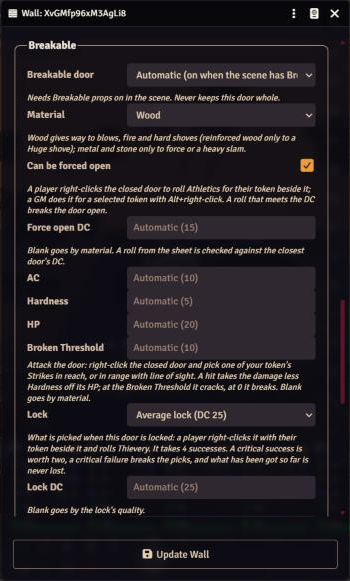
The Breakable box on a wooden door, in a PF2e world. Taken on Animater 4.9.0.
Where: Wall configuration → Breakable. These fields show while the Door Type is a door or a secret door.
| Field | Default | What it does |
|---|---|---|
| Breakable door | Automatic (on when the scene has Breakable props) | Never keeps this door whole. |
| Material | Wood | Wood, Reinforced wood, Metal or Stone. |
| Can be forced open | On | Whether a creature can force it open from the door. |
| Force open DC | Blank: by material | Your own DC, 1 to 60. Blank shows the automatic one, such as "Automatic (15)". Daggerheart calls it Force open Difficulty. Draw Steel has no DC. |
| AC, Hardness, HP, Broken Threshold | Blank: by material | PF2e only. For attacking the door. A door that has been hit says how much HP it has left here. |
| Lock | Average lock | Poor, Simple, Average, Good or Superior lock. What is picked when the door is locked. See Picking a lock. New in 4.5.0. |
| Lock DC | Blank: by the lock | Your own DC, 1 to 60. Daggerheart calls it Lock Difficulty. Draw Steel has no DC. New in 4.5.0. |
| Successes to pick | Blank: by the lock | How many successful checks open it, 1 to 20, in any game system. New in 4.5.1. |
Below the door's fields, for doors, windows and breakable walls alike:
| Field | Default | What it does |
|---|---|---|
| Spells break it | Yes | No keeps a spell's area from breaking it: a fireball over it leaves it standing. Everything done by hand still breaks it: a shove, a weapon, a Strike through it, a Force Open roll, a powder keg beside it. An Energy blast counts as a spell here. New in 4.5.1. |
| Repair | Put this one back. Shows only on a door, window or wall that is broken, breached or has taken damage. See Repairing. New in 4.5.1. |
| Cause | Wood | Reinforced wood | Metal or stone |
|---|---|---|---|
| An area spell or Energy blast over the door's middle | Bludgeoning, slashing, fire or force | Bludgeoning, slashing, fire or force | Force only |
| A creature forced or charging through it | Large or bigger | Huge or bigger | Huge or bigger |
| A powder keg's burst | Yes | Yes | Yes |
| The GM's Shift+right-click on its door control | Yes | Yes | Yes |
| Forcing it open | Meeting the DC | Meeting the DC | Meeting the DC |
| Attacking it (PF2e) | At 0 HP | At 0 HP | At 0 HP |
A Medium creature shoved into a wooden door doesn't break it. The GM's smash works in any game system, and the door bursts from the selected token's side, if one is selected. A door set to Spells break it: No ignores the first row. With Spells wear doors down on (PF2e), a spell takes HP off the door instead of breaking it outright: see below.
A broken door becomes an open gap: creatures, sight, light and sound all pass. A dark, ragged hole is drawn over the painted door, with splintered stubs at both ends and planks thrown through to the far side. A wooden door bursts with a crash, a metal one clatters, and a stone one falls like stone.
| System | The roll | Wood | Reinforced wood | Metal | Stone |
|---|---|---|---|---|---|
| PF2e, SF2e | The Force Open action (Athletics) | DC 15 | DC 20 | DC 20 | DC 25 |
| D&D 5e | Strength (Athletics) | DC 15 | DC 20 | DC 20 | DC 25 |
| Daggerheart | A Strength roll | Difficulty 13 | Difficulty 16 | Difficulty 16 | Difficulty 19 |
| Draw Steel | A Might test | Tier 2 or 3 | Tier 3 | Tier 3 | Tier 3 |
Type your own Force open DC on the door to change it for that door.
- A player right-clicks a closed or locked door. Their token has to be within one square of the door: the selected one, or with none selected, their only token beside it. Not while the game is paused.
- The GM selects a token beside the door and Alt+right-clicks the door.
A box asks, in the system's words, for example "Force it open? Athletics vs DC 15", then rolls the check. The GM's screen judges the roll against the door's own DC, and a roll that meets it breaks the door. In PF2e and SF2e that means a success or a critical success. In Daggerheart a critical always forces the door. Each roll breaks one door at most, and a roll is spent once used, so it can never force the same door twice.
On a locked door that can be picked, the box offers Force it open and Pick the lock side by side (in PF2e, Attack the door as well).
Players see the DC only when the system lets them: PF2e's and SF2e's setting for showing DCs, or D&D 5e's challenge visibility. The GM always sees it.
In PF2e and SF2e, a Force Open rolled from the character sheet counts for the closest closed door that can be forced open, within one square of the token, against that door's DC.
Other game systems have no Force open roll here. The GM smashes the door with Shift+right-click instead.
So far the PF2e roll has been tried at the table. The SF2e, D&D 5e, Daggerheart and Draw Steel rolls follow each system's own roll but haven't been tried in play. If one shows a warning instead of a roll, report it.
In PF2e, right-clicking a closed or locked breakable door (the GM: Alt+right-click) asks Force it open or Attack the door, and on a locked door Pick the lock too.
- Attack the door uses your selected token, or your only token on the scene, and lists its Strikes that reach the door. A melee Strike reaches within its reach (5 feet reaches a door within one square). A ranged or thrown Strike reaches within its range, with nothing blocking the line to the door. A bow with no arrows is left out.
- Pick a Strike and click Strike. It rolls against the door's AC.
- On a hit, answer Yes to "Roll damage against the door?", or use the attack card's own Damage button. A critical hit rolls critical damage.
- The damage less the door's Hardness comes off its HP. The GM is whispered a line such as "Door: 13 of 20 HP left." Damage below the Hardness does nothing.
- At its Broken Threshold the door shows painted cracks. At 0 HP it smashes open like any broken door.
| Material | AC | Hardness | HP | Broken Threshold |
|---|---|---|---|---|
| Wood | 10 | 5 | 20 | 10 |
| Reinforced wood | 10 | 10 | 40 | 20 |
| Metal (iron) | 10 | 9 | 36 | 18 |
| Stone | 10 | 14 | 56 | 28 |
These come from the core rules. Type your own in Wall configuration → Breakable to change them for one door.
The GM's screen checks the attack and damage rolls itself (your token, in reach, against the door's own AC) and applies each damage roll once. Only damage rolled at no one counts: if you say No to the damage, or make another Strike first, a later damage roll at a creature never hits the door. Players see the door's AC in the prompt only when they would see a DC (see above).
Shoves, Force Open, a powder keg and the GM's Shift+right-click still break a door at once, whatever its HP, and so do spells unless Spells wear doors down is on. Repair, or the door's own Put this one back, gives it its full HP back. Other systems have no Attack the door.
New in 4.5.1. With the scene's Spells wear doors down on, a spell's area no longer blows a door open just because its damage type would. It waits for the damage to be rolled, takes the door's Hardness off the total and the rest off its HP, and the GM is whispered what is left, as for a Strike. At the Broken Threshold the door cracks. Only at 0 HP does it break.
- Breakable walls wear down the same way, on their own Hardness and HP (see Breakable walls).
- Windows still shatter: they have no HP.
- Props, decorations, powder and grass still break or catch the moment the spell lands.
- A spell nobody rolls damage for leaves the door standing.
The switch shows only in PF2e, the one system here whose doors have Hardness and HP. It's off by default, because it changes what a fireball already does to a door.
New in 4.5.0. A locked door can be picked, and so can a locked Animater window (one the GM has locked shut with a right-click, see Windows and Doors). It needs Breakable props on for the scene, and for a door, Doors and windows break on and the door not set to Never.
Who picks it:
- A player right-clicks the locked door or window. Their token has to stand next to it, as for Force open. On a door that can also be forced (or in PF2e, attacked), a box offers the choices, with Pick the lock first.
- The GM selects a token beside it and Alt+right-clicks. The GM's plain right-click on a window still locks or unlocks it.
A box asks, for example "Pick the lock? Thievery vs DC 25", then rolls the system's own check. A lock that takes more than one success says how far along it is: "(2 of 4 ways in)". Players see the DC only when they would for Force open. The GM's screen judges the roll against the lock it reads from the wall, never the DC in the message. When the lock opens, a door is unlocked and left shut, and a window is unlocked.
| System | The roll | Poor | Simple | Average | Good | Superior |
|---|---|---|---|---|---|---|
| PF2e, SF2e | Thievery (the Pick a Lock action where the system has it) | DC 15, 2 successes | DC 20, 3 | DC 25, 4 | DC 30, 5 | DC 40, 6 |
| D&D 5e | Dexterity with thieves' tools | DC 10 | DC 12 | DC 15 | DC 20 | DC 25 |
| Daggerheart | A Finesse roll | Difficulty 11 | 13 | 16 | 19 | 22 |
| Draw Steel | An Agility test | Tier 2 | Tier 2 | Tier 2 | Tier 3 | Tier 3 |
The lock's quality is set in Wall configuration → Breakable → Lock, Average by default. Lock DC and Successes to pick override it for one door or window.
PF2e and SF2e follow their own Pick a Lock rules:
- A better lock takes several successes, and they add up over separate tries.
- A critical success counts as two.
- A critical failure breaks your picks. The GM and the player who rolled are whispered "The lock holds, and the picks break." Animater doesn't take the tools off the sheet: that's the table's to do.
- Progress is never lost, not even on a critical failure.
Other systems take one success to open a lock unless you type a number in Successes to pick (new in 4.5.1). A failure is only a failure: no picks break. D&D 5e rolls thieves' tools, or Sleight of Hand on a 5e too old to have a tool check.
Nothing is said in chat about a lock that held or gave a little: the roll is in chat, and the next prompt says how far along it is.
So far none of these rolls has been tried at the table. Read from the code, not tested live.
New in 4.5.1. With the scene's Ask me what a success does on, a won Force Open or lockpicking roll changes nothing until the GM answers a box on their own screen. Leaving the box open is the timing: the door goes when you have finished describing what happens.
| Roll | Choices |
|---|---|
| Force Open | Break it open; Open it, unbroken (only on a critical success); It holds, and takes damage (PF2e only: type the damage, which loses the door's Hardness first and comes off its HP, so enough still breaks it); It does not open |
| Picking a lock | Unlock it; It stays locked |
A Force Open roll is spent whichever you choose. Closing its box without answering leaves the door as it is and doesn't spend the roll. Closing the lock's box keeps it locked. A lock you keep shut is left one success short of opening, so nothing won is taken back. D&D 5e is never offered Open it, unbroken, since a 5e ability check has no critical.
With it off, a success does what the rules say at once.
Where: Wall configuration → Breakable, on a wall with no door.
| Field | Default | What it does |
|---|---|---|
| Window | Automatic | Whether this wall is a window that can break. Automatic makes it one when its Animater window type (see Windows and Doors) is a glass, leaded, mosaic, rose or frosted window, and shows its answer, such as "Automatic (yes: a glass window)". Yes makes any wall a breakable window, No never. |
| Material | Glass | Won't break keeps it whole. |
| Lock, Lock DC, Successes to pick | Average lock | The lock picked when an Animater window is locked. See Picking a lock. New in 4.5.0; Successes to pick in 4.5.1. |
Spells break it and Repair are below these, as for a door.
A breakable window breaks from:
- any Strike made through it, every time. If the straight line from the attacker to the target crosses the glass, the first window on it breaks, hit or miss: a critical success, a success, a failure or a critical failure alike, with no chance roll. That goes for melee, ranged and thrown Strikes, as long as the weapon's damage type breaks glass. A melee hit or miss breaks it as the swing lands, a flying weapon as it reaches the glass. A missed swing breaks a window its line goes through.
- a missed shot flying past. A missed ranged or thrown Strike flies on past its target, a little to one side, as its animation shows. The first window on that path breaks as the shot reaches it.
- a missed melee strike beside the target, never on the attacker's side, if the weapon's damage type breaks glass. Only this case goes by the scene's Chance a miss breaks a prop (%). A critical failure always breaks it.
- an area spell or Energy blast over its middle, of bludgeoning, piercing, slashing, fire, cold, electricity, acid, sonic or force damage, unless it's set to Spells break it: No. A window shatters even with Spells wear doors down on.
- a creature of any size forced or charging into it. The creature still stops at the frame, but the glass breaks.
- a powder keg's burst.
Poison and the other damage types that never break a prop never break glass. The GM's Shift+right-click, Force open and Attack the door are for doors only. A locked window can be picked.
A broken window opens. A glass window becomes an open one, letting light, sight and sound through, and shutters stand open. It still blocks movement: you'd have to climb through the frame. The pane goes dark with glass teeth left in the frame, and shards fan out on the far side. It also lets room smoke out (see Fire and Smoke). Repair puts it back.
A plain wall can be breached: a gap opens in it and the rest of the wall stands. Only walls you mark can break.
Where: Wall configuration → Breakable, on a plain wall: Door Type None, and not a window. A window never breaches as a wall, whether it is Foundry's window, an Animater window, or a wall set to Window: No, and the wall fields are hidden on it.
| Field | Default | What it does |
|---|---|---|
| Breakable wall | No | Yes lets this wall be breached. |
| Material | Wood | Wood (palisade, plank wall), Brick, Stone (masonry) or Metal (iron plate). The hint under it says what breaches that material, and in PF2e its Hardness, HP and Broken Threshold. |
The scene's Breakable props and Doors and windows break must be on too. The Make all doors and windows breakable button never marks walls.
| Material | Breached by |
|---|---|
| Wood | A fire or force area, a powder keg, or a Huge or bigger creature forced or charging into it |
| Brick | A force area, a powder keg, or a Gargantuan creature |
| Stone | A powder keg, or a Gargantuan creature |
| Metal | Only a powder keg |
Misses and Strikes never breach a wall. A creature too small to breach it just stops at the wall. An area or Energy blast never breaches a wall set to Spells break it: No.
Where it opens:
- An area breaches a wall where the middle of its shape (a burst's centre, the middle of a cone or line) meets it, straight across to the wall, and only when that spot is inside the area. If the middle is too far from the wall for the area to reach straight across, nothing happens. Like any area, it breaks the wall when its animation lands.
- A powder keg breaches it where the wall is nearest the keg, within its burst.
- A slammed creature breaches it where it hits, and goes on through.
The gap is one square wide, or two for a powder keg, and stays inside the wall. A wall shorter than a square and a half opens whole. Creatures, sight, light and sound pass through the gap.
A ragged dark hole is painted over the gap, with debris on the far side from the hit: splintered planks for wood, grey stone or red brick chunks and dust, and bent iron plates, shards and sparks for metal. Wood sounds like a door bursting, stone and brick like falling stone, and metal clatters. Every screen sees the same wreck, and after a reload it lies there settled.
One breach per wall. The rest of the wall stands as a second piece, and neither piece breaches again until it is repaired.
In PF2e the wall's configuration shows its Hardness, HP and Broken Threshold from the core rules: wood 10/40/20, brick 12/48/24, stone 14/56/28, iron 18/72/36. Walls can't be attacked with a Strike yet, but with Spells wear doors down on, a spell that would breach a wall takes HP off it instead and only breaches it at 0 (see Spells wear doors down).
The Animater controls have a Breach wall button (a brick wall). Click it, then move over a breakable wall: it lights up orange under the pointer. Click on it and it breaches there at once, whatever its material. The debris flies away from your selected token, or from the side you clicked. Escape or a right-click cancels. Show the Breach wall button hides it. See The Animater Workspace.
Repair broken props, or Put this one back in either piece's Wall configuration, closes the breach and puts the wall back exactly as it was, one wall again, with the second piece taken away. If you move or change either piece of a breached wall by hand, your edit stays and Repair leaves that wall alone. If you delete the second piece by hand, Repair still puts the whole wall back.
The break plays on every screen at once, with its sound. The tile itself is hidden, so players see only the wreckage. Walls drawn inside the prop's tile, both ends within it, stop blocking, so a broken crate no longer stops anyone or blocks sight. Doors, breakable windows and breakable walls are never counted as a prop's walls: they break by their own rules.
The wreckage stays until it's repaired, through reloads, and every screen lays it out the same way.
On a scene with levels, a prop, door or window breaks only from something on its own level, and its wreckage shows only on that level. A tile that names no level is on every level.
- Repair broken props, in Scene configuration → This place, or in the Animater controls under Tidy up, puts the whole scene back after asking. Broken props show again and their walls block again. Doors come back as they were, so a locked door is locked again, and an attacked door has its full HP back. Windows are mended, breached walls are closed, the lights that went out are lit, every region's broken decorations come back, rubble regions go and burning oil goes out. Fires go out, burnt props and grass come back and room smoke clears (see Fire and Smoke), and cracks and holes in thin ice close (see Water).
- Put this one back, in a door's, window's or wall's own configuration (Wall configuration → Breakable → Repair), mends just that one and leaves the rest of the scene alone: whole, closed, its HP restored, a breach closed up. It shows only when there is something to mend, and the configuration closes once it's done. GM only. New in 4.5.1.
- Repair decorations, in a region's Decorations section, puts back just that region's decorations and removes their rubble. See Decorations.
- Unhiding one broken tile, or the arrow on its HUD (see Breaking a prop by hand), puts just that prop back, with its walls, lights and rubble.
- Deleting a broken tile gives its walls back.
If you edit a broken door's type or restrictions by hand, Animater forgets the break: its wreckage goes and Repair leaves your edit alone.
- A tile whose Material is Won't break, or that isn't a prop (see What counts as a prop).
- Props painted into the map image, or flattened into one picture with others (FA Nexus's flattened tiles, say). They have no tile of their own.
- A hidden tile.
- A door set to Never, a window whose Window is No (or Automatic on a wall that isn't a glass window) or whose Material is Won't break, and a plain wall not marked Breakable wall: Yes.
- A wall already breached, until it's repaired.
- A door, window or wall set to Spells break it: No, from a spell's area or an Energy blast. Everything else still breaks it.
- A decoration in a region without Decorations can break, or of a kind that never breaks (see Decorations).
- Anything on a scene without Breakable props, or without a GM connected.
| Setting | Everyone (GM) | My screen | Choices or range | What it does |
|---|---|---|---|---|
| Show the Repair broken props button | — | On | — | In the Animater controls, under Tidy up, for the GM: unhides every broken prop in the scene and puts its walls, doors, windows and decorations back, as the scene configuration's Repair button does. (GMs only.) |
| Show the Breach wall button | — | On | — | In the Animater controls, for the GM: click on a wall marked Breakable wall: Yes to breach it there at once. (GMs only.) |
| Energy blasts break what they catch | On | — | — | A blast breaks the props, doors, windows and decorations its own energy would break: fire takes a rug and lights lamp oil, force and sonic smash stone, psychic breaks nothing at all. The same rules a spell's area goes by. Turn it off to keep blasts to the eye alone. New in 4.5.0. |
| Force and sonic blasts really push | Off | — | — | The creatures a force or sonic Energy blast catches are really moved half a square away from the blast (never through a wall), instead of only being thrown back and settling. It changes where their tokens stand. Only with it on does a blast shove creatures into props, doors, windows and decorations that break. |
Everything else is set per scene, per tile, per wall and per region, as above.
Windows and Doors · Fire and Smoke · Decorations · Fire and Lights · Water · Scene and Region Options · Recipe Studio and Finishers · The Animater Workspace
For developers and the curious. Read from the 4.9.0 code, and not run or measured.
Source: scripts/engines/props/ (pure rules and drawing; pick-lock.mjs for locks, success-choices.mjs for Ask me what a success does), scripts/ui/prop-config.mjs (the Tile, Wall and Scene fields), and the wiring in scripts/main.mjs. Fire and smoke are on Fire and Smoke.
| Document | Flags | Notes |
|---|---|---|
| Scene |
flags.animater.breakableProps, propMissChance, breakWalls, rubbleDifficult, askSuccess, wearDoors, fireSpreads, smokeFills
|
breakWalls counts as on unless it's false. wearDoors only counts in DOOR_ATTACK_SYSTEMS (PF2e). |
| Tile |
flags.animater.prop.material, style, contents, light, tips, burst, rubble
|
Blank means Automatic, guessed by propGuesses in prop-traits.mjs. |
| Tile, broken | flags.animater.prop.broken |
The note: seed, cut angle, where the blow came from, pattern, mark, the walls it opened, the lights it put out, and for kegs powder and burst, for toppled statues the rubble region. readNote clamps everything read back. |
| Wall |
flags.animater.breakWall.door, material, forceOpen, forceDC, ac, hardness, maxHp, bt, window, wall, wallMaterial, lock, lockDC, lockSuccesses, lockProgress, spells, hp
|
spells is "no" (or false) to bar spells. lockProgress is the successes won so far, never more than one short of lockSuccessesNeeded. hp is a hit door's (or worn wall's) HP left, cleared by Repair. The window group's Material is submitted as windowMaterial and merged into material by wallBreakFormMerge, by the Door Type saved. window is "yes", "no" or blank for Automatic (true/false from before Automatic are still read); Automatic is on when flags.animater.window is one of GLASS_PANES (wall-break.mjs). wall is "yes" for a breakable wall. |
| Wall, breach piece | flags.animater.breakWall.breachOf |
The second piece of a breached wall names the wall it was split from (wall-breach.mjs). A wall with breachOf, or one that is a window of any kind, is never a breakable wall. |
| Region | flags.animater.decorBroken |
The region's broken decorations, written only with options.animater.decorBreak or decorRepair (decor-break.mjs). |
| Wall, broken | flags.animater.breakWall.broken |
Its restore keeps the wall's door, ds, move, sight, light and sound (a window only sight, light, sound), which Repair writes back. A Force Open break keeps the chat message's id. |
Every break is a request. The client that rolled or moved builds a note and emits prop-break or prop-wall-break on the module socket. The active GM's client runs validBreakRequest or validWallBreakRequest against its own documents and writes the result. Only the seed, the cut angle and the blow's origin are taken from the requester. Material, walls, lights, style, lamp-oil fire, powder and rubble are all decided on the GM's side. Without an active GM nothing breaks.
Checks include the scene switches, the sender viewing the scene, the material rule (canBreak, canBreakWall), the cause fitting where things stand, and the level (onLevel). A slam's path may be at most PATH_SQUARES = 12 squares long. A placed area is remembered for AREA_TTL_MS = 600000 (10 minutes) waiting for its animation or damage roll. A plain miss is rolled by the GM against propMissChance, 25 by default. A blast can only come from the GM, from a keg whose note says it exploded.
| Constant | Value | File |
|---|---|---|
MAX_SIDE |
3 squares, 6 for a plant | prop-material.mjs |
BIG_SLAM |
2 squares (Large) for metal and stone props | prop-material.mjs |
| Door slams | wood 2 squares, reinforced wood, metal and stone 3 |
wall-break.mjs canBreakWall
|
| Door attack stats | AC / Hardness / HP / BT: wood 10/5/20/10, reinforced 10/10/40/20, metal 10/9/36/18, stone 10/14/56/28 | door-attack.mjs |
BURST_DEFAULT |
2 squares, clamped 1 to 4 | prop-traits.mjs |
BURN_MS |
60000 ms of burning lamp oil | prop-lights.mjs |
COAL_MS |
10000 ms of glowing coals | prop-tip.mjs |
TOPPLE_REACH |
1.375 times the longer side | prop-topple.mjs |
| Default DCs | d20 systems wood 15, reinforced 20, metal 20, stone 25; Daggerheart 13/16/16/19; Draw Steel tiers at 12 and 17 | force-open.mjs |
| Force Open reach | 1 square from the token's footprint | force-open.mjs |
LOCKS |
DC / successes: poor 15/2, simple 20/3, average 25/4, good 30/5, superior 40/6; LOCK_DEFAULT average |
pick-lock.mjs |
| Lock DCs elsewhere | D&D 5e 10/12/15/20/25; Daggerheart 11/13/16/19/22; Draw Steel tier 2, 2, 2, 3, 3 | pick-lock.mjs |
| Successes counted | PF2e and SF2e only (COUNTS_SUCCESSES); lockSuccesses 1 to 20 overrides in any system |
pick-lock.mjs |
PICK_STAMP_MS, FORCE_STAMP_MS
|
120000 ms | main.mjs |
| Lights on a prop | centre within the tile grown by a quarter square | prop-lights.mjs |
A prop's own walls (prop-walls.mjs) are non-door walls with both ends inside the tile's turned bounds, not breakable windows. Breaking opens them; undoing restores only the ones named in the note that no other broken tile still names. A forced move ignores them, so the mover passes through.
Burning lamp oil is a temporary AmbientLight with flags.animater.propFire = {tileId, until}. The active GM puts out stale ones on load. Rubble is a Region with a modifyMovementCost behaviour doubling walking only, flagged propRubble with the tile's id.
A roll from the door carries flags.animater.forceOpen = {wallId, dc, tokenId}. Where the system's roll API takes no message data (PF2e/SF2e's game.pf2e.actions.forceOpen, Daggerheart's rollTrait), the next matching chat message from that actor is stamped in preCreateChatMessage, for up to 120 s. A PF2e or SF2e sheet roll is recognised by the action:force-open roll option and goes to closestForcedDoor. The GM ignores any DC in the message and judges against the wall's own (forceOpenResult).
The door control's _onRightDown is wrapped at setup: the GM's Shift+right-click smashes, a player's right-click or the GM's Alt+right-click forces open or picks (doorChoice offers Force it open, Pick the lock and, in PF2e, Attack the door), and anything else goes to Foundry's own handler. A window control's rightdown locks for the GM and calls pickLockAsk for anyone else (or the GM with Alt) on a locked window.
A pick roll carries flags.animater.pickLock = {wallId, dc, tokenId}, stamped in preCreateChatMessage where the system's roll takes no message data. Only the active GM judges it (judgePickLock: pickLockResult, then lockPicked) and writes ds: 0 (door) or windowLocked: false (window) and lockProgress. Broken picks post one whisper to the GMs and the roller.
With askSuccess on, applyWallBreak waits on askForceOutcome for a Force Open, and judgePickLock on askPickOutcome. Choices come from forceOpenChoices and pickLockChoices. A used Force Open message gets flags.animater.forceOpenUsed. With wearDoors on, an area cause on a door or wall goes through wearWall, which reads the damage roll's total and applies wallDamageResult. repairOneWall mends one wall or a breach pair (wallRepairGroup). The tile HUD button is propHudButton, which asks a break with the first of BY_HAND (bludgeoning, slashing, force, fire, acid) that breaks the material. Door attacks are in door-attack.mjs, wall breaches in wall-breach.mjs and wall-wreck.mjs, and decoration breaks in decor-break.mjs and decor-options.mjs.