Repository navigation
Sounds and Voices
Spell and weapon sounds come from the packs you install: GGG, PSFX, SoundFx Library and PF2e Creature Sounds. Animater uses whichever are active, keeping sound in step with the visuals. It also ships sounds of its own for the world around the fight.
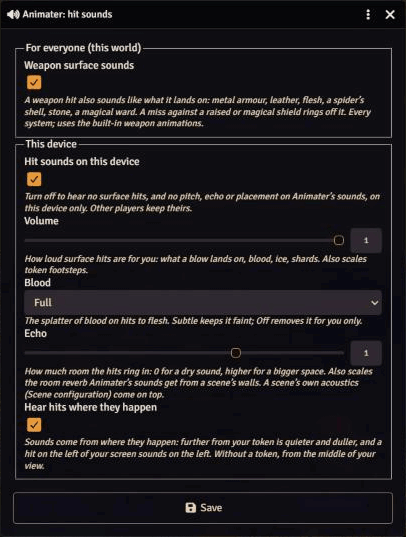
Where: Animater settings → Sound → Hit sounds. This window has its own Save button.
Weapon hits also sound like what they land on: metal armour, leather, flesh, a spider's shell, stone, a magical ward. The full table is in the Settings Reference.
Sounds echo to fit the space, worked out from the walls: dry outdoors, tight in small rooms, ringing in halls. The edge of the canvas counts as open, not as a wall. Changed in 3.8.7: so do walls drawn along the scene's edge, so an outdoor map fenced in by boundary walls still sounds outdoors.
Scene configuration → Animater → Acoustics overrides this for the whole scene:
| Choice | Sound |
|---|---|
| From the walls | Default. Each sound gets reverb to fit where it happens. |
| Open air | Little echo |
| Hall or temple | Longer echo. Counts as underground. |
| Cave or dungeon | Long, dark echo. Counts as underground. |
Each player's Echo slider in Hit sounds scales the reverb.
Moving tokens make their sounds: footsteps by floor and feet, wing beats, a burrower's churn, a swimmer's stroke, the thud of a landing.
Footstep volume follows the Volume slider in Hit sounds. Huge and bigger creatures carry half as far again as Footstep hearing range says.
An attacking creature now and then grunts, snarls or roars. A hurt one now and then cries out, and one that falls always does. Ghosts wail, skeletons rattle and oozes gurgle. Animated objects and elementals stay silent.
Choosing a voice for one token: Token configuration → Appearance → Animater creature voice. Choose its creature's own voice, Silent, or any voice group (a man, a wolf, a dragon, a ghost and so on), then one voice of that group by name. Attack, Hurt and Death play the choice on your screen only.
On PF2e with PF2e Creature Sounds active, that module voices them instead. Its first choice is Use PF2e Creature Sounds. Picking an Animater voice mutes that module for the token's actor, and going back restores its sound set.

Animater creature voice on Token configuration, shown with PF2e Creature Sounds active.
Creature voices from my own folder points at a folder in your Data folder. Each sub-folder is one voice, filed by its name (Huge Dragon, orc, banshee, Crow…), with attack, hurt and death folders holding the takes.
- The GM's screen scans it and shares the list, and rescans at each start.
- The files stay yours and play from your server, so a commercial library you own can be used in your own games.
- A folder holding only part of a voice is skipped, as is a folder whose sounds Animater already ships.
- An
animater-voices.jsonbeside the voices can keep, reject or re-file folders:
{"keep": ["..."], "reject": ["..."], "family": {"folder": "dragon"}}Once it keeps any, only those play.
New in 3.5.0. Read from the code, not tested live.
All Animater sounds, at the top of the Sound tab, silences everything Animater plays. There's a switch for the whole table, and one for each player on their own screen. Sounds already playing stop, and your other sound settings stay as they are.
- Previews you click in Animater's windows still play.
- The game's sound and other modules' sound aren't touched.
| Feature | How to get it |
|---|---|
| Rivers | Any water region with a way to flow. Loudest at the bank, silent while frozen. |
| Ponds and swamps | New in 3.8.7, changed in 3.8.8. Still water (not the sea) heard while River sounds are on: a pond laps quietly like a lake shore, and only still water whose Texture style is Swamp plays insects and slow mud bubbles. |
| Waterfalls | Heard while River sounds are on. |
| The sea | A region marked as the sea. New in 3.5.0: a calm-sea loop in light wind, fading to surf between 0.1 and 0.4 on the wind's scale of 0 to 1. |
| Tavern murmur | The region's right-click panel → Air → Tavern murmur, on any floor. Loud inside, faint through its walls, spilling out of an open door. |
| Fires | New in 3.8.9. Fire sounds: each fire light crackles by its kind, a cooking pot bubbles. The four nearest each play their own loop, and since 4.0.0 a long-burning fire crossfades into its next recording instead of looping one. Torches and lanterns that creatures hold crackle too, unless you turn off Held torches crackle (new in 4.0.0) on your screen. See Fire and Lights. |
| Rain, wind, hail, thunder | Weather sounds. Muffled under a roof. Calendaria's own weather sound stands down on this screen for the weathers sounded here, and its fantasy weathers keep theirs. |
| Animals | Wildlife sounds. New in 3.3.1: wolves howl and growl. New in 3.8.0: deer, squirrels, snakes, herons and crabs have calls of their own. See Wildlife and Town Life. |
| Rats and bats | Rat and bat sounds. See Caves and Underground. |
A region's right-click panel can turn off its Water sound, Dripping sound or Animal sounds. See Region Steps and Painted Floors.
| Feature | What you hear |
|---|---|
| Carriers | New in 4.4.0. A wagon or cart is heard as its iron rims on whatever it crosses, with the axle creaking when a wheel drops, the load shifting, the harness and chains jingling with the pace and the brake when it stops short; a covered wagon's canvas pulls on its ropes. A wagon also has its team's hooves. A ridden mount is heard at the pace it is going: walk, trot or gallop, working up to a gallop over a few squares. A boat has the wash along its hull, oars and creaking timbers, and water slapping it while it is moored. Loudest beside it, fading within a few squares. All CC0 recordings. Carrier sounds turns them on, and Carrier volume sets how loud for you. See Carriers. |
| Thin ice | New in 4.4.0. Ice giving way, then a body going into the water just after it, heard up to about 18 squares away and muffled by walls. Seven recordings (three of ice, four of water), and every screen hears the same pair for the same hole. Several squares going at once make one break, not a pile of them. A hole melted by fire is silent, and so is ice already broken when you arrive. Cracking has no sound. See Water. |
| Handouts | New in 4.5.0. A handout shown to players makes a sound as it arrives, by how it arrives: a letter unfolding, a scroll running open, a map pulled apart, a page held up, one blown in, a pin tapped in, a lamp set down. A page laid on the table has none. A pinned page is heard as the pins go in, not as it crosses the screen, and the same handout always picks the same take. See Handouts and Arrivals. |
| Moments | New in 4.4.4. A GM's moment can be heard as well as seen. By default a shockwave and falling dust sound like stone giving way, a pulse like thunder close by and a rumble like thunder far off; the rest are silent. The Moments dashboard's Heard row picks another of these, any file of your own, or silence. A moment at a place is heard from there, one on tokens from them, and one over the whole screen from the middle of each person's view. It is louder the stronger it is, and a random take is used where there are several. See Moments. |
All Animater sounds silences all of these too. Read from the code, not tested live.
Each player sets these for their own screen, on the Floor & world tab of the Animater settings:
- River volume and Waterfall volume for running water.
- Fire volume, from silent to twice as loud. New in 3.8.9.
- Weather volume, from 0 (silent) to 100% (as recorded), for rain, wind, hail and thunder. New in 3.8.0. Moving it changes loops already playing.
- Held torches crackle, under Fire sounds, quiets the torches and lanterns creatures hold. New in 4.0.0.
- Carrier volume, from silent to twice as loud, on the Interface & performance tab beside Carriers. New in 4.4.0.
Every recording Animater ships is credited, with its source and licence, in the licence files kept with the sounds. The fire, carrier, handout and thin ice recordings are all CC0. Changed in 4.4.1: twenty footstep sounds (dirt, sand, water, mud and ice) from sixteen Freesound recordings had no credit line; all sixteen were checked as CC0 and credited.
Changed in 3.8.1 and 3.8.2. A river, the surf, a waterfall, a pool, the night or the weather no longer throbs or restarts while a scene loads or a river is placed. Each loop changes volume smoothly from where it was. One that drops to silence fades out and keeps going, and stops only after several seconds of real quiet. A river goes quiet for ice only once it's frozen over.
| Setting | Everyone (GM) | My screen | Choices or range | What it does |
|---|---|---|---|---|
| All Animater sounds | On | On | — | Every sound Animater makes: animations, footsteps, voices, weather, water, animals and the rest, for the whole table. Off: Animater is silent and everything else still plays. Your other sound settings stay as they are for when you turn it back on. |
| Room acoustics from walls | On | On | — | In scenes without an Acoustics choice, Animater's sounds echo to fit the space around them, worked out from the walls: dry outdoors, tight in small rooms, ringing in halls. |
| Muffle sounds behind walls | — | On | — | Animater's sounds from beyond a wall sound muffled, as Foundry's own sounds do. |
| Footstep sounds | On | On | — | Moving tokens make their sounds: footsteps by floor and feet, wing beats, a burrower's churn, a swimmer's stroke, the thud of a landing. Off: tokens move silently; the view still shakes under giant footfalls (Giant footfalls shake the view). |
| Footsteps ring in the room | On | — | — | Footsteps, wing beats and footfall thuds echo softly in the room they happen in and sound muffled from behind a wall, as Animater's hit sounds do (with Room acoustics and Muffle sounds behind walls on). |
| Footstep hearing range | Normal (6 squares) | — | Close (3 squares) / Normal (6 squares) / Far (10 squares) / Very far (15 squares) | How far away footsteps, wing beats and other movement sounds can be heard (Foundry plays them only to tokens within this range). Huge and bigger creatures carry half as far again. Close 3 squares, Normal 6, Far 10, Very far 15. |
| Footsteps outside combat | Normal | — | Normal / Quieter (half volume, heard within 3 squares) / Off | Footsteps, wing beats and other movement sounds while no combat has started on the scene, for a party walking about the map in exploration. Quieter plays them at half volume, heard only within 3 squares; Off moves tokens silently. In combat they play as usual. |
| Creatures growl on their turn | On | — | — | With PF2e Creature Sounds active, a Large or bigger NPC sometimes growls from where it stands as its combat turn starts, heard only by those who could hear it. Uses that module's sound sets and volume. |
| Creatures cry out when they attack and are hurt | On | On | — | An attacking creature now and then grunts, snarls or roars as it attacks, a hurt one now and then cries out, in a voice for its creature and its creature type (a man or a woman, small folk, a wolf, a bear, a bird, a dragon, a zombie, a spider, a fiend and more), and one that falls always does, from where it stands, heard only by those who could hear it. Ghosts wail, skeletons rattle, oozes gurgle; animated objects and elementals stay silent. On PF2e, PF2e Creature Sounds voices them instead when it is active. |
| Creature voices from my own folder | Empty | — | — | A folder of your own creature sounds (in your Data folder) to use besides Animater's: each sub-folder is one voice, filed by its name (Huge Dragon, orc, banshee, Crow…), its attack, hurt and death folders holding the takes. The files stay yours and are played from your server, never bundled. Empty: Animater's own voices only. |
| River sounds | On | On | — | Running water, gentle or swift, from any water region with a way to flow (the region's right-click panel → Water → Flows toward), quiet lapping by still water (Pond), and insects and slow mud bubbles instead where its Texture style is Swamp: loudest at the bank, fading with distance, silent while frozen. A region's Sound: Off quiets its own. |
| River volume | — | 1 | 0 to 2 | How loud running water is for you: 0 silent, 1 as recorded, 2 twice as loud. |
| Waterfall volume | — | 1 | 0 to 2 | How loud waterfalls are for you: 0 silent, 1 as recorded, 2 twice as loud. Heard while River sounds are on; with Waterfalls off, a fall sounds as a river and River volume applies. |
| Fire sounds | On | On | — | Fire lights crackle close by, each by its Fire kind (Light configuration → Animater → Fire): a torch, a quieter lantern, a brazier, a campfire, a cooking pot bubbling over its fire. Torches and lanterns creatures hold crackle too. Loudest beside it, fading within a few squares, quieter through a wall. A light's Sound: Off quiets its own. |
| Fire volume | — | 1 | 0 to 2 | How loud fires are for you: 0 silent, 1 as recorded, 2 twice as loud. |
| Held torches crackle | — | On | — | Torches and lanterns creatures hold crackle for you. Off keeps them quiet while fires on the map still crackle. |
| Carrier sounds | On | On | — | A wagon or a cart you can hear as it rolls: its iron rims on whatever it is crossing, the axle creaking when a wheel drops, the load shifting behind it, the harness and trace chains jingling with the pace, the brake when it stops short, and a covered wagon's canvas pulling on its ropes. Loudest beside it, fading within a few squares. Only for a token set as a carrier (Token configuration → Animater: carrier). Drawn at Balanced quality or better. |
| Carrier volume | — | 1 | 0 to 2 | How loud wagons and carts are for you: 0 silent, 1 as recorded, 2 twice as loud. |
| Weather sounds | On | On | — | Rain, wind and hail you can hear, growing and fading with the weather and the scene's wind and muffled under a roof, and thunder after each lightning flash. Calendaria's own weather sound stands down on this screen for the weathers sounded here; its fantasy weathers keep theirs. |
| Weather volume | — | 100 | 0 to 100 | How loud rain, wind, hail and thunder are for you, in percent: 0 silent, 100 as recorded. Only on your screen; everyone sets their own. |
| Thunder from the side it struck | — | On | — | Thunder plays to the left or right of your selected token, or of the middle of your view with none selected, as it struck. Off: in both ears alike. Either way, how far off it struck says how loud it is. |
| Tavern murmur | On | On | — | A region marked as a tavern (the region's right-click panel → Air → Tavern murmur) is full of voices: loud inside, a far-off murmur through its walls, spilling out when a door opens. Played at Balanced quality or better. |
| Wildlife sounds | On | On | — | The hawk's cry, crows passing, songbirds chirping and their wings as they burst up, a rabbit's thump when it bolts, a fish's splash as it darts, ducks quacking, gulls crying, frogs croaking and plopping in, a fox's bark, dragonflies, and by night an owl and a constant bed of crickets. A few at a time, only near enough to be heard. With Birds, rabbits and fish on. |
| Rat and bat sounds | On | On | — | The rats' claws and squeaks, sharper when one bolts, and the bats' wings and chirps, quietly and a few at a time, only near enough to be heard, ringing in the room and muffled by walls. With Rats and bats on. |
| Sneaking is quiet | On | — | — | A creature moving stealthily steps softer, slower and duller, and only a Huge or bigger one still thuds: PF2e's Avoid Notice exploration activity or a Sneak effect, PF2e Visioner's sneaking, D&D 5e's Hiding status. |
Movement Effects · Combat Drama · Integrations · Fire and Lights · Carriers · Handouts and Arrivals · Moments