Repository navigation
Region Steps and Painted Floors
Change the ground during play without opening a window. Fresh grass burns, clear water turns bloody, stone floods. Each step has its own look, footsteps and sounds, and can switch on an effect such as mist or lava.
Every Animater setting of a region lives in one place: the region panel.
New in 3.8.0. It replaces the old right-click step menu and the Animater tab in Region configuration.

The panel on a test region set to Ground, with the Ground section open. Taken on Animater 4.9.0.
As GM, with the Tokens or Regions layer active, quickly right-click a region on the map. The panel opens by the pointer. That is the usual press; you can choose another (see below).
- Quick means quick. A right-click held down or dragged pans the map as usual. A token keeps its own right-click, and so does a window's or door's icon. Nothing opens while the ruler is out or a token is being dragged.
- Any region opens it, with a floor or without, at any elevation.
- The region shows on the map. A gold outline is drawn round it while the panel is open, so you can see which one you clicked.
- Its heading drags it about the screen. It stays where you put it until it closes.
- Drag the region itself to move it. New in 4.2.0. While its panel is open, left-drag inside the region on the map: its gold outline follows the pointer in half-square steps, or freely with Shift held. Let go and the region moves by that much, and what it carries (decorations, raised ground, crossings) goes with it. A token under the pointer keeps its own drag. Read from the code, not tested live.
- It closes with its × button, Esc, a click outside it, or when the map is panned.
- The cog by the close button closes the panel and opens Foundry's own region window.
- The trash can beside the cog closes the panel and deletes the region, after Foundry's own "Delete Region?" question. New in 4.1.1.
- Every change saves at once, and reaches every screen. There is no Save button.
New in 4.4.2. A GM who pans with the right button, or aims at a token and misses, can open the panel by accident. A region's panel opens on (Animater settings → Interface & performance) lets each GM pick, for their own screen:
| Choice | What opens the panel |
|---|---|
| Right-click (the default) | A quick right-click, as above. |
| Shift + right-click | The same, with Shift held. |
| Double right-click | Two quick right-clicks within about half a second (450 ms) and 8 pixels of each other. |
| Only the region's sheet | Nothing on the map. Use Open its panel in the region's configuration (see Region configuration). |
Whichever you pick, a held or dragged right-click still pans, and the region's own configuration still opens the panel.
The panel starts with a row of kinds. Pick what the region is, and only the sections that kind uses follow.
| Kind | Sections it shows, in order |
|---|---|
| None | None. Animater does nothing in this region (a teleport, a trigger). Choosing it takes every Animater setting off the region, after asking you, and they can't be brought back. |
| Water | Water, Steps, Animals, Air, Look |
| Ground | Ground, Decorations, Animals, Steps, Air, Look |
| Indoors | Ground, Animals, Air, Look |
| Cave | Cavern, Decorations, Drips, Air, Animals |
| Lava | Steps, Air, Look |
No separate Dock kind. New in 4.0.0. A dock, jetty or bridge is Ground with Over water on. The kind row shows it as Ground, and its Ground section holds the dock's settings. Such a region shows the Ground, Steps and Look sections. Docks made before keep working.
Sections fold. Each shows its name and a one-line summary, such as "River · flowing south · deep", or the current step and its place in the list. Click a heading to open it. The first section starts open, or Animals on a Ground region that has animals.
More sections. A line at the bottom lists the sections the kind doesn't show yet. Click one to add it, open. A section the region already uses always shows, whatever the kind, so no setting is ever out of reach.
Height. New in 4.2.0. A region painted as raised ground or a crossing with Map painting's Heights tab gets a Height section, first and open: its height, its edge (Cliff or Hill), its cliff look, the scene's cliff walls and cliff view, and Add crossing; a crossing shows its kind and the heights of its two ends. It's never offered under More sections. See Map Painting.
Inside a section, rarer settings wait under a "More: …" line. Click it to unfold them.
Where two or more regions overlap at the click, the panel shows a tab for each, at any elevation. An elevated dock and the water under it can both be reached.
- It opens on the last listed region with a floor at the level's base elevation. If none matches, it's the last listed region at that spot.
- Tabs use the region's name, or the floor's name with "region" when it has none. Where two read alike, the floor is added in brackets.
Read from the code, not tested live.
Ground (Ground and Indoors):
| Setting | What it does |
|---|---|
| Floor | What creatures walk on here: their footsteps, sounds and prints. From the scene uses the scene's floor. |
| Over water | A deck, jetty or bridge built over water. New in 3.8.0. Moving water runs on under it. With it on, the section shows Built as, Posts and the shadow (see Casting a shadow). Off makes it plain ground again, keeping its floor. See Water. |
| Changes with the seasons | Grassy floors only: whether the season colours it. |
| Burns | New in 4.4.0. Shown only while the scene has Fire spreads on. Whether fire runs through the ground here, square by square. On by default for grass and field floors, off for the rest. See Fire and Smoke. |
| Floor texture | Paints the region's floor over the map. |
| Texture style | The floor's styles, while it's painted. |
| Texture opacity | New in 4.0.0. 10% to 100%, while the floor is painted. Less lets the map's own picture show through, grass blades included. |
| Pattern size | 25% to 300%, in 5% steps. Shown while the floor is painted or the step has a look. Smaller gives more of it, such as more stones. |
| More: its shadow… | Casts a shadow and its settings, for a raised floor such as a stage or balcony. |
Water: kind, flow and current, depth, reflections, freezing, Thin ice, sound, and under More drips, coast and waterfall. See Water.
- Thin ice. New in 4.4.0. Off until you turn it on. The water is frozen thinly whatever the weather, and Holds up to (Tiny to Gargantuan, Medium by default) sets the biggest creature it carries safely; heavier ones crack it or go through. Refreeze freezes every crack and hole in the region over again. While it's on, the Steps section shows only a note, because thin ice sets the step. Leaving the Water kind turns it off. How the ice cracks and breaks is on Water.
- When a step overrides the current. New in 4.3.0. If the step showing has a current of its own, a note under Current names the step and its current, with Use the river's to go back to the river's.
Steps: the region's steps, as buttons. See Using steps.
Animals: cards for each animal, grouped (Open ground, Water, Town, Farm, Dark places), with the kinds that suit the region first and the rest under More animals…. Each card shows its count: click for one more, right-click for one fewer. Their size runs from 50% to 200%. Also Animal sounds and Keep out. See Wildlife and Town Life.
Air:
| Setting | What it does |
|---|---|
| Roof | New in 4.0.0. Keeps the weather, the sun and the sky's light out, as indoors or in a cave. It switches Foundry's Suppress Weather behavior on the region on or off, adding one (named "Roof") if there is none. Off only switches the behavior off, so one you set up by hand keeps its settings. |
| Weather | New in 3.7.0. As the scene, or a weather drawn only inside this region, such as mist in a hollow. Only the look: the ground, sounds and footsteps follow the scene. |
| Climate | New in 3.7.0. Scene, Cold or Warm: whether creatures' breath shows inside. |
| Tavern murmur | The murmur of a crowd inside, faint through the walls. |
| Opens to the outside | A way out: stairs up, a cave mouth, an air shaft. The air flows toward it. |
| Open to the sky | The weather reaches the floor here, and underground the sky shows through. |
| Open sides | Roofed, but with no wall where the roof ends: a porch, a cart lodge, a lean-to. A room's smoke leaves along that open edge. Off, only doors, windows and holes let smoke out. See Fire and Smoke. |
| Window | New in 3.7.0. Shown with Open to the sky: what fills the opening. None: open to the weather, Glass skylight, Mosaic or stained glass, Leaded diamonds, Rose window, Frosted glass, Wooden lattice or Iron grate. See Windows and Doors. |
| Pane size | 50% to 200%, with a window chosen: how big its panes are in its light. |
| Weather edge | New in 3.7.0. 0 to 3 squares, usually 0.5. How far the weather, clouds and the sun's light fade in at the edge of a region that keeps the weather out or is open to the sky. 0 is a hard line. |
| Room dressing | Cobwebs, Wet walls, Steam vents or Bad air, in any region but a cave (a cave has these in its own section). See Caves and Underground. |
The openings are Opens to the outside, Open to the sky (with its window and pane size) and Open sides. On a Cave or Indoors region they show at once. On other kinds they wait under More, with the weather edge and room dressing.
The 3.7.0 changelog calls the weather edge Edge softness and puts it and the window in Region configuration. In the code now they are in the panel's Air section, with the labels above.
Look:
| Setting | What it does |
|---|---|
| Floor texture, Texture style, Texture opacity, Pattern size | As in Ground, for kinds with no Ground section (Water, Cave, and Ground with Over water on). |
| Creatures inside | A Tokenshade look every creature inside shows. See Looks and Tokenshade. |
| More: soft edge… | Soft edge and its Softness, 0.1 to 3 squares. Off gives a hard edge along the region's own line, for painted looks and moving water. On brings back the softness you had. A painted floor meets its region's line. |
On a Lava region, Look holds More: its shadow… in place of the soft edge.
Cavern and Drips: see Caves and Underground.
Decorations: New in 4.0.0. Painted rocks, trees, bushes, puddles and more over the region, the same on every screen. Other kinds are laid with Map painting's Decorate brush. See Decorations and Breakable Props.
| Setting | What it does |
|---|---|
| Decorations | The on switch. Turning it on scatters the place's usual kinds. |
| Where | Outdoors or Underground: which kinds fit. |
| How dense | 0x to 2x, usually 0.6x. How many there are, all kinds together. |
| Size | 0.3x to 3x. Every decoration bigger or smaller, those painted by hand too. |
| Height | New in 4.1.0. 30% to 300%, usually 100%. How tall every decoration here stands for its size, times each one's own Decoration height from the brush. Taller ones throw longer shadows. It never moves a decoration or changes how it breaks. |
| Decorations can break | Off by default. The region's crates, barrels, bushes and other breakable kinds break like props. A note says so while the scene's Breakable props is off, since nothing breaks until it's on. |
| Material, Breaks as, Contents, Burst (squares), Light prop, Tips over | Shown with Decorations can break on, each on Automatic (by kind). Burst shows only with Black powder. Tips over is the tile's Tips over instead of breaking. |
| Repair decorations | A button, shown while they can break or any are broken: puts back every broken decoration in this region. |
Read from the code, not tested live.
Foundry's region window keeps an Animater tab, but it only says how to open the panel: since 4.4.2 its line names the press you chose, such as "Double right-click the region on the map to set it up." For a GM, on the scene being viewed, it has an Open its panel button that closes the window and opens the panel at the region's centre.
Open the panel's Steps section. Each step is a button: click one and the floor changes, spreading from where you right-clicked (or from upstream on a river).
The section also has:
| Setting | What it does |
|---|---|
| Current here | Changed in 4.3.0, where it was Speed. On flowing water: how fast the water runs while this step shows. As the river (the default) uses the Water section's Current; Very slow, Slow, Gentle and Swift are the same words Current uses. |
| Strength | 10% to 200%, for a step with a look: how strong it is, such as how much blood. |
| Hide this step | Hides the current look without leaving the step. |
| Edit steps… | Opens the editor below. |
Hover the buttons to see what the current step walks as, when it changes that.
On a water region with Thin ice on, the section holds only a note: thin ice sets the step, frozen over whatever the weather. Turn Thin ice off under Water to pick steps again. Its heading then reads "Frozen over · thin ice".
Every floor starts with a ready-made list. For example:
| Floor | Some of its steps |
|---|---|
| Grass | Fresh, Rain-soaked, Bloodied, Trampled, Flowering, Withered, Blighted, Burning, Burnt |
| Water | Clear, Murky, Bloody, Frozen over, Oil slick, Burning oil, Boiling, Glowing, Poisoned, Drained to mud |
| Stone | Dry, Rain-wet, Dripping, Steam vents, Lava, Bloodied, Crystals, Webbed, Flooded, Rubble, Runes glowing |
| Snow | Fresh, Churned to slush, Bloodied, Melted, Blizzard-drifted, Crusted ice, Scorched |
| Lava | Crust, Cracking, Molten. New in 3.7.0. See Caves and Underground. |
After its own list, each floor adds what any floor can become, such as Bloodied, Frozen over, Flooded or Scorched, where that makes sense.
New in 3.3.2. Read from the code, not tested live. Narrow holes cut in a region stay clear in every painted look.
New in 3.4.0. Read from the code, not tested live.
Casts a shadow works on any region with a floor other than water. It's off by default, except on a region with Over water on, where it's on unless you turn it off. Once it's on, its other settings show.
- Where it falls: on the ground, lower floors and moving water. Never on the region itself, or on floors at the same height or higher.
- How it falls: away from the sun, longer as the sun gets low. It's fainter with less light, and there's none with no light, where walls or trees already keep the light off, or from a region under a roof.
- Length: the region's bottom elevation minus the highest floor below it, or the level's base: 0.45 of a square per square of height, between 0.15 and 3 squares. A region with no bottom elevation counts as at the level's base, so give it an elevation for more than a short shadow.
- It needs what painted floors need: region steps on, and a quality that shows them.
- On moving water, see Water.
Shadow. Each floor has its own set, the usual one first:
| Floor | Shadows |
|---|---|
| Wood | Planks, Slats, Beams, Solid |
| Stone | Solid, Arches |
| Metal | Solid, Grate, Beams |
| Glass | Coloured light, Frosted, Leaded |
| Ice | Faint, Cracked |
| Grass, Dirt, Mud | Dappled, Solid |
| Sand, Pebbles, Snow | Solid, Dappled |
Any other floor is Solid. A region keeps one choice per floor, so changing its floor and back finds your choice again.
Softness (0% to 100%, usually 0%) and Darkness (10% to 90%, usually 45%) follow the shadow type. A region has one of each, whichever floor it's on.
Where to find it in the panel:
- Ground with Over water on: in the Ground section, with softness and darkness under More: shadow softness, darkness….
- Other Ground and Indoors regions: in the Ground section under More: its shadow….
- Lava: in the Look section under More: its shadow….
New in 3.4.0. Read from the code, not tested live.
A wood, stone or metal floor with Over water on has Built as in its Ground section.
| Choice | What it shows |
|---|---|
| Plain (the default) | Just the floor and its shadow. |
| Old boards | Edge boards, plank gaps and bolts on wood, thick posts and beam ends. |
| Railed pier | Slim posts, rails and a ladder-shaped rail shadow. |
- By floor: wood has round posts. Stone has square pillars, with no beams or bolts. Metal has thin struts.
- Painting: edge boards, plank gaps and bolts only show while the region paints its texture. Posts and rails don't need it.
- Its shadow: a built floor throws Solid until you choose another type.
- Separating: a shadow only separates from the deck once its offset is more than the deck's width. Then thin post shadows join the two.
Posts is a switch shown only for Old boards and Railed pier, and it's on unless you turn it off. Off removes the posts, beam ends and post shadows. A railed pier keeps its rails.
- Where they go: along the region's long edges, just outside them, across from one another. Wood is about 1.1 squares apart, metal 1.7 and stone 2.6.
- What they stand on: moving water, or lower ground if the region is raised. A region at the level's base on dry ground shows none.
- In moving water they make ripples, a few at a time.
Edit steps… in the panel's Steps section. It opens a window of its own. Every change saves at once.
For each step you set its name, its look on the floor, what it walks as (its footsteps, sounds and prints), and the effect it switches on.
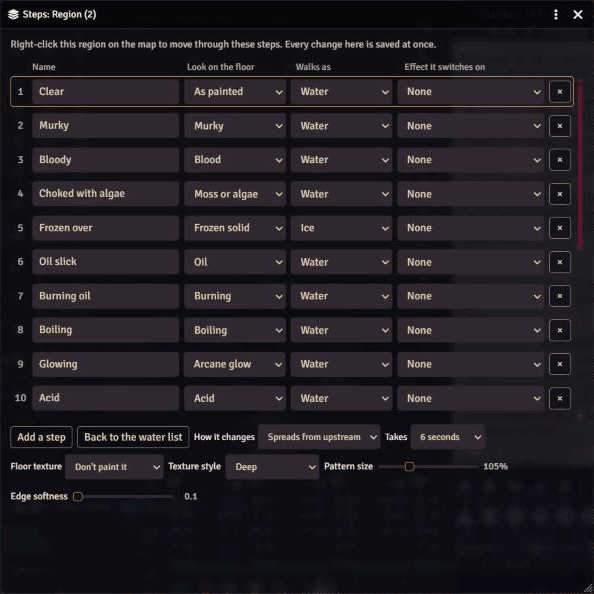
The steps editor for a water region.
| Field | Choices |
|---|---|
| Look on the floor | As painted; weather and wear (Wet, Frozen solid, Snowed over, Frost, Slush, Flooded and more); Blood, Dried blood, Bones; Moss, Vines, Flowers, Blight; Arcane glow, Consecrated, Cursed, Dead magic, Electrified; Burnt, Burning, Ash, Oil, Acid, Poison, Boiling, Red-hot, Lava cracks |
| Walks as | Stone, Wood, Dirt, Grass, Sand, Snow, Water, Ice, Mud, Pebbles, Glass, Metal, Lava |
| Effect it switches on | None, Mist on the floor, Dripping water, Steam vents, Lava, Lava (cracking), Lava (crust), Wet walls, Cobwebs, Glowing fungus (3 colours), Crystals (3 colours), Bad air |
| How it changes | Spreads from where you click (or from upstream), or Fades everywhere |
| Takes | At once, 3, 6 or 12 seconds |
| Floor texture | As the scene says, Paint it, Don't paint it |
Below the list are the texture style, Pattern size, Soft edge and its softness, the look strength of the current step, and Affected by season on grassy floors.
Back to the … list restores the floor's ready-made steps. Changing a region to another floor gives it that floor's list until you set it back.
For a bare or blank map, a region can paint its floor, including grass blades that respond to wind, sun and whatever walks through them.
- For a whole scene: Scene configuration → Animater → Region floor textures, default Off because the map is usually painted already.
- For one region: Floor texture in its panel (Ground or Look section), or in its steps.
Painted floors, shiny looks and moving water respond to the world around them: the sun and moon, nearby lights, clouds, rain, wind, lightning and wall shadows.
Where painted floors overlap. New in 4.8.0. The biggest floor lies at the bottom and smaller ones on top of it: a road on its meadow, a room's boards on the yard round it. Floors of the same size go by their ids, so every screen stacks them the same way, after every reload. Before, the order depended on which tile finished loading first, and could differ between screens.
Water inside a painted floor. New in 4.8.0. Moving water is drawn under painted floors, so a floor now leaves a hole over any smaller water lying in it, and a pond in a painted meadow shows. A floor smaller than the water, such as an islet or stepping stones, stays on top of it, and so does anything built over water.
Read from the code, not tested live.
| Setting | Everyone (GM) | My screen | Choices or range | What it does |
|---|---|---|---|---|
| Region steps | On | On | — | The GM right-clicks a region on the map and moves it through its steps in its panel's Steps: grass goes from fresh to bloodied to burnt, a cave from dry to steam to lava. A region can also paint its floor for a bare map (Scene configuration, or its menu). A step can draw blood, wet or burnt on the floor, change what the floor walks as (its footsteps, sounds and prints), switch on a region effect such as mist or steam, and set a river's speed. The steps are set with Edit steps in the panel's Steps. Off stops the looks (the panel still opens); steps already chosen keep their floor and effects. Each screen's Animation quality sets how much it draws: Full and Light keep grass blades, moving flames and bubbles and shine on every look, Light with fewer torches; Balanced keeps floors catching the sun, moon and two lights; Low draws them still. Drawn at Balanced quality or better. |
| A region’s panel opens on (this device) | — | Right-click | Right-click, Shift + right-click, Double right-click, Only the region's sheet | Which press opens a region’s Animater panel on the map, for you. A right-click that is held or dragged pans as it always has and never opens it, but a quick one on the open floor does — pick another gesture if you keep opening it while aiming at a token. Whatever you choose, the panel also opens from the region’s own configuration, on its Animater tab. (GMs only.) |
Off stops the looks, but the panel still opens. Steps already chosen keep their floor and effects.
- GM only.
- Animals stay off ground a step has made dangerous or foul, such as burning, lava, acid, poison, cursed, burnt or freshly bloodied ground. Snow, frost, mist, bones and dried blood don't bother them.
Water · Decorations · Fire and Smoke · Map Painting · Movement Effects · Caves and Underground · Scene and Region Options
For developers and the curious. Read from the 3.2.2 code, with the 3.3.0, 3.3.2, 3.3.3, 3.4.0 and 3.8.0 changes added, and the panel, the opening press, region dragging and floor stacking read from the 4.9.0 code, and not run or measured.
Source: scripts/engines/motion/floor-looks.mjs, floor-motion.mjs and region-steps.mjs. The panel is scripts/ui/region-panel.mjs, region-panel-model.mjs and region-panel-sections.mjs, with the steps editor and tabs in region-steps-ui.mjs. FLOOR_DETAIL is in scripts/core/quality.mjs.
region-steps.mjs isn't a renderer. It's pure data and flag helpers: stepFlags overlays the active step on the region's flags, and stepLook produces the look layer's inputs. A step reaches every screen because it lives on the region's flags, and each screen draws it at its own quality. A step change is saved with render: false.
| Level | Motion | Blades | Shine | Sheen | Lights | Tile px |
|---|---|---|---|---|---|---|
| Full | Yes | Yes | Yes | Yes | 6 | 2048 |
| Light | Yes | Yes | Yes | Yes | 3 | 2048 |
| Balanced | No | No | Yes | No | 2 | 1024 |
| Low | No | No | No | No | 0 | 1024 |
| Off | Nothing shows | 0 | 1024 |
A tile already made seems to keep its size if quality changes in that session, because the tile map is keyed by floor and style only. Inferred, not tested.
Tile pass (bake). Each floor and style is one tile from a generated fragment shader. There are 63 styles across 12 floors. Shaders compile off the main path with KHR_parallel_shader_compile where available, and one tile is drawn per frame. It's drawn with raw GL into a framebuffer, read back with readPixels and uploaded through BaseTexture.fromBuffer, with repeat wrap, mipmaps and anisotropy 8. The picture tile follows the table above, and the "surface" tile (normal and gloss) is always 1024.
Panel tabs (new in 3.3.3, changed in 3.8.0 and 4.4.2). Read from the code, and not run. stepMenuClick in main.mjs wraps the canvas's clickRight. A right press counts as quick when the button came up within 350 ms and 6 px of where it went down, timed from the pointer events' own time stamps. Whether a quick press opens the panel is panelOpens in engines/regions/panel-gesture.mjs, by the client setting regionPanelOpens (right, shift, double or sheet): a double needs the previous quick press within DOUBLE_MS = 450 and DOUBLE_PX = 8, and panelPressMemory forgets a press that opened, so a third click doesn't open it again. PANEL_WORDS gives the region window's line for each. regionsUnder lists every region whose polygons hold the point, using pointInPolygon, so elevation is ignored and a hole counts as outside. Since 3.8.0 that is any region, not only those with a plain floor. The panel opens on floorRegionAt, which uses testPoint at the level's base elevation, or else the last of that list. stepTabs puts that region first, then the rest in list order. A region with no name is called after its floor ("Grass region"), and names that match get their floor in brackets.
Panel (new in 3.8.0). regionKindOf reads the kind from the flags and the floor the region comes to: none, lava, cave, deck (overWater), water, indoors (the panel's own indoors flag) or ground. kindFlags writes a kind. Deck is still a kind inside the model for its sections, but since 4.0.0 it isn't in REGION_KINDS and the kind row lights Ground for it. panelSections takes the kind's ORDER, then any section whose IN_USE test passes, then those added from More sections; a height section (a raised part or crossing, new in 4.2.0) is sorted first and starts open. A folded section's controls aren't built. Every control calls saveStepFlags, a doc.update with render: false. The Roof switch is not a flag: setRoof creates or toggles suppressWeather behaviors and also saves roof in the flags so redraw hooks hear of it. The outline is a PIXI.Graphics on canvas.interface, gold over a dark under-stroke. The header holds the trash can (remove), the cog (configure) and ×, in that order. Since 4.4.0 a fireSpreads() callback decides whether the Ground section shows Burns (regionBurns in engines/props/fire-spread.mjs: the burns flag, else on for grass and field), and thinIceOn replaces the Steps section with a note.
Dragging a region (new in 4.2.0). Capture-phase pointerdown, pointermove and pointerup listeners on window take a left drag that starts on the canvas inside the region the panel shows, unless a visible token's bounds hold the point. The outline is moved by the snapped offset (half a grid square, or 1 px with Shift) while dragging, and on release movedShapes in region-panel-model.mjs shifts every shape's points (or a rectangle's or ellipse's x, y) in one doc.update.
Floor stacking (new in 4.8.0). floorStack in engines/motion/floor-stack.mjs (pure) sorts the floors to paint by areaOf their areas, biggest first, ties by id. Each floor not built over water gets, as under, the areas of moving water that is smaller than it and whose box meets its box, and the painter opens the floor there.
Cast shadows (new in 3.4.0). Read from the 3.4.0 code, and not run. floor-shadows.mjs draws one quad per casting region, on sortLayer 405, built by syncFloorShadows in main.mjs. A region is left out with a water floor, with castsShadow false, or under a ceiling (roofedRegion). uShape holds the shape in red, and in green blockers: itself, floors with a bottom at or above its own, and moving water, which draws its own. The shader samples the shape at vWorld + uToSun * uLift * (1 + 1.6 * uLow), where uLow is (45 - height) / 45, up to 2.6 times as long. It multiplies by overPattern, shared with the water, by uSun and by sunReach, and is culled by its box. Coloured light adds a tint at 0.26 alpha. overLiftOf takes the bottom and max(base, floors below), using floors whose boxes meet it.
Built as (new in 3.4.0). Read from the 3.4.0 code, and not run. The panel offers it only in the deck section, for floors where floorBody(floor).post is set. dockStyleOf in region-steps.mjs gives '', old or railed, for floors floorBody gives a post. With '' only the shadow mesh exists. Otherwise dockPieces is pure and returns strips and pieces, all small quads on sortLayer 406, so the cost per pixel doesn't rise with the number of posts. PIECE_FRAG draws beams, posts, boards, rails, uprights and bolts from the tile. STRIP_VERT throws thin shadows by uAway times a share of uReach and uRailH, so the sun moves them with no rebuild. DECK_FRAG draws wood's plank gaps and tones. FLOOR_BODIES holds post size, slim size, spacing and beam reach, and stone's beam is 0. Boards, planks and bolts need painted. MOST_POSTS = 160 and MOST_BOLTS = 400.
showsPosts is overPosts !== false, and with it off the posts list is empty, which removes beam ends too. Rails and uprights come from edges, so a railed pier keeps them. overShadowOf falls back to solid for a built floor. shadowStretch makes thin shadows over water read the sun's colour, to meet the shadow the water draws. ripples runs every 1.4 s, for posts in water and in view, at min(0.45, 5 / count).
Hard edges (new in 3.4.0). uTight of 2, when edge is 0, makes inside a smoothstep(uPeak * 0.25, uPeak * 0.5, ...) with no wobble, in the show pass and the look images, so the floor meets the line.
Soft edge and Pattern size (new in 3.3.3). Read from the 3.3.3 code, and not run. The stepEdgeOff flag makes stepEdge return 0, and stepEdge itself stays saved, which is how the softness comes back. At 0, maskOf adds no BlurFilter. The line is still as fine as the mask, at min(0.25, 512 / longest side). The Pattern size slider's step is 0.05, where it was 0.1, and from a minimum of 0.25 only the smaller step lands on 1.
Edges and holes (new in 3.3.2). maskOf blurs the region's shape, then erases each hole again, sharp, with BLEND_MODES.ERASE, because the blur runs over a hole narrower than itself. The show pass and the look images both use it, so every painted look gets this. inside now ends its fade at uPeak * (0.97 - 0.27 * uTight). uTight is 1 only for the water floor in the show pass, so painted water is full at 0.70 of the peak and everything else at 0.97. The look images don't set it.
Show pass. One quad mesh per region with SHOW_FRAG, on sortLayer 400, with 5 samplers: uTile, uShape, uMask, uSunlit, uTreeShade. The tile covers 4 squares times scale and is sampled twice with a turned UV to hide repeats. Its light loop is MOST_FLOOR_LIGHTS = 6.
Mask. A RenderTexture at min(0.25, 512 / longest side), drawn with Graphics and BlurFilter.
Updates. Uniforms only. Sky updates every 0.5 s and lights every 0.2 s. No tick runs when nothing is fading, shine is off and the floor isn't grass.
Comment and code differ: the setting says "Low draws them still". On grass, swaysInWind keeps uTime and uWind running and uSway drives a gust brightness shift regardless of shine, so painted grass keeps a moving band of light on Low.
One shared geometry with two meshes, blades then shadows, as children of the floor mesh. Each blade has 8 vertices and 18 indices, with MOST_BLADES = 14000 per region. All bending is in the vertex shader, which holds uLights[6], uLightColors[6] and uPress[16]. Fragment samplers: 3. Presses update at most 30 times a second. Full and Light only.
Each look is painted once, then shown as a plain sprite.
-
Paint: raw GL into a
RenderTextureatmin(1, 2048 / longest side)with a per-look shader. There are 43 painters. Time is fixed at 0, and shaders compile in the background, so the existing image stays until ready. -
Finish: a mesh with
FINISH_FRAGrenders into a second texture, adding relief, the mask edge and an optional sea clip. -
Spread: only during a change, a mesh with
SPREAD_FRAGblends old and new, with a burning edge for some looks. Default time isSTEP_SECONDS = 6. -
At rest: a
PIXI.SpriteonsortLayer410.BREATHINGvaries the alpha of 9 looks by a sine. -
Sheen: Full and Light only, a separate mesh with
SHEEN_FRAG, 3 samplers and a 6-light loop, hidden with no sun and no lights.
Rebuild. Compares scale, clip, look, shape, cover, edge, strength and sheen. Only a new look on the same shape and edge animates. The sync is debounced by 50 ms.
Comment and code differ: a comment says a look "is drawn live only while it changes" and that a finished one "costs no more than a tile". On Full and Light, a finished look with sheen also keeps a per-frame mesh.
Plain PIXI.Sprites on sortLayer 420, recycled through a spare list. This is the only engine in this group that sets a blend mode, ADD or Normal per particle. Textures are painted once to canvases. MOST_PER_REGION = 100, MOST_ANYWHERE = 320, with 26 looks in MOTIONS. It moves on the CPU per frame and spawns only for regions in view. Full and Light only.