Repository navigation
Sun Moon and Shadows
Animater works out where the sun and moon are and casts shadows from them. Almost all of it is drawn separately on each screen. Darkness follows the sun is the exception: it changes the scene itself.
- For the world: Animater settings → Floor & world → Sun and time of day (GM).
- For one scene: Scene configuration → Animater, on the sun dial.
| Mode | What it does |
|---|---|
| World default | Scenes only: uses the world's sun. |
| Time of day | Follows the clock: long shadows at dawn and dusk, short at noon, none at night. Drag the dial to set where east lies on this map. The sun crosses the south at noon. Changed in 4.1.0: it follows the season as in the sky (see Darkness follows the sun for how the day's length sets it): a summer sun rises in the north-east, stands high at noon (about 67° on a 15½-hour day) and sets in the north-west; a winter one rises in the south-east and stays low (about 20° on an 8½-hour day). Before, it always rose due east and climbed to 60°. Scrub the day ruler to preview an hour, which doesn't change the game's clock. |
| Fixed | Stays where you put it. Drag the sun round the dial for its direction, and toward the middle for a higher sun. By night, the moon shines from the same spot if a calendar gives its phase. The world's default is Fixed. |
| No sun | Only lights cast shadows here. For caves, dungeons and some overcast scenes. |
Shadow strength (0% to 100%) sets how dark the shadows are.
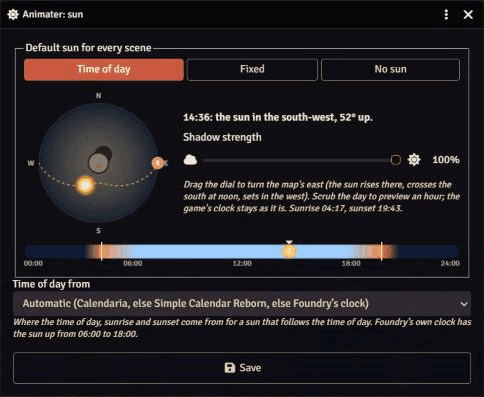
The world's Sun window, set to Time of day in a test world. A scene's own version adds a World default button.
New in 3.7.0. Scene configuration → Animater → No shadows on this map. The sun and moon still light the map, but walls, roofs, trees, creatures and animals cast no shadow from them. It's for a map that paints its own shadows. No sun takes the light away as well. Shadows from lamps, and a raised floor's own shadow, stay.
The Sun and time of day window chooses the clock: Automatic (Calendaria, else Simple Calendar Reborn, else Foundry's clock), Calendaria, Simple Calendar Reborn, or Foundry's own clock. With no clock, sunrise is 06:00 and sunset 18:00.
Moonlight tints the map silver-blue at night and casts faint shadows, by how much of the moon is lit: bright at full, nothing at new. It needs Calendaria or Simple Calendar Reborn for the phase.

To see shadows on your own scene, click Sun and shadows in Choose your immersion. This picture shows only the window, not the shadows.
New in 3.7.1, changed in 3.7.2. Off by default. It sits under Sunrise and sunset colour in the settings.
With it on, the active scene's real Darkness Level follows how far the sun is below the horizon, as twilight does. Foundry's lighting and vision, and the game's light rules, follow it.
Changed in 4.1.0: the sun sinks as it really does. A calendar gives only the day's length (its sunrise and sunset, which it counts, as real calendars do, from the sun's top edge with refraction, its centre 0.833° under). The world is taken as mid-latitude, 45°, and the season read from the day's length, so a long summer day has a long, lingering dusk and a winter one a shorter. A day longer than 45° ever gets (over about 15½ hours) is read as further north at midsummer: its night may never get fully dark.
The darkness follows the light outdoors under a clear sky, on the eye's (logarithmic) scale: about 2000 lux a few degrees up is full day, about 400 at sunset is a tenth dark, about 3 lux at the end of civil twilight (6° under) is nearly half, about 0.03 at the end of nautical twilight (12°) is three quarters, and starlight at the end of astronomical twilight (18°) is full dark.
| A 15½-hour midsummer day (sunset 19:43) | Sun | Darkness |
|---|---|---|
| Sunset | −0.8° | 0.16 |
| 20:20, civil twilight ends | −6° | 0.45 |
| 21:15, nautical twilight ends | −12° | 0.79 |
| 22:15, astronomical twilight ends | −18° | 1 |
| Midnight | −22.6° | 1 |
That is close to a real midsummer evening at 45°N (Montreal: civil twilight 39 minutes, nautical ending 87 and astronomical 153 minutes after sunset). Dawn lifts it the same way.
- Only a full moon lightens the night. With Moonlight on, a full moon (within about a day of it) high in a clear sky keeps the night from going fully dark, lightening it by a fifth at most. Any other night goes fully dark. Changed in 3.7.2: before, any moon lightened it by how much of it was lit.
- Calendaria: its darkness by the time of day only reached full dark around the middle of the night. It's turned off while this is on.
- Left alone: scenes under the ground, scenes whose darkness is locked in Foundry, and scenes where Calendaria was told to leave the darkness alone.
- Storms still darken it further. See Storm Darkness.
- A GM has to be connected, because the lead GM's screen writes the change.
New in 3.7.0. The sun's light warms gradually as it goes down: near white high up, soft yellow in the afternoon, golden lower, deep orange-red at sunset, and a fading crimson as it slips under. A winter sun, never climbing as high, stays a little yellow even at noon. Under cloud the colour greys toward a plain warm white. Windows, roof openings and the open ground share it, and the open ground takes it with a fixed sun too, not only one following the clock.
Sunrise and sunset colour turns everything outdoors golden, then deep orange at the horizon. Changed in 4.1.0: once the sun is down the colour carries on from the sunset's red at full strength, then cools as the sun sinks: crimson, the pink afterglow, then the blue hour, gone by 8° under (and the other way before sunrise), with no jump at the moment it sets. The scene's lighting and darkness aren't changed. Roofs and tokens take the colour, and a room seen under a faded roof keeps its own.
It only shows where the sun follows the time of day. A scene can choose its own (as the module's setting, off, subtle or strong) in Scene configuration.
New in 3.7.0. On by default. While it's on, Animater colours the scene through the day and turns off Calendaria's "Sync Scene Ambience" settings, so the map isn't coloured twice. That also happens if one of them is turned back on mid-session.
Turn it off if you prefer a calendar module's own scene colouring, such as Calendaria's. Animater then leaves those settings as you set them, and its own sunrise and sunset colour steps aside where Calendaria colours the scene. Read from the code, not tested live.
New in 4.0.0. Read from the code, not tested live.
A torch, a lantern or a Light spell is tiny next to daylight, and Animater now weighs it that way. Each light counts by how strong it really is beside the sky's light at that spot, worked out from the scene's darkness there:
| Time | What a light does |
|---|---|
| Full day | Next to nothing. It throws no second shadow from a creature, and doesn't light up the floor, the water or the snow round it. |
| Dusk | It begins to show, and grows as the darkness rises: about a sixth of its strength at half darkness, about two thirds at two thirds darkness, and nearly all of it from four fifths. |
| Night | It's all the light there is, at its full strength. |
| Under a roof | Daylight doesn't reach, so a light keeps its full strength at any hour. |
This covers what Animater draws from lights: creatures' shadows, the light on floors, water and lying snow, the snow on roofs and trees, the shadows decorations throw and the light on animals. Foundry's own lighting and vision aren't changed.
For the floors, water and snow, the darkness is read where each light stands, so a darkness region brings a light out there too. Anything that raises the scene's real darkness, such as Darkness follows the sun or a storm with Storms change the scene's darkness on, brings lights out everywhere. A storm that's only a look doesn't.
- Shadows under every token is on by default (changed in 4.1.0; a world that had turned it off keeps it off). Without it, only fliers cast shadows.
- Shadows in creatures' shapes uses each creature's outline. Art with no outline of its own, like an opaque square portrait, always casts a round shadow.
- A shadow for each light lets a creature lit by both the sun and a lamp cast one from each, each as dark as that light's share: in full day the torch's doesn't show, at dusk both do, at night only the torch's.
- Flier shadows fall on creatures also darkens the creatures a flier passes over.
How dark. Changed in 3.7.0. A standing creature's shadow in full sun is a little over half dark, about as dark as a real one on a painted map. It keeps that darkness however long it gets in the evening, and softens only a little as it lengthens. Clouds, dusk and wall shade still lighten it.
Which way the art lies. New in 3.7.6, changed since. A standing creature's shadow in sunlight, moonlight, lamplight or window light lies with its head away from the light. Thrown down or across the map, its sides stay where they are on the map, as a reflection in water does. Changed in 4.0.0: a shadow thrown up the map now shows the creature as its token does, right side on the right, instead of mirrored. A flipped token's shadow follows the token's flip. Fliers keep the art as drawn from above.
A token can opt out with Token configuration → Animater casts no shadow, for a ghost, a marker or art with its own shadow drawn in.
Walls cast shadows in sunlight is on by default (changed in 4.1.0; a world that had turned it off keeps it off). Each wall that stops light throws a shadow away from the sun. Windows and foliage cast half, open doors none. There are none at night, in a scene with no sun, or under a roof.
A wall's height comes from, in order:
- The Wall Height module's top and bottom, if it's active
- The wall's own Shadow top and Shadow bottom fields
- The level's ceiling
- The Wall height (squares) setting
A wall can also tick Casts no shadow, for one round the map's edge or one that only stops movement.
New in 4.7.0. The Structures tab of Map painting draws real buildings: walls, doors, windows and roofs. Their walls throw shadows like any other wall. See Buildings.
One shadow, in the roof's shape. Changed in 4.7.4. Read from the code, not tested live. With Walls cast shadows in sunlight on, a roofed building throws a single shadow that follows its roof. The eaves cast from the top of the tallest wall in that room, and the ridge, or the point of a pyramid or cone, from its own height above them. So a gable pushes a peak out past its end wall, a hipped roof tapers toward its ridge, and a pyramid or cone comes to a point. Roofs are pitched as steep as they are wide, so the shape shows whenever the sun is lower than 45°. Under a high sun the peak's shadow falls inside the eaves' and the shadow is a plain box, as it would be. With wall shadows off, the short shadow painted into the roof's own picture shows instead.
New in 4.7.0. Scene configuration → Animater, beside the sun dial: Buildings here are roofed, off by default. It's for a map whose roofs are painted into its picture, which Animater can't see. With it on, every room that walls close in counts as under cover, for the weather as well as the sun: the furniture and creatures inside stop casting sun shadows across the floor, and no rain or snow lands there. Light still comes in through windows, open doors and anything Open to the sky, and lamps light the room as before. Leave it off for a map of walled yards, pens or cloisters that really are open above.
- Decorations. New in 4.0.0. Painted decorations throw shadows from the sun, the moon and nearby lamps. Changed in 4.1.0: one painted bigger also stands taller, so its shadows, and a tree's canopy shade, reach further. Decoration height on the Decorations brush bar (0.3 to 3) and Height in a region's Decorations section make them stand taller or shorter than their size alone; neither moves them or changes how they break. See Decorations.
- Cliffs and crossings. New in 4.2.0 and 4.2.1. Raised ground painted on the Heights tab throws a cliff shadow away from the sun, as long as the sun's height makes it, up to six squares. Ramps, ladders, ropes and bridges cast shadows from their own planks, rungs and rope, and a creature on a bridge or a raised top casts its shadow onto it. Wall and roof shadows no longer fall on higher ground. See Map Painting.
- Carriers. New in 4.4.0. Every animal pulling a wagon or sled throws its own shadow. See Carriers.
- Tiles. New in 4.8.0. Tiles placed as things cast shadows too. See Tiles that stand as objects.
- Light through windows shines through windows and open doors onto the floor inside, and Warm light from windows spills a lit room's light outside at night. The kinds of window and the patterns their light prints are on Windows and Doors.
- Roof shadows casts a building's shadow from overhead roof tiles, and lets the sun in through their holes.
- Sunlight through holes in roofs. New in 3.7.0. A region marked Open to the sky inside a room lets the sun in: the floor under it is lit and warm, creatures there cast sun shadows, and a passing cloud darkens it. As the sun gets low the pool of light slides away from the opening, but stops at the room's wall. Its edge fades as far as the region's Weather edge says. See Region Steps and Painted Floors.
Light through trees casts shade from overhead tree tiles, broken by sunlight coming through.
- Tree shade by kind. New in 3.7.0. Each tree tile throws the shade of its kind: a broadleaf's heavy clumps with branches in the gaps, a pine's whorls of needles, a palm's combed fronds, a birch's light lace, a bare tree's branches, a willow's trailing strands. It's darker than before 3.7.0, up to 80% under a pine.
- Sunlight through the leaves. New in 3.8.0. The light coming through is soft dappled patches of varied shape, brighter where the leaves are thin, moving with the wind and shaped to the kind of tree, in place of round pale spots. A passing cloud takes them away.
- Two more kinds. New in 4.0.0. Spruce, fir or cypress casts a narrow star, and Blossom or fruit tree small clusters. Blossom trees drop pink and white petals instead of leaves.
- Bushy tiles. New in 3.7.1. A tile holding a few thick bushes with open ground between them is judged by the bushes, not the open ground, so its shade comes out full instead of about half as dark.
Painted trees from Decorations join the same shade.
Tile configuration → Animater decides for one tile.
| Field | Choices | Auto does |
|---|---|---|
| Sunlight | Auto, Tree, Roof, Object, None | Overhead tiles: one named as a tree (tree, oak, pine, canopy, foliage…) is a tree. One named as a building (roof, house, tower, tent…) or drawn solid is a roof. A tile that restricts light or weather is a roof. Tiles on the floor: a thing is an object, unless the scene has Tiles stand as objects off (see below). Anything else lets the sun be. Object (new in 4.8.0) makes this tile an object whatever the scene says. |
| Leaves | Auto, Sparse, Medium, Dense | By its name (a birch, willow or palm is sparse; an oak, pine or fir dense), else by the gaps in its picture. |
| Tree type | Auto, Broadleaf (oak, maple, elm), Pine, Spruce, fir or cypress, Palm, Birch, aspen or olive, Blossom or fruit tree, Bare or winter tree, Willow | By the tile's file name: palm, spruce or fir, cherry or apple, pine or cedar, willow, dead or bare, birch or olive and so on. Anything else is a broadleaf. |
| Height | A number, or Auto | A roof is as tall as its level's storey. A tree goes by its name: an oak or pine 30 ft, a bush or hedge 6 ft, other trees 25 ft. An object goes by its name too (see below). |

The Animater section of Tile configuration, on the Overhead tab, with the Breakable prop section below it. Taken on Animater 4.9.0.
New in 4.8.0. Read from the code, not tested live.
A map dressed with tiles, such as barrels, carts and bushes from an asset pack laid with any placing tool, can have those tiles live in the light and weather the way Animater's own decorations do.
Where: Scene configuration → Animater, beside the sun dial: Tiles stand as objects. It's on unless you turn it off.
Each tile it takes:
- gets a little dark at its foot
- throws a shadow from the sun or moon that turns and lengthens with the hour, and after dark one from each lamp near it
- takes the ground's snow and rain (except a tile named as a burning fire, such as a campfire or brazier, which keeps its snow off)
- takes autumn and winter colour if its picture is mostly leaf-green, like a bush (pictures up to 1024 pixels a side)
- glints where its picture has metal that shines, such as a barrel's hoops: toward the sun and toward a torch carried past, in the colour of that light, by day as well as after dark
What's left alone. Tiles above their level's floor (roofs and canopies), tiles set to Tree, Roof or None, hidden tiles, anything longer than 9 squares on its longer side, and a picture that fills nearly all of its rectangle, which is taken for a floor. Flat things are left alone by their file name: rugs, mats, stains, puddles, paths, cobwebs, runes and the like. A small picture from another site that can't be read is given the benefit of the doubt and taken for a thing.
One tile. Tile configuration → Animater → Sunlight → Object: its own shadow, snow and rain makes a tile an object even with the scene's switch off. Tree, Roof or None keep it out. Height sets how tall it stands, and so how far its shadow reaches. On Auto it goes by the file name: a statue, a cart, a boulder or a well a square tall, a sack, a campfire or a stump about a third of a square, anything else a little over half, and never much taller than it is wide.
Object relief (0 to 1), beside the switch, lays the shading of each object's form on top: the side toward the light paler, the side away darker. It's at 0 by default, where a tile is drawn as painted and only its metal glints. Art with its light already painted in looks swollen with much of it.
Two drop shadows. If the tool you placed the tiles with draws its own drop shadow, turn that off in the tool, or each tile will have two.
With No shadows on this map on, no tile is drawn as an object at all, so the snow, rain and glints go with the shadows.
New in 4.8.4, changed in 4.8.5. Map painting's Lift from map cuts a painted thing out of the map's picture and stands it on the map as a tile of its own (see Map Painting). Its It stands choice sets the tile up for this page:
- Flat, Low, Waist and Tall make an object, with Sunlight set to Object and a matching Height.
- A bush and A tree ask its Kind (Broadleaf, Pine, Spruce, Palm, Birch, Blossom, Bare or Willow) and make a tree tile instead: Sunlight Tree, with that Tree type. It casts dappled shade in that kind's pattern with moving flecks of sun, and sways with Trees in the wind. A bush stands 6 ft and a tree 25 ft on 5 ft squares. Leaves and height can be changed afterwards in Tile configuration.
Something lifted as A tree in 4.8.4 is still an object: set its Sunlight to Tree, or take it back and lift it again.
| Setting | Everyone (GM) | My screen | Choices or range | What it does |
|---|---|---|---|---|
| Sunrise and sunset colour | On | On | — | In scenes whose sun follows the time of day, the low sun turns everything outdoors golden, then deep orange at the horizon, with a rose afterglow just after sunset and before sunrise (and moonlight by night, below). Roofs and tokens take it too; a room seen under a faded roof keeps its own colour. Drawn on each screen: the scene's own lighting and darkness are not changed. A scene can say otherwise in its configuration. On, it turns off Calendaria's own “Sync Scene Ambience with Time of Day”, so the map is not coloured twice. |
| Colour strength | 0.6 | — | 0.1 to 1 | How strongly dawn and dusk colour the map. |
| Color the scene as the time of day | On | — | — | On (the usual), Animater colours the scene through the day and turns off a calendar module's own scene ambience (such as Calendaria's “Sync Scene Ambience” settings), so the map is never coloured twice. Off, for those who prefer that module's: Animater leaves its settings as you set them, and steps aside while it colours the scene. |
| Darkness follows the sun | Off | — | — | The active scene's Darkness Level follows how far the sun is under the horizon, as real twilight does: a little dark at sunset, half dark half an hour later, fully dark about an hour and a half after sunset until dawn's first light, then lightening the same way; a full moon high in a clear sky keeps the night a little lighter (with Moonlight on). Foundry's lighting and vision and the game's light rules follow it. It takes over from Calendaria's darkness by the time of day (turned off while this is on). Not in scenes under the ground, scenes with their darkness locked, or scenes where Calendaria was told to leave the darkness alone; a storm still darkens it further. |
| Moonlight | On | — | — | By night the moon tints the map silver-blue and casts faint shadows from creatures and walls, by how much of it is lit: bright at full moon, nothing at new moon. Needs Calendaria or Simple Calendar Reborn for the moon's phase. |
| Shadows under every token | On | On | — | Every creature standing on the ground casts its shadows too, not only fliers, so tokens sit on the map instead of floating over it, and taking off reads at a glance. Needs Movement effects on. |
| Flier shadows fall on creatures | On | On | — | A flying creature’s shadow darkens the creatures it passes over, not only the floor between them; so does a large or bigger creature’s standing between a light and smaller creatures. |
| Shadows in creatures' shapes | On | On | — | Each creature's shadow is its own outline (wings, tail and all), laid on the floor and stretched along the light. Off: the round shadows. Art with no outline of its own (an opaque square portrait) always casts a round one. |
| A shadow for each light | On | On | — | A creature lit by both the sun and a lamp (a torch, a lantern, a Light orb, a placed light) casts a shadow from each, as dark as that light's share: in full day the torch's is faint, at dusk both show, at night only the torch's. Off: one shadow, from the stronger light. |
| Walls cast shadows in sunlight | On | On | — | Each wall that stops light throws its shadow on the floor away from the sun, longer as the sun sinks, and a creature standing in one casts no sun shadow of its own. Windows and foliage cast half, open doors none. None at night, in a scene with no sun, or inside a region that suppresses weather (a roof). Lights already stop at walls. Drawn at Balanced quality or better. |
| Wall height (squares) | 2 | — | 0.5 to 10 | How tall walls stand for their shadows, when neither the Wall Height module nor the scene's level gives a height. |
| Light through windows | On | On | — | The sun shines through windows and open doors onto the floor inside, in from where it stands: short shafts at noon, long golden ones at dawn and dusk, silver under a bright moon. Shows only under a roof, a region that keeps the weather out (as for snow and rain). Drawn at Balanced quality or better. |
| Warm light from windows | On | On | — | At night a lit room's light spills out of its windows and open doors onto the ground outside, in the light's colour, further the brighter the room. A room is a region that keeps the weather out; any light inside it that reaches the window lights it. Drawn at Balanced quality or better. |
| Light through trees | On | On | — | Overhead tree tiles cast their shade on the ground away from the sun, broken by sun flecks that drift and wink as the leaves move: short at noon, long and golden at dawn and dusk, silver under a bright moon, faint under clouds. A tile counts as a tree when its file name says so (tree, oak, pine, canopy, foliage…); Tile configuration → Animater → Sunlight decides for one tile. Drawn at Balanced quality or better. |
| Roof shadows | On | On | — | Overhead roof tiles cast a building's shadow on the open ground away from the sun, and let the sun in through their holes onto the floor inside (a ruin, a broken roof). A tile counts as a roof when its file name says so (roof, house, tower, tent…) or its picture is solid; Tile configuration → Animater → Sunlight decides for one tile. Drawn at Balanced quality or better. |
| Sun on water, snow and ice | On | On | — | Small glints of sun and a faint drifting sheen on water, more in a wind; snow and ice sparkle. Golden at dusk, silver under the moon. Water, snow and ice are the regions with that floor (or named as water), and the scene's own floor. Drawn at Balanced quality or better. |
| Creatures lit by their surroundings | On | On | — | A creature near a light (a torch, a brazier, a glowing spell) takes on its colour and catches a rim of it on the side facing it. Strongest in the dark. Needs Tokenshade token filters on. |
- Most of these are drawn at Balanced quality or better. See Performance and Quality.
- They only change what's drawn, except Darkness follows the sun. Vision and the rules aren't otherwise affected.
Windows and Doors · Fire and Lights · Storm Darkness · Decorations · Buildings · Map Painting
For developers and the curious. Read from the 3.2.2 code, with 3.3.0's changes added, and not run or measured. Sections marked with a later version were read from that code.
Source: scripts/engines/motion/ sun.mjs, wall-shadows.mjs, canopy-light.mjs and flier-silhouette.mjs. Wiring is in scripts/main.mjs.
Quality. All of these use the same gate: world setting on, ...Local on and rank at least 2. Full, Light and Balanced draw them the same, and Low and Off drop them whole. No simplified variants were found.
sun.mjs is pure maths and draws nothing. It outputs { angle, height, strength, moon? }. Since 4.1.0: the sun's height and bearing come from spherical astronomy (solarGeometry, sunElevation): the calendar's sunrise and sunset (taken as the sun's centre 0.833° under, as calendars count them) give the day's length; latitude 45° unless the day is longer or shorter than 45° ever gets, then declination ±23.44° and the latitude solved instead. Strength is height / 8, clamped. (Before: a fixed NOON = 60.) The moon uses MOON_NOON = 45 and MOON_SHADOW = 0.35, and needs at least 0.1 of it lit. sunReach is up / tan(height), with height clamped to 3 to 89 degrees.
The result is cached per client and refreshed on hooks, not per frame. Saved data is the scene's flags.animater.sun and two hidden world settings. The scene flag noShadows (3.7.0) keeps the sun's light but drops the shadows it throws.
Read from the code after 3.8.12, not tested live.
darknessBySun(elevation, lift) in sun.mjs is a smoothstep of (LIGHT_ABOVE - e) / (LIGHT_ABOVE + DARK_UNDER), with LIGHT_ABOVE = 4 and DARK_UNDER = 16 degrees, capped at 1 - lift. moonLift is non-zero only for a full moon (FULL_MOON = 0.97 lit) above the horizon at night: MOON_LIFT = 0.2 times its height over 20 degrees and the clear sky. Only the lead GM writes it, 400 ms after a change, with animateDarkness: 2000, skipping changes under 0.01. It compares with stormDark.base while a storm holds the darkness. It skips the scene when darknessLock is set, the scene is underground, or the scene's calendaria.darknessSync flag is off, and it waits for calendaria.ready when Calendaria is active.
Read from the code, not tested live.
movement-feel.mjs exports LIGHT_LUX = { noon: 100000, lamp: 20, moon: 0.25 } and skyLux(darkness) = 10^(5 - 6 * darkness). In main.mjs, floorLightSources gives each active light (not the global light, not darkness sources) a strength: 1 when underCeiling at its centre, else lampAgainstSky, which is 20 / (20 + skyLux(d)), with d from canvas.effects.getDarknessLevel at the light. That list feeds water, floor looks, floor textures, lying snow, tile snow, decorations' lamp shadows and the animals' light. Decorations skip a light under 0.03.
For creature shadows, shadowFalls weighs the sky (skyLux(darkness), or LIGHT_LUX.moon by moonlight, times the sun's strength) against each lamp (LIGHT_LUX.lamp times its strength there). A light whose share of the total is under a tenth casts no shadow.
laidArt in flier-silhouette.mjs: for a standing creature with the light to one side (laid), it rotates the art a quarter turn. When the shadow falls with a positive sin(along) (down the map), it mirrors the art (mirror: -1), as a reflection does. Thrown up the map it turns the art without mirroring it (since 4.0.0). A flier's art keeps rotation - along, unmirrored.
createWallShadows draws one PIXI.Graphics of black polygons, one quad per wall pushed away from the sun, with a BlurFilter, into a RenderTexture. That shows as one PIXI.Sprite with no custom shader. No blend mode is set.
-
Layer:
canvas.primary,sortLayer640. -
Resolution:
RESOLUTION = 0.25, capped atMAX_TEXTURE = 4096per side. Blur isSOFTNESS = 2. -
Reach: capped at
WALL_SHADOW_CAP = 12squares. -
Alpha:
0.35 * sun, timesmax(0, 1 - darkness * 1.2)unless it's the moon. -
Roofs: polygons of regions with an enabled
suppressWeatherbehaviour are erased withBLEND_MODES.ERASE. -
Sunlit mask: a second bake, never drawn itself. It masks creatures' sun shadows and feeds floors and water as
uSunlit. - Per frame: nothing.
Comment and code differ: the header says it's kept "until the sun, the walls or the scene change". rebuildWallShadows has no change key, and it runs debounced by 150 ms on updateWorldTime and setting changes, so those rebake it even if nothing moved.
Not confirmed: a comment says overlapping shadows are never darker, and that wasn't checked by running it.
Indoors (4.7.0). indoorPolygons() is the weather-suppressing regions plus two more sets: roofedRooms(), the floor under each painted roof (round under a cone since 4.7.4), and walledRooms(), which with the scene flag roofedBuildings adds every square the open air can't reach past the walls (kept until the walls change).
Read from the 4.9.0 code. rebuildWallShadows in main.mjs adds two things to the wall quads when painted walls are on: roofShadowEdges (eave edges at the room's wall height, the ridge at eaves plus rise) for the "is this spot shaded" test, and roofShadows, one hull per roof. Both are in engines/motion/roof-looks.mjs. The hull is the outline round the eave corners, the eave corners pushed out by reach(eaves), and the ridge ends or peak pushed out by reach(top). ROOF_PITCH = 1, rise capped at ROOF_RISE_MOST = 4 squares. The eaves' height comes from wallsUnder, the tallest wall under that roof, falling back to the Wall height setting.
Read from the 4.9.0 code. engines/motion/tile-props.mjs is pure. tileProp takes a tile when its flags.animater.sunlight is prop; otherwise only with the scene flag tileProps not false, not overhead, at most PROP_MOST_SQUARES = 9 squares, not named as flat (unless also named tall), and less than PROP_SOLID = 0.93 solid (an unreadable picture counts when it is 4 squares or less). propHeight uses sunHeight (scene units) or the name: 1, 0.3 or 0.6 squares, capped at 1.2 times its longer side. propBurning keeps snow off a fire by name. In main.mjs, syncTileProps hands them to the decoration engine, with the season's art (tileInSeason, green share over 0.3, at most 1024 px, 4 new pictures a pass) and a relief map (tileRelief) only when the picture shines enough (SHINES_ENOUGH) or tileRelief (the scene's Object relief, 0 to 1) is above 0. The lit shader is createLitMesh in decor-lit.mjs. A lifted tile (engines/mapbuild/map-lift.mjs liftTileData) is written with sunlight prop, or tree and sunTree for A bush (1.2 squares) and A tree (5 squares), and sunHeight in scene units.
createWindowShafts bakes one PIXI.Graphics, drawn in SLICES = 6 from the opening out, or one band per slat. It's masked to the roof polygons and blurred, at the same 0.25 and 4096 rule. It shows as an ADD sprite tinted with the sun or moon colour, plus a PIXI.Mesh with MOTES_FRAG (ADD) for dust.
It sits on canvas.primary at sortLayer 645, clipped to what's in sight by keepToSight. Per frame only uTime moves. WINDOW_SHAFT_CAP = 8 squares. Alpha by kind is glass 0.8, open 1, curtained 0.4, shuttered 0.55.
createWindowGlow bakes the glow in 6 slices with a blur of SOFTNESS * 2, masked by an outdoor reach polygon from Foundry's light backend, with tree and roof pictures erased. It shows as a PIXI.Mesh with GLOW_FRAG (ADD) and two samplers, uGlow and uShade. It sits in canvas.effects at zIndex 99985.
Creature shadows in the glow are a second render texture, redrawn only when tokens change. Each glow uses WINDOW_SAMPLES = 4 points across the opening. Each lamp's shadow takes LAMP_SHARE = 0.7 of the darkness, with silhouettes stretched at most SHAPE_STRETCH = 2.5.
Rebake. Debounced by 300 ms, and a JSON key skips it when nothing visible changed. It's on when (darkness - 0.25) / 0.45 or the storm gloom is past 0.02.
Lights. It takes all active light sources except the global one. Each opening keeps its brightest light inside the room that reaches it, so one lamp per opening colours and casts.
createCanopyLight bakes seven masks: uTrees, uTreesAt, uRoofCast, uRoofs, uRoofArea, uIndoor, uWater, at RESOLUTION = 0.25 and MAX_TEXTURE = 2048. Three PIXI.Mesh quads share one shader, chosen by uMode: 0 shade (Normal), 1 flecks and light through roof holes (ADD), 2 falling leaves. They sit on canvas.primary at sortLayer 642.
Flecks scan 3×3 cells and leaves 5×5. The cloud check is the same CLOUD_DECK GLSL as the sky, so shade and flecks agree. Each tile's shade offset is baked into the mask, so a rebuild follows when the sun moves one rounded degree in angle or half a degree in height. Reach is capped at 6 squares.
Tree kinds. New in 3.7.0, two more in 4.0.0. tree-kinds.mjs lists the Tree type choices (flags.animater.sunTree) and each kind's darkest shade, TREE_DARK, from 0.55 for a birch to 0.8 for a pine. treeKindOf takes the tile's own choice, else matches its file name, else a broadleaf. Each kind's pattern is drawn once and laid over the tile's picture when the shade is baked. The falling-leaves pass reads a uKinds texture, so a blossom tree's leaves are drawn as petals.
Which tile counts: own sunlight flag first, then non-overhead tiles are ignored, then a tree name unless the picture is at least 0.95 solid, then a roof if it restricts light or weather, has a building name or is at least 0.85 solid. solidShare reads the picture once at 32×32 and caches it.
createTreeSway adds one PIXI.Filter per tree tile mesh, offsetting texture lookups by noise. Amplitude is (0.01 + 0.05 * wind) * grid. It's not in the shader warm-up list.
flier-silhouette.mjs is a texture factory using a 2D canvas: art shrunk once, drawn with ctx.filter = blur(...), then filled black by source-in. Longer side is 128, 256 or 512. Art over SOLID_COVERAGE = 0.82 solid gives no silhouette, so a round shadow is used. At most one is made per 16 ms, and results are cached. See Movement Effects.