Repository navigation
Recipe Studio and Finishers
A timeline editor for building your own animation or customizing a catalog entry. Saved recipes play automatically when Play my own recipes automatically is on, which it isn't by default.

The Recipes page, where you open a recipe in the studio. The Finishers page and the finisher editor aren't pictured.
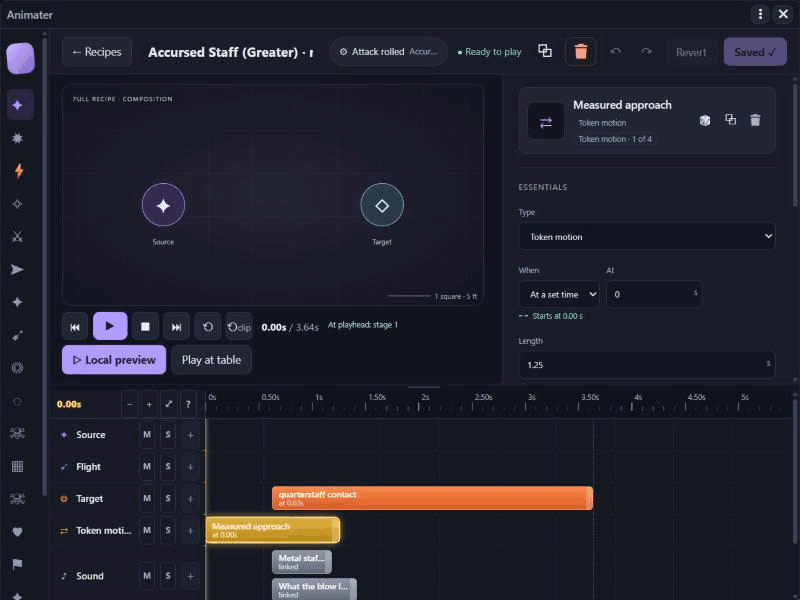
The studio, open on a saved recipe.
| Part | What it does |
|---|---|
| Preview monitor | Play, pause, stop, loop and scrub. |
| Tracks | Source, Flight, Target, Token motion, Sound, Tokenshade, and Scene & overlays, plus Teleport on a teleport recipe. Add stages with the track's + button. |
| Clips | Drag to change timing, drag the right edge to trim, right-click to duplicate or delete. Clips snap to other clips and the playhead. A linked clip stays linked and shifts its offset, and holding Alt unlinks it. |
| Choreography | Start a stage With or After another stage, or At a set time. Linked stages stay attached when timing changes. |
| Mute and solo | Isolate tracks while previewing. |
| Stage inspector | Choose assets, stage types and options. Visuals have previews, sounds a listen player and volume. |
| Recipe settings | The ⚙ trigger chip: trigger, bound item, description, category and accent. |
| Table playback | Try a private local preview, then Play at table to share it. |
FXMaster particles can play in the preview monitor. FXMaster scene filters need Play at table to inspect them.
Read from the code, not tested live.
- Stay until the effect ends, on an aura stage, keeps a looping clip on the token for as long as the spell's effect lasts.
- Stay while placed, on an area stage, keeps the area on the map for as long as its template stands: difficult terrain, a drift, a cloud, a wall. Length then only sets the preview. Give it a looping clip, or the Tokenshade area look, so it doesn't hold its last frame. New in 4.4.1. Before, only Animater's own reading of the spell (a lasting duration, and wording that sounded like standing ground) decided whether an area stayed, so a feat that plainly leaves the ground covered could never leave anything behind.
A stage that follows a catalog entry doesn't show these ticks and keeps the catalog's choice. The world's Lasting area animations setting still decides how a staying area shows, so a table that chose Play once, then fade sees a ticked area play once. See Spell and Action Animations.
Changed in 4.8.2. Read from the code, not tested live.
Target stages on an area. A recipe's target stages on a placed area, such as an impact on each creature caught, play for the creatures standing in the area: the ones you targeted among them if you chose some, otherwise all of them. The caster is never one, nor is a hidden creature, and a big creature counts if any of its squares is inside. Before, the stages played for whoever you had targeted at the instant the area went down, which missed systems and modules that target what a template covers a moment later. On tables where nobody targets, area recipes now show their reactions.
"Item used" recipes that draw on an area. A recipe triggered by Item used whose stages draw on an area used to be blocked, because when the item is used there is no area yet, and the catalog's animation played on the area in its place. Such a recipe now waits, and plays when that item's area is placed. An Area placed recipe for the same item still goes first. From the changelog: the waiting itself wasn't traced in the code.
In Recipe settings, choose Attack rolled or Damage rolled, then Applies to: All melee strikes or All ranged strikes. A recipe's Applies to also lists the system's own categories, such as PF2e weapon groups or D&D 5e weapon types. A recipe for a specific item wins over a category, and a category wins over all melee or all ranged.
New in 4.3.0. Read from the code, not tested live.
A recipe bound to an item on an actor (its bound item in Recipe settings) also plays for that item on the actor's unlinked tokens, not only on the actor itself.
From the Creature showcase. Each step of a creature's showcase has an edit button:
- Edit … animation asks Who plays your version?: This creature only (that actor's own ability, on every token of the actor) or Every creature's … (any NPC Strike or ability with that name). Then Copy built-in and edit or Start blank opens the recipe editor. Nothing changes until you save, and your saved recipe plays before the built-in.
- A step you've already edited shows Edited and Edit customization, which reopens your recipe.
- A Movement step's button is Edit movement sounds, which opens that token's Animater movement sounds in Token configuration. See Movement Effects.
The PF2e NPC ability catalog has Customize and Edit customization too, like the other catalogs.
New in 3.3.0. Read from the code, and not seen running in a D&D world.
Animater comes with a few starter recipes, such as Fire nova. A starter you haven't edited now only plays where nothing else would, so it no longer takes over a catalog animation or blocks one. Turning it off doesn't stop the catalog's own animation for that item.
A recipe you've edited still wins over the catalog. What counts as edited is changing its name, trigger, item names, or its stages' kinds or art. Turning a starter off or changing its description doesn't count.
New in 3.3.0. The trigger option has been seen in Foundry on PF2e. Hope and Victory haven't been tested live.
In a recipe's When it plays section, set Trigger to Heroic resource gained or spent, then choose Plays when. The recipe plays in place of the usual glow, on the character's tokens. The Source is the token and nobody is targeted.
| System | Choices |
|---|---|
| PF2e | Hero Point gained, Mythic Point gained, Mythic Point spent |
| SF2e | Hero Point gained |
| D&D 5e | Heroic Inspiration gained, Heroic Inspiration spent |
| Daggerheart | Hope gained, Hope spent |
| Draw Steel | Victory gained |
Ready-made heroic recipes. New in 3.7.6. Read from the code, not tested live. Each system's heroic looks come as starter recipes in the Heroic category, named for the moment, such as Hero Point gained, Mythic Point spent, Heroic Inspiration spent, Hope gained or Victory gained. Left as they come, they are the usual glow itself, and each player's My screen switch still hides it. Change one (see what counts as edited, above) and your version plays in place of the glow. Worlds made before 3.7.6 get them once, the next time a GM loads the world.
Things to know about a changed recipe, read from the code and not tested:
- The glow's setting still counts. With that resource's glow off for everyone, neither the glow nor the recipe plays.
- A player's own switch doesn't stop it. The glow's My screen switch hides only the glow.
- It doesn't need Play my own recipes automatically. That check isn't on this path.
- A GM has to be connected, because the active GM starts it.
A teleport recipe has a Teleport track with one stage. The token vanishes as it starts and reappears at the picked spot when it ends. Its length, Gone for, defaults to 0.5 seconds, and 0 means reappear at once. Teleport look in Recipe settings sets the departure and arrival effects, including your own media.
Assets → Folder sources: enter a source name, choose Add folder, and pick its folder. Animater indexes animations, images and sounds in it and its subfolders, without needing Sequencer's database. Sources are remembered per user. Refresh picks up new files, and Remove stops indexing without deleting anything.

The Media library, the Assets page, opened while choosing art for a stage. The numbers depend on the packs installed.
Space play/pause · Home/End jump · L loop · Ctrl+D duplicate · Delete remove a clip · Ctrl+S save · Ctrl+wheel zoom the timeline
Right-click it on the Recipes or Finishers page:
- Copy share code gives one line to paste into Import in another world. Several codes at once work too.
- Copy as macro gives a script macro that imports it when a GM runs it.
Player animations (Interface & performance, GM) sets how much players may do in Animater. New in 4.2.0: before, players could only submit animations for approval.
| Choice | What players get |
|---|---|
| Off | No Animater window or buttons. Their saved animations don't play, but they're kept. |
| Submit for approval (the default) | Their own animations, each playing for their own characters once you approve it. |
| No approval needed | The same, but each plays as soon as they save it. You can still turn any one off under Recipes. |
Players start from the whole library: every catalog page, read-only, from which Customize copies into My animations, and the GM's own recipes. Animations waiting for your approval are at the bottom of the Recipes page.
The GM's animations, view only. New in 4.3.1. A player's GM's animations page lists the GM's recipes, with a search. Opening one shows it beside the list, read-only: its preview plays on stand-in tokens, so nothing needs selecting or targeting, and its stages are listed. Nothing is copied until the player presses Copy to mine, which puts a copy named "… (mine)" in My animations and opens it in the studio. With approval on, that copy plays once you approve it.
The Finishers page holds your finishing moves. Design one in the studio or copy a preset such as Launch, Cleave, Burn to ash or Shatter.
Assign it from either side: the finisher's Applies to list, or the Finisher dropdown on a catalog entry. It plays on a killing blow or on every successful use.
Finishers really move the token, and the ending plays: it vanishes, stays as a Defeated body, or stays put. Unhide the token and remove Defeated to undo. It stays on the square where it landed. Player-side moves are written by the active GM.
Movement is a keyframed path you draw: drag points on a grid and retime keyframes. At the table it's aimed away from the attacker and stopped at walls.
Token fragments split the token's artwork into pieces drawn on every client while the token itself stays hidden. Presets: Slice in half, Bisect, Shatter into shards, Disintegrate, Sky launch, Ragdoll tumble, Vortex spiral, Pancake.
Players' finishers: the GM gives finishers to players with Available to. Each player picks one per item, in PF2e Combater or through the API. That option shows only with PF2e Combater.
Slow-motion kill-cam, if on, plays first, and the finisher waits for it, for as long as Kill-cam length says. See Combat Drama.
const animater = game.modules.get("animater").api;
await animater.play("Fireball", { source: canvas.tokens.controlled[0], targets: Array.from(game.user.targets) });
await animater.preview("Fireball"); // local only
animater.resolve(message);          // the recipe automatic playback would use, or null
animater.handles(item);             // true when Animater would animate this item or message
await animater.stop();
animater.clearGroundMarks();
await animater.importRecipes(code); // GM only
await animater.loadCatalogs();      // load every catalog's data now (new in 3.8.12)
Hooks: animater.preDispatch(event, recipe) runs before automatic playback, and returning false claims the event. animater.played(event, recipe) runs afterwards.
This section comes from the README and wasn't re-checked line by line against the code.
Spell and Action Animations · Looks and Tokenshade · Integrations
For developers and the curious. Read from the 3.2.2 code, with 3.3.0's changes added, and not run or measured.
Source: scripts/engines/playback/runtime.mjs, scripts/engines/finishers/ and scripts/engines/fragments/ fragments.mjs and fragment-render.mjs.
Real plays use sequence.play({}), relying on Sequencer's own sync, and previews use {local:true}. Custom data rides on effects through addOverride: animaterTier, animaterLasting, animaterLight, animaterMark, animaterWarp, animaterShake, animaterTint, animaterGround, animaterTether and others. Every client reads them on createSequencerEffect.
motion and optional effect stages aren't Sequencer effects: motions go over Animater's own socket. If the module socket is unavailable, a real play with motion throws.
Which stages reach which client is on Performance and Quality.
enrich in main.mjs: for a template event whose document is a Region with testPoint, areaTargets in scripts/engines/playback/area-targets.mjs replaces event.targets. A token is caught if the middle of any of its grid squares is inside (one sample for a 1×1 token or one over 36 squares). The user's targets inside win; otherwise every non-hidden token inside, never the source. For a cast with castWithoutArea and no template (integrations/das-smite.mjs, 4.8.3), castAreaFor builds the area from the spell's size, and a round one adds the tokens within it to the creature hit.
persist on an aura stage is Stay until the effect ends, and on a template stage Stay while placed (4.4.1); neither tick is drawn on a stage linked to a catalog entry (ui/workspace.mjs). areaLoopMode (loop, once, turn) still applies to a persisting area.
World setting playerAccess: off, approval or free. The GM's decisions are in the hidden world setting playerApprovals. A player's workspace (playerLibrary()) lists the catalogs except NPC abilities, and gm-recipes. copyGmRecipe saves a validated copy with a new id, the name "… (mine)", category Custom, enabled.
A finisher has no render pass of its own. It rewrites a recipe's stages for the landing square, wall hit or vanish, then plays it through the normal path. There are 44 presets, counted by searching the presets file.
Token moves, hides and defeats are written through host.commit, while test plays write nothing. A wall slam probes 25 directions from -90° to +90°. Finishers wait for the kill-cam's length.
Pieces of the token's own texture:
-
Halves and shards: a
PIXI.Spritemasked by aPIXI.Graphicspolygon. - Dust and pixel grids: cropped sub-textures with no mask. A comment gives this as why "dozens stay cheap", with no measurement.
They copy the mesh's elevation, sortLayer and sort, and use zIndex + 1. Per frame, only transform and alpha change. Tints use PIXI tint, and stone adds one shared, reference-counted ColorMatrixFilter. There are 15 patterns, 11 behaviours and 9 tints.
Tokenshade on pieces. fragmentFx wraps all pieces in one container carrying the preset's filters, so it's one pass however many pieces. It's gated by allowsTokenFx, so Full only.
Data. "Every client derives the same pieces and flights from the shared seed." The stage reaches clients as a motion stage over the socket. So fragments should run from Full down to Low, as motion stages do. Inferred.
Checked against the 3.3.0 code.
GLOW_RESOURCES in scripts/systems/hero-points.mjs lists each resource, and heroicChoices builds the choices from each one's gained and spent looks, so Hero Point and Victory have no spent choice. validateRecipe in scripts/core/model.mjs keeps heroic only in the form name:gained or name:spent.
In the updateActor hook, heroicRecipe finds the first enabled, non-finisher recipe with that choice. A recipe with no valid choice for this system answers to the system's first. If one matches, the active GM calls runtime.play for each of the actor's active tokens, and the glow doesn't apply. One update plays one look, a spend over a gain.
heroicStarters(systemId) in hero-points.mjs builds one recipe per look, id heroic-<resource>-<gained|spent>, category Heroic, with a single tokenfx stage holding the glow's own layers. They join starterRecipes() in presets.mjs. The updateActor hook filters out untouchedStarterRecipe before heroicRecipe, so an unedited starter falls through to the glow (and its heroPointGlowLocal check). A world with saved recipes from before gets them once from the active GM, recorded by the hidden world setting heroicStartersAdded.
Checked against the 3.3.0 code.
starterGivesWay in scripts/core/presets.mjs wraps the catalog lookup in systemRecipe in main.mjs. It first resolves with own, the saved recipes minus unedited starters. Only if that finds nothing, and the event has no skipReason, does it resolve again with the full list.
starterUnchanged compares lookOf against the shipped starter: name, trigger, match, and each stage's kind and assets. So enabled and the description aren't part of it.
D&D 5e. In scripts/catalogs/dnd5e/dnd5e-catalog.mjs, a use event with no targets waits for a later roll if rollComesLater says one is coming, setting skipReason. Otherwise withoutTargets rewrites the recipe: aura and sound stages on targets move to source, and travel, projectile, impact and other target stages are dropped, unless optional or aimed at an area. breathes tests the name for "breath" or "exhale", except a spell's utility activity, and pins an inhale to the first non-sound stage.