Repository navigation
Spell and Action Animations
Catalogs are ready-made animations with sounds for your game system. Turn one on and it plays when the thing happens in your normal workflow.
- Spells: casting, flight, impact and area footage that follows the native template: bursts, cones, lines, emanations and walls. Spells that let you choose a damage type animate in the chosen element.
- Feats, actions and class features: Demoralize, Grapple, Raise a Shield, Rage, Sneak Attack, Flurry of Blows and many more. Damage riders like Sneak Attack play alongside the Strike.
- Weapons: melee, ranged and thrown uses, chosen from the actual Strike. Elemental runes, bombs and firearms are included.
- Effects and conditions: persistent layers that follow the token and end when the native effect does. See Looks and Tokenshade.
- NPC abilities (PF2e, SF2e): Grab, Constrict, Swallow Whole, Breath Weapon, Trample, Pounce and more.
- Token motion: cosmetic lunges, recoils, leaps, charges and stagger poses. Tokens return to their place, so the real position never changes, except for finishers and teleports.
- Sound: optional, in step with the visuals, from packs you've installed. See Sounds and Voices.
- Open the catalog in the workspace.
- Search and filter to find what you want.
- Turn on the whole catalog with Use entire catalog, or one entry with Use animation.
While the whole catalog is on, hover a card and use ⊘ to exclude that entry, or open it and choose Leave out of Plug & play. Click again, or Put back in Plug & play, to include it. Excluded cards appear dimmed.
Left out, your own version still plays. Changed in 4.8.0. Read from the code, not tested live. Leaving an entry out silences the catalog's own animation for it, and nothing else. If you customized that entry, your version plays in its place, in every system's catalogs, until you pause it or switch the whole catalog off. Before 4.8.0 a left-out entry played nothing, unless Play my own recipes automatically happened to be on. The entry's card says which it is: Your version plays, or Your version is paused when you've turned your copy off.
You can also preview any entry, adjust its token motion, sounds and volume from the catalog controls, and choose Customize to make it an editable recipe. Entries marked as needing configuration need setup before automatic playback.
Catalogs play on their own switch (Plug & play). Play my own recipes automatically covers only your own recipes, not the catalogs.
Every catalog works the same way. The PF2e NPC abilities page also has three switches, the same as the NPC settings below, and Leave out skips one ability. The numbers on these pages are from one PF2e test world, so yours may differ.
When catalogs load. New in 3.8.12. Catalog data no longer loads with the module. See Performance and Quality.
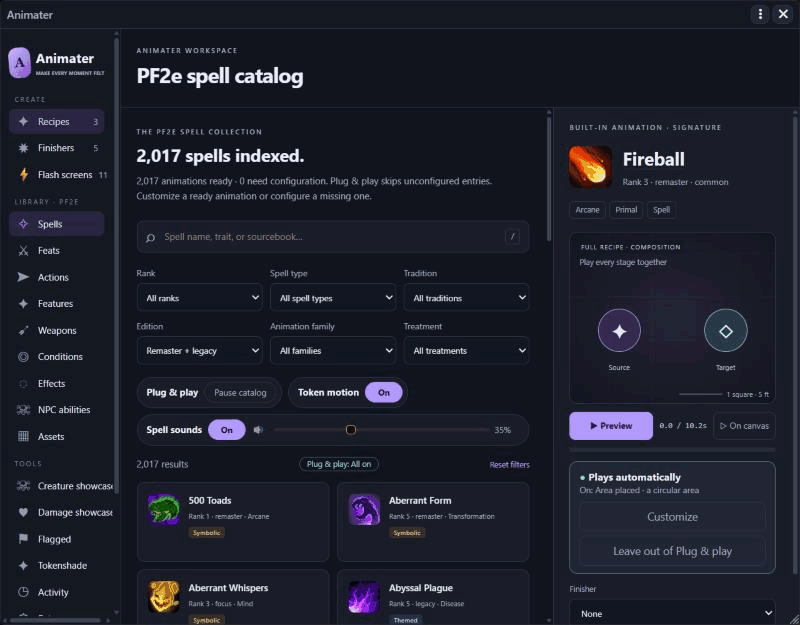
The PF2e spell catalog. No animation is playing in this picture. It was taken before 3.8.7, so its header has no Reset catalog… button.
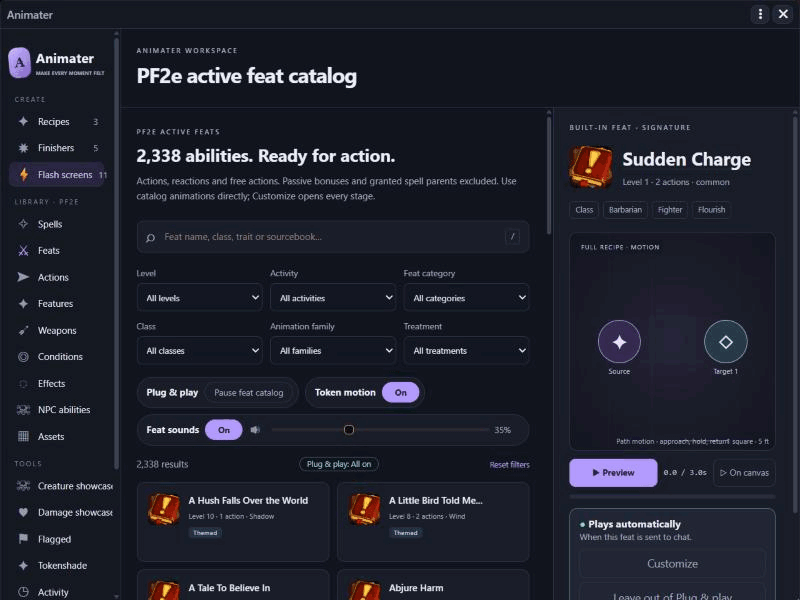
Feats.

NPC abilities. The three switches here are the same as the settings below, and Leave out skips one ability.
New in 3.8.7. Read from the code, not tested live.
A GM sees ↺ Reset catalog… in the header of each catalog page. It puts that one catalog back to the stock catalog:
- Entries you picked, left out or customized are cleared, and its motion, sound, volume, visibility and lasting look choices go back to their defaults.
- The recipes Customize made from its entries are deleted. The question it asks first names them (up to ten) and marks the ones you've edited since.
- Your own recipes, the starters, other catalogs' recipes and players' recipes are kept.
- The catalog stays on or paused as it was, unless you tick Also switch this catalog back to its fresh-install state (off).
Before it changes anything, it keeps a copy of what it removes in the world and downloads the same copy as a file. ↶ Restore last reset… then appears beside the button and puts the catalog back as it was, including whether it was on, and brings the deleted recipes back. Only the latest reset of each catalog is kept. The downloaded file can be brought back with Import on the Recipes page.
| System | Notes |
|---|---|
| PF2e | Spells, feats, actions, class features, weapons, items, conditions, effects, NPC abilities. Weapon rune flourishes. |
| SF2e | Its own catalogs. Can borrow PF2e's, and PF2e can borrow its, with Also use the … catalogs. |
| D&D 5e | Public 2014 and 2024 SRD content. Passive features are excluded from active ability catalogs. See the changes below. |
| Daggerheart | The system's own domain cards, weapons and conditions. Animations are designed from the card's domain and kind or the weapon's family and range, not from card text. |
| Draw Steel | Hero abilities, with a fallback for monsters and homebrew, and its ten conditions. |
New in 3.3.0. Read from the code, and not seen running in a D&D world.
- Casting with nobody targeted. A spell with no roll to wait for, such as Dragon's Breath, now plays on the caster. What would fall on the target falls on the caster, and what flies or strikes at a target is left out. A spell with an attack, damage or healing roll to come, or a save that deals damage, still waits for that roll, when its targets are known.
- Breath. Catalog breath weapons and exhales now draw breath first, but only with a sound pack that has an inhale.
Read from the code and the changelog, and not seen running in a D&D world.
- Conditions show again. Fixed in 4.1.0. From 3.8.12, when the catalogs started loading after the scene, D&D 5e's conditions and catalog effects were looked up before the catalog had arrived, so no condition showed its look on a token. SF2e's effect auras had the same fault. Both now look in the catalog as it is.
- Original names in brackets. New in 4.3.1. In a translated world, Original names in brackets (Automation & catalogs, each person's own, off by default) shows each translated name in the library followed by its English original, such as "Тьма [Darkness]". Search finds either name, whether it's on or off. The row shows only in D&D 5e.
- Customized spells after the activity split. Fixed in 4.8.1. D&D 5e 6.1 gave some spells a separate activity that places their area: Spirit Guardians (2024), for one, has Cast Spell to lay its emanation beside its save. A version you had customized stayed tied to the old activity and never played, while the catalog's own did, or nothing did once the spell was left out of Plug & play. Your version now plays wherever the catalog's own design would. Pausing it still silences the spell, and a later save roll doesn't play the area again.
- A spell resolved with no template. New in 4.8.2. Some casts never put an area on the map: a smite cast from another module's prompt, such as Hail of Thorns after a hit, is resolved with its damage and effect and no template. When Animater knows a cast placed no area, your Item used recipe for it plays at once on an area built from the spell's own size: an emanation round the one creature you aimed at, or round the caster; a burst or cube on what you aimed at; a cone or line from the caster toward it. The catalog's own area animations still wait for a real area, so a template set down afterwards is never played twice by them.
- Smites cast through DAS. New in 4.8.3. The DAS · Core module asks which smite to cast after a weapon hits and resolves it itself, so D&D 5e never "uses" the spell and no area is set down, and Animater played nothing. The smite DAS records on the weapon's damage roll now counts as its cast. A smite with an area (Hail of Thorns: 5 feet round the creature hit) plays on that area, built from the spell's own size, and every creature standing in it is a target; any other smite plays on the creature hit. The catalog's animation, your customized copy and a recipe of your own all answer it, whether set to Area placed or Item used.
- At a raised creature's height. New in 3.5.1. An area's art from a flying or elevated caster, such as a dragon's breath, is drawn as high as the highest of the caster and those caught in it, instead of on the ground under them. On a scene with levels it stays within the caster's level.
- With nobody in the area. New in 3.5.2, from the changelog; the code path wasn't traced. An NPC breath or other area ability whose template catches no one still plays, with the creature lunging toward the area.
- Fewer false alarms in Activity. New in 3.5.2. Using something that places an area no longer also logs "No animation is set" when the area's own animation plays.
- The creatures in the area react. Changed in 4.8.2. An area's target stages, such as an impact on each creature caught, play for the creatures standing in the area once it's placed: the ones you targeted among them if you chose some, otherwise everyone in it. Never the caster and never a hidden creature, and a big creature counts if any of its squares is inside. See Recipe Studio and Finishers.
- Lasting areas. Lasting area animations (Automation & catalogs) says how spell areas that stay on the map show: looping until the template goes, played once, or played once and again at the caster's turn start. Which areas count as lasting is the catalog's reading of the spell, or a recipe stage's own Stay while placed tick (new in 4.4.1).
Teleport spells let whoever cast them click a spot, and the token jumps there. Turn off Teleport tokens if another module already moves tokens for these spells: they then only play their animation.
Glowing effects light the scene around them while they play. See Fire and Lights.
With FXMaster active, weather-like catalog spells add brief scene effects such as rain, fog or embers. Skipped automatically when the module is missing.
| Setting | Everyone (GM) | My screen | Choices or range | What it does |
|---|---|---|---|---|
| Play my own recipes automatically | Off | — | — | Your saved recipes play when their spell, attack, damage or area happens. The catalogs have their own Plug & play switch and play whether or not this is on. Turn off overlapping animations in other modules to avoid playing twice. |
| Also use the SF2e catalogs | Off | — | — | Items none of this world's recipes or catalogs know play their SF2e catalog animation. (Only PF2e and SF2e. In an SF2e world it's the PF2e twin. The SF2e catalogs then appear under Borrowed from SF2e.) |
| Original names in brackets | — | Off | — | In a translated world, the Animater library shows each translated name with its English original after it, as translated content is often written: “Тьма [Darkness]”. Search finds either name, on or off. (Only D&D 5e. New in 4.3.1.) |
| Lasting area animations | Stay while placed | — | Stay while placed / Play once, then fade / Play once and at turn start | How spell areas that stay on the map (walls, clouds, difficult terrain) show. "Stay while placed" loops the area until its template is removed. "Play once, then fade" plays it once when placed. "Play once and at turn start" also plays it again briefly whenever the caster's turn starts in combat, while the template stays. Conditions and effects on tokens keep their own Lasting animation switch. Applies to areas placed after the change. |
| Animate NPC abilities | On | — | — | PF2e and SF2e NPCs' monster abilities animate when used: Grab, Constrict, Swallow Whole, Engulf, Breath Weapon (when its area is placed), Trample, Pounce, Rend, Knockdown, Throw Rock, Ferocity, Change Shape and more. Your own recipes for an ability still come first. (Only PF2e.) |
| Animate other NPC abilities from what they do | On | — | — | With Animate NPC abilities on, an NPC ability that has no animation of its own gets one from what it does: an area it places plays in that shape (cone, line, burst, emanation) and its damage's colour, damage with no area strikes its target, else its traits decide (a teleport blinks, a fear ability cries out). Off: only the named monster abilities animate. (Only PF2e.) |
| Guess NPC Strikes | On | — | — | An NPC Strike that no weapon or creature attack name places still animates: by its damage (a slashing one rakes like a claw, others land as a blow), and a ranged one by what it throws or spits. Off: those Strikes play nothing unless you make a recipe for them. (Only PF2e.) |
| Weapon effect size | 1.5 | — | 0.5 to 3 | Multiplies the size of weapon hit and residue effects (1 = the target token's footprint). |
| Weapon rune flourishes | On | — | — | Catalog weapon Strikes show each weapon’s runes: potency adds a glint, striking a bigger hit, and each property rune (flaming, frost, shock, holy…) its own accent on a hit. Saved recipes are never changed. (Only PF2e.) |
| FXMaster scene effects in catalog animations | On | — | — | When FXMaster is active, weather-like catalog spells add brief scene effects (rain, fog, embers). Skipped automatically when the module is missing. |
| Tokenshade filters in catalog animations | On | — | — | Catalog animations add matching shader effects on the token itself (flames, frost, glows, shimmer). Drawn by Animater on each screen; nothing is saved to the token. |
| Teleport tokens | On | — | — | Teleport spells (Translocate, Friendfetch…) let whoever cast them click a spot, and the token jumps there (Friendfetch drags its targets to the caster on its own). Turn off if another module already moves tokens for these spells: they then only play their animation. |
| Animater's token motions come first | On | — | — | While Animater moves a token (a finisher or attack, a condition's trembling or swaying, a look that rocks it), other modules' passing Sequencer motions on that token don't play, such as PF2e RPG Numbers' damage shake. Off: both play, and the token can jitter between them. |
| Projectiles stop at walls | On | — | — | Arrows, bolts and thrown weapons strike walls instead of passing through; a hit aims at the part of the target the shooter can see. |
| Lasting condition animations (this device) | — | Follow the catalog setting | Follow the catalog setting / Always visible / On application and at its turn start / On application only | How lasting conditions and effects show on your screen. "Follow the catalog setting" uses each catalog's Lasting animation switch in Animater. "On application and at its turn start" plays them when applied and again briefly whenever that creature's turn starts in combat. The Defeated look keeps its own setting. Each player's choice affects only their screen. |
- An area plays once when it's placed unless it counts as lasting (see Areas above). For other visuals that last as long as the area does, use Spell Arsenal. See Integrations.
- Actions whose area is placed separately, such as Dragon Breath, use their regular animation.
- Turn off overlapping animations in other modules to avoid playing twice. See Integrations.