Repository navigation
Weather Panel
The Weather panel builds a scene's weather. Start from any weather, or from your calendar's, change what falls, add effects, and save the result as a preset.
Where: the Weather button (a cloud with sun and rain) in the Animater controls, GM only. If you don't see it, check Show the Weather button in Configure Settings. Like Show the Animals button and Show the Breach wall button, it isn't in the Animater settings window. Checked in the 4.9.0 code. Since 4.6.0, saving Choose your immersion with a start pressed also sets the controls bar: the Weather buttons stay with the Map making or Everything start, and are hidden if you pressed only Animations or Combat drama.
How changes reach players: a slider previews on your own screen as you drag it, and reaches everyone when you let go. Anything else, such as a button, is saved to the scene at once.
If the panel shows a warning at the top, the weather won't appear yet. It warns when Weather on the map is off, or when the scene is underground with no region marked Open to the sky.
Calendaria isn't required. Without a calendar weather, the panel starts from clear skies, or from the weather made from the date (see below), and you choose from there.
New in 3.7.0.
A second button beside it, a globe (Weather for all scenes), opens the same panel titled Weather: all scenes. What you set there applies to every scene at once. It shows whenever the Weather button does.
A scene keeps the last word: its own weather, its own sliders, its own direction or No weather on the scene's panel all come first. So one map can stay out of a world-wide storm. Presets are shared between the two panels.
New in 3.7.0.
In a scene with more than one level, a row at the top says Changes apply to, with This level (and the level's name) or Whole scene. It starts on this level. A level takes what it sets over the scene's, and whatever it leaves alone it takes from the scene. Use the scene's clears everything the level set for itself.
A level can have its own weather, sliders, No weather, fall direction and wind direction. The Animals panel has the same row. See Wildlife and Town Life.
New in 3.3.0. The list has been seen working in Foundry on PF2e.
The top of the panel lists what's at work on this scene and where it comes from. It keeps up as things change, except while you're dragging a slider.
| Row | Source shown | Can you turn it off from the row? |
|---|---|---|
| No weather on this scene | Animater | Yes |
| The scene's own weather | Animater, or Foundry if it isn't one of Animater's | Yes |
| The calendar's weather | Calendaria, or Animater when it's made from the date | No, change it in Calendaria or at Weather from the date |
| What you set falling, and any Cloud cover, Cloud height, Cloud transparency, Storm darkness, Fog, Lightning, wind Strength or Temperature you set | Animater | Yes |
| Any effect you turned on | Animater | Yes |
| Storm darkness, while a storm is raising the scene's real darkness | Animater | No, this row has no off button. See Storm Darkness |
| FXMaster's effects and filters | FXMaster | No, turn them off in FXMaster |
With nothing active it says "No weather or effects on this scene."
The top row sets the base weather.
| Button | What it does |
|---|---|
| No weather | None on this scene, whatever the calendar says. No rain, snow, clouds, wind sounds or lightning, and what lay on the ground goes. The sun still follows the time of day. Also in Scene configuration as No weather on this scene. |
| Calendar | Your calendar's weather, or none. |
| Clear | Clear, Partly Cloudy, Cloudy, Overcast, Windy, Heat Wave |
| Rain | Drizzle, Rain, Sunshower, Monsoon, Sleet, Hail |
| Snow | Snow, Blizzard, Ice Storm, Permafrost Surge |
| Storms | Thunderstorm, Tornado, Hurricane, Sandstorm, Dust Devil |
| Fog | Fog, Mist, Rolling Fog, Ashfall, Wildfire Smoke |
| Seasons | Sakura Bloom, Autumn Leaves, Spore Cloud |
| Strange | Everything else: Luminous Sky, Black Sun, Ley Surge, Aether Haze, Nullfront, Gravewind, Veilfall, Arcane Winds, Acid Rain, Blood Rain, Meteor Shower, Divine Light, Plague Miasma |
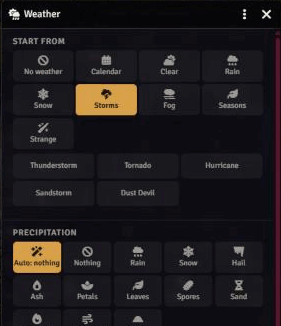
Choosing a family shows its weathers. This picture predates 3.6.0, so newer rows are missing from it.
New in 3.7.6. Read from the code, not tested live.
Simple Calendar Reborn and Foundry's own clock have no weather of their own. When Calendaria isn't active, the scene's panel shows Weather from the date under Start from, with a climate to pick: Off (the default), Temperate, Cold, Dry (desert) or Tropical.
- Animater then makes the weather from the date, the season and the climate. It changes every six hours and drifts from clear to cloudy to rain and back, rather than jumping about.
- Every screen works out the same weather from the same date, so nothing is saved or sent. Each world rolls its own.
- The temperature comes with it, from the climate and season, a little colder in rain or fog and hotter in a heat wave. Snow always comes cold enough to lie.
- The coming week shows under it as a table: a row a day, with its night, morning, afternoon and evening. The part of today it is now is marked. With Simple Calendar Reborn the rows carry the calendar's own day names, and with Foundry's clock they read Today, Tomorrow, In 2 days and so on.
The climate is one choice for the whole world. A scene's own weather still comes first. With Calendaria active, its weather is used as before and this row doesn't show.
What falls: Auto (what this weather has falling), Nothing, or Rain, Snow, Hail, Ash, Petals, Leaves, Spores, Sand, Embers, Wind gusts, Debris.
Add something else falling gives you a second kind, with its own amount and colour. Two kinds at most.
| Control | Range | What it does |
|---|---|---|
| Amount | 0% to 200% of the weather's own | How much falls. Also how wet the ground gets, how fast snow lies, how loud the rain is and how fast it washes blood away. |
| Size | 40% to 200% | How big the drops and flakes are. |
| Speed | 25% to 300% | How fast it falls. |
| Colour | Any | Red for blood rain, grey for ash. Only the look: it wets the ground as before. |
Direction decides which way it falls:
| Choice | What it does |
|---|---|
| Auto | As the module's Rain and snow fall down the map setting. |
| With wind | The wind takes it whichever way it blows. |
| Down map | Always down the map, and the wind only leans it. |
| From above | For top-down maps: rain and snow stream in toward the point under the camera, and rain lands in ripples. |
Choosing snow means it's cold enough to lie, whatever the calendar's temperature says.
Rain and fire. New in 4.4.3. With Fire spreads on, rain and wet snow damp how far a fire reaches and put out burning things sooner. See Fire and Smoke.
Rain that stays scattered. Fixed in 4.4.1. After hours on one map, most often on coming back to a tab left in the background, every raindrop could fall into step, one shape repeated in rings. The clock the drops are drawn from is now kept small enough for the graphics card to tell drops apart, so a storm in its fifth hour looks as it did in its first.
New in 3.7.0. These two sliders show only while rain is falling, chosen here or the weather's own.
| Control | Range | What it does |
|---|---|---|
| Puddle size | 0% to 150% | How big the rain's puddles are on this map. Smaller ones stay apart, which suits a town map with painted buildings, where a big puddle can run across the roofs. At 0% none lie, though the ground still darkens when wet. |
| Splash size | 0% to 150% | How big the spray and rings are where drops land on the ground. At 0% there are none. Water regions keep their rings. |
Both belong to the map. A saved preset doesn't carry them, and applying a preset keeps the map's own.
| Control | Range | What it does |
|---|---|---|
| Temperature | −30 °C to 45 °C | How cold or hot it is here. Snow lies or melts by it and water freezes or thaws, by the game clock. Breath shows in the cold, and the air shimmers in great heat. Works in any weather, so you can have a cold, sunny day. |
| Cloud cover | 0% to 100% | How much of the sky is cloud. Less sun reaches the ground under more. At full, the sky shuts and Storm Darkness applies. |
| Cloud height | Low, Medium, High | New in 3.7.6. How high the clouds stand over this map. See below. |
| Storm darkness | 0% to 100% | This scene's own value. See Storm Darkness. |
| Fog | 0% to 100% | How thick the fog is, in any weather. |
| Fog colour | Any | The fog, where there is some. |
| Lightning | 0% to 100% | How fierce the storm is: how often lightning strikes and lands on the map, with its thunder. At full, a bolt every few seconds. |
Cloud height starts at Low, as clouds were before 3.7.6. Higher clouds are bigger and fewer, and their shadows fall a little further off. Low suits fields and wilds. On a town map at 5 ft squares, a higher setting gives clouds over whole blocks instead of puffs over each roof. It changes only the drawn clouds and their shadows.
New in 3.6.0, changed in 3.6.1, 3.6.2 and 3.7.0.
Without drawn clouds, only the clouds' shadows cross the ground. Drawn clouds, the first button under Effects, puts the clouds themselves over the map as well, above the rain and the roofs. It's off unless you turn it on for a scene.
- One sky. The drawn clouds and their shadows come from the same clouds. Turning drawn clouds on fades the clouds in right over the shadows already showing, so nothing jumps.
- How many. As many as the weather has. A clear sky has none, and partly cloudy only a few, unless Cloud cover asks for more. Overcast becomes a closed, rolling sheet.
- Cloud transparency (0% to 95%, starting at 40%) shows once drawn clouds are on. It sets how much of the map shows through, however many clouds overlap.
- Lit by the sun. Each cloud has a bright side toward the sun and a shaded side away from it. Moving the sun moves the light across the clouds; it doesn't turn them. Through the day they go white at noon, gold when the sun is low, glowing at sunset and blue under the moon, and they dim with the scene's darkness.
- Kept to the map. Clouds drift across the map itself, in numbers that suit its size, and stop at its edge rather than drawing over the padding.
- Not indoors. Clouds don't show over a room. Their shadows, and high birds' shadows, still fall through a region marked Open to the sky, underground too.
Cloud shadows look like the shadows of separate clouds, and since 3.7.0 they're darker, closer to real ones under a bright sun. They carry on drifting from where they are as the game clock ticks, instead of jumping back to where they started.
Each is a button you turn on and off, and an effect that's on gets a strength slider. An effect your weather already has starts on.
Drawn clouds, Low mist, Rain sheets, Spiral clouds, Tornado, Dust devil, Smoke, Heat haze, Frost, Ice glaze, Sun rays, Glow, Rainbow, Aurora, Sparks, Wisps, Meteors, Static.
- Drawn clouds has no strength slider. It has Cloud transparency instead.
- Glow, Aurora, Sparks and Wisps also have a colour.
- Rainbow also has Rotation (0° is up the map, turning clockwise; Auto is away from the sun) and Size. It comes and goes over some seconds.
Strength sets how hard it blows, for the clouds, the grass, the leaves and the water too. Blows from is a compass, with north up the map. The middle button is the weather's own direction.
Other things move with the scene's wind as well:
- Bridges and climbing ropes from Map painting's Heights tab sway, gently in a breeze and more in a gale. Ladders stay put. New in 4.2.0.
- Feast-day garlands and lanterns on a building you drew swing in the wind the panel is blowing. New in 4.7.0. Read from the code, not tested live. See Buildings.
- Painted decorations: bushes, grass, reeds and tree crowns sway, awnings and tents ripple, loose papers flutter. New in 4.0.0. See Decorations.
- Fire. Out of doors, fire spreads faster downwind. See Fire and Smoke.
Name the weather and press Save. Presets belong to the world, so you can pick one on any scene. × deletes one.
Clear all puts everything back to Auto, the calendar's weather and the weather's own direction. Your presets stay.
New in 3.7.0.
Rain coming on, or a storm breaking, eases in over a set time instead of switching at once. What falls, the clouds, the fog and the light all move across together. Weather changes take sets how many seconds, from 0 (at once) to 120, and it's 10 by default. A slider you're dragging in the panel always shows at once.
Without the panel, weather comes from these sources:
- Calendaria: its weather, wind and temperature, which Animater draws itself. FXMaster's effects for Calendaria's weather are hidden on your screen while Weather on the map is on, and FXMaster's settings are never changed. See Integrations for what happens to Calendaria's own colouring.
- Weather from the date: with no Calendaria, the climate you picked above.
- Scene configuration → Weather Effect: Animater adds its weathers to Foundry's list, as Animater: Rain and so on. The panel's Start from buttons set this same field.
- Foundry's scene weather or FXMaster's rain and snow: several features read these too, such as Weather on the ground and Weather on creatures.
A region's own weather. New in 3.7.0. A region can have weather of its own, drawn only inside it, such as mist in a hollow or snow on one peak, and its own climate. Only the look changes: the ground, the sounds and the footsteps follow the scene's. At most six such regions are drawn on a scene. It's set in the region's right-click panel. See Region Steps and Painted Floors.
New in 3.7.0.
Rain, snow, clouds, cloud shadows and the sun's light and shade fade in over about half a square at the edge of a room, instead of stopping on a hard line that looked like a dark box over the floor. An opening marked Open to the sky fades the same way. Each region sets its own: Weather edge, from 0 (the old hard line) to 3 squares. See Region Steps and Painted Floors.
- In a storm a bolt lands somewhere on the scene now and then. Its flash throws shadows from where it struck, sparks fly from the spot, and a wide pool of light shows round it, stopped by walls that block light.
- Thunder follows the strike. The closer it lands, the sooner and louder the thunder, up to a boom right beside a token. Under a roof it's muffled as well as quieter.
- Windows and open doors facing a strike are the ones that light up.
Thunder from the side it struck pans thunder left or right of your selected token, or of the middle of your view with none selected. Volume always follows distance. Lightning flash strength lets each player turn the flashes down.
Rain, wind, hail and thunder are heard with Weather sounds on. New in 3.8.0: each player sets Weather volume for their own screen, from 0 (silent) to 100% (as recorded). See Sounds and Voices.
Fog and mist creep indoors through open doors and walls that let light through, as far as the room's walls allow. They go further with the wind blowing in and hardly at all against it, and linger after the door shuts. An open window lets fog through too. See Windows and Doors.
These are on-screen previews on a small test map, from one GM's screen, taken before drawn clouds existed. They show what's falling and the colour of the light, and nothing more: no lightning strike, lying snow, wet ground, puddles or storm darkness is in these pictures.

Rain.

Thunderstorm, with no strike in frame.

Falling snow, before any has settled.
| Setting | Everyone (GM) | My screen | Choices or range | What it does |
|---|---|---|---|---|
| Weather on the map | On | On | — | Animater draws Calendaria’s weather itself: clouds seen from above with their shadows where the sun throws them, rain, drizzle, hail, snow and sleet blowing with the wind, fog, sand, ash, embers, petals and leaves, and the fantasy weathers (blood and acid rain, aurora, ley sparks, divine light, a black sun, static, spectral wisps, meteors, a tornado). All in one pass on the graphics card, whatever the weather. FXMaster’s effects for Calendaria’s weather are hidden on your screen while this is on (its settings are never changed). Drawn at Balanced quality or better. |
| Rain and snow fall down the map | Off | — | — | They always come down the map, the wind only leaning them over a little, so they never go sideways or upward. Off: the wind takes them whichever way it blows, and a strong one can. Each scene can say otherwise in its own configuration. |
| Weather changes take | 10 | — | 0 to 120 | How many seconds the weather on the map takes to change, from no rain to rain, or rain to a storm: what falls, the clouds, the fog and the light ease across. 0 changes at once. A slider being dragged in the Weather panel always shows at once. |
| Clouds over the map | On | On | — | The clouds' shade moving over the map with the wind, and how they dull the day. They show on the ground, with the sun out, not as shapes in the air (only smoke and ash do). Turn off for the weather without them; what falls, the fog and the rest stay. Drawn at Balanced quality or better. |
| Cloud shadows | On | On | — | On a cloudy day, the clouds' shadows drift over the open ground with the wind: a few under scattered clouds, more as it clouds over. From Calendaria's weather, else the scene's. Drawn at Balanced quality or better. |
| Weather light | On | On | — | The weather lights the outdoors its own way: a grey sky's flat, cool light, rain's grey-blue, a thunderstorm's dark green-grey (deeper the fiercer), falling snow's pale cold, a sandstorm's dusty amber; over the roofs too, while a room you look into keeps its own light. Stands in for Calendaria's “Sync Scene Ambience with Weather”, which colours the whole scene one hue (turned off while this is on). Drawn at Balanced quality or better. |
| Weather sounds | On | On | — | Rain, wind and hail you can hear, growing and fading with the weather and the scene's wind and muffled under a roof, and thunder after each lightning flash. Calendaria's own weather sound stands down on this screen for the weathers sounded here; its fantasy weathers keep theirs. |
| Weather volume | — | 100 | 0 to 100 | How loud rain, wind, hail and thunder are for you, in percent: 0 silent, 100 as recorded. Only on your screen; everyone sets their own. |
| Thunder from the side it struck | — | On | — | Thunder plays to the left or right of your selected token, or of the middle of your view with none selected, as it struck. Off: in both ears alike. Either way, how far off it struck says how loud it is. |
| Lightning flashes | On | On | — | In a thunderstorm (Calendaria's weather, the scene's storm, or FXMaster's lightning), lightning flashes over the map now and then, throwing the creatures' shadows hard for a moment. Drawn at Balanced quality or better. |
| Lightning flash strength | — | 1 | 0 to 1 | How bright lightning flashes are on your screen: 0 none, 1 as they come. A repeating bright flash can be hard on the eyes: this is yours to turn down. |
| Weather on creatures | Off | — | — | In rain every creature on the scene is soaked (darker, bluer, wet), in snow dusted with snow, from Foundry’s scene weather or FXMaster’s rain and snow. A creature under a roof (a Suppress Weather region) stays dry. Needs Tokenshade token filters on. |
| Weather on the ground | On | — | — | When it rains on the scene (Foundry's scene weather or FXMaster), every step splashes, dirt turns to mud (its sound and prints), stone, wood, grass and sand get puddles under each step, and prints on sand, dirt and mud look wet; when it snows, every step kicks up a light dusting. Never under a region that suppresses weather. |
| Rainbows | On | On | — | When the rain stops and the sun comes out under a clearing sky, a soft rainbow arcs over the map away from the sun, fading as the ground dries. Drawn at Balanced quality or better. |
| Flames in the wind | On | On | — | Out of doors, flames, torches and their smoke lean with the wind, swelling in the gusts and pressed low by the strongest. Under a roof or in a room they feel none of it. Never changes the light itself. Drawn at Balanced quality or better. |
- Falling rain and snow, fog and clouds don't show inside rooms. A region that suppresses weather acts as a roof, as do a painted roof from Map painting's Structures tab (since 4.7.0) and, on a scene with Buildings here are roofed on, every room the walls close in (see Sun Moon and Shadows), and a region marked Open to the sky lets the weather reach the floor there as wet ground, puddles and snow. See Scene and Region Options.
- On an underground scene, weather only shows in regions marked Open to the sky.
- Moving a slider doesn't write to the scene until you let go, so players won't see a drag in progress.
- Weather from the date isn't offered on the all-scenes panel; the climate is set from a scene's panel.
Storm Darkness · Snow and Wet Ground · Sun Moon and Shadows · Fire and Smoke
For developers and the curious. Read from the 3.2.2 code, with 3.3.0's changes added, and not run or measured.
Source: scripts/engines/motion/sky-light.mjs, with the weather data in sky-weather.mjs, weather-tune.mjs and cloud-deck.mjs, the drawn clouds in drawn-clouds.mjs, the date's weather in weather-forecast.mjs, the bolts in lightning-bolt.mjs and the indoor fog in air-seep.mjs. The panel is scripts/ui/weather-panel.mjs. Wiring is in scripts/main.mjs.
createSurfaceLight draws almost all the weather with one vertex and fragment shader pair on seven PIXI.Mesh quads covering the scene. They share a geometry and differ by the uMode uniform:
| Mode | Name | Blend | Parent | What it draws |
|---|---|---|---|---|
| 0 | shade | Normal | skyRoot |
Wet ground, season colour, fallen leaves |
| 1 | light | ADD | skyRoot |
Sun sheen, glints, sparkle, puddle sheen, rain rings, moonlight, fireflies |
| 2 | pale | Normal | skyRoot |
Ice, lying snow, rainbow, morning mist |
| 3 | flock | Normal | birdRoot |
Bird silhouettes. No caller found in 3.3.0, so it looks unused |
| 4 | veil | Normal | birdRoot |
Weather light, cloud shadow, storm gloom, fog, mist, what falls, curtains, bands, frost, haze, smoke, glow, wisps, static, tornado |
| 5 | glow | ADD | glowRoot |
Rays, aurora, sparks, embers, meteors |
| 6 | air | MULTIPLY | birdRoot |
The colour of the open air at this time of day |
Layers. skyRoot is on canvas.primary at sortLayer 643. birdRoot is at 1100, just above the highest tile, so the veil falls over roofs. glowRoot is a child of canvas.effects at zIndex 99985.
What's baked and what's live. build() bakes the masks. look() only sets uniforms and mesh visibility, and tick() advances uTime and uFallTime. Meshes start hidden and show only when a pass has work. A changed scene weather needs no rebuild, because skyNeedsBuilding ignores weather, darknessLevel and the look-only flags.
Rebuilds. rebuildSky is debounced by 250 ms and runs on canvasReady, region changes, setting changes, updateWorldTime and Calendaria or Simple Calendar time and weather hooks. Changed in 3.6.0 and 3.6.2: it builds surfaceLight again only when skyBuildKey of what it's built from has changed, so a clock tick only looks at the sky. When it does rebuild, drop() keeps uTime, uCloudRun and uFallTime in clocks, so clouds and what falls carry on. The hooks that rebuild the canopy and lamp glows skip the core.time setting save (isClockSave), so tree light and lamps no longer rebuild each game minute.
Easing between weathers. New in 3.7.0. look() takes fade, the weatherFade setting in seconds (default 10, 0 to 120). It's 0 while a slider is dragged or a preview runs.
Region weather. New in 3.7.0. Up to 6 regions whose regionWeather is one of Animater's weathers are built as their own passes over the map.
Samplers. The shader uses 16, and a comment calls that the number "a card takes for sure". To stay within it, some masks pack several meanings into their channels.
Masks. Scale is min(0.25, 2048 / longest side). Roof picture, FXMaster cloud shadow and lamp reach use half of that.
Shader limits.
- At most 2 falling kinds at once, from 11 kinds.
sky-weather.mjsholds 42 weather recipes. - Rain and snow draw 4 depths, or 3 and 4 seen from above. Sand and gusts draw 2, and ember, spore, ash and the generic layer draw 3.
-
fbmruns 5 octaves. Meteors loop 6 times, aurora curtains 2. - The veil's falling amount is capped at
MOST_FALLING = 1.5. -
The falling clock (4.4.1, read from the 4.9.0 code). Drops are hashed from cells of a lattice scrolled by
uFallTime, which the card holds in float32.fallClockinsky-light.mjscaps each frame's step atSKY_STEP_MAX = 0.25s and winds the clock back byFALL_WRAP = 3600s once it passes an hour, while nothing is falling, or regardless afterFALL_WRAP_FORCED(four hours).
Quality. The gate is bothSettingsOn: world setting on, ...Local on and rank at least 2. So Full, Light and Balanced build the same passes, and the sky shader has no quality uniform. The only differences are lamp counts on snow, ice and puddles (3, 3 and 2, because floorDetail lights are capped at 3) and heat shimmer, which is Full only.
Comment and code differ:
- The setting text says everything is drawn "in one pass", and a comment says a blizzard costs what a drizzle does. The effects actually span modes 4 and 5, and a blizzard runs more falling layers than a drizzle. The cost claim isn't shown by the code and wasn't measured.
- A comment says "Foundry's canvas layer draws its children blended normally", yet mode 6 is set to
MULTIPLYin that same container. Which one holds at runtime wasn't confirmed. - Clouds over the map gates ash and smoke clouds and storm gloom. The cloud shade itself is gated by Cloud shadows.
Everything but a slider being dragged is saved with scene.update: weather, plus flags.animater weatherTune, weatherOff, fallsDown and windFrom. cleanTune sanitises the tune and always writes every key. While dragging, the tune is held in tuneDragged on that GM's screen only.
Added since 3.5.0, read from the code after 3.8.12:
-
Levels.
WEATHER_KEYS(weather,weatherTune,weatherOff,fallsDown,windFrom) can live on the level's own flags.overLevelinui/level-scope.mjslays a level's non-null keys over the scene's. The panel's scope starts at"level"in a scene with several levels. -
All scenes. The globe button writes the world setting
globalWeather(an object of the same shape,config: false). A scene's and a level's own values are laid over it. -
Puddles and splashes.
puddleSizeandsplashSizeare tune keys (0 to 1.5, a multiple of 1).saveLookstrips them from a preset andapplyLookkeeps the scene's own. -
Cloud height and transparency.
cloudHeightruns 1 to 5 (labelled Low below 1.75, Medium below 3.75, else High).drawn-clouds.mjscloudHeightmakes each cloud that many times bigger and pushes its shadow out by the square root.cloudClearruns 0 to 0.95, default 0.4. -
Weather from the date.
weather-forecast.mjsis pure. The day is cut intoBLOCK_HOURS = 6blocks. Each block's weather comes from a seeded slow wave (two value-noise waves, 5 and 2 blocks apart) read against the climate's weighted table for the season, laid mildest first. The seed is a hash ofgame.world.id. The climate is the hidden world settingdateWeather(default"off").calendarWeatheruses Calendaria'sgetCurrentWeatherfirst and falls back to this.
Flash. An ADD object in canvas.effects at zIndex 99995. With rooms in the scene it's a mesh with a baked mask, otherwise a plain white sprite. The mask scale is min(0.25, 2048 / longest side), with rooms held down to BOUNCED = 0.12 and window patches added in 10 strips. It's rebaked at each strike so the windows facing it light up.
Bolt. A PIXI.Graphics of strokes plus glow sprites and sparks, all ADD, on boltRoot at zIndex 99996. It's drawn once per strike and animated by alpha. BOLT_SECONDS = 0.42, the light spot's radius is STRIKE_LIGHT_SQUARES = 9, and sparks number 15 to 24. Glow and sparks are masked by a light polygon from Foundry's backend, while the bolt itself isn't masked.
Timing. nextStrikeMs gives 15 to 35 s in a mild storm and 3 to 10 s at the worst. Strikes come from each client's own Math.random, with no socket in the callers read, so screens probably don't flash together. Not confirmed by running it.
Lightning flash strength scales only the flash mask. The bolt, its glow and its sparks use the strike level, so they still draw at 0.
FXMaster and Calendaria. FXMaster's Lightning filter is stopped once a second while Animater's is on, and Calendaria's hudEffect is swapped in memory.
air-seep.mjs finds openings: open doors, opened windows and walls with light === 0, on a room boundary. surfaceLight.seep rebakes the uFreeze mask, adding 4 rings per opening to its green channel from Foundry light polygons. SEEP_IN_SECONDS = 7, SEEP_OUT_SECONDS = 10. It checks at most every 250 ms, and only while fog or mist is drawn or air is still inside.
Checked against the 3.3.0 code.
activeWeather in scripts/ui/weather-panel.mjs is pure and returns one row each: { key, icon, name, detail, source, action, data }. A row with no action has no off button. main.mjs passes the calendar's weather from getCurrentWeather, the scene's stormDark flag, and FXMaster's effects and filters scene flags.
The panel rerenders 400 ms after an updateScene touching weather, flags.fxmaster or Animater's flags, or an updateSetting of calendaria.currentWeather, and not while tuneDragged is set.