Repository navigation
Windows and Doors
Animater has windows that open and close with a control on the map, like a door's. Windows you draw into a wall with Map painting's Structures tab are on Buildings. The ones that open and shut there are the same window types as below, so what this page says about opening, locking, picking and breaking applies to them.
To make one: Wall configuration → Animater window → Window. Setting a type makes any wall a window, even a solid one.
| Type | Shut | Open |
|---|---|---|
| Wooden window: shut, it stops everything | Stops light, sight and sound. | Lets light, sight and sound through. |
| Wooden shutters: shut, slats open for light in bands, then the window open | Stops light, sight and sound. With slats open, you can see out and light shows in bands, but sound and, by the rules, light still stop. | Lets light, sight and sound through. |
| Glass: shut, light and sight come through | Light and sight come through. Sound doesn't. | Lets light, sight and sound through. |
| Curtains: shut, only a dim light comes through | Stops light, sight and sound by the rules. A dim light is drawn through them. New in 3.7.0. | Lets light, sight and sound through. |
| Mosaic or stained glass: shut, coloured light comes through | As glass, with coloured light. New in 3.7.0. | Lets light, sight and sound through. |
| Leaded diamonds: shut, light in a fine diagonal net | As glass, with light in a net of diamonds. New in 3.7.0. | Lets light, sight and sound through. |
| Rose window: a wheel of coloured light | As glass, with a wheel of coloured light. New in 3.7.0. | Lets light, sight and sound through. |
| Frosted glass or oiled paper: a soft glow, nothing seen through | Light comes through as a soft glow, but sight and sound don't. New in 3.7.0. | Lets light, sight and sound through. |
Wooden shutters take three clicks to go round: shut, slats open, open, then shut again. Every other type just opens and shuts.
The bands of light through shutters, and the dim light through curtains, are only a look. They show by day and night, but by the rules the light stops there.
Air and fog also come through only when a window is open.
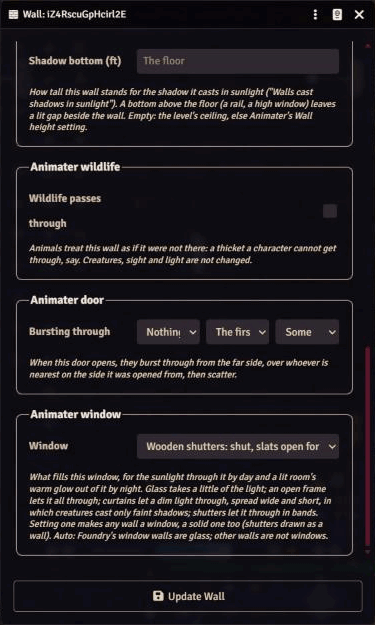
The Window choice in Wall configuration, set to Wooden shutters. It was taken before 3.7.0, so it shows fewer kinds of window and none of the newer fields.
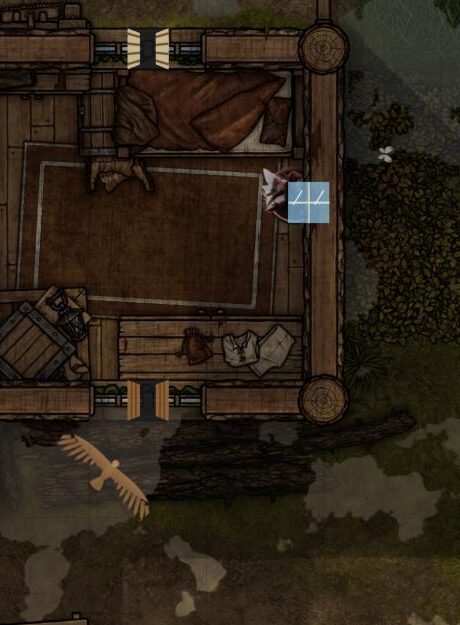
Window controls on the map at 3.2.2. Top: Wooden shutters, open. Right: Glass, shut. Bottom: Wooden window, open.
| Field | What it does |
|---|---|
| Pattern size | How big the panes, diamonds, lattice squares or bars are in the window's light: from 0.5 for more, finer ones to 2 for fewer, larger ones. 1 is usual. Plain glass's cross and the shutters' bar keep their size. New in 3.7.0. |
| Can be climbed through when open | Fully open, creatures pass through this window as through an open door. Only for a window that opens and closes. Off by default. New in 3.7.0. |
| Who | When |
|---|---|
| GM | Always, unless it's locked. |
| Players | They need Foundry's permission to use doors, the game not paused, and one of their creatures within reach: 1.5 squares past its edge. With the Arms Reach module active, Arms Reach decides the reach instead, as it does for doors (new in 3.7.0). Otherwise they're told they're too far away. |
The GM's right-click locks one shut or unlocks it, as on a door. Locking also shuts it. A locked window won't open for anyone until it's unlocked, and clicking it says it's locked.
A locked window can be picked. New in 4.5.0. On a scene with Breakable props on, a player right-clicks the locked window with their token beside it and rolls the system's lockpicking check (the GM does it with Alt+right-click and a token selected). The lock's quality is set in Wall configuration → Breakable → Lock. See Picking a lock.
Right-clicking a window's or a door's icon is about that icon, even with a region under it. The region's panel doesn't open over it.
Each icon shows its window's type and state, with no box or border round it, and a locked one shows a padlock. Under the pointer it gets an outline, as a door's does. New in 3.7.0.
The Window icons setting chooses how much they show (new in 3.7.0):
| Choice | What it does |
|---|---|
| As usual | Always shown. The default. |
| Faint | See-through until a creature of yours is within 3 squares, or the pointer is over it. |
| Only when near | Hidden until then. A GM still sees them faintly. |
For the GM, "a creature of yours" means a selected token. A hidden icon still answers the pointer: move over it and it shows.
- The wall's own settings are left as they were. Change the window type back to Auto and the wall is as you set it.
- Movement stays as the wall has it, so a wall that stops creatures still stops them with the window open, unless the window has Can be climbed through when open ticked.
- Windows make no sound of their own.
These choose how light passes but don't open and close. They don't change sight, sound or movement either: the wall's own settings decide those.
| Choice | What it does |
|---|---|
| Auto (Foundry's window: glass) | Foundry's window walls count as glass. Other walls aren't windows. The default. |
| Empty frame: always open | Lets all the light through. |
| Curtained: a dim, soft light | A dim, soft light, spread wide and short, in which creatures cast only faint shadows. |
| Wooden lattice: always open, light in small squares | Light in small squares. New in 3.7.0. |
| Iron bars: always open, light in stripes | Light in stripes. New in 3.7.0. |
| Arrow slit: a thin blade of light | A thin blade of light. New in 3.7.0. |
Walls set to the older Glass, fixed or Shuttered, fixed keep showing that choice, but new walls can't pick them.
See Sun Moon and Shadows. Sunlight shines in by day and a lit room's glow spills out at night, in the colour of the light in the room. The glow only comes from a light that actually reaches the opening, and it stops at any wall outside. A wall just beyond an opening keeps sun and lightning out, and a lightning flash only lights the windows and open doors facing the strike.
Sunlight coming in. New in 3.7.0. Read from the code, not tested live.
- Each kind prints its own pattern in the patch of light on the floor. Shut glass shows its frame's cross, slatted shutters the bar where they meet, stained glass and rose windows coloured panes, leaded windows a fine net, a lattice small squares, bars stripes, an arrow slit a thin blade, and frosted glass a soft glow. A window thrown open lets the light in whole.
- The patch stops at the far wall, and the rest of the light shows as a bright band along that wall's foot.
- A sunlit window glows softly. As the sun goes down the room dims and the light through its windows turns deep gold, then orange-pink.
- A creature standing in that light casts its sun shadow away from the window.
- Doorways and curtains are lit as before.
Lamplight going out. New in 3.7.1. A lit room's light spilling out of a window at night carries the window's pattern onto the ground outside: coloured panes from stained glass and rose windows (tinted by the lamp's colour), the net of a leaded window, glass's cross, the lines of lattices and bars. Frosted glass only spreads it, and an open window or door lets it out whole.
Shadows in a window's lamplight. New in 3.7.3. The light fans out from the lamp through the window, off to one side if the lamp is. A creature standing in it outside throws its shadow away from the lamp. Curtains and frosted glass still spread their light evenly.
Windows in roof openings. New in 3.7.0. A region open to the sky can hold a window too: glass, coloured glass, leaded diamonds, a rose window or frosted glass keep the weather out and let the sun through in their pattern, and a lattice or iron grate lets the weather in as well. See Scene and Region Options.
New in 4.0.0. With Breakable props on for the scene, a wall with no door can be a window that breaks: Wall configuration → Breakable → Window. Automatic, the default, makes it one when its Animater window type above is glass, leaded, mosaic, rose or frosted. Yes makes any wall a breakable window, No never.
Any Strike made through the glass breaks it, hit or miss, thrown weapons included. A missed shot breaks the window it flies into past its target, and a melee miss can break one beside its target by the scene's chance. Blows, spells, a GM's Energy blast (new in 4.5.0) and creatures shoved into it break it too. Spells break it: No (new in 4.5.1) keeps spells and blasts from breaking it while everything else still does.
A broken window opens: a glass window becomes an open one, letting light, sight and sound through, and shutters stand open. It still blocks movement. An open or broken window lets room smoke out, and a shut one stops fire like a wall (see Fire and Smoke). Repair broken props puts it back as it was, and so does Put this one back in its own Wall configuration (new in 4.5.1). Scene configuration → Animater → This place → Make all doors and windows breakable or Make none breakable sets every door and window on the scene at once. See Breakable Props.
Doors you draw with Map painting's Structures tab (planked, banded, iron, a portcullis, double doors that swing as one) are on Buildings. Everything below works on any Foundry door, drawn or not.
New in 4.0.0. With Breakable props on for the scene, doors break from heavy blows, creatures forced through them, exploding powder kegs and, from 4.5.0, the GM's Energy blasts. Locked doors break too. Each door's Breakable section in Wall configuration sets its material (Wood, Reinforced wood, Metal or Stone), whether it can be forced open, its DC, its lock, and in PF2e its AC, Hardness, HP and Broken Threshold. A broken door becomes an open gap. See Breakable Props for what breaks each material and the DC in each game system.
On a door's control:
| Who | Click | What it does |
|---|---|---|
| GM | Shift+right-click | Smashes the door, whatever its material, in any game system. |
| GM | Alt+right-click, with a token selected beside the door | Rolls to force it open, or offers a choice, for that token, as a player's right-click does. |
| Player | Right-click a closed or locked door | For their token within a square of the door, in PF2e, SF2e, D&D 5e, Daggerheart and Draw Steel. On a closed door it rolls to force it open. On a locked door it offers Force it open and Pick the lock. In PF2e it always asks first, with Attack the door among the choices. |
Picking a lock: New in 4.5.0. A locked door can be picked with the system's own check: Thievery in PF2e and SF2e, thieves' tools in D&D 5e, Finesse in Daggerheart, Agility in Draw Steel. Each door has a Lock quality, Poor to Superior, with a Lock DC and Successes to pick (new in 4.5.1) of your own if you want them. In PF2e and SF2e a better lock takes several successes, a critical success counts twice and a critical failure breaks the picks. Progress is never lost. A picked door is unlocked and left shut. See Picking a lock.
Attacking a door (PF2e): pick one of your token's Strikes that reaches the door. It rolls against the door's AC, and on a hit you roll damage. The damage less the door's Hardness comes off its HP. At its Broken Threshold the door shows cracks, and at 0 HP it smashes open. Repair gives it full HP again.
The scene's say. Two scene switches in This place, both new in 4.5.1 and off by default:
- Ask me what a success does: a won Force Open or lockpicking roll waits for the GM, who can break the door, push it open unbroken on a critical, let it hold and take damage (PF2e), or rule it stays shut. See Ask me what a success does.
- Spells wear doors down (PF2e only): a spell's area takes HP off a door instead of breaking it outright. See Spells wear doors down.
Spells break it: No on one door keeps spells off it while blows, shoves, Force Open and kegs still break it. Put this one back in the door's own Wall configuration mends just that door and gives back its HP (new in 4.5.1).
Walls can break too. A plain wall marked Breakable wall: Yes can be breached by a powder keg, the right spell or a huge creature slammed into it, and the GM can breach one with Breach wall in the Animater controls. Windows never breach as walls. See Breakable Props.
The GM's plain right-click still locks and unlocks a door as usual.
With Fire spreads on, a closed door stops fire like a wall and an open one lets it through. With Fires fill rooms with smoke on, a shut door holds smoke in, an open door to the outside lets it out, an open door between two rooms passes it next door, and a door swinging open shoves the smoke through. See Fire and Smoke.
Wall configuration → Animater door → Bursting through sends creatures through a door as it opens, from the far side and over whoever is nearest.
| Field | Choices |
|---|---|
| What | Nothing (default), A flock of bats, A run of rats |
| When | The first time it opens (default), Every time it opens |
| How many | Few, Some (default), Many |
Once a door's creatures have gone, set it to Nothing and back, or to Every time, to send them again.
- Drafts: the air flows through open doors toward the way out, in underground scenes. See Caves and Underground.
- Fog and mist creep through open doors. See Weather Panel.
- Tavern murmur spills out through an open door. See Sounds and Voices.
- Light through windows and Warm light from windows also use open doors.
| Field | Where | What it does |
|---|---|---|
| Casts no shadow | Animater shadow | No shadow in sunlight. |
| Shadow top, Shadow bottom | Animater shadow | The wall's height for shadows. Hidden when the Wall Height module is on. |
| Wildlife passes through | Animater wildlife | Animals treat this wall as if it weren't there: a thicket a character can't get through, say. Creatures, sight and light aren't changed. |
| Breakable | Breakable | Whether a door or window breaks, or a plain wall can be breached, its lock, whether spells break it, and a Repair button for that one wall. New in 4.0.0; locks in 4.5.0; Spells break it and Repair in 4.5.1. See Breakable Props. |
| Setting | Everyone (GM) | My screen | Choices or range | What it does |
|---|---|---|---|---|
| Window icons | As usual | — | As usual / Faint / Only when near | How the open and close controls on windows show on the map. Faint: see-through until a creature of yours is near or the pointer is over one. Only when near: hidden until then (a GM with no creature selected still sees them faintly). |
| Bats and rats bursting through doors | On | On | — | A door set to it (Wall configuration → Animater door) sends a flock of bats or a run of rats through as it opens, over whoever opened it, with their sounds. Drawn at Balanced quality or better. |
| Light through windows | On | On | — | The sun shines through windows and open doors onto the floor inside, in from where it stands: short shafts at noon, long golden ones at dawn and dusk, silver under a bright moon. Shows only under a roof, a region that keeps the weather out (as for snow and rain). Drawn at Balanced quality or better. |
| Warm light from windows | On | On | — | At night a lit room's light spills out of its windows and open doors onto the ground outside, in the light's colour, further the brighter the room. A room is a region that keeps the weather out; any light inside it that reaches the window lights it. Drawn at Balanced quality or better. |
The window types themselves have no on-off setting.
- The windows that open need a GM connected for a player's click to take effect, because the GM's screen makes the change. A player's request is checked again there.
Sun Moon and Shadows · Breakable Props · Buildings · Fire and Smoke · Scene and Region Options
For developers and the curious. Read from the 4.9.0 code, and not run or measured.
Source: scripts/engines/motion/window-state.mjs and the wiring in scripts/main.mjs. Light through windows is in scripts/engines/motion/wall-shadows.mjs and on Sun Moon and Shadows. Breaking doors and windows is in scripts/engines/props/ and on Breakable Props.
The state is saved on the wall document's flags: flags.animater.window, windowOpen, windowSlats, windowLocked, windowWalk and windowPattern. The wall's own light, sight, sound and move are never written.
Instead, shapeWindowEdge finds Foundry's working edge with canvas.edges.get(doc.id), and applyWindowEdge assigns new values to it with Object.assign. move is only set, to 0, when windowWalk is on and the window is open. Otherwise movement stays as the wall has it.
| State | light | sight | sound |
|---|---|---|---|
| Any kind, open | 0 | 0 | 0 |
| Shutters, slats open | 20 | 0 | 20 |
| Wooden window, shutters or curtains, shut | 20 | 20 | 20 |
| Frosted glass, shut | 0 | 20 | 20 |
| Glass, mosaic, leaded or rose, shut | 0 | 0 | 20 |
Here NONE = 0 and NORMAL = 20, matching Foundry's restriction values.
Keeping it applied. Foundry makes the edge anew when a wall changes, so at setup the module wraps CONFIG.Wall.documentClass.prototype.initializeEdge and reapplies after each call. canvasReady applies to every wall. On updateWall with a window flag it calls doc.initializeEdge() and then canvas.perception.update with the light, vision and sound rebuilds, because Foundry wouldn't re-check on a flag change alone.
Every client derives its edge from the synced flags, and the edge change itself is never saved. Only the eight kinds in CLOSING_WINDOWS touch the edge. The other kinds (open, curtained, lattice, bars, slit) affect only the drawn light.
Bands and curtains. With slats open, or curtains shut, light stays 20, so by Foundry's rules the light stops there. The bands and the dim light are drawn by the window light pass (windowOpening, with WINDOW_KINDS giving each kind's share of the light). windowPattern is clamped to WINDOW_PATTERN 0.5 to 2.
mayUseWindow allows a GM, or a user with door permission, unpaused and in reach. Reach is WINDOW_REACH_SQUARES = 1.5 past the token's edge, or, with the arms-reach module active, its api.isReachable(token, wall). A player's click emits a window-toggle socket message, and the active GM's client rechecks everything before writing.
drawWindowIcon makes one PIXI.Graphics per window, in a container on canvas.controls, rebuilt on wall changes. Each control also holds a rounded outline shown only while hovered. Visibility is rechecked on sightRefresh and controlToken.
windowIconAlpha reads the windowIcons setting: hovered 1; usual 0.8; faint 0.8 near, else 0.3; near 0.8 near, else 0.3 for a GM and 0 for a player. "Near" is WINDOW_ICON_NEAR = 3 squares past the edge of one of your tokens (the GM's selected ones).
overControlIcon tests the window controls and canvas.controls.doors, so a right-click there doesn't open the region panel.
A breakable window is flags.animater.breakWall.window ("yes", "no", or blank for Automatic: on when flags.animater.window is glass, leaded, mosaic, rose or frosted), door type 0. Breaking writes sight, light and sound 0 on the wall document and keeps the old values in the note. On a window kind that closes, it also sets flags.animater.windowOpen to true and keeps the old value in the note's restore.windowOpen, so the window's own state lets everything through too. Repair writes both back (wall-break.mjs).
The door control's _onRightDown is wrapped for Shift+right-click (smash) and right-click or Alt+right-click (Force open, Pick the lock on a locked door, and in PF2e Attack the door). Window controls aren't door controls, so none of that applies to them. Instead a window control's rightdown locks or unlocks for the GM, and for anyone else (or the GM holding Alt) calls pickLockAsk on a window whose windowLocked is true. A picked window has windowLocked set false; a picked door has ds set to 0. The lock lives in flags.animater.breakWall (lock, lockDC, lockSuccesses, lockProgress), as on Breakable Props.
wallShadowStrength reads the wall document's door, ds and light, not the edge, and doesn't look at windowOpen. So a window wall's sun shadow follows what the GM set on the wall, not whether it stands open. That comes from reading the code and wasn't tested.
scripts/engines/motion/door-burst.mjs uses a sprite and shadow per creature, plus a tail PIXI.Graphics for rats, reusing the vermin art. Rats and shadows sit on sortLayer 660 and bats on 1100. Paths are worked out once and followed by Catmull-Rom interpolation. Counts are small 8, medium 16, big 30. Every screen seeds from the wall id and _stats.modifiedTime, so flocks match. It needs rank at least 2.