Repository navigation
Integrations
Animater works alone once Sequencer and JB2A are in place. These modules add to it. Settings for a module show only with that module active.
Two modules that play the same event would play twice, so Animater offers two opposite ways to share.
- Take over from Automated Animations when Animater has an animation (default on): Automated Animations skips items Animater animates. Items you customized in Automated Animations stay with it.
- Only animate what Automated Animations doesn't (default off): items it animates stay with it, and Animater animates the rest. If both are on, this one wins.
- Take over from Trigger Animations when Animater has an animation (default off): it skips what Animater animates, its wildcard triggers and Trove's included. A trigger naming that very item's UUID stays with it.
-
Only animate what Trigger Animations doesn't (default off): items a trigger names stay with it. Wildcard triggers like
damage:*don't count. If both are on, this one wins.
Spells mapped to a Spell Arsenal area rule keep their lasting Spell Arsenal tiles. Tick Also play Animater recipe on a mapping to play Animater's animation beside them. It needs Tile Arsenal too.
Adds an Animater: Play animation node.
Required. Faster animations (this device) makes every Sequencer effect in the world cheaper to draw, in memory only, so Sequencer's files aren't touched. See Performance and Quality.
Animater's token motions come first stops other modules' passing motions on a token Animater is moving, such as PF2e RPG Numbers' damage shake. Off, both play and the token can jitter.
Gives Animater the time, sunrise, sunset, moon phase, season, weather, wind and temperature. Animater draws Calendaria's weather itself with Weather on the map.
- Weather on the map on: FXMaster's effects for Calendaria's weather are hidden on your screen. FXMaster's settings aren't changed.
- Weather light on: the GM's client turns off Calendaria's Sync Scene Ambience with Weather, and says so in a notification.
- Sunrise and sunset colour on: the GM's client turns off Calendaria's Sync Scene Ambience with Time of Day, and says so in a notification.
- Color the scene as the time of day off: new in 3.7.0. Animater leaves Calendaria's Sync Scene Ambience settings as you set them and steps aside, for tables that prefer Calendaria's colouring.
- Darkness follows the sun on: new in 3.7.1. Calendaria's darkness by the time of day is turned off while it's on, and a scene where Calendaria was told to leave the darkness alone is left alone. See Sun Moon and Shadows.
- Weather sounds on: Calendaria's own weather sound stands down on this screen for the weathers sounded here. Its fantasy weathers keep theirs.
Animater changes those two Calendaria settings for real, and doesn't change them back. It turns them off again at each start while its own setting is on. If you turn Animater's setting off and want Calendaria's colouring back, turn it on in Calendaria's settings yourself. Calendaria's darkness by the hour and the weather stays, because that's game rules.
Not confirmed from Animater's code: Calendaria is reported to sync the weather only on its active scene. If a scene's weather looks wrong, set it in the Weather Panel.
Gives the time, sunrise, sunset, moon phase and season. It has no weather of its own, so from 3.7.6 the Weather panel can make weather from the date, with a climate you pick, and shows the coming week with the calendar's day names. See Weather Panel.
Brief scene effects for weather-like catalog spells, with FXMaster scene effects in catalog animations. Its rain, snow and lightning are also read by Weather on the ground, Weather on creatures and Lightning flashes.
- Footsteps, tracks and other movement effects respect what each player's tokens have detected (Movement respects stealth). A sneaking creature counts for Sneaking is quiet.
- Effect light reveals creatures is off by default and homebrew: a creature lit by a spell's light counts as lit. Needs Visioner 8.14.12 or later.
- With Storms change the scene's darkness on, Visioner follows the real Darkness Level. See Storm Darkness.
- Large and bigger NPCs sometimes growl as their turn starts (Creatures growl on their turn).
- It voices attacking, hurt and dying creatures in place of Animater's own cries, except tokens given an Animater voice.
- Picking an Animater voice mutes it for that token's actor, and going back restores its sound set.
Its creatures count as summoned for New creatures appear, and its walls and glowing summons cast effect light.
Players can pick finishers in its item sheet, and sustaining a spell keeps the spell's animation running. Needs Combater 2.6.7 for the second.
Its tracker has the flash screen menus.
- Splatter: blood follows the damage (default on): Animater sets how much each wound bleeds. Slashing and piercing bleed most, bludgeoning less, fire and lightning little, psychic not at all. Crits and killing blows bleed more.
- With that on, Splatter paints the floor's blood instead of Animater.
- The damage lens uses Splatter's blood colours and bloodless creatures, and its Blood Sheet replaces Blood colours.
| Module | What it does with Animater |
|---|---|
| Dice So Nice | Attack and damage animations wait for the 3D dice. |
| libWrapper | New in 4.3.0. If it's active, every Foundry method Animater wraps goes through it, so it no longer warns about Animater. |
| FA Nexus | New in 4.8.0. Pick in Nexus on the Map painting bar opens its asset browser and takes the picture you click for walls, doors, windows, roofs, ground, paths or decorations. Nothing of the art is shipped or stored by Animater. See Map Painting. |
| DAS · Core (D&D 5e) | New in 4.8.3. A smite it casts after a weapon hit counts as the spell's cast, so its animation plays, on the smite's area or the creature hit. See Spell and Action Animations. |
| Wall Height | Its top and bottom give wall shadows their height, and Animater's own fields hide. |
| Token Magic FX | Optional. Your world's presets are listed and drawn by Tokenshade. |
| Big Bad Module Manager | Lock players' Animater options. See How Settings Work. Features you hard-lock for players are left out when they're asked to choose their immersion. |
| Arms Reach | New in 3.7.0. Windows use its rule for how far a creature reaches, as doors do. See Windows and Doors. |
| Image Hover | New in 3.7.0. With Blood on portraits on, its hover picture shows the creature's blood too. See Blood and Aftermath. |
| GGG, PSFX, SoundFx Library | Sound packs. Whichever are active get used, including for Energy blasts from 3.7.0. |
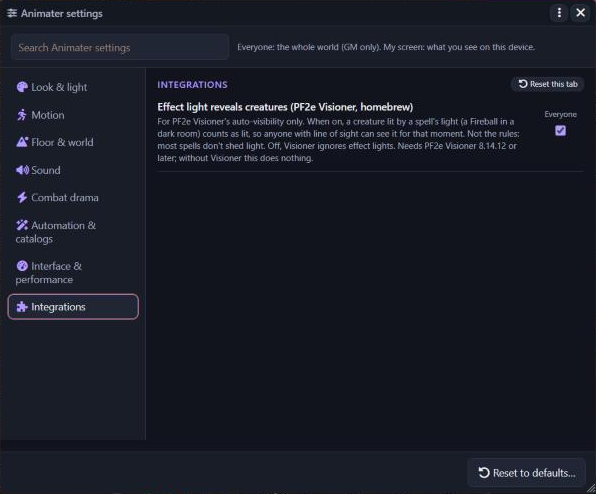
Only rows for active modules show. This world had PF2e Visioner active and none of the others listed there, so there is one row, and its value isn't the default.
Setting names and defaults were read from the code. Other modules' behaviour wasn't tested live while writing this page, and module version numbers come from the changelog and setting text.