Repository navigation
Looks and Tokenshade
Tokenshade is Animater's built-in shader engine for effects on the token's own artwork: flames off the outline, frost creeping in, auras, force fields, material changes and bindings. It needs no other module, and it's drawn on each screen. Most of it writes nothing to tokens or scenes. The exception is a look you put on a token, tile or drawing for everyone (below), which is kept in that thing's own data. Hidden tokens pause their effects.
In a PF2e test world at 3.2.2, its page listed 263 token presets and 45 region presets. Every Token Magic FX preset name works, so older recipes keep playing. With Token Magic FX active, your world's own presets are listed too and drawn by Tokenshade.
- Tokenshade page in the workspace (Tools): browse, build and save your own. New in 3.3.0. Its search stays as you move between Token, Region and Mine.
- The token HUD: a quick picker on the right-click menu of a token. See below.
- The Tile HUD and the Drawing HUD: the same picker, for a tile or a drawing. New in 4.9.0. See below.
- Recipe Studio: open Customize effect on a token filter stage to change every layer's settings. GMs can save the result to My presets.
Token art from another site. New in 3.8.6. The Tokenshade page's preview works with token pictures hosted elsewhere, such as on The Forge or given as an https:// link. It asks that site for leave to use the picture. Where the site refuses, the preview shows its stand-in figure instead. Effects on tokens on the map weren't affected.

The Tokenshade page, with the Bevel preset open. It was taken before the Apply to selected tokens button was added to the Use it card.
New in 4.0.0. Read from the code, not tested live.
A look you put on a token stays there for everyone until it's taken off, through reloads and scene changes. It's kept in the token's own data, so every screen draws it. Each screen still needs Animation quality at Full to draw it, as with any Tokenshade filter.
Right-click a token and click the Tokenshade button (a wand with sparkles) on the left of the HUD. A small picker opens beside it.
| In the picker | What it does |
|---|---|
| On this token | The looks already applied, each with × to take it off. |
| Search box | Looks through every section at once. |
| Section tabs | Recent (your last eight, on this browser only), the Tokenshade page's own sections, then Mine (the presets saved to My presets). |
| Hover a look | Tries it on the token, on your screen only, until the pointer leaves it. |
| Click a look | Applies it for everyone. |
Transitions and looks that follow the game's values aren't offered, because they play once or need those values to make sense. Applying the same look again replaces the older copy. A token holds at most eight applied looks; the oldest goes first.
Who can use it: the GM on any token, a player on tokens they own.
The Use it card has two buttons beside Preview on the canvas:
- Apply to selected tokens puts the look you're viewing, with any changes you've made to its layers, on each selected token you own.
- Remove takes applied looks off the selected tokens. It clears all of them on each token, including those added from the HUD.
To take off just one look among several, use the HUD's × instead. The Tokenshade page itself is GM only, and its two buttons work on tokens only.
New in 4.9.0. Read from the code, not tested live.
Right-click a tile or a drawing and its HUD has the same Tokenshade button as a token's, opening the same picker: hover a look to try it on your screen only, click it to put it on for everyone, and use × under On this tile or On this drawing to take it off.
- A tile takes every look a token can, on its picture. Animater's own work on the tile carries on beside the look, so a tree tile still sways in the wind. A look never changes how fast a tile's video plays; on a token, some looks slow or stop animated art (a creature turned to stone, for example), but never on a tile.
- A drawing takes looks on its shape and its text together. Looks that reach out round the edge, such as glows, flames and outlines, show around it. Looks that change the art itself, such as stains, stone or a shift in colour, show only where the drawing has paint: on a drawing with no fill they show on its line only.
- Not offered on a drawing: the Body forms section (wings and growths), which grow out of a creature's body. As on tokens, Transitions and looks that follow the game aren't offered anywhere.
The looks are kept on the tile or drawing itself, in the same way as on a token: at most eight, the same look again replaces the older copy, and they stay through reloads and are copied with the tile or drawing. Rings and halos are sized to the tile's or drawing's own width and height on the map. Each screen needs Animation quality at Full to draw them.
Who can use it: the GM on any tile or drawing, and a player on a drawing they own. Players don't normally get the Tile HUD at all.
Persistent looks follow a token while the native condition or effect is active, and end when it ends.
- Condition looks chooses Tokenshade (a quiet look on the creature itself) or JB2A (the condition's JB2A animation).
- Conditions transition in plays a transition as one lands: stone creeping up a petrified creature, for example.
- Condition looks grow with their value: Frightened 1 to 4 and the like show stronger looks.
- Subtle effects, conditions and auras draws them all smaller, fainter and calmer. Attack, spell and one-time animations, and your own recipes, are unchanged.
- Lasting condition animations (this device) lets each player show them always, on application and at the creature's turn, or only on application.
Sized to the token's art. New in 4.1.0. A condition's look, a lasting marker or a spell landing on a creature is sized to the token as it's drawn. Art scaled up to 2 in the token's settings gets effects twice as big, smaller art gets smaller ones, and on a token with a dynamic ring the creature is measured as the ring draws it. Auras still measure their reach from the token's square, as the rules do.
Rings that fit. New in 4.1.0. The spinning or glowing border many lasting states draw round a creature (Hasted, Fly Speed, Climb Speed and many more, in PF2e, SF2e and D&D 5e) is no bigger than the token, at its art's scale. Before, it was drawn about half again as big. Auras that show a reach keep their own size.
Who sees a condition's look. Changed in 4.3.2. A condition's look shows to anyone who can see the token, as its status icon does. In PF2e, Hide Condition Update Message used to hide NPCs' condition looks from players; that setting only hides the chat and floating messages, so it no longer affects looks. A token the GM hid, or one a player can't see, still shows nothing. An unidentified effect's look shows only to the GM, and an entry the catalog marks as private only to the GM and the token's owners.
Each conditions and effects catalog has a Lasting animation choice: Stay while active, Play once, then fade, or Play once and at turn start. The conditions catalog also has a Condition look switch. The numbers on these pages are from one PF2e test world, so yours may differ.

Conditions. Taken before 3.8.7, so there's no Reset catalog… button.
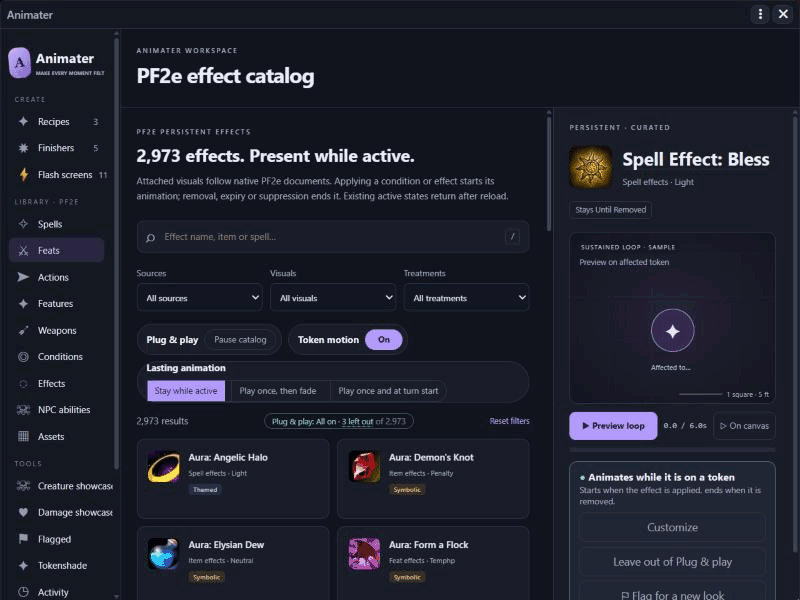
Effects.
Aura style chooses how an aura's reach is drawn:
| Style | How it looks |
|---|---|
| JB2A animations | Looping JB2A footage across the reach. The default. |
| Tokenshade | Drawn on the ground, a crisp line exactly at the reach with a pattern in the aura's colour and theme, and nothing over the creatures inside. Lighter on slower computers. |
Auras outside combat can show them, make them subtle, or hide them until initiative is rolled.
Customizing a Tokenshade aura. New in 3.6.0. With Aura style set to Tokenshade, Customize on an aura opens it as a Tokenshade ground look, with its pattern and colour ready to change, rather than as its JB2A clip. A customized aura's stage has an Area look choice: JB2A animation or Tokenshade ground (round areas). Auras you customized before keep their JB2A look until you switch them.
| Feature | What it does |
|---|---|
| Region looks | A region gives every creature inside it a look, fading in and out. Region configuration → Animater → Creatures inside → Animater look. |
| Weather on creatures | Soaked in rain, dusted in snow. Off by default. A creature under a roof stays dry. |
| Heat and cold around creatures | A fire creature's air shimmers, a cold one breathes mist. |
| Creatures lit by their surroundings | Takes on a nearby light's colour, with a rim of it on the facing side. |
| Sustained spells show who holds them | A faint thread from caster to target while a spell is sustained. |
| New creatures appear | A creature placed on the map forms in a look. By default only summoned creatures do. |
| Teleports dissolve | A teleporting creature dissolves away and forms again where it lands. |
| Defeated look | How a Defeated token is drawn. New defeats only. |
Several of these need Tokenshade token filters on, meaning Animation quality at Full on that screen. See Performance and Quality.
| Setting | Everyone (GM) | My screen | Choices or range | What it does |
|---|---|---|---|---|
| Condition looks | Tokenshade | — | Tokenshade / JB2A | How catalog conditions show on a creature. Tokenshade: a quiet look on the creature itself. JB2A: the condition’s JB2A animation only, with no Tokenshade filters. Also set from each conditions catalog in Animater. |
| Conditions transition in | On | — | — | A condition that has just landed plays a transition before its lasting look: stone creeping up a petrified creature, sickness spreading over the sickened, a curse taking hold of the doomed, life draining from the drained, poison spreading through the veins. Only as it lands, never on a reload. Needs the Tokenshade condition looks. |
| Subtle effects, conditions and auras | Off | — | — | For tables that want only light touches: every catalog effect, condition and aura look on a creature is drawn smaller, fainter and calmer. An aura's ring keeps its size so you still see its reach. Attack, spell and other one-time animations are unchanged, and so are recipes you made yourself. To show lasting looks only when they land, each player can also set "Lasting condition animations". |
| Aura style | JB2A animations | — | JB2A animations / Tokenshade (drawn by Animater) | How an aura’s reach is drawn. JB2A animations: looping JB2A footage across the reach. Tokenshade: drawn by Animater on the ground, a crisp line exactly at the reach with a pattern in the aura’s colour and theme (flame, frost, runes, vines and more) and nothing over the creatures inside; lighter on slower computers. Either way the aura’s small accent stays around its creature. |
| On-token effect under the token | Off | — | — | With the Tokenshade aura style, draws the small effect an aura keeps on its creature under the token instead of over it. Art that fills its square hides whatever does not reach past its edge. Recipes you made yourself keep their own layering. |
| Tokenshade follows the game | On | — | — | Tokenshade effects set to follow the game change with the creature: a look that drains as it is hurt, glows on its turn, shimmers as it climbs. Off: they hold their starting look. |
| Tokenshade reacts to light and weather | On | — | — | Effects that follow the game can also follow how dark it is where the creature stands (a glow brighter in the dark, dimmer in torchlight) and rain, snow or a storm over it (none under a roof). |
| Weather on creatures | Off | — | — | In rain every creature on the scene is soaked (darker, bluer, wet), in snow dusted with snow, from Foundry’s scene weather or FXMaster’s rain and snow. A creature under a roof (a Suppress Weather region) stays dry. Needs Tokenshade token filters on. |
| Condition looks grow with their value | On | — | — | A valued condition (Frightened, Drained, Doomed, Dying…) shows a stronger Tokenshade look at each value. Off: one look for every value, only stronger. |
| Region looks | On | On | — | A region given an Animater look (its right-click panel → Look) shows it on every creature inside, fading in and out as they come and go. Needs Tokenshade token filters on. |
| Heat and cold around creatures | On | On | — | A fire creature’s air shimmers with heat; a cold one breathes a faint mist. From its traits, else its name. Needs Tokenshade token filters on. |
| Creatures lit by their surroundings | On | On | — | A creature near a light (a torch, a brazier, a glowing spell) takes on its colour and catches a rim of it on the side facing it. Strongest in the dark. Needs Tokenshade token filters on. |
| Sustained spells show who holds them | On | On | — | While a creature sustains a spell on another (PF2e and SF2e sustained spells; D&D concentration, its summoned creatures included), a faint shimmering thread runs from the caster to it, motes flowing along it, so everyone sees who holds what. It goes when the spell ends. Drawn at Balanced quality or better. |
| Tokenshade fades | — | Smooth (0.7 s) | At once / Quick (0.3 s) / Smooth (0.7 s) / Slow (1.5 s) | How Tokenshade effects come and go on this screen: they fade in and out, and a look that changes (Frightened 2 easing to 1) crossfades into the next. |
| Auras outside combat | Show them | — | Show them / Subtle (smaller, fainter, calmer) / Hide them until combat | How aura looks (an aura's ring around its creature, often 30 to 90 feet) show while no combat has started on the scene. Subtle draws them smaller, fainter and calmer; Hide them until combat keeps them off the map until initiative is rolled. Allies inside an aura keep their small copy. In combat every aura shows as usual. |
| Tokenshade filters in catalog animations | On | — | — | Catalog animations add matching shader effects on the token itself (flames, frost, glows, shimmer). Drawn by Animater on each screen; nothing is saved to the token. |
| New creatures appear | Summoned creatures form in | — | Summoned creatures form in / Every new token forms in / Off | A creature placed on the map forms in a Tokenshade look: fiends and undead rise from shadow, celestials step out of light, fire creatures rise from the ashes, the rest form from sparkles. Summoned creatures: the ones PF2e Summons Assistant places or that have the summoned trait. Needs Tokenshade token filters on. |
| Teleports dissolve | On | — | — | A teleporting creature dissolves away in a look matched to the spell (sparkles, embers, shadow, light) and forms again where it lands. Off: it fades out quickly. Needs Tokenshade token filters on. |
| Defeated look | Foundry default (skull over the whole token) | — | Foundry default (skull over the whole token) / Small icon / Animater effect | How a Defeated token is drawn (combat tracker, system or finisher). Small icon: a normal status icon instead of the skull over the whole token. Animater effect: the small icon, faint skull smoke and a greyed token while it stays Defeated. Applies to tokens defeated from now on; existing Defeated effects keep their look. |
| Lasting condition animations (this device) | — | Follow the catalog setting | Follow the catalog setting / Always visible / On application and at its turn start / On application only | How lasting conditions and effects show on your screen. "Follow the catalog setting" uses each catalog's Lasting animation switch in Animater. "On application and at its turn start" plays them when applied and again briefly whenever that creature's turn starts in combat. The Defeated look keeps its own setting. Each player's choice affects only their screen. |
Spell and Action Animations · Recipe Studio and Finishers · Fire and Lights
For developers and the curious. Read from the 3.2.2 code, with 3.3.0's changes added and the applied looks checked against the 4.9.0 code, and not run or measured. The counts below are still 3.2.2's. Individual filters' shader bodies weren't reviewed one by one.
Source: scripts/engines/tokenshade/ engine.mjs, filter-factory.mjs, glsl.mjs, animation.mjs, layers.mjs, warmup.mjs, aura-field.mjs, wave-field.mjs, swarm-field.mjs and filters/*. Also scripts/engines/playback/ aura-fields.mjs, persistent-states.mjs, tethers.mjs and tether-art.mjs.
Counted by importing the 3.2.2 modules in Node:
| What | Count |
|---|---|
| Filter types | 60: color 11, light 7, warp 10, elemental 14, field 3, image 3, status 6, damage 2, transition 2, forms 2 |
| Filters with a second "field" pass | 13 |
| Filters with image textures | 3 |
| Built-in preset entries | 308: 263 token, 45 region |
| Distinct preset names | 307, because Barkskin is declared twice |
| Most layers in a built-in preset | 5 |
| Layer cap on an edited stage | MAX_LAYERS = 8 |
A world's own presets, and Token Magic FX's when active, are added at runtime.
One PIXI.Filter subclass, with each type a plain-data spec: defaults, uniforms, optional textures, reach, time scale, order and a GLSL main(). Sources are cached per type.
Attachment. Filters go on token.mesh.filters, after any other module's. tip always draws last. Others sort by zOrder, which is params.zOrder, else spec.order, else 500. No PIXI blendMode is set anywhere under engines/tokenshade/: blending is done in GLSL. No cap on the total filters per token was found.
Common uniforms: uTime, uZoom, uCenter, uSeed, uScreenToArt, uArtToScreen, uArtSize, uTokenSize, uReach, uFxMix.
Update loop. One ticker callback for all entries, removed when none remain. Each tick writes uniforms and measures transforms, and nothing is rebaked. Animations are pure functions of time. sync* types use game.time.serverTime, and driven ones follow hpLost, height, turn, darkness or weather, eased over DRIVE_EASE_MS = 400.
Pausing. If the token or mesh is hidden, not renderable or at zero world alpha, every filter gets enabled = false and its uniforms stop advancing. The filters stay attached.
Field pass. A spec with field first renders its slow silhouette terms into a smaller pooled texture, and the main pass samples it. Resolution is min(inputResolution, max(inputResolution / 8, 1 / spacing)).
Padding. Worked out from the spec's reach, in screen pixels at the current zoom, capped at 2048. Pixels outside the art box and padding pass straight through. autoFit is on. Filter resolution isn't set by this code, so it stays at PIXI's default. Inferred.
Fades. uFxMix carries them. tokenshadeBlend is 0, 300, 700 or 1500 ms.
The code's claim, in a comment, not measured here: on Windows (ANGLE to Direct3D) a shader's first compile "takes 0.1–0.9 s". So warmup.mjs compiles in the background with KHR_parallel_shader_compile, polling COMPLETION_STATUS_KHR, then lets PIXI build its own and relies on the browser's shader cache. Without that extension nothing is warmed. Defaults are parallel = 3, tick = 40 ms and slowBuild = 120 ms. It starts 3000 ms after the trigger, and only on Full. Aura, wave and swarm shaders aren't on the list, so they compile at first use. Inferred.
The engine does no networking, and its header says nothing is synced. That's true of the shader state, but looks applied to a token (below) are kept in its flags, and a recipe's one-shot tokenfx stage is broadcast by the playback layer as a socket message, validated by each receiver and dropped if allowsTokenFx is false. Lasting condition filters use no socket: each client derives them.
Applied looks (4.0.0; tiles and drawings 4.9.0). scripts/engines/playback/applied-looks.mjs. The HUD picker (scripts/ui/tokenshade-hud.mjs) and the studio's Apply to selected tokens write flags.animater.appliedLooks: a list of { id, name, stage }, each a tokenfx stage, at most MAX = 8, the oldest dropped. A stage with the same signature (library, preset, layers, speed, tint, strength) replaces the older entry. APPLIED_ON is Token, Tile and Drawing: each client's AppliedLooks.sync keeps its drawn filters in step with the flag on create…, update… (only when the change touches the flag) and delete… for all three, and 1.5 s after canvasReady for every token, tile and drawing of the scene, through optionalFx.retain, and only where allowsTokenFx holds, so Full only. The picker is mounted on renderTokenHUD, renderTileHUD and renderDrawingHUD, for a GM or a user for whom doc.isOwner is true. HUD_SKIP_FOR leaves out Transitions and Follows the game everywhere, plus Body forms on a drawing. The HUD's hover preview is startTokenFxPreview on this client for up to 30 s. Recents are localStorage key animater.tokenshadeHudRecent, at most 8, shared by all three HUDs.
Hosts (4.9.0). scripts/engines/tokenshade/hosts.mjs. hostKind reads the document name; hostMesh is the tile's mesh or the drawing's shape (its text is a child of the shape, so it is filtered too). tokenFxSize uses hostSize, the tile's width/height or the drawing's shape.width/shape.height, for tiles and drawings, and the token's square times tokenArtScale for tokens (4.1.0). The top-down forms and pace() (video playback rate) apply to tokens only.
tokenFx.engine.enabled follows allowsTokenFx, so filters run on Full only. The exception is fxEssential condition looks, which keep playing at Light, Balanced and Low even though the choice labels say token filters are skipped.
A PIXI.Mesh with a custom shader on one shared unit quad, one mesh per field. They sit on auraRoot, canvas.primary at sortLayer 660, with premultiplied output and no blend mode set. Uniforms and position update per frame, and nothing is rebaked.
-
Aura: a crisp edge at the reach, a motif in a band inside it and a faint wash. There are 23 motif ids, 18 edge-band, 4 ground patterns and
swarm. The motif is chosen by regex over name, description, labels and asset names. - Swarm: procedural bodies in a moving grid, each pixel checking a 3×3 neighbourhood. There's no count constant, because density comes from cell size.
Fades. In over 400 ms, and out over 800 ms when played once. Subtle multiplies alpha by 0.55.
Not confirmed: the setting calls the Tokenshade aura "lighter on slower computers". No measurement is in the code.
Sizes (4.1.0). lastingScale caps a JB2A token_border stage, and an aura granted by another creature, at scale 1; a stage with an auraRadius keeps its own. stateVisible (4.3.2) shows a condition to anyone who can see the token: the GM always, players unless the token is hidden, the effect is unidentified, or the catalog entry is private and they don't own it. PF2e's metagame_secretCondition isn't read.
persistent-states.mjs has no renderer of its own. It composes Sequencer effects, Tokenshade filters, aura fields and body motion, and each client derives them from native documents, with sequence.play({local:true}) and .temporary() per effect.
Reconciling is debounced by 35 ms and scoped to dirty tokens when possible. A JSON signature decides whether to restart a layer. A changed look keeps showing until its replacement is up.
| Quality | States per token | Layers per state |
|---|---|---|
| Full, Light | No limit | No limit |
| Balanced | 3 | 1 |
| Low | 1 | 1 |
| Off | 0 | 0 |
Sustain threads and other travel looks use one container per tether, with textured PIXI.Mesh strips and sprites, from MeshGeometry and MeshMaterial. Textures are painted once to a 2D canvas and cached. Per frame, vertices and UVs are rewritten in place, with no rebuild. There are 9 styles. It's on sortLayer 750. Tags travel as animaterTether on the effect's data, and ends are read live from each client's mesh position.