Repository navigation
Home
中文 · English
很高兴认识你,陌生人! 我是一名初二学生,在中国新疆读初中。英语和写的代码都还在慢慢练, 这份手册是我一边做一边写下来的,请大家多多谅解,也欢迎直接指正。
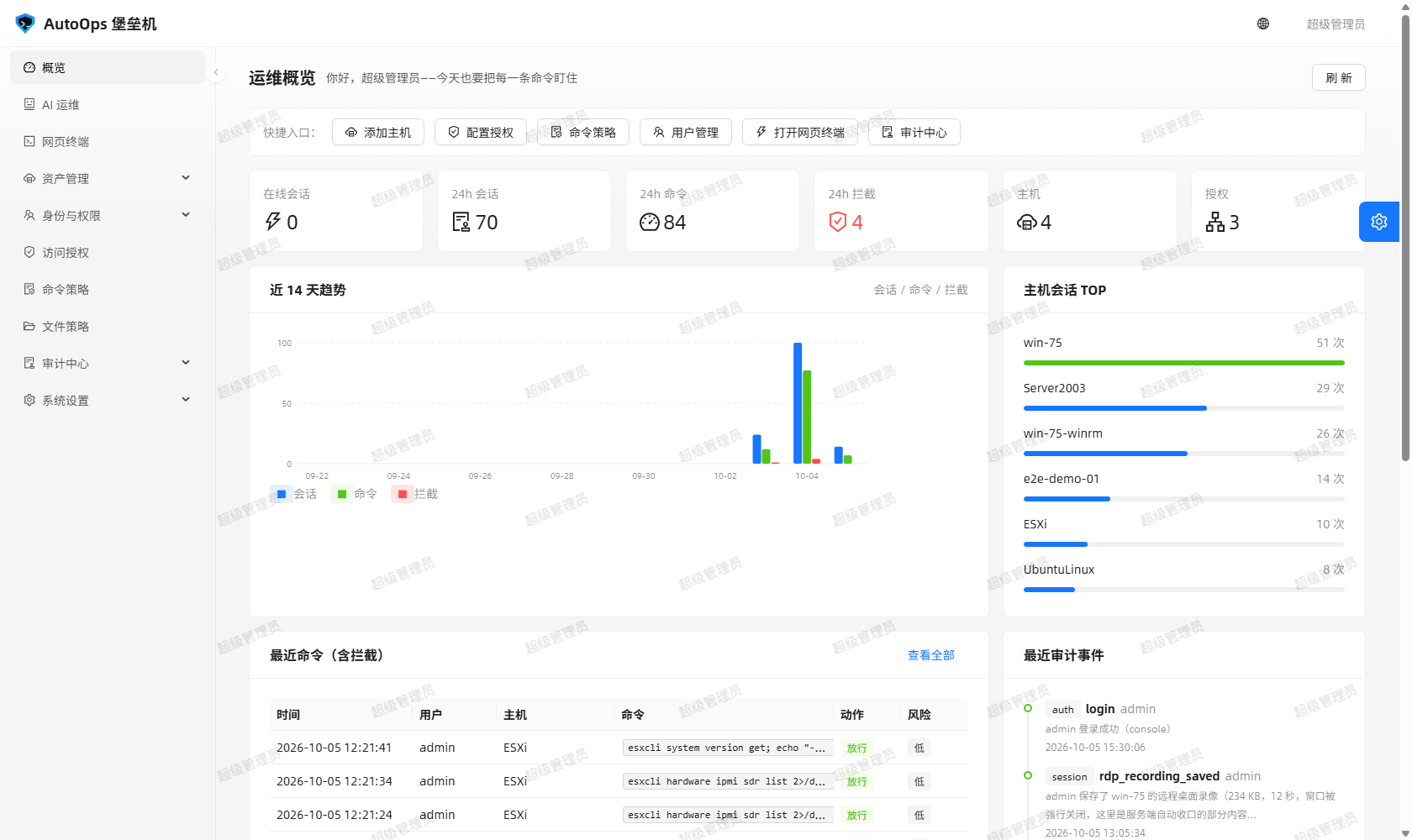
AutoOps 堡垒机是一个开源的运维堡垒机:把「谁能连哪台机器、用哪个账号、能敲什么命令」管起来。 后端是 Python Flask,前端是 ant-design-pro,数据全部落在本地文件里,不依赖外部数据库。
- 仓库主页:https://github.com/sywdn-001/AutoOps
- License:MIT
-
默认管理员:
admin / admin123(首次登录会强制改口令)
| 你是…… | 先看这三页 |
|---|---|
| 第一次听说,想先跑起来看看 | 安装与部署 → 快速上手 → 网页终端与文件管理器 |
| 运维,天天要连机器 | 资产与账号管理 → 网页终端与文件管理器 → SSH 网关 |
| 管理员,负责配权限 | 身份、角色与访问授权 → 命令策略与文件策略 → 系统设置与个人设置 |
| 审计/安全,负责查账 | 审计中心 → 安全加固与日常维护 → AI 运维助手 |
| 遇到问题了 | 常见问题 → 故障排查 → 升级与备份 |
起步
- 安装与部署 —— 环境要求、开发环境三步起服务、Linux 生产部署、环境变量与命令行参数、systemd、上线自检
- 快速上手 —— 从空库到「连上一台机器并留下审计」的最短路径
- 系统设置与个人设置 —— 参数设置、SSH 网关状态、改自己的口令
管资产与权限
- 资产与账号管理 —— 一台主机多个协议端点、账号与凭据、连通性测试、同地址合并、主机分组
- 身份、角色与访问授权 —— 用户、角色与 36 个权限码、授权矩阵、时间窗与并发上限
- 命令策略与文件策略 —— 什么命令能敲、哪些路径能碰,以及怎么先试后配
干活
- 网页终端与文件管理器 —— 浏览器里的 SSH / WinRM 终端,SFTP 浏览上传下载
- 远程桌面与录像 —— 浏览器里的 WebRDP,全程录像与回看
-
SSH 网关 ——
ssh -p 2222 <账号>@<堡垒机>,受管控的授权主机菜单 - AI 运维助手 —— 自然语言下指令,敏感操作要管理员当场确认
查账与维护
- 审计中心 —— 会话/命令/文件/AI 对话/录像/操作日志,以及防篡改哈希链
- 安全加固与日常维护 —— 三把密钥、网络暴露面、备份什么最要紧
- 升级与备份 —— 升级步骤、回滚、迁移到新机器、恢复演练
- 常见问题 / 故障排查
| 想看什么 | 去哪里 |
|---|---|
| 项目介绍与截图 | README.md |
| 18 步图文教程(带截图) | docs/图文教程.md |
| 完整使用手册(按角色分) | docs/使用手册.md |
| 审计与安全说明 | docs/审计与安全.md |
| 需求 → 实现 → 证据 | docs/需求对照.md |
| 门禁与真机实测记录 | docs/验证记录.md |
| 遇到问题想提问 | 提交 Issue 指南 |
| 报告安全漏洞 | SECURITY.md(别开公开 issue) |
Nice to meet you, stranger! I'm an eighth-grade student in Xinjiang, China. My English and my code are still a work in progress — this manual was written while building the project, so please bear with me (and tell me if you can).
AutoOps Bastion is an open-source bastion host: it governs who may reach which machine, with which account, and which commands. The backend is Python Flask, the frontend is ant-design-pro, and all data lives in local files with no external database.
- Repository: https://github.com/sywdn-001/AutoOps
- License: MIT
-
Default administrator:
admin / admin123(you are forced to change it on first sign-in)
| If you are… | Read these three |
|---|---|
| New here and want it running | Install and Deploy → Quick Start → Web Terminal and File Manager |
| An operator connecting to hosts daily | Assets and Accounts → Web Terminal and File Manager → SSH Gateway |
| An administrator managing access | Identity, Roles and Access Grants → Command and File Policies → System and Account Settings |
| An auditor or security reviewer | Audit Centre → Security Hardening and Maintenance → AI Operations Assistant |
| Stuck on something | FAQ → Troubleshooting → Upgrade and Backup |
Getting started
- Install and Deploy — requirements, three commands for a dev setup, Linux production deploy, environment variables and CLI flags, systemd, go-live checks
- Quick Start — the shortest path from an empty database to "connected to a host, with the audit trail written"
- System and Account Settings — parameters, SSH gateway status, changing your own password
Assets and permissions
- Assets and Accounts — one host with several protocol endpoints, accounts and credentials, connectivity tests, merging same-address hosts, host groups
- Identity, Roles and Access Grants — users, roles and the 36 permission codes, the grant matrix, time windows and concurrency limits
- Command and File Policies — what may be typed and which paths may be touched, plus how to dry-run a rule before saving it
Day-to-day work
- Web Terminal and File Manager — SSH / WinRM terminals in the browser, plus SFTP browsing and transfers
- Remote Desktop and Recordings — WebRDP in the browser, recorded end to end and replayable
-
SSH Gateway —
ssh -p 2222 <account>@<bastion>, an audited menu of the hosts you may reach - AI Operations Assistant — plain-language requests, with an administrator confirmation for sensitive tools
Audit and upkeep
- Audit Centre — session / command / file / AI-conversation / recording / operation logs, plus the tamper-evident hash chain
- Security Hardening and Maintenance — the three keys, network exposure, what you must back up
- Upgrade and Backup — upgrading, rolling back, moving to a new machine, restore drills
- FAQ / Troubleshooting
| Looking for | Where |
|---|---|
| Project overview and screenshots | README.md |
| 18-step illustrated tutorial | docs/图文教程.md |
| Full manual by role | docs/使用手册.md |
| Audit and security notes | docs/审计与安全.md |
| Requirement → implementation → evidence | docs/需求对照.md |
| Gates and real-machine test records | docs/验证记录.md |
| How to ask a good question | Issue guide |
| Report a vulnerability | SECURITY.md (please do not open a public issue) |
相关页面 / Related pages: Install-and-Deploy · Quick-Start · FAQ · Troubleshooting