Repository navigation
Audit Center
中文 · English
审计中心回答四个问题:谁、在什么时候、对哪台机器、做了什么。它把六类记录并排放在一起,从「某人登过一次机器」一路下钻到「他敲的那条命令被哪条策略拦了」。
进审计中心需要权限:会话与录像看 session:view,命令记录看 command:view,文件记录看 command:view,操作日志看 audit:view,AI 对话审计看 ai:view,远程桌面录像看 audit:view 或 session:view_all 或 rdp:use。审计员(auditor 角色)看得到所有人,普通用户只看到自己的 —— 这条过滤做在后端,不是前端藏按钮。
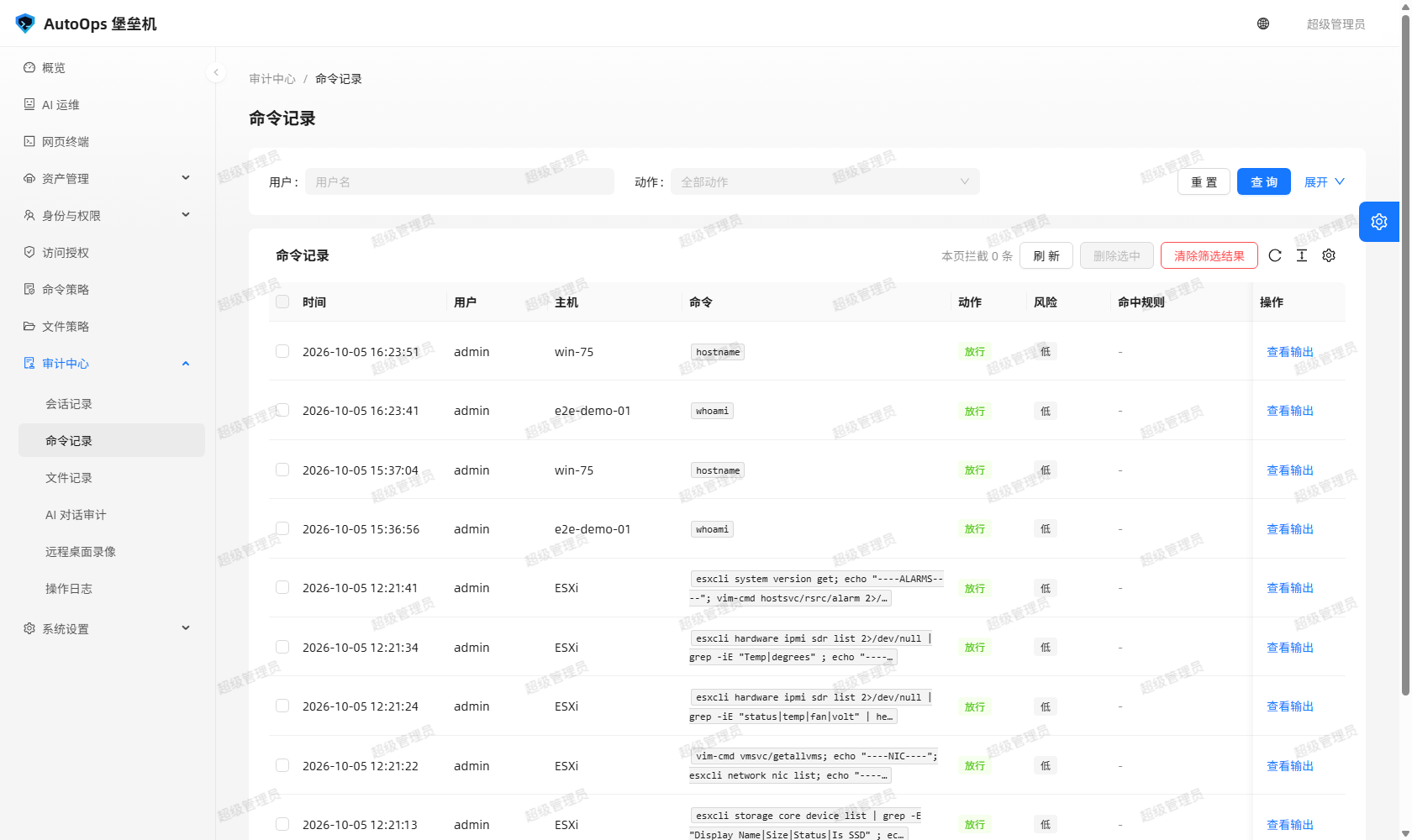
图里能看到什么:命令记录列表一行一条命令 —— 时间、用户、主机、命令本身、放行还是拦截、风险等级、耗时;点开一行看得到完整输出与命中的策略规则。
| 记录 | 入口 | 一条记录回答什么 | 谁看得到 |
|---|---|---|---|
| 会话记录 | 审计中心 → 会话记录 | 谁、从哪来(web/gateway/shell)、用哪个账号、连了哪台机器、什么协议、开始与结束时间、时长、命令数、被拦数、上下行字节数、结束原因、会话录像 |
session:view / session:view_all
|
| 命令记录 | 审计中心 → 命令记录 | 一条命令的原文、完整输出、action、风险级别、命中的策略规则、耗时、退出码 |
command:view / command:view_all
|
| 文件记录 | 审计中心 → 文件记录 | 一次 SFTP 操作(list/read/download/upload/write/mkdir/rename/move/copy/delete/chmod/archive)、路径与目标路径、动作、命中规则、结果、字节数、文件数、耗时 |
command:view / command:view_all
|
| AI 对话审计 | 审计中心 → AI 对话审计 | 用户问了什么、模型回了什么、思考过程、调用了哪个工具、入参、结果、是否敏感、谁确认的 |
ai:view / ai:view_all
|
| 远程桌面录像 | 审计中心 → 远程桌面录像 | 谁录的、被登录的资产账号是哪台机器的、时长、体积、时间、是否「未正常结束」,可回看 |
audit:view 或 session:view_all 或 rdp:use
|
| 操作日志 | 审计中心 → 操作日志 | 控制台动作本身:登录、新建/修改/删除主机与账号、授权变更、策略变更、设置变更、会话建立与中断、清除审计 | audit:view |
会话记录详情有三个视图:概要(上面那些字段)、命令记录(这次会话里逐条命令)、录像回放(会话转录)。文件记录与命令记录长得像,但多两列:路径 与 目标路径 —— 重命名、移动、复制要同时校验源与目标,两条都记下来。
| 字段 | 取值 | 怎么读 |
|---|---|---|
username |
堡垒机登录账号 | 是谁;不是目标机上的账号 |
accountUsername |
资产账号 | 登到目标机上用的是哪个账号 |
hostName / hostAddress
|
主机名 / 地址 | 连的是哪台机器 |
sid |
会话号(64 位) | 一次会话的唯一标识,命令与文件记录都挂在它上面 |
seq |
序号 | 这条命令在这条会话里排第几;被策略拒绝的命令不占执行序号 |
source |
web / gateway / shell
|
从哪来:网页终端、SSH 网关、会话内 /ask-ai
|
protocol |
ssh / winrm / rdp / sftp
|
走的哪条通道,文件管理器固定是 sftp
|
startedAt / endedAt / durationSeconds
|
开始、结束、时长(秒) | 先按时间缩小范围,再按主机 |
bytesIn / bytesOut
|
上下行字节数 | 会话记在 sessions,文件操作记在 file_logs.size
|
status |
active / closed / failed / terminated / denied
|
会话结局;terminated 多半是被强制中断 |
endReason |
文本 | 结束原因,例如 空闲超时自动断开、管理员强制中断、用户在终端里退出了 Windows 会话
|
action |
allow / deny / error / timeout / confirm;本地清屏记 allow 但 reason 写明「本地清屏指令」 |
放行还是被拦;拦截也写审计,而且根本不会下发到目标机 |
result |
success / denied / failure
|
文件域专用:放行了但执行失败也是 failure,不会伪装成成功 |
riskLevel |
low / medium / high
|
来自命中的规则;会话记录里是这次会话的最高风险 |
matchedRuleId / matchedRulePattern
|
规则号 / 规则原文 | 会话与策略的接口 —— 用命令试算器能复现这条判定 |
reason |
文本 | 命中说明或拒绝原因;授权级拒绝时 matchedRuleId 为空 |
三张流水表 audit_logs、command_logs、file_logs 的每一行都带 prev_hash 与 entry_hash 两列 64 位十六进制哈希。
- 计算口径:
entry_hash = HMAC-SHA256(key, table + prev_hash + 规范化字段),其中key = sha256(b"bastion-audit-chain-v1" + SECRET_KEY),密钥只从SECRET_KEY派生,不落库。 -
prev_hash指向上一条记录的entry_hash(按id升序),第一条的prev_hash是空串。写库顺序是「插入取到自增id→ 取上一条哈希 → 赋值 → 提交」,所以链是自然长出来的,不需要额外维护。 - 改一条历史记录,链就断在这里:改字段、改哈希、改连接关系,逐行重算都能点名到具体是哪一行。
校验方式有三种,结论必须一致:
cd bastion-backend && python tools/verify_audit_chain.py[OK] audit_logs: 总行 87, 已哈希 87, 遗留前缀 0, 链内空洞 0, 坏首行 None
- 页面:审计中心 → 操作日志页顶部有「链完整性」徽标,显示三张表的总数、已哈希数、链尾哈希,配「刷新状态」与「逐行校验哈希」两个按钮。
-
接口:
GET /api/audits/chain给徽标用(counts[表] = {total, hashed, pending, pendingPrefix, pendingInside}、heads[表] = {lastId, lastEntryHash, verifiedHead},healthy只看链内空洞),POST /api/audits/chain/verify?table=<表>&expected_head=<哈希>做只读逐行校验;expected_head必须和table一起给,否则 400ANCHOR_NEEDS_TABLE。 -
离线:CLI 还支持
--print-head(打印三张表的链尾锚点,抄到库外的安全地方)与--expect-head audit_logs=<哈希>(复核锚点,对不上 exit 1)。
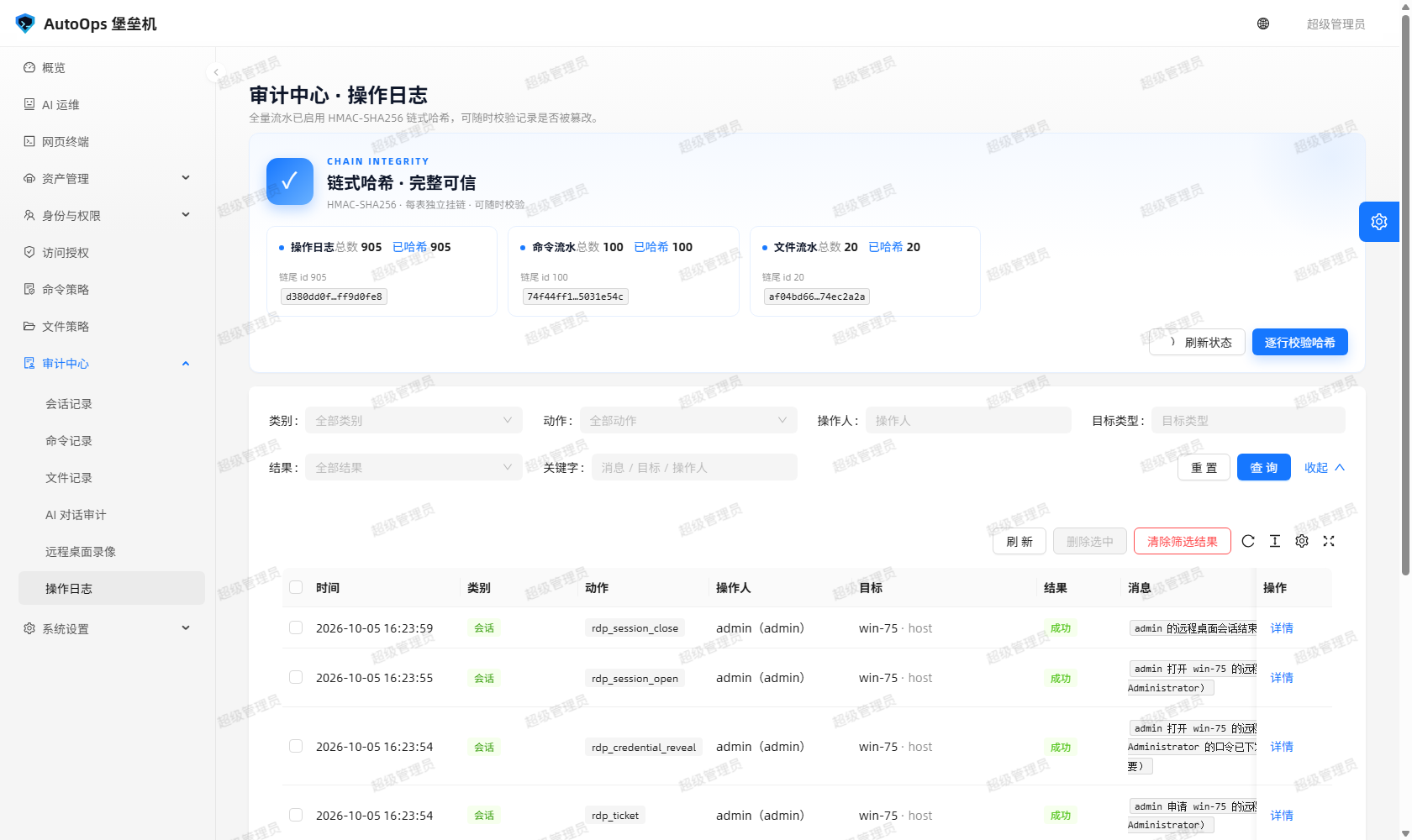
图里能看到什么:三张流水表的链式哈希统计与「逐行校验哈希」的结论;徽标是蓝白就是完整,变红就说明 verify.ok=false。
两个容易误判的地方,界面上也写着:
-
链起步前的空哈希行是合法的(老库升级前补不出哈希),会算进
pendingPrefix,不会把好好的链判成不健康;链内再出现空哈希行才是异常(pendingInside),那是有人想清空哈希冒充升级前遗留。 -
整段删掉表尾的记录,库内自洽是抓不出来的,只能拿库外锚点比对。所以
--print-head抄下来的那串哈希要真的抄走。
- 会话记录可按用户、主机、会话号、协议、状态、时间范围筛;命令记录可按会话、用户、主机、
action、风险级别、关键字(命令原文)筛;文件记录可按用户、主机、会话号、操作、动作、结果、风险筛;操作日志可按类别、动作、结果、操作人、目标类型、关键字筛;录像可按操作人、资产账号、主机、时间筛。 - 列表都是分页的(默认每页 20 条),后端统一返回
{data, total, page, pageSize}。翻页是按id倒序,最近的在最前面。 -
导出:以界面为准。 网页上提供的是「按当前筛选条件清除」和逐页浏览;需要整批数据的场合,建议直接查接口(认证用
Authorization: Bearer <JWT>,也支持?token=)或读instance/bastion.db。
「会话记录」页对 status=active 的会话有「中断」按钮,落在 POST /api/sessions/<id>/terminate,需要 session:terminate。
- 点下去会走在线会话注册表把会话关掉,
endReason写成管理员强制中断,会话状态变成terminated。 - 中断动作本身也写一条操作日志(
terminate_session)。实测里中断 RDP 会话时,terminate_session与rdp_session_close相隔 118 毫秒成对出现。 - RDP 会话同样登记在注册表里,所以「中断」对远程桌面也生效 —— 不是只看网页终端和网关。
| 权限码 | 给什么 |
|---|---|
session:view |
看会话记录;加上 session:view_all 才看得到别人的
|
session:view_all |
看所有人的会话 |
session:replay |
回放会话录像(转录) |
session:terminate |
中断在线会话 |
command:view |
看命令记录 |
command:view_all |
看所有人的命令记录;清除命令/文件审计也要求它 |
audit:view |
看操作日志、AI 之外的审计页;也是录像列表的可见条件之一 |
rdp:use |
使用远程桌面;录像列表对它也开放 |
内置角色的实际口径:auditor 只读审计(主机、策略、会话、命令、审计日志),没有终端、没有写权限;viewer 只看得到自己的会话与命令,它没有 command:view_all,所以清不掉审计;ops 有 command:view_all,但不能管理用户、角色与系统设置。
审计数据默认长期保留,instance/transcripts/<sid>.log 里的会话录像跟着会话走。清除是管理员专属操作,四个审计页(会话 / 命令 / 文件 / 操作日志)都支持两种口径:勾选后「删除选中」,或按当前筛选条件「清除筛选结果」(未设置筛选就是清空全部)。
POST /api/audits/delete          # ids 删勾选行;all=true 加筛选条件清空,all 必须显式 true
POST /api/commands/delete        # sessionId / username / hostId / action / riskLevel / keyword
POST /api/sessions/delete        # 级联删该会话的命令日志与录像文件
POST /api/audits/files/delete    # operation / action / result / riskLevel / username / hostName / sid / keyword
三件事必须知道:
-
清除会话是级联的:该会话的命令日志与磁盘上的录像文件一起删;
status=active的进行中会话会被跳过,并在skippedActive里计数(提示先中断再清除)。 -
清除本身留痕:每次清除都写一条审计,记下谁、什么时候、按什么条件、删了多少条(
purge_audits/purge_commands/purge_sessions/purge_file_logs)。 -
文件记录的清除在权限模型里等价于「命令记录清除」,要
command:view_all(接口是POST /api/audits/files/delete,审计动作名是purge_file_logs)。联调脚本里用e2e-viewer实测过:没有这个权限,接口直接 403。
- 先按时间缩小范围:知道大概几点出的问题,就把审计页的时间范围卡到那一两个小时。
-
再按主机 / 账号:用主机名或
accountUsername过滤,确认是「就这一台」还是「一片机器都这样」。 -
最后看命令与策略命中:进命令记录看
command、output、action、matchedRuleId。被拦的命令不下发目标机,所以「命令报错」和「被策略拦住」是两种现象:前者action=allow但output里有异常,后者action=deny并带命中规则。 - 需要复现判定时,把命令原文丢进「命令试算器」,它只判定不写审计,结果与线上一致。
- 会话级的异常(比如连接断了、被强制中断了)看
status与endReason,再看录像回放里断开前最后几屏。 - 怀疑审计被动过,就跑
python tools/verify_audit_chain.py,再比对库外锚点。
-
哈希链防的是「偷偷改一条」,不是「拿到服务器的人」。 手里有数据库写权限、又拿得到
SECRET_KEY的人,可以改完之后把整条链从头重算一遍,链依然自洽。哈希链的价值在于让「悄悄改一条历史记录」留下无法解释的断口,它不提供对服务器管理员的防护。 - 同理,整段删尾行在库内看不出问题,必须靠库外锚点(
--print-head抄走的那串哈希)。 - 录像「未正常结束」(
recovered=true)不是异常,是窗口被强行关掉(关标签页、崩溃、断网)后服务端自动收口的部分录像 —— 界面会把它标出来,别把「只录到一半」当成「正常结束」。 - 链完整性徽标、
GET /api/audits/chain与 CLI 的结论必须同声:徽标变红 ⇔verify.ok=false。
更细的口径与威胁模型见 安全加固与日常维护 与 docs/审计与安全.md。字段名与接口路径以代码为准。
The Audit Centre answers four questions: who, when, against which machine, did what. It puts six kinds of records side by side, so you can go from "somebody signed in to a host once" all the way down to "which policy rule blocked the command they typed".
Access needs permissions: sessions and recordings need session:view, command logs need command:view, file logs need command:view, operation logs need audit:view, AI conversation audit needs ai:view, and RDP recordings need audit:view or session:view_all or rdp:use. An auditor (the built-in auditor role) sees everybody; an ordinary user sees only their own records — that filter runs in the backend, it is not a hidden frontend button.
What you can see: one row per command — time, user, host, the command itself, allowed or denied, risk level, duration. Open a row to read the full output and the policy rule that matched.
| Record | Where | What one record answers | Who can read it |
|---|---|---|---|
| Session records | Audit Centre → Sessions | Who, from where (web/gateway/shell), which account, which host, which protocol, start and end time, duration, command count, denied count, bytes in and out, end reason, session transcript |
session:view / session:view_all
|
| Command logs | Audit Centre → Commands | The exact command, its full output, action, risk level, the policy rule that matched, duration, exit code |
command:view / command:view_all
|
| File logs | Audit Centre → Files | One SFTP operation (list/read/download/upload/write/mkdir/rename/move/copy/delete/chmod/archive), path and target path, action, matched rule, result, bytes, file count, duration |
command:view / command:view_all
|
| AI conversation audit | Audit Centre → AI | What the user asked, what the model answered, its reasoning, which tool was called, the arguments, the result, whether it was sensitive, who approved it |
ai:view / ai:view_all
|
| Remote desktop recordings | Audit Centre → RDP recordings | Who recorded it, which asset account on which host, duration, size, time, whether it ended abnormally, and playback |
audit:view or session:view_all or rdp:use
|
| Operation logs | Audit Centre → Operation logs | Console actions themselves: sign-in, creating/editing/deleting hosts and accounts, grant changes, policy changes, settings changes, session open and close, audit purges | audit:view |
A session detail has three views: Summary (the fields above), Commands (every command of that session), and Replay (the session transcript). File logs look like command logs but carry two extra columns, path and target path — rename, move and copy check the source and the destination, and both get recorded.
| Field | Values | How to read it |
|---|---|---|
username |
Bastion login | Who it was — not the account on the target host |
accountUsername |
Asset account | Which account was used to sign in to the target host |
hostName / hostAddress
|
Hostname / address | Which machine was reached |
sid |
Session id (64 chars) | Unique per session; commands and file operations hang off it |
seq |
Sequence number | Position of this command in the session; a command rejected by policy does not consume a sequence number |
source |
web / gateway / shell
|
Where it came from: web terminal, SSH gateway, in-session /ask-ai
|
protocol |
ssh / winrm / rdp / sftp
|
Which channel; the file manager is always sftp
|
startedAt / endedAt / durationSeconds
|
Start, end, duration in seconds | Narrow by time first, then by host |
bytesIn / bytesOut
|
Bytes in and out | Sessions keep them in sessions; file operations keep file_logs.size
|
status |
active / closed / failed / terminated / denied
|
How the session ended; terminated usually means it was killed |
endReason |
Text | Why it ended, e.g. 空闲超时自动断开, 管理员强制中断, 用户在终端里退出了 Windows 会话
|
action |
allow / deny / error / timeout / confirm; a local clear-screen is logged as allow with a reason saying so |
Allowed or blocked. Blocks are audited too, and the command never reaches the target host |
result |
success / denied / failure
|
File domain only: allowed but failed at the host is still failure, never dressed up as success |
riskLevel |
low / medium / high
|
Comes from the matched rule; on a session it is the highest risk of that session |
matchedRuleId / matchedRulePattern
|
Rule id / rule text | The bridge between a session and the policy; the command dry-runner reproduces the same verdict |
reason |
Text | Why it matched or was refused; a grant-level refusal leaves matchedRuleId empty |
Every row of the three ledger tables audit_logs, command_logs and file_logs carries two 64-character hex columns, prev_hash and entry_hash.
- How it is computed:
entry_hash = HMAC-SHA256(key, table + prev_hash + normalised fields)wherekey = sha256(b"bastion-audit-chain-v1" + SECRET_KEY). The key is derived fromSECRET_KEYonly and is never stored in the database. -
prev_hashpoints at the previous row'sentry_hashin ascendingidorder; the first row'sprev_hashis empty. The write order is "insert to get the auto-incrementid→ look up the previous hash → assign the two columns → commit", so the chain grows naturally with no extra maintenance. - Change one historical record and the chain breaks right there: edited fields, edited hashes or rewired links are all pinpointed to a specific row when the chain is recomputed.
Three ways to verify, and all three must agree:
cd bastion-backend && python tools/verify_audit_chain.py[OK] audit_logs: 总行 87, 已哈希 87, 遗留前缀 0, 链内空洞 0, 坏首行 None
- Page: the top of Audit Centre → Operation logs shows a "chain integrity" badge with the totals, hashed counts and chain-head hashes of all three tables, plus Refresh status and Verify every row.
-
API:
GET /api/audits/chainfeeds that badge (counts[table] = {total, hashed, pending, pendingPrefix, pendingInside},heads[table] = {lastId, lastEntryHash, verifiedHead};healthylooks only at in-chain holes), andPOST /api/audits/chain/verify?table=<table>&expected_head=<hash>runs a read-only row-by-row check.expected_headmust be given together withtable, otherwise 400ANCHOR_NEEDS_TABLE. -
Offline: the CLI also takes
--print-head(print the chain-head anchors of the three tables, so you can copy them somewhere outside the database) and--expect-head audit_logs=<hash>(re-check an anchor; a mismatch exits 1).
What you can see: the hash-chain statistics for the three ledger tables and the verdict of "verify every row". A blue-and-white badge means the chain is intact; red means verify.ok=false.
Two things people get wrong, and the interface says so too:
-
A row with an empty hash before the chain starts is legitimate (data from before an upgrade cannot be hashed retroactively). It counts as
pendingPrefixand does not make a healthy chain look broken. An empty hash inside the chain is the anomaly (pendingInside) — that is somebody clearing hashes to pass them off as pre-upgrade leftovers. -
Deleting rows from the tail of a table leaves the database self-consistent, so it cannot be caught from inside. Only an off-database anchor can. So actually copy away the hashes
--print-headprints.
- Sessions filter by user, host, session id, protocol, status and time range. Command logs filter by session, user, host,
action, risk level and keyword (the command text). File logs filter by user, host, session id, operation, action, result and risk. Operation logs filter by category, action, result, actor, target type and keyword. Recordings filter by operator, asset account, host and time. - Every list is paged (20 rows per page by default) and the backend returns
{data, total, page, pageSize}uniformly. Paging is by descendingid, so the newest rows come first. -
Exporting: whatever the interface offers is what you get. The web UI gives you "purge the current filter result" plus page-by-page browsing. When you need the whole dataset, query the API directly (authenticate with
Authorization: Bearer <JWT>,?token=also works) or readinstance/bastion.db.
On the Sessions page, a session with status=active has a Terminate button, backed by POST /api/sessions/<id>/terminate and requiring session:terminate.
- Terminating goes through the live-session registry, writes
endReasonas管理员强制中断and flips the session toterminated. - The termination itself is logged as an operation log entry (
terminate_session). In a real measurement, terminating an RDP session producedterminate_sessionandrdp_session_close118 milliseconds apart. - RDP sessions are registered in the same registry, so Terminate works for remote desktop too, not only for the web terminal and the SSH gateway.
| Permission code | What it grants |
|---|---|
session:view |
Read session records; you need session:view_all to see other people's
|
session:view_all |
See everyone's sessions |
session:replay |
Replay a session transcript |
session:terminate |
Terminate a live session |
command:view |
Read command logs |
command:view_all |
See everyone's command logs; purging command and file audits also requires it |
audit:view |
Read operation logs and the audit pages other than AI; also one of the conditions for the recordings list |
rdp:use |
Use remote desktop; the recordings list is open to it as well |
What the built-in roles actually get: auditor is read-only audit (hosts, policies, sessions, commands, audit logs) with no terminal and no write access; viewer sees only its own sessions and commands and has no command:view_all, so it cannot purge audit data; ops has command:view_all but cannot manage users, roles or system settings.
Audit data is kept long term by default, and the session transcripts under instance/transcripts/<sid>.log travel with their sessions. Purging is administrator-only. All four audit pages (sessions / commands / files / operation logs) support two forms: tick rows and Delete selected, or Purge filter results on the current filter (with no filter set, that is "purge everything").
POST /api/audits/delete          # ids to delete ticked rows; all=true plus filters to purge, all must be explicit
POST /api/commands/delete        # sessionId / username / hostId / action / riskLevel / keyword
POST /api/sessions/delete        # cascades: deletes that session's command logs and recording files
POST /api/audits/files/delete    # operation / action / result / riskLevel / username / hostName / sid / keyword
Three things you must know:
-
Purging a session cascades: that session's command logs and its on-disk transcript go with it. Sessions with
status=activeare skipped and counted inskippedActive(the UI tells you to terminate them first). -
A purge leaves a trace of itself: every purge writes an audit entry naming who, when, with what filter, and how many rows were deleted (
purge_audits/purge_commands/purge_sessions/purge_file_logs). -
Purging file logs is equivalent to purging command logs in the permission model and needs
command:view_all(endpointPOST /api/audits/files/delete, audit actionpurge_file_logs). The live test script verified withe2e-viewer: without that permission the endpoint returns 403.
- Narrow by time first. If you roughly know when it happened, clamp the time range to that hour or two.
-
Then by host or account. Filter on the hostname or
accountUsernameto see whether it is one machine or a whole rack. -
Finally read the command and the policy hit. In command logs look at
command,output,actionandmatchedRuleId. A blocked command never reaches the target host, so "the command failed" and "policy blocked it" are different symptoms: the former hasaction=allowwith an error inoutput, the latter hasaction=denywith a matched rule. - To reproduce the verdict, paste the command into the command dry-runner. It only evaluates and writes no audit, and it agrees with production.
- For session-level trouble (a dropped connection, a forced termination) read
statusandendReason, then replay the last few screens of the transcript. - If you suspect the audit itself was touched, run
python tools/verify_audit_chain.pyand compare the off-database anchors.
-
The hash chain defends against silently editing one record, not against whoever owns the server. Anyone with database write access and
SECRET_KEYcan edit a row and then recompute the whole chain from scratch; the chain stays self-consistent. Its value is that a quiet edit to one historical record leaves an unexplained break. It is not protection from a server administrator. - By the same token, deleting rows from the tail looks fine from inside the database; only an off-database anchor (
--print-headhashes you copied away) can prove it. - A recording marked abnormally ended (
recovered=true) is not a fault: it is the partial recording the server salvaged after the window was killed (tab closed, browser crashed, network dropped). The UI marks it so you do not mistake "half recorded" for "ended normally". - The chain integrity badge,
GET /api/audits/chainand the CLI must always agree: a red badge ⇔verify.ok=false.
For the finer definitions and the threat model, see Security Hardening and Maintenance and docs/审计与安全.md. Field names and endpoint paths follow the code.
相关页面 / Related pages: Home · Security-and-Maintenance · AI-Assistant