Repository navigation
Policies
中文 · English
身份与授权决定「谁能进哪台机器」,策略决定「进去之后能干什么」。堡垒机把这件事分成两套策略:命令策略管命令行里敲了什么,文件策略管文件管理器里碰了哪条路径。菜单在「策略管理 → 命令策略」与「策略管理 → 文件策略」。
一条命令规则由四件事决定:匹配方式(怎么算命中)、优先级(谁先判)、风险等级(有多危险)、动作(命中后放行还是拦下)。
| 字段 | 取值与默认值 |
|---|---|
优先级 priority
|
默认 100,数字越小越先命中;命中即结束,后面的规则不再看。建议高危规则给 10~50 |
匹配方式 match_type
|
regex 正则表达式(默认)、prefix 前缀匹配、exact 精确匹配、contains 包含匹配 |
模式 pattern
|
按匹配方式解释的字符串,例如 ^\s*rm\s+-rf\s+/
|
动作 action
|
allow 放行、deny 拦截、confirm 需确认 |
风险等级 risk_level
|
low 低、medium 中(默认)、high 高、critical 致命 |
说明 description
|
这条规则为什么存在,最长 200 字 |
启用 enabled
|
默认开,关掉的规则不参与判定 |
四种匹配方式的含义(界面里贴在输入框下方):
-
精确匹配
exact:整条命令完全等于 pattern 才命中。例:pattern=whoami只拦whoami,不拦sudo whoami; -
前缀匹配
prefix:命令以 pattern 开头才命中(不要求单词边界)。例:pattern=rm会连rmdir一起命中,用rm -rf更精确; -
包含匹配
contains:命令任意位置包含 pattern 即命中。例:pattern=/etc/shadow; -
正则表达式
regex:按 Python 正则匹配整条命令。例:^\s*rm\s+-rf\s+/拦截递归强删根目录;注意转义与误伤范围。
策略自身还有一个字段 default_action(未命中任何规则时怎么处理,deny / allow,默认 allow),界面上的说法是「未命中任何规则时:默认放行 / 默认拦截」。
引擎(bastion-backend/app/policy.py)不是简单地对整行做一次正则:
- 用一遍状态机按
&&、||、;、|与换行把命令行拆成多段(正确跳过引号里的分隔符与反斜杠转义),每一段单独判定; - 抽出命令替换
$(...)与反引号`...`里的子命令,递归判定 —— 所以echo $(rm -rf /)也躲不过去; - 规则按
priority升序逐条比对,第一条命中的规则即定论,不再看后面的规则; - 一条都没命中时,按策略的
default_action处理。
-
allow:放行,命令发往目标机; -
deny:拦截。被拒绝的命令不会发往目标机,用户在终端里当场看到拒绝原因,审计里记denied; -
confirm:高危命令不直接执行,要求管理员当场确认后才发出去。
会话控制指令 exit / quit / logout / bye 在策略评估之前就放行(is_session_exit()),否则一个「拦下一切」的策略会把人锁死在会话里 —— 但它们仍然照常写审计,动作为 allow。
上线一条新规则之前,先在策略页下半部分的「命令试算器」里试一条命令:输入一条命令,实时看命中哪条规则、放行还是拦截。试算是只读的,只需要 policy:view。
结论会显示「放行 / 拦截」、「命中动作」、「风险等级」、「生效策略:<策略名> #<策略ID>」,以及命中的「命中规则」#<规则ID> 与它的模式串。接口是 POST /api/policies/<id>/test 与 POST /api/policies/evaluate。
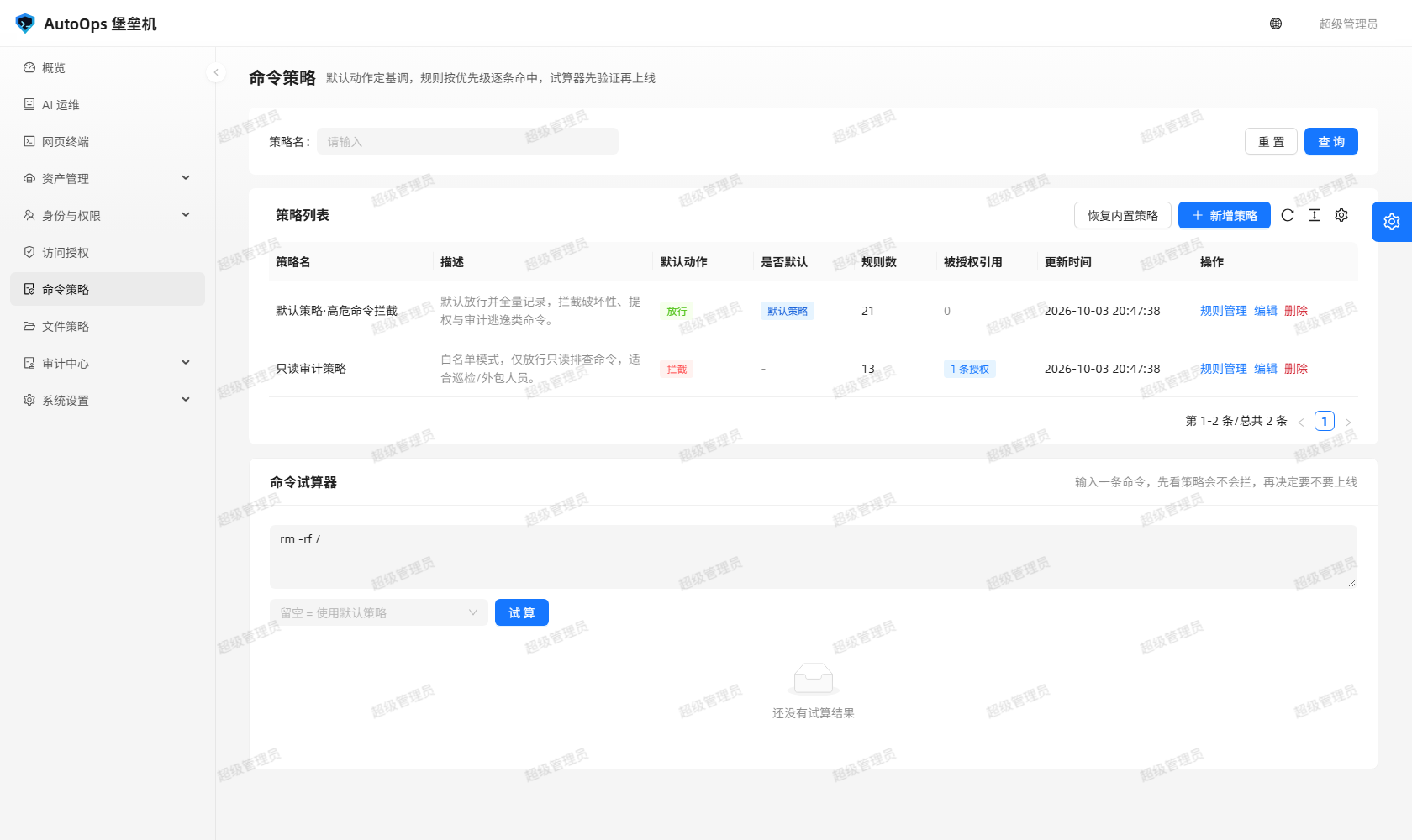 图里能看到:命令策略的默认动作、「规则管理」抽屉里按优先级排列的规则,以及下半部分的命令试算器与命中结论。
系统自带四套模板,由 BUILTIN_POLICY_REV 版本化管理,随时可以用「重置内置策略」恢复:
| 策略 | 思路 |
|---|---|
| 只读审计策略 | 默认拒绝的白名单思路:只放行查询类命令,同时拦截输出重定向与 tee / dd / truncate / mkfifo / mknod,并拦截读取 /etc/shadow、/etc/sudoers、私钥等凭据文件 |
| 标准运维策略 | 默认放行的黑名单思路:放行日常运维,拦下 rm -rf /、mkfs、dd of=/dev/*、shutdown / reboot、账号变更、visudo、iptables -F、history -c 等高危动作 |
| 高危需确认 | 高危命令用 confirm,由管理员当场确认 |
| 全审计放行 | 只记录、不拦截,适合先观察一段时间再做收紧 |
文件策略回答的是「这条路径上,允许做哪些文件操作」。它和授权里的开关是两道闸:授权开关决定你能不能用文件管理器,文件策略决定这条路径允不允许。
| 字段 | 取值与默认值 |
|---|---|
优先级 priority
|
默认 100,数字越小越先命中,命中即结束 |
适用操作 operation
|
单个操作,或 * 表示全部操作(默认 *) |
匹配方式 match_type
|
glob 通配符(默认,* 可跨目录)、regex 正则表达式、prefix 前缀匹配、contains 包含匹配 |
路径 / 模式 path_pattern
|
例如 /etc、/srv/app、/etc/**
|
动作 action
|
allow 放行、deny 拦截,默认 deny
|
风险等级 risk_level
|
low / medium(默认)/ high / critical
|
说明 description
|
为什么拦这条路径,最长 200 字 |
启用 enabled
|
默认开 |
可用的操作名:list、read、download、archive、upload、write、mkdir、rename、move、copy、delete、chmod(界面「适用操作」下拉里由 GET /api/file-policies/operations 提供,另有 * 全部操作)。策略的 default_action 由「未命中任何规则时」的单选决定:默认放行适合「只拦敏感路径」,默认拦截适合「只放行白名单路径」。
三种匹配方式的示例:glob(* 可跨目录)/etc/** 匹配 /etc 下任意层级、/home/*/data 只匹配一层目录;regex ^/var/log/.*\.log$;prefix /srv/app 匹配 /srv/app 与其下所有路径。
rename / move / copy 这类「从一个路径挪到另一个路径」的操作,会同时校验源路径与目标路径,只在源路径上放行是不够的。
| 策略 | 思路 |
|---|---|
| 默认文件策略·敏感路径拦截 | 默认放行常规运维操作,叠加 14 条拦截规则:.ssh 目录、id_rsa / *.pem / .netrc / .pgpass 等私钥与凭据文件、向 /etc / /boot / /sys 等系统目录写入;「复制到系统目录」按目标路径判定 |
| 只读浏览策略 |
default_action=deny,只放行 list 导航与白名单目录下的打包下载 archive
|
被拦下时的提示是这种形态:
文件操作被策略「默认文件策略·敏感路径拦截」拦截:操作 [read] 源路径 [/.ssh/id_rsa] 命中规则 #1:禁止通过文件管理器访问 .ssh 目录
文件策略页下半部分是「操作试算」:选一个操作、填一条路径(以及可选的策略),点「试算」,看这条操作会被允许还是拒绝。重命名 / 移动 / 复制必须同时填源路径与目标路径,否则校验不完整。
结论用「允许执行 / 拒绝执行」加大标签展示,并列出:判定说明(理由)、命中规则(#<规则ID> 加模式串;没命中时写明「未命中任何规则,按默认动作处理」)、试算路径。接口是 POST /api/file-policies/evaluate,以及针对某个会话的 POST /api/files/sessions/<sid>/check(只做判定、不写审计)。
同一套策略覆盖堡垒机的全部四个入口,谁都不能绕开:
| 入口 | 说明 |
|---|---|
| 网页终端 | 每条命令在发出前过一遍命令策略 |
| 文件管理器(SFTP) | 每个文件操作过一次文件策略 |
| AI 工具调用 | AI 助手代你执行命令或文件操作时同样受策略约束(POST /api/terminal/exec 需要 terminal:use 且 ai:tool_exec,写操作类工具还要 ai:tool_write) |
| SSH 网关 |
ssh -p 2222 进来的会话走的是同一套命令策略 |
另外,会话建立时会把当时的命令策略快照进会话(授权里的 policy_id 是冻结式的),所以中途改策略不会影响已经在跑的会话;文件策略则按实时读取判定(file_policy_id 留空时走系统默认文件策略)。
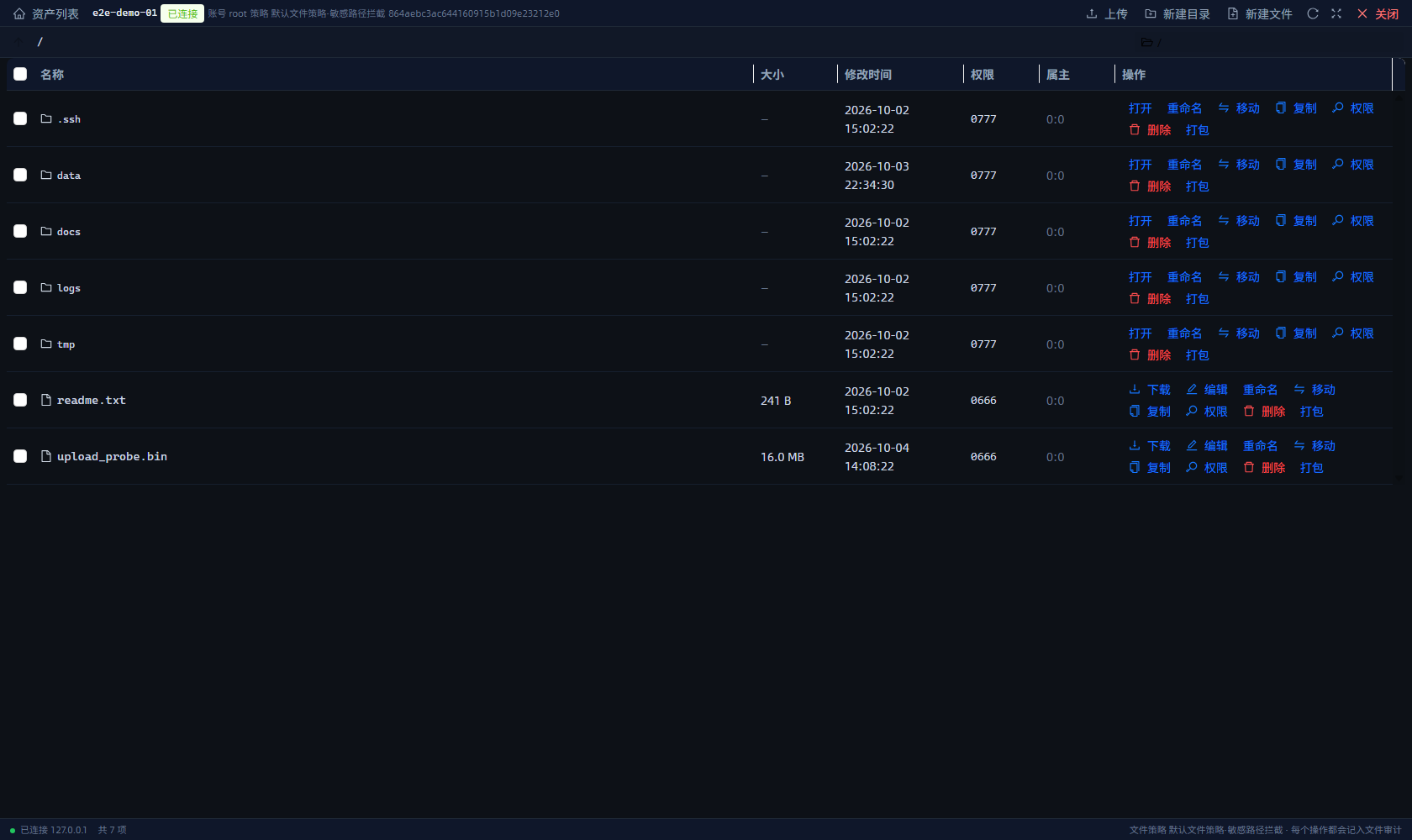 图里能看到:文件管理器里的路径导航与操作按钮 —— 这些操作每一个都会先过文件策略再执行。
-
命令:写
command_logs,带action(allow/deny/error/timeout)与命中的策略信息。放行要记,拒绝也要记; -
文件操作:写
file_logs,三种结果success(放行)、denied(被策略拦下)、failure(执行失败),并留痕用户、主机、会话号、操作、路径、目标路径、动作、风险级别、命中规则号与规则文本、原因、字节数、文件数、耗时; - 试算只判定,不写审计(试算器就是给人试的,不该污染审计数据)。
- 命令策略引擎的拆段与子命令递归细节:以
bastion-backend/app/policy.py为准; - 文件策略判定(
evaluate_file_policy()、WRITE_OPERATIONS/DOWNLOAD_OPERATIONS/UPLOAD_OPERATIONS的划分):以bastion-backend/app/file_policy.py与bastion-backend/app/files/为准; - 内置模板的规则全集随
BUILTIN_POLICY_REV/BUILTIN_FILE_POLICY_REV变化,逐条规则请看策略页的「规则管理」抽屉或代码bastion-backend/app/__init__.py; - 规则表单的动作下拉目前只有「放行」与「拦截」两项,而引擎与内置的「高危需确认」策略支持
confirm(需确认),以代码与docs/使用手册.md为准。
Identity and grants decide who may reach which machine; policies decide what may be done after that. The bastion splits the job into two policy families: command policies watch what you type on the command line, file policies watch which paths you touch in the file manager. The menus are "策略管理 → 命令策略" and "策略管理 → 文件策略".
One command rule is defined by four things: match type (what counts as a hit), priority (who is evaluated first), risk level (how dangerous it is) and action (allow or block once it hits).
| Field | Values and default |
|---|---|
Priority priority
|
Default 100; a smaller number is evaluated first, and the first hit ends evaluation. Give dangerous rules 10–50 |
Match type match_type
|
regex regular expression (default), prefix, exact, contains
|
Pattern pattern
|
A string interpreted by the match type, e.g. ^\s*rm\s+-rf\s+/
|
Action action
|
allow, deny, confirm
|
Risk level risk_level
|
low, medium (default), high, critical
|
Description description
|
Why this rule exists, up to 200 characters |
Enabled enabled
|
On by default; a disabled rule takes no part in evaluation |
What the four match types mean (the text sits right below the input box in the UI):
-
Exact
exact: the whole command must equal the pattern.whoamiblockswhoamibut notsudo whoami; -
Prefix
prefix: the command must start with the pattern (no word boundary). The patternrmalso hitsrmdir;rm -rfis more precise; -
Contains
contains: the pattern appearing anywhere in the command is a hit, e.g./etc/shadow; -
Regex
regex: a Python regular expression matched against the whole command, e.g.^\s*rm\s+-rf\s+/blocks a recursive force-delete of the root directory. Watch escaping and the blast radius.
A policy itself also has default_action (what happens when no rule matches, deny / allow, default allow), shown in the UI as "未命中任何规则时:默认放行 / 默认拦截".
The engine (bastion-backend/app/policy.py) does not run one regex over the raw line:
- A single-pass state machine splits the command line on
&&,||,;,|and newlines (correctly skipping separators inside quotes and escaped characters), and each segment is evaluated on its own; - Command substitutions
$(...)and backticks`...`are extracted and evaluated recursively — soecho $(rm -rf /)cannot slip past; - Rules are compared in ascending
priorityorder and the first matching rule is final; later rules are not consulted; - If nothing matches, the policy's
default_actionapplies.
-
allow: the command is sent to the target host; -
deny: blocked. A denied command is never sent to the target host; the user sees the refusal reason in the terminal right away, and the audit recordsdenied; -
confirm: a high-risk command is not executed immediately but waits for an administrator to confirm it on the spot.
Session-control commands exit / quit / logout / bye are allowed before policy evaluation (is_session_exit()), otherwise a "block everything" policy would trap a user inside the session — they are still audited with action allow.
Before shipping a new rule, try a command in the "命令试算器" (command simulator) in the lower half of the policy page: type one command and see which rule it hits and whether it is allowed or blocked. It is read-only and only needs policy:view.
The result shows "放行 / 拦截" (allow / block), the matched action, the risk level, the effective policy as <policy name> #<policy ID>, and the matched rule as #<rule ID> plus its pattern. The interfaces are POST /api/policies/<id>/test and POST /api/policies/evaluate.
In the picture: the policy default action, the priority-ordered rules in the "规则管理" drawer, and the command simulator with its hit result below.
Four templates ship with the system, versioned by BUILTIN_POLICY_REV and restorable at any time with "重置内置策略":
| Policy | Approach |
|---|---|
| 只读审计策略 (read-only audit) | Allow-list in a deny-by-default shape: only query-style commands pass, while output redirection and tee / dd / truncate / mkfifo / mknod are blocked, as is reading /etc/shadow, /etc/sudoers and private keys |
| 标准运维策略 (standard ops) | Deny-list in an allow-by-default shape: everyday operations pass, while rm -rf /, mkfs, dd of=/dev/*, shutdown / reboot, account changes, visudo, iptables -F and history -c are blocked |
| 高危需确认 (confirm high risk) | High-risk commands use confirm and wait for an administrator's on-the-spot approval |
| 全审计放行 (audit everything) | Record only, block nothing — good for observing traffic before tightening |
A file policy answers "on this path, which file operations are allowed". It is the second gate next to the grant switches: the switch decides whether you may use the file manager at all, the file policy decides whether this path is allowed.
| Field | Values and default |
|---|---|
Priority priority
|
Default 100; smaller is evaluated first and a hit ends evaluation |
Operation operation
|
One operation, or * for all (default *) |
Match type match_type
|
glob wildcard (default; * crosses directories), regex, prefix, contains
|
Path / pattern path_pattern
|
e.g. /etc, /srv/app, /etc/**
|
Action action
|
allow or deny (default deny) |
Risk level risk_level
|
low / medium (default) / high / critical
|
Description description
|
Why the path is blocked, up to 200 characters |
Enabled enabled
|
On by default |
Available operations: list, read, download, archive, upload, write, mkdir, rename, move, copy, delete, chmod (the UI's "适用操作" dropdown is served by GET /api/file-policies/operations, and * means all of them). The policy's default_action comes from the "未命中任何规则时" radio: default allow suits "block only sensitive paths", default deny suits "allow only a white list".
Examples of the three match styles: glob (* crosses directories) — /etc/** matches any depth under /etc, /home/*/data matches exactly one directory level; regex — ^/var/log/.*\.log$; prefix — /srv/app matches /srv/app and everything under it.
For rename / move / copy, an operation that moves between paths, both the source and the target path are validated; allowing the source alone is not enough.
| Policy | Approach |
|---|---|
| 默认文件策略·敏感路径拦截 | Allow by default for ordinary operations, plus 14 blocking rules: the .ssh directory, credential files such as id_rsa / *.pem / .netrc / .pgpass, and writes into system directories like /etc / /boot / /sys; "copy into a system directory" is judged by the target path
|
| 只读浏览策略 |
default_action=deny, allowing only list navigation and packaged downloads archive inside white-listed directories |
A blocked operation reports like this:
文件操作被策略「默认文件策略·敏感路径拦截」拦截:操作 [read] 源路径 [/.ssh/id_rsa] 命中规则 #1:禁止通过文件管理器访问 .ssh 目录
The lower half of the file policy page is "操作试算": pick an operation, type a path (and optionally a policy), press "试算" and see whether the operation would be allowed or refused. Rename / move / copy must supply both the source and the target path, otherwise the check is incomplete.
The result is shown as "允许执行 / 拒绝执行" with tags, listing the reason, the matched rule (#<rule ID> plus pattern; when nothing matches it says "未命中任何规则,按默认动作处理") and the path used. The interfaces are POST /api/file-policies/evaluate and, for one specific session, POST /api/files/sessions/<sid>/check (which only decides and writes no audit entry).
One policy set covers all four entry points of the bastion, and none of them can be bypassed:
| Entry point | Notes |
|---|---|
| Web terminal | Every command passes through the command policy before it is sent |
| File manager (SFTP) | Every file operation passes through the file policy |
| AI tool calls | When the AI assistant runs commands or file operations for you, the same policies apply (POST /api/terminal/exec needs terminal:use and ai:tool_exec; writing tools additionally need ai:tool_write) |
| SSH gateway | Sessions arriving through ssh -p 2222 use the very same command policy |
In addition, the command policy in force is snapshotted into the session at setup time (policy_id on a grant is frozen), so editing a policy does not affect sessions already running; file policies are read live (a blank file_policy_id means the system default file policy).
In the picture: the path navigation and action buttons of the file manager — every one of those actions passes through the file policy before it runs.
-
Commands land in
command_logswith anaction(allow/deny/error/timeout) plus the matched policy information. Allows are recorded, and so are denials; -
File operations land in
file_logswith one of three results —success,denied(blocked by policy) orfailure(execution error) — and record the user, host, session id, operation, path, target path, action, risk level, the matched rule id and rule text, the reason, byte count, file count and elapsed time; - A simulation only decides and writes no audit entry, because a simulator is meant to be experimented with and must not pollute audit data.
- For the segmentation and recursive substitution details of the command policy engine, see
bastion-backend/app/policy.py; - For file policy evaluation (
evaluate_file_policy()and theWRITE_OPERATIONS/DOWNLOAD_OPERATIONS/UPLOAD_OPERATIONSsplit), seebastion-backend/app/file_policy.pyandbastion-backend/app/files/; - The complete rule set of the built-in templates follows
BUILTIN_POLICY_REV/BUILTIN_FILE_POLICY_REV; read the rules in the "规则管理" drawer or inbastion-backend/app/__init__.py; - The rule form's action dropdown currently offers only "放行" and "拦截", while the engine and the built-in "高危需确认" policy support
confirm("需确认"); treat the code anddocs/使用手册.mdas authoritative.
相关页面 / Related pages: Assets and Accounts · Identity and Grants · Home