Repository navigation
SSH Gateway
中文 · English
SSH 网关是给习惯命令行的运维同学准备的入口:不用打开浏览器,一条 ssh 命令进到堡垒机,看到一台主机一行的菜单,选一台就进到受管控、全程留痕的审计 shell。菜单、提示、帮助全部由堡垒机自己实现,目标机完全不知道你在用堡垒机,也没授权的机器连名字都不会出现。
ssh -p 2222 <堡垒机账号>@<堡垒机IP>-
2222是网关默认端口,登录用的是堡垒机账号,不是目标机账号。 - 网关支持口令认证与公钥认证,自己的主机密钥是持久化的;指纹可以在「系统设置 → SSH 网关」里看到,首次部署时应该分发给运维人员,防止中间人攻击。
- 首次登录(或管理员重置过密码)会先强制改密,改完才进主机菜单;改密成功后旧密码立即失效,网页终端也用新密码。
=== AutoOps 堡垒机 审计网关 ===
1) web-01  10.0.0.11:22  [生产]   策略:标准运维策略  账号: root, deploy
2) db-01   10.0.0.21:22  [数据库] 策略:高危需确认    账号: dba
请输入主机编号(l 刷新 / i 我的信息 / h 帮助 / q 退出):
- 菜单的主机只有一个来源:
accessible_targets(user, protocols=("ssh", "winrm")),只列你有权限的主机。 -
同一台主机如果有多个协议端点,会各占一条(比如同一台 Windows 主机既有
winrm又有别的端点)。 - 没有授权的机器连名字都不出现 —— 菜单是你权限的投影;超级管理员在没有授权记录时可以看到并连上已启用的主机,方便新部署环境不被自己挡在门外。
- Windows 远程桌面(
protocol=rdp)不在这个菜单里:图形协议走浏览器入口,见 Remote-Desktop-and-Recordings。
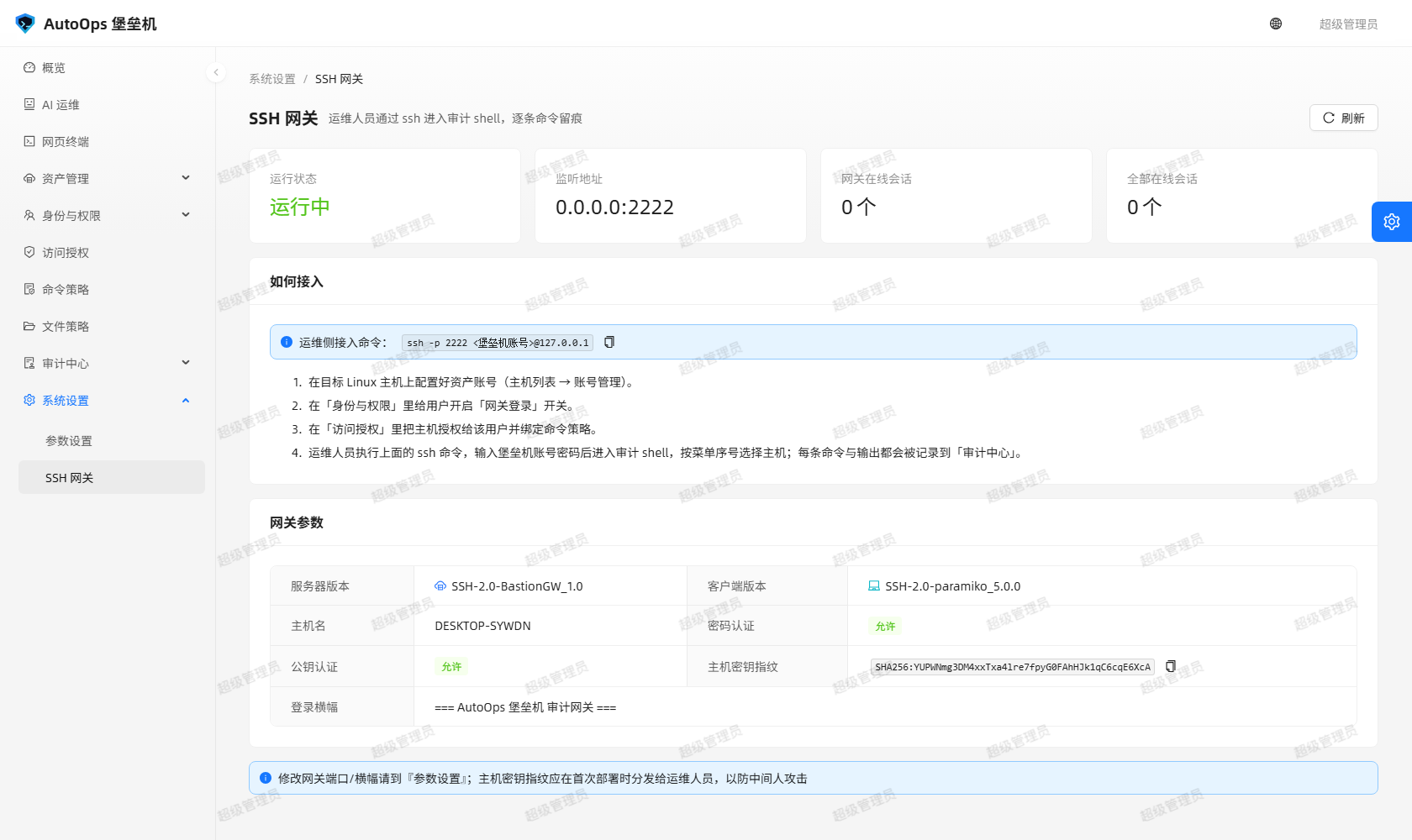
图:ssh -p 2222 登录后的主机菜单,一行一台主机,带分组、生效策略与可用账号。
| 输入 | 作用 |
|---|---|
<编号> |
连接对应主机 |
直接回车 / l / list
|
重新显示主机列表 |
i / info
|
查看本次登录与会话信息 |
/ask-ai |
会话里问 AI(如 /ask-ai 这台机器磁盘满了吗) |
h / help / ?
|
显示本帮助 |
q / quit / exit / logout / bye
|
退出堡垒机网关 |
-
i/info会显示账号、角色、来源 IP、认证方式与在线会话数 —— 自查「我为什么连不上某台机器」时很有用。 - 没有可访问主机时会提示「(没有可访问的主机,按回车重新检查,或输入 q 退出)」。
- 帮助与查询信息后都要按一次回车返回,提示符是
按回车继续 >。
输入编号后,流程是:选账号(授权里有多个账号时)→ 检查会话配额 → 建立到目标机的通道 → 你的输入 → 策略判定 → 放行或拦截。
-
会话内每条命令与输出都记录:命令文本、输出、放行或拦截、风险级别、命中规则、耗时都会落库,一整段会话另行转录到
instance/transcripts/<sid>.log。 - 被拦下的命令不会发到目标机,界面上会即时给出原因。
-
会话控制指令
exit/quit/logout/bye在策略评估之前放行(否则只读白名单策略会把用户困在会话里),但照样完整留痕,审计里的原因标注为「不受命令策略限制」。 - 授权里的时间窗、星期窗、过期时间、并发上限、授权能力位(
canWebterm)都在网关内强制校验;会话数达到上限会提示「你已达到并发会话上限(N 条),请先关闭其他会话。」 - 主机没开交互式终端会提示「该主机未开放交互式终端,请联系管理员。」
- 会话建立后先自动清屏,再重画上下文与横幅,最后补一个裸回车让远端重画提示符;清屏与重画用与网页终端同一套措辞。裸回车不落库、也不进策略引擎。
Windows 主机(protocol=winrm)和 Linux 主机并列出现在同一个菜单里,选中后进的是 PowerShell 提示符(走 WinRM 桥),exit 回到主机菜单、q 退出网关。会话建立时终端里会打印能力边界(与网页终端同一措辞):
[堡垒机] 这是 Windows(WinRM)会话:每条命令在目标机上单独执行,cd 会保留;环境变量、自定义变量等进程内状态不保留。
[堡垒机] more / pause / Read-Host 等交互式程序不可用,本会话也不支持文件传输;需要这些能力时请改用远程桌面。
真机验证由 tools/winrm_gw_check.py 覆盖(网关里选 Windows 主机共 9 项断言);库里的会话记录是 protocol=winrm、source=gateway,结束原因是「用户在终端里退出了 Windows 会话」,命令与输出同样进「命令记录」与会话转录。
- 在目标机 shell 里直接输入
/ask-ai <问题>就能问 AI,不用切窗口。 - 这一行不会被目标机执行:网关用一份影子行缓冲判断当前输入行,命中
/ask-ai时补发Ctrl-U把该行抹掉、不转发回车,所以远端 shell 的历史里不会留下这条命令。 - 答案在终端里原地流式重绘(
\r\x1b[K),标题、列表、代码与表格按终端配色重画,卡片降级成 ASCII,终端里不会出现 JSON。 - AI 需要敏感操作确认时用纯文本提示 + 掩码输入,按键不会漏给目标机。
- AI 出错只在终端打一行
[堡垒机] AI 调用失败:…并写 warning 日志,会话不会断。对话与工具调用落库,source=shell。
管理员在「系统设置 → SSH 网关」页面可以看到:
- 四个数字:运行状态(运行中 / 未运行)、监听地址(
listenHost:listenPort)、网关在线会话、全部在线会话。 - 一组参数:服务器版本、客户端版本、主机名、密码认证、公钥认证、主机密钥指纹、登录横幅。
- 网关已启用但没监听时,页面会给出告警「网关未监听,请确认后端启动日志中 SSH 网关是否报端口占用」。
修改端口与开关:
- 界面上改端口与横幅到「参数设置」;页面提示也写明「修改网关端口/横幅请到『参数设置』」。
- 启动参数:
--gateway-host/--gateway-port(默认0.0.0.0/2222)、--no-gateway(本次不启动 SSH 网关)。 - 环境变量:
BASTION_GATEWAY_HOST/BASTION_GATEWAY_PORT(默认0.0.0.0/2222)、BASTION_GATEWAY_ENABLED=0关掉整条网关、BASTION_GATEWAY_MAX_SESSIONS(默认5)。 - 生产环境要放行 5000(Web / API)与 2222(SSH 网关)两个端口;网关不是 HTTP,不要往 2222 上挂反向代理 —— 想用标准 22 端口,就用防火墙或端口转发把 22 转到 2222。
- 部署参数细节以
README.md的部署章节为准。
排障时最有用的一件事,是分清「我们在对谁自称什么」:
| 方向 | 标识 |
|---|---|
| 服务端(网关对客户端声明) | SSH-2.0-BastionGW_1.0 |
| 客户端(堡垒机连目标机时声明) | SSH-2.0-paramiko_<版本> |
- 客户端标识里的
paramiko是小写,与 paramiko 的Transport.local_version一致;拿不到传输层时用default_client_version()兜底,兜底值同样按小写paramiko。 -
GET /api/settings/gateway会回传serverVersion与clientVersion;「主机 → 账号 → 连接测试」会回传目标机的这两个值。两边并排显示,排查「对端不认我们的客户端版本」时一眼就能看清。 - 连接测试的失败形态也是可读的:目标机只允许交互 shell、拒绝
exec时,接口回 400SSH_TEST_COMMAND_FAILED,并带上已经握手成功的serverVersion/clientVersion/fingerprint与一条失败审计,不会再出现裸 500 与英文异常。
- 会话里输入
exit(或quit/logout/bye)→ 回到主机菜单,可以继续选别的机器。 - 在菜单里输入
q(或quit/exit/logout/bye)→ 窗口收口提示「已退出堡垒机网关,再见。」然后连接关闭。 - 客户端被直接关掉(网络断开、窗口关闭)→ 网关提示「连接已断开,再见。」,会话按服务端规则收口。
- 菜单每轮都会重新取一次终端宽度:窗口在菜单停留期间被拉宽或收窄,下一屏就按新宽度重排。
- 端口没开 / 防火墙拦住:客户端连不上 2222(连接被拒绝或一直卡在超时)。先在服务器侧确认 2222 在监听、再检查云安全组与防火墙有没有放行。
-
网关没启动:启动时用了
--no-gateway,或环境里设了BASTION_GATEWAY_ENABLED=0。到「系统设置 → SSH 网关」看「运行状态」是「未运行」,后端启动日志里也会有说明。 -
口令错误触发锁定:失败次数累加,达到上限后账号被锁定一段时间(默认
BASTION_LOGIN_MAX_FAILURES=5、BASTION_LOGIN_LOCK_MINUTES=15),锁定期内即使口令正确也登不进;登录成功与失败都有审计。管理员忘记口令时可以在服务器上重设(python run.py --reset-admin后按提示输入新口令)。 -
客户端版本被目标机拒绝:老设备或安全设备可能只白名单某个 OpenSSH 标识,而堡垒机作为客户端声明的是
SSH-2.0-paramiko_<版本>。用「主机 → 账号 → 连接测试」看两端版本,就能确认卡在版本协商还是账号/网络。
The SSH gateway is the command-line entry point for operators who live in a terminal: one ssh command, a menu with one row per host, and picking a host drops you into an audited shell where everything is recorded. The menu, prompts and help are all implemented by the bastion itself — the target host never knows you are behind one, and hosts you are not authorized for are not even named.
ssh -p 2222 <bastion-account>@<bastion-ip>-
2222is the gateway's default port, and you log in with your bastion account, not a target-host account. - The gateway supports password and public-key authentication and keeps a persistent host key; its fingerprint is shown in System Settings → SSH Gateway and should be handed to operators at first deployment to guard against man-in-the-middle attacks.
- A first login (or a login after an administrator reset the password) forces a password change before the host menu appears; once changed, the old password stops working and the web terminal uses the new one too.
=== AutoOps 堡垒机 审计网关 ===
1) web-01  10.0.0.11:22  [生产]   策略:标准运维策略  账号: root, deploy
2) db-01   10.0.0.21:22  [数据库] 策略:高危需确认    账号: dba
请输入主机编号(l 刷新 / i 我的信息 / h 帮助 / q 退出):
- The menu has exactly one source of hosts:
accessible_targets(user, protocols=("ssh", "winrm"))— it lists only the hosts you are authorized for. -
If one host has several protocol endpoints, each takes a row of its own (for example a Windows host exposing a
winrmendpoint and another one). - Hosts you are not authorized for are not even named — the menu is a projection of your permissions. A superuser with no grant records can see and connect to enabled hosts, so a fresh deployment does not lock its own administrator out.
- Windows remote desktop (
protocol=rdp) is not in this menu: graphical protocols use the browser entry, see Remote-Desktop-and-Recordings.
Figure: the host menu after logging in with ssh -p 2222, one host per row, showing group, effective policy and available accounts.
| Input | Effect |
|---|---|
<number> |
Connect to that host |
Enter alone / l / list
|
Redisplay the host list |
i / info
|
Show this login and session information |
/ask-ai |
Ask the AI inside the session (e.g. /ask-ai 这台机器磁盘满了吗) |
h / help / ?
|
Show this help |
q / quit / exit / logout / bye
|
Quit the bastion gateway |
-
i/infoshows account, role, source IP, authentication method and online session count — the quickest way to answer "why can't I reach that host?". - With no accessible hosts it says 「(没有可访问的主机,按回车重新检查,或输入 q 退出)」.
- Help and info pages wait for one Enter, prompted with
按回车继续 >.
Entering a number runs: pick an account (when the grant has several) → check the session quota → open the channel to the target → your input → policy evaluation → allow or deny.
-
Every command and its output in the session is recorded: command text, output, allow/deny, risk level, matched rule and duration all go to the database, and the whole session is additionally transcribed to
instance/transcripts/<sid>.log. - A denied command never reaches the target host, and the reason is shown immediately.
-
Session control commands —
exit/quit/logout/bye— are allowed before policy evaluation (otherwise a read-only whitelist policy would trap you in the session), but they are still fully audited, with the reason marked 「不受命令策略限制」. - The grant's time window, weekday window, expiry, concurrency limit and capability bits (
canWebterm) are all enforced inside the gateway; hitting the limit reports 「你已达到并发会话上限(N 条),请先关闭其他会话。」. - A host without an interactive terminal reports 「该主机未开放交互式终端,请联系管理员。」.
- Once the session is up the gateway clears the screen first and then redraws the context and banner, ending with a bare Enter so the remote redraws its prompt — the same wording as the web terminal. That bare Enter is not recorded and does not enter the policy engine.
Windows hosts (protocol=winrm) sit in the same menu as Linux hosts; picking one gives a PowerShell prompt (through the WinRM bridge), exit returns to the host menu and q quits the gateway. When the session is established the terminal prints the capability limits (the same wording as the web terminal):
[堡垒机] 这是 Windows(WinRM)会话:每条命令在目标机上单独执行,cd 会保留;环境变量、自定义变量等进程内状态不保留。
[堡垒机] more / pause / Read-Host 等交互式程序不可用,本会话也不支持文件传输;需要这些能力时请改用远程桌面。
Live verification is covered by tools/winrm_gw_check.py (9 assertions selecting a Windows host inside the gateway); the stored session has protocol=winrm, source=gateway and the end reason 「用户在终端里退出了 Windows 会话」, with commands and output landing in the command records and the session transcript just like Linux.
- Type
/ask-ai <question>inside the target shell to ask the AI without leaving the terminal. - That line never reaches the target: the gateway keeps a shadow line buffer to recognise
/ask-ai, and on a hit sendsCtrl-Uto erase the line and does not forward the Enter, so the remote shell history does not contain it. - The answer is redrawn in place in the terminal (
\r\x1b[K), with headings, lists, code and tables repainted in terminal colours, cards degraded to ASCII, and no JSON in the terminal. - When the AI needs a sensitive-operation confirmation it uses plain-text prompts plus masked input, and your keystrokes are not leaked to the target.
- An AI failure prints only one line
[堡垒机] AI 调用失败:…plus a warning log, and the session stays alive. Conversations and tool calls are stored withsource=shell.
The System Settings → SSH Gateway page shows:
- Four figures: run state (运行中 / 未运行), listen address (
listenHost:listenPort), gateway online sessions, total online sessions. - A set of parameters: server version, client version, host name, password authentication, public-key authentication, host key fingerprint, login banner.
- When the gateway is enabled but not listening, the page warns 「网关未监听,请确认后端启动日志中 SSH 网关是否报端口占用」.
Changing port and switches:
- Port and banner are changed in "参数设置" — the page itself says 「修改网关端口/横幅请到『参数设置』」.
- Startup flags:
--gateway-host/--gateway-port(default0.0.0.0/2222) and--no-gateway(do not start the SSH gateway this run). - Environment variables:
BASTION_GATEWAY_HOST/BASTION_GATEWAY_PORT(default0.0.0.0/2222),BASTION_GATEWAY_ENABLED=0to disable the whole gateway,BASTION_GATEWAY_MAX_SESSIONS(default5). - A production deployment must allow 5000 (web / API) and 2222 (SSH gateway). The gateway is not HTTP, so do not put a reverse proxy in front of 2222 — to serve the standard port 22, forward 22 to 2222 with a firewall rule or port forward.
- Deployment details are authoritative in the deployment chapter of
README.md.
The most useful thing when troubleshooting is telling apart "what we claim to whom":
| Direction | Identity |
|---|---|
| Server side (gateway introduced to clients) | SSH-2.0-BastionGW_1.0 |
| Client side (bastion connecting to a target) | SSH-2.0-paramiko_<version> |
- The
paramikoin the client identity is lower-case, matching paramiko'sTransport.local_version; when the transport is unavailable,default_client_version()is used and its fallback value is lower-caseparamikotoo. -
GET /api/settings/gatewayreturnsserverVersionandclientVersion; "Host → Account → connection test" returns the target's two values. Showing them side by side makes "the peer rejects our client version" obvious at a glance. - The failure shape is readable as well: when a target only allows an interactive shell and refuses
exec, the API returns 400SSH_TEST_COMMAND_FAILEDtogether with the already-negotiatedserverVersion/clientVersion/fingerprintand a failed-audit entry, instead of a bare 500 with an English exception.
- Typing
exit(orquit/logout/bye) inside a session returns to the host menu, so you can pick another host. - Typing
q(orquit/exit/logout/bye) in the menu closes the window with 「已退出堡垒机网关,再见。」. - If the client simply disconnects (network drop, window closed) the gateway prints 「连接已断开,再见。」 and the session is finalised by the server's rules.
- The menu re-reads the terminal width on every round: if the window is resized while you sit in the menu, the next screen is laid out for the new width.
- Port closed / blocked by a firewall: the client cannot reach 2222 (connection refused, or it hangs until timeout). Confirm the server is listening on 2222, then check the cloud security group and host firewall.
-
Gateway not started: it was launched with
--no-gateway, orBASTION_GATEWAY_ENABLED=0is set. "System Settings → SSH Gateway" shows 运行状态 as 「未运行」, and the backend startup log explains why. -
Wrong password triggers lockout: failures accumulate, and past the limit the account is locked for a while (defaults
BASTION_LOGIN_MAX_FAILURES=5,BASTION_LOGIN_LOCK_MINUTES=15); during the lockout even the correct password is refused, and both successful and failed logins are audited. An administrator who forgot the password can reset it on the server (python run.py --reset-admin, then enter the new password at the prompt). -
Client version rejected by the target: legacy devices and security appliances may whitelist only a particular OpenSSH identity, while the bastion claims
SSH-2.0-paramiko_<version>. Use "Host → Account → connection test" to compare both versions and tell a version-negotiation problem from an account or network one.
相关页面 / Related pages: Web-Terminal-and-Files · Remote-Desktop-and-Recordings · Home