Repository navigation
Identity and Grants
中文 · English
堡垒机管的第一件事是「谁能连哪台机器」。这一页讲三层身份模型:用户(堡垒机账号)、角色(权限码集合)与访问授权(用户 × 主机 × 资产账号)。菜单在「身份与权限 → 用户 / 角色」与「身份与权限 → 访问授权」。
每个运维人员一个堡垒机账号,它不是目标机上的账号。 同一个账号既登录网页控制台,也登录 SSH 审计网关(共用同一套凭据:User 同时是控制台用户与网关用户)。
| 字段 | 说明 |
|---|---|
username |
登录名,全局唯一 |
display_name / email / phone / remark
|
显示名、邮箱、电话、备注 |
role_id |
所属角色 |
status |
active(界面上是「正常」)/ disabled(「已停用」) |
gateway_enabled |
「网关登录」开关:是否允许登录 SSH 审计网关 |
webterm_enabled |
「网页终端」开关:是否允许使用 Web 终端 |
is_superuser |
超级管理员标记(见本页最后一节) |
must_change_password |
首次登录(或管理员重置密码后)强制改口令 |
public_key |
网关公钥登录(可选) |
登录失败会被计数与锁定:failed_attempts 累加,达到上限后写 locked_until,界面「锁定情况」列可见,管理员可用 POST /api/users/<id>/unlock 解锁。默认上限与锁定时长来自 BASTION_LOGIN_MAX_FAILURES(默认 5)与 BASTION_LOGIN_LOCK_MINUTES(默认 15)。
接口:/api/users(增删改查)、/api/users/options、POST /api/users/<id>/password(重置口令)、POST /api/users/<id>/unlock。用户管理写操作需要 user:manage。
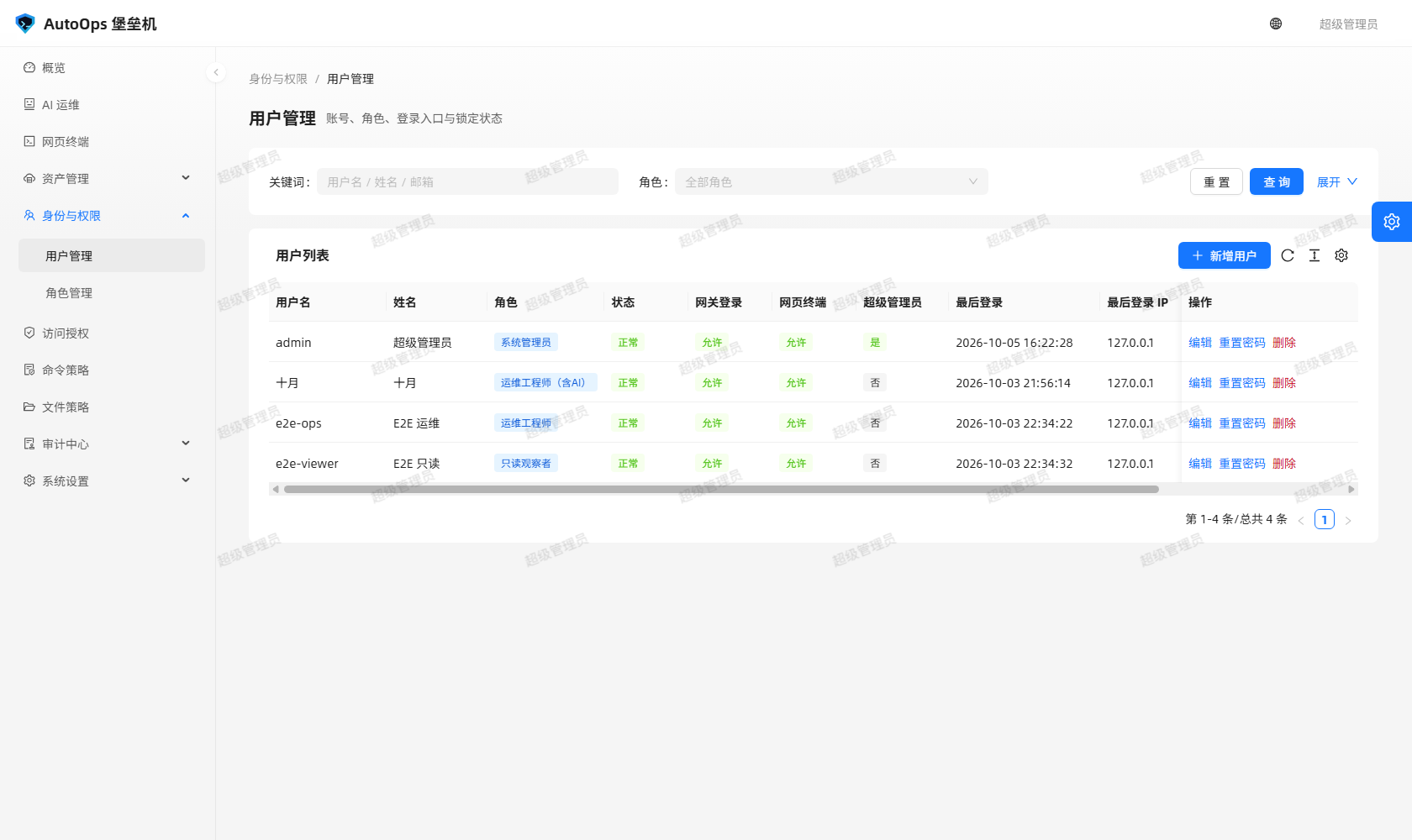 图里能看到:用户列表上的「网关登录」「网页终端」两列开关、角色列与锁定情况,以及新增用户表单。
角色就是一组权限码(Role.permissions,JSON 数组),其中 * 表示全部权限。界面里权限码按模块分组,建议只勾最小集合。接口:/api/roles、/api/roles/permissions(可选权限码清单)、/api/roles/options。
权限码共 36 个(定义在 bastion-backend/app/security.py):
| 模块 | 权限码 |
|---|---|
| 概览 | dashboard:view |
| 资产 |
host:view、host:manage、account:view、account:manage、group:view、group:manage
|
| 授权 |
grant:view、grant:manage
|
| 策略 |
policy:view、policy:manage
|
| 身份 |
user:view、user:manage、role:view、role:manage
|
| 会话与命令 |
session:view、session:view_all、session:replay、session:terminate、command:view、command:view_all、audit:view
|
| 入口 |
terminal:use、rdp:use、file:use、filepolicy:view、filepolicy:manage
|
| 系统 |
setting:view、setting:manage
|
| AI 运维助手 |
ai:view、ai:use、ai:view_all、ai:tool、ai:tool_write、ai:tool_exec、ai:manage
|
内置角色的 is_builtin=True,权限集合逐字如下:
| 角色 | 名称 | 权限 |
|---|---|---|
admin |
系统管理员 |
["*"](全部权限) |
ops |
运维工程师 |
dashboard:view、host:view、account:view、group:view、grant:view、policy:view、session:view、session:view_all、session:replay、session:terminate、command:view、command:view_all、audit:view、terminal:use、rdp:use、file:use、filepolicy:view(17 个) |
auditor |
安全审计员 |
dashboard:view、host:view、policy:view、session:view、session:view_all、session:replay、command:view、command:view_all、audit:view(9 个) |
viewer |
只读观察者 |
dashboard:view、host:view、session:view、command:view(4 个) |
要点:
-
ops不能管理用户、角色与系统设置,也不能改文件策略(只有filepolicy:view);它没有command:view_all之外的清除口径以外的写权限,也没有setting:manage; -
auditor只读审计,没有terminal:use/rdp:use/file:use,无法登录任何主机; -
viewer是最小可见集合,没有command:view_all,因此不能清除审计数据; - AI 权限默认只给
admin:内置ops/auditor/viewer都不含任何ai:*; - 写操作一律要管理员(后端
@admin_required),读操作按permission_required("<x>:view")判定。
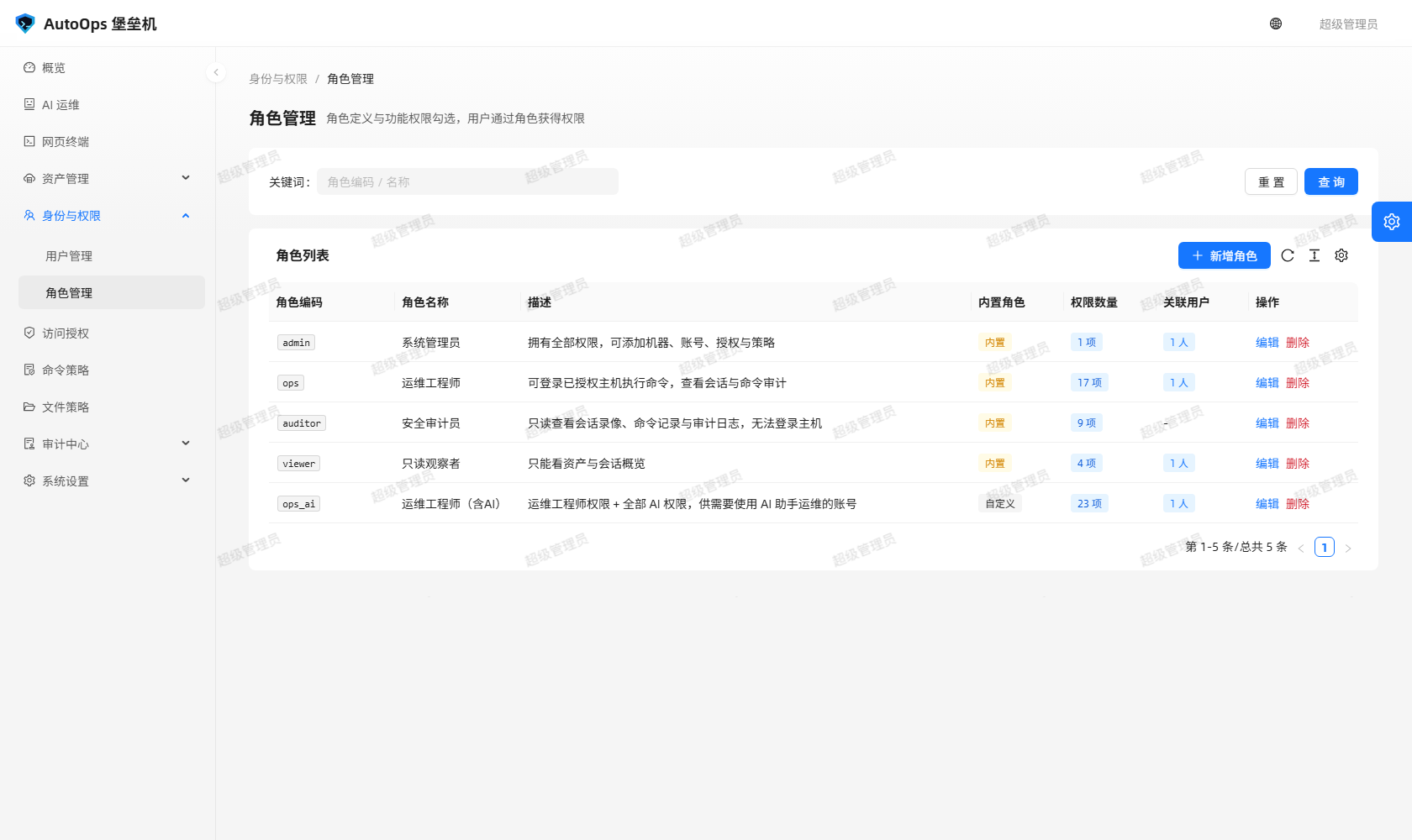 图里能看到:角色编辑页按模块分组的权限码勾选,以及内置角色不可删除的标记。
一条授权 = 用户 × 主机 × 资产账号 + 一组开关 + 时间窗与配额 + 绑定策略。 资产账号可以留空,那就是「整机授权」。
界面文案与字段、默认值:
| 界面文案 | 字段 | 默认 |
|---|---|---|
| 允许登录 | can_login |
开 |
| SFTP 传输 | can_sftp |
关 |
| 允许上传 | can_upload |
关 |
| 允许下载 | can_download |
关 |
| 允许改文件 | can_file_write |
关 |
| 端口转发 | can_port_forward |
关 |
| 网页终端 | can_webterm |
开 |
「允许改文件」覆盖上传 / 编辑 / 新建 / 改名 / 移动 / 复制 / 删除 / 改权限这一组修改类操作。
| 界面文案 | 字段 | 语义 |
|---|---|---|
| 每日时段 |
time_start / time_end
|
留空表示全天可用;支持跨零点 |
| 生效星期 | weekdays |
0=周一 … 6=周日,空数组或全选表示每天 |
| 到期日期 | expire_at |
留空表示长期有效 |
| 最大并发会话 | max_sessions |
默认 3,0 表示不限制 |
| 启用 | enabled |
停用的授权不参与判定 |
-
policy_id:命令策略。冻结式 —— 会话建立时把策略快照进会话,之后改策略不影响已开的会话; -
file_policy_id:文件策略。留空就走系统默认文件策略,判定时实时读取,不冻结。
授权开关与策略是两层判定,同时成立才放行:授权开关决定「能不能做这件事」,文件策略决定「这条路径允不允许」。
网页终端资产列表与 SSH 网关菜单取的都是 accessible_targets() 的结果,只列该用户被授权的主机;没授权的机器在这些入口里根本看不到。绕过界面手敲 hostId / accountId 直连后端也一样被拒,并留下拒绝审计(会话状态里有 denied)。
账号解析纪律:未指定账号时,优先用精确到账号的授权,否则用整机授权加该主机第一个可用账号;显式指定账号时只认绑定该账号的授权或通配授权,绝不静默替换成另一个账号。
接口:/api/grants(增删改查)、/api/grants/<id>、POST /api/grants/batch(批量)、POST /api/grants/preview(授权预览)、GET /api/grants/matrix(矩阵)。授权写操作需要 grant:manage。
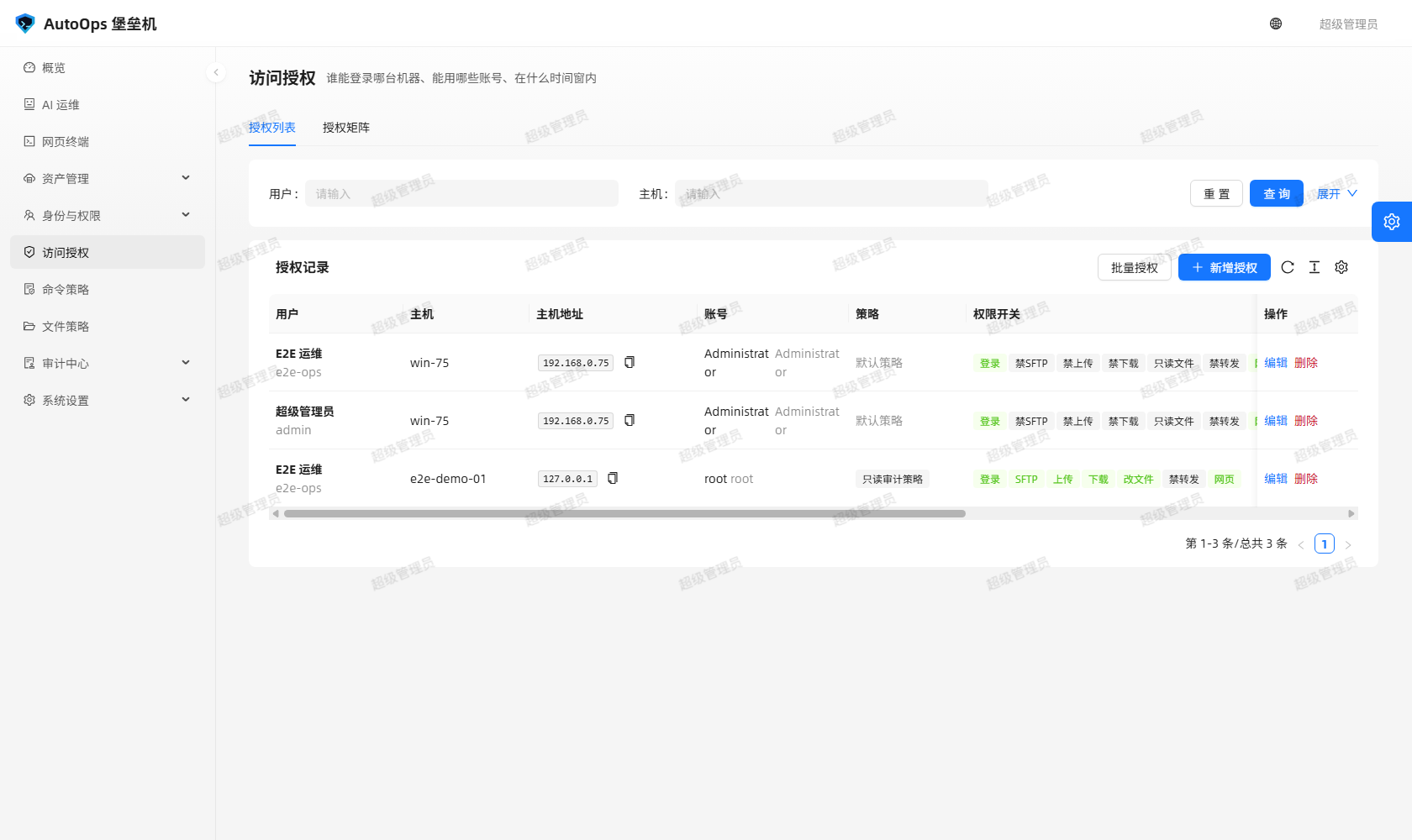 图里能看到:一条授权的用户 / 主机 / 账号三元组、七个能力开关、时段与星期窗、并发上限,以及命令策略与文件策略两个下拉。
访问授权页有两个页签:
- 授权列表:授权记录的增删改查,以及批量授权;
- 授权矩阵:用户 × 主机的授权全景图,一眼看出谁对哪台机器有什么权限(单元格提示会写明「网页终端:允许 / 禁止」)。
批量授权是「一次给一批用户 × 一批主机开整机授权」:批量表单不支持选账号与启停,后端批量接口固定按「整机 + 启用」落库,完成后弹出「批量授权完成」汇总。
is_superuser(内置 admin 角色)有一条明确的例外:在没有任何授权记录时,也能在网页终端与 SSH 网关看到并连上「已启用的主机」。
它的边界写得很清楚:
-
只放宽「能不能进」,不放宽「能干什么」:命令策略按系统默认策略照常强制执行,命令与输出照常记录,会话照常落库(
source=web/source=gateway); - 这条准入用的临时授权不落库,会话行上的
grant_id为空; - 主机下没有可用的资产账号时照样拒绝,提示「该主机下没有可用账号,请联系管理员配置资产账号」;
-
只有
is_superuser生效:ops/viewer在没有授权时依旧看不到任何主机(回归用例tests/test_access.py::test_regular_user_still_requires_grant); - 图形入口(WebRDP)与字符入口(网页终端 / SSH 网关)的准入规则各自成立:字符入口只认
protocol in ("ssh", "winrm")的主机,RDP 要求主机protocol=rdp、授权里开着「网页终端」、账号是口令认证,并且调用者具备rdp:use。
- 三层模型与授权判定细节(时间窗、账号绑定、并发配额、超级管理员兜底)以
bastion-backend/app/access.py与bastion-backend/app/models.py为准; - 权限码清单以
bastion-backend/app/security.py为准,内置角色的权限集合以bastion-backend/app/__init__.py的builtin_roles为准; - 授权表单的完整字段与校验以
bastion-backend/app/api/grants.py为准。
The first thing a bastion governs is who may connect to which machine. This page covers the three-layer identity model: users (bastion accounts), roles (permission-code sets) and access grants (user × host × asset account). The menus are "身份与权限 → 用户 / 角色" and "身份与权限 → 访问授权".
Every operator gets one bastion account, and it is not an account on the target machine. The same account signs in to the web console and to the SSH audit gateway (both share one credential: a User is a console user and a gateway user at once).
| Field | Meaning |
|---|---|
username |
Login name, globally unique |
display_name / email / phone / remark
|
Display name, e-mail, phone, remark |
role_id |
The assigned role |
status |
active (shown as "正常") / disabled (shown as "已停用") |
gateway_enabled |
The "网关登录" switch: may this account sign in to the SSH audit gateway? |
webterm_enabled |
The "网页终端" switch: may this account use the web terminal? |
is_superuser |
Superuser flag (see the last section of this page) |
must_change_password |
Force a password change at the next sign-in (also after an admin resets it) |
public_key |
Optional public-key login for the gateway |
Failed sign-ins are counted and locked out: failed_attempts grows, and once the limit is reached locked_until is written; the table shows the lock state and an administrator can unlock with POST /api/users/<id>/unlock. The defaults come from BASTION_LOGIN_MAX_FAILURES (default 5) and BASTION_LOGIN_LOCK_MINUTES (default 15).
Interfaces: /api/users (CRUD), /api/users/options, POST /api/users/<id>/password (reset), POST /api/users/<id>/unlock. User writes need user:manage.
In the picture: the "网关登录" and "网页终端" switch columns, the role column and the lock state, plus the create-user form.
A role is nothing but a set of permission codes (Role.permissions, a JSON array) in which * means everything. The UI groups the codes by module; grant the smallest set that works. Interfaces: /api/roles, /api/roles/permissions (the selectable catalogue), /api/roles/options.
There are 36 permission codes (declared in bastion-backend/app/security.py):
| Module | Permission codes |
|---|---|
| Dashboard | dashboard:view |
| Assets |
host:view, host:manage, account:view, account:manage, group:view, group:manage
|
| Grants |
grant:view, grant:manage
|
| Policies |
policy:view, policy:manage
|
| Identity |
user:view, user:manage, role:view, role:manage
|
| Sessions and commands |
session:view, session:view_all, session:replay, session:terminate, command:view, command:view_all, audit:view
|
| Entry points |
terminal:use, rdp:use, file:use, filepolicy:view, filepolicy:manage
|
| System |
setting:view, setting:manage
|
| AI assistant |
ai:view, ai:use, ai:view_all, ai:tool, ai:tool_write, ai:tool_exec, ai:manage
|
Built-in roles carry is_builtin=True; their permission sets, verbatim:
| Role | Name | Permissions |
|---|---|---|
admin |
系统管理员 |
["*"] (everything) |
ops |
运维工程师 |
dashboard:view, host:view, account:view, group:view, grant:view, policy:view, session:view, session:view_all, session:replay, session:terminate, command:view, command:view_all, audit:view, terminal:use, rdp:use, file:use, filepolicy:view (17) |
auditor |
安全审计员 |
dashboard:view, host:view, policy:view, session:view, session:view_all, session:replay, command:view, command:view_all, audit:view (9) |
viewer |
只读观察者 |
dashboard:view, host:view, session:view, command:view (4) |
Worth noting:
-
opscannot manage users, roles or system settings, and cannot change file policies (it only holdsfilepolicy:view); it has nosetting:manageeither; -
auditoris read-only for audit data and holds noterminal:use/rdp:use/file:use, so it cannot log in to any host; -
vieweris the smallest visible set and lackscommand:view_all, therefore it cannot purge audit data; - AI permissions go to
adminonly by default: the built-inops/auditor/viewerhold noai:*at all; - Every write needs an administrator (backed by
@admin_required); reads are guarded withpermission_required("<x>:view").
In the picture: the role editor with permission codes grouped by module, and the marker that a built-in role cannot be deleted.
One grant = user × host × asset account + a set of switches + time windows and quota + bound policies. The asset account may be left empty, which means "the whole host".
| UI label | Field | Default |
|---|---|---|
| 允许登录 | can_login |
on |
| SFTP 传输 | can_sftp |
off |
| 允许上传 | can_upload |
off |
| 允许下载 | can_download |
off |
| 允许改文件 | can_file_write |
off |
| 端口转发 | can_port_forward |
off |
| 网页终端 | can_webterm |
on |
"允许改文件" covers the whole modifying group: upload, edit, create, rename, move, copy, delete and chmod.
| UI label | Field | Semantics |
|---|---|---|
| 每日时段 |
time_start / time_end
|
Empty means all day; crossing midnight is supported |
| 生效星期 | weekdays |
0=Monday … 6=Sunday; an empty array (or all seven) means every day |
| 到期日期 | expire_at |
Empty means no expiry |
| 最大并发会话 | max_sessions |
Default 3; 0 means unlimited |
| 启用 | enabled |
A disabled grant takes no part in evaluation |
-
policy_id: the command policy. It is frozen — the policy is snapshotted into the session at session setup, so later edits do not affect sessions already open; -
file_policy_id: the file policy. Leave it empty to use the system default file policy; it is read live on every evaluation and is not frozen.
Grant switches and policies form two layers that must both pass: the switches decide whether the action is allowed at all, the file policy decides whether this specific path is allowed.
The web terminal asset list and the SSH gateway menu both render the result of accessible_targets(), so they only list hosts the user holds a grant for; ungranted machines never appear at those entries. Bypassing the UI by hand-crafting a hostId / accountId does not help either: the backend refuses the call and records a denial in the audit trail (session status includes denied).
Account resolution discipline: when no account is given, an account-specific grant wins, otherwise a whole-host grant plus the host's first usable account is used; when an account is named, only a grant bound to that account (or a wildcard grant) counts, and the backend never silently substitutes a different account.
Interfaces: /api/grants (CRUD), /api/grants/<id>, POST /api/grants/batch (bulk), POST /api/grants/preview (preview), GET /api/grants/matrix (matrix). Grant writes need grant:manage.
In the picture: the user / host / account triple of one grant, the seven capability switches, the time and weekday windows, the concurrency cap, and the two policy dropdowns.
The access-grant page has two tabs:
- 授权列表 (grant list): CRUD for individual grants, plus bulk granting;
- 授权矩阵 (grant matrix): a user × host overview that shows at a glance who holds which rights on which machine (the cell tooltip spells out "网页终端:允许 / 禁止").
Bulk granting opens a whole-machine grant for a batch of users against a batch of hosts. The bulk form does not let you choose an account or a state: the backend bulk endpoint always stores "whole host + enabled" and reports a "批量授权完成" summary when done.
is_superuser (the built-in admin role) has one explicit exception: with no grant record at all, it can still see and connect to "enabled hosts" in the web terminal and the SSH gateway.
The limits are equally explicit:
-
It relaxes only "may I get in", never "what may I do": command policies still run with the system default policy, commands and output are still recorded, and the session is still stored (
source=web/source=gateway); - The temporary grant behind this admission is never persisted, and the session row's
grant_idis empty; - If the host has no usable asset account the request is still refused with "该主机下没有可用账号,请联系管理员配置资产账号";
-
Only
is_superusergets this:ops/viewerstill see no host at all without a grant (regression casetests/test_access.py::test_regular_user_still_requires_grant); - The graphical entry (WebRDP) and the character entries (web terminal / SSH gateway) keep their own rules: character entries only accept hosts with
protocol in ("ssh", "winrm"), while RDP requires the host to beprotocol=rdp, the grant to have "网页终端" enabled, the account to use password auth, and the caller to holdrdp:use.
- For the three-layer model and grant evaluation details (time windows, account binding, concurrency quota, superuser fallback), see
bastion-backend/app/access.pyandbastion-backend/app/models.py; - For the permission-code catalogue see
bastion-backend/app/security.py; for the built-in role permission sets seebuiltin_rolesinbastion-backend/app/__init__.py; - For the complete grant form fields and validation see
bastion-backend/app/api/grants.py.
相关页面 / Related pages: Assets and Accounts · Policies · Home