Repository navigation
Assets and Accounts
中文 · English
资产与账号是堡垒机的起点:先把被纳管的服务器登记成「主机」,再给每台主机配上登录用的「资产账号」;之后的身份、访问授权、命令策略与审计,全部挂在这两样东西上。菜单位置是「资产管理 → 主机列表」。
一台机器一行。列表字段:
| 列 | 内容 |
|---|---|
| 主机名 | 主机别名(加粗显示);搜索框「关键字」同时匹配主机名 / 地址 / 描述 |
| 地址 | 逐端点列出 地址:端口,可点一下复制。一台机器有几个协议端点就有几段地址 |
| 协议/系统 | 每个端点一枚协议标签,末尾再跟系统标签;RDP 安全层是「强制 SSL」时加一枚 强制 SSL,WinRM 认证方式是 basic 时加一枚 Basic 明文
|
| 分组 | 所属分组名,未分组显示 -
|
| 状态 |
启用 / 停用
|
| 账号数 | 该主机下的资产账号条数 |
| 授权数 | 授权到该主机的访问授权条数 |
| 操作 |
账号管理 · 编辑 · 合并 · 删除(删除会连带删除该主机的账号与授权记录) |
列表还有「描述」与「创建时间」两列。工具栏按钮是 新增主机 与 刷新。「账号管理」只要 account:view 就能打开,其余写操作需要 host:manage(后端写接口一律 @admin_required,非管理员访问会被拒)。
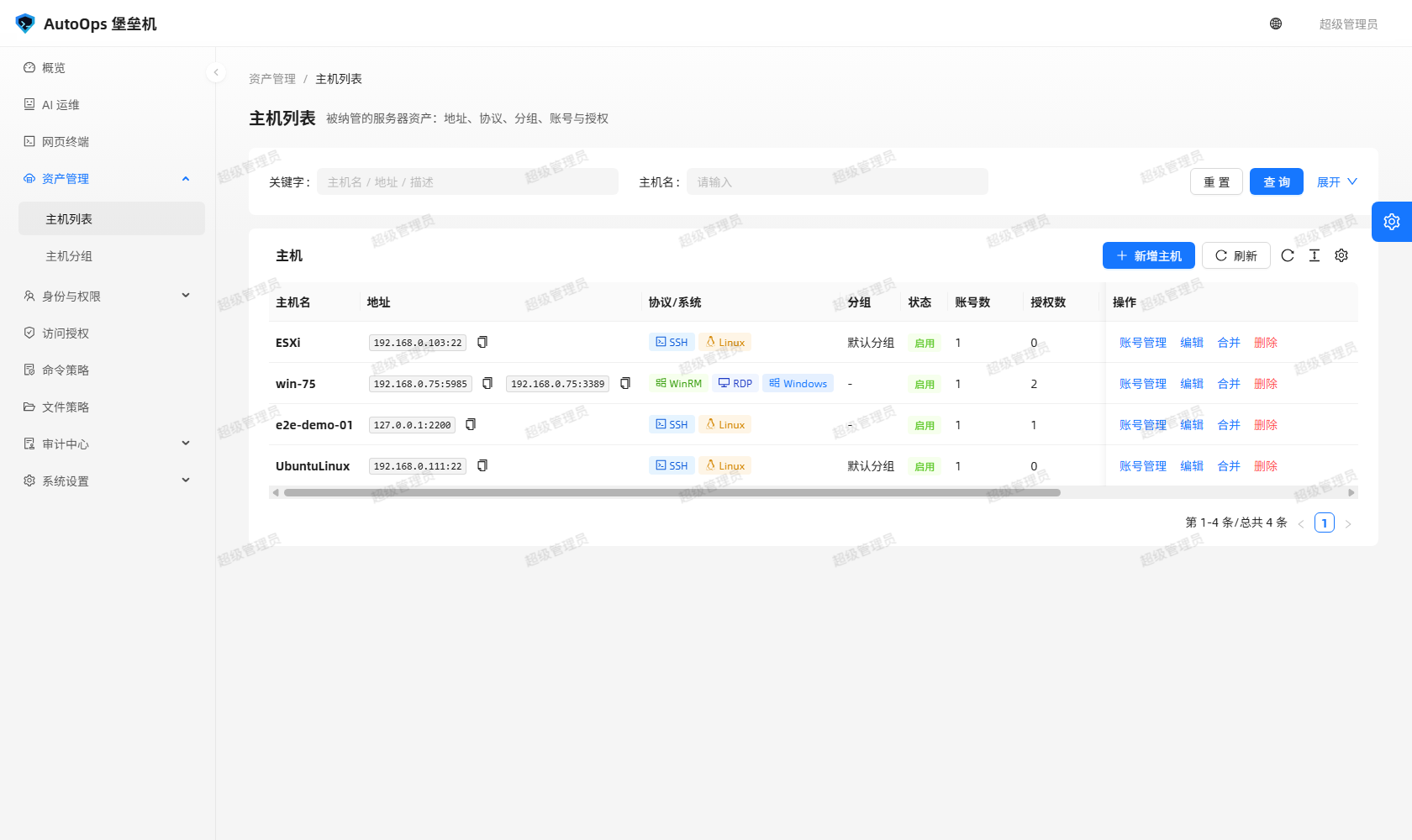 图里能看到:主机列表的地址列逐端点列出
 地址:端口,协议/系统列给每个端点打标签,操作列有「账号管理 / 编辑 / 合并 / 删除」。
同一台机器常常既要命令审计(SSH / WinRM)又要看画面(RDP)。如果「一条主机记录只能有一个协议」,同一台机器就得分建成几条记录,于是协议从主机的一个字段升级成主机的一组端点:
- 表
host_protocols(id, host_id, protocol, port, winrm_transport, status),唯一约束uq_host_protocol(host_id, protocol)钉住「同一协议只有一条端点」; -
hosts.protocol/hosts.port/hosts.winrm_transport保留为主端点镜像(Host.mirror_primary_endpoint()维护),老代码路径读host.port依然正确; - 老库升级时
backfill_host_protocols()给还没有端点行的主机补一条,已有端点的跳过(幂等)。
典型配置:
Linux 主机    ssh:22
Windows 主机  winrm:5985 与 rdp:3389 可以同时开
每个协议各自一个端口,默认值来自 Host.DEFAULT_PORTS(ssh 22、rdp 3389、winrm 5985,与前端表单同一份口径):
-
WinRM:默认
5985(HTTP);目标机开了 HTTPS 就把端口改成5986,客户端会自动走 TLS(build_target()见到5986自动use_ssl); -
RDP:默认
3389; -
SSH:默认
22。SFTP 文件管理器固定走host.endpoint_for("ssh")的端口,没有 ssh 端点时返回 400NO_SSH_ENDPOINT。
新建与编辑主机(POST /api/hosts / PUT /api/hosts/<id>,管理员)都接受 protocols:
{
  "protocols": [
    { "protocol": "winrm", "port": 5985, "winrmTransport": "ntlm" },
    { "protocol": "rdp", "port": 3389 }
  ]
}
也可以简写成 ["ssh", "winrm"]。约束:显式端口必须是 1-65535,协议必须是 ssh / rdp / winrm 且不重复,winrmTransport 只能是 ntlm / basic,否则 400。不传 protocols 就走老的单协议路径,行为与以前一致。_apply_endpoints() 按请求对齐端点表(增 / 删 / 改),再把主端点写回镜像字段。
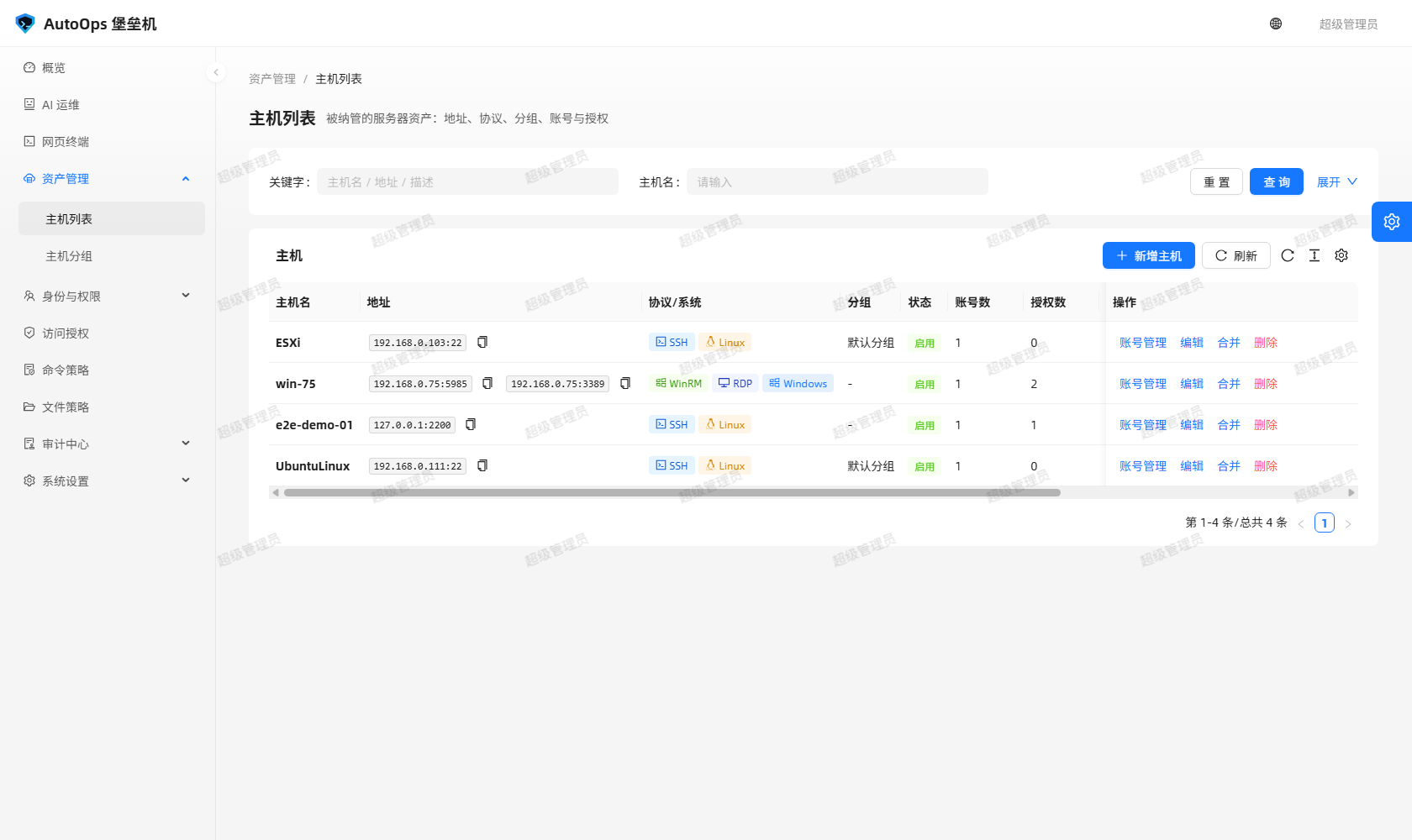 图里能看到:一台 Windows 主机的地址列同时列出
 192.168.0.75:5985 与 192.168.0.75:3389,协议列上是 WinRM 与 RDP 两枚标签。
「新增主机 / 编辑主机」用抽屉表单,字段与界面文案:
| 字段 | 界面文案与说明 |
|---|---|
| 主机别名 | 必填 |
| 主机地址 | 必填,例如 192.168.1.10 或 host.example.com
|
| 协议入口 | 多选,必填(至少一个):Linux / Unix(SSH 命令行) 或 Windows(命令行 + 远程桌面)
|
| Windows 通道 | 选了 Windows 之后勾这台机器实际开了哪些:命令行(WinRM / PowerShell)、远程桌面(RDP),默认两个都开 |
| 每协议端口 | 按勾出来的通道逐个渲染:SSH 端口(默认 22)、WINRM 端口(默认 5985)、RDP 端口(默认 3389),取值 1-65535 |
| RDP 安全层 | 只在勾了 RDP 时出现:自动(默认,按客户端协商,含 NLA) / 强制 SSL(不使用 NLA,兼容老系统)
|
| WinRM 认证方式 | 只在勾了 WinRM 时出现:NTLM(默认,域 / 本地账号) / Basic(明文,需目标机 AllowUnencrypted)
|
| 操作系统 |
Linux / Windows / Unix,必填 |
| 所属分组 | 可留空,「不选则不属于任何分组」 |
| 状态 |
启用 / 停用,必填 |
| 标签 | 回车添加 |
| 描述 | 多行文本 |
界面把 Windows 的两个通道合成一个「Windows」选项(PROTOCOL_OPTIONS),端口、RDP 安全层、WinRM 认证方式 都按展开后的通道渲染 —— 勾 Linux 就只出 SSH 的字段,不会再冒出「RDP 安全层」。RDP 安全层落在主机列 Host.rdp_security(auto / ssl):老系统(Windows Server 2003 / XP 一类)在 NLA 阶段被直接断开时改成「强制 SSL」,退回标准 RDP 安全层。
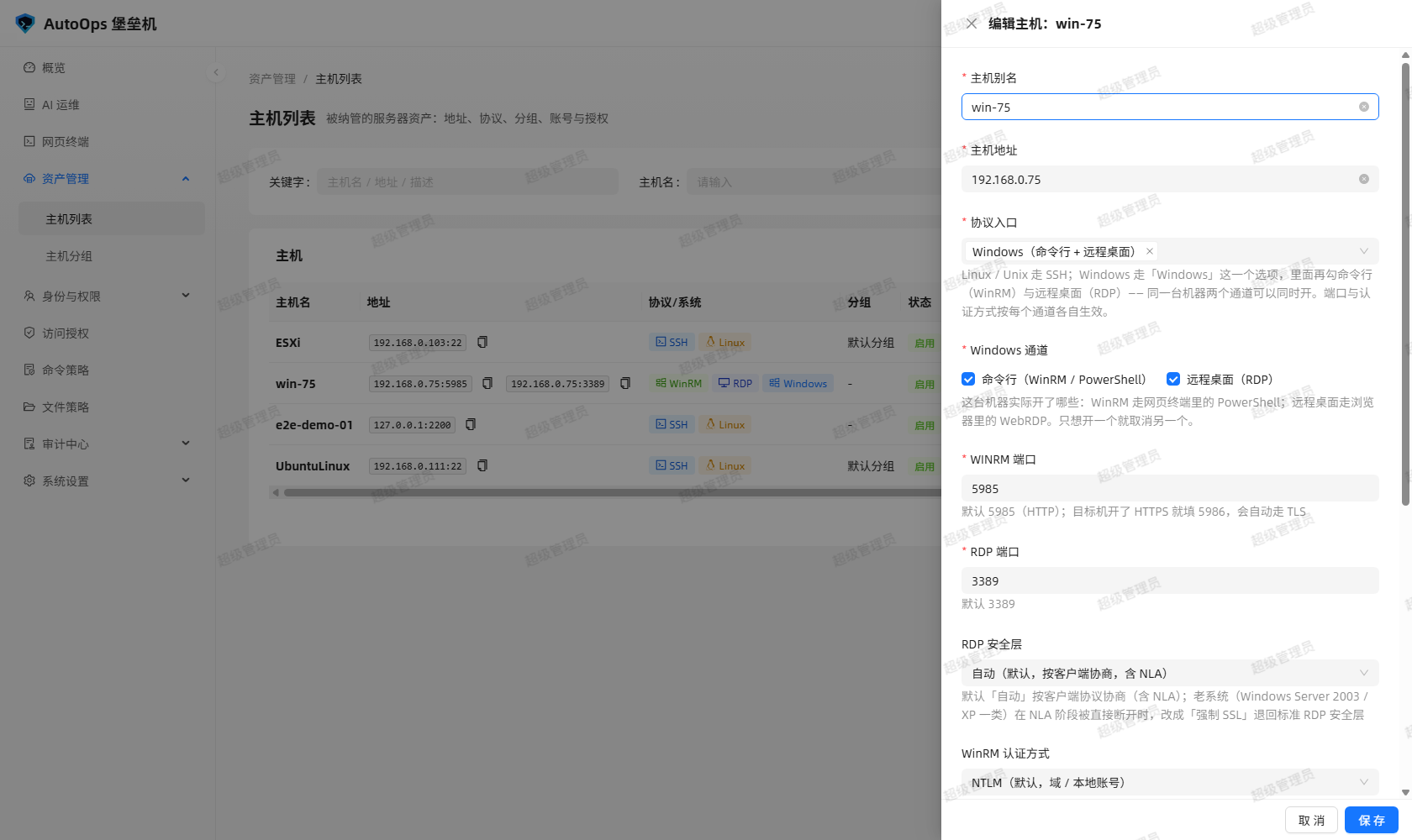 图里能看到:主机抽屉里的「协议入口」多选、Windows 通道勾选、每个通道各自的端口框,以及操作系统与分组。
点主机行里的「账号管理」打开抽屉,抽屉标题是 账号管理:<主机名>,顶部列出该主机的端点(winrm://192.168.0.75:5985 · rdp://192.168.0.75:3389)、操作系统与分组,然后是该主机的账号列表。
账号列表字段:名称、登录用户名、认证方式(密码认证 / 密钥认证)、是否有口令(已配置 / 未配置)、sudo 命令、授权数、操作(编辑 / 测试连接 / 删除)。
新增 / 编辑账号弹窗字段:
| 字段 | 说明 |
|---|---|
| 账号别名 | 必填,同一主机内唯一(uq_host_account_name) |
| 登录用户名 | 必填,目标机上的账号名 |
| 认证方式 |
密码认证(password)或 密钥认证(key) |
| 登录密码 | 认证方式为密码认证时填写;编辑时留空表示不修改已保存的口令 |
| 私钥内容 | 认证方式为密钥认证时填写;编辑时留空表示不修改已保存的私钥 |
| 私钥口令 | 私钥没有口令时留空即可 |
| sudo 命令 | 登录后自动执行的提权命令,不需要时留空 |
| 描述 | 多行文本 |
口令与私钥都用 Fernet 加密落库(secret_enc / private_key_enc / passphrase_enc),只有具备 host:manage 权限的请求才会回显明文(to_dict(with_secret=True));普通读取只返回 hasSecret / hasPrivateKey / hasPassphrase 三个布尔值。
端口与认证方式随协议走:会话与测试连接用的端口取自端点(endpoint.port),WinRM 的认证方式取自 endpoint.winrm_transport,不是主机级字段。
账号行的「测试连接」按钮调 POST /api/hosts/<id>/accounts/<account_id>/test,真实连一次目标机:
- Linux:跑一次
uname -a; - Windows:走 WinRM 的
PROBE_SCRIPT,回whoami/COMPUTERNAME/PowerShellVersion/OSVersion; - 接口支持
?protocol=精确点名端点(例如?protocol=rdp会明确拒绝并返回 400NO_CHARACTER_ENDPOINT);不点名时走主端点; - 返回里带堡垒机自己的
serverVersion(SSH-2.0-BastionGW_1.0)与clientVersion(SSH-2.0-paramiko_<版本>),同一个客户端版本也出现在「系统设置 / SSH 网关」页; - 目标机只允许交互 shell、拒绝
exec时回 400SSH_TEST_COMMAND_FAILED,并带上已经握手成功的serverVersion/clientVersion/fingerprint,同时写一条失败审计(不会再出现裸 500)。
以前「WinRM 一条记录、远程桌面又一条记录」是同一台机器的常见写法。现在行里提供「合并」:把同一台机器的另一条主机记录并进本机。
- 只允许同一地址的主机互相合并:弹窗提示
只允许同一地址的主机互相合并,下拉里只列同地址的其它主机(一般是另一个协议); - 来源主机的账号、授权与协议端点都会搬到本机,随后删除来源记录;
- 同名且同一把凭据的账号复用(
_same_credential()解密后比对 —— Fernet 密文带随机 IV,不能比密文);同名但凭据不同的账号改名保留,绝不因为重名丢掉来源机的登录凭据; - 地址不同回 400;来源主机还有在线会话回 409;
- 会话历史是审计数据,不会被改写;
- 接口:
POST /api/hosts/<id>/merge,请求体{"sourceId": n},管理员权限。
菜单「资产管理 → 主机分组」维护分组:host_groups 的 name 全局唯一,另有 description 与统计出来的 hostCount。接口前缀 /api/host-groups。分组只是归类与筛选手段,授权仍然按主机一条条给。
主机与端点都带 status(active / disabled):
- 主机停用后不再出现在 SSH 网关菜单与网页终端资产列表里(入口列表取的是「已启用」的主机),也不能开会话;
- 端点停用后该协议入口单独失效,主机上的其它端点照常可用;
- 停用不等于删除:账号、授权、历史会话与审计都留在库里。
- 主机与账号请求体的完整字段名与校验细节:以
bastion-backend/app/api/hosts.py为准; - 端点模型与兜底行为(
protocol_endpoints()在没有任何端点行时按镜像字段造一条、persisted=False):以bastion-backend/app/models.py为准; - 页面文案随版本可能微调,截图以仓库
docs/screenshots/里的最新文件为准。
Assets and accounts are where a bastion starts. First register each managed server as a host, then give every host the asset accounts used to log in to it; identity, access grants, command policies and auditing all hang off those two things. The menu path is "资产管理 → 主机列表" (Assets → Host list).
One row per machine. The columns are:
| Column | Content |
|---|---|
| Host name | The host alias, shown in bold; the "关键字" search box matches host name, address and description |
| Address | Each endpoint listed as address:port, click to copy. Two endpoints means two address entries |
| Protocol / OS | One protocol tag per endpoint plus the OS tag. A host with RDP security layer 强制 SSL also shows a 强制 SSL tag, and a host whose WinRM transport is basic shows Basic 明文
|
| Group | The group name, - when ungrouped |
| Status |
启用 (enabled) / 停用 (disabled) |
| Account count | How many asset accounts the host carries |
| Grant count | How many access grants target the host |
| Actions |
账号管理 (accounts) · 编辑 (edit) · 合并 (merge) · 删除 (delete, which also removes the host's accounts and grants) |
Two more columns, "描述" and "创建时间", are hidden in the table above. The toolbar offers 新增主机 (create host) and 刷新 (refresh). Opening the accounts drawer only needs account:view; every write operation needs host:manage (write endpoints are all guarded by @admin_required, so a non-admin request is refused).
In the picture: the address column lists address:port per endpoint, the protocol/OS column tags each endpoint, and the action column offers "accounts / edit / merge / delete".
The same machine often needs both command auditing (SSH / WinRM) and a visible desktop (RDP). If one host record could hold only one protocol, one machine would have to be split into several records, so the protocol was promoted from a field of the host to a set of endpoints:
- Table
host_protocols(id, host_id, protocol, port, winrm_transport, status)with the unique constraintuq_host_protocol(host_id, protocol), which pins down "one endpoint per protocol per host"; -
hosts.protocol/hosts.port/hosts.winrm_transportare kept as the primary-endpoint mirror (maintained byHost.mirror_primary_endpoint()), so older code paths that readhost.portstill behave correctly; - On upgrade,
backfill_host_protocols()adds one endpoint row to every host that has none; hosts that already have endpoints are skipped, so the backfill is idempotent.
A typical setup:
Linux host     ssh:22
Windows host   winrm:5985 and rdp:3389 side by side
Each protocol has its own port, defaulting to Host.DEFAULT_PORTS (ssh 22, rdp 3389, winrm 5985 — the same table the web form uses):
-
WinRM:
5985(HTTP) by default. If the target has HTTPS enabled, set the port to5986and the client uses TLS automatically (build_target()switchesuse_sslon for5986); -
RDP:
3389by default; -
SSH:
22by default. The SFTP file manager always uses the port ofhost.endpoint_for("ssh"); a host without an ssh endpoint returns 400NO_SSH_ENDPOINT.
Creating and editing a host (POST /api/hosts / PUT /api/hosts/<id>, administrator) both accept protocols:
{
  "protocols": [
    { "protocol": "winrm", "port": 5985, "winrmTransport": "ntlm" },
    { "protocol": "rdp", "port": 3389 }
  ]
}
The short form ["ssh", "winrm"] works too. Validation: an explicit port must be 1-65535, the protocol must be ssh / rdp / winrm and must not repeat, and winrmTransport may only be ntlm / basic; anything else is 400. Omitting protocols takes the old single-protocol path, with exactly the previous behaviour. _apply_endpoints() aligns the endpoint table with the request (add / remove / update) and then writes the primary endpoint back into the mirror fields.
In the picture: one Windows host lists both 192.168.0.75:5985 and 192.168.0.75:3389 in the address column, with a WinRM tag and an RDP tag in the protocol column.
"新增主机 / 编辑主机" is a drawer form. Its fields and on-screen wording:
| Field | Wording and behaviour |
|---|---|
| 主机别名 (alias) | Required |
| 主机地址 (address) | Required, e.g. 192.168.1.10 or host.example.com
|
| 协议入口 (protocol entry) | Multi-select, at least one: Linux / Unix(SSH 命令行) or Windows(命令行 + 远程桌面)
|
| Windows 通道 (channels) | After picking Windows, tick what the machine really runs: 命令行(WinRM / PowerShell) and 远程桌面(RDP), both on by default |
| Per-protocol port | Rendered once per ticked channel: SSH 端口 (default 22), WINRM 端口 (default 5985), RDP 端口 (default 3389), range 1-65535 |
| RDP 安全层 | Only when RDP is ticked: 自动(默认,按客户端协商,含 NLA) / 强制 SSL(不使用 NLA,兼容老系统)
|
| WinRM 认证方式 | Only when WinRM is ticked: NTLM(默认,域 / 本地账号) / Basic(明文,需目标机 AllowUnencrypted)
|
| 操作系统 (OS) |
Linux / Windows / Unix, required |
| 所属分组 (group) | Optional — "不选则不属于任何分组" |
| 状态 (status) |
启用 / 停用, required |
| 标签 (tags) | Press Enter to add |
| 描述 (description) | Multi-line text |
The UI folds the two Windows channels into a single "Windows" option (PROTOCOL_OPTIONS), while ports, RDP 安全层 and WinRM 认证方式 are rendered per expanded channel: tick Linux and you only get the SSH fields, never an "RDP security layer". The RDP security layer is stored on the host column Host.rdp_security (auto / ssl). For legacy systems (Windows Server 2003 / XP and similar) that drop the connection during NLA, switch to 强制 SSL to fall back to the standard RDP security layer.
In the picture: the protocol-entry multi-select, the Windows channel checkboxes, one port box per channel, and the OS and group selectors.
Click "账号管理" in a host row to open the drawer, titled 账号管理:<host name>. Its header lists the host's endpoints (winrm://192.168.0.75:5985 · rdp://192.168.0.75:3389), the OS and the group, followed by the account table.
Account columns: 名称 (name), 登录用户名 (login username), 认证方式 (密码认证 / 密钥认证), 是否有口令 (已配置 / 未配置), sudo 命令, 授权数 (grant count), 操作 (编辑 / 测试连接 / 删除).
The create/edit account dialog has:
| Field | Behaviour |
|---|---|
| 账号别名 (alias) | Required, unique within the host (uq_host_account_name) |
| 登录用户名 (username) | Required, the account name on the target machine |
| 认证方式 (auth type) |
密码认证 (password) or 密钥认证 (key) |
| 登录密码 (password) | Shown for password auth; leave blank while editing to keep the stored password |
| 私钥内容 (private key) | Shown for key auth; leave blank while editing to keep the stored key |
| 私钥口令 (passphrase) | Leave blank when the key has no passphrase |
| sudo 命令 | A privilege-escalation command run right after login; leave blank if unused |
| 描述 (description) | Multi-line text |
Passwords and private keys are stored Fernet-encrypted (secret_enc / private_key_enc / passphrase_enc). Only requests holding host:manage get the plaintext back (to_dict(with_secret=True)); a normal read returns just the three booleans hasSecret / hasPrivateKey / hasPassphrase.
Port and auth method follow the protocol: sessions and connection tests take the port from the endpoint (endpoint.port) and the WinRM auth method from endpoint.winrm_transport, not from the host-level fields.
The "测试连接" button on an account row calls POST /api/hosts/<id>/accounts/<account_id>/test and really connects to the target:
- Linux: it runs
uname -a; - Windows: it runs the WinRM
PROBE_SCRIPT, returningwhoami/COMPUTERNAME/PowerShellVersion/OSVersion; - The endpoint accepts
?protocol=to name one endpoint exactly (for example?protocol=rdpis refused outright with 400NO_CHARACTER_ENDPOINT); without it, the primary endpoint is used; - The response carries the bastion's own
serverVersion(SSH-2.0-BastionGW_1.0) andclientVersion(SSH-2.0-paramiko_<version>); the same client version also appears on the "系统设置 / SSH 网关" page; - If the target only allows an interactive shell and refuses
exec, the call returns 400SSH_TEST_COMMAND_FAILEDtogether with the already-negotiatedserverVersion/clientVersion/fingerprint, and writes a failure audit entry (no more bare 500s).
Building "one record for WinRM, another for the remote desktop" was once the usual way to describe one machine. Each row now offers "合并": fold another host record of the same machine into this one.
- Only hosts with the same address may merge: the dialog says
只允许同一地址的主机互相合并, and its dropdown lists just the same-address hosts (normally the other protocol); - The source host's accounts, grants and protocol endpoints all move over, and the source record is then deleted;
- Accounts with the same name and the same credential are reused (
_same_credential()compares them after decryption — Fernet ciphertext carries a random IV, so ciphertexts cannot be compared); same name but different credential means the account is renamed and kept, so the source machine's login credentials are never lost to a name clash; - A different address returns 400; a source host that still has online sessions returns 409;
- Session history is audit data and is never rewritten;
- Interface:
POST /api/hosts/<id>/mergewith body{"sourceId": n}, administrator only.
"资产管理 → 主机分组" maintains groups. In host_groups, name is globally unique, description is free text, and hostCount is derived. The API prefix is /api/host-groups. Groups are for classification and filtering only: access is still granted host by host.
Both hosts and endpoints carry a status (active / disabled):
- A disabled host disappears from the SSH gateway menu and the web terminal asset list (those entry points only consider enabled hosts) and cannot open sessions;
- A disabled endpoint fails on its own while the host's other endpoints keep working;
- Disabling is not deleting: accounts, grants, past sessions and audit records all stay in the database.
- For the full request fields and validation of host and account endpoints, see
bastion-backend/app/api/hosts.py; - For the endpoint model and its fallback behaviour (
protocol_endpoints()synthesising one entry from the mirror fields withpersisted=Falsewhen the host has no endpoint rows), seebastion-backend/app/models.py; - On-screen wording can drift between versions; treat the newest files in the repository's
docs/screenshots/as the reference for screenshots.
相关页面 / Related pages: Identity and Grants · Policies · Home