Repository navigation
AI Assistant
中文 · English
AI 运维助手让你用一句话下指令:「看一下 win-75 的主机名和系统版本」、「哪台机器的磁盘快满了」、「把 demo-01 从生产组挪到测试组」。
它不绕过任何一道门。AI 每个工具调用都带着你本人的身份去打堡垒机自己的 REST 接口,所以你在网页上做不了的事,问 AI 也做不了;真正有风险的动作还会停下来,等你把管理员口令填进去。
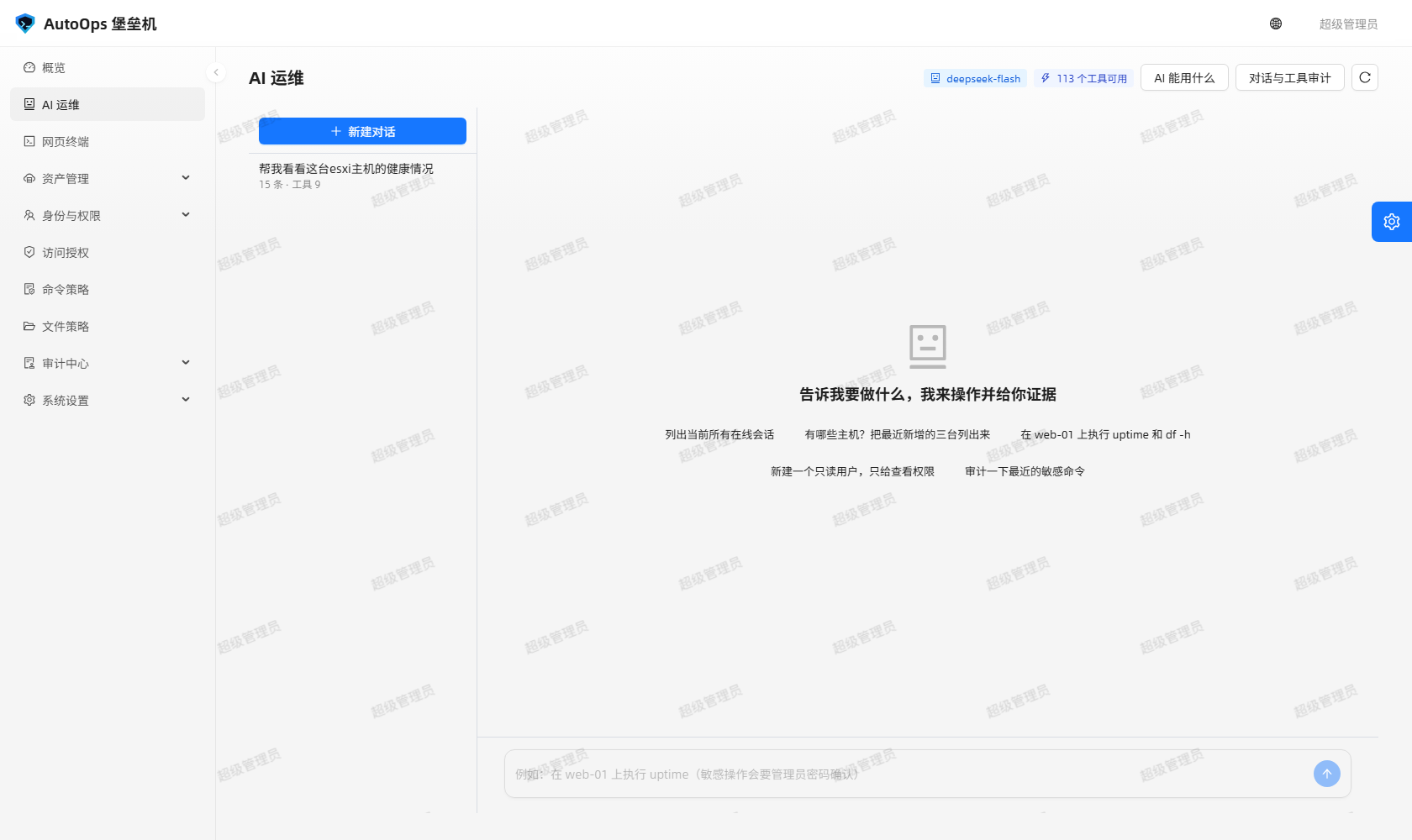
图里能看到什么:左边是对话列表,中间是消息流,右边是这次回答用到的工具调用;敏感操作会在消息流里插一张需要管理员口令的确认卡片。
| 入口 | 怎么进 | 需要什么 |
|---|---|---|
| 网页「AI 运维」页 | 侧边菜单「AI 运维」,地址 /ai
|
ai:use |
| 终端与网关 | 进到目标机 shell 之后,把 /ask-ai 你的问题 当一条命令敲 |
已连上会话;网关身份仍受 ai:use 约束 |
/ask-ai 那一行不会被目标机执行:网关识别到前缀后补发一个 Ctrl-U 把行擦掉、不转发回车,所以目标机的 shell 历史里不留痕。网页终端里同样支持这条前缀。
两种入口同一套权限、同一套工具、同一套审计,只是展示方式不同:网页端渲染 Markdown 与卡片,终端里 Markdown 原地重绘、卡片降级成 ASCII 表格(终端里绝不会漏出 JSON)。
- 自然语言下指令:不用记接口,说清楚要做什么就行。
-
查主机与资产:
list_hosts、list_host_accounts、list_host_groups、test_host_account等。 -
跑只读命令:
run_command在一台有授权的机器上执行命令并取回输出,check_terminal_target真的连一次做连通性体检。 -
查审计:
list_sessions、list_audits、get_audit等,回答「昨天谁登过 web-01」这类问题。
工具在后端 bastion-backend/app/ai/tools.py 的 TOOLS 注册表里声明式注册(当前 113 个),按 group 分组,例如「资产」「账号」「授权」「身份」「命令策略」「文件策略」「审计」「执行」「文件」「系统」。注册表里的工具名是唯一权威,下面照抄几个常用的:
| 工具名 | 干什么 | 权限档 |
|---|---|---|
list_hosts |
查询被纳管的服务器列表 | 只读 ai:tool
|
list_sessions |
查询会话记录(谁在什么时候登了哪台机器、协议、状态、命令数) | 只读 ai:tool
|
list_audits |
查询身份审计日志(登录、增删改、策略变更等控制台动作) | 只读 ai:tool
|
get_audit |
查看一条审计日志的详情(含变更明细) | 只读 ai:tool
|
check_terminal_target |
连通性体检:能不能登上某台主机(真的连一次) | 执行 ai:tool_exec,敏感 |
run_command |
在某台授权的机器上执行一条命令并取回输出 | 执行 ai:tool_exec,敏感 |
open_file_session / list_remote_dir / read_remote_file
|
开 SFTP 会话、列目录、读文本文件 | 执行 ai:tool_exec
|
create_host / update_host / delete_host
|
资产增删改 | 写 ai:tool_write,敏感 |
create_grant / update_grant / delete_grant / batch_grant
|
访问授权增删改 | 写 ai:tool_write,敏感 |
terminate_session |
强制中断一个在线会话 | 写 ai:tool_write,敏感 |
purge_sessions / purge_commands / purge_audits / purge_file_logs
|
清除会话、命令、审计、文件审计记录 | 写 ai:tool_write,敏感 |
update_settings / reset_settings
|
改系统设置、恢复默认 | 写 ai:tool_write,敏感 |
工具的执行方式是:invoke() 用 app.test_client() 带上调用者自己的 JWT 去打堡垒机自身 REST。所以工具的目标路径都是项目里真实存在的接口,权限判定、命令策略、文件策略、审计落库全部复用人类走的那一套。
工具目录按权限裁剪:tools_for_permission(permissions, *, is_admin=False)。没勾 ai:tool* 的话,工具目录能看见但一个都拿不到;没有 ai:tool_exec,「在目标机执行命令」这一类工具会全部被过滤掉。网页「AI 能用什么」抽屉里列的就是当前账号实际可用的工具。
run_command 不用你操心目标机是 Linux 还是 Windows:通道按主机的协议端点自动挑。
- Linux 端点走 SSH,命令按 Bash / POSIX 语法写。
- Windows 端点走 WinRM,命令按 PowerShell 语法写。
- 返回体里能看出实际走了哪条:
channel与protocol。 - 你显式传
protocol指定一个该主机并不存在的字符端点,接口直接返回 400NO_CHARACTER_ENDPOINT,文案里列出这台主机可用的端点。传rdp这类图形端点也会被明确拒绝,并说明「rdp 是图形桌面」。 - 不点名时才自动在
ssh/winrm里挑第一个,一个都没有同样 400。 -
run_command的入参是hostId、command、accountId(留空自动选账号)、protocol(留空自动挑)、timeout(默认 60 秒)、reason(为什么要执行这条命令,会写进审计)。
工具声明为敏感(sensitive=True)时,服务层不会直接执行:
- 模型要调用敏感工具,后台先落一条
pending的工具调用,并向界面回一个confirm_required事件。 - 网页上弹一张确认框,列出即将执行的操作与参数,要填管理员账号 + 管理员密码;终端里是纯文本提示,密码输入不回显(直接回车就是拒绝)。
- 口令正确 → 执行,并写一条
audit_logs(action="ai_tool_confirm"),然后同一轮对话继续跑下去。口令错误或你点了拒绝 → 判为拒绝,工具不执行,但同样留痕。 - 没有待确认记录时调确认接口返回 400
NOTHING_TO_APPROVE。确认请求里只有密码是必填的,管理员账号留空会回退到发起人自己账号;但依然要求这个人确实是管理员、口令也校验通过 —— 发起人不是管理员或口令不对,一律 403,工具保持pending。
工具调用本身逐条落库(ai_tool_call),所以「AI 想做什么、做了什么、谁批的」三件事都能对得上。
审计中心 → AI 对话审计(路由 /audit/ai,需要 ai:view)有两个页签:
- AI 对话:对话、发起人、关联主机、消息数、工具数、最近活动。
- 工具调用:时间、调用人、工具与敏感标记、状态、确认人、入参、结果。
点「查看详情」能看到该对话的逐条消息(含思考过程与卡片 JSON)与全部工具调用。只有 ai:view_all 能看到别人的对话,否则只看得到自己的。
支撑这些页面的是三张表:
| 表 | 记什么 |
|---|---|
ai_conversations |
标题、发起人与 source(web / shell)、模型、关联主机与会话号、消息数 / 工具数 / token 数 |
ai_messages |
角色、正文、思考过程、工具调用、卡片、状态、模型、prompt / completion / reasoning token、结束原因、耗时 |
ai_tool_calls |
工具名、入参、要求的权限码、是否敏感、状态(pending / approved / rejected / running / success / failure)、确认人与确认时间、结果摘要与预览、错误、耗时 |
再加上第三层:工具打到 REST 之后,里面的命令、文件操作、配置变更继续落 command_logs、file_logs、audit_logs。所以一次「让 AI 重启服务」,在命令记录里也能看到那条命令。
| 权限码 | 给什么 |
|---|---|
ai:use |
能用 AI:开会话、提问、确认敏感操作 |
ai:view |
看 AI 对话审计与工具调用 |
ai:view_all |
看别人的对话 |
ai:tool |
只读类工具 |
ai:tool_write |
写类工具(默认敏感) |
ai:tool_exec |
执行类工具,包含「在目标机跑命令」(默认敏感) |
ai:manage |
AI 设置与全局管理 |
后端的接口对应关系:GET /api/ai/status 与 GET /api/ai/tools 登录即可(工具目录按权限裁剪);POST /api/ai/chat 与 POST /api/ai/confirm 要 ai:use;GET /api/ai/conversations、GET /api/ai/conversations/<id>、GET /api/ai/tool-calls 要 ai:view(看他人对话需要 ai:view_all 或 ai:manage);DELETE /api/ai/conversations/<id> 要 ai:view 加本人身份或 ai:manage;GET /api/ai/settings 要 ai:manage。
默认只给 admin。 内置的 ops / auditor / viewer 三个角色都不含任何 ai:* 权限码;要给谁用 AI,就在他的角色里勾 ai:view + ai:use(只读),再按需要加 ai:tool_write / ai:tool_exec。
写在 bastion-backend/.env(模板是同目录的 .env.example,.env 已在 .gitignore 里)。变量名以 bastion-backend/app/config.py 与 README 部署章为准:
| 变量 | 默认 | 说明 |
|---|---|---|
AI_ENABLED |
1 |
关掉后所有 AI 接口返回 403 AI_DISABLED,菜单也不显示 |
DEEPSEEK_API_KEY |
空 | DeepSeek 的 Key;兼容 OpenAI 协议的中转地址也能用 |
DEEPSEEK_BASE_URL |
https://api.deepseek.com |
接口地址 |
AI_MODEL |
deepseek-flash |
模型名 |
AI_REQUEST_TIMEOUT / AI_MAX_TOKENS
|
120 / 8192
|
单次请求超时与最大输出 |
AI_MAX_TOOL_ROUNDS |
8 |
一个回合里最多几轮「模型要工具 → 执行 → 回灌」 |
AI_HISTORY_LIMIT |
40 |
回灌的历史消息条数 |
AI_CONFIRM_TTL |
300 |
敏感操作确认的有效窗口(秒) |
换完 Key 要重启后端进程才生效。AI 页面在没配 Key 时的表现以 docs/使用手册.md 与代码为准:后端口径是 /api/ai/chat 直接返回 400 AI_NOT_CONFIGURED(不是先 200 再在流里报错),网页上也会给出「尚未配置 DEEPSEEK_API_KEY(写入 bastion-backend/.env 后重启服务)」这类提示。
POST /api/ai/chat 是 SSE 流,事件顺序大致是:
start → reasoning / content → tool_call → tool_result → cards → message_end
异常走 error。网页端用 fetch + getReader() 增量解析,所以回答是一个字一个字长出来的,思考过程单独折叠;tool_call 与 tool_result 让工具调用在消息流里可见(工具名、入参、结果、耗时、是否敏感,失败也显示原因)。终端里用 \r\x1b[K 原地重绘,看起来同样是一行行刷出来的。
- AI 受同一套权限与策略约束,不会绕过授权。 工具带的是你的身份,你调不动的接口 AI 也调不动。
- 敏感操作一定有人当场批准。 批的人、批的时间、批的是哪次工具调用,都在审计里。
- AI 说的话不是审计。 要证据就去看命令记录、文件记录与 AI 对话审计,那里才是落库的原始记录。
- 让 AI 跑命令时,把
reason写清楚:它会写进审计,事后翻记录的人只能靠它理解当时为什么这么干。
The AI Operations Assistant lets you give instructions in one sentence: "check the hostname and OS version of win-75", "which machines are running out of disk", "move demo-01 from the production group to the test group".
It does not go around any door. Every AI tool call carries your own identity and hits the bastion's own REST API, so anything you cannot do in the web UI, you cannot do by asking the AI either. Genuinely risky actions stop and wait for you to type an administrator password.
What you can see: the conversation list on the left, the message stream in the middle, and the tool calls used by this answer on the right. A sensitive operation inserts a confirmation card into the stream that asks for an administrator password.
| Entry point | How to get there | What it needs |
|---|---|---|
| Web page "AI 运维" | Sidebar menu, route /ai
|
ai:use |
| Terminals and the gateway | Once you are in a target shell, type /ask-ai your question as a command |
An open session; the gateway identity is still bound by ai:use
|
That /ask-ai line is never executed on the target host: the gateway notices the prefix, sends a Ctrl-U to erase the line and does not forward the Enter, so nothing is left in the target shell's history. The web terminal supports the same prefix.
Both entry points share one permission model, one tool registry and one audit trail; only the presentation differs. The web page renders Markdown and cards, while a terminal redraws Markdown in place and degrades cards to ASCII tables (JSON never leaks into a terminal).
- Take instructions in plain language: no need to memorise endpoints, just say what you want.
-
Query hosts and assets:
list_hosts,list_host_accounts,list_host_groups,test_host_accountand friends. -
Run read-only commands:
run_commandexecutes a command on a host you are authorised for and returns the output;check_terminal_targetactually connects once as a connectivity check. -
Query the audit:
list_sessions,list_audits,get_auditanswer questions like "who signed in to web-01 yesterday".
Tools are registered declaratively in the TOOLS registry in bastion-backend/app/ai/tools.py (113 of them at the moment), grouped by group — "资产", "账号", "授权", "身份", "命令策略", "文件策略", "审计", "执行", "文件", "系统". The registry is the only authority on tool names; here are some of the common ones, copied verbatim:
| Tool name | What it does | Permission tier |
|---|---|---|
list_hosts |
List managed servers | read-only ai:tool
|
list_sessions |
Query session records (who signed in where, protocol, status, command count) | read-only ai:tool
|
list_audits |
Query identity audit logs (sign-ins, create/update/delete, policy changes — all console actions) | read-only ai:tool
|
get_audit |
Read one audit log entry in detail, including the change payload | read-only ai:tool
|
check_terminal_target |
Connectivity check: can a given host be reached (it really connects) | execution ai:tool_exec, sensitive |
run_command |
Execute one command on an authorised host and return the output | execution ai:tool_exec, sensitive |
open_file_session / list_remote_dir / read_remote_file
|
Open an SFTP session, list a directory, read a text file | execution ai:tool_exec
|
create_host / update_host / delete_host
|
Create, edit and delete assets | write ai:tool_write, sensitive |
create_grant / update_grant / delete_grant / batch_grant
|
Create, edit and delete access grants | write ai:tool_write, sensitive |
terminate_session |
Forcibly terminate a live session | write ai:tool_write, sensitive |
purge_sessions / purge_commands / purge_audits / purge_file_logs
|
Purge session, command, audit and file-audit records | write ai:tool_write, sensitive |
update_settings / reset_settings
|
Change system settings, restore defaults | write ai:tool_write, sensitive |
How a tool runs: invoke() uses app.test_client() with the caller's own JWT to call the bastion's own REST API. That means every tool target is a real endpoint in this project, and permission checks, the command policy, the file policy and audit writes are all the very same ones a human goes through.
The tool catalogue is trimmed by permission via tools_for_permission(permissions, *, is_admin=False). Without any ai:tool* permission you can see the catalogue but get none of it; without ai:tool_exec, every "run something on the target host" tool is filtered out. The "what can the AI use" drawer in the web page lists exactly the tools your account can actually call.
run_command does not make you care whether the target is Linux or Windows; the channel follows the host's protocol endpoints.
- A Linux endpoint goes over SSH, and the command is written in Bash / POSIX syntax.
- A Windows endpoint goes over WinRM, and the command is written in PowerShell syntax.
- The response tells you which one was used:
channelandprotocol. - If you pass an explicit
protocolnaming a character endpoint the host does not have, the API returns 400NO_CHARACTER_ENDPOINTand the message lists the endpoints that do exist. Passing a graphical endpoint such asrdpis refused too, with an explanation that "rdp is a graphical desktop". - Only when you name nothing does it pick the first of
ssh/winrm; if the host has neither, that is a 400 as well. -
run_commandtakeshostId,command,accountId(blank picks an account),protocol(blank picks a channel),timeout(60 seconds by default) andreason(why this command is being run; it goes into the audit).
When a tool is declared sensitive (sensitive=True), the service layer does not just run it:
- The model asks for a sensitive tool; the backend first writes a
pendingtool call and emits aconfirm_requiredevent to the frontend. - The web page opens a confirmation dialog listing the operation and its arguments and asking for an administrator account plus administrator password; in a terminal it is a plain-text prompt with the password masked (pressing Enter alone means refuse).
- Correct password → it runs, writes
audit_logs(action="ai_tool_confirm"), and the same turn of the conversation carries on. Wrong password or an explicit refusal → treated as refused, the tool does not run, and it is still recorded. - With nothing pending, the confirm endpoint returns 400
NOTHING_TO_APPROVE. Only the password is required in that request; leaving the administrator account blank falls back to the caller's own account — but the caller must really be an administrator and the password must still check out. Otherwise it is a 403, and the tool stayspending.
Each tool call is stored as its own row (ai_tool_call), so "what the AI wanted to do", "what it did" and "who approved it" all line up.
Audit Centre → AI conversation audit (route /audit/ai, needs ai:view) has two tabs:
- AI conversations: conversation, initiator, related host, message count, tool count, last activity.
- Tool calls: time, caller, tool and sensitive flag, status, approver, arguments, result.
View details shows every message of that conversation (including reasoning and card JSON) and all of its tool calls. Only ai:view_all lets you read other people's conversations; otherwise you see your own.
Three tables back those pages:
| Table | What it holds |
|---|---|
ai_conversations |
Title, initiator and source (web / shell), model, related host and session id, message / tool / token counts |
ai_messages |
Role, content, reasoning, tool calls, cards, status, model, prompt / completion / reasoning tokens, finish reason, elapsed time |
ai_tool_calls |
Tool name, arguments, required permission code, sensitive flag, status (pending / approved / rejected / running / success / failure), approver and approval time, result summary and preview, error, duration |
There is a third layer on top: once a tool hits REST, the commands, file operations and configuration changes inside it keep landing in command_logs, file_logs and audit_logs. So a "have the AI restart the service" shows up in the command logs as that command.
| Permission code | What it grants |
|---|---|
ai:use |
Use the AI: open conversations, ask questions, approve sensitive operations |
ai:view |
Read the AI conversation audit and tool calls |
ai:view_all |
Read other people's conversations |
ai:tool |
Read-only tools |
ai:tool_write |
Write tools (sensitive by default) |
ai:tool_exec |
Execution tools, including "run a command on a target host" (sensitive by default) |
ai:manage |
AI settings and global management |
Mapping to endpoints: GET /api/ai/status and GET /api/ai/tools only need a sign-in (the catalogue is trimmed by permission); POST /api/ai/chat and POST /api/ai/confirm need ai:use; GET /api/ai/conversations, GET /api/ai/conversations/<id> and GET /api/ai/tool-calls need ai:view (reading other people's conversations needs ai:view_all or ai:manage); DELETE /api/ai/conversations/<id> needs ai:view plus ownership or ai:manage; GET /api/ai/settings needs ai:manage.
By default only admin has any of this. The built-in ops, auditor and viewer roles carry no ai:* permission code at all. To let somebody use the AI, tick ai:view + ai:use (read-only) in their role, then add ai:tool_write / ai:tool_exec as needed.
Put them in bastion-backend/.env (the template is .env.example in the same directory, and .env is in .gitignore). Variable names follow bastion-backend/app/config.py and the deployment chapter of the README:
| Variable | Default | Meaning |
|---|---|---|
AI_ENABLED |
1 |
Turn it off and every AI endpoint returns 403 AI_DISABLED, and the menu disappears |
DEEPSEEK_API_KEY |
empty | The DeepSeek key; an OpenAI-compatible relay works too |
DEEPSEEK_BASE_URL |
https://api.deepseek.com |
API base URL |
AI_MODEL |
deepseek-flash |
Model name |
AI_REQUEST_TIMEOUT / AI_MAX_TOKENS
|
120 / 8192
|
Per-request timeout and maximum output |
AI_MAX_TOOL_ROUNDS |
8 |
Maximum "model asks for a tool → run it → feed it back" rounds per turn |
AI_HISTORY_LIMIT |
40 |
How many historical messages are replayed |
AI_CONFIRM_TTL |
300 |
Validity window of a sensitive-operation confirmation, in seconds |
Restart the backend process after changing the key. What the AI page does when no key is configured follows docs/使用手册.md and the code: on the backend side /api/ai/chat returns 400 AI_NOT_CONFIGURED outright (it does not return 200 first and then fail inside the stream), and the web page shows a hint such as "尚未配置 DEEPSEEK_API_KEY(写入 bastion-backend/.env 后重启服务)".
POST /api/ai/chat is an SSE stream, roughly in this order:
start → reasoning / content → tool_call → tool_result → cards → message_end
Failures come through error. The web page parses it incrementally with fetch + getReader(), so the answer grows character by character and the reasoning is folded away separately; tool_call and tool_result make tool calls visible inside the message stream (tool name, arguments, result, duration, sensitive flag — and the reason when one fails). A terminal redraws in place with \r\x1b[K, which looks just as incremental.
- The AI obeys the same permissions and policies and never bypasses authorisation. Tools carry your identity; an endpoint you cannot call is an endpoint the AI cannot call.
- A sensitive operation always has a human approving it on the spot. Who approved it, when, and which tool call — all of it is audited.
- What the AI says is not the audit. For evidence, read the command logs, file logs and the AI conversation audit; that is where the raw records live.
- When you have the AI run a command, write a clear
reason: it goes into the audit, and whoever reads the record later has only that to understand why it was run.
相关页面 / Related pages: Home · Audit-Center · Security-and-Maintenance