Repository navigation
Security and Maintenance
中文 · English
这一页讲的是「上线之后别出事」:哪些东西必须马上改、哪些东西丢了就真丢了、出问题了怎么升级怎么回滚。看完你至少应该记住一句话:
instance/目录加上三把密钥,就是这个堡垒机的全部家底。
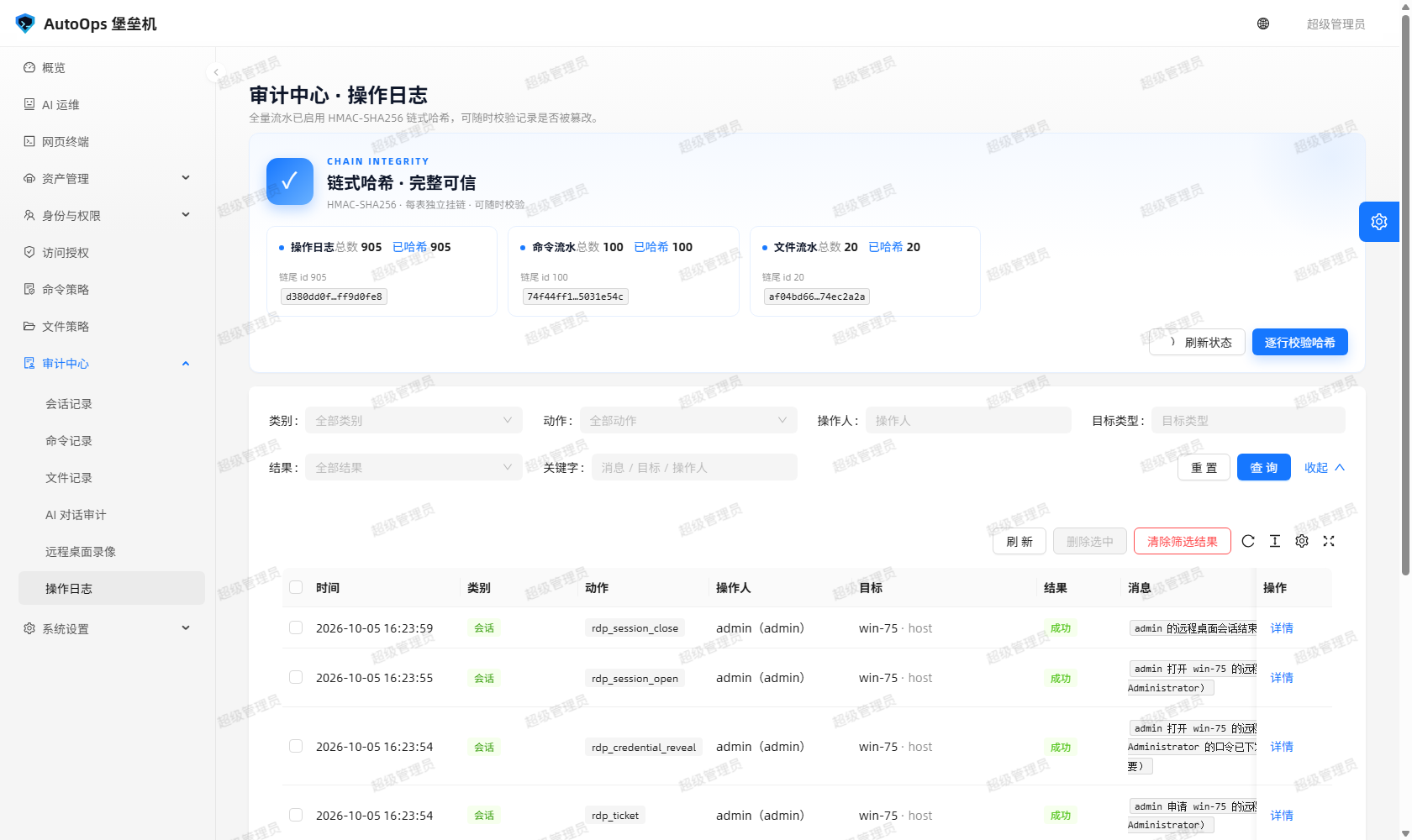
图里能看到什么:审计中心顶部的「链完整性」徽标 —— 三张流水表的链式哈希统计与逐行校验结论。它是你确认「审计没被动过」的第一个地方。
-
改掉初始管理员口令。 出厂值是
admin / admin123,写在文档里、也写在每个克隆者的屏幕上。用初始管理员从网页登录会被要求立刻改密;首次用管理员登录 SSH 网关同样会强制改密 —— 改完之后admin123就失效了。忘了口令可以用python run.py --reset-admin重设(会按提示输入新口令)。 -
给每个人建独立账号,按最小角色给权限。 不要让三个人共用一个账号:审计记录的是
username,共用账号等于把「谁干的」这件事丢掉。内置的admin/ops/auditor/viewer四个角色已经给了合理的起点:审计员只读、viewer只看得到自己的会话与命令。 -
日常不要拿超级管理员账号干活。
User.is_superuser=True等价于拥有全部权限,而且在没有任何授权记录时也能连上所有已启用的主机(产品里叫「超级管理员准入例外」,见docs/使用手册.md:它只放宽准入、不放宽管控 —— 临时授权不写库、会话与命令照常落库、命令策略照常强制)。要日常运维就建一个ops账号。
顺带一句:python tools/demo_ssh_target.py 起的演示目标机(127.0.0.1:2200,账号 root / s3cret)是给人试用的假机器,别把它当成生产环境的凭据管理方式。
BASTION_SECRET_KEY、BASTION_JWT_SECRET、BASTION_FERNET_KEY 分别管三件事:
| 变量 | 管什么 | 丢了会怎样 |
|---|---|---|
BASTION_SECRET_KEY |
会话签名,同时是审计哈希链的派生源(key = sha256(b"bastion-audit-chain-v1" + SECRET_KEY)) |
已签发的会话失效;审计链无法继续计算与校验 |
BASTION_JWT_SECRET |
登录令牌(JWT)的签名 | 所有 JWT 立即失效,所有人需要重新登录 |
BASTION_FERNET_KEY |
资产口令、私钥、私钥口令短语的对称加密(Fernet) | 已存的资产口令就解不开,只能重新录一遍凭据 |
默认情况下三把密钥首次启动时随机生成并落盘到 bastion-backend/instance/,同目录里还有:
| 文件 | 是什么 |
|---|---|
bastion.db |
SQLite 数据库(BASTION_DB_URI 可换成 PostgreSQL 等) |
secret.key |
Flask SECRET_KEY 与 JWT_SECRET_KEY 随机生成并持久化 |
fernet.key |
资产口令加密主密钥 |
gateway_host_rsa.key |
SSH 网关主机私钥(RSA 2048) |
transcripts/<sid>.log |
每会话录像(JSON Lines,含命令、输出、放行与拦截) |
rdp_recordings/ |
远程桌面录像 |
三条铁律:
-
设严的文件权限。 这个目录只给运行服务的系统账号可读(例如
chmod 600密钥文件、目录权限 700)。同机其他用户读走fernet.key就等于读走所有资产口令。 -
多实例部署必须显式给同一组值。 起两个进程共用一份数据时,
BASTION_SECRET_KEY/BASTION_JWT_SECRET/BASTION_FERNET_KEY要在两边配成一模一样的值,否则一台签发的令牌另一台不认,一台加密的口令另一台解不开。 -
密钥不要进版本库。 生产推荐把它们写进 systemd 单元或
/etc/autoops.env,别提交到 Git;.env里只放 AI 的DEEPSEEK_API_KEY(该文件已在.gitignore里)。
资产口令、私钥、口令短语在落库时就用 Fernet 加密,接口只在调用者具备 host:manage 权限时才回显 —— 没有这个权限的人,列表里拿到的凭据字段是空的。
默认监听:Web 与 API 0.0.0.0:5000,SSH 网关 0.0.0.0:2222。
- 两个端口都不要裸奔在公网。 Web 侧放到反向代理后面并启用 TLS(HTTPS/WSS),SSH 网关要么限制来源 IP,要么只对内网/跳板网段开放。想让它走标准 22 端口,就用防火墙或端口转发把 22 转给 2222,而不是把 2222 直接摆出去。
- Nginx 反代必须透传 WebSocket,网页终端和远程桌面靠它:
location / {
    proxy_pass http://127.0.0.1:5000;
    proxy_http_version 1.1;
    proxy_set_header Upgrade $http_upgrade;      # 必须
    proxy_set_header Connection "upgrade";       # 必须
    proxy_set_header Host $host;
    proxy_set_header X-Real-IP $remote_addr;
    proxy_read_timeout 3600s;                    # 长连接别被中途掐断
}-
把
BASTION_CORS_ORIGINS收窄到实际前端域名。 默认*只是为了部署调试方便;前后端分离部署时一定要收紧。 - 网关主机指纹在「系统设置 → SSH 网关」里能看到。首次用
ssh连网关时核对一下指纹,避免中间人。版本信息也在同一处:服务器版本SSH-2.0-BastionGW_1.0,客户端版本形如SSH-2.0-paramiko_<版本>。
| 参数 | 默认 | 作用 |
|---|---|---|
login_max_failures |
5 |
连续登录失败到这个次数就锁定账号 |
login_lock_minutes |
15 |
锁定时长(分钟) |
session_idle_timeout |
1800 |
会话空闲上限(秒),超时自动断开并写 end_reason = 空闲超时自动断开
|
max_sessions_per_user(环境变量 BASTION_GATEWAY_MAX_SESSIONS) |
5 |
单用户网关并发会话上限 |
前三个可以在「系统设置 → 系统参数」里调整;max_sessions_per_user 也可由网关配置项给出。另外文件管理器每用户在线会话上限是 MAX_SESSIONS_PER_USER=8。失败登录会累加 failed_attempts,锁定行为本身会写审计。
并发上限不是摆设:会话空闲超时就是被真实泄漏逼出来的 —— 关标签页不会触发前端清理,会话会一直占配额,真机上曾经泄漏 8 条文件会话把 MAX_SESSIONS_PER_USER=8 撞满,之后所有 POST /api/files/sessions 都返回 QUOTA_EXCEEDED。
三张流水表 audit_logs / command_logs / file_logs 逐行挂 prev_hash 与 entry_hash:entry_hash = HMAC-SHA256(key, table + prev_hash + 规范化字段),prev_hash 指向上一条的 entry_hash,密钥从 SECRET_KEY 派生且不落库。改一条历史记录,链就断在那里。
cd bastion-backend && python tools/verify_audit_chain.py
python tools/verify_audit_chain.py --print-head
它的边界要说清楚:
- 它防的是「偷偷改一条」。手里有数据库写权限、又拿得到
SECRET_KEY的人,可以把整条链从头重算一遍,链依然自洽 —— 哈希链不是对服务器管理员的防护。 -
整段删掉表尾的记录在库内看不出问题,只能拿库外锚点比对。所以记得把
--print-head打印的链尾哈希抄到库外。 - 链起步前的空哈希行是合法遗留(老库升级后补不出哈希),链内出现空哈希行才是异常。徽标只对后者亮红,
healthy的判据也是它。 - 审计记录只增不改:清除是管理员专属操作,走二次确认、按筛选或勾选删除,且每次清除本身都写一条审计留痕;文件记录的清除在权限模型里等价于命令记录清除,需要
command:view_all。
更多细节见 审计中心 与 docs/审计与安全.md。
cd /opt/autoops/app
git pull
cd bastion-backend && .venv/bin/python -m pip install -r requirements.txt
cd ../ant-design-pro && npm ci && npm run build
sudo systemctl restart autoops
重启完立刻自检:
curl -fsS http://127.0.0.1:5000/api/health看到 {"success":true,...} 说明后端起来了。前端产物 dist/ 由后端启动时自动挂载,不需要另配 Web 服务器;数据库表结构由 ensure_schema() 在启动时只加不减地对齐(含「一台主机多协议」端点回填),不写迁移脚本也不会丢数据。
再跑一轮门禁与真机自测:
cd bastion-backend
python -m pytest -q                                    # 单元测试
python tools/live_e2e_check.py --admin-password <口令>  # 真机联调
python tools/verify_audit_chain.py                     # 审计链仍完整
live_e2e_check.py 要求后端已在跑、python tools/demo_ssh_target.py 在 2200 监听;Windows 控制台中文乱码时先 $env:PYTHONIOENCODING='utf-8'。
必须一起备份的是一整份 $BASTION_INSTANCE_DIR:bastion.db、secret.key、fernet.key、gateway_host_rsa.key、transcripts/、rdp_recordings/。另外把 .env 里的 BASTION_SECRET_KEY / BASTION_JWT_SECRET / BASTION_FERNET_KEY 单独记一份。
漏掉密钥就等于白备份: 只恢复了 bastion.db 而没有 fernet.key,里面所有资产口令、私钥、口令短语都解不开,只能一台台重新录凭据。
做法上二选一:
# 方案一:停服再打包(最稳)
sudo systemctl stop autoops
tar czf autoops-backup-$(date +%F).tar.gz -C /opt/autoops/app bastion-backend/instance
sudo systemctl start autoops
# 方案二:不停服,用 SQLite 自己的备份命令做一致性快照
sqlite3 /opt/autoops/app/bastion-backend/instance/bastion.db \
".backup '/backup/bastion-$(date +%F).db'"录像目录会随着使用一直长大,备份前先看看空间;远程桌面录像默认上限 RDP_RECORDING_MAX_MB=512(实测码率约 16 KB/s,够录 9 小时)。
- 在新机器上装好 Python 与 Node,克隆同一个提交,建好虚拟环境并
pip install -r requirements.txt、npm ci && npm run build。 -
停掉服务,把备份的
instance/整份放回去(数据库 + 三把密钥 + 录像一个不少),把.env里的 AI Key 与三个BASTION_*密钥按原值写回。 -
目录权限重新收紧:
instance/归运行用户所有,密钥文件 600、目录 700。 - 起来之后先
curl -fsS http://127.0.0.1:5000/api/health,再用管理员登录核对三件事:主机列表在、资产账号的「连接测试」能过(说明fernet.key是对的)、python tools/verify_audit_chain.py全绿(说明secret.key是原值)。 - 换了地址或端口记得同步客户端:SSH 网关是
ssh -p 2222 <账号>@<新IP>,改gateway_host/gateway_port后必须重启后端进程才生效,运行中的网关监听不会热切换。
详细步骤与恢复演练见 升级与备份。
发版前的可用状态在仓库里打了 green-* 里程碑 tag。要回滚就切回上一个 green-*:
cd /opt/autoops/app
git fetch --tags
git tag -l 'green-*' | tail -n 5
git checkout green-<上一个>
cd bastion-backend && .venv/bin/python -m pip install -r requirements.txt
cd ../ant-design-pro && npm ci && npm run build
sudo systemctl restart autoops注意两件事:数据库不会跟着回滚(ensure_schema() 只加字段,不减字段),所以老版本能读到新库;但新版本写入的字段老版本不认识,回滚后如果发现功能异常,优先怀疑这一类。另一个是历史 green-* tag 只是存档里程碑,SECURITY.md 明确说了它们不承诺安全修复 —— 回滚是临时手段,别长期停在旧 tag 上。
别开公开 issue,也不要在讨论区或聊天群里贴利用细节。首选仓库 Security 面板 → Advisories → 「Report a vulnerability」;看不到入口就私信维护者 @sywdn-001,第一条消息只说「有安全问题想私下聊」,不要附利用细节。
报告里写清楚:受影响的提交(git rev-parse --short HEAD)、组件(SSH 网关 / 网页终端 / 文件管理器 / WebRDP / REST 接口 / 权限与角色 / 策略引擎 / 审计与哈希链 / AI 助手 / 部署配置)、影响与前提、复现步骤或 PoC、是否已公开或已有 CVE、是否要署名,以及你建议的修复方向。
只在你自己搭建的实例上测试。 不要对公网实例、他人实例、不属于你的被管主机做测试;不要读写删别人的数据。完整范围与安全港条款以 SECURITY.md 为准。
This page is about not getting burned after go-live: what you must change immediately, what is gone forever if you lose it, and how to upgrade and roll back when something breaks. If you remember one line, remember this:
The
instance/directory plus the three keys are the entire estate of this bastion.
What you can see: the "chain integrity" badge at the top of the Audit Centre — hash-chain statistics and the row-by-row verdict for the three ledger tables. It is the first place to look when confirming the audit has not been touched.
-
Change the initial administrator password. The shipped value is
admin / admin123, printed in the docs and on every cloner's screen. Signing in on the web as that administrator forces an immediate change, and the first gateway sign-in as that administrator does the same — after whichadmin123stops working. If you forget it,python run.py --reset-adminresets it and prompts for a new one. -
Give every person their own account, with the least role that fits. Do not let three people share one account: the audit records
username, so a shared account throws away the answer to "who did it". The built-inadmin/ops/auditor/viewerroles are sane starting points — an auditor is read-only, andviewersees only its own sessions and commands. -
Do not do daily work as the superuser.
User.is_superuser=Trueis equivalent to every permission, and with no grant records at all it can still reach every enabled host (the product call it the superuser admission exception, documented indocs/使用手册.md: it relaxes admission only, never control — the temporary grant is not persisted, sessions and commands are recorded as usual, and the command policy is still enforced). Create anopsaccount for everyday work.
One aside: the demo target started by python tools/demo_ssh_target.py (127.0.0.1:2200, account root / s3cret) is a fake machine for trying things out. Do not treat it as a pattern for managing production credentials.
BASTION_SECRET_KEY, BASTION_JWT_SECRET and BASTION_FERNET_KEY govern three different things:
| Variable | What it governs | What happens if you lose it |
|---|---|---|
BASTION_SECRET_KEY |
Session signing, and it is the derivation source of the audit hash chain (key = sha256(b"bastion-audit-chain-v1" + SECRET_KEY)) |
Issued sessions stop working; the hash chain can no longer be computed or verified |
BASTION_JWT_SECRET |
Login token (JWT) signatures | Every JWT is invalidated at once; everyone has to sign in again |
BASTION_FERNET_KEY |
Symmetric encryption (Fernet) of asset passwords, private keys and key passphrases | Stored asset passwords cannot be decrypted; every credential has to be entered again |
By default the three keys are generated randomly on first start and written under bastion-backend/instance/, which also holds:
| File | What it is |
|---|---|
bastion.db |
The SQLite database (BASTION_DB_URI can point at PostgreSQL and friends) |
secret.key |
Flask SECRET_KEY and JWT_SECRET_KEY, generated and persisted |
fernet.key |
The master key for asset credential encryption |
gateway_host_rsa.key |
The SSH gateway host private key (RSA 2048) |
transcripts/<sid>.log |
Per-session transcripts (JSON Lines, with commands, output, allows and blocks) |
rdp_recordings/ |
Remote desktop recordings |
Three hard rules:
-
Lock the file permissions down. Only the system account running the service should read this directory (for example
chmod 600on key files, 700 on the directory). Another user on the same box readingfernet.keyhas read every asset password. -
A multi-instance deployment must be given the same values explicitly. When two processes share one dataset,
BASTION_SECRET_KEY/BASTION_JWT_SECRET/BASTION_FERNET_KEYmust be identical on both, otherwise a token issued by one is rejected by the other and a password encrypted by one cannot be decrypted by the other. -
Keys must not go into version control. In production put them in the systemd unit or
/etc/autoops.env, never in Git. The.envfile is only for the AIDEEPSEEK_API_KEY(and it is already in.gitignore).
Asset passwords, private keys and passphrases are encrypted with Fernet the moment they are stored, and the API only returns them to a caller holding host:manage — without it the credential fields come back empty.
Default listeners: web and API on 0.0.0.0:5000, SSH gateway on 0.0.0.0:2222.
- Do not leave either port naked on the public internet. Put the web side behind a reverse proxy with TLS (HTTPS/WSS), and either restrict the SSH gateway by source IP or expose it only on an internal network. To serve it on the standard port 22, forward 22 to 2222 with a firewall or port forward rather than exposing 2222 itself.
- An Nginx reverse proxy must pass WebSocket through — the web terminal and remote desktop depend on it:
location / {
    proxy_pass http://127.0.0.1:5000;
    proxy_http_version 1.1;
    proxy_set_header Upgrade $http_upgrade;      # required
    proxy_set_header Connection "upgrade";       # required
    proxy_set_header Host $host;
    proxy_set_header X-Real-IP $remote_addr;
    proxy_read_timeout 3600s;                    # do not cut long connections short
}-
Tighten
BASTION_CORS_ORIGINSto your real frontend domain. The default*exists only so deployment is easy to debug; narrow it for any split frontend/backend deployment. - The gateway host fingerprint is visible under System settings → SSH gateway. Compare it the first time you
sshto the gateway to avoid a man in the middle. Version information lives in the same place: the server version isSSH-2.0-BastionGW_1.0, and the client version looks likeSSH-2.0-paramiko_<version>.
| Parameter | Default | Effect |
|---|---|---|
login_max_failures |
5 |
Consecutive failed sign-ins before the account is locked |
login_lock_minutes |
15 |
Lockout duration in minutes |
session_idle_timeout |
1800 |
Idle limit in seconds; the session is closed and end_reason = 空闲超时自动断开
|
max_sessions_per_user (env BASTION_GATEWAY_MAX_SESSIONS) |
5 |
Concurrent gateway sessions per user |
The first three are adjustable under System settings → System parameters; max_sessions_per_user also comes from the gateway configuration. The file manager separately caps concurrent sessions per user at MAX_SESSIONS_PER_USER=8. Failed sign-ins accumulate in failed_attempts, and the lockout itself is audited.
These limits are not decoration: the idle timeout exists because of a real leak — closing a tab does not trigger frontend cleanup, so a session keeps holding its quota. On a real machine 8 leaked file sessions filled MAX_SESSIONS_PER_USER=8 and every subsequent POST /api/files/sessions returned QUOTA_EXCEEDED.
Every row of the three ledger tables audit_logs / command_logs / file_logs carries prev_hash and entry_hash: entry_hash = HMAC-SHA256(key, table + prev_hash + normalised fields), where prev_hash points at the previous row's entry_hash and the key is derived from SECRET_KEY and never stored. Change one historical record and the chain breaks right there.
cd bastion-backend && python tools/verify_audit_chain.py
python tools/verify_audit_chain.py --print-head
Its boundary needs to be stated plainly:
- It defends against silently editing one record. Anyone with database write access and
SECRET_KEYcan recompute the whole chain from scratch and leave it self-consistent — the hash chain is not protection from a server administrator. -
Deleting rows from the tail cannot be detected from inside the database; only an off-database anchor comparison can. So actually copy away the chain-head hashes that
--print-headprints. - Rows with an empty hash before the chain starts are legitimate leftovers (data from before an upgrade cannot be hashed retroactively). An empty hash inside the chain is the anomaly. The badge only turns red for the latter, and that is also what
healthylooks at. - Audit records are append-only: purging is administrator-only, confirmed a second time, and either ticked or filter-based — and every purge writes an audit entry of its own. Purging file logs is equivalent to purging command logs in the permission model and needs
command:view_all.
More detail in Audit Centre and docs/审计与安全.md.
cd /opt/autoops/app
git pull
cd bastion-backend && .venv/bin/python -m pip install -r requirements.txt
cd ../ant-design-pro && npm ci && npm run build
sudo systemctl restart autoops
Check it immediately after the restart:
curl -fsS http://127.0.0.1:5000/api/healthA {"success":true,...} response means the backend is up. The frontend build in dist/ is mounted automatically when the backend starts, so no separate web server is needed, and the schema is aligned additively by ensure_schema() at startup (including the multi-protocol endpoint backfill) — no migration scripts, no data loss.
Then run the gates and the live self-check:
cd bastion-backend
python -m pytest -q                                    # unit tests
python tools/live_e2e_check.py --admin-password <pw>   # live end-to-end
python tools/verify_audit_chain.py                     # chain still intact
live_e2e_check.py expects the backend to be running and python tools/demo_ssh_target.py to be listening on 2200. On Windows, when Chinese output comes out garbled, run $env:PYTHONIOENCODING='utf-8' first.
Back up one whole $BASTION_INSTANCE_DIR: bastion.db, secret.key, fernet.key, gateway_host_rsa.key, transcripts/, rdp_recordings/. Separately record the BASTION_SECRET_KEY / BASTION_JWT_SECRET / BASTION_FERNET_KEY values from .env.
Missing keys means the backup is worthless: restore bastion.db without fernet.key and every asset password, private key and passphrase inside is undecryptable — you re-enter every credential by hand.
Two ways to do it:
# Option 1: stop the service, then archive (safest)
sudo systemctl stop autoops
tar czf autoops-backup-$(date +%F).tar.gz -C /opt/autoops/app bastion-backend/instance
sudo systemctl start autoops
# Option 2: keep running and take a consistent snapshot with SQLite itself
sqlite3 /opt/autoops/app/bastion-backend/instance/bastion.db \
".backup '/backup/bastion-$(date +%F).db'"The recordings directory keeps growing; check your free space before backing up. Remote desktop recordings default to RDP_RECORDING_MAX_MB=512 (measured at roughly 16 KB/s, which is about 9 hours).
- Install Python and Node on the new machine, clone the same commit, create the virtual environment, then
pip install -r requirements.txtandnpm ci && npm run build. -
Stop the service, put the whole backed-up
instance/back (database, three keys, recordings — nothing missing), and write the original AI key andBASTION_*secrets back into.env. -
Tighten the permissions again:
instance/owned by the runtime user, key files 600, directory 700. - After it starts, run
curl -fsS http://127.0.0.1:5000/api/healthand then sign in as an administrator to confirm three things: the host list is there, an asset account passes Test connection (that provesfernet.keyis the right one), andpython tools/verify_audit_chain.pyis green (that provessecret.keyis the original). - If the address or port changed, update your clients: the gateway is
ssh -p 2222 <account>@<newIP>. Changinggateway_host/gateway_portrequires restarting the backend process — a running gateway listener does not hot-swap.
Full steps and restore drills are in Upgrade and Backup.
Known-good release states are tagged in the repository as green-* milestones. To roll back, check out the previous green-*:
cd /opt/autoops/app
git fetch --tags
git tag -l 'green-*' | tail -n 5
git checkout green-<previous>
cd bastion-backend && .venv/bin/python -m pip install -r requirements.txt
cd ../ant-design-pro && npm ci && npm run build
sudo systemctl restart autoops
Two caveats. The database does not roll back with the code (ensure_schema() only adds columns, never removes them), so an older version can read a newer database — but columns written by the newer version are unknown to the older one, so if something misbehaves after a rollback, suspect that first. And historical green-* tags are archived milestones: SECURITY.md states plainly that they carry no promise of security fixes, so a rollback is a stopgap, not a place to live.
Do not open a public issue, and do not paste exploit details into a discussion forum or chat group. Prefer the repository's Security panel → Advisories → "Report a vulnerability"; if you cannot find it, message the maintainer @sywdn-001 privately and make the first message only "I would like to talk about a security issue privately" — without exploit details.
Include: the affected commit (git rev-parse --short HEAD), the component (SSH gateway / web terminal / file manager / WebRDP / REST API / permissions and roles / policy engine / audit and hash chain / AI assistant / deployment configuration), the impact and preconditions, reproduction steps or a PoC, whether it is already public or has a CVE, whether you want credit, and any fix direction you suggest.
Test only on an instance you built yourself. Do not test against public instances, other people's instances, or hosts you do not own; do not read, write or delete other people's data. The complete scope and safe-harbour terms are in SECURITY.md.
相关页面 / Related pages: Home · Audit-Center · AI-Assistant