Repository navigation
Remote Desktop and Recordings
中文 · English
浏览器里直接开 Windows 远程桌面:不用装任何客户端、不用客户端软件记口令,画面直接画在网页的 <canvas> 上,整场会话自动录像,录像可在审计中心回看。入口已经并入「网页终端」——Windows 主机和 Linux 主机同列一张资产表,点「连接」弹出独立控制台窗口(/rdp/console),独立的「远程桌面」列表页与菜单已删除。
点「连接」后:
- 前端
POST /api/rdp/sessions({hostId, accountId?})申请一次会话,服务端做完准入后回一张一次性票据与 WebSocket 路径。 - 准入同时校验:
rdp:use权限码、访问授权(账号 / 时段 / 星期 / 过期 / 并发上限)、can_webterm、主机protocol=rdp、口令认证。 - 浏览器带着票据去升级
/api/rdp/ws?ticket=…;RdpWebSocketMiddleware在 WSGI 层接住这个升级请求,做浏览器 ↔ 网关 ↔ 目标机 3389 的字节中继,cleanpath.py负责 RDCleanPath 的 X.224 / TLS / 凭据封包解包。 - 票据有效期
TICKET_TTL_SECONDS = 120秒,用一次即作废。
浏览器侧跑的是第三方库 ironrdp-wasm(Rust 版 IronRDP 编译成 WASM):RDP 协议栈完全在客户端侧实现,堡垒机只做字节中继、不解码画面。两个取舍说明白:
- 为了让 NLA / CredSSP 在客户端侧算出来,接口把资产口令随一次性票据下发给浏览器,并专门写一条
rdp_credential_reveal审计 —— 想让口令绝不出服务器,就得把 RDP 客户端搬到服务端(guacd / FreeRDP 位图流),本项目当前不做。 - 也正因为网关看不到画面,录像只能在浏览器侧录(见下文),而不是在服务端录。
窗口顶部工具条(措辞与界面一致):远程桌面 · <主机>、操作系统标签、{address}:{port} · 账号 {username}、当前分辨率 {width}×{height}、状态标签、录制中(录制时红色)、已连接 mm:ss(已连时长,每秒刷新)、全屏显示远端桌面 / 退出全屏、收起工具条 / 展开工具条、重新连接、断开、关闭窗口。
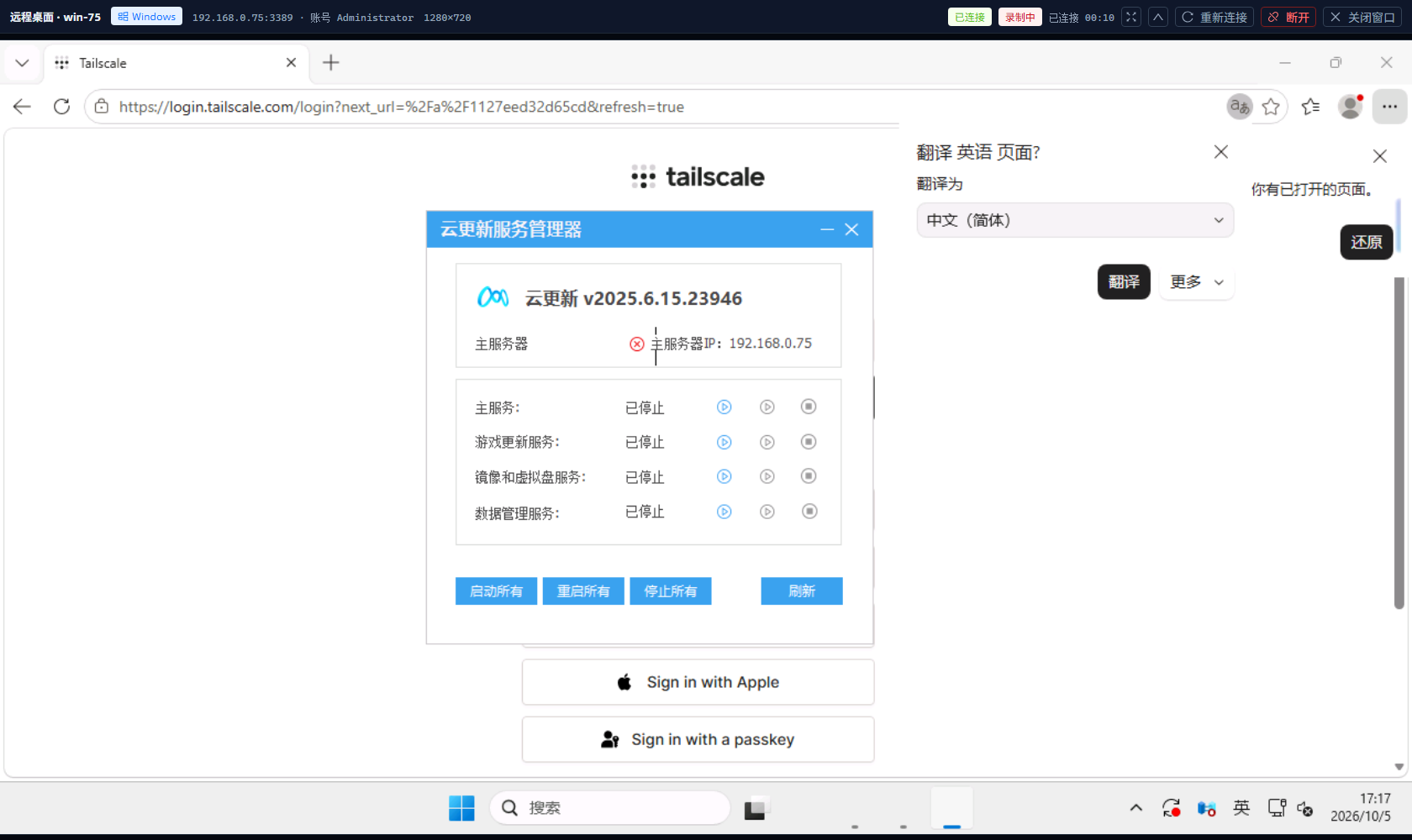
图:浏览器里连着 win-75,右上角显示正在录制;工具条可收起,把画面让给远。
-
画面随窗口自适应:
ResizeObserver去抖后调Session.resize(),让被控主机真的换分辨率,而不是把画面拉伸;画布的后备缓冲完全交给 wasm(手工改canvas.width/height会清空画布,而 RDP 只补增量,右下角会留黑带);画布按位图宽高比等比 contain,工具条显示的是真正生效的分辨率。连接首帧那次 resize 排在Start RDP session之前会被目标机忽略,所以 1.2 秒后补发、最多 3 次。 -
键鼠由
input.ts翻成 RDP 输入 PDU;全屏下的坐标按object-fit: contain的真实内容框与居中偏移换算。 -
出错说人话:所有错误经
describeRdpError()翻译;连接失败时顶部出现「连接失败」告警与「重试」按钮。 - 结束:会话结束后弹出「远程桌面会话已结束」,10 秒倒计时自动关窗(与 Linux 网页终端断开的收口方式一致),录像自动上传。
-
录制在浏览器侧:
<canvas>交给canvas.captureStream(12)+MediaRecorder(优先 VP9)分片攒成 webm,整场会话全程录制,不需要手动点开始。 -
边录边传:每 5 秒把分片
POST /api/rdp/recordings/chunk上传,服务端按uploadId顺序追加(幂等重传、乱序 409、uploadId路径逃逸被拒、过短丢弃、abort结束)。 - 窗口被强行关掉也不丢:直接关标签页 / 浏览器崩溃 / 断网时,服务端凭已经收到的分片自动收口成一条「未正常结束」的录像 —— 只录到窗口关闭那一刻,不是完整的操作过程。静默超过 45 秒的录制任务,会在下一次「看列表 / 开新会话」时被自动收口。
-
兜底路径:必要时整包
POST /api/rdp/recordings(multipart,file+hostId必需,hostId必须是当前账号可远程桌面的主机,否则 403;只收video/webm、video/x-matroska或application/octet-stream;文件名由服务端生成 uuid;超过RDP_RECORDING_MAX_MB(默认512)返回 413)。 -
落盘与配置:录像目录
RDP_RECORDING_DIR(默认instance/rdp_recordings)。实测码率约 16 KB/s,512 MB 大致够 9 小时。 - 为什么不在服务端录:堡垒机只是字节中继、不解码画面;服务端转码会给中继进程带来与并发数成正比的 CPU 开销。
列表在「审计中心 · 远程桌面录像」(/audit/recordings),列:录像(#id,未正常结束时带橙色标签「未正常结束」)· 目标主机 · 操作人 · 资产账号 · 时长 · 体积 · 录制时间 · 操作。鼠标停在「未正常结束」上会说明:浏览器窗口被强行关掉(直接关标签页 / 崩溃 / 断网)时,服务端凭边录边传已经收到的分片自动收口的录像 —— 只录到窗口关闭那一刻,不是完整的操作过程。
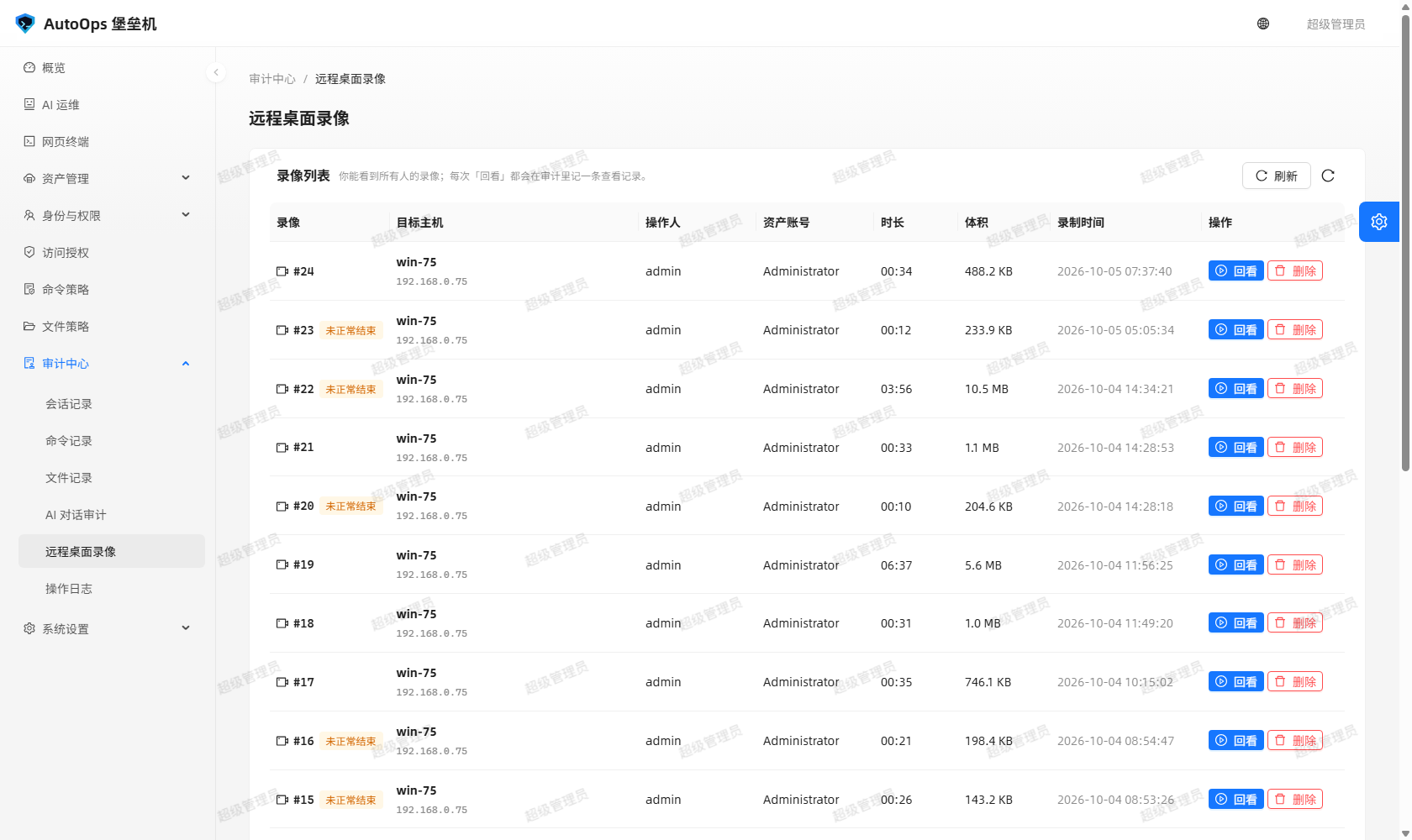
图:审计中心里的录像列表,能看到主机、操作人、资产账号、时长、体积与录制时间,右侧是「回看」与「删除」。
-
「回看」弹独立回放窗口:窗口先自己
POST /api/rdp/recordings/<id>/ticket换一张10 分钟的一次性票据(JWT,scope=rdp-recording且绑定这一条录像),签票那一步就写一条rdp_recording_viewed审计(票据路径不再重复记)。所以窗口不需要带着登录态,关掉列表页也不影响回放。 -
可以拖动进度条:
GET /api/rdp/recordings/<id>/file?ticket=…支持Range(206 / 416);<video>带不了Authorization头,所以同时接受?ticket=。票据过期 / scope 不对 / 拿登录 token 当票一律 401,给别人的录像签票 403,文件丢了 404。 -
删除仅管理员:确认框「删除这条录像?」的说明是「录像文件会从堡垒机上删除,审计里只留下「已删除」的记录。」;服务端先删盘上的文件再删库里的行,并写
rdp_recording_deleted。审计链是rdp_recording_saved→rdp_recording_viewed→rdp_recording_deleted三段。
- 页面菜单的可见性由
canRdpRecordings决定:audit:view、session:view_all、rdp:use三者有其一即可进入。 - 列表接口的口径更细:有
session:view_all或audit:view的人看全部录像;否则只看得到自己上传的那部分。 - 删除只有管理员能做。
老系统的 RDP 只支持 TLS 1.0 与标准 RDP 安全层,而 Python 3.13 的默认 TLS 上下文最低要求 TLS 1.2,会被对端直接重置:实测 192.168.0.105:3389(Server 2003)协商回 PROTOCOL_HYBRID 后抛 ConnectionResetError 10054,把上下文放宽到 TLSv1 … TLSv1_2 + ALL:@SECLEVEL=0 就能握上(对端证书 CN=WIN-EM5GV59V0PA)。因此:
-
app/rdp/proxy.py的握手改成两段式:先按现代 TLS 握,失败(ssl.SSLError或OSError)就换一条新连接、按兼容模式再握一次;两次都失败才抛可读的RdpProxyError。 - 主机表有
rdp_security列,界面上叫「RDP 安全层」,取值auto/ssl:auto按客户端协商(含 NLA);ssl会改写 X.224 请求里客户端声明支持的安全层、只报PROTOCOL_SSL,绕开 NLA。老系统在 NLA 阶段被直接掐断时,把它设成「强制 SSL」就能把会话建起来。 -
但能力边界要如实说:Server 2003 这一类 RDP 5.x 目标机即使把会话建起来(实测服务端已回 59646 字节),浏览器里的
ironrdp-wasm仍会以decode error收场。结论:这类老系统不支持 WebRDP,请改用 Windows 自带的「远程桌面连接」(mstsc)。 这个结论有对照:用系统自带mstsc的同一个 Administrator 账号实测可以连上,说明卡点在浏览器客户端的 RDP 协议版本,而不是网络或账号。
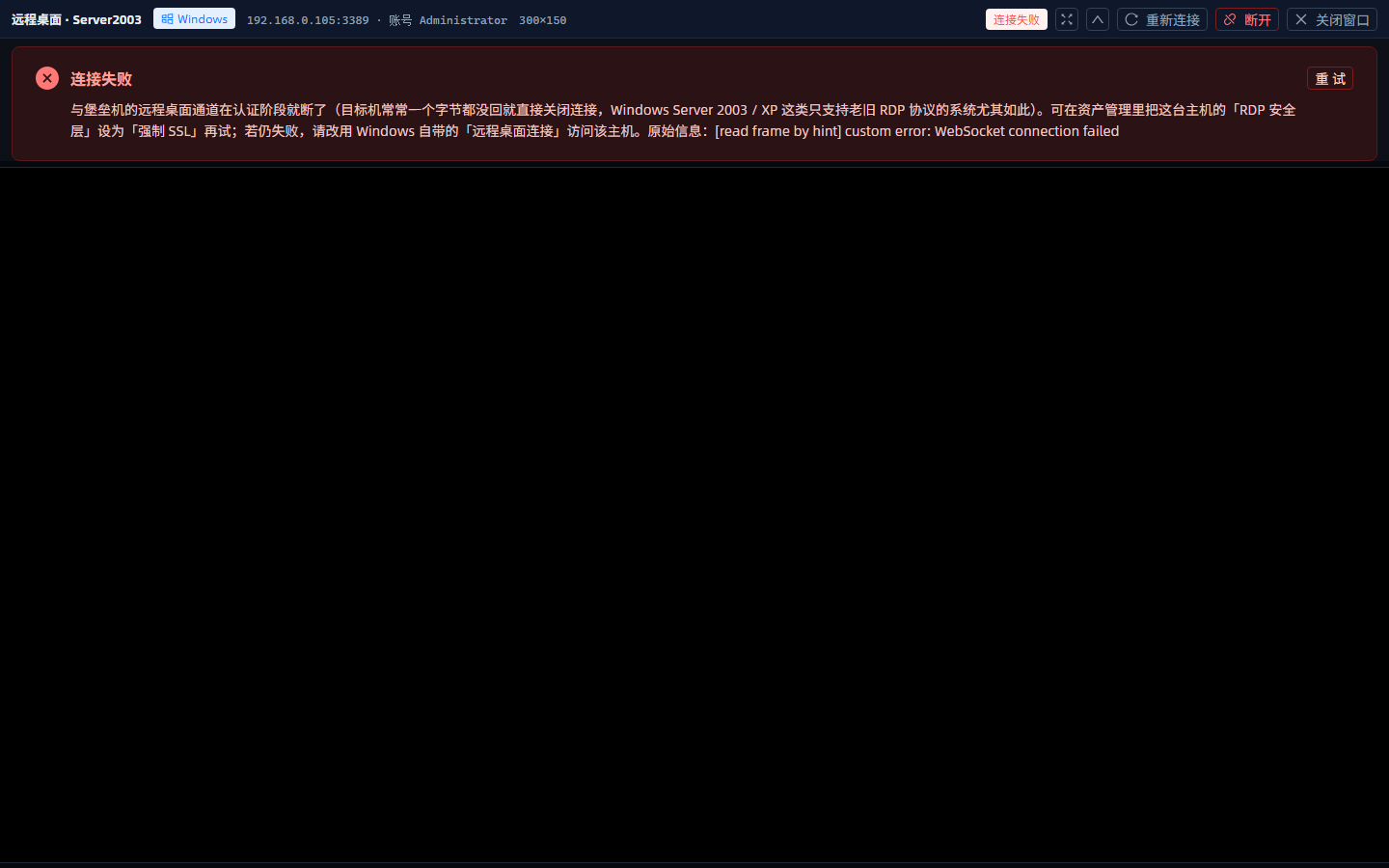
图:连 Server 2003 时控制台给出的告警 —— 会话能建起来但客户端解码失败,并直接给出「改用系统自带远程桌面连接」的出路。
堡垒机在这里保证的是「失败一定说得清」:控制台告警、会话记录的结束原因与审计里都会写明原因和出路(前端 describeRdpError() 的 /decode error/ 与 /websocket connection failed/ 两个分支 + 后端 _with_security_hint()),不再只丢一句「客户端内部错误(WebSocket connection failed)」。
RDP 传的是像素流,命令策略(按正则匹配命令行)没有可匹配的对象 —— 这是能力边界,不是配置问题。补偿手段是两条:全程录像(每场会话自动录,含被强关的异常收口)+ 回看权限控制(谁能看全部、谁只能看自己的、删除仅管理员,且查看与删除都进审计)。要对 Windows 做命令级管控,请改用 WinRM 字符会话(见 Web-Terminal-and-Files)。
- RDP 会话落
sessions表,protocol='rdp'、source='web';idle_sweeper的空闲清理同样生效。 - 一次会话写四段审计:
rdp_ticket→rdp_credential_reveal→rdp_session_open(详情带协商结果与服务器证书)→rdp_session_close(断开原因、bytesFromClient/bytesFromServer、时长)。 - 管理员在「会话记录」里点「中断」能真的停掉隧道:隧道被登记进在线表(
kind="rdp"),中断时原因改成「管理员强制中断」并收口为terminated;真机复验中terminate_session与rdp_session_close在 41~118 毫秒内成对出现,行状态变「已被中断」。 - 中继本身做成单线程 + 非阻塞 TLS:同一个
SSLSocket不能被两个线程同时操作(否则会出现「sendall()成功但字节没上线」的假死),而「读线程 +select+ 锁」的版本又会死锁,所以整个中继只用一个线程、用SSLWantReadError/SSLWantWriteError驱动。
Open a Windows remote desktop straight from the browser: no client to install and no password to remember on the client machine, the screen is drawn into a <canvas>, and the whole session is recorded automatically for later playback in the audit centre. The entry point is merged into the Web Terminal — Windows and Linux hosts share one asset table, clicking Connect opens a separate console window (/rdp/console), and the standalone "Remote Desktop" page and menu entry are gone.
After you click Connect:
- The front end calls
POST /api/rdp/sessions({hostId, accountId?}); once admission checks pass, the server returns a one-time ticket and a WebSocket path. - Admission checks the
rdp:usepermission code, the access grants (account / time window / weekday / expiry / concurrency limit),can_webterm, the host'sprotocol=rdp, and password authentication. - The browser upgrades
/api/rdp/ws?ticket=…;RdpWebSocketMiddlewarecatches that upgrade at the WSGI layer and relays bytes browser ↔ gateway ↔ target host 3389, withcleanpath.pypacking and unpacking the RDCleanPath X.224 / TLS / credential frames. - The ticket is valid for
TICKET_TTL_SECONDS = 120seconds and is burned after a single use.
The browser runs the third-party library ironrdp-wasm (Rust IronRDP compiled to WASM): the RDP protocol stack lives entirely on the client side, and the bastion only relays bytes — it never decodes the picture. Two trade-offs, stated plainly:
- So that NLA / CredSSP can be computed on the client side, the API hands the asset password to the browser together with the one-time ticket and writes a dedicated
rdp_credential_revealaudit entry. Keeping the password strictly on the server would require moving the RDP client to the server side (guacd / FreeRDP bitmap streaming), which this project does not do today. - For the same reason the gateway cannot see the picture, recording happens in the browser (below) rather than on the server.
The window toolbar (wording matches the UI): 远程桌面 · <host>, an OS tag, {address}:{port} · 账号 {username}, the current resolution {width}×{height}, a status tag, 录制中 (red while recording), 已连接 mm:ss (connected duration, refreshed every second), 全屏显示远端桌面 / 退出全屏, 收起工具条 / 展开工具条, 重新连接, 断开, 关闭窗口.
Figure: a live RDP session to win-75 in the browser; the top right shows that recording is in progress and the toolbar can be collapsed to give the screen more room.
-
The picture follows the window: after a debounced
ResizeObserverthe client callsSession.resize()so the managed host really changes resolution instead of the image being stretched. The canvas backing buffer is owned entirely by the wasm module — settingcanvas.width/heightby hand clears the canvas while RDP only sends increments, leaving a black band at the bottom right. The canvas is contained at the bitmap aspect ratio, and the toolbar shows the resolution that is actually in effect. The resize triggered by the first frame arrives beforeStart RDP sessionand is ignored by the target, so it is re-sent after 1.2 seconds, at most three times. -
Keyboard and mouse are translated into RDP input PDUs by
input.ts; in fullscreen the coordinates are mapped through the real content box ofobject-fit: containand its centring offset. -
Errors are humanised: everything goes through
describeRdpError(), and a failed connection shows a "连接失败" alert with a "重试" button. - Ending: when the session ends a "远程桌面会话已结束" dialog appears and the window closes itself after a 10-second countdown (the same closure behaviour as a Linux web terminal disconnect), and the recording is uploaded automatically.
-
Recording happens in the browser: the
<canvas>feedscanvas.captureStream(12)+MediaRecorder(VP9 preferred), whose chunks become a webm file. The entire session is recorded — there is no start button to click. -
Chunked upload while recording: every 5 seconds chunks are sent to
POST /api/rdp/recordings/chunk, and the server appends them inuploadIdorder (idempotent retries, out-of-order chunks get 409,uploadIdpath traversal is rejected, too-short recordings are dropped,abortfinishes a task). - A forcibly closed window still keeps its recording: if you close the tab, the browser crashes, or the network drops, the server finalises a "did not end normally" recording from the chunks it already received — it only contains the session up to the moment the window closed, not the complete operation. A task that goes silent for more than 45 seconds is finalised automatically the next time the list is opened or a new session starts.
-
Fallback path: a whole-file
POST /api/rdp/recordings(multipart;fileplus a requiredhostId, which must be a host the current account may reach over remote desktop or the request is 403; onlyvideo/webm,video/x-matroskaorapplication/octet-streamare accepted; the file name is server-generated uuid; anything aboveRDP_RECORDING_MAX_MB— default512— returns 413). -
Storage and configuration: recordings live in
RDP_RECORDING_DIR(defaultinstance/rdp_recordings). The measured bitrate is roughly 16 KB/s, so 512 MB covers about 9 hours. - Why not record on the server: the bastion only relays bytes and never decodes the picture, and server-side transcoding would add CPU cost proportional to the number of concurrent sessions.
The list lives at Audit Center · Remote Desktop Recordings (/audit/recordings) with the columns Recording (#id, carrying an orange "未正常结束" tag when applicable) · Target host · Operator · Asset account · Duration · Size · Recorded at · Actions. Hovering the "未正常结束" tag explains that when the browser window is killed (tab closed, crash, network loss) the server finalises the recording from the chunks that arrived while recording — it only covers up to the moment the window closed, not the complete operation.
Figure: the recording list in the audit centre, showing host, operator, asset account, duration, size and recording time, with "回看" and "删除" on the right.
-
"回看" opens a separate playback window which first calls
POST /api/rdp/recordings/<id>/ticketto mint its own 10-minute one-time ticket (a JWT withscope=rdp-recordingbound to that single recording). Minting the ticket writes onerdp_recording_viewedaudit entry (the ticket request path does not log again), so the window needs no login state and closing the list page does not break playback. -
The progress bar can be dragged:
GET /api/rdp/recordings/<id>/file?ticket=…supportsRange(206 / 416). A<video>element cannot send anAuthorizationheader, which is why?ticket=is accepted. An expired ticket, a wrong scope, or passing a login token as a ticket all return 401; signing a ticket for someone else's recording returns 403; a missing file returns 404. -
Deletion is admin-only: the confirmation "删除这条录像?" says "录像文件会从堡垒机上删除,审计里只留下「已删除」的记录。". The server deletes the file on disk first, then the database row, and writes
rdp_recording_deleted. The audit chain isrdp_recording_saved→rdp_recording_viewed→rdp_recording_deleted.
- Menu visibility is driven by
canRdpRecordings: any one ofaudit:view,session:view_allorrdp:useis enough to open the page. - The list API is finer-grained: holders of
session:view_alloraudit:viewsee all recordings; everybody else sees only the ones they uploaded. - Deleting is restricted to administrators.
Legacy systems only support TLS 1.0 and the standard RDP security layer, while Python 3.13's default TLS context requires TLS 1.2 at minimum, so the peer resets the connection: against 192.168.0.105:3389 (Server 2003) the negotiation returned PROTOCOL_HYBRID and then raised ConnectionResetError 10054, and it connected only after relaxing the context to TLSv1 … TLSv1_2 with ALL:@SECLEVEL=0 (peer certificate CN=WIN-EM5GV59V0PA). Therefore:
- The handshake in
app/rdp/proxy.pyis two-stage: try modern TLS first, and on failure (ssl.SSLErrororOSError) open a fresh connection and handshake again in compatibility mode; only if both fail is a readableRdpProxyErrorraised. - The host table has an
rdp_securitycolumn exposed in the UI as "RDP 安全层" with the valuesauto/ssl.autonegotiates as the client asks (including NLA);sslrewrites the security layers the client claims to support inside the X.224 request so that onlyPROTOCOL_SSLis advertised, bypassing NLA. Setting it to "强制 SSL" is what gets a session up on a legacy host that is cut off during the NLA phase. -
The capability boundary must be stated honestly: even when a session is established to an RDP 5.x target such as Server 2003 (the server had already returned 59,646 bytes in testing),
ironrdp-wasmin the browser still ends in adecode error. Conclusion: these legacy systems are not supported by WebRDP — use the built-in Windows "远程桌面连接" (mstsc) instead. That conclusion is backed by a control experiment: the same Administrator account connects fine with the built-inmstsc, which shows the blocker is the browser client's RDP protocol version, not the network or the account.
Figure: the alert shown when connecting to Server 2003 — the session comes up but the client fails to decode, and the message points straight at the built-in Remote Desktop Connection as the way out.
What the bastion guarantees here is that a failure always explains itself: the console alert, the session record's end reason and the audit all state the cause and the way out (the /decode error/ and /websocket connection failed/ branches of describeRdpError() on the front end, plus _with_security_hint() on the back end), instead of the old single line "客户端内部错误(WebSocket connection failed)".
RDP carries a pixel stream, so command policy — which matches command lines with regular expressions — has nothing to match. That is a capability boundary, not a configuration problem. The compensation is twofold: full-session recording (every session is recorded automatically, including abnormal closures) plus playback access control (who sees everything, who sees only their own uploads, and deletion being admin-only, with both viewing and deleting audited). For command-level control of Windows, use a WinRM character session instead (see Web-Terminal-and-Files).
- RDP sessions land in the
sessionstable withprotocol='rdp'andsource='web'; theidle_sweeperidle cleanup applies to them too. - One session writes four audit entries:
rdp_ticket→rdp_credential_reveal→rdp_session_open(with the negotiation result and the server certificate in the detail) →rdp_session_close(disconnect reason,bytesFromClient/bytesFromServer, duration). - An administrator clicking "中断" in the session list really stops the tunnel: the tunnel is registered in the online table (
kind="rdp"), the reason is rewritten to "管理员强制中断", and the record is finalised asterminated. In live verificationterminate_sessionandrdp_session_closeappeared as a pair within 41–118 milliseconds, and the row became "已被中断". - The relay itself is single-threaded with non-blocking TLS: the same
SSLSocketmust not be used by two threads at once (otherwise you get the false hang wheresendall()succeeds but no bytes go out), while a "reader thread +select+ lock" design deadlocks instead — so the whole relay runs in one thread driven bySSLWantReadError/SSLWantWriteError.
相关页面 / Related pages: Web-Terminal-and-Files · SSH-Gateway · Home