Repository navigation
Licensing and Trial
Magic Toolbox is a paid app with a free 72-hour trial. A licence is a one-time purchase: see Buy a licence.

A one-time licence for Magic Toolbox costs $74.99 AUD. No subscription. The button opens a secure FastSpring checkout, which shows the price in your local currency. Your licence key is emailed to you once payment goes through.
Want the MDM Reporting Tool as well? Buy both together for $99.99 AUD (save $14.99), for a limited time only:

For volume pricing or a custom licence, email info@mdmmagic.au. Purchases are subject to the Terms & Conditions.
- The trial starts the first time you open Magic Toolbox and lasts 72 hours. It counts clock time from that first launch, so it keeps running while the app is closed. The start date is kept in the macOS Keychain, with a second copy in the app's preferences, and the earlier of the two is used, so reinstalling the app or deleting one copy doesn't restart it. Setting the Mac's clock back doesn't add time either.
- During the trial every tool is fully usable.
- The toolbar badge shows how long is left, for example Trial – 41h 12m. You can see the same in About (?): "Free Trial — 41h 12m remaining".
- When the trial ends, the main window changes to Activate Magic Toolbox, with a field for your licence key. This happens even if a tool is open, but if the tool is in the middle of changing Jamf Pro, it waits until that finishes.
- If the Keychain can't be read when the app starts, the trial is treated as over rather than restarted. Unlock your login keychain and reopen the app.
During the trial, credentials saved to the Keychain in the Compare tool are only kept for the first instance. Once you've activated a licence, all four instances are saved.
Once the trial has ended and there's no active licence:
- Every tool is locked, including the ones that run only on your Mac, such as Inspector. The window shows the activation screen instead of the tool grid.
- The toolbar still works. You can open About (?) to activate a key, Preferences and the Debug Log.
- About (?) shows "Trial Expired — all tools are locked" and the badge shows Unlicensed.
Your saved servers, credentials and preferences are kept. They're there again as soon as you activate.
-
Buy a licence. Your key looks like this:
MAGIC-XXXXXXXX-XXXXXXXX-XXXXXXXX - In Magic Toolbox, click the licence badge in the toolbar or the About (?) button. If your trial has ended, the activation screen is already showing.
- Paste your key and click Activate License (in About) or Activate Licence (on the activation screen).
- A confirmation appears and the badge changes to Licensed.
The key isn't case-sensitive, and spaces before or after it are ignored. On the activation screen, the field formats the key for you: it adds the MAGIC- prefix and hyphens, and drops any character that can't be part of a key. Activate Licence stays greyed out until the key is complete.
Activation needs an internet connection. The app sends your licence key and a random ID it created for this Mac to the MDM Magic licence server, which links the key to this Mac. The ID is kept in the macOS Keychain. No serial number or other hardware ID is sent. See Privacy and Security.
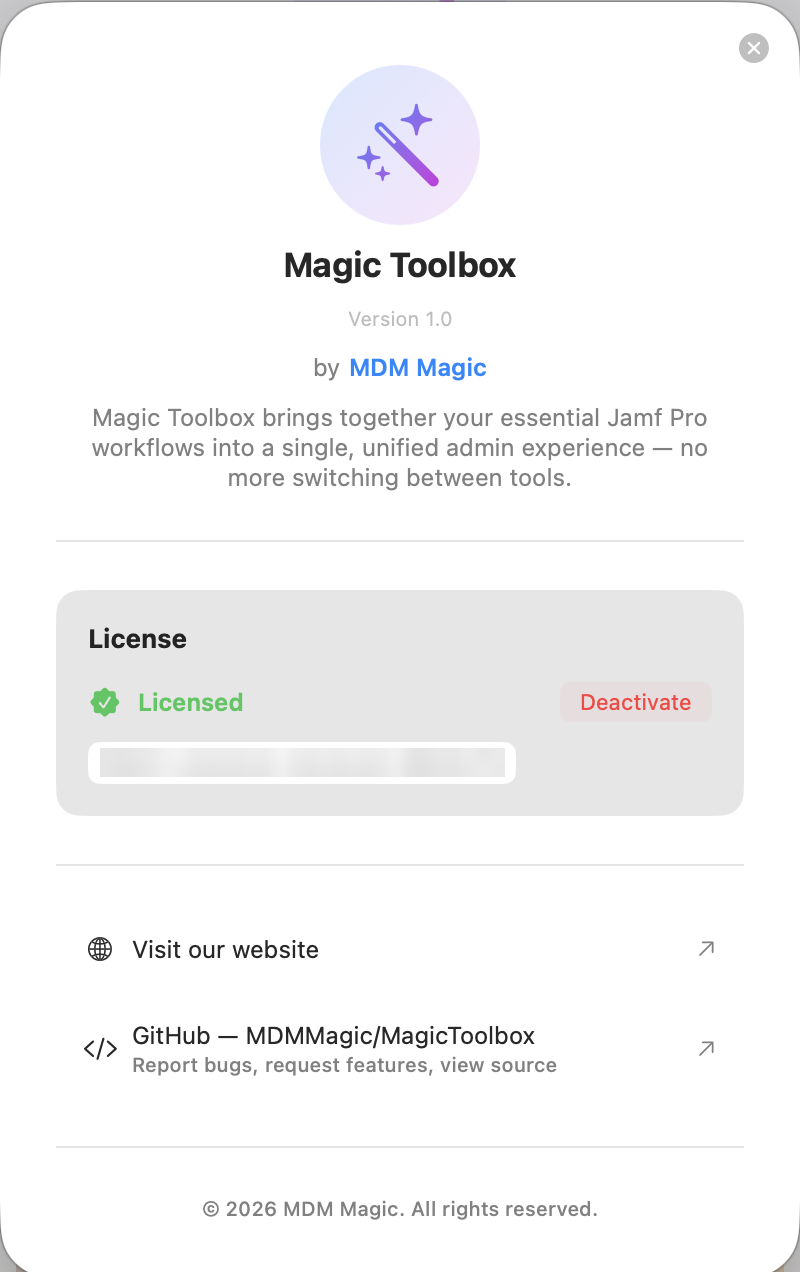
Once activated, About (?) shows Licensed and a masked copy of your key (only the last group of characters is visible). The key and a signed licence token are stored in the macOS Keychain on this Mac only.
Each licence key is active on one Mac at a time. If you try to activate a key that's already in use on another Mac, you'll see:
Licence key is already active on another machine.
Activating the same key again on the Mac it's already linked to works, for example after the key has been removed from that Mac. If macOS is reinstalled, or the app's machine-id Keychain entry is deleted, the Mac gets a new ID and counts as a different Mac: deactivate first, or contact MDM Magic to have the key released.
- On the old Mac, make sure you're online, then open About (?) and click Deactivate. This frees the key. It happens straight away, with no confirmation. The server only frees the key when the request comes from the Mac it's active on. If you're offline, the licence is only removed from that Mac and the key stays linked to it.
- On the new Mac, activate the key as usual.
After you deactivate, the old Mac goes back to the trial if there's time left on it. Otherwise it shows the activation screen.
If the old Mac is lost, broken or already wiped and you can't deactivate it, contact MDM Magic through mdmmagic.au to have the key released.
Each successful activation or check gives the Mac a signed licence token that's valid for 25 hours. The licence is checked:
- when the app starts, if the token has less than 12 hours left
- every 6 hours while the app is running, even if the token is still fresh, so a revoked licence takes effect without a restart
- when you switch back to the app, or when the token expires while the app is open (at most once every 15 minutes)
If the server can't be reached:
- While the token hasn't expired, the app stays licensed.
- Once the token has expired, a 72-hour grace period starts. It starts once and doesn't reset each time you open the app. Its end date is kept in the macOS Keychain. During the grace period the app stays licensed.
- When the grace period ends, the app removes the licence token and shows the activation screen. Your licence key stays on the Mac, so the next time the app reaches the server, the licence comes back without entering the key again.
Setting the Mac's clock back doesn't extend the trial, the token or the grace period. The app remembers the latest time it has seen and never counts from an earlier one. When it's online, a wrong clock doesn't lock you out: a token the server has just issued is always accepted.
Only a definite answer from the licence server can remove a licence. Rate limiting, server errors, proxies and captive portals are treated like being offline. If the Keychain can't be read, the app doesn't contact the server, because it couldn't prove which Mac it is.
If the licence server rejects a key outright, for example because it was refunded or revoked, the app removes the key from this Mac and goes back to unlicensed straight away.
| Message | What it means / what to do |
|---|---|
| Invalid key format — please check your licence key. | The key must look like MAGIC- followed by three groups of 8 characters (0–9, A–F), separated by hyphens. Check for missing or extra characters. |
| Licence key not recognised… / Licence key not found. | The key doesn't exist. Copy it again from your purchase email. |
| Licence key is already active on another machine. | Deactivate it on the other Mac first (see above). |
| Licence key has been revoked. | Contact MDM Magic. |
| Magic Toolbox couldn't access the Keychain to read this Mac's ID… | Unlock your login keychain and try again. |
| The licence was accepted but couldn't be saved to the Keychain… | Try again. If it keeps happening, check the login keychain in Keychain Access. |
| The activation screen says "Your free trial has ended, or your licence couldn't be verified" | Either the trial has ended, or the licence couldn't be confirmed within the grace period. Reconnect to the internet, or enter your licence key. |
| Could not reach the licence server — check your internet connection. | Check your network, proxy or firewall. The app needs outbound HTTPS to the licence server, and gives up after 10 seconds. See Privacy and Security. |
Buying or billing questions: info@mdmmagic.au.