Repository navigation
Android Fasting App Tutorial
Home › Android › Android App Tutorial: Fasting
Experimental. Android support is new and still settling: the
-appoptions and how tkControls behaves on a phone may still change. See Android for what works today.
This page follows a complete app from an empty folder to a signed release on a phone: Fasting, a tracker for intermittent fasting. It has six screens, keeps its data in SQLite on the phone, syncs with a web server over HTTPS, follows the phone's light or dark setting, and is built from one tiko source that also runs on the desktop as a phone-sized window. It uses tkControls for everything on the screen and has no Java, Kotlin or Android Studio project.
Every picture below was taken on the Android Studio emulator (API 36, 1080 × 2400) with sample data. The code is shortened from the app's own; its full source is not part of the toolchain.
Set up the PC first with the Android Setup Tutorial: it installs what every step here needs.
- What it does
- The project
- One form, six pages
- A page: the Timer
- Lists, a calendar and charts
- Editor pages and the BACK button
- Talking to the server
- The data on the phone
- Light and dark
- Run it on the desktop first
- Build it, install it, run it
- A signed release for a phone
- What the phone taught us
| Timer | Calendar | History |
|---|---|---|
 |
 |
 |
| Weight | Reports | Settings |
|---|---|---|
 |
 |
 |
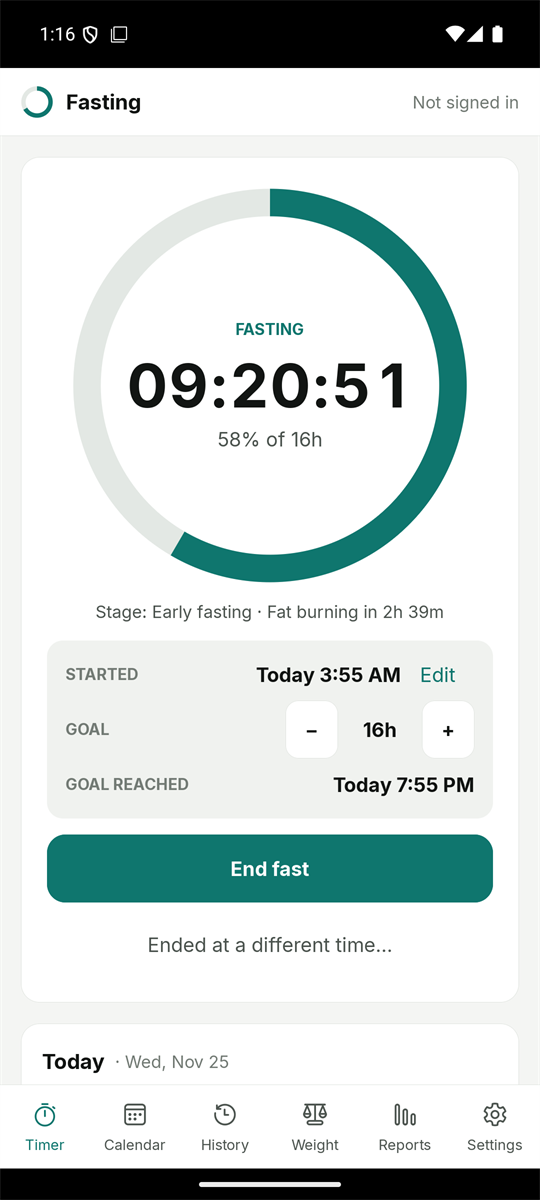
- Timer: start and end a fast, see how long it has run against the goal, change the goal.
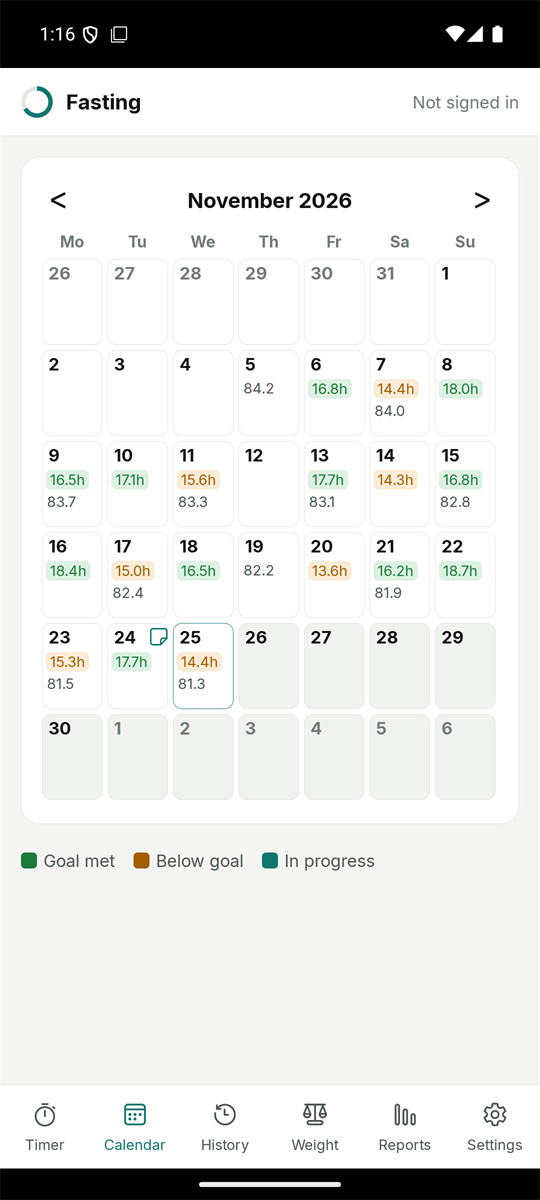
- Calendar: a month at a glance; tap a day to see its fasts, weight and note.
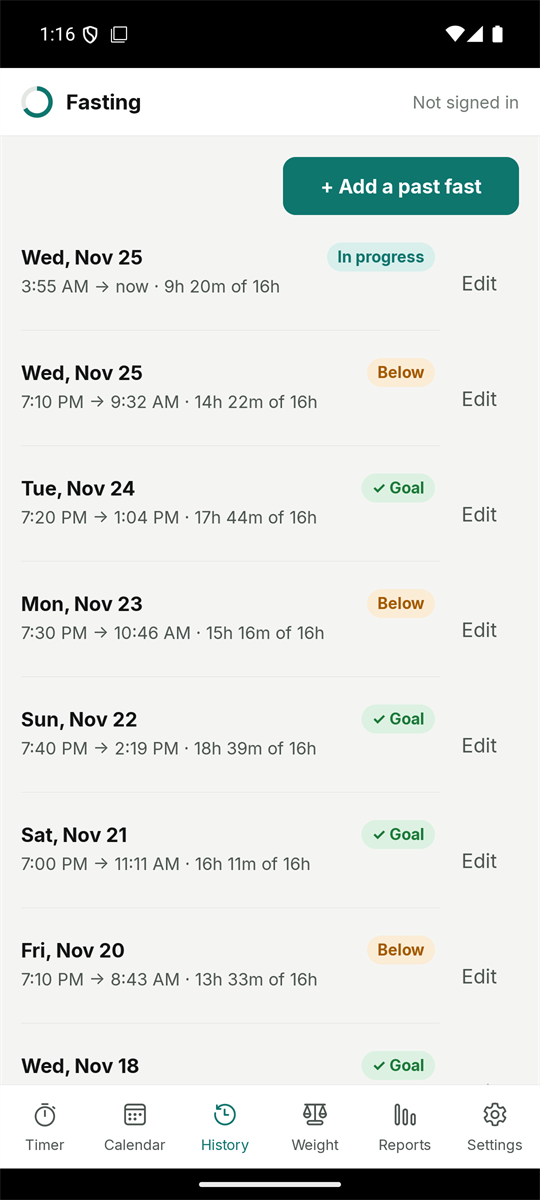
- History: every fast, newest first, to edit or add one that was not timed.
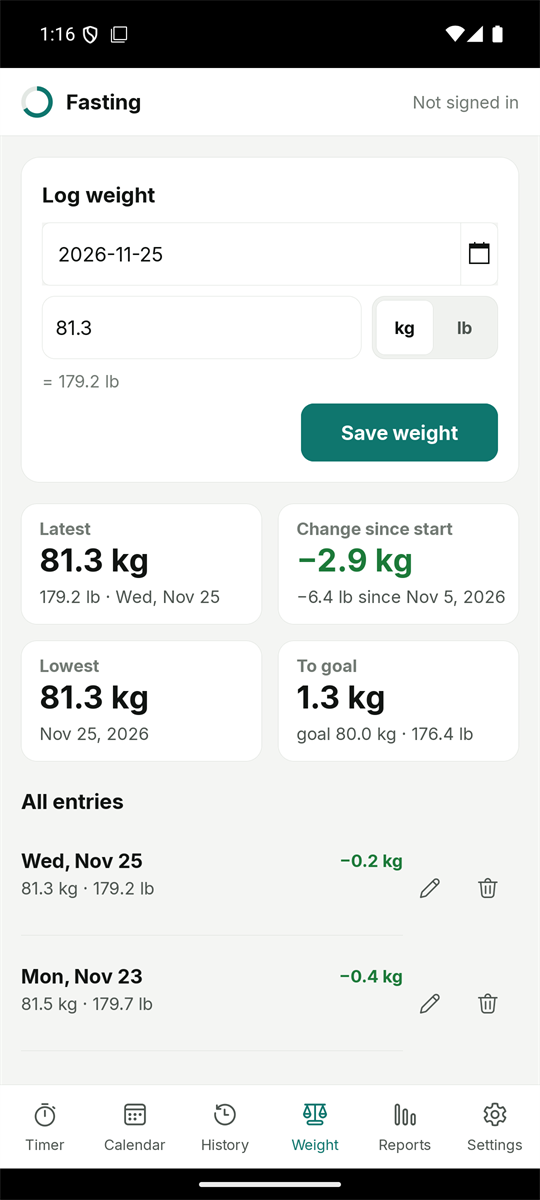
- Weight: log a weight in kg or lb, see the trend.
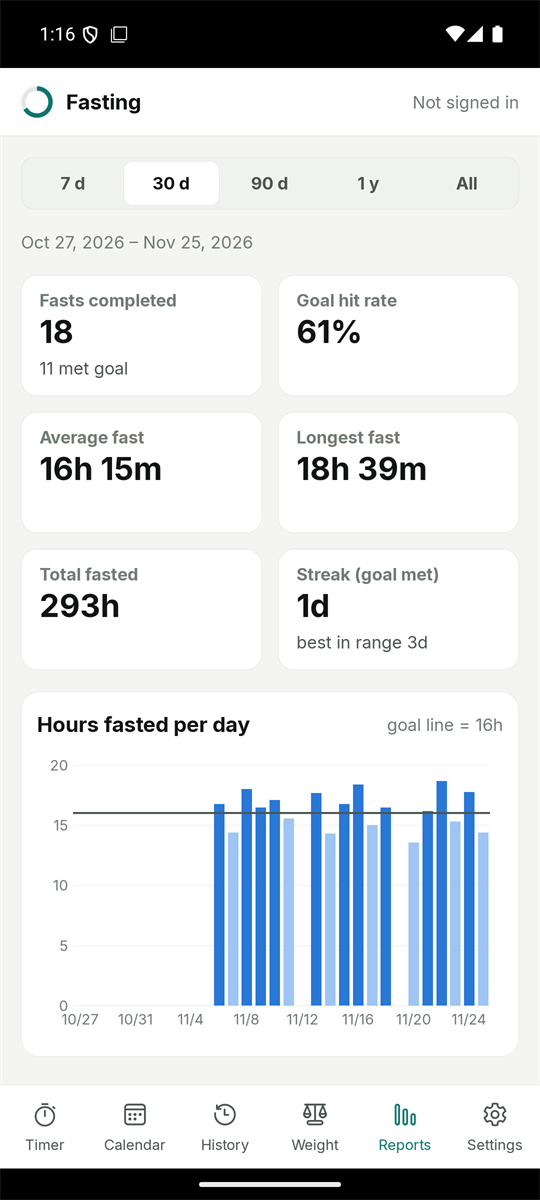
- Reports: totals, streaks and a chart for the last 7, 30 or 90 days, the year or everything.
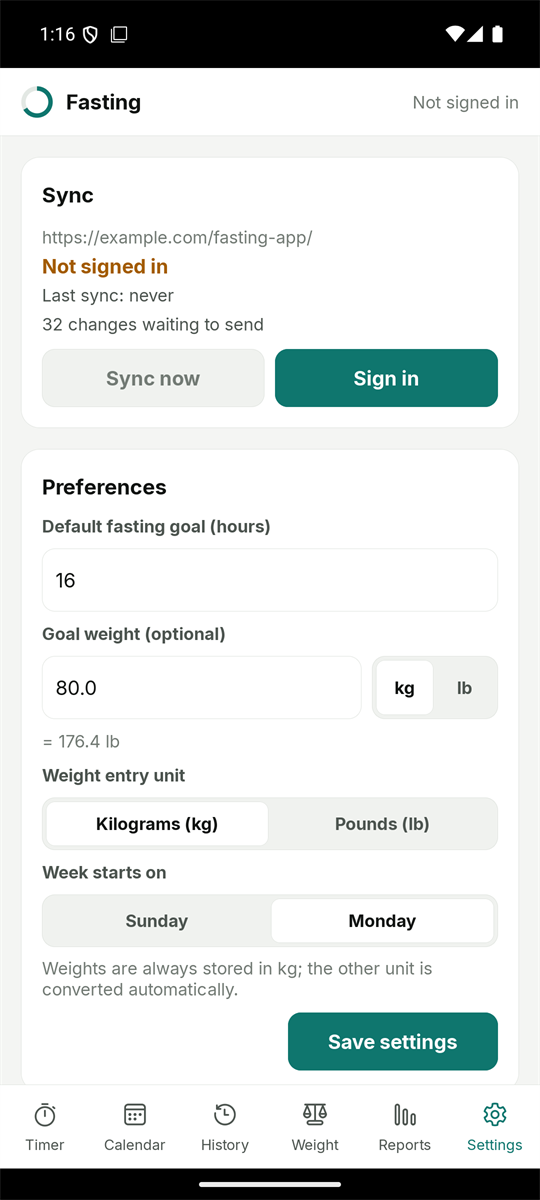
- Settings: sync, the goal, units, the week's first day and the theme.
The app is a folder with a tiko.toml and a src folder:
| Path | What is in it |
|---|---|
tiko.toml |
the project: a desktop target and two app targets |
src/main.tiko |
start-up: opens the database and runs the app |
src/model/ |
the data: fasts, weights, notes, settings; days, formats and the report's sums |
src/store/ |
the phone's SQLite database |
src/sync/ |
talking to the server |
src/ui/ |
the form, the six pages, the editor pages, fields, the theme |
res/icon.png |
the launcher icon, 512 × 512 |
tiko.toml names one main file three times: for the desktop, for an app to test with, and for
the release signed with the app's own key.
[package]
name = "fastingtk"
[target.desktop] # a phone-sized window on Windows, Linux or macOS
main = "src/main.tiko"
output = "out/fasting.exe"
subsystem = "gui"
[target.fasting] # the app, signed with the debug key: for testing
main = "src/main.tiko"
kind = "app"
[target.fasting.app]
id = "com.example.fasting"
label = "Fasting"
version = "0.1,1"
icon = "res/icon.png"
permissions = ["INTERNET"] # it talks to a server
[target.fasting-release] # the same app, signed with its own key
main = "src/main.tiko"
kind = "app"
[target.fasting-release.app]
id = "com.example.fasting"
label = "Fasting"
version = "0.1,1"
icon = "res/icon.png"
key = "keys/fasting-release.jks,fasting" # its password comes from TIKO_ANDROID_KS_PASS
permissions = ["INTERNET"]kind = "app" is what makes tiko build produce an APK; [target.x.app] holds what
-app's options would say on a command line. permissions = ["INTERNET"]
matters: without it Android refuses every network call the app makes.
src/main.tiko is short. On Android the working directory is the app's private storage, so a
plain file name is a file the app owns:
'' fasting -- on Android the database is in the app's own storage (the working directory);
'' on the desktop, the path given, else fasting.db.
#import "./ui"
using ui
dim as ustring dbPath = command( 1 )
if len( dbPath ) = 0 then dbPath = "fasting.db"
TimerPageRegister( )
CalendarPageRegister( )
HistoryPageRegister( )
WeightPageRegister( )
ReportsPageRegister( )
SettingsPageRegister( )
end AppMain( dbPath )A phone app has one window, the whole screen. The app makes one form with tkApp and puts everything on it: a top bar, a navigation bar of six buttons at the bottom, and six pages between them. Each page is a tkScrollPanel with a tkStack inside, and only one page is shown at a time. Shortened:
public function AppMain( byref dbPath as const ustring ) as int32
dim as TKAPP_OPTIONS o
o.FontUISize = 11.25
if tkApp_Init( o ) = false then print "fasting: no SDL: " & *SDL_GetError( ) : return 1
gDb.Open( dbPath )
gForm = tkApp_NewForm( "Fasting", 412, 860 ) '' a phone's size on the desktop; the screen on Android
dim as TK_WIDGET ptr root_ = tkForm_Widget( gForm )
for i as int32 = 0 to PG_COUNT - 1
gPage(i) = tkScrollPanel_Create( root_, 100 + i )
dim as TK_WIDGET ptr inner = tkScrollPanel_GetPanel( gPage(i) )
gStack(i) = tkStack_Create( inner ) '' the page's content: one item under another
tkStack_SetPadding( gStack(i), PAD, PAD, PAD, PAD + 8 )
tkStack_SetGap( gStack(i), GAP )
gBuild(i)( inner ) '' the page's own module fills it
tkWidget_Show( gPage(i), false )
next
gTop = NewDrawn( root_, @PaintTop_ ) '' "Fasting" and the sync state
gNav = NewDrawn( root_, @PaintNavBar_ )
for i as int32 = 0 to PG_COUNT - 1 '' Timer, Calendar, History, Weight, Reports, Settings
gNavBtn(i) = tkButton_Create( gNav, i + 1 )
tkButton_SetPaintCallback( gNavBtn(i), @PaintNavPanel_ )
tkButton_SetClickCallback( gNavBtn(i), @NavClick_ )
next
tkForm_OnSize( gForm, @Layout_ ) '' top bar, nav bar, the page between
ShowPage( PG_TIMER )
return tkApp_Run( gForm )
end functionThe layout is in design units, which are dp on a phone: the top bar is 52 high and the navigation buttons at least 48, the size Android's guidelines give a finger. tkControls keeps the form inside the phone's safe area: the status bar at the top and the gesture bar at the bottom in the pictures are Android's, not the app's.
Each page lives in a module of its own and registers the procedure that builds it, so AppMain
knows nothing about what is on a page.
The Timer page is a stack of cards: a card is a panel with rounded corners holding a stack of
its own. The ring and the big clock are one control the app paints itself with
tkPaint; the rest are tkButtons and small painted labels. The goal row is a
horizontal stack: a label that fills the space, then the – button, the value and the + button,
each a fixed width. From the page's build procedure, shortened (NewCard, NewDrawn and
NewButton are the app's own helpers around tkPanel and tkButton):
dim as TK_WIDGET ptr card = NewCard( panel, 0 )
dim as TK_STACK ptr cs = tkStack_Create( card ) '' the card's own column
tkStack_SetPadding( cs, 20, 24, 20, 24 ) : tkStack_SetGap( cs, 12 )
tRing = NewDrawn( card, @TmPaintRing_ )
tkStack_AddFunc( cs, tRing, @TmRingH_ ) '' its height: worked out from the width
...
tRowGoal = NewDrawn( strip, @TmPaintNothing_ )
dim as TK_STACK ptr rg = tkStack_Create( tRowGoal, TK_STACK_HORIZONTAL )
dim as TK_WIDGET ptr gl = NewDrawn( tRowGoal, @TmPaintGoalLabel_ )
tBtnDec = NewButton( tRowGoal, "−", BTN_PLAIN, @TmOnDec_ )
tGoalVal = NewDrawn( tRowGoal, @TmPaintGoalVal_ )
tBtnInc = NewButton( tRowGoal, "+", BTN_PLAIN, @TmOnInc_ )
tkStack_AddFill( rg, gl ) '' takes what is left
tkStack_Add( rg, tBtnDec, 40 ) : tkStack_Add( rg, tGoalVal, 64 ) : tkStack_Add( rg, tBtnInc, 40 )
tkStack_AddStack( ss, tRowGoal, rg, 44 )
...
tBtnMain = NewButton( card, "Start fast", BTN_PRIMARY, @TmOnMain_, true )
tkStack_Add( cs, tBtnMain, 52 )
tkStack_AddStack( pg, card, cs ) '' the card goes on the page's stackA timer from tkApp_SetTimer( 1000, ... ) redraws the clock once a second. Nothing here is
Android code: the same lines make the desktop window.
| Calendar | Reports |
|---|---|
|
|
-
Calendar is a tkCalendar that paints each day itself: the hours fasted, green
when the goal was met, orange when not, and the weight under them. On a phone one tap opens a
day (
SetActivateOnClick); a desktop calendar wants a double click. - History is a stack of rows, one per fast, each a horizontal stack of its own. "Show more" adds the next rows to the end.
-
Reports uses tkChart for the hours per day and the weight. A finger cannot hover,
so the chart is set to tap to inspect (
SetTapToInspect): a tap pins the nearest point and shows its value until the next tap. - Weight has a number field. A tkTextBox in numeric mode with decimal places asks Android for the number pad with a decimal point, a password field for a keyboard without suggestions, and a note field for one where Enter is a new line:
dim as TK_WIDGET ptr kg = tkTextBox_Create( parent, 0, false )
tkTextBox_SetNumericMode( kg, true )
tkTextBox_SetDecimalPlaces( kg, 1 ) '' on a phone: the number pad, with "."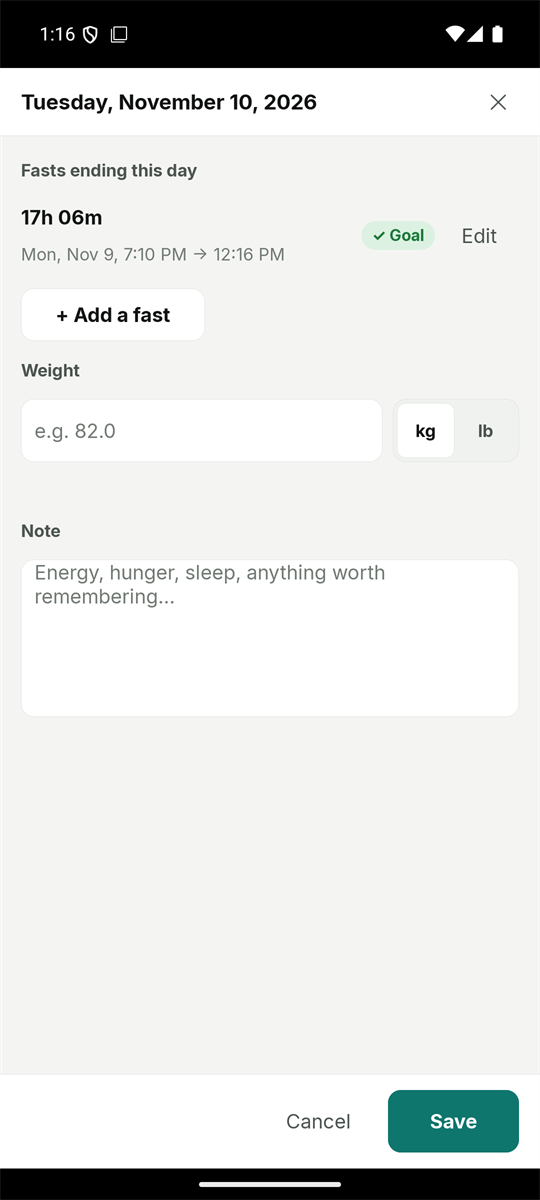
Tapping a day, Edit or Add a past fast opens an editor page: a form of its own, with a
title, fields, and Cancel and Save at the bottom. On the desktop it is a window; on Android
tkControls draws every form after the first inside the one window, over the whole screen, and
Android's BACK gesture closes the top one, as Cancel does. The app opens them as on the
desktop, with tkApp_NewForm, and does nothing of its own for BACK.
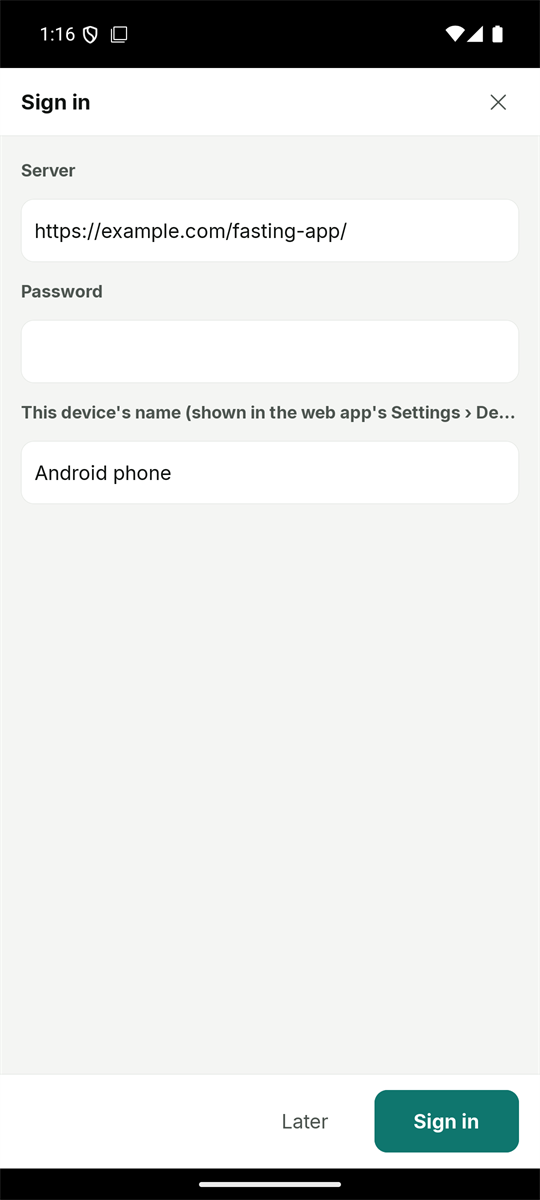
Sign-in is an editor page too. It opens by itself the first time the app starts:
The app syncs with a small web service: it sends the changes made on the phone and gets back
everything else, so the phone, the website and another phone show the same fasts.
src/sync/sync.tiko does that with JSON over HTTPS, through one function that sends a request:
public type HttpFn as function( byref method_ as const string, byref url as const string, _
byref token as const string, byref body as const string ) as HttpReplyThat function is the one place where the desktop and the phone differ:
- On the desktop it is std/http.
-
On Android
std/httphas no TLS library to use, so it is Android's ownjava.net.HttpURLConnection, called over JNI through theJNIEnvthatSDL_GetAndroidJNIEnv( )returns. Android's own TLS, certificate store and proxy settings apply, and nothing is bundled.
#ifndef TIKO_OS_ANDROID
public function HttpDefault( ... ) as HttpReply '' std/http: http.Client, http.Request
...
end function
#else
public function HttpDefault( ... ) as HttpReply '' java.net.URL, HttpURLConnection over JNI
...
end function
#endifSync runs on a worker thread so the screen never waits for the network, and that thread
needs an explicit stack size: on Android a thread that calls Java must have a real stack, and
threadcreate's default is too small for the Java VM to attach to it.
gSyncSem = SDL_CreateSemaphore( 0 )
gSyncThread = threadcreate( @SyncWorker_, 0, 1024 * 1024 ) '' 1 MB: it calls Java on AndroidThe worker waits on a semaphore, syncs, and hands the result back to the screen with
tkApp_RunOnUI, which runs a procedure on the thread that owns the controls. The app also syncs
when it comes back to the front: SDL reports that as SDL_EVENT_DID_ENTER_FOREGROUND, which an
event watch sees even though SDL does not queue it.
private function AppWatch_( byval userdata as any ptr, byval e as SDL_Event ptr ) as boolean
if e->type = SDL_EVENT_DID_ENTER_FOREGROUND then SyncNow( ) '' signals the worker's semaphore
return true
end function
SDL_AddEventWatch( @AppWatch_, 0 )
Changes made while signed out, or with no network, wait in an outbox ("32 changes waiting to send") and go at the next sync.
The phone keeps its own copy of everything in SQLite, through the
vendor/sqlite3 package, in fasting.db in the app's private storage. Every
change is written to the copy and queued in the outbox in one transaction, so the screens work
the same with or without a network. Each thread opens its own connection: the screen's, and the
sync worker's.
vendor/sqlite3, vendor/cJSON (the JSON) and SDL3 all link statically into an Android app:
the APK carries one native library, libmain.so, with all of them inside.
| Light | Dark |
|---|---|
|
 |
The app has two colour palettes, given to tkApp as a pair. Its System setting uses tkApp's
TKAPP_THEME_SYSTEM mode, which follows the phone's dark-mode setting and its changes:
tkApp_SetThemePair( darkTheme, lightTheme )
select case setting
case "light" : tkApp_SetThemeMode( TKAPP_THEME_LIGHT )
case "dark" : tkApp_SetThemeMode( TKAPP_THEME_DARK )
case else : tkApp_SetThemeMode( TKAPP_THEME_SYSTEM )
end selectControls the app paints itself, such as the ring and the calendar's days, read their colours from
the palette in force, and tkForm_OnThemeChanged repaints them after a switch.
Most of the work happens on the desktop, where a build takes seconds and there is a debugger:
tiko build desktop
.\out\fasting.exeThe window is 412 × 860, a phone's size, and the pages are the same pages. Two things only a
phone shows: touch (a mouse click is not a finger), and the screen keyboard. tkControls can draw
the desktop window the way it draws on Android, popups and editor pages inside the one window,
when TK_VIRTUAL=1 is set, so the layout can be checked before a phone is involved.
For the emulator:
tiko build fasting -target android-x86_64
adb install -r out\debug\fasting.apkThe debug APK is about 17 MB. Fasting appears in the emulator's app
list with its icon. For a phone connected over USB, build for android-arm64 instead.
print output from the app goes to the device's log, which helps when something goes wrong:
adb logcat -s tikoThe release is the fasting-release target: arm64 only, the release profile, signed with the
app's own key. Make the key once with keytool, as in the
setup tutorial, keep it out of version control,
and give tiko its password in TIKO_ANDROID_KS_PASS:
$env:TIKO_ANDROID_KS_PASS = Read-Host "Keystore password"
tiko build fasting-release --profile release -target android-arm64
adb install -r out\release\fasting-release.apkThe release APK is about 10 MB. Every later version must be signed with the same key and have a
higher version number (version = "0.2,2"), or the phone refuses it as an update.
Things the emulator or a phone showed that the desktop did not, each now handled by tiko, tkControls or the app:
-
No
INTERNETpermission, no network. Every call failed with aSecurityExceptionuntil the manifest asked for it (permissions = ["INTERNET"]). - A thread that calls Java needs a stack. The sync worker stopped the app on its first JNI call with the default stack; 1 MB fixed it.
- Gesture bars are not part of the safe area. SDL counted the gesture zones down each side of a gesture-navigation phone as unsafe, and every page lost a band down both edges. tkControls now keeps clear of the system bars and a display cutout only.
- Pixels round differently at 2.625. A height written one way and drawn another differed by a pixel at the emulator's density, and a card lost its bottom edge on the phone only. Heights now come from the same terms in both places.
- A finger has no hover. Charts inspect on a tap; calendars open a day on one tap.
- Fonts must travel with the app. The phone's own font had no bold weight, so the app uses the fonts tkControls bundles into every APK.
- Android: what works, what to know, the limits
- Android Setup Tutorial
- Compiler Option: -app
- tkApp, tkStack, tkScrollPanel, tkCalendar, tkChart, tkTextBox
- Category: HTTP and TLS