Repository navigation
Machine FG_05
This page is generated from the Unity twin. Published from
_docs/context/fg-05.md— edit it there, not here. Changes made in the wiki are overwritten on the next sync.
| Scene path | Project/FG_05 |
| Twin PLC path | MAIN.FG_05 |
| Served by |
Index05 (FG_Transport) |
| Symbols | 10 |
| Behaviour | fg-05-behaviour.md |
Fits a cap from the bunker onto the part carried on the pallet.
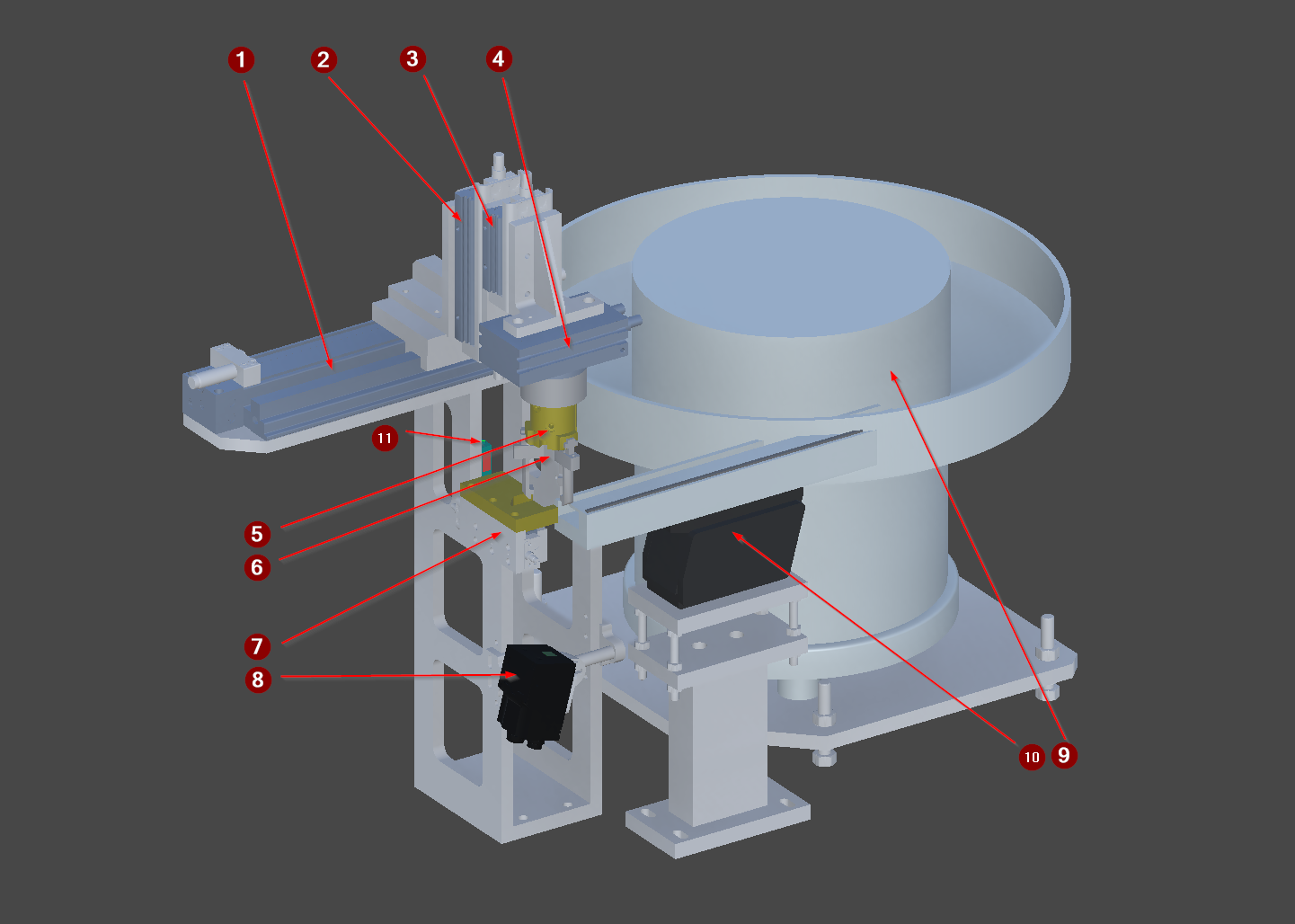
The FG_05 capping station, isolated, with the cap bunker on the left.
The numbered arrows name the station modules. Each has its own view below, and its devices are in the table further down.
1 Y_AxisX · 2 Axis_X/Y_AxisZ1 · 3 Axis_X/Axis_Z1/Y_AxisZ2 · 4 Axis_X/Axis_Z1/Axis_Z2/Y_AxisR · 5 Axis_X/Axis_Z1/Axis_Z2/Axis_R/Y_Gripper · 6 Axis_X/Axis_Z1/Axis_Z2/Axis_R/B_Detect · 7 Y_CapsSourceStopper · 8 P_Camera · 9 Y_CapsSource · 10 Y_CapsSource/M_Conveyor · 11 B_Part
| # | Device | Type | Twin FB | Twin PLC path | What it does |
|---|---|---|---|---|---|
| 1 | Y_AxisX |
Cylinder | FB_Cylinder |
MAIN.FG_05.Y_AxisX |
Horizontal traverse between the cap pick position and the pallet. |
| 2 | Y_AxisZ1 |
Cylinder | FB_Cylinder |
MAIN.FG_05.Y_AxisZ1 |
Vertical stroke on the pallet side, lowering the cap onto the part. |
| 3 | Y_AxisZ2 |
Cylinder | FB_Cylinder |
MAIN.FG_05.Y_AxisZ2 |
Vertical stroke on the bunker side, lowering the gripper to pick a cap. |
| 4 | Y_AxisR |
Cylinder | FB_Cylinder |
MAIN.FG_05.Y_AxisR |
Rotates the cap into its fitting orientation before placement. |
| 5 | Y_Gripper |
Cylinder | FB_Cylinder |
MAIN.FG_05.Y_Gripper |
Gripper that holds the cap from pick through to placement on the part. |
| 6 | B_Detect |
SignalBinary | FB_SensorBinary |
MAIN.FG_05.B_Detect |
Grip sensor in the jaws of Y_Gripper. Reports whether this unit is carrying a cap - not whether one is available, which is B_Part on the feed. |
| 7 | Y_CapsSourceStopper |
Cylinder | FB_Cylinder |
MAIN.FG_05.Y_CapsSourceStopper |
Stopper on the cap feed conveyor. Holds the next cap at the pick position. |
| 8 | P_Camera |
DataReader | FB_Camera |
MAIN.FG_05.P_Camera |
Identification read of the ASSEMBLY on the pallet, not of the cap. Mounted on the feed side, looking across at the pallet; returns the assembly CapsID. |
| 9 | Y_CapsSource |
ControlBunker | FB_DeviceByte |
MAIN.FG_05.Y_CapsSource |
Cap bunker. Feeds small caps onto the short conveyor that presents them at the pick position. |
| 11 | B_Part |
SensorBinary | FB_SensorBinary |
MAIN.FG_05.B_Part |
Presence sensor at the cap pick position. The station waits for this before starting a cycle. |
# is the numbered arrow on the figure above.
The twin path is not the control path. A control platform spells these devices differently - it may fold a twin child into its parent unit, or address it from another root entirely - and only the control spelling works in a binding or a link, where the twin's fails silently. The verified control path for each row is on the vendor page linked below.
Control is what the PLC writes and the twin obeys; Status is what the twin reports and the PLC reads. Which member a device uses is on its device type page.
| Symbol | Meaning |
|---|---|
ControlData.0 |
enables the vibration table that feeds the bunker |
ControlData.1 |
enables the short caps conveyor that carries them to the pick position |
2 of 8 control bits used. The status byte is unused.
| Symbol | Meaning |
|---|---|
Control.0 |
enable |
Control.1 |
trigger |
Status.0 |
Ready |
Status.1 |
Busy |
Status.2 |
ResultValid |
Status.3 |
ResultOK |
2 of 8 control bits, 4 of 8 status bits. ResultOK is meaningless unless ResultValid is set. Identical to FG_01 and FG_02.
The scene tree. The comment on each line is what the node is; † marks one that differs between scenes.
Y_AxisX:              # Cylinder
Axis_X:               # grouping, not a device
  Y_AxisZ1:           # Cylinder
  Axis_Z1:            # grouping, not a device
    Y_AxisZ2:         # Cylinder
    Axis_Z2:          # grouping, not a device
      Y_AxisR:        # Cylinder
      Axis_R:         # grouping, not a device
        Y_Gripper:    # Cylinder
          Finger_1:   # grouping, not a device
          Finger_2:   # grouping, not a device
          Finger_3:   # grouping, not a device
          Gripper:    # grouping, not a device
        B_Detect:     # SignalBinary
Axis_Source:          # grouping, not a device
Y_CapsSourceStopper:  # Cylinder
Y_CapsSource:         # ControlBunker
  M_Conveyor:         # grouping, not a device
    Surface:          # grouping, not a device
  Source:             # grouping, not a device
P_Camera:             # DataReader
B_Part: # SensorBinaryTwin animation: SequenceUnit5.cs, SequenceBunker.cs — behaviour contract is in transport-behaviour.md
Y_AxisX — MAIN.FG_05.Y_AxisX · Cylinder
- Signal — Double solenoid with both limits read. MAX is over the pallet, min is over the cap feed.
Axis_X — MAIN.FG_05.Axis_X · not a PLC symbol
- Function — Kinematic joint of the cap handling unit, driven by the matching Y_ cylinder. Carries motion only and is not a PLC device in its own right.
Y_AxisZ1 — MAIN.FG_05.Y_AxisZ1 · Cylinder
- Signal — Double solenoid with both limits read. EXTENDED lowers the cap onto the part on the pallet side.
Axis_Z1 — MAIN.FG_05.Axis_Z1 · not a PLC symbol
- Function — Kinematic joint of the cap handling unit, driven by the matching Y_ cylinder. Carries motion only and is not a PLC device in its own right.
Y_AxisZ2 — MAIN.FG_05.Y_AxisZ2 · Cylinder
- Signal — Double solenoid with both limits read. EXTENDED lowers to the cap at the pick position on the feed side.
Axis_Z2 — MAIN.FG_05.Axis_Z2 · not a PLC symbol
- Function — Kinematic joint of the cap handling unit, driven by the matching Y_ cylinder. Carries motion only and is not a PLC device in its own right.
Y_AxisR — MAIN.FG_05.Y_AxisR · Cylinder
- Signal — Double solenoid with both limits read. Rotary. Extended is the fitting orientation, retracted is home.
Axis_R — MAIN.FG_05.Axis_R · not a PLC symbol
- Function — Kinematic joint of the cap handling unit, driven by the matching Y_ cylinder. Carries motion only and is not a PLC device in its own right.
Y_Gripper — MAIN.FG_05.Y_Gripper · Cylinder
- Signal — Double solenoid with both limits read. EXTENDED grips the cap. The limit proves the jaws moved, NOT that they caught one - only B_Detect says that.
Finger_1 — `` · not a PLC symbol
- Function — One jaw of a three-finger gripper. Cosmetic kinematics only.
- Twin — OC Axis driven by the gripper cylinder. Carries no payload itself - the Gripper sibling holds it.
Finger_2 — `` · not a PLC symbol
- Function — One jaw of a three-finger gripper. Cosmetic kinematics only.
- Twin — OC Axis driven by the gripper cylinder. Carries no payload itself - the Gripper sibling holds it.
Finger_3 — `` · not a PLC symbol
- Function — One jaw of a three-finger gripper. Cosmetic kinematics only.
- Twin — OC Axis driven by the gripper cylinder. Carries no payload itself - the Gripper sibling holds it.
Gripper — `` · not a PLC symbol
- Function — Payload carrier for the cap handling unit. Holds one cap from the feed to the part.
- Twin — OC Gripper on a Rigidbody. The parent Cylinder's events drive it: OnLimitMax calls Pick, OnLimitMin calls Place, and OnActiveChanged calls Place(IsActive). Carries Snapping too, which the FG_03 grippers do not.
- Approximation — Snapping aligns the cap to a fixed pose on pick, so placement is always repeatable. A real gripper would inherit whatever pose the cap arrived in.
- Caution — Cylinder.IsActive means MOVING and Place(true) releases, so ANY drift off the max limit drops the payload. A de-energised double solenoid does NOT hold it here.
B_Detect — MAIN.FG_05.B_Detect · SignalBinary
- Signal — Grip witness in the jaws. Active while this unit carries a cap. NOT the same question as B_Part.
Axis_Source — `` · not a PLC symbol
- Function — Kinematic axis positioning the cap feed relative to the handling unit.
- Twin — OC Axis. Static during operation - nothing in the PLC commands it.
Y_CapsSourceStopper — MAIN.FG_05.Y_CapsSourceStopper · Cylinder
- Signal — Double solenoid with both limits read. EXTENDED BLOCKS the feed path and the queue accumulates against it. The opposite sense to a transport stopper.
Y_CapsSource — MAIN.FG_05.Y_CapsSource · ControlBunker
- Signal — Two bool outputs from the PLC and no status bits - the bunker reports nothing back. MIL turns both on together for as long as it is enabled.
M_Conveyor — `` · not a PLC symbol
- Function — Transform grouping for the cap feed belt. Carries no OC component itself; the driven Surface is its child.
- Twin — Unity grouping only - no Hierarchy, so it opens no level in the PLC path.
Surface — `` · not a PLC symbol
- Function — The cap feed belt, running continuously to push caps up to the pick position.
- Twin — TransportLinear on a Rigidbody, from the Source Unit Caps prefab.
- Caution — The feed is NOT part of the pallet cycle. It is commanded on mode and state only; driven from a station sequence it would stop between pallets and no cap would ever be waiting.
Source — `` · not a PLC symbol
- Function — Spawns cap payloads onto the feed belt.
- Twin — OC Source (a Detector) with Create() / Delete(), carrying _typeId and _uniqueId. Spawns on its own schedule, not on a PLC command.
- Approximation — The bunker is modelled as an infinite supply. There is no level sensor, no empty state and nothing the PLC could read to know it has run out.
P_Camera — MAIN.FG_05.P_Camera · DataReader
- Signal — Enable, then trigger; reads back Ready, Busy, ResultValid and ResultOK. The twin echoes the two control bits and hands over the datum; the verdict is synthesised in OC_SIM FB_Camera.
B_Part — MAIN.FG_05.B_Part · SensorBinary
- Signal — Binary presence sensor. On the FEED: a cap has arrived at the pick position. Once the gripper lifts one away it reports the NEXT one.
The twin is master for structure, and that is all this page states. The control module, the twin device layer, the verified control PLC paths and the terminal mapping is the control platform's own knowledge base:
- Beckhoff
- Siemens — no knowledge base published yet