Repository navigation
PLC Connectivity
Published from
_docs/04-plc-connectivity.md— edit it there, not here. Changes made in the wiki are overwritten on the next sync.
Which control platforms drive this machine, how each one is wired to the twin — and how to add yours.
03 · How it works covers the part that never changes: Unity, the TwinCAT simulation unit, and a fieldbus between the twin and whatever runs your program. This page is the other side of that fieldbus.
| Platform | Status | Documentation |
|---|---|---|
| Beckhoff / TwinCAT 3 | Working today — control program, twin device layer, TE2000 web HMI | Setup, usage, and how the PLC projects are organised · wiki |
| Siemens / TIA Portal | Working today — TIA Portal V19 PLC and HMI on PLCSIM Advanced, maintained by Andreas Fast | Setup guide · Operating the machine and the framework · video walkthrough |
| Anything else | Wide open — and this is where help is most wanted | Section 4 |
A platform is a separate, optional repository cloned into this repo's root. Which ones are
declared, and which versions pair with this twin, is
_workflow/config/modules.json and
COMPATIBILITY.md.
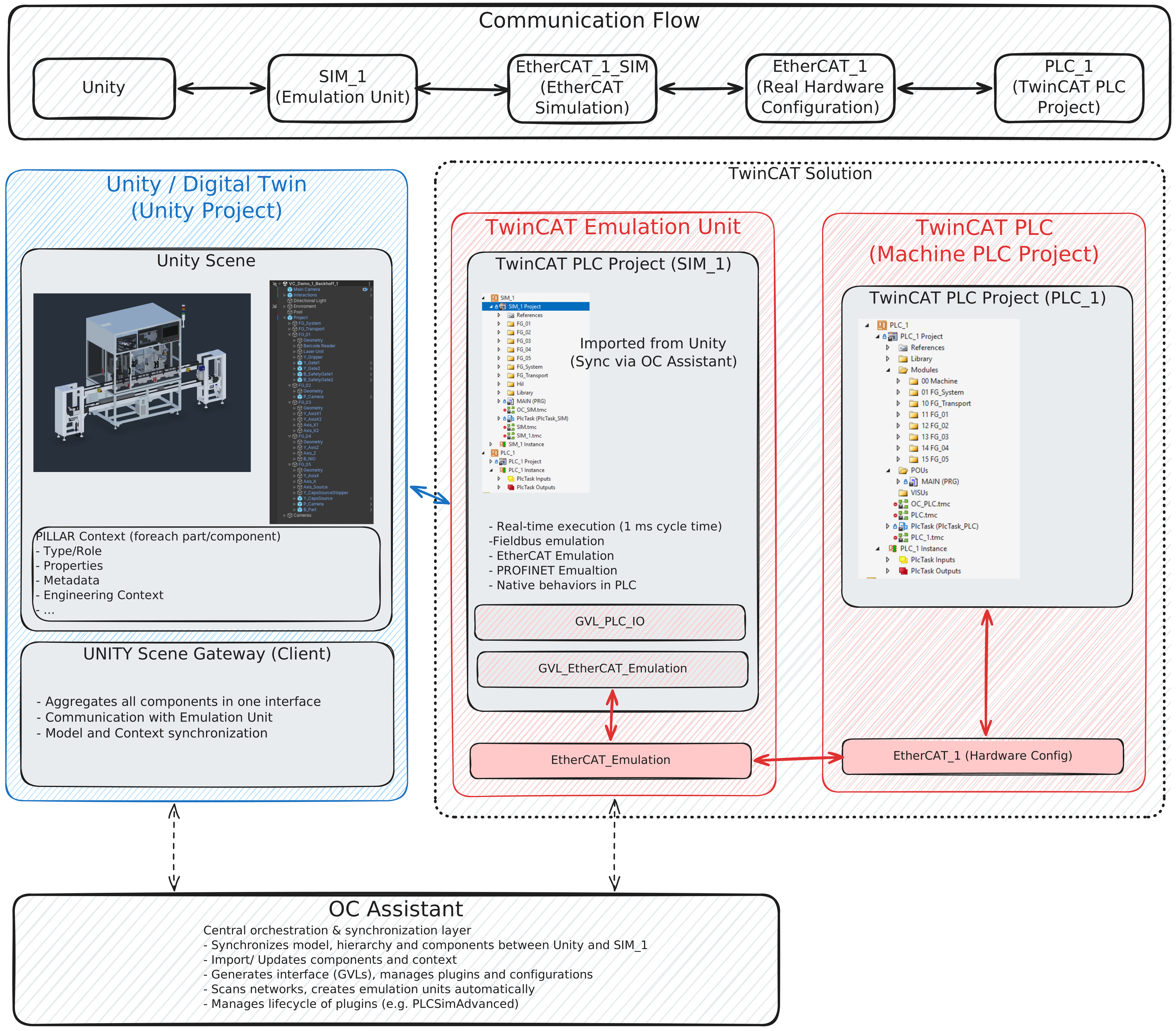
The base setup — Unity plus the simulation unit — with a second TwinCAT PLC project, PLC_1,
carrying the machine program. Alongside it goes the real hardware configuration: an EtherCAT_1
master with all its terminals, exactly as the cell would be wired. From that master an
EtherCAT_1_SIM simulation device is created; the two are coupled and run in full emulation.
Unity ⇄ SIM_1 ⇄ EtherCAT_1_SIM ⇄ EtherCAT_1 ⇄ PLC_1
This is the setup this repository runs today. Its concrete projects, ports and terminals are documented by the Beckhoff module.
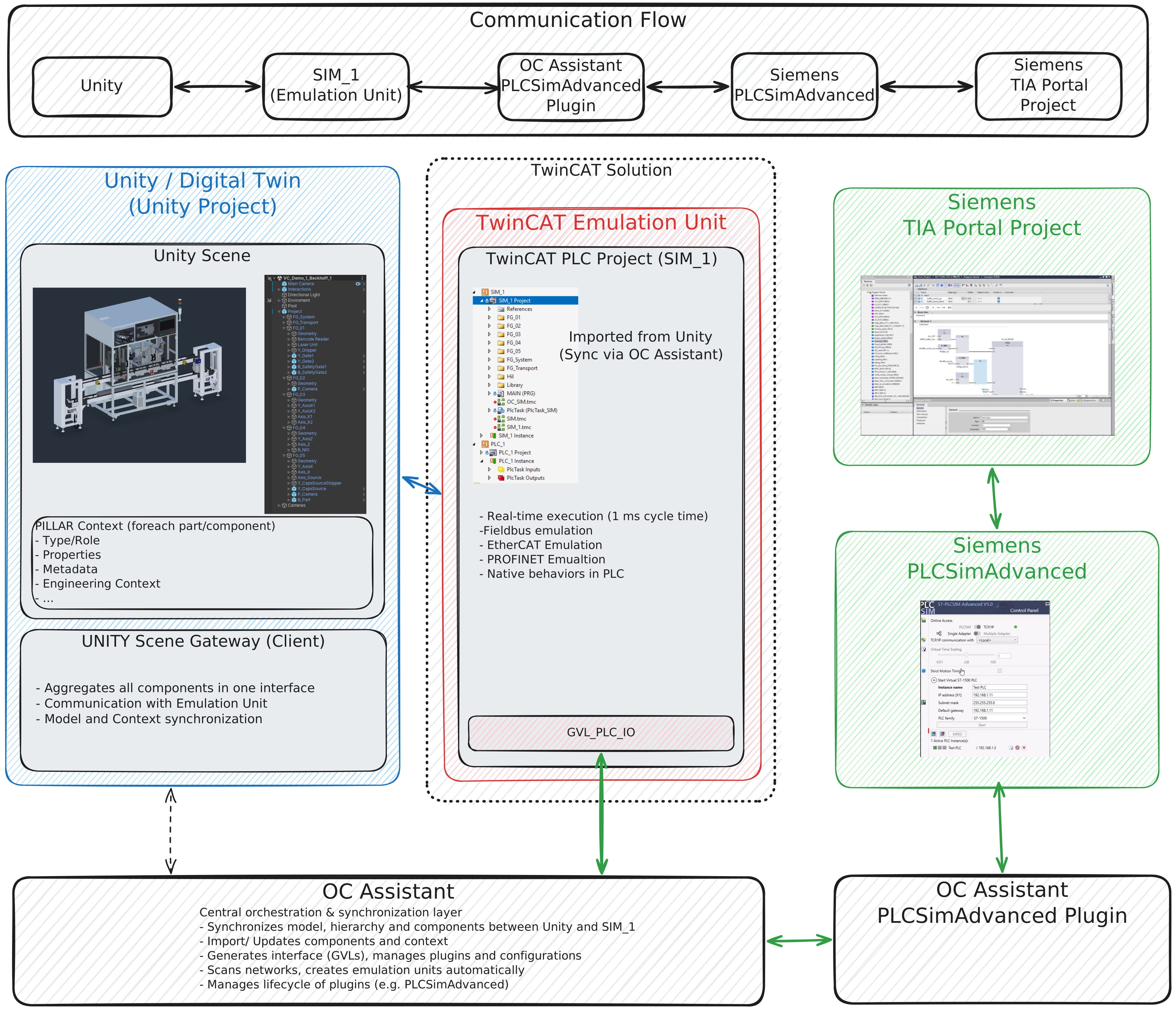
Same base setup. OC Assistant's PLCSIM Advanced plugin creates an extra GVL in SIM_1, and that
GVL is the interface to the PLCSIM Advanced I/O. OC Assistant manages the plugin's lifecycle.
Unity ⇄ SIM_1 ⇄ PLCSIM Advanced plugin ⇄ PLCSIM Advanced ⇄ TIA Portal project
This is the setup the Siemens module runs. Its emulation project, the PLCSIM Advanced instance and the connection settings are documented by the Siemens module.
Same base setup again. OC Assistant scans the PROFINET fieldbus and creates the emulation unit as a PROFINET master automatically, with the matching GVL in the emulation project.
Start the PLC runtime first, then enter Play mode in Unity. The twin binds its devices on connect, so a runtime that appears later is a runtime the twin never found.
Then open that platform's scene:
| Scene | Platform |
|---|---|
VC_Demo_1_Beckhoff_1 |
Beckhoff / TwinCAT |
VC_Demo_1_Siemens_1 |
Siemens / TIA Portal |
The step-by-step procedure belongs to the platform: for TwinCAT it is
Beckhoff/_docs/01-setup.md,
for TIA Portal it is
Siemens/_docs/setup.md.
This repository does not repeat a vendor's install steps, because nothing here would keep them true.
Same project, same program, same twin. Only the runtime differs:
| SIL — emulated runtime | HIL — controller hardware | |
|---|---|---|
| Where the PLC runs | On this PC — TwinCAT runtime, PLCSIM Advanced | On a real controller |
| Address | Local loopback — TwinCAT uses 127.0.0.1.1.1
|
The controller's real network address |
| Fieldbus | Simulated pair on one machine | Real master on the controller, simulated side facing the twin |
| Timing | Not real time — the PC schedules it | Real cycle time, real jitter, real bus |
| Good for | Everyday development, CI, learning | Proving the program on the hardware that will ship |
Validate in SIL, then move to HIL without touching the program. That the same binary runs both ways is the property that makes the SIL result worth anything.
Everything documented in this repository today was run in SIL. HIL uses the same mechanism, but the concrete steps have not been captured from a working installation:
-
TODO(setup): creating the route to a physical controller, and what to enter where. -
TODO(setup): network configuration between the PC running Unity and the controller. -
TODO(setup): which parts of the fieldbus configuration change when the master is real.
If you get it working, that is one of the most useful contributions you could send.
Beckhoff and Siemens run this machine today. Nothing in the twin is shaped by either of them, and nothing in this repository needs editing to accept another platform — the Siemens module was added as a scene and a declaration, exactly as described below.
You implement against a published specification rather than reading someone else's PLC code:
context/.machine.json |
Every device, its type, its twin PLC path and its group — schema-versioned machine-readable JSON. This is the handoff |
| The device type pages | What each kind of device is, which bit of its interface means what, and what will catch you out |
| The behaviour contracts | What the machine must do — the station handshake, the interlocks, the fault codes, the reset model. Machine-level, so your platform honours the same ones TwinCAT does |
| The machine pages | The hierarchy, the groups, the circulation ring, with figures |
Two of those deserve emphasis, because they are where a first attempt goes wrong:
-
No functional group runs on its own. Each is served by an Index unit in
FG_Transportthat fixes the pallet, triggers the group, and waits for it to report done before releasing the pallet. A group designed without that handshake is designed wrong — read transport-behaviour.md before sequencing anything. - A reset must terminate on its own cylinders and on time. It may branch on a sensor but must never wait on one, and never on another unit. Both violations of this have shipped here, and both deadlocked a whole functional group.
| A control program | Your platform's realisation of the behaviour contracts |
| An I/O mapping | Your terminals, on your fieldbus, to the simulation unit's process image |
| A Unity scene | A copy of the machine prefab plus your vendor's operator panel — a scene, never a fork of the machine |
| A module repository | Everything above, self-contained, with its own _docs/
|
The scene is the only part that touches this repository. Adding one is the whole of adding a vendor
on the twin side: every scene under Unity/Assets/Demo_1/Scenes/ is exported and picked up by glob,
with no file to edit.
A module is a normal repository with three things this project relies on:
module.json |
Its name, vendor, version and platform. version is written by that module's release bot, never by hand |
_workflow/config/handoff/.machine.json |
Its committed copy of the machine handoff, so the module builds from a standalone clone with no main repo present |
_docs/ |
Its own documentation, and — if it publishes pages — its own wiki, built by its own tooling against _workflow/WIKI-SPEC.md
|
On the main-repo side, a platform is declared by one entry in
_workflow/config/modules.json: its URL, branch, platform name,
the version it was tested against, and whether it publishes documentation. Nothing else changes —
the compatibility table, the cross-links and the wiki all read that declaration.
Declared, never probed. These pages are tracked, so what they contain must not depend on which optional modules a given user happened to clone.
- Never write a control-platform fact into this repository. Function blocks, terminal channels, HMI structures and project mechanics belong to the module that owns them. This repository links out to a platform's documentation and never describes it.
- A module documents its realisation of a contract, never a second version of the contract. If a behaviour contract is wrong, fix it here, once, for everyone.
-
A link that crosses a repository boundary is an absolute URL, in both directions. A module's
directory is gitignored here, so
../Beckhoff/…is dead for anyone who did not clone it.
Open an issue saying which platform you are starting, before you write much. It costs nothing and it means somebody can tell you which parts of the contract are load-bearing.
→ CONTRIBUTING.md · → 05 · Engineering workflow, for where the handoff comes from and how PLC code is generated from it.