Repository navigation
Machine FG_System
This page is generated from the Unity twin. Published from
_docs/context/fg-system.md— edit it there, not here. Changes made in the wiki are overwritten on the next sync.
| Scene path | Project/FG_System |
| Twin PLC path | MAIN.FG_System |
| Served by | — |
| Symbols | 10 |
| Behaviour | fg-system-safety.md |
Cell infrastructure - safety enclosure, interlocked doors, operator panel, signal tower and monitors. Carries no part processing of its own.
Not every scene has this group's operator panel. 9 node(s) below are marked † because they come from the reference scene
VC_Demo_1_Beckhoff_1and another scene spells them differently. Read them as an example of a vendor panel, not as the machine's. Each vendor's own is on its page at the bottom of this one.
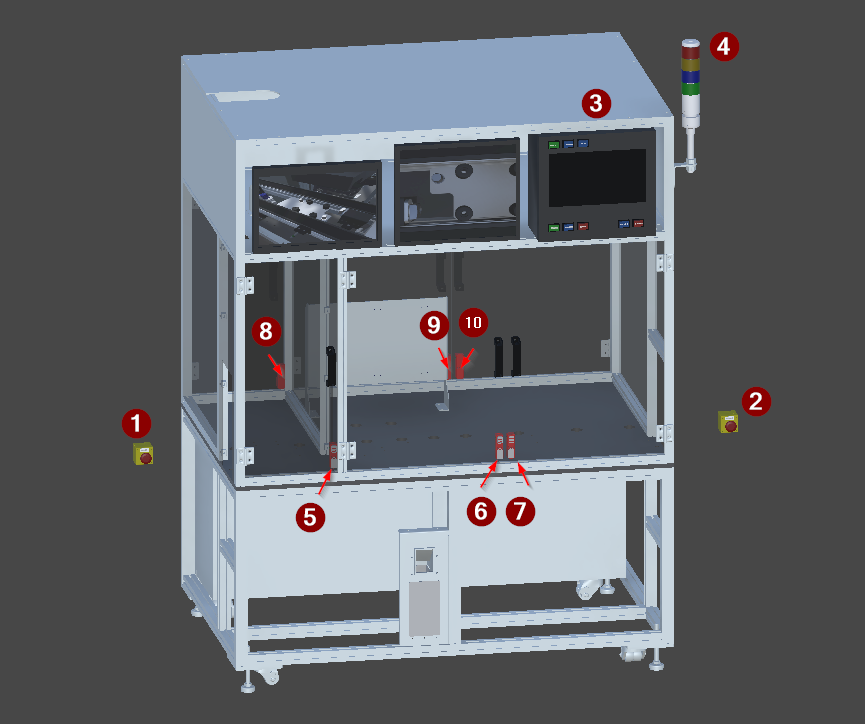
The FG_System group and the machine main frame, isolated.
| # | Device | Type | Twin FB | Twin PLC path | What it does |
|---|---|---|---|---|---|
| 1 | SS_EStop1 |
Button | FB_Button |
MAIN.FG_System.SS_EStop1 |
Emergency stop, position 1. Latching mushroom actuator that drops the cell to a safe state. |
| 2 | SS_EStop2 |
Button | FB_Button |
MAIN.FG_System.SS_EStop2 |
Emergency stop, position 2. Latching mushroom actuator that drops the cell to a safe state. |
| 3 |
H_ControlPanel † |
PanelSampler | FB_Panel |
MAIN.FG_System.H_ControlPanel |
Main operator panel, TwinCAT/Beckhoff variant. Samples eight push buttons - five PackML machine commands and three mode selections - into one PLC symbol, and lights each button back from it. |
| 4 | H_SignalTower |
PanelSampler | FB_Panel |
MAIN.FG_System.H_SignalTower |
Four colour signal tower. Samples its red, yellow, blue and green lamps into one PLC symbol. |
| 5 | B_SafetyDoor11 |
Lock | FB_Lock |
MAIN.FG_System.B_SafetyDoor11 |
Safety interlock on an enclosure door, side 1. Reports door position and holds the door locked while the cell may move. |
| 6 | B_SafetyDoor12 |
Lock | FB_Lock |
MAIN.FG_System.B_SafetyDoor12 |
Safety interlock on an enclosure door, side 1. Reports door position and holds the door locked while the cell may move. |
| 7 | B_SafetyDoor13 |
Lock | FB_Lock |
MAIN.FG_System.B_SafetyDoor13 |
Safety interlock on an enclosure door, side 1. Reports door position and holds the door locked while the cell may move. |
| 8 | B_SafetyDoor21 |
Lock | FB_Lock |
MAIN.FG_System.B_SafetyDoor21 |
Safety interlock on an enclosure door, side 2. Reports door position and holds the door locked while the cell may move. |
| 9 | B_SafetyDoor22 |
Lock | FB_Lock |
MAIN.FG_System.B_SafetyDoor22 |
Safety interlock on an enclosure door, side 2. Reports door position and holds the door locked while the cell may move. |
| 10 | B_SafetyDoor23 |
Lock | FB_Lock |
MAIN.FG_System.B_SafetyDoor23 |
Safety interlock on an enclosure door, side 2. Reports door position and holds the door locked while the cell may move. |
# is the numbered arrow on the figure above.
† From the reference scene only. Every scene instances the same Machine_1 prefab, but each adds its own vendor's operator panel, so this row is VC_Demo_1_Beckhoff_1's and another scene spells it differently. The machine is what is unmarked; a marked row is an example. Each vendor's own is on its page below.
The twin path is not the control path. A control platform spells these devices differently - it may fold a twin child into its parent unit, or address it from another root entirely - and only the control spelling works in a binding or a link, where the twin's fails silently. The verified control path for each row is on the vendor page linked below.
Control is what the PLC writes and the twin obeys; Status is what the twin reports and the PLC reads. Which member a device uses is on its device type page.
| Signal | Type | The PLC reads | The PLC writes | What it is |
|---|---|---|---|---|
RED |
Lamp | — | ControlData.0 |
Assumed from the colour, not confirmed by code: fault or stopped. |
YELLOW |
Lamp | — | ControlData.1 |
Assumed from the colour, not confirmed by code: warning, or ready and waiting. |
BLUE |
Lamp | — | ControlData.2 |
Signal tower lamp segment. Its meaning is given by the Role entry. |
GREEN |
Lamp | — | ControlData.3 |
Assumed from the colour, not confirmed by code: running normally. |
Verified 2026-08-20 from the live PanelSampler _components list, 4 bits used of 32. Lamps are outputs only - the PLC drives them through ControlData; StatusData is unused. Order follows the _components list - reordering it changes the PLC bit assignment.
| Signal | Type | The PLC reads | The PLC writes |
|---|---|---|---|
START |
Button | StatusData.0 |
ControlData.0 |
RESET |
Button | StatusData.1 |
ControlData.1 |
STOP |
Button | StatusData.2 |
ControlData.2 |
CLEAR |
Button | StatusData.3 |
ControlData.3 |
ABORT |
Button | StatusData.4 |
ControlData.4 |
PRODUCTION |
Button | StatusData.5 |
ControlData.5 |
MAINTANANCE |
Button | StatusData.6 |
ControlData.6 |
MANUAL |
Button | StatusData.7 |
ControlData.7 |
8 of 32 bits used. StatusData carries the pressed state in, ControlData drives each button's lamp at the same bit. Order follows the PanelSampler _components list.
The scene tree. The comment on each line is what the node is; † marks one that differs between scenes.
Doors:             # grouping, not a device
  B_SafetyDoor11:  # Lock
  B_SafetyDoor12:  # Lock
  B_SafetyDoor13:  # Lock
  B_SafetyDoor21:  # Lock
  B_SafetyDoor22:  # Lock
  B_SafetyDoor23:  # Lock
H_SignalTower:     # PanelSampler
  RED:             # Lamp · a bit inside H_SignalTower
  YELLOW:          # Lamp · a bit inside H_SignalTower
  BLUE:            # Lamp · a bit inside H_SignalTower
  GREEN:           # Lamp · a bit inside H_SignalTower
H_ControlPanel:    # PanelSampler †
  START:           # Button · a bit inside H_ControlPanel †
  RESET:           # Button · a bit inside H_ControlPanel †
  STOP:            # Button · a bit inside H_ControlPanel †
  CLEAR:           # Button · a bit inside H_ControlPanel †
  ABORT:           # Button · a bit inside H_ControlPanel †
  PRODUCTION:      # Button · a bit inside H_ControlPanel †
  MAINTANANCE:     # Button · a bit inside H_ControlPanel †
  MANUAL:          # Button · a bit inside H_ControlPanel †
SS_EStop1:         # Button
SS_EStop2: # ButtonAggregated - bits inside a FB_Panel, not devices of their own. Do not generate code for these:
-
RED(Lamp) →H_SignalTower -
YELLOW(Lamp) →H_SignalTower -
BLUE(Lamp) →H_SignalTower -
GREEN(Lamp) →H_SignalTower -
START† (Button) →H_ControlPanel -
RESET† (Button) →H_ControlPanel -
STOP† (Button) →H_ControlPanel -
CLEAR† (Button) →H_ControlPanel -
ABORT† (Button) →H_ControlPanel -
PRODUCTION† (Button) →H_ControlPanel -
MAINTANANCE† (Button) →H_ControlPanel -
MANUAL† (Button) →H_ControlPanel
Doors — MAIN.FG_System.Doors · not a PLC symbol
- Function — Enclosure doors and their safety locks. Three doors on each of the two accessible sides.
B_SafetyDoor11 — MAIN.FG_System.B_SafetyDoor11 · Lock
- Signal — Two inputs back - closed and locked - and one lock coil out. Secure means BOTH: closed alone is not enough.
B_SafetyDoor12 — MAIN.FG_System.B_SafetyDoor12 · Lock
- Signal — Two inputs back - closed and locked - and one lock coil out. Secure means BOTH: closed alone is not enough.
B_SafetyDoor13 — MAIN.FG_System.B_SafetyDoor13 · Lock
- Signal — Two inputs back - closed and locked - and one lock coil out. Secure means BOTH: closed alone is not enough.
B_SafetyDoor21 — MAIN.FG_System.B_SafetyDoor21 · Lock
- Signal — Two inputs back - closed and locked - and one lock coil out. Secure means BOTH: closed alone is not enough.
B_SafetyDoor22 — MAIN.FG_System.B_SafetyDoor22 · Lock
- Signal — Two inputs back - closed and locked - and one lock coil out. Secure means BOTH: closed alone is not enough.
B_SafetyDoor23 — MAIN.FG_System.B_SafetyDoor23 · Lock
- Signal — Two inputs back - closed and locked - and one lock coil out. Secure means BOTH: closed alone is not enough.
H_SignalTower — MAIN.FG_System.H_SignalTower · PanelSampler
- Signal — PanelSampler. Aggregates the four tower lamps into one FB_Panel DWORD, with the lamps own links disabled. Same packing mechanism as the control panel.
RED — MAIN.FG_System.RED · Lamp · not a PLC symbol
- Function — Signal tower lamp segment. Its meaning is given by the Role entry on each instance.
- Role — Assumed from the colour, not confirmed by code: fault or stopped.
- Signal — Not a PLC symbol in its own right - its own Link is disabled by the PanelSampler. Reached as bit 0 of the H_SignalTower FB_Panel DWORD.
YELLOW — MAIN.FG_System.YELLOW · Lamp · not a PLC symbol
- Function — Signal tower lamp segment. Its meaning is given by the Role entry.
- Role — Assumed from the colour, not confirmed by code: warning, or ready and waiting.
- Signal — Not a PLC symbol in its own right - its own Link is disabled by the PanelSampler. Reached as bit 1 of the H_SignalTower FB_Panel DWORD.
BLUE — MAIN.FG_System.BLUE · Lamp · not a PLC symbol
- Function — Signal tower lamp segment. Its meaning is given by the Role entry.
- Signal — Not a PLC symbol in its own right - its own Link is disabled by the PanelSampler. Reached as bit 2 of the H_SignalTower FB_Panel DWORD.
GREEN — MAIN.FG_System.GREEN · Lamp · not a PLC symbol
- Function — Signal tower lamp segment. Its meaning is given by the Role entry.
- Role — Assumed from the colour, not confirmed by code: running normally.
- Signal — Not a PLC symbol in its own right - its own Link is disabled by the PanelSampler. Reached as bit 3 of the H_SignalTower FB_Panel DWORD.
H_ControlPanel † — MAIN.FG_System.H_ControlPanel · PanelSampler
- Signal — PanelSampler. Disables its children's individual communication and exposes one aggregated FB_Panel DWORD, packing their status bits in and unpacking control bits back.
START † — MAIN.FG_System.START · Button · not a PLC symbol
- Signal — Not a PLC symbol in its own right - its own Link is disabled by the PanelSampler. Pressed state is bit 0 of the H_ControlPanel FB_Panel StatusData; its feedback lamp is bit 0 of ControlData.
RESET † — MAIN.FG_System.RESET · Button · not a PLC symbol
- Signal — Not a PLC symbol in its own right - its own Link is disabled by the PanelSampler. Pressed state is bit 1 of the H_ControlPanel FB_Panel StatusData; its feedback lamp is bit 1 of ControlData.
STOP † — MAIN.FG_System.STOP · Button · not a PLC symbol
- Signal — Not a PLC symbol in its own right - its own Link is disabled by the PanelSampler. Pressed state is bit 2 of the H_ControlPanel FB_Panel StatusData; its feedback lamp is bit 2 of ControlData.
CLEAR † — MAIN.FG_System.CLEAR · Button · not a PLC symbol
- Signal — Not a PLC symbol in its own right - its own Link is disabled by the PanelSampler. Pressed state is bit 3 of the H_ControlPanel FB_Panel StatusData; its feedback lamp is bit 3 of ControlData.
ABORT † — MAIN.FG_System.ABORT · Button · not a PLC symbol
- Signal — Not a PLC symbol in its own right - its own Link is disabled by the PanelSampler. Pressed state is bit 4 of the H_ControlPanel FB_Panel StatusData; its feedback lamp is bit 4 of ControlData.
PRODUCTION † — MAIN.FG_System.PRODUCTION · Button · not a PLC symbol
- Signal — Not a PLC symbol in its own right - its own Link is disabled by the PanelSampler. Pressed state is bit 5 of the H_ControlPanel FB_Panel StatusData; its feedback lamp is bit 5 of ControlData.
MAINTANANCE † — MAIN.FG_System.MAINTANANCE · Button · not a PLC symbol
- Signal — Not a PLC symbol in its own right - its own Link is disabled by the PanelSampler. Pressed state is bit 6 of the H_ControlPanel FB_Panel StatusData; its feedback lamp is bit 6 of ControlData.
MANUAL † — MAIN.FG_System.MANUAL · Button · not a PLC symbol
- Signal — Not a PLC symbol in its own right - its own Link is disabled by the PanelSampler. Pressed state is bit 7 of the H_ControlPanel FB_Panel StatusData; its feedback lamp is bit 7 of ControlData.
SS_EStop1 — MAIN.FG_System.SS_EStop1 · Button
- Signal — One input and one lamp coil, as a single device. Active while the mushroom is latched.
SS_EStop2 — MAIN.FG_System.SS_EStop2 · Button
- Signal — One input and one lamp coil, as a single device. Active while the mushroom is latched.
The twin is master for structure, and that is all this page states. The control module, the twin device layer, the verified control PLC paths and the terminal mapping is the control platform's own knowledge base:
- Beckhoff
- Siemens — no knowledge base published yet