Repository navigation
home
hMailServer is a free, open-source mail server for Windows and Linux: SMTP, IMAP and POP3, with the transport security, sender authentication and anti-abuse machinery a mail server needs in 2026. This wiki documents hMailServer 6.3.7, the latest release (17 October 2026) — Progressive Robot's fork of hMailServer, not the original hMailServer by Martin Knafve (ForkAndOriginal.md says how the two differ), maintained by Christopher Holloway / Progressive Robot Ltd, licensed AGPL-3.0-or-later.
Download: the latest release is an x64 installer, and since 6.3.6 an ARM64 one (a preview, never run on ARM64 hardware), that upgrades in place every earlier release of this fork, and the original hMailServer up to 5.6 - not the original's 5.7 releases, whose schema went on from 5708 by steps of its own, and which, from the release after 6.3.7, the installer refuses before it changes anything, the installers of 6.3.7 and earlier not looking, so that they must not be run over one (Upgrading Guide) (hMailServer-x64.exe always fetches the latest one), and - since 6.3.6 for x86-64 and AArch64, with each supported distribution release's own package, both AppImages, the source tarball and the Helm chart beside them - a .deb and an .rpm for Linux (hmailserver_amd64.deb, hmailserver.x86_64.rpm). The project's own download links, https://updates.progressiverobot.com/download/hMailServer-x64.exe, /download/hmailserver_amd64.deb and /download/hmailserver.x86_64.rpm, always lead to the newest stable release, never a pre-release - GitLab's own permalink/latest follows the release published last, a pre-release included - and /download/ to its page. Every file of 6.3.7 is signed with Sigstore, its bundle beside it, each installer and package has an SBOM of its own, and the release's notes begin with a Download table that gives each Windows installer's SHA-256 (Security Policy, Verifying a release). A 6.3.6 server's live update installs it, but for one installed from a distribution release's own package, which is upgraded with its package manager, one whose three GitLab trust settings still name the path the project began at, which refuses it until they are cleared, and one in a container, whose image is pulled instead (Upgrading hMailServer 18.4f). 6.3.4, which carries no Sigstore bundle, is checked against its hmailserver-6.3.4-SHA256SUMS.txt, signed with the release tags' SSH key, and every server installed it by hand (18.4c). Source and issues: the repository, on GitLab since 22 September 2026, the one place the project is worked on - its issues, merge requests, pipelines and releases; since 18 October 2026 its mirror on GitHub is https://github.com/RainbowWizard-coder/hMailServer, with copies of the releases and of this wiki, and Discussions, and no Issues, and a pull request opened there is read and, if it is accepted, landed through GitLab. The addresses of the project's former GitHub account, Progressiverobot, have answered 404 since GitHub suspended it on 18 September 2026. Questions: an issue on GitLab with the Question template, a thread in the Q&A of GitHub's Discussions, or the forum; a vulnerability is reported privately, never in a public issue, a discussion or a pull request (Security Policy). Following releases: the feed https://updates.progressiverobot.com/releases.atom in any feed reader, from 6.3.6 - every release with the first paragraph of its notes, whose entries' ids are made from each release's tag alone, so that they do not change when a release is edited or the project moves (UpdateFeed.md, "The Atom feed") - or GitLab's own, https://gitlab.com/hmailserver/hmailserver/-/releases.atom, or, signed in to GitLab, the bell on the project page set to Custom with New release ticked, for an email each time. What is planned: Roadmap2.md; what exists and what was deliberately not done is recorded in Roadmap.md.
| Current release | 6.3.7, build 46, published 17 October 2026 (the tag v6.3.7, 31d656c0c; the release), a security release, the first since releases paused: it fixes vulnerabilities in every earlier version, so upgrade every server running 6.3.6 or earlier (Changes-Since-6210 4h). The schema stays at 6108: an upgrade from 6.3.6 changes no table. Made by the tag's GitLab pipeline, Authenticode-signed, and signed with Sigstore at the group's path, gitlab.com/hmailserver/hmailserver, with the project's id in the certificate, as 6.3.6 was: each of its sixty-two files with its bundle, and the release with its SLSA provenance; the container image is registry.gitlab.com/hmailserver/hmailserver:6.3.7, also tagged 6.3 and latest. A 6.3.6 server's live update installs it - under NT SERVICE\hMailServer with Install update in the Control Panel - but for one installed from a distribution release's own package, which is upgraded with its package manager; so does a 6.3.4 or 6.3.5 one on LocalSystem, and under NT SERVICE\hMailServer those two install it by hand, once, and on Linux with the package manager. A server whose three GitLab trust settings still name the path the project began at refuses it until they are cleared, and in a container the update check names the image to pull and installs nothing (Upgrading hMailServer 18.4f). 6.3.6 (6 October 2026) was the first release signed at the group's path; 6.3.5 (29 September 2026) the first the pipeline made, at the path the project began at; 6.3.4 (27 September 2026) was Authenticode-signed by hand with no Sigstore bundle, so every server installed it by hand. A server from 6.2.28 to 6.3.3, or one installed from 6.3.3's AArch64 packages or AppImages, is upgraded by hand, once. 6.3.6 was the last release planned by date: the 6.3 line receives security fixes until 30 September 2027, each in a security release cut from master with the finished work master holds then (Security Policy, While releases pause) |
| Database schema |
6108 in 6.3.6 and 6.3.7, which adds no step: 6.3.5's 6105 and 6.3.6's three one-way steps to 6108 follow 6.3.4's 6104, sixty-four steps from 6.3.3's 6040, one way: 6041 CalDAV calendars, 6042 the settings store, 6043 the audit trail and alerts, 6044 domain transforms, 6045 remote domain policies, 6046 to 6096 everything from the sender lists to SCIM provisioning, and 6097 eDiscovery, 6098 storage compression and de-duplication, 6099 mailbox encryption at rest, 6100 mail in to a webhook, 6101 rooms and equipment (two columns on hm_messages), 6102 utf8mb4 on MySQL and MariaDB (every table rebuilt), 6103 secrets at rest and 6104 who set a fetch account up - Changes-Since-6210 section 2 has every step. The installer runs DBUpdater, which applies them; the .deb and .rpm run hmailserver --upgrade-database. 6.3.3 is at 6040 (6039 widens a domain's relay-password column, 6040 adds the CardDAV columns) |
| Platform | Windows x64 - an Inno Setup installer, the server running as a Windows service, as the virtual account NT SERVICE\hMailServer on a new installation since 6.3.4 - and since 6.3.6 Windows on ARM64 as a preview installer, built and tested in CI and never run on ARM64 hardware; and Linux: a .deb and an .rpm for x86-64 and AArch64, a package for each supported distribution release (Debian 12 and 13, Ubuntu 24.04, Fedora 44 and 43, EL 10 and 9, openSUSE Leap 16.0 and Tumbleweed), both AppImages, a container image for linux/amd64 and linux/arm64 and a Helm chart (the charts of 6.3.6 and 6.3.7 that the Helm repository serves start no server: the release after 6.3.7's is the first that does, and until then the chart of a checkout starts the published image - Running in a Container), with a systemd unit that runs the server as its own user; 6.3.4 and 6.3.5 carried the x86-64 .deb and .rpm only, and the AArch64 packages and the AppImages, new in 6.3.0, stopped at 6.3.3 until 6.3.6. One source tree builds both (the Arch PKGBUILD in it builds from the release's tag on GitLab); Alpine Linux and Nix are supported from the tree |
| Licence | AGPL-3.0-or-later, with an SPDX header on every source file |
| Protocols served | SMTP (with ESMTP: SIZE, 8BITMIME, PIPELINING, CHUNKING, BINARYMIME, SMTPUTF8, ENHANCEDSTATUSCODES, DSN, STARTTLS, AUTH), IMAP4rev1 and IMAP4rev2, POP3, ManageSieve |
| Database backends | SQL Server Compact (built in, no setup), Microsoft SQL Server, MySQL/MariaDB, PostgreSQL |
| Administration | hMailCP, a .NET 10 desktop Control Panel over COM - 65 pages in eight groups in 6.3.4 (55 in 6.3.3); a REST API whose OpenAPI document names 441 paths and 621 path-and-method operations in 6.3.4 (413 and 585 of them under /api/; 146 and 219 in 6.3.3), writing as well as reading since 6.3.0; the Control Deck, an administration page in the browser at / with 40 views in 6.3.4 (15 in 6.3.3), where the census in DeckParity.md finds 458 of the 466 properties the desktop program writes, and the eight it misses, an account's directory fields, are edited on a route of their own; a webmail for users at /portal; and, since 6.3.4, the hmctl and PowerShell command-line clients, SCIM 2.0 provisioning at /scim/v2, sign-in to the webmail and the Deck by passkey, OpenID Connect or SAML, and a read-only SNMP agent, off as shipped and answering nobody until it is given a manager |
| Regression suite | 2,302 Windows tests in 6.3.3; 3,811 in 6.3.4 ([Test] counted in hmailserver/test/RegressionTests at the tag, 51e2dbda0), run in two halves on two benches. The Linux suite ran on GitHub Actions until 18 September 2026; in 6.3.4 it is a job of the project's own GitLab CI, on its own Linux runner, whose first run, in the first pipeline of 26 September 2026, failed on faults of the tree's that 6.3.4 fixes. Then master's first full pipeline, 2886389460 on 27 September 2026 (master 6bc09509d, 6.3.4 and one harness commit), ran the whole pipeline, its gates on the project's two runners, and passed 25 of its 29 jobs: both regression suites among them - windows-gate on bench150, 3,811 tests, 3,736 passed, 0 failed, 74 skipped and 1 inconclusive, and linux-suite on linix, 2,020 tests, 1,710 passed, 0 failed, 310 skipped, each in 2 h 23 min. It left db-matrix manual and failed secret_detection, semgrep and static-analysis, each on a fault of the tree's that batch41, the branch of 6.3.5, mends (work item #21, ContinuousIntegration.md). 6.3.7's tag pipeline ran the Windows suite in two halves at once, windows-gate on bench150 (2,794 tests, 2,732 passed, 0 failed, 62 skipped) and windows-gate-s1vm on S1-WINBENCH (1,652 tests, 1,634 passed, 0 failed, 18 skipped), and linux-suite (2,652 tests, 2,284 passed, 0 failed, 368 skipped) |
| This wiki | 72 pages, arranged as the five journeys below. The reference pages cite file:line into the repository, so any claim on them can be checked against the code |
flowchart TB
  subgraph EDGE["Listeners"]
    L1["SMTP 25 / 587 / 465"]
    L2["IMAP 143 / 993"]
    L3["POP3 110 / 995"]
    L4["ManageSieve, metrics,<br/>REST API and portal,<br/>public web services"]
  end

  subgraph CORE["The server process"]
    ACC["Accept and save:<br/>anti-spam, scripts, signatures,<br/>Authentication-Results, archive"]
    Q["Delivery queue"]
    DEL["Delivery: virus scanning, global rules,<br/>DKIM signing, mirroring"]
    LOC["Local delivery:<br/>rules, Sieve, forwarding,<br/>lists, public folders"]
    EXT["External delivery:<br/>routes or MX, MTA-STS,<br/>DANE, TLS"]
    SCH["Scheduler: backups, greylist cleaner,<br/>retention, TLS-RPT and DMARC reporters"]
    FET["External account fetching"]
  end

  subgraph STORE["State"]
    DB[("Database:<br/>SQL CE, MSSQL,<br/>MySQL, PostgreSQL")]
    FS["Message store on disk"]
  end

  subgraph OUTS["Outside"]
    DNS["DNS resolvers"]
    SA["SpamAssassin spamd"]
    CAV["ClamAV clamd"]
    REM["Other mail servers"]
  end

  L1 --> ACC
  ACC --> Q
  Q --> DEL
  DEL --> LOC
  DEL --> EXT
  EXT --> REM
  L2 --> FS
  L3 --> FS
  ACC --> FS
  ACC --> DB
  LOC --> FS
  SCH --> DB
  FET --> ACC
  ACC -.-> SA
  DEL -.-> CAV
  ACC -.-> DNS
  EXT -.-> DNS
  L4 --> DB
Solid lines are the path a message takes; dotted lines are the services the server calls out to. Architecture maps this onto the source tree; Ports Reference covers every listener and every outbound connection.
Five journeys, and one reference spine that every journey lands on. The sidebar is in the same order, so the group you are reading from is the group you are in.
flowchart LR
  subgraph J1["1. Install and run"]
    direction TB
    A1["Before You Install"] --> A2["Installing hMailServer"]
    A2 --> A3["The Control Panel"]
    A3 --> A4["Your First Domain<br/>and Mailbox"]
    A4 --> A5["Connecting a<br/>Mail Client"]
    A5 --> A6["DNS for Your Domain"]
  end

  subgraph J2["2. Secure it"]
    direction TB
    B1["Encryption and<br/>Certificates"] --> B2["Stopping Spam"]
    B2 --> B3["Stopping Viruses"]
    B3 --> B4["Security Hardening"]
  end

  subgraph J3["3. Operate it"]
    direction TB
    C1["Monitoring and Health"] --> C2["Backup and Restore"]
    C2 --> C3["Troubleshooting and<br/>Diagnosing Stalled Mail"]
    C3 --> C4["Upgrading hMailServer"]
    C4 --> C5["Warm Standby,<br/>High Availability"]
  end

  subgraph J4["4. Extend it"]
    direction TB
    D1["Rules and Sieve"] --> D2["Aliases, Lists,<br/>Public Folders"]
    D2 --> D3["Routes and Relays"]
    D3 --> D4["COM API and<br/>event scripts"]
    D4 --> D5["The REST API"]
  end

  subgraph J5["5. Contribute to it"]
    direction TB
    E1["Project Handbook"] --> E2["Architecture"]
    E2 --> E3["Contributing"]
    E3 --> E4["Regression Test<br/>Environment"]
    E4 --> E5["Release Process"]
  end

  REF["Look it up:<br/>Settings Reference, Ports Reference,<br/>Control Panel Reference, APIs Reference,<br/>Capabilities and Configuration,<br/>Changes Since 6.2.10, Glossary"]

  A6 --> B1
  B4 --> C1
  C5 --> D1
  D5 --> E1

  A3 -.-> REF
  B2 -.-> REF
  C3 -.-> REF
  D4 -.-> REF
  E2 -.-> REF
Solid arrows are the order the pages are meant to be read in. The dotted arrows say the same thing five times: every journey ends up in the reference pages, which are generated from the code rather than written from memory.
Three kinds of page, and it is worth knowing which one you are reading:
| Kind | How to recognise it | What to trust it for |
|---|---|---|
| Guide (38 pages) | Opens with a note saying it began as a chapter of the 6.2.10 manual and has been corrected against the 6.2.28 source - or, for the eight written on 24 September 2026 and the four written on 26 September 2026, that it was written from the repository's documents, at master 540347500 or in 6.3.4 | Doing the job. Screenshots are from a 6.2.10-era build, and the installer shots from a 6.2.11 one; each caption says when the current dialog differs |
| Generated reference | Opens with a scope paragraph naming the commit it was read at, and cites file:line on nearly every claim |
Exact values: defaults, limits, route tables, key names. Where a guide and a reference disagree, the reference is right |
| Repository document | Copied from a file in the repository. Twenty-two say so in a "Source of truth" note at the top; the runbooks copied without that note are all listed, with the file each came from, in Runbooks Digest | The project position: governance, security policy, assurance, release rules, and the operational runbooks |
New to hMailServer? Read in this order: What hMailServer Is and Is Not → How Email Works → Before You Install → Installing hMailServer → The Control Panel → Your First Domain and Mailbox → Connecting a Mail Client → DNS for Your Domain → Encryption and Certificates → Stopping Spam.
flowchart LR
  A["What hMailServer<br/>Is and Is Not"] --> B["How Email Works"]
  B --> C["Before You Install"]
  C --> D["Installing hMailServer"]
  D --> E["The Control Panel"]
  E --> F["Your First Domain<br/>and Mailbox"]
  F --> G["Connecting a<br/>Mail Client"]
  G --> H["DNS for Your Domain"]
  H --> I["Encryption and<br/>Certificates"]
  I --> J["Stopping Spam"]
  J --> K["Live"]
  H -.-> L["Ports Reference"]
  I -.-> L
Mail will flow after step F. It will land in inboxes rather than spam folders only after steps H and I, which is why the two are in the path and not in an appendix.
Step E is where the installer leaves you: the Control Panel Welcome page, which is built on the same idea as this one — a list of tasks named for the job you actually came to do, a tile for each area below them, and a search box over every page.
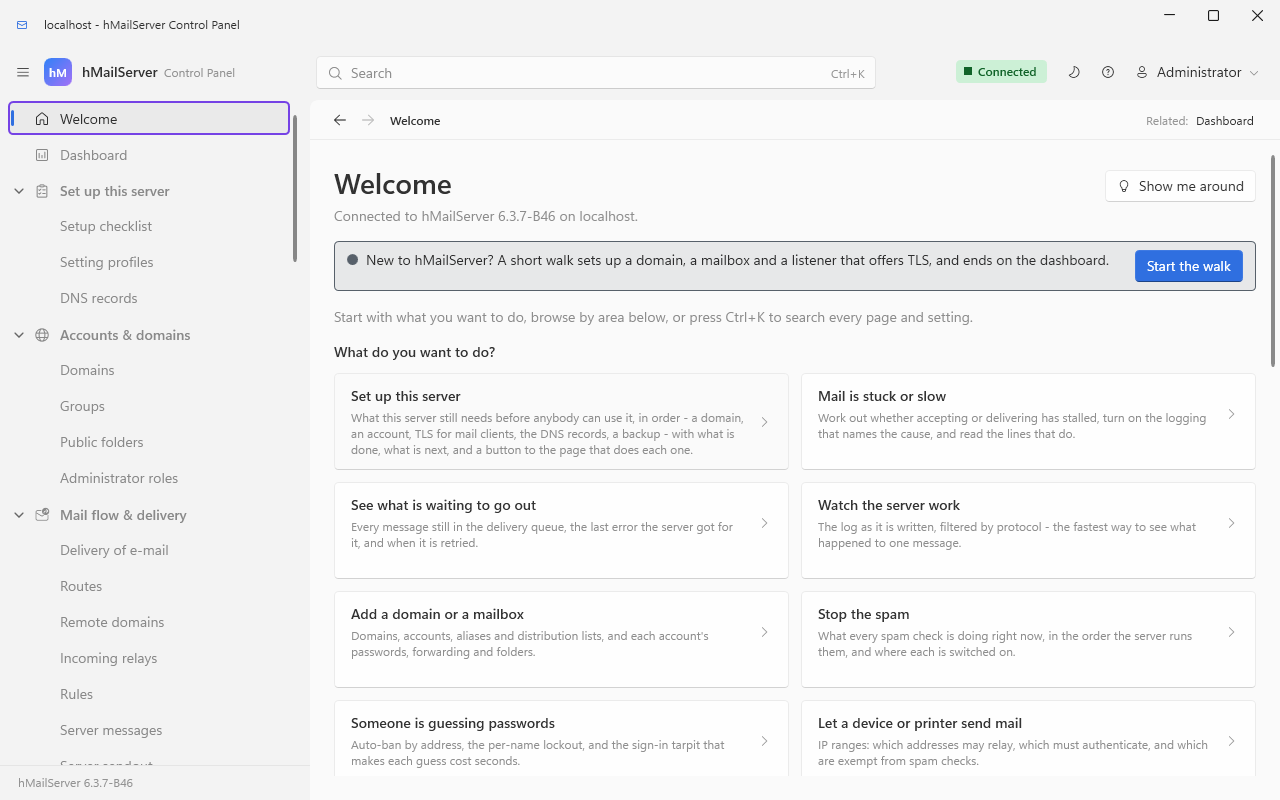
The task rows go on below the frame, and under them, headed "Or browse by area", is one tile for each group of the tree; Control Panel Reference maps the tree.
Running a server already? Upgrading hMailServer and Changes-Since-6210 say what moves between versions; the Settings Reference is the complete hMailServer.INI reference, generated from the code.
flowchart LR
  S(["Symptom"])
  S --> R1["Nothing arrives<br/>from outside"]
  S --> R2["I cannot send"]
  S --> R3["My mail lands in<br/>the spam folder"]
  S --> R4["A message is sitting<br/>in the queue"]
  S --> R5["A mail client cannot<br/>connect, or cannot log in"]
  S --> R6["The Control Panel<br/>will not connect"]
  S --> R7["The service<br/>will not start"]
  S --> R8["Something was refused<br/>and I want to know why"]

  R1 --> P1["Troubleshooting 19.2,<br/>then Ports Reference and<br/>DNS for Your Domain"]
  R2 --> P2["Troubleshooting 19.3,<br/>then Routes and Relays"]
  R3 --> P3["Troubleshooting 19.4,<br/>then DNS for Your Domain"]
  R4 --> P4["Diagnosing Stalled Mail"]
  R5 --> P5["Troubleshooting 19.6,<br/>then Connecting a Mail Client<br/>and Ports Reference"]
  R6 --> P6["Troubleshooting 19.5"]
  R7 --> P7["Troubleshooting 19.9"]
  R8 --> P8["Stopping Spam, then<br/>Monitoring and Health<br/>for the log to read"]
The numbers are the section headings inside Troubleshooting. Read §19.1 Start here, always before any of them: it names the log to open first, which is the step people skip.
| I want to… | Go to |
|---|---|
| Understand what this software does and does not do | What hMailServer Is and Is Not |
| Learn how mail actually moves, with the protocol conversations | How Email Works |
| Install it for the first time | Before You Install, then Installing hMailServer |
| Add my first domain and mailbox | Your First Domain and Mailbox |
| Tell a user what to type into Outlook or Thunderbird | Connecting a Mail Client |
| Know which port to open, and which to close | Ports Reference |
| Publish SPF, DKIM, DMARC, MTA-STS, TLS-RPT or TLSA | DNS for Your Domain |
| Get a certificate, automatically or by hand | Encryption and Certificates |
| Stop spam, or find out why something was refused | Stopping Spam |
| Keep a virus scanner in the delivery path | Stopping Viruses |
| Sort mail into folders, or let a user write their own filters | Rules and Sieve |
| Make one address reach several people | Aliases Lists and Public Folders |
| Send everything through a smart host | Routes and Relays |
| Work out why a message is stuck in the queue | Diagnosing Stalled Mail |
| Move a configured installation to another directory or drive | Relocating an Installation |
| Run hMailServer on Linux, on x86-64 or AArch64 | Installing on Linux |
| Run it as a container | Running in a Container |
| Look up an hMailServer.INI key and its default | Settings Reference |
| Find the Control Panel page behind a setting | Control Panel Reference |
| Know which protocol keyword the server actually advertises | Capabilities and Configuration |
| Script the server, or call it over HTTP | The COM API and Scripting, APIs Reference, The REST API, Command Line |
| Back it up, or restore it | Backup and Restore |
| Move from SQL CE to a real database server | Migrating the Database Backend |
| Survive the loss of the machine | Warm Standby, High Availability Runbook |
| Watch it with Prometheus or an OpenTelemetry collector | Monitoring and Health |
| Harden it before it goes public | Security Hardening |
| Report a vulnerability | Security Policy |
| Know what changed between two versions | Changes-Since-6210 |
| Look up a term I do not know | Glossary |
| Build it, test it, or send a patch | Project Handbook, Contributing |
| Decide whether to run this on the public internet | Assurance Case |
The other 71 pages of this wiki, grouped exactly as the sidebar groups them.
| Page | What it answers |
|---|---|
| What hMailServer Is and Is Not | What the software owns, what it leaves to your DNS provider and your mail clients, and what the licence requires of you |
| How Email Works | SMTP, IMAP, POP3 and DNS for someone who has not run a mail server, with the real conversations and where each filter sits in them |
| Page | What it answers |
|---|---|
| Before You Install | The pre-flight list: hardware, a fixed address and its reverse DNS, the host name, the database choice and the certificate plan — decided before the installer runs, because two of them are awkward to change afterwards |
| Installing hMailServer | The installer wizard screen by screen, the silent install, the administrator password, and what the first start creates |
| The Control Panel | hMailCP: connecting to the service, the navigation tree of 55 pages in eight groups (65 in 6.3.4), the Ctrl+K search over every page and setting, the Welcome and Dashboard pages, and the first-run tour of the tree |
| Installing on Linux | The .deb and the .rpm for x86-64 and AArch64, each supported distribution release's own package and both AppImages (6.3.4 and 6.3.5 carried the x86-64 .deb and .rpm only), the build services that carry 6.3.7, building from source, and exactly what is packaged and proven on Linux |
| Running in a Container | The Linux server as a container image: what is in it and what is not, the environment variables that configure it, Compose and the Helm chart, volumes, upgrades and backups |
| Profiles and Environment | New in 6.3.4: when a saved setting takes effect, the settings a domain or an account may hold a value of its own, every setting's name in the environment, and the four setting profiles |
| The Control Deck | The administration page in the browser at / on the REST listener: signing in, its fifteen views in 6.3.3 and forty in 6.3.4, and how near it comes to the Control Panel |
| Your First Domain and Mailbox | Adding a domain and an account, and proving to yourself that delivery works before anyone else depends on it |
| Connecting a Mail Client | Exactly what to give a user for Outlook, Thunderbird and phones; which port and which encryption; autoconfig and autodiscover so they need not be told at all |
| The Webmail | The mail client in the browser at /portal: turning it on, what 6.3.3 had, what 6.3.4 adds, and what the administrator decides |
| DNS for Your Domain | MX, SPF, DKIM, DMARC, MTA-STS, TLSA and TLS-RPT, with the record text and the order to publish them in. The most consequential page in the wiki for whether your mail is delivered |
| Migration | Bringing existing mailboxes in: one person's own, a few kept in step until the cut-over, hundreds as migration jobs since 6.3.4, Outlook's PST files read by the server itself since 6.3.4, and mbox files and a Maildir |
| Page | What it answers |
|---|---|
| Encryption and Certificates | Getting a certificate — ACME automatically, or by hand — binding it to ports, the TLS versions and ciphers, DANE and MTA-STS, and what a client sees when it is wrong |
| Database TLS | New in 6.3.4: the connection to the database encrypted whenever the database server offers TLS, TlsMode and TlsCaFile under [Database] to require it or to check the certificate, what each backend did before and does now, --check-database, and certificates that name an IP address |
| Encryption for People | Encrypting the message rather than the connection: S/MIME in the webmail, and since 6.3.4 a domain's S/MIME authority, OpenPGP, password-protected messages, zero-access mailboxes and gateway encryption |
| Stopping Spam | The filter layers in the order the server runs them, from connection checks to SpamAssassin, with greylisting, quarantine, and how to read the refusal the sender got; SPF as RFC 7208 and the external-sender tag and first-contact note of 6.3.4 |
| Stopping Viruses | Why the server scans nothing itself, how ClamAV and external scanners are wired in, blocked attachments, and what happens to mail when the scanner is unreachable |
| Security Hardening | The checklist for a server about to face the internet: what to turn off, what to bind to loopback, what to rate-limit, what to log |
| Secure Defaults | New in 6.3.4: what a new installation is given before anyone configures it - a self-signed certificate, STARTTLS on 25, 587, 110 and 143, and TLS required for sign-in from the Internet range - why only a database the installation created, the verb that applies it by hand, and the checklist item that judges an upgraded server |
| The Service Account | New in 6.3.4, on Windows: the service as the virtual account NT SERVICE\hMailServer on a new installation, what /GrantServiceAccess grants it, everything LocalSystem could do that it cannot, and moving it and going back |
| Secrets at Rest | Where each secret the server keeps is, and how: since 6.3.4 the administrator password as PBKDF2, and each account's second factor and the [Settings] secrets sealed under a stored-secrets key, which an elevated step makes, never the service (an upgrade gets none by itself), and which is exported and imported on every other node that shares the database; and what is still kept as written, and why |
| Sign-in and Identity | How people prove who they are: 6.3.3's second factor and app passwords, and since 6.3.4 passkeys, OpenID Connect and SAML, SCIM provisioning, account recovery, devices and administrator roles |
| Security Policy | Which versions receive fixes, and until when while releases pause after 6.3.6, and how to report a vulnerability privately |
| Page | What it answers |
|---|---|
| Monitoring and Health | The three things worth doing first, then the Dashboard, the logs, the Prometheus endpoint, the health probes and the OpenTelemetry exporters; since 6.3.4, syslog export, per-domain reports, alerts and the audit trail |
| The SNMP Agent | New in 6.3.4, off as shipped and answering nobody until a manager is named: a read-only SNMP agent - SNMPv3 at authPriv for one user, SNMPv2c as an option - serving the mail MIB from the counters /metrics serves; its settings, its engine, its bounds and every object it answers |
| Backup and Restore | What a backup does and does not contain — including the per-account data 6.3.3 left out and 6.3.4 carries — scheduling one, the verified-restore check that runs on every backup by default, and restoring for real |
| Message Storage | New in 6.3.4 and off until an administrator turns it on: messages stored compressed with each large attachment kept once, a mailbox encrypted at rest to a key its own password opens, and the mailboxes kept in an S3-compatible store or Azure Blob Storage |
| Compliance and eDiscovery | New in 6.3.4: cases, searches, legal holds and exports for a lawyer or a regulator, with every step in the audit trail, and a person's own export and erasure, which a hold outranks |
| Troubleshooting | Symptom by symptom, from "I cannot receive mail from outside" to "the server will not start", plus what the server actually said and what it meant |
| Diagnosing Stalled Mail | The case where nothing is broken and nothing moves: how the queue works, the retry schedule, and the log line that names the cause |
| Relocating an Installation | Moving a configured installation to another directory or drive: what records the path, the order to change it in, and the diagnostic that proves it worked |
| Upgrading hMailServer | The upgrade procedure, the cost of each step, and the decision tree for which path you are on |
| Upgrading Guide | The mechanism underneath that procedure: what the database upgrade actually does, and why this is the one operation that can cost mail rather than time |
| The Update Feed | Where a server learns of a new release since GitHub suspended the project's old account - https://updates.progressiverobot.com - the one line a server from 6.2.28 to 6.3.3 needs, what such a server can install through it, what a server from 6.3.4 checks before it installs anything, and how the site is published |
| Migrating the Database Backend | Moving between SQL Server Compact, SQL Server, MySQL/MariaDB and PostgreSQL. There is no migration tool and none is needed: it is back up, repoint, restore |
| High Availability Runbook | The supported active/passive topology, the health check that drives failover, and why the server deliberately contains no clustering code |
| Warm Standby | A second machine ready to take over: what must be replicated, what must not be running, and the DPAPI-protected passwords that do not travel |
| Runbooks Digest | Every runbook in the repository, what it covers, and where each of its claims was checked against the code — including the places the document and the code disagree |
| Page | What it answers |
|---|---|
| Rules and Sieve | Two independent filtering systems, both running during delivery: server and account rules, and Sieve scripts managed over ManageSieve |
| Aliases Lists and Public Folders | Aliases, distribution lists with moderation and bounce handling, and public folders shared across accounts |
| Rooms and Equipment | New in 6.3.4: a meeting room or a projector as an account that answers invitations by itself - the booking policy, who may book it, its delegates, and where people find it |
| Mailing Lists | New in 6.3.4: a list that defines its own members, and the list manager - joining and leaving, each member's copy, the digest, the archive and bounces |
| Routes and Relays | Smart hosts, per-domain routes, and which hosts may relay through you — the setting most often got wrong in a way that ends on a blocklist; and the remote domain policies of 6.3.4 (per-domain TLS, limits, recipient callout) |
| Mail In to a Webhook | New in 6.3.4 and off until a route is made: the mail for an address or a whole domain posted to a URL, signed and retried until the endpoint takes it |
| Outbound Shaping | New in 6.3.4: the back-off when a destination asks this server to slow down, the connection ceilings, IP warm-up, and where to see each |
| The COM API and Scripting | The COM object model, and the event scripts that run inside delivery so you can change what happens to a message |
| Event Scripts | Since 6.3.4 on Linux as well: which of VBScript, JScript and JavaScript runs where, every event and what Result does in it, each object member by member, how JavaScript differs, a ported handler, and the limits a handler runs within |
| The REST API | The HTTP API and the self-service portal as an administrator meets them: turning the listener on, credentials, and what the routes are for |
| Command Line | Administering the server from a shell or from PowerShell: hmctl, which the Linux packages install, and the HmailServer module, both over the REST API - the verbs, the credentials, accounts imported from and exported to a CSV file, reports, and the whole configuration as one document |
| APIs Reference | The exhaustive version: four HTTP listeners all off by default, a row for every REST route family with authentication and source lines, the web services listener, the metrics listener, and the COM object model |
| Page | What it answers |
|---|---|
| Project Handbook | Building each component, running the suite, the checks a change must pass, and cutting a release — the whole project in one page |
| Architecture | A map of the codebase for someone about to change it: where a change goes, and the constraints that have already caused bugs here |
| Contributing | The build, the DCO sign-off, the checks to run by hand before a merge request, and how a change reaches master
|
| Release Process | The ordered, gated release procedure, and how a security release is still made while releases pause. Every rule in it exists because breaking it cost a release cycle or nearly shipped a defect |
| Governance | Who decides what, described as the project actually runs today rather than as an aspiration |
| Assurance Case | What the project claims about its own security, the argument and evidence for each claim, and what it deliberately does not claim |
| Regression Test Environment | What a machine must have to run the regression suite (3,811 Windows tests in 6.3.4), which does not mock the server but drives a real one over SMTP, IMAP, POP3 and COM |
| Fuzzing | The parser fuzzing harness, and why a parser bug in this process is a mail outage rather than a failed request |
| Regulatory Scope | The dated, reviewable position on whether the Cyber Resilience Act and the revised Product Liability Directive place obligations on this project |
| Third-Party Binaries | The third-party binaries the build uses - the manifest names 35 artifacts and 3 build inputs, and none of them is kept in git any more - what each one is, where it came from, and the check that fails when the record and the tree disagree |
| Page | What it answers |
|---|---|
| Settings Reference | Every key of hMailServer.INI as the server reads it: 242 in [Settings] alone, each with its default and the code that consumes it; since 6.3.4, where the database is the store, when a save applies each key, its level and its environment name, and the 191 hm_settings rows 6.3.4 added |
| Settings Overview | The smaller set of settings the manual explains, with worked examples |
| Capabilities and Configuration | Every SMTP, IMAP, POP3 and ManageSieve keyword the server advertises today, checked against the code that emits it |
| Control Panel Reference | The Control Panel's pages - 55 in 6.3.3, 65 in 6.3.4 - and their dialogs, field by field, with the setting or COM property behind each one |
| Control Panel Pages | The same tree as the manual described it, page by page, with the screenshots |
| Ports Reference | Every socket the server can open and every socket it can open towards something else, and which of the two places configures it |
| Changes-Since-6210 | Every user-visible change from 6.2.11 to 6.3.7, by release and by area, with the schema steps, the new INI keys and their defaults, and what changes on upgrade without a switch |
| Version-History-to-6210 | The lineage before this fork |
| Glossary | Each term: what it means, what it means here, and the Control Panel page, setting or wiki page to go to next |
Twenty-six of the pages here began as chapters of the 6.2.10 manual and were corrected for 6.2.24 and again for 6.2.28; each one says so at the top. Eight more were written on 24 September 2026 from the repository's documents, for ground 6.3.4 added, and four on 26 September 2026 from 6.3.4's own documents - Message Storage, Compliance and eDiscovery, Rooms and Equipment, and Mail In to a Webhook - and say so at the top too. The reference pages headed Settings Reference, Capabilities and Configuration, Control Panel Reference, APIs Reference and Changes Since 6.2.10 were produced by reading the code and every release note, and carry file and line references so a claim can be checked. The rest are copies of documents kept in the repository - seven of them copied on 27 September 2026 from 6.3.4's own documents: The SNMP Agent, Event Scripts, Secure Defaults, The Service Account, Secrets at Rest, Database TLS and The Update Feed - and Runbooks Digest names the file behind each. Found an error? Open an issue naming the page and what it gets wrong.