Repository navigation
Ports Reference
This page began as a chapter of the 6.2.10 manual and has been corrected for 6.2.24, then rewritten against the 6.2.28 source on 8 September 2026. It was brought up to 6.3.4 (27 September 2026, schema 6104), from
92b8f9f63, before the last batch the release carries: the SNMP agent, the one listener 6.3.4 adds (section 4.6); the four listeners a new installation now gets with STARTTLS (section 3.1); and the outbound connections of the features 6.3.4 adds (section 6). The Control Panel's pages are grouped differently now, so the paths below use today's groups; the TLS ports 465, 993 and 995 exist only after you create them on the TCP/IP ports page (a fresh install seeds 25, 587, 110 and 143); and everything added since 6.2.10 is in Changes-Since-6210. Where a value here disagrees with the Settings Reference, which is generated from the code, the reference is right. Brought up on 5 October 2026 to 6.3.6 (6 October 2026, schema 6108), for what 6.3.6 changes on this page. 6.3.7, the latest release (17 October 2026, schema 6108), is not yet reflected here.
Every socket hMailServer can open, and every socket it can open towards something else. There are two kinds, and they are configured in two different places:
-
Mail-protocol listeners — SMTP, POP3 and IMAP. Rows in the database table
hm_tcpipports, edited under Connections & protocols → TCP/IP ports. You may create as many as you like, on as many addresses as you like. -
Service listeners — the metrics endpoint, the REST API and self-service portal, the
public web services, ManageSieve. Each is a single key in
hMailServer.INI, each defaults to off, and each has its own bind address.
flowchart LR
  subgraph OUT["The internet"]
    MTA["Other mail servers"]
    CLI["Your users' mail clients"]
    ACME["ACME certificate authority"]
    BROW["Browsers, Thunderbird, Outlook"]
  end

  subgraph LOCAL["Localhost / your management network"]
    PROM["Prometheus, health probes"]
    SCRIPT["Administration scripts"]
    SIEVE["Sieve script managers"]
    NMS["SNMP managers"]
  end

  subgraph HMS["hMailServer"]
    P25["SMTP 25 — inbound mail"]
    P587["SMTP 587 — submission"]
    P465["SMTP 465 — submission, implicit TLS"]
    PIMAP["IMAP 143 / 993"]
    PPOP["POP3 110 / 995"]
    PWEB["Web services — WebServicesHttpPort / WebServicesHttpsPort"]
    PREST["REST API and /portal — RestApiPort"]
    PMET["Metrics — MetricsServerPort"]
    PSIEVE["ManageSieve — ManageSieveServerPort"]
    PSNMP["SNMP agent — UDP SnmpPort (6.3.4)"]
  end

  MTA --> P25
  CLI --> P587
  CLI --> P465
  CLI --> PIMAP
  CLI --> PPOP
  BROW --> PWEB
  BROW --> PREST
  ACME --> PWEB
  PROM --> PMET
  SCRIPT --> PREST
  SIEVE --> PSIEVE
  NMS --> PSNMP
Only the boxes in the middle are listeners. Everything hMailServer initiates — delivery to other servers, DNS, the virus and spam daemons, the database — is in section 6.
| Port | Protocol | Encryption | Who uses it | Open to the internet? |
|---|---|---|---|---|
| 25 | SMTP | STARTTLS | Other mail servers delivering to you | Yes — required |
| 587 | SMTP submission | STARTTLS | Your users sending mail | Yes |
| 465 | SMTPS | Implicit TLS | Your users sending mail (legacy-modern) | Optional |
| 143 | IMAP | STARTTLS | Your users reading mail | Optional — prefer 993 |
| 993 | IMAPS | Implicit TLS | Your users reading mail | Yes |
| 110 | POP3 | STARTTLS | Your users reading mail | Optional — prefer 995 |
| 995 | POP3S | Implicit TLS | Your users reading mail | Optional |
| 80 | HTTP | None | ACME challenges, autoconfig | Only if using ACME/web services |
| 443 | HTTPS | TLS | MTA-STS policy, autoconfig, autodiscover | Only if using MTA-STS hosting |
| 4190 | ManageSieve | STARTTLS when the server has a certificate to offer | Users managing Sieve scripts |
No — off by default (ManageSieveServerPort=0), localhost only when on |
| (your choice) | REST API, and the self-service portal at /portal (new in 6.2.28)
|
TLS (required unless bound to 127.0.0.1/::1) | Administration scripts; users signing in to the portal | No for administration alone — localhost, or TLS + firewall. If users are to reach the portal, a certificate and a reachable bind address |
| (your choice) | Metrics | None by default; TLS with MetricsServerCertificateFile + MetricsServerPrivateKeyFile
|
Prometheus, health probes | No — localhost only |
| 161 UDP | SNMP (new in 6.3.4) | SNMPv3 at authPriv only (HMAC-SHA-256, AES-128); SNMPv2c optional and off, its community in the clear | A monitoring system that speaks SNMP |
No — off by default (SnmpEnabled), and answers nobody until SnmpAllowedAddresses names a manager; bind it to a management address |
Ports are configured under Connections & protocols → TCP/IP ports.

A new database is seeded with exactly four rows — all of them without encryption:
| Protocol | Port | Connection security | Certificate |
|---|---|---|---|
| SMTP | 25 | None | — |
| SMTP | 587 | None | — |
| POP3 | 110 | None | — |
| IMAP | 143 | None | — |
(Source: hmailserver/source/DBScripts/CreateTablesMSSQL.sql, and the MySQL and PostgreSQL
equivalents.) Ports 465, 993 and 995 are not created for you: you add them yourself once
you have a certificate. Changing the security of 587, 143 and 110 from None to
STARTTLS required is the other half of the same job — see Encryption and Certificates.
A new installation of 6.3.4 or later does not stay like that. The create scripts still
make exactly those four rows, but the Windows installer, after its database step, and the
Linux unit's first start (from the release after 6.3.7 the Compose file's and the Helm
chart's too; the AppImage and any other container by hand, with
--apply-new-install-defaults) then give a database that installation created a
self-signed certificate for the machine (RSA 2048, 825 days, recorded as Self-signed (made
at installation)), set all four listeners to STARTTLS optional with it, and make the
Internet IP range require TLS for authentication, so that a password from another machine
never crosses the network in the clear; My computer (127.0.0.1) is left as it was. An
upgraded or attached database is never changed; the setup checklist's Passwords only over
TLS item judges it. STARTTLS stays optional rather than required because on port 25 a
requirement would refuse every sending server that cannot do TLS, and on the other three it
would refuse this computer's own clients; the IP range's rule is what protects the password.
Replace the certificate with ACME, which gives its certificate to every listener holding the
self-signed one (SecureDefaults.md).
Each row is one hm_tcpipports record. The numbers are persisted and exposed through the COM
API, so they never change meaning between versions.
| Dialog field | Column | Values |
|---|---|---|
| Protocol | portprotocol |
1 = SMTP, 3 = POP3, 5 = IMAP |
| Bind address |
portaddress1 / portaddress2
|
0.0.0.0 (or ::) means every address on the machine |
| Port | portnumber |
1–65535 |
| Connection security | portconnectionsecurity |
0 = None, 1 = SSL/TLS (implicit), 2 = STARTTLS optional, 3 = STARTTLS required |
| TLS certificate | portsslcertificateid |
The certificate to present, a row of the TLS certificates page; 0 = none |
| Client certificate policy (mutual TLS) | portclientcertificatepolicy |
0 = off, 1 = request, 2 = require |
| SMTP authentication (6.3.6, schema 6108) | portsmtpauth |
0 = On, 1 = Off, 2 = Honeypot, as COM TCPIPPort.SMTPAuthentication (hMailServer.idl, id 12) and REST smtp_authentication; only On on a POP3 or IMAP port |

sequenceDiagram
    autonumber
    participant C as Client
    participant S as hMailServer

    rect rgba(80, 140, 255, 0.12)
    Note over C,S: Connection security = SSL/TLS — implicit, the 465/993/995 shape
    C->>S: TCP connect
    C->>S: TLS ClientHello
    S->>C: certificate, handshake
    S->>C: 220 mail.example.com ESMTP
    Note right of S: The banner is sent only after the handshake completes
    end

    rect rgba(80, 200, 120, 0.12)
    Note over C,S: Connection security = STARTTLS optional or required
    C->>S: TCP connect
    S->>C: 220 mail.example.com ESMTP
    C->>S: EHLO client.example.net
    S->>C: 250-STARTTLS ... 250 HELP
    C->>S: STARTTLS
    S->>C: 220 Ready to start TLS
    C->>S: TLS ClientHello
    S->>C: certificate, handshake
    Note right of S: The session resets to the just-greeted state.<br/>The client MUST send EHLO again — RFC 3207 section 4.2
    end
The reset after STARTTLS is not cosmetic. Everything learned before the handshake is
discarded: the HELO host name, any credentials, any transaction in progress. Until 6.2.24 the
state machine stayed in the post-greeting state instead, which let a client send MAIL FROM
on the encrypted session with an empty HELO host — skipping the HELO host spam test and the
OnHELO/OnEHLO script events. (Source: Server/SMTP/SMTPConnection.cpp,
OnHandshakeCompleted.)
| Setting | What the server does | What a client sees | What happens when it is wrong |
|---|---|---|---|
| None (0) | Plain text. STARTTLS is answered 503 5.5.1 Bad sequence of commands, and it is not advertised. |
Everything, including the password, in the clear. | The commonest configuration accident. Add TLS before you publish the port. |
| SSL/TLS (1) | Handshake first; the banner comes after. No STARTTLS keyword. |
Correct for 465, 993, 995. | Set on 587/143/110 by mistake: existing clients hang, then time out — they wait for a banner that will not arrive until they speak TLS. |
| STARTTLS optional (2) | Advertises STARTTLS. Accepts both encrypted and cleartext sessions. |
The right setting for port 25 — a sending server that cannot do TLS must still be able to deliver. | On a submission port it lets a misconfigured client send its password in the clear. |
| STARTTLS required (3) | Advertises STARTTLS, and answers 530 5.7.0 Must issue STARTTLS first. to every command except NOOP, EHLO, STARTTLS and QUIT. |
The right setting for 587, and for 143/110 if you keep them. | On port 25 it silently refuses mail from every server that cannot do TLS. Do not use it there. |
Two failure modes are worth naming because the symptom does not point at the cause:
-
TLS chosen but no certificate selected. The listener does not start at all. The
application log records error HM5113,
Error initializing SSL. Certificate not set.with the address and port. Clients get connection refused; nothing appears in the SMTP log, because no session is ever created. -
Port already in use. Error HM4316,
Failed to bind to local port… This is often caused by another server listening on the same port.The rest of the server starts normally, so mail on the other ports keeps flowing and only one protocol looks broken.
Deliberately a per-port setting: the population connecting to a partner-relay SMTP port and the population on the public IMAP port do not share an issuing CA, and a single global switch would force the strictest policy onto every listener at once.
| Policy | Behaviour | If the CA bundle cannot be loaded |
|---|---|---|
| Off (0) | No certificate is requested. The default, and what every port did before this setting existed. | — |
| Request (1) | A certificate is asked for, verified if offered, and the outcome logged — but the handshake never fails over it. Use it to inventory which clients could survive require. | Reported (HM6140) and the port starts anyway. |
| Require (2) | The handshake fails unless the client presents a certificate chaining to the port's CA bundle. | The listener is not started — "require" with no trust anchors can only reject everybody. |
The bundle is the only trust anchor for client certificates on that port — not the Windows
certificate store. A verified client certificate is also what makes SASL EXTERNAL appear in
the EHLO, CAPABILITY and CAPA responses on that connection.
Setting a client-certificate policy on a port with no TLS is refused when you save it. A hand-edited database that has one anyway is reported as HM6142; require stops the listener, request only logs.
| Setting | Where | Default | What it does |
|---|---|---|---|
DisableAUTHList |
hMailServer.INI, [Settings]
|
empty | Comma-separated list of local port numbers on which SMTP AUTH is neither advertised nor accepted. Use it to keep authentication off port 25. Since 6.3.6 each SMTP listener also has its own SMTP authentication (the port dialog, smtp_authentication over REST, portsmtpauth): On (as before), Off (AUTH not offered) or Honeypot (offered exactly as On). On Off and Honeypot an AUTH is answered 502 5.5.1 AUTH not permitted on this port. without the account being looked up, and the first AUTH of a session bans the address for AutoBanMinutes (never this computer, a never-ban address or name, or an authenticated session). A new installation's port 25 is a Honeypot and 587 On; an upgraded server's listeners stay On, and the setup checklist's No password on port 25 says so. DisableAUTHList still applies to an On listener alone (504 Authentication not enabled., no ban) (SmtpAuthOnDeliveryPorts.md). |
SMTPProxyProtocolEnabled / SMTPProxyProtocolTrustedIPs
|
hMailServer.INI |
0 / empty |
Accept a HAProxy PROXY header from a listed peer, so the session behaves as if the real client had connected. A PROXY line from an untrusted peer closes the connection without a reply. |
SMTPXClientEnabled / SMTPXClientTrustedIPs
|
hMailServer.INI |
0 / empty |
The Postfix XCLIENT verb, same purpose. Advertised only to a trusted peer, decided against the real TCP address; anyone else never learns the verb exists. |
SMTPDMinTimeout / SMTPDMaxTimeout
|
hMailServer.INI |
10 / 1800 seconds |
Idle timeout for an inbound SMTP session, scaled down towards the minimum as load rises. |
POP3DMinTimeout / POP3DMaxTimeout
|
hMailServer.INI |
10 / 600 seconds |
The same, for POP3. |
| (IMAP) | not configurable | 300 – 1800 seconds | The IMAP idle timeout is fixed in code at 5 to 30 minutes. |
SmtpTarpitCount / SmtpTarpitDelaySeconds
|
hMailServer.INI |
0 / 0
|
After count RCPT TO commands in one unauthenticated session, every further reply — refusals included — is held for delay seconds. Aimed at dictionary attacks; a range exempt from spam protection is exempt from this too. |
LogonTarpitSeconds |
hMailServer.INI |
0 |
Delay added per failed logon on the same connection, multiplied by the failure count and capped. |
RequireTLSForAuth is not a port setting at all — it lives on the IP range
(Sign-in & access → IP ranges, Require TLS before authentication among the range's
permissions), and it changes what SMTP
EHLO, IMAP CAPABILITY, POP3 CAPA and the ManageSieve capability response advertise to a
client from that range. A
range that requires TLS is offered no authentication mechanism at all on a cleartext
connection, and IMAP additionally advertises LOGINDISABLED, so a client learns before it
sends the password rather than after.
All keys are in the [Settings] section. Every one of these listeners is off by default,
and every one is rebuilt when the service restarts — changing the key alone is not enough.
Since 6.3.4 these keys are kept in the database, with the file's [Settings] section their
copy: change them in the Control Panel, over COM (Settings.SetIniSetting), over REST (PUT /api/v1/settings/ini/{name}) or on Linux with hmailserver --set-setting NAME=VALUE, not by
editing the file, whose changed line is not used (HM5804) and is put back where the service
may write the file - not under NT SERVICE\hMailServer, nor under the Linux packages'
hmailserver user, to either of which the file is read-only (The Service Account). The
SNMP agent (4.6) is not in
this table because its settings are hm_settings rows, not [Settings] keys.
| Feature | Port key | Default | Bind key | Bind default | TLS | Refuses to start when… |
|---|---|---|---|---|---|---|
| Metrics + health probes | MetricsServerPort |
0 (off) |
MetricsServerBindAddress |
127.0.0.1 |
MetricsServerCertificateFile + MetricsServerPrivateKeyFile; plain HTTP otherwise |
— |
REST API + /portal
|
RestApiPort |
0 (off) |
RestApiBindAddress |
127.0.0.1 |
RestApiCertificateFile + RestApiPrivateKeyFile, falling back to the ACME fullchain.pem/privkey.pem
|
the administrator password is not set; or no certificate is configured and the bind address is not 127.0.0.1, localhost or ::1; or (6.3.6) the bind address is written in a form Windows used to take (192.168.1, 0x7f.1, an address with a port), which the application log says |
| Public web services |
WebServicesHttpPort, WebServicesHttpsPort
|
0, 0 (off) |
WebServicesBindAddress |
0.0.0.0 |
WebServicesCertificateFile + WebServicesPrivateKeyFile on the HTTPS port |
(6.3.6) the bind address is written in a form Windows used to take, which leaves the listener stopped and the application log saying so |
| ManageSieve | ManageSieveServerPort |
0 (off) |
ManageSieveServerBindAddress |
127.0.0.1 |
Reuses the certificate configured on an IMAP, POP3 or SMTP port; STARTTLS is advertised only when one is available | — |
| ACME http-01 challenge | AcmeHttpPort |
80 |
— | every address | never | — |
| SNMP agent (6.3.4), UDP |
SnmpPort (an hm_settings row, section 4.6) |
161, with SnmpEnabled off |
SnmpBindAddress |
empty = every address | SNMPv3 USM (authPriv) instead of TLS | an address or allow-list entry a check refuses is refused when it is saved; (6.3.6) a bind address kept in a form Windows used to take leaves the agent stopped, HM7420 in the error log |
Since 6.3.6, on Windows the metrics, ManageSieve, ACME http-01 and both web listeners no
longer set SO_REUSEADDR, and the SMTP, POP3, IMAP, ManageSieve, metrics, web and SNMP
listeners claim SO_EXCLUSIVEADDRUSE: a port another program holds fails to bind, and the
listener says so.
Four paths, on MetricsServerPort:
| Path | Answer | Authentication |
|---|---|---|
/livez |
200 alive if the process and listener thread are responsive. No dependency checks, so a database outage does not get a healthy process killed by an orchestrator. |
Never required |
/readyz |
200 ready, or 503 not ready: <reason> when the database is not connected |
Never required |
/healthz |
JSON health document, 200 or 503
|
Never required |
/metrics |
Prometheus text exposition |
MetricsServerAuthToken, or MetricsServerAuthUsername + MetricsServerAuthPassword, when set |
The three probes are answered before anything that could refuse: a probe has nowhere to keep
a credential. Unauthorised /metrics requests are counted
(hmailserver_metrics_unauthorized_requests_total) rather than logged, so a scanner cannot
fill the application log.
Leave the bind address at 127.0.0.1 unless you have set a credential and a certificate.
See Monitoring and Health.
One listener serves both. It will not start without an administrator password, and it will not
start in the clear on anything but loopback. Its TLS uses the same cipher list, protocol
versions, option mask and key-exchange groups as the mail protocols — including the
post-quantum groups from TlsKeyExchangeGroups — rather than OpenSSL's defaults.
If RestApiCertificateFile is empty and ACME has produced fullchain.pem and privkey.pem,
those are used and the choice is written to the application log:
RestApi: Using the ACME certificate for HTTPS. The startup line names the outcome either
way: RestApi: Listening on <endpoint> (https) or (http, loopback only).
The portal at /portal is the page your users sign in to; the /api/v1/… routes are for
administration. If users are to reach the portal, this listener needs a real certificate and a
reachable bind address — which also means it needs a firewall rule and, sensibly, a name of its
own in DNS. See The REST API and APIs Reference.
Everything a browser or a mail client fetches over HTTP:
| Path | Purpose | Needs |
|---|---|---|
/.well-known/mta-sts.txt |
The MTA-STS policy, built from MtaStsPolicyMode, MtaStsPolicyMaxAge and MtaStsPolicyMx
|
HTTPS only, per RFC 8461 §3.3 |
/.well-known/acme-challenge/<token> |
ACME http-01 challenge responses | HTTP |
/mail/config-v1.1.xml, /.well-known/autoconfig/mail/config-v1.1.xml
|
Thunderbird autoconfig |
AutoconfigEnabled (default 1) |
/autodiscover/autodiscover.xml |
Outlook autodiscover (POX). Outlook POSTs; GET is accepted too | AutoconfigEnabled |
/email.mobileconfig, /mail/config.mobileconfig
|
Apple configuration profile | AutoconfigEnabled |
/.well-known/security.txt, /security.txt
|
Contact details, for hosted domains with a postmaster address | — |
/.well-known/caldav, /.well-known/carddav
|
RFC 6764 service-discovery redirects | A redirect target configured |
Both port keys default to 0, while MtaStsHostingEnabled and AutoconfigEnabled default to
1. That combination — features on, nothing listening — is the shipped default, and it is
reported once at startup so you are not left wondering why the URLs are silent. The port
defaults are left alone deliberately: binding port 80 on a box that may be running IIS would be
a worse failure.
Since 6.3.6 every wait has a deadline (CHANGELOG items 29 and 37): a command line must arrive
whole within 30 seconds of the server waiting for it, which is also how long a session may sit
idle between commands; the TLS handshake after STARTTLS has 30 seconds; a literal (a script, a
SASL response) and the writing of each response 300; and a connection must complete
AUTHENTICATE within 60 seconds of being accepted, or of UNAUTHENTICATE. Up to 16 connections
are served at once and up to 64 wait for a thread. Before it has signed in an address - an IPv6
one by its /64, an IPv4 client of NAT64 or Teredo by its own IPv4 address - has one connection
served at a time, its others waiting their turn, four at most (a fifth is refused with BYE (TRYLATER)), and a connection that runs out of time before signing in counts as a failed logon
from its address for the auto-ban (with the shipped MaxInvalidLogonAttempts of 3, a ban after
three) - but not from this computer's loopback address. A signed-in session ends with BYE
after ten lines in a row that do nothing (NOOP, CAPABILITY, an empty or unknown command) or
once it has waited two minutes in all for its commands; an account has at most four sessions, a
fifth sign-in answered NO (TRYLATER). A reinitialise or a stop ends each session at its next
command. The figures are constants; there is no setting. A client that keeps a session open to
edit in signs in again. Until 6.3.6 the service served one connection at a time (since 6.2.3).
Off by default and bound to loopback when on. It has no certificate of its own: STARTTLS is
offered only if an IMAP, POP3 or SMTP port has one, and if none does, the log says so —
ManageSieveServer: No TLS certificate is configured on an IMAP, POP3 or SMTP port, so STARTTLS will not be offered. Bind the listener to 127.0.0.1, or put it behind a TLS terminator.
Its capability response is IMPLEMENTATION, SIEVE, STARTTLS (when usable), SASL,
UNAUTHENTICATE and VERSION "1.0". When the connecting range requires TLS and the session is
still in the clear, the SASL line is advertised empty rather than offering PLAIN — the
client upgrades, the capability response is re-issued, and only then is a password sent. See
Rules and Sieve.
AcmeHttpPort defaults to 80, and this is the one entry in the table that is not a
permanent listener. During each certificate issuance:
flowchart TD
  A["Renewal due"] --> B{"Is WebServicesHttpPort<br/>the same as AcmeHttpPort?"}
  B -- yes --> C["The always-on web services listener<br/>serves /.well-known/acme-challenge/"]
  B -- no --> D["A temporary listener is bound on AcmeHttpPort<br/>for the duration of the issuance"]
  D --> E{"Bind succeeded?"}
  E -- no --> F["ACME: Failed to start the http-01 challenge listener.<br/>Is the port in use?"]
  E -- yes --> C
  C --> G["CA fetches the token over HTTP<br/>and issues the certificate"]
If ACME is enabled and the two ports differ, that is said once at startup so a port conflict weeks later during a renewal is not a surprise. See Encryption and Certificates.
A read-only SNMP agent answering the mail MIB (RFC 2789, MTA-MIB) and the standard groups from
the same counters /metrics serves. It is off (SnmpEnabled), and even when on it
answers nobody until SnmpAllowedAddresses names a manager: a datagram from any other
address is dropped unanswered before it is read. It speaks SNMPv3 for one user at
authPriv only (HMAC-SHA-256 authentication, RFC 7860; AES-128 privacy, RFC 3826) and,
only with SnmpV2cEnabled on as well, SNMPv2c, whose community crosses the network in
the clear with every request; SNMPv1 is not answered, a Set is answered noAccess, and no
trap or inform is ever sent.
Setting (hm_settings) |
REST key | Default | What it means |
|---|---|---|---|
SnmpEnabled |
snmp_enabled |
off | Off, no socket is opened |
SnmpPort |
snmp_port |
161 |
The UDP port, 1 to 65535 |
SnmpBindAddress |
snmp_bind_address |
empty | Every address (one dual-stack socket where the machine has IPv6), or one address of this machine. 127.0.0.1 for a manager on the same machine; otherwise an address on a management network. Since 6.3.6 four decimal parts, or IPv6 as RFC 4291 writes it: a value in an older form leaves the agent stopped (HM7420) |
SnmpAllowedAddresses |
snmp_allowed_addresses |
empty | Addresses and CIDR ranges, comma-separated, at most 64. Empty answers nobody. Name managers one by one: UDP does not prove a source address |
SnmpV3User, SnmpV3AuthPassword, SnmpV3PrivPassword
|
snmp_v3_user, snmp_v3_auth_password, snmp_v3_priv_password (the passwords write-only) |
empty | The one SNMPv3 user and its two passwords, 8 to 64 characters each |
SnmpV2cEnabled, SnmpV2cCommunity
|
snmp_v2c_enabled, snmp_v2c_community (write-only) |
off, empty | SNMPv2c, off even with the agent on; an empty community answers no SNMPv2c request |
SnmpContact, SnmpLocation
|
snmp_contact, snmp_location
|
empty | sysContact and sysLocation |
Every one is read when the agent starts - at a service start or a reinitialise - so a saved
change waits for one. They are keys of /api/v1/settings (the server group), fields of the
Control Deck's Settings view and of hmctl settings; there is no COM property and no
Control Panel page for them. Its enterprise arc is RFC 5612's documentation number, not one
registered to this project. Open UDP 161 (or the port chosen) only from the managers, and
only on the address the agent is bound to
(Snmp.md).
Useful for proving that the thing answering a port is the thing you think it is.
SMTP — the banner is the Welcome banner from Connections & protocols → Protocols →
SMTP, or the computer name if that is blank, with ESMTP appended:
220 MAIL01 ESMTP
EHLO test.example.net
250-MAIL01
250-SIZE 20971520
250-8BITMIME
250-PIPELINING
250-CHUNKING
250-BINARYMIME
250-SMTPUTF8
250-ENHANCEDSTATUSCODES
250-DSN
250-STARTTLS
250-AUTH LOGIN SCRAM-SHA-256
250 HELP
SIZE is the maximum message size in KB × 1024 — the default 20480 KB gives 20971520.
A bare 250-SIZE means the limit is set to 0, i.e. unlimited. STARTTLS appears only on a
STARTTLS port that is not yet encrypted. The AUTH line grows SCRAM-SHA-256-PLUS on a TLS
connection, XOAUTH2 OAUTHBEARER when OAuth2 is enabled, and EXTERNAL when the handshake
verified a client certificate; PLAIN appears only when plain-text authentication is allowed.
XCLIENT ADDR NAME PORT PROTO HELO LOGIN appears only to a trusted upstream.
IMAP — * OK IMAPrev1, or your welcome message.
POP3 — +OK POP3, or your welcome message.
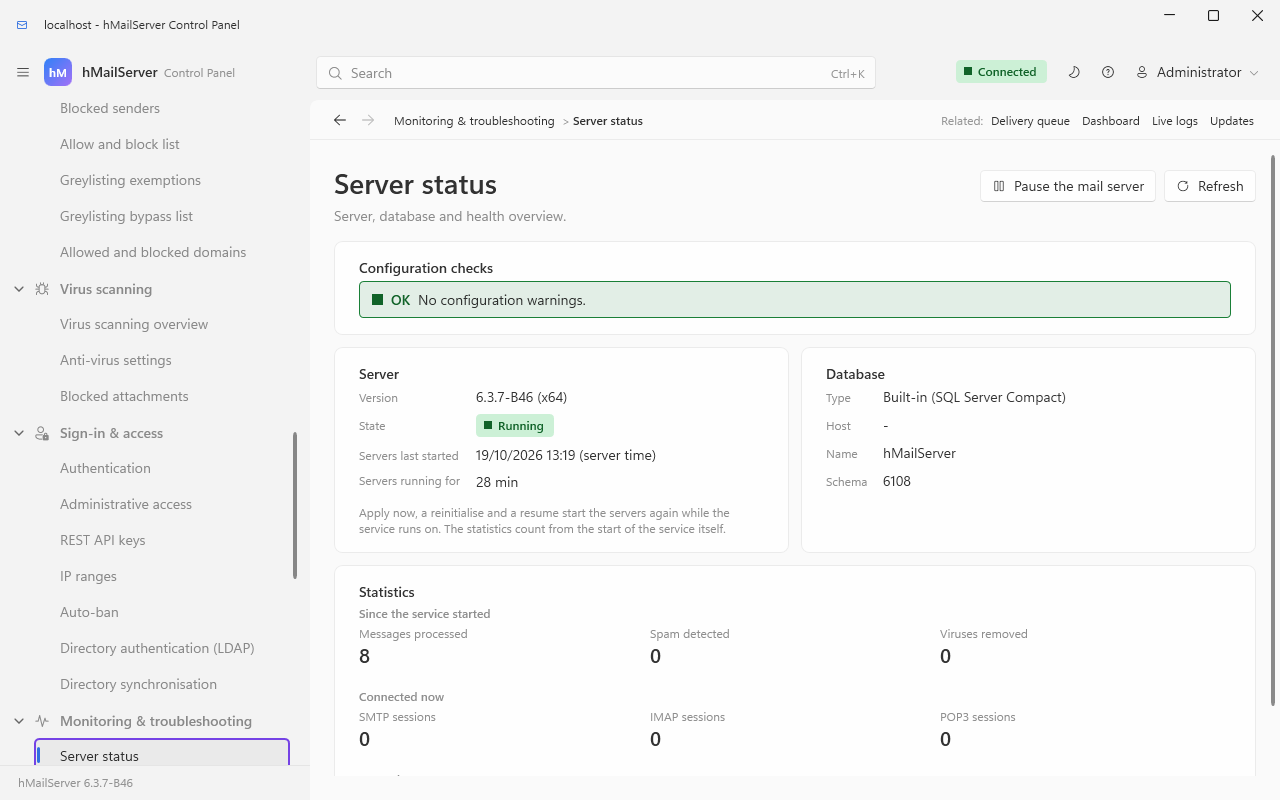
The Listening column of Connections & protocols → TCP/IP ports shows which listeners the service actually brought up, and Monitoring & troubleshooting → Server status whether the servers are running and who is connected - the fastest way to tell a firewall problem from a configuration one:
If the port is implicit TLS you will get no banner at all until you speak TLS:
# Prove a port is listening and which process owns it
Get-NetTCPConnection -State Listen -LocalPort 587 |
  Select-Object LocalAddress, LocalPort, OwningProcess

# Read the banner and the EHLO keywords over implicit TLS
openssl s_client -connect mail.example.com:465 -quietNone of these is a listener, and none of them appears on the TCP/IP ports page. They are what your outbound firewall rules have to allow.
| Destination | Port | Configured by | What breaks if it is blocked |
|---|---|---|---|
| Every recipient domain's MX host | 25 | Nothing — this is how SMTP works | Nothing leaves the server. Messages accumulate in the delivery queue and are retried, by default 4 times at 60-minute intervals, then bounced. Many consumer ISPs block outbound 25; a smart host is the usual answer. |
| Smart host / SMTP relayer |
smtprelayerport, default 25
|
Mail flow & delivery → Delivery of e-mail → Smart host, the Server-wide smart host card | Same symptom, one hop earlier. The relayer's own connection security and credentials are set beside the port. |
| A route's target host |
routetargetsmtport per route |
Mail flow & delivery → Routes | Only the domains that route through it are affected. See Routes and Relays. |
| DNS resolvers | 53 UDP and TCP | The machine's own resolvers, or the custom server list under Connections & protocols → DNS resolver | MX lookups fail, so nothing is delivered externally; DNSBL, SPF, DKIM, DMARC, MTA-STS and DANE all stop working at once. Custom server entries must be given port 0 — the Windows DNS client supplies port 53 itself and rejects an entry that specifies one. |
SpamAssassin spamd
|
spamassassinport, seeded 783
|
Spam filtering → Anti-spam settings | Messages are still delivered; the SpamAssassin test contributes no score. A slow spamd shows up as a long "Spam test: SpamAssassin" time in the log. |
ClamAV clamd
|
ClamAV host and port, with no seeded default | Virus scanning → Anti-virus settings | Depends on AVFailAction: messages are either delivered unscanned or held. clamd is PINGed before it is trusted. |
| Database server |
[Database] Port, default 0 = the provider's own default |
The installer, or hMailServer.INI | The server marks the database unavailable and answers 451 4.3.2 rather than losing mail. See Migrating the Database Backend. Since 6.3.4 the connection to MySQL and MariaDB uses TLS whenever the database server offers it, SQL Server's providers encrypt the whole session, and PostgreSQL is unchanged when nothing is set - all on the same port; [Database] TlsMode (empty for prefer, disable, require or verify-full) and TlsCaFile choose otherwise on every backend that crosses a network (DatabaseTls.md). |
| ACME directory | 443 | AcmeDirectoryUrl |
Certificates are not issued or renewed. |
| MTA-STS policy fetch (of other domains) | 443 |
MtaStsEnabled, default 1
|
Delivery to domains publishing an enforcing policy falls back to whatever DANE and your TLS settings allow. |
| OTLP collector | as configured |
OtelEndpoint, OtelMetricsEndpoint, OtelLogsEndpoint
|
Traces, metrics and logs are not exported; mail is unaffected. |
| Forward proxy | as configured |
HttpProxy (new in 6.2.28)
|
When set, every request the server makes as a web client goes through it — CONNECT for HTTPS, an absolute URL for plain HTTP (the MTA-STS fetch, the OAuth2 token and the ACME requests, and the brand logo, WKD, Web Push, unsubscribe and inbound webhook routes held to public addresses, since 6.3.6; a request held to public addresses asks for a tunnel to the address the server checked, never the name). |
| The update feed | 443, updates.progressiverobot.com (6.3.4); up to 6.3.3, the suspended account's Releases API on GitHub, which answers 404 |
UpdateCheckEnabled, off by default; UpdateFeedUrl
|
The update check reports that the feed could not be read; the server runs on. See Upgrading hMailServer 18.4c. |
| An object store (6.3.4) | 443, or the port in MessageStoreObjectEndpoint
|
MessageStoreObjectService (empty, none, as shipped) and the other MessageStoreObject* settings |
Messages written to the local disk wait there for the background committer, and nothing is lost; IMAP and POP3 are told to try again for a message only the store holds. TLS to the store is always verified (ObjectStorage.md). |
| A route of mail in to a webhook (6.3.4) | the URL's port | a route under /api/v1/inbound-webhooks; none as shipped |
The post is retried on the outbound webhooks' schedule; when the attempts run out the route keeps the message, or returns it to its sender, as it says (InboundWebhooks.md). |
| Outbound webhooks, the attachment sandbox, the password breach check, an OpenID Connect issuer, Web Push services, a migration's source server (6.3.4) | the URL's or the server's port | each feature's own settings; every one off, or empty, as shipped | Only that feature stops; mail flows. |
DANE and TLS-RPT need no port of their own: DANE is DNS (TLSA records over the resolver above), and TLS-RPT reports are sent as ordinary mail.
| Rule | Direction | Ports | Why |
|---|---|---|---|
| Allow from anywhere | inbound | 25 | Mandatory. Any server on the internet must be able to offer you mail. |
| Allow from anywhere | inbound | 587, 465, 993, 995 | Only the ones you actually created. Prefer the implicit-TLS pair. |
| Allow from anywhere | inbound | 80, 443 | Only if you use ACME, MTA-STS hosting or autoconfiguration. |
| Allow from your management network | inbound | REST API / metrics / ManageSieve ports | Or leave them on 127.0.0.1 and reach them over a tunnel. |
| Allow to anywhere | outbound | 25 | Delivery. Or to your smart host only. |
| Allow to your resolvers | outbound | 53 | Everything depends on it. |
| Deny | inbound | 143, 110 | Once you have 993 and 995, and once no client is left on the old ports. |
| Symptom | Likely cause | Where to look |
|---|---|---|
| No mail arrives; senders report timeouts; nothing at all in the SMTP log | Port 25 blocked upstream, or no listener bound | The listener never accepted a connection, so there is nothing to log. Check the firewall, then the Listening column of Connections & protocols → TCP/IP ports |
| One protocol dead, the rest fine | Bind failure on that port | Application log, error HM4316 |
| A TLS port refuses connections after a certificate change | Certificate row missing or unreadable | Application log, error HM5113; Certificates & encryption → TLS certificates |
| Clients hang on connect and then time out | Implicit TLS set on a STARTTLS port (or the reverse) | The port's connection-security value |
| Clients can read mail but not send | No submission port, or AUTH disabled on the port they use |
DisableAUTHList; the port's protocol and security |
530 Must issue STARTTLS first |
The port is STARTTLS required and the client has not upgraded | Correct — fix the client, or the range's RequireTLSForAuth
|
530 5.7.0 SMTP authentication is required |
The client is relaying without authenticating | Sign-in & access → IP ranges, the four delivery permissions |
| Everything works from the LAN, nothing from outside | The listener is bound to a single internal address | The port's IP address; use 0.0.0.0 for every address |
| MTA-STS or autoconfig URLs return nothing |
WebServicesHttpPort and WebServicesHttpsPort are still 0
|
The startup report in the application log names this exact case |
/portal unreachable from a user's browser |
RestApiBindAddress is 127.0.0.1, or no certificate is configured |
The RestApi: Listening on … line at startup |