Repository navigation
Aliases Lists and Public Folders
This page began as a chapter of the 6.2.10 manual and has been corrected against the 6.2.28 source tree. The Control Panel's pages are grouped differently now, so the paths below use today's groups; the TLS ports 465, 993 and 995 exist only after you create them on the TCP/IP ports page (a fresh install seeds 25, 587, 110 and 143); and everything added since 6.2.10 is in Changes-Since-6210. Where a value here disagrees with the Settings Reference, which is generated from the code, the reference is right. What 6.3.4 (27 September 2026, schema 6104), adds - masked addresses, verified send-as, the alias a mailbox move leaves, lists that define themselves, the list manager, shared address books and calendars, rooms and equipment, and addresses routed to a webhook - is labelled since 6.3.4; the page was brought up to 6.3.4 on 26 September 2026. 6.3.5 (29 September 2026, schema 6105), 6.3.6 (6 October 2026, schema 6108), 6.3.7 (17 October 2026, schema 6108) and 6.3.8, the latest release (2 November 2026, schema 6108), are not yet reflected here.
Three ways of making one address reach somewhere other than a mailbox of the same name, and one way of giving several people the same folder. They are decided in the same function, in a fixed order, so it is worth knowing which one wins.
flowchart LR
    A["An address arrives at RCPT TO"] --> B["Domain aliases rewrite the domain"]
    B --> C["Plus addressing trims the local part"]
    C --> D["ACCOUNT?"]
    D -->|found| E(["Deliver to the mailbox"])
    D -->|no| F["ALIAS?"]
    F -->|found| G["Follow it and start over, up to 25 hops"]
    G --> B
    F -->|no| H["DISTRIBUTION LIST?"]
    H -->|found| I(["Expand to the members, or to the moderator"])
    H -->|no| J["ROUTE?"]
    J -->|found| K(["Send to the route's target server"])
    J -->|no| L["The domain's POSTMASTER address, the catch-all"]
    L -->|set| G
    L -->|empty| M(["550 Unknown user"])
The full version of this, with every refusal and every early exit, is the flowchart in Your First Domain and Mailbox §6.3. Everything here fills in the boxes.
Since 6.3.4 one question is asked before every box above: is the address, or its domain,
routed to a webhook? A route decides that the address exists, so RCPT TO is accepted for
it whether or not an account, an alias or a list has it. A route that only posts takes the
address's mail instead of its mailbox, alias or list - a list whose address is routed never
sees the message, nor applies its posting rules to it - and one that also delivers posts the
message and then delivers it as the address would have been without the route. Route a list's
domain with care. Mail In to a Webhook has the whole of it.
An alias is a second address that delivers to an existing target. info@ → sales@
costs no extra mailbox and no extra password.
Accounts & domains → Domains, select the domain, then the Aliases panel: type the alias address and the target and press Add alias.
| Field | COM property | Meaning |
|---|---|---|
| Alias address | Alias.Name |
The address people send to. Must be in this domain |
| Target | Alias.Value |
Where it goes. May be anything — another account here, another alias, a distribution list, an address covered by a route, or an address at a completely different server |
| Active | Alias.Active |
Unticked: RCPT TO is answered 550 Alias is not active. — not passed on to the catch-all |
What actually happens (RecipientParser, Alias.cpp):
-
The target replaces the address and resolution starts again. So an alias may point at
an alias, which may point at a list. The chain is bounded at 25 hops; beyond that the
answer is
550 Mail server configuration error. Too many recursive forwards. -
An alias is only consulted when no account has that address. An account always wins.
Creating
sales@as an account aftersales@exists as an alias silently changes where the mail goes. -
An alias to an external address is still treated as inbound mail, not as relaying. The
first iteration sets
bTreatSecurityAsLocalwhen the domain is local, deliberately, souser@yourcompany.com → user@gmail.comworks for external senders without opening a relay. -
The local part can be almost anything. The regression suite creates aliases named
customer/department=shipping@,$A12345@,!def!xyz%abc@,_somename@and!#$%&'*+-/=?^_`.{|}~@and requires all of them to be accepted (test/RegressionTests/Infrastructure/Persistence/AliasNameValidation.cs).
Since 6.3.4, three more kinds of second address exist beside the administrator's alias, and they are the person's own rather than the administrator's:
-
The alias a mailbox move leaves. Renaming a mailbox, or moving it to another domain
(
Account.MoveTo,hmctl mailbox move, the Control Panel's account dialog, and SCIM's rename), keeps the old address as an alias of the new one by default, so mail to it goes on arriving; turn it off only when the old address must stop working. -
Masked addresses (schema 6067): the person makes an address for one shop or sign-up in
the webmail (Settings, Masked addresses) -
bookshop.k3v9qa@example.com- which delivers to them and which they may reply from; switched off, mail to it is refused as an address that never existed, not handed to the catch-all. - Verified send-as (schema 6066): an address at another provider the person proves with a six-digit code mailed to it, after which they may write as it. It receives nothing here; it is a From address, not an alias (Security Hardening §17.7a).
Domain aliases work at the domain level: mail to yourcompany.net is delivered to the
accounts of yourcompany.com. Accounts & domains → Domains → Properties → Names, then
add the alias domain name.
The rewrite is mechanical and total: DomainAliases::ApplyAliasesOnAddress keeps the local
part and swaps the domain, so anything@yourcompany.net becomes anything@yourcompany.com
before anything else is looked at. That has three consequences worth knowing:
| Consequence | Why |
|---|---|
| You do not create per-address aliases for an alias domain | Every address is rewritten, including ones that do not exist yet |
| The sender address is rewritten too | Once, before the resolution loop. This is what makes a distribution list in membership or domain members mode recognise a member who posts from the alias domain (test/RegressionTests/SMTP/DistributionLists.cs, TestDistributionListsMembershipDomainAliases) |
| The alias domain needs its own MX record | hMailServer accepts mail for it; DNS still has to send mail to hMailServer |
Off by default, and enabled per domain on Accounts & domains → Domains → Properties →
Limits: tick Enable plus addressing and choose the character (default +).
With it on, everything from the character to the @ is discarded before the account lookup:
alice+invoices@example.com and alice+github@example.com both resolve to alice@example.com.
The full original address is still in the To: header, which is what makes it useful for
filtering — and for finding out who sold your address.
| Detail | Behaviour |
|---|---|
| Where it applies | The recipient address only, and only when the recipient's domain has it enabled (PlusAddressing::ExtractAccountAddress) |
| Order | After domain aliases, before the account, alias and list lookups |
| Aliases | An alias's target may use plus addressing — plusalias@example.com → plustest3+hejsan@example.com delivers to plustest3@. Verified in Infrastructure/DomainServices.cs, TestPlusAddressing
|
| When off |
alice+invoices@ is simply an unknown address: it reaches the catch-all, or is refused |
A distribution list delivers one message to many recipients — everyone@yourcompany.com.
Accounts & domains → Domains, select the domain, then the Distribution lists panel: type the address, press Add list, then the pencil button on the list's row ("Edit distribution list …") for the settings and the people button beside it ("Members of …") for the membership.
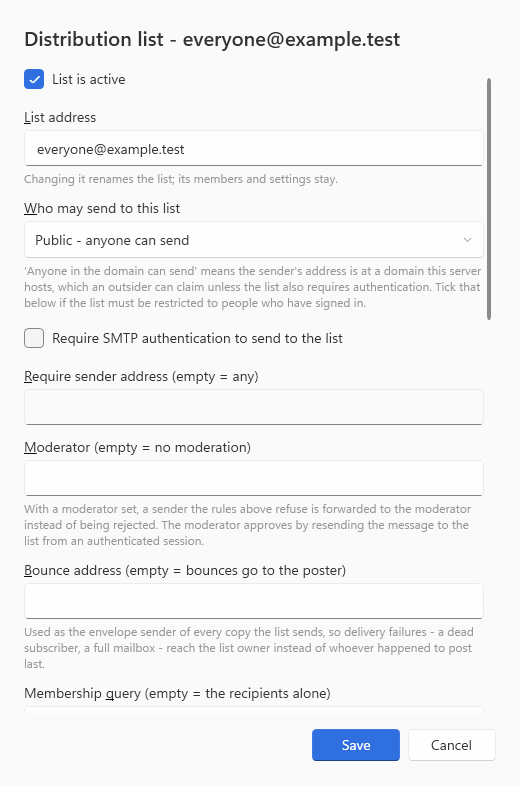
The Moderator and Bounce address fields, described below, are in the shot, and the membership query (§13.2a) begins at its foot; the list manager's fields (§13.2b) follow below it, in a dialog that scrolls.
| Mode | Stored value | Who may post | Refusal text when they may not |
|---|---|---|---|
| Public - anyone can send | 0 |
Anyone at all | — |
| Membership - only list members can send | 1 |
Any address on the member list, after domain aliases are applied to both sides | 550 Not authorized sender. |
| Announcements only | 2 |
Only the single address in Require sender address | 550 Not authorized owner. |
| Anyone in the domain can send | 3 |
Any sender whose domain is the list's own domain | 550 Not authorized domain. |
| (plus, on any mode) Require SMTP authentication | flag | An unauthenticated session is refused before the mode is even considered | 550 SMTP authentication required. |
"Anyone in the domain" is a claim, not a proof.
MAIL FROMis free text, so an outsider can assert a local address. Tick Require SMTP authentication with that mode or the list is open to the internet.
There used to be a fifth mode, and it did the opposite of what it said. "Anyone with a server account can send", mode
4, existed only as an enumerator in the type library: the server has no branch for it,put_Modeseeded its local withLMPublic, andget_Modereported it back as "Public". An administrator picking the more restrictive-sounding of the two "anyone…" entries was silently given the single most permissive setting the server has.put_Modenow refuses the value and the option is gone from the dialog (Views/DistributionListDialog.cs;SMTP/DistributionLists.cs,TestUnsupportedListModeIsRefusedRatherThanTreatedAsPublic).
There is one more check, and it runs for every mode including Public: the poster must be
allowed to reach every recipient of the list. UserCanSendToList_ re-enters
CheckDeliveryPossibility once per member, so a list containing a members-only list that the
poster is not in is refused as a whole. That is what makes lists-of-lists behave.
Set a Moderator address and a posting the rules above would refuse is not rejected —
it is accepted with 250 and forwarded to the moderator instead. The moderator approves it
by resending it to the list from an authenticated session.
sequenceDiagram
    autonumber
    participant O as Outsider
    participant S as hMailServer
    participant M as Moderator
    participant L as List members
    O->>S: MAIL FROM outsider@elsewhere.example, RCPT TO everyone@company.com
    S->>S: UserCanSendToList_ refuses - but the list has a moderator
    S->>S: Mark this list address as needing approval, for this connection only
    S-->>O: 250 OK. The sender cannot tell approval from delivery, which is the point
    S->>S: Expansion: the marked list expands to the MODERATOR and to nobody else
    S->>M: One copy, stamped X-hMailServer-Moderation with the list address. No List-* headers
    Note over M: The moderator reads it and decides
    M->>S: Approve by resending the message to the list, authenticated as the moderator
    S->>S: The authenticated moderator bypasses the mode checks - this bypass IS approval
    S->>L: Distributed to every member, with the full List-* header set
Three failure modes are handled explicitly rather than silently, and each writes a numbered error you can search the log for:
| Situation | Error | Outcome |
|---|---|---|
| The moderator address was removed between the check and the expansion | 6360 |
The recipient is refused. Expanding to the members instead would distribute a message the check decided needed approval |
| The moderator address does not resolve to anything deliverable | 6361 |
The recipient is refused with 550. A posting silently lost between the list and a broken moderator address looks exactly like moderation working |
| The list is its own moderator | 6363 |
Refused once, with the reason, instead of recursing to the 25-hop limit |
The moderator's authentication is the security boundary and is unconditional — it is deliberately not the list's own Require SMTP authentication flag. An unauthenticated session claiming the moderator's address proves nothing and falls through to the ordinary mode checks, where a mode that refuses it sends the forgery to the real moderator.
Bounce address (empty = bounces go to the poster) becomes the envelope sender of every copy the list produces. Two things improve at once:
- a dead subscriber's bounce reaches the list owner, who can remove them, instead of whoever happened to post last, who can do nothing about it;
- an external member's receiving server evaluates SPF against the list's own domain rather than the author's — a domain this server is actually entitled to pass.
A bounce address pointing at the list itself is ignored, with error 6362, because it would
hand every delivery failure back to the list for redistribution.
RFC 2369 and RFC 2919 headers are added while the message is still being accepted — before DKIM signing, so they are inside the signature rather than breaking it.
| Header | Value | Notes |
|---|---|---|
List-Id |
<everyone.company.com> |
Built from the list address, with any character that is not a-z, A-Z, 0-9, - or . in the local part replaced by -, so the identifier always parses as a domain name. It is opaque and never resolved |
List-Post |
<mailto:everyone@company.com> |
For an announcements-only list this is the literal NO instead: the list does not accept postings, and pointing subscribers at the address would point them at a 5xx
|
List-Help |
<mailto:owner@company.com?subject=help> |
|
List-Owner |
<mailto:owner@company.com> |
|
List-Unsubscribe |
<mailto:owner@company.com?subject=unsubscribe%20everyone@company.com> |
mailto: only, deliberately. RFC 8058 one-click would need an HTTPS endpoint that accepts a POST, and advertising one that does not exist makes receivers treat the unsubscribe as broken |
The owner address in the last three is chosen in this order:
- an announcements-only list's required sender address — the closest thing stored to an owner, and known to be a real mailbox because postings are checked against it;
- otherwise the domain's postmaster (catch-all) address;
- otherwise
postmaster@at the list's own domain, which RFC 5321 §4.5.1 requires every domain to accept.
Cases where nothing is added, all logged rather than silent:
| Case | What happens |
|---|---|
The message already carries a List-Id
|
Left alone. RFC 2919 allows exactly one, and the upstream list's headers describe where the subscriber really got the mail |
| The list address or owner address is not US-ASCII | No List-* headers. The values would become raw bytes in the header block, and a mangled unsubscribe address is worse than an absent one |
| The list address has no local part or no domain | No valid identifier can be derived, so no List-* headers. Not an error |
| The message file is missing, empty, or held open by another process | No headers, and error 5760 — because a message that loads without the Received header this server always writes was not really read, and rewriting it would produce a message with no body |
Schema 6074. A list can carry a membership query - one short text that
says who its members are, answered against the server's accounts at the moment a message is
sent to it. Exchange calls the shape a dynamic distribution group. everyone@example.com
with the query domain reaches every active account of the domain on the day, including the
person who joined this morning and not the one switched off last night, with nobody editing
the list.
| Query | Members |
|---|---|
| (empty) | The addresses under Recipients and nothing else - every list made before this, and every new one until a query is set |
domain |
Every active account of the list's own domain |
domain:other.example |
Every active account of another domain this server hosts |
pattern:sales-*@example.com |
Every active account whose address matches the wildcard |
everyone |
Every active account of every active domain |
The query is a union with the list's own recipients, so the one contractor elsewhere stays
under Recipients; an address that is both is sent one copy. It answers accounts only - not
aliases, other lists or outside addresses - and never a disabled account. Who may post,
moderation and the bounce address are unchanged. A domain administrator may set domain or a
pattern in their own domain; everyone and another tenant's domain are the server
administrator's. When the accounts cannot be read - the database locked by a backup - the
recipient is refused 451 4.3.2 and the sender retries, rather than the list quietly reaching
only its hand-kept rows. The Deck's list editor shows Delivers to now, each address marked
Kept by hand or From the query.
Schema 6092. A distribution list with the list
manager switched on is what a small organisation runs Mailman for: people join and leave
themselves by mail or by page, every member gets a copy of their own with a way out that
works, and the list keeps an archive, offers a daily digest and notices when an address has
died. It answers team-subscribe@, -unsubscribe@, -request@, -owner@ and -bounces@
beside the list's own address. Mailing Lists is the walk through it; the points that
change this page:
- A managed list sends one copy per member, each with the RFC 2369 fields and RFC 8058
one-click unsubscribe - offered over an
https://base URL and on copies the list's domain signs with DKIM, which is what Gmail and Yahoo ask before they show the button. Themailto:-onlyList-Unsubscribedescribed below is the unmanaged list's. - The list's own bounce handling - VERP when asked, a hard bounce or five soft ones within thirty days pausing the member and telling the owner, and a forged report counting for nothing - replaces the single bounce address for a managed list.
-
It does not rewrite
Fromfor DMARC, so an outside author at ap=rejectdomain can be refused by Gmail and Yahoo on a copy the list changed.
Accounts & domains → Public folders creates shared IMAP folders visible to multiple users — a shared archive, or a team inbox.
Since 6.3.4, three other kinds of sharing sit beside public folders, and each is the owner's to grant rather than the administrator's: shared address books (schema 6079), shared with one account or a whole domain, read-only or writable, which the other person sees in the webmail and syncs on a phone as another CardDAV collection; shared calendars (schemas 6064 and 6086), shared with an account, a group or a delegate who answers invitations on the owner's behalf; and an account's own folders shared by IMAP ACL, which since 6.3.4 are also announced to Outlook in the Autodiscover answer as delegated mailboxes. None of the three is a public folder, which belongs to no account.

Public folders live in their own IMAP namespace, #Public, and sub-folders are made by typing
the whole path with the hierarchy delimiter — . by default, from the IMAPHierarchyDelimiter
setting:
#Public                     the namespace root - \Noselect, it holds nothing itself
#Public.Team                a folder
#Public.Team.Archive        a sub-folder, created by typing the full name
#Users.alice@example.com    a DIFFERENT namespace: one account's own folders, shared
On disk every public-folder message goes into one tree, regardless of which public folder it belongs to:
Data\#Public\a3\{a3f01e6c-....eml}
Select a folder and press Permissions. Each entry grants a set of RFC 4314 rights to one of three kinds of subject:
| Applies to | Meaning |
|---|---|
| Account (user) | One mailbox, by address |
| Group | A security group from Accounts & domains → Groups |
| Anyone | Every authenticated account on the server |
| Right | Bit | Letter | What it allows |
|---|---|---|---|
| Lookup (folder is visible) | 1 | l |
The folder appears in LIST/LSUB and can be subscribed to. Without this the folder does not exist as far as that user is concerned
|
| Read messages | 2 | r |
SELECT and STATUS
|
| Keep seen/unseen state | 4 | s |
Set or clear \Seen
|
| Set flags | 8 | w |
Set or clear flags other than \Seen and \Deleted
|
| Insert / append messages | 16 | i |
APPEND and COPY into the folder |
| Post | 32 | p |
Send mail to the folder's submission address — and, when SmtpAuthenticatedSenderCheck is on, send as this mailbox's address over SMTP (Send-As) |
| Create sub-folders | 64 | k |
CREATE beneath it, and it may be the parent in a RENAME
|
| Delete folder | 128 | x |
DELETE, and the old name in a RENAME
|
| Delete messages | 256 | t |
Set or clear \Deleted
|
| Expunge | 512 | e |
EXPUNGE, and the implicit expunge in CLOSE
|
| Administer | 1024 | a |
SETACL, DELETEACL, GETACL, LISTRIGHTS
|
(Common/BO/ACLPermission.h; the Control Panel's labels are in
Views/FolderPermissionsDialog.cs.)
How a right is actually decided — one function, ACLManager::CheckPermission, for IMAP,
for delivery, for rules and for Send-As:
flowchart TD
    Q(["May account A do X to folder F?"]) --> ENF{"Is ACL enforcement on? Default: yes"}
    ENF -->|no| ALL(["Allowed. The historical meaning of the switch: public folders are open"])
    ENF -->|yes| OWN{"Does A own F?"}
    OWN -->|yes| FULL(["Allowed. Owners have every right implicitly"])
    OWN -->|no| WALK["Walk up from F to the nearest ancestor that has ANY ACL rows, in the owner's own tree, at most 250 levels"]
    WALK --> FOUND{"Found a folder with rows?"}
    FOUND -->|no| DENY(["Denied. No rows anywhere above it means no access"])
    FOUND -->|yes| PICK{"Which row applies?"}
    PICK -->|A row for this account| USE1["Use it"]
    PICK -->|else a row for a group A is in| USE2["Use it"]
    PICK -->|else a row for Anyone| USE3["Use it"]
    PICK -->|else nothing| DENY
    USE1 --> BIT{"Is bit X set in that row?"}
    USE2 --> BIT
    USE3 --> BIT
    BIT -->|yes| ALLOW(["Allowed"])
    BIT -->|no| DENY
Three consequences that account for most "why can they not see it" questions:
| Symptom | Cause |
|---|---|
| A user cannot see the folder at all, though it exists | No Lookup right. Every other right is useless without l
|
| Adding one permission to a sub-folder removed everyone else's access to it | The nearest ancestor with any rows wins, and rows are not merged. The walk stops at the first folder that has any ACL entries; a sub-folder with one entry no longer inherits the parent's set |
| Turning ACL enforcement off did not open other users' mailboxes | Deliberate. "Off" means public folders are open; it does not extend to #Users, which stops existing entirely — NAMESPACE advertises NIL and #Users… paths do not resolve. An operator who turned ACL off to simplify a public archive has not consented to every user reading every other user's mail |
\Seenis shared in a shared folder, not per user. Flags are stored on the message row, so a delegate with thesright marks a message seen for everyone. The documented trade: grantlrsand delegates share one read/unread state; grantlrand they leave no trace, but their clients cannot track what they have read. (Design record inCommon/Application/ACLManager.h.)
Since 6.3.4 (schema 6101). A meeting room or a projector is neither a public folder nor a
shared calendar: it is an account whose kind is room or equipment, set on the Control
Deck's account editor, over REST (kind on /api/v1/accounts/{address}) or over COM
(Account.Kind). It cannot be signed into; it is invited to a meeting like any guest and
answers by itself by its booking policy - who may book it, how far ahead, how long, in
which hours, over another booking or not - and leaves what it does not decide to its
delegates, who get a delegate share of its calendar. Nothing changes until an account is
given a kind. Rooms and Equipment is the whole of it.
| You want | Use | Not |
|---|---|---|
| A second name for one person | Alias | An account — a second password to manage, and mail split across two mailboxes |
| One address reaching several people | Distribution list | Several aliases with the same name — only one can exist |
| A whole second domain reaching the same people | Domain alias | One alias per address |
| Per-sender filtering on one mailbox | Plus addressing | An alias per correspondent |
| Several people reading and replying from the same folder |
Public folder with lrswi rights, or a shared mailbox |
A distribution list — every member gets a private copy and replies fork |
| Mail for a domain going to a different server | Route | An alias per address; see Routes and Relays |
| Since 6.3.4: "everyone in the domain", kept current by itself | A list with a membership query (§13.2a) | A list somebody has to edit every time a person joins or leaves |
| Since 6.3.4: people joining and leaving by themselves, with archives and digests | A managed list (Mailing Lists) | A list the administrator edits for every request |
| Since 6.3.4: a team's contacts, or a calendar, several people use | A shared address book or a shared calendar, shared from the owner's webmail read-only or writable (The Webmail) | A public folder of contacts, which phones do not sync |
| Since 6.3.4: an address for one sign-up the person can switch off | A masked address (§13.1) | An alias the administrator must remove |
| Since 6.3.4: a meeting room or a projector people book | An account of kind room or equipment with a booking policy (§13.3a) | A shared calendar somebody has to watch and answer |
| Since 6.3.4: an address whose mail an application receives | A webhook route (Mail In to a Webhook) | A rule that runs a script |