Repository navigation
Settings Overview
This page began as a chapter of the 6.2.10 manual and has been corrected for 6.2.24, then checked and extended against the 6.2.28 source on 8 September 2026. The Control Panel's pages are grouped differently now, so the paths below use today's groups; the TLS ports 465, 993 and 995 exist only after you create them on the TCP/IP ports page (a fresh install seeds 25, 587, 110 and 143); and everything added since 6.2.10 is in Changes-Since-6210. Where a value here disagrees with the Settings Reference, which is generated from the code, the reference is right. The sections on what 6.3.4 changed were read again against master
540347500on 24 September 2026, and against92b8f9f63on 26 September 2026, before the last batch the release, 6.3.4 (27 September 2026, schema 6104), carries; the newhm_settingsrows of 6.3.4, and the secrets now sealed in the database, are in the last two subsections of Two stores. Brought up on 5 October 2026 to 6.3.6 (6 October 2026, schema 6108), for what 6.3.6 changes on this page. 6.3.7, the latest release (17 October 2026, schema 6108), is not yet reflected here.
Everything here is also editable in the Control Panel. On 6.3.3 a change is saved at
once and applies at the next start or reinitialise; since 6.3.4 most apply
the moment they are saved, and each field says when it applies
(below). File: Bin\hMailServer.INI,
section [Settings]. Values shown are the defaults.
Since 6.3.4, the file is no longer the place these are changed. From schema 6042 the database is the store for every key shown on this page in an
[Settings]block, and the section in the file is a copy the server keeps current where it may write the file - not underNT SERVICE\hMailServer, to which the file is read-only (The Service Account). Theiniblocks below still show each key under the name it has always had; on 6.3.3 and earlier, editing the file is still how it works. What changes, and how a setting is changed instead, is under Since 6.3.4: the database is the store.
This page is the tour. The Settings Reference is the map: every one of the 242
[Settings] keys, plus [Database], [Directories], [Security], [GUILanguages],
[SendingLimits] and [LDAP], each with its default, its validation, the file that
consumes it and when it is read.
A setting on this page lives in one of two places, and which one is history rather than design.
-
The database, table
hm_settings: everything the COMSettingsobject has always carried - the protocols' own settings, the anti-spam thresholds, the delivery options, the logging switches. The Control Panel's classic pages write these, and they travel with the database in a backup and between nodes that share one. -
The
[Settings]keys: 242 of them, most added by this fork since 6.2.10 and some carried over from it - OAuth 2.0, SRS and BATV, the REST and metrics listeners, the update checker, the tarpits, the auto-ban firewall hook and the rest. Nearly every one has a Control Panel editor, and every one a REST route (/api/v1/settings/ini/{name}). In 6.3.3 they live in[Settings]inhMailServer.ini, and since schema 6011 every one is mirrored intohm_inisettingsso that a backup and a Control Panel on another machine can see it - but the file is what the server reads. Since 6.3.4 the table is the store and the file is its copy; see below.
The consequence to know on 6.3.3: a change to a file setting is saved now and applied when the service next starts, and two servers cannot share one file. Since 6.3.4 both halves have gone. The database is the store (schema 6042), and a save publishes: 211 of the keys are in effect when the save returns, 28 wait for a reinitialise - the listeners, their TLS contexts and a few more - and 2 for a restart, each marked, listed while it waits, and applied with one click (below; the Roadmap2 row was closed on 23 September 2026).
The direction is settled, and dated: from 15 September 2026 a new setting goes in the database. The
rule is written where a contributor meets it, in
CONTRIBUTING.md:
a new setting belongs in hm_settings, reached through the COM Settings object's Property and
PropertySet, with a Control Panel editor - and no new key is added to the [Settings] section of
hMailServer.ini. The file keeps only what is needed to reach the database or to be let in without
one: [Directories], [Database], and [Security]'s administrator password and second-factor secret.
Something that genuinely has to be readable before the database is open is the exception, and it is
expected to be rare and argued for in the commit that adds it. The four reasons given are the ones an
operator feels: two nodes cannot share a file, and shared settings are what an active-active pair needs;
a configuration backup that leaves the file out is not a backup of the configuration; a Control Panel or
a Control Deck on another machine has no share to that file; and a change to a file setting is applied at
the next service start, where a change in the database can be published to the running server.
On every release up to and including 6.3.3, these keys are read from the file, and if this page tells you a key lives in the file, on 6.3.3 it lives in the file. The migration that flips which store is the truth is in 6.3.4, and is the next section.
New in 6.3.4. Schema 6042 carries no table change - hm_inisettings has had the right
shape since 6011 - and the version step is the whole of it: a 6.3.3 server, which would let the file win,
refuses a database at 6042 or later (HM5011, "too new"), and the new server refuses one that is older.
IniSettingStore (Common/Application/IniSettingStore.cpp) is the code behind every sentence here.
The migration is the first start, and there is nothing to run by hand. At each start the server reads
the table and the [Settings] section together. A key the table has never seen is adopted - inserted with
the file's value - which on the first start at 6042 moves every key the section holds at once, and on a
fresh installation is how any value already written into the file before that first start gets in. After
that the stored value is the one the server runs on:
flowchart TD
    A["For each key in the Settings section of the file"] --> PEP{"PasswordPepper?"}
    PEP -- yes --> PEP1["Kept in the file only, never stored.<br/>A row an earlier start stored is removed<br/>once the file holds the value in use"]
    PEP -- no --> B{"Is there a row for it?"}
    B -- no --> C["Adopted: a row is inserted with the file's value"]
    B -- yes --> D{"Was the line changed since the server last wrote it,<br/>to something other than the stored value?"}
    D -- yes --> E["HM5804 names the key. The stored value is used<br/>and the line is put back where the file may be<br/>written - reported once"]
    D -- no --> F{"Does the line hold the stored value?"}
    F -- yes --> G["Nothing to do"]
    F -- no --> H["The stored value is written into the file where it<br/>may be: a restore, or a change made on another node"]
    E --> RO{"May the service write the file?"}
    H --> RO
    RO -- no --> R["Nothing is written, and the line stays as it is:<br/>the file is read-only to the service's virtual<br/>account on Windows and to the packages' user on<br/>Linux. An edit is still named once, and a reinitialise,<br/>where application logging is on, names the older<br/>lines in the application log"]
    RO -- yes --> W{"Could the file be written?"}
    W -- no --> X["HM5803. The stored value is still used;<br/>hMailServer.exe /Register and other direct<br/>readers of the file see the old line"]
    N["For each row whose line is missing from the file"] --> O["Written back into the file where the service<br/>may write it. Deleting a line no longer returns<br/>a setting to its default"]
    S["Then the SettingsOverride section"] --> T["Every key in it is applied over the store, even when<br/>the table could not be read. HM5807 at every start"]
What that means for an administrator:
-
Editing a
[Settings]value inhMailServer.inidoes not change a setting the database holds. The next start or reinitialise uses the stored value, names the key inERROR_hmailserver_<date>.logas HM5804, and puts the line back where the service may write the file - underNT SERVICE\hMailServer, to which the file is read-only, the edit stays in the file, named once (The Service Account). A line deleted from the file changes nothing either: the stored value is used, and the line written back from the stored row where the file may be written. The one thing the file can still do is introduce a key the database has never held, which is adopted once at the next start and is a stored setting from then on - so on a server that has run for a while, treat the file as read-only and store the change instead. -
A setting is changed in one of these places, and each one stores it and then rewrites the line
where the service may write the file (under
NT SERVICE\hMailServerthe file's copy is not refreshed): the Windows Control Panel (which now writes over COM even when it runs on the server, and says a connection is needed rather than writing a file whose edit the server would not use);PUT /api/v1/settings/ini/{name}with{"value": "..."};hmctl ini set <name> <value>orSet-HmIniSettingin the PowerShell module (Command Line); or COMSettings.SetIniSetting(name, value). The REST routes take the administrator password only - an API key of any scope is refused. The Control Deck has no editor for these keys as such: its Settings view edits the groups under/api/v1/settings, which carry four of them (SmtpTarpitCount,SmtpTarpitDelaySeconds,UseLanguageandRewriteEnvelopeFromWhenForwarding). -
Returning a setting to its default is
DELETE /api/v1/settings/ini/{name},hmctl ini delete <name>or COMSettings.DeleteIniSetting(name), each of which removes the line and the row together where the service may write the file; where it may not and the file has the line, the line stays and the row is kept holding the key's default, which the server treats the same, or the removal is refused forPasswordPepperand a key this build does not read (The Service Account). The Control Panel does not do this: clearing a box stores an empty value, which for a number reads as0rather than as the default. - A stored value is in effect when the save returns, for 211 of the keys; the other 30 wait for a reinitialise or a restart and say so. That came a week after the store, and the next section is the whole of it. What the first start does is unchanged: it reconciles the file with the table as the diagram above shows, and a save does not - a save reads the rows alone.
-
[SettingsOverride]is the one way to make the file win, for a database that is unreachable or holds a value the server will not start on. A key written there, by hand, is applied over whatever is stored, read even when the table cannot be, and named in the error log as HM5807 at every start, because no page shows it and no backup carries it. Storing a value for a key an override shadows is accepted and reported as HM5808, since that value will not take effect until the override is removed. -
PasswordPepperis the exception that stays in the file. It exists to be somewhere the password hashes are not, so it is never stored in the database and never written into a backup; it is changed in the file, or over COM or REST, which write only the file and are refused where the service may not write it - underNT SERVICE\hMailServeran administrator sets it with an elevated editor and restarts the service (The Service Account). See Security Hardening §17.2. -
The file keeps what is needed before the database is open:
[Directories],[Database](with, since 6.3.4,UpgradeOnStart,TlsModeandTlsCaFile),[Security](the administrator password, its second factor and, since 6.3.4, the stored-secrets key) and[GUILanguages], which are read from the file and nowhere else.[LDAP],[SendingLimits]and[SendingLimitsOverrides]also stay in the file for now, read by their own code and not through the store. Where it may write the file, the server adds a[SettingsStore]section of two keys,Store=databaseand aReadMesentence saying all of this, so that somebody opening the file learns it before editing a value. - Values are stored trimmed, as the file reads them back, so a value with spaces at either end cannot be mistaken for an edit at every start.
-
The rule is held by a checker.
build/check-ini-coverage.pycompares the keys the server reads withbuild/ini-settings-baseline.txtand fails a new[Settings]key, with the rule quoted. The baseline held 263 keys when the store landed - 238[Settings]keys, the literal reads - 267 at master of 24 September 2026, and 270 in 6.3.4: 241[Settings]keys, the threePasswordHash*work factors now counted, and 29 in the four bootstrap sections, among them the four added since the store, each to be read before the database can be -[Database] UpgradeOnStart,TlsModeandTlsCaFileand[Security] StoredSecretsKey.UseLanguage, read per call, is the 242nd[Settings]key and has no line. Each line also carries the key's shipped default, when a save applies it and the deepest level it may be set at. The checkers ran in GitHub's workflows until 18 September 2026 and by hand after; the project's own.gitlab-ci.ymldefines acheckersjob for them.
The regression fixture for the store is IniSettingsMirror; it ran in the full Windows gate at
3233b0cc4 - 2,410 tests, 2,402 passed, none failed, 8 skipped - and in every gate since.
New in 6.3.4. The [Settings] values are one immutable block the
server swaps in one step, and a save publishes: the store takes the value, the server rebuilds its
settings from the rows, and every key whose readers can take a new value is in effect when the save returns,
whether it came over COM, REST, hmctl, the Deck or the Control Panel. Each key carries a mark, the fifth field of
its line in build/ini-settings-baseline.txt, decided from the code that reads it:
| Mark | Keys | What it means |
|---|---|---|
now |
211 | Applies on save. Its readers ask for the value when they use it, or a subscriber takes the new one - the greylist cleaner's period, the backup schedule, the OpenTelemetry exporters, the CalDAV and CardDAV redirects, the two per-minute rate limits |
reinitialize |
28 | Waits for a reinitialise, because it is bound into something the servers build when they start: the REST, metrics, web-services and ManageSieve listeners' addresses, ports, credentials and certificates, the six TLS context keys, MaxNumberOfExternalFetchThreads, DatabaseStatementTimeout, AcmeEnabled and AcmeCertificateDirectory
|
restart |
2 | Waits for the service to restart: ServiceAccountName and ServiceAccountPassword. hMailServer.exe /Register read them with no database open up to the service-account change of 6.3.4; since then it takes the account from its command line alone, and the two keys are still read and no longer used for it (ServiceAccount.md). Every bootstrap key - [Database], [Directories], [Security], [GUILanguages] - is restart too, and is never in the store |
A key marked reinitialize or restart whose stored value is not the value the server runs on is
pending, recomputed at every request rather than remembered:
- the Control Panel marks each field kept in the store Applies on save, After reinitialize or After a restart, and shows a bar at the foot of the window - "N saved setting(s) wait for a reinitialize" - with Apply now;
- the Control Deck shows the same words as a badge beside a field, and the same sentence and button above its Settings view;
- COM answers
Settings.IniSettingApplies(name),Settings.IniSettingAppliesAllandSettings.PendingIniSettings; - REST answers
appliesandpendingon every/api/v1/settings/inianswer, andGET /api/v1/server/settings/pendinglists{name, stored, running, applies, secret}- the administrator password's route, as the ini routes are.
Apply now is a reinitialise: every service stops and starts again in place, which takes every
reinitialize key and not a restart one, and it ends maintenance mode if the server was draining. A value
stored by another process - another node on the same database, hmailserver --set-setting - reaches this
server at its next save, reinitialise or restart, because nothing watches the table. A server from before
this is told apart by the COM member being unknown, and the Control Panel then marks every field After a
restart, as that server behaves. hmailserver/docs/SettingsApply.md has the reason for every key that is
not now.
New in 6.3.4 (schema 6088). Twenty-seven settings may be set for the server, for a domain and for an account, and every place that shows one shows the value in effect and where it came from: for an account, its own value, else its domain's, else the server's. Every setting on the list is one of three kinds, and the kind decides how the levels combine and who may set them:
| Kind | How many | The rule | Who sets a level below the server |
|---|---|---|---|
| Limit | 15 | A level below may tighten the level above and never loosen it; a value the level above has since tightened past is capped when it is read | Anybody who administers that level - a domain administrator, a key restricted to the domain |
| Gate | 4 | The deepest level that holds a value wins, either way | The server administrator alone |
| Preference | 8 | The deepest level that holds a value wins | The domain's administrators |
The twenty-seven are the maximum message size; the quarantine digest's switch and hour; the external-sender
tag's two switches; the impersonation action; the session idle and lifetime seconds, one-per-device and
bind-to-address; the quota warning, grace and send-stop shares; plus addressing; the country policy; the
message retention; the recall and recover-deleted windows; the two sending limits; the OpenPGP portal;
zero-access mailboxes; the four reader maximums (fetch accounts, sender addresses, masked addresses, offline
days); and a directory people edit themselves. A level held in a field the domain or account already had
stays in that field with the meaning it always had; the rest are rows of hm_settingoverrides, where no row
means "take the level above". Nothing changes for a domain or an account that holds no value of its own.
| Where | What |
|---|---|
| REST |
GET /api/v1/settings/levels lists the twenty-seven with their kinds; GET /api/v1/domains/{domain} and GET /api/v1/accounts/{address} answer <name>_effective and <name>_source for each, and <name> where the level is held in the overlay (null takes the level above, and a PUT of null makes it inherit); the server's settings routes answer <key>_levels beside a key that has levels |
| COM |
Domain.SettingOverride(name) and Account.SettingOverride(name) (an empty string is "take the level above", written at once), EffectiveSetting(name) and EffectiveSettingSource(name) on both |
hmctl |
hmctl domain set <domain> <name> <value|inherit>, hmctl account set <address> <name> <value|inherit>
|
| Control Panel | A Levels tab on the domain and the account dialogs, ticked where the level holds a value of its own, with "In effect: ..., from the ..." beside each |
| Control Deck | The same card in its domain and account editors |
A setting not on the list is the server's alone: its name is refused on the domain and account routes and by
COM's SettingOverride. Of the store's keys only QuotaWarningPercent has levels, and it applies on save at
every level. hmailserver/docs/SettingLevels.md has the table of all twenty-seven, with where each level is
held, the code that resolves it and the test that proves it.
New in 6.3.4. Every setting has a name in the environment, by one rule and no table:
| Variable | Sets |
|---|---|
HM_SETTING_<key> |
the [Settings] key <key>, one of the 241 of the baseline, matched without case - HM_SETTING_MaxSubmissionsPerIPPerMinute=30
|
HM_PROPERTY_<name> |
the hm_settings row <name>, one of the rows this build reads - HM_PROPERTY_maxmessagesize=20480
|
HM_SETTING_<key>_FILE, HM_PROPERTY_<name>_FILE
|
the same, with the value read from the file the variable names - a Kubernetes Secret or a Compose secret mounted as a file; at most 64 KB of UTF-8 |
hmailserver --apply-environment (and hMailServer.exe --apply-environment on Windows) reads the variables,
checks every value before it stores any - a name that is no setting is refused with the nearest real one,
a value is held to the row's own check in the row's own words - and exits 1 having changed nothing when one is
refused. The container's entrypoint runs it at every start. Only the two [SendingLimits] keys, which are
neither kind, stay in hMailServer.ini.
The environment wins. Because it is written at every start, the server records which settings it manages
(the hm_settings row EnvironmentManagedSettings) and refuses an administrator's change to one of them -
409 over REST, the same sentence over COM, a field shown as Set by the environment with no control in the
Deck and disabled in the Control Panel - until a start without the variable gives it back.
GET /api/v1/settings/environment lists what the environment manages, names and sources and no value. A
value a _FILE supplied stays withheld after the variable is gone: it is never printed, never answered over
REST or by GetIniSetting, and recorded in the audit trail as (changed) when an administrator replaces it.
The environment sets the server level only; a domain's or an account's own value of a setting with levels is
not the environment's, and the _FILE form of such a setting is refused.
hmailserver/docs/EnvironmentConfiguration.md, and Running in a Container.
New in 6.3.4. A profile is the set of settings that makes a server
the kind it is, named, with the reason for each. Four ship, as documents built into the server
(Common/Application/Profiles/<name>.json in the source):
| Profile | For | Entries |
|---|---|---|
office |
One server that receives an office's mail, holds its mailboxes and sends what its people write | 31 |
gateway |
A server behind a filtering gateway that has already judged the mail | 17 |
relay |
A server that sends for applications and other servers and holds no mailbox anybody reads | 24 |
sender |
The relay's shape, for a high-volume sender | 32 (the relay's and its own) |
A diff comes first: GET /api/v1/settings/profiles/{name} (COM Settings.GetProfile, the Deck's
checklist, the Control Panel's Setting profiles page, hmctl settings profile NAME) answers every entry
beside the value this server holds, when a change to it applies, and a caution where one is earned. Then
the apply, all or nothing: an entry that closes a listener, trusts an address range, turns a filter off or
shortens how long something is kept asks for an explicit confirmation wherever it would change something; the
value each entry replaces is saved before the first write; each entry is written through the setter its REST
settings row runs; and a setting the environment manages is skipped. The way back puts those values back,
leaving alone a setting an administrator has changed since (POST /api/v1/settings/profiles/revert, COM
Settings.RevertProfile, hmailserver --revert-profile). A new server is offered a profile first - the
checklist's first item, the Deck, the Control Panel, the installer's last page, and the container's
HM_PROFILE. hmailserver/docs/Profiles.md has every entry of the four, with its reason.
New in 6.3.4. Every setting whose value is not the one this version ships, with the shipped
value beside it, in one list: GET /api/v1/settings/changed, COM Settings.GetChangedFromDefault,
hmctl config changed, Get-HmChangedSetting and the Deck's Changed from stock page - the REST route and
the COM call answer the same document, byte for byte. The shipped default of a [Settings] key is the one its read in IniFileSettings.cpp names, extracted
into the baseline, and that of an hm_settings row is what the create script inserts, generated into
Common/Application/SettingsDefaults.h; a checker fails when either drifts from the code. A secret is listed as (set), a value [SettingsOverride] forces is
said to be forced, and a setting the environment manages is marked. hmailserver/docs/ChangedFromStock.md.
No [Settings] key has been added since 6.3.3, and by the rule above none will be. The features of 6.3.4
added 191 rows of hm_settings - the audit trail and the alerts, syslog, the quarantine digest,
bounces and complaints, webhooks, country blocking, Web Push, the reputation watch, spam traps, the breach
check, single sign-on and passkeys, account recovery, compromised-account detection, the greylisting and SMTP
policy switches, the reader maximums, outbound shaping, the sandbox and the rest - each with its default in
SettingsDefaults.h, each writable over REST (most over COM too), and each with an HM_PROPERTY_ name.
The last twenty-seven, all off or empty as shipped, belong to five features of 6.3.4's last days:
| Feature | Rows (default) | Over COM? |
|---|---|---|
| Storage compression and attachment de-duplication (schema 6098) |
MessageStoreCompression (0, off), MessageStoreDedupMinKB (256) |
Yes: Settings.MessageStoreCompression, MessageStoreDedupMinKB, and the read-only MessageStoreStatus
|
| Object storage for the message store (no schema step) |
MessageStoreBackend (file), MessageStoreObjectService (empty: none), and ten more MessageStoreObject* rows for the endpoint, region, bucket, addressing, prefix, credentials, CA file and cache. Off until a store is named
|
No; REST message_store_* and the Deck |
| Mailbox encryption at rest (schema 6099) |
MailboxKeyIdleMinutes (15); encryption itself is per account and off on every one |
No; REST and the Deck |
| PST import (no schema step) |
PstImportDirectory (empty, which takes no PST job until an administrator names a directory) |
No; REST pst_import_directory
|
| The SNMP agent (no schema step) |
SnmpEnabled (0), SnmpPort (161), SnmpAllowedAddresses (empty, which answers nobody) and eight more; applied at a restart |
No; REST snmp_*, the Deck and hmctl
|
Settings Reference section 17 lists every row by feature, with its default.
An account's TOTP second factor and ten [Settings] secrets - SRSSecret, BATVSecret,
OAuth2HmacSecret, OAuth2IntrospectionClientSecret, OutboundOAuth2ClientSecret,
OutboundOAuth2FixedToken, MetricsServerAuthToken, MetricsServerAuthPassword,
ServiceAccountPassword and GssapiServicePassword - live in the database, and a database can be read on
more than one machine. Since 6.3.4 (schema 6103) they are sealed there, and in the file's copy, as
HMK1:<key id>:<base64> (AES-256-GCM), under the installation's stored-secrets key: 32 random bytes that
every server sharing the database holds in its own hMailServer.ini as [Security] StoredSecretsKey, under
that machine's DPAPI (or the Linux key file). The key is never in the database and never in a backup
archive; the database records only its id (StoredSecretsKeyId). What this changes for an administrator:
-
A new installation gets its key from the Windows installer (or the container's
--create-database), which then says to export it. An upgrade gets no key: nothing is sealed, exactly as before, one line at each start says so, and the setup checklist offers the step -hMailServer.exe --create-stored-secrets-keyfrom an elevated prompt,sudo hmailserver --create-stored-secrets-keyon Linux. -
Export the key at once and keep the file apart from the backups
(
--export-stored-secrets-key <file>); the checklist stays open until it has been exported. Import it on every other server of the installation (--import-stored-secrets-key <file>). A database-level backup restored without the key opens none of those secrets; a backup archive carries them opened, and a restore seals them under the restoring server's own key. -
A lost key is not recoverable:
--forget-sealed-secrets <key id>clears what that key sealed, and those settings and second factors are set again. -
ProtectStoredSecretsWithDPAPI=0keeps everything as written. -
PasswordPepperis not sealed: it stays in the file only, on purpose. The administrator password is a PBKDF2 hash in[Security] AdministratorPassword, and since 6.3.4 an older MD5 or SHA-256 value is hashed again at the next administrator sign-in.
SecretsAtRest.md has the whole account, and Upgrading hMailServer 18.4c what an upgrade does.
The file name is literally hMailServer.ini, and it lives in the server's Bin
directory — HKLM\SOFTWARE\hMailServer\InstallLocation + \Bin when that registry value
exists, otherwise the directory the running hMailServer.exe sits in. COM
Application.InitializationFile returns the resolved path, which is the quickest way to
be certain which file you are editing.
Three things write it, and one thing reads it into the running server. This is 6.3.3; since
6.3.4 the Control Panel writes over COM wherever it runs, a text editor's change to [Settings] is
not used at the next start - and its line put back where the service may write the file - and the
database row is what LoadSettings takes (section above):
flowchart LR
    CP["Control Panel"] -->|"writes directly when it is on the server"| F["hMailServer.INI in the Bin directory"]
    CP -->|"COM SetIniSetting when it is remote"| COM["COM Settings object"]
    COM --> F
    COM --> DB[("hm_inisettings mirror")]
    ED["A text editor"] --> F
    INST["The installer"] --> F
    F --> LS["IniFileSettings::LoadSettings"]
    DB --> LS
    LS --> M["About 200 typed members"]
    M --> CONS["Consumers: listeners, tasks, protocol handlers"]
LoadSettings reads every key in one pass. It runs in five situations: first thing in
Application::InitInstance with the file alone; again in the same start once the
database is open, this time with the hm_inisettings overlay; on
Application.Reinitialize; on every COM Settings.Directories get and on
Database.CreateInternalDatabase; and on hMailServer.exe /Register, so the service
account settings reach the SCM.
The house rule on 6.3.3 is: persist now, apply on the next start. Nothing in SetIniSetting
re-runs LoadSettings. So whichever way you make a change, the reliable sequence is
edit, then restart the service (or call COM Application.Reinitialize, which is what
the regression suite does). Since 6.3.4 the rule is gone: a [Settings] key is
stored through the Control Panel, the REST API, hmctl or COM, not typed into the file, and the
save applies it, or says it waits for a reinitialise or a restart
(above). A handful of things are exceptions and are read live:
[Settings] UseLanguage, [Directories] LogFolder (once, then cached), the whole of
[SendingLimits]/[SendingLimitsOverrides] and [LDAP] (re-read when the file's
timestamp changes, checked at most every two seconds), and the separate
hMailServerApiKeys.ini (re-read on every REST request).
Two read mechanics that catch people out, both consequences of the Windows profile API:
- A key that is present but empty —
LogDeleteDays=— reads as 0, not as "absent". On 6.3.3, deleting the line is how you return a setting to its default. Since 6.3.4 a deleted[Settings]line changes nothing - the stored row is used, and the line written back from it where the service may write the file - and the default comes back throughDeleteIniSetting,DELETE /api/v1/settings/ini/{name}orhmctl ini delete. - Booleans are
== 1. Only the literal1is true;2,yesandtrueare all false. A value such as5xreads as5, andxreads as0.
This is how 6.3.3 and every release since schema 6011 reconcile the two; since 6.3.4 the database wins instead, as drawn in the section above.
Since schema 6011 the [Settings] section is mirrored into a table, hm_inisettings,
so that a remote Control Panel can change settings and so that settings are included in
backups. Only [Settings] is mirrored — [Database], [Directories], [Security] and
[GUILanguages] always come from the file alone. The reconciliation runs at every start:
flowchart TD
    A["For each key in the file"] --> B{"Is there a row for it?"}
    B -- no --> C["Insert a row. The file value wins."]
    B -- yes --> D{"Has the file changed since the two last agreed?"}
    D -- yes --> E{"Has the row also changed?"}
    E -- yes --> F["HM5804 conflict reported. The file wins, and the row is updated."]
    E -- no --> G["The file wins, and the row is updated."]
    D -- no --> H{"Has the row changed?"}
    H -- yes --> I["Write the row's value into the file"]
    I --> J{"Did the write succeed?"}
    J -- yes --> K["Both now agree on the row's value"]
    J -- no --> L["HM5803. The file value is used for this run."]
    H -- no --> M["They agree. Nothing to do."]
    N["For each row whose key is gone from the file"] --> O{"Did the row still agree with the last file value?"}
    O -- yes --> P["The deletion is the newer fact. Delete the row."]
    O -- no --> Q["A database-side edit or a restore. Write it back into the file."]
Read that as one sentence: the file wins when the file changed; the database wins when
only the database changed; and deleting a line really does delete the setting. If the
table cannot be read at all, the server runs on the file alone and reports HM5802, and a
backup that includes settings fails with "The server settings could not be written to the
backup" and creates no archive until it is fixed (BackupExecuter, Configuration::XMLStore).
The same is true since 6.3.4.
MtaStsEnabled=1               ; honour recipient MTA-STS policies when sending
DaneEnforcementEnabled=1      ; honour recipient DANE/TLSA records when sending
DnssecValidationEnabled=1     ; validate DNSSEC for DANE and SPF/DKIM/DMARC lookups
DnssecTrustAnchors=           ; override root trust anchors ("tag alg digesttype hex;...")
ArcSealingEnabled=0           ; add ARC seals when forwarding (uses the domain's DKIM key)
TlsRptFromAddress=            ; sender for daily TLS-RPT reports (empty = disabled)
TlsRptOrganizationName=hMailServer
The When it takes effect columns on this page are 6.3.3's. Since 6.3.4 every key on this page
whose column says Next start applies when it is saved; the listener keys marked Restart - RestApiPort,
RestApiBindAddress, the REST certificate pair, MetricsServerPort, MetricsServerBindAddress and
ManageSieveServerPort - wait for a reinitialise; and ServiceAccountName waits for a restart.
| Key | Default | When it takes effect | What you see when it is wrong |
|---|---|---|---|
MtaStsEnabled |
1 |
Next start | This is the outbound switch — whether this server honours other people's policies. It has nothing to do with publishing your own; that is MtaStsHostingEnabled below, and the two are confused constantly. |
DaneEnforcementEnabled |
1 |
Next start | The key is not DaneEnabled, although the getter is. Spelling it DaneEnabled in the file leaves the default in force and reports nothing. |
DnssecValidationEnabled |
1 |
Next start | With it off, DANE has nothing trustworthy to stand on. Diagnostics.DnssecChainStatus(name, type) over COM answers 0 secure, 1 insecure, 2 bogus for one name, which is the fastest way to tell a broken zone from a broken setting. |
DnssecTrustAnchors |
empty | Next start | Empty means the built-in IANA root keys. A malformed override does not fall back — it replaces them, so every validation fails. |
ArcSealingEnabled |
0 |
Next start | Seals use the domain's DKIM key, so a domain with DKIM off is silently not sealed. |
TlsRptFromAddress |
empty | Next start | Empty is not "off" in the sense you might expect: statistics are still collected, they are simply never sent. Set the address and reports start the next day. |
TlsRptOrganizationName and DmarcRptOrganizationName both default to hMailServer and
appear in the reports recipients read, so they are worth setting to your own name.
AcmeEnabled=0                 ; issue and renew certificates automatically
AcmeContactEmail=             ; expiry notices from the CA
AcmeDomains=                  ; comma-separated host names for the certificate
AcmeDirectoryUrl=https://acme-v02.api.letsencrypt.org/directory
AcmeHttpPort=80               ; port for http-01 challenges
AcmeReuseKey=1                ; keep the same key across renewals (keeps TLSA records valid)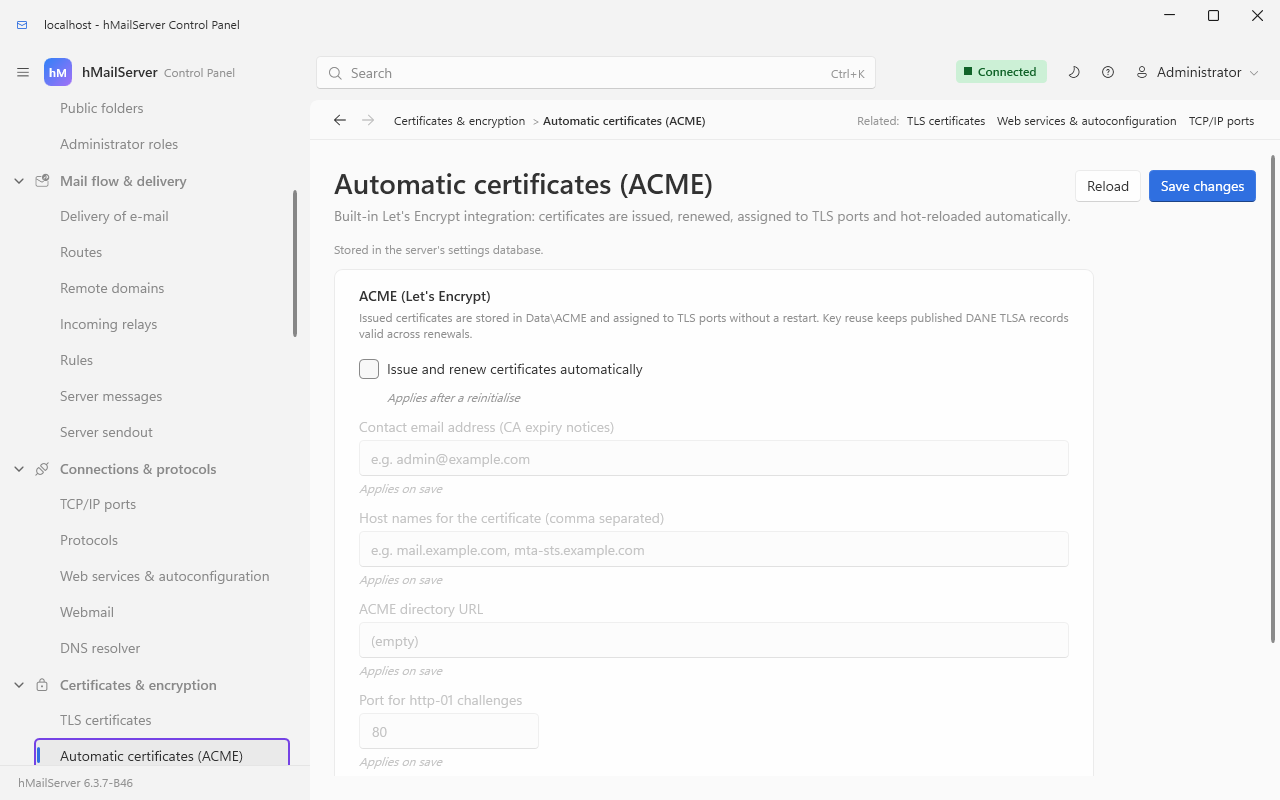
| Key | Default | What you see when it is wrong |
|---|---|---|
AcmeEnabled |
0 |
Nothing happens until this is 1. |
AcmeDomains |
empty |
AcmeEnabled=1 with no domains logs ACME: No domains configured and issuance never runs. This is the single most common "ACME does nothing" cause. |
AcmeContactEmail |
empty | Optional — the account is simply created without a contact, so the CA cannot warn you about expiry. |
AcmeHttpPort |
80 |
The http-01 challenge must be reachable from the internet on this port. If the web-services HTTP listener owns the same port it serves the challenges; otherwise a transient challenge server is started for the duration, which fails if something else holds the port. |
AcmeReuseKey |
1 |
Setting it to 0 changes the public key at every renewal, which invalidates any 3 1 1 TLSA record you published from /api/v1/tlsa. |
Certificates are written as fullchain.pem and privkey.pem (plus account.key) in
AcmeCertificateDirectory, which defaults to <DataFolder>\ACME. After a successful
issuance the server logs ACME: Restarting servers to load the new certificate. and
reinitialises itself — which is how a REST or web-services HTTPS listener that could not
start for want of a certificate comes up without anyone touching it.
WebServicesHttpPort=0         ; 80 to enable
WebServicesHttpsPort=0        ; 443 to enable (uses the ACME certificate if none is set)
WebServicesBindAddress=0.0.0.0
MtaStsHostingEnabled=1        ; serve https://mta-sts.<domain>/.well-known/mta-sts.txt
MtaStsPolicyMode=enforce      ; enforce, testing or none
MtaStsPolicyMaxAge=604800
MtaStsPolicyMx=               ; override mx patterns (default: the domain's live MX records)
AutoconfigEnabled=1           ; Thunderbird autoconfig + Outlook autodiscover
AutoconfigClientHost=         ; host name clients connect to (default: the server's host name)
Per domain, point mta-sts.<domain>, autoconfig.<domain> and autodiscover.<domain>
at this server, and include them in AcmeDomains for HTTPS.
Both feature switches above default to on and do nothing. MtaStsHostingEnabled=1
and AutoconfigEnabled=1 are the shipped defaults, but neither has a listener until
WebServicesHttpPort or WebServicesHttpsPort is set — and MTA-STS specifically needs
the HTTPS one, because the specification requires the policy to be fetched over HTTPS.
The server says so at every service start:
WebServices: these features are enabled but unreachable, because no web services listener is configured: ... Nothing answers those URLs until WebServicesHttpPort and/or WebServicesHttpsPort is set...
| Key | Default | What you see when it is wrong |
|---|---|---|
WebServicesHttpPort |
0 |
0 means no listener. |
WebServicesHttpsPort |
0 |
Set, but with no certificate of its own and no ACME certificate on disk, the HTTPS listener is quietly kept down while the HTTP one still runs: No TLS certificate available yet. The HTTPS listener is disabled until a certificate exists (enable ACME or set WebServicesCertificateFile).
|
MtaStsPolicyMode |
enforce |
Anything that is not enforce, testing or none is read as enforce — a typo makes your policy stricter, not looser. |
MtaStsPolicyMaxAge |
604800 |
Clamped to 86400–31557600 whatever you write. |
MtaStsPolicyMx |
empty | Empty means the domain's live MX records, looked up and cached for an hour. Set it only when the live records are not what you want published. |
AutoconfigClientHost |
empty | Empty means the server's own host name. This is the name written into every autoconfig, autodiscover and .mobileconfig answer and used as the SRV target from /api/v1/srv, so getting it wrong sends every new client to the wrong host. |
The Apple .mobileconfig profile is served over HTTPS only. A plain-HTTP request is
redirected to the HTTPS listener when one is configured, and refused with a reason when
it is not; X-Forwarded-Proto: https from a TLS-terminating proxy counts as HTTPS when the proxy is on
loopback or is listed in WebServicesTrustedProxies (a key new in 6.3.3) - from any other peer the
header is ignored.
RestApiPort=0                 ; REST admin API (administrator password over HTTP Basic, or an API key as Bearer); new in 6.2.28: also the self-service portal at /portal
RestApiBindAddress=127.0.0.1  ; TLS is required unless bound to 127.0.0.1, localhost or ::1
RestApiCertificateFile=       ; PEM; falls back to the ACME certificate
RestApiPrivateKeyFile=
MetricsServerPort=0           ; Prometheus metrics endpoint (/metrics) + health probes
MetricsServerBindAddress=127.0.0.1
LogDeleteDays=0               ; prune date-stamped logs older than N days (0 = keep all)
ShutdownDrainSeconds=0        ; on stop, wait up to N seconds for sessions to finish
MessageStoreFsync=0           ; force each message to physical disk before acknowledging
MessageStoreConsistencyCheck=0; periodically cross-check message rows against files
ManageSieveServerPort=0       ; ManageSieve (RFC 5804); standard port 4190
ManageSieveServerBindAddress=127.0.0.1
JsonLogging=0                 ; write logs as JSON lines
| Key | Default | When it takes effect | What you see when it is wrong |
|---|---|---|---|
RestApiPort |
0 |
Restart | 0 means no listener. Set, it still refuses to start when [Security] AdministratorPassword is empty, saying so in the log. See The REST API. |
RestApiBindAddress |
127.0.0.1 |
Restart | Any address but 127.0.0.1, localhost or ::1 requires a certificate; without one the listener refuses to start rather than serving management traffic in clear. |
RestApiCertificateFile / RestApiPrivateKeyFile
|
empty | Restart | Empty is not necessarily "no TLS": if <AcmeCertificateDirectory>\fullchain.pem and privkey.pem both exist they are used, logged as RestApi: Using the ACME certificate for HTTPS.
|
MetricsServerPort |
0 |
Restart | 0 means no listener — no /metrics, and no /livez, /readyz or /healthz either. |
MetricsServerBindAddress |
127.0.0.1 |
Restart | On a non-loopback bind with no credential configured, /metrics answers 503 with a body naming MetricsServerAuthToken and MetricsServerAuthUsername/Password. The health probes keep answering; they are never authenticated. This is the usual cause of "Prometheus gets a 503 but the server is fine". |
LogDeleteDays |
0 |
Next start | 0 keeps every date-stamped log forever. On a busy server that is the disk filling up slowly. |
ShutdownDrainSeconds |
0 |
At stop | 0 means sessions are cut at stop. Raise it before a planned restart if you would rather in-flight deliveries finish. |
MessageStoreFsync |
0 |
Next start | 1 forces each spool file to physical disk before the 250 — durable, and measurably slower. A failed flush refuses the message rather than acknowledging it. |
MessageStoreConsistencyCheck |
0 |
Next start | 1 starts a read-only scheduled walk comparing rows to files and publishes hmailserver_messagestore_missing_files. Nothing is repaired; it only tells you. |
ManageSieveServerPort |
0 |
Restart | 0 means no ManageSieve. The standard port is 4190; the bind defaults to loopback, so a remote Sieve client sees nothing until you change both. |
JsonLogging |
0 |
Next start | Changes the log line format. Anything parsing the old format will stop working the moment this is flipped. |
UpdateCheckEnabled=0          ; read the project's release feed every UpdateCheckHours
UpdateCheckHours=24
UpdateChannel=stable          ; or prerelease
UpdateFeedUrl=                ; empty = the project's feed (6.3.4: updates.progressiverobot.com;
                              ; up to 6.3.3: the suspended account's Releases API on GitHub,
                              ; which answers 404); set for a mirror
HttpProxy=                    ; forward proxy (host:port, or [ipv6]:port) for the web requests this server
                              ; makes as a client; empty = direct; no proxy credentials
UpdateAutoDownload=0          ; fetch and Sigstore-verify the installer as soon as one is found
UpdateWindow=                 ; when a verified update may be applied unattended, e.g. Sun 03:00 (empty = never)
UpdateBackupBeforeApply=1     ; back up to the configured destination before an unattended apply
UpdateRequireAuthenticode=0   ; also require an Authenticode signature on the installer
UpdateServiceWaitSeconds=180  ; how long the helper waits for the service before rolling back
The trust settings (UpdateTrustRootsFile, UpdateLogPublicKeyFile, UpdateSigningIdentity,
UpdateSigningIssuer, UpdateSourceRepository) default to the public Sigstore instance and the signers
compiled into the server; see the Settings Reference. Since 6.3.6 the five are read from the file
alone and cannot be set over COM, REST, the Control Panel or the Deck. Up to 6.3.3 the default feed is GitHub's
API, which has answered 404 since GitHub suspended the project's account on 18 September 2026, so a check
fails with The update feed answered HTTP 404. until UpdateFeedUrl names
https://updates.progressiverobot.com/releases.json, and the one signer such a server trusts is this
repository's release workflow on GitHub, which signed no release after 6.3.3. Since 6.3.4 the default
feed is https://updates.progressiverobot.com, which GitLab Pages serves from the project's releases, and
the server trusts two signers: that GitHub workflow, for a release no later than 6.3.3, and the project's
GitLab CI pipeline for a v* tag, which has signed every release since 6.3.5 - at the path the project
began at, where it signed 6.3.5, and at the path of the group hmailserver, which the project moved to on
29 September 2026 and where it has signed every release from 6.3.6, the certificate there also carrying
the project's id. 6.3.4
itself carries no Sigstore bundle, so no server's live update installs it; it is installed by hand
(Upgrading hMailServer 18.4c,
UpdateFeed.md).
| Key | Default | What you see when it is wrong |
|---|---|---|
UpdateCheckEnabled |
0 |
The scheduled task exists either way and runs every fifteen minutes, but does nothing at all until this is 1. An on-demand check over COM or POST /api/v1/update/check ignores this key and reads the feed anyway. |
UpdateCheckHours |
24 |
Values below 1 are read as 1. The Control Panel's label says "1 to 168" but the server applies no ceiling. |
UpdateChannel |
stable |
prerelease (or pre-release) makes pre-releases eligible and switches the default feed to the last ten releases. Any other value is the stable channel. |
UpdateFeedUrl |
empty | A mirror must be https, unless it is on this machine: the server's web client refuses plain http to anything but a loopback address. |
UpdateAutoDownload |
0 |
Only downloads and verifies. It never runs anything. |
UpdateWindow |
empty | Empty means nothing is ever applied unattended. An unparsable value is logged once per process and, again, nothing is applied. Forms: 03:00, Sun 03:00, Sat,Sun 02:00-05:00; days are English three-letter names, times local 24-hour, and a range crossing midnight belongs to the day it starts on. |
UpdateBackupBeforeApply |
1 |
With no backup destination configured, this cancels the unattended apply rather than applying without a backup. |
UpdateServiceWaitSeconds |
180 |
Values below 5 are read as 5. This is how long the helper gives the service to come back before it reinstalls the previous version. |
HttpProxy is not update-only: it carries every request the server makes through its own web
client - the release feed and its downloads, and the OAuth2 JWKS and token-introspection fetches.
CONNECT for an https target, with the certificate checked exactly as on a direct connection; the
absolute URL in the request line for plain http. A value without a port is an error, not a quiet
direct connection. Its editor is beside the feed URL on the Control Panel's Updates card.
ACME issuance and the outbound-relay XOAUTH2 token request build their own connections and do not go through it.
[Database]
TlsMode=                          ; empty = prefer; or disable, require, verify-full
TlsCaFile=                        ; PEM file of CA certificates, read by verify-full only
These two are [Database] keys, in the file and never in the store, because they say how the store is
reached; they are read at the service's start. With nothing set, a 6.3.4 server's connection to MySQL and
MariaDB uses TLS whenever the database server offers it and connects without it when it offers none -
through MariaDB Connector/C, the client bundled on Windows and the one Ubuntu packages, it had never used
TLS at all, whatever the documents said - and SQL Server through MSOLEDBSQL 18 or SQL Native Client
encrypts the whole session; PostgreSQL is unchanged (PostgreSQLSslMode and PostgreSQLSslRootCert
win when set). The application log says at every start what the connection got, and hmailserver --check-database makes one connection and says the same.
| Key | Default | What you see when it is wrong |
|---|---|---|
TlsMode |
empty (prefer) |
Anything but the four words - verify-ca among them - refuses the connection without an attempt (HM7530), so that a typo in the one setting meant to require verification cannot switch it off. require checks no certificate; verify-full checks the chain and the name or address against Server=
|
TlsCaFile |
empty | Read by verify-full only. A file that is not there refuses the connection (HM7531) rather than falling back to the system's store. SQL Server does not read it and checks against the Windows store (HM7532, once) |
AllowUnencryptedConnection is still read and changes nothing: what it described is the default now
(DatabaseTls.md).
ProtectStoredSecretsWithDPAPI=1   ; machine-scoped DPAPI for reversible stored secrets; since 6.3.4, 0 also
                                  ; keeps second factors and the [Settings] secrets unsealed
ServiceAccountName=               ; up to 6.3.3, the account /Register runs the service as (empty = LocalSystem);
                                  ; since 6.3.4 not used by /Register
ServiceAccountPassword=           ; empty for virtual/managed accounts
The secret-protection and service-account rows quoted above are further down the page than this capture reaches.
| Key | Default | What you see when it is wrong |
|---|---|---|
ProtectStoredSecretsWithDPAPI |
1 |
Protection is machine-scoped (CRYPTPROTECT_LOCAL_MACHINE). A DPAPI:-prefixed value copied to a different machine cannot be decrypted there — which matters when you restore a configuration onto new hardware. Legacy Blowfish values stay readable either way, and if DPAPI fails the server falls back to Blowfish rather than losing a secret. |
ServiceAccountName |
empty (LocalSystem) | Up to 6.3.3, applied only by hMailServer.exe /Register; editing the key alone changes nothing, and the service keeps logging on as whatever the SCM already records. Since 6.3.4 /Register no longer reads it (nor ServiceAccountPassword): it takes the account from its command line alone, hMailServer.exe --service-account virtual|localsystem|keep|DOMAIN\name$ /Register, because the key is a row of the settings store that people who are not Windows administrators can set. Any other account with a password is set in services.msc, and every upgrade keeps it. A new installation runs the service as NT SERVICE\hMailServer; an upgrade keeps its account (ServiceAccount.md). |
ServiceAccountPassword |
empty | Leave empty for virtual and managed accounts. |
A related trap that belongs here: [Database] Passwordencryption is read with a
lower-case e but written by the server as PasswordEncryption. Both work, because the
Windows profile API is case-insensitive about key names — but the hm_inisettings mirror
matches names case-sensitively, so a case-only rename produces one noisy start that heals
itself.
SRSEnabled=0                         ; Sender Rewriting Scheme for forwarded mail
SRSSecret=                           ; HMAC secret for SRS (required when SRSEnabled=1)
MaxSubmissionsPerIPPerMinute=0       ; cap MAIL FROM per source IP per minute (0 = off)
MaxOutboundPerDestinationPerMinute=0 ; cap outbound per destination domain (0 = off)| Key | Default | What you see when it is wrong |
|---|---|---|
SRSEnabled |
0 |
SRSEnabled=1 with an empty SRSSecret does nothing and says nothing. The rewriter returns an empty address for an empty secret, and the forwarder then leaves the envelope alone. Forwarded mail keeps failing the recipient's SPF check and nothing in the log points at the cause. Set both keys or neither. |
SRSSecret |
empty | Changing it invalidates addresses already in flight, so bounces for recently forwarded mail stop reversing. |
MaxSubmissionsPerIPPerMinute |
0 |
Over the cap, submissions get 421 Too many messages from your IP. A shared NAT counts as one IP. |
MaxOutboundPerDestinationPerMinute |
0 |
Over the cap, delivery to that destination domain is deferred, not refused — so the queue grows rather than bouncing. |
PIPELINING, SMTPUTF8/EAI (RFC 6531/6532), ENHANCEDSTATUSCODES (RFC 2034), DSN
(RFC 3461), CHUNKING/BDAT (RFC 3030) and 8BITMIME are advertised automatically and
need no configuration. Legacy HELO sessions keep the classic non-enhanced replies.
Nearly every report of this shape is one of seven things - eight since 6.3.4, where a value typed into the file is the new one. Work down the list:
flowchart TD
    A["A setting appears to do nothing"] --> B{"Did the service restart after the edit? Since 6.3.4: is it pending?"}
    B -- no --> B1["6.3.3: restart, or call Application.Reinitialize. 6.3.4: Apply now, or a restart for a restart key."]
    B -- yes --> Z{"Since 6.3.4: was it typed into hMailServer.ini?"}
    Z -- yes --> Z1["The stored value wins and HM5804 names the key. Store it in the Control Panel, with PUT /api/v1/settings/ini/name, hmctl ini set or COM SetIniSetting."]
    Z -- no --> C{"Is the value literally 1 for a boolean?"}
    C -- no --> C1["Only 1 is true. 2, yes and true all read as false."]
    C -- yes --> D{"Is the key spelled exactly as the code reads it?"}
    D -- no --> D1["An unknown key is silently the default. Check the Settings Reference: the key name and the getter name differ for several settings."]
    D -- yes --> E{"Does the feature need a listener that is still off?"}
    E -- yes --> E1["MTA-STS hosting and autoconfig need a WebServices port. IndexerFullText needs COM Settings.MessageIndexing. The startup log names the unreachable ones."]
    E -- no --> F{"Does it need a companion value?"}
    F -- yes --> F1["SRSEnabled needs SRSSecret. ACME needs AcmeDomains. Outbound XOAUTH2 needs a token URL or a fixed token. Metrics off loopback needs a credential."]
    F -- no --> G{"Was it edited on a remote Control Panel while the database mirror disagreed?"}
    G -- yes --> G1["Check the log for HM5802, HM5803 and HM5804 - and, since 6.3.4, HM5807 and HM5808, which mean a SettingsOverride section is forcing a value."]
    G -- no --> H["Read the key's row in the Settings Reference: its validation may be clamping or rejecting the value."]
Values out of range do not usually fail loudly. They are clamped, or reset to the
default with a numbered error in the application log: HM5528
(PreferredHashAlgorithm), HM5561 (the three PasswordHash* work factors), HM5562
(SpamAssassinUser with a control character), HM5780 (an unusable
CalDavRedirectUrl/CardDavRedirectUrl), HM6210 (DmarcRptSchemaVersion), HM4401
(an invalid DNSServer) and HM6119 (SimulateDatabaseFailureFor — a test-only key that
is reported as High on every start while it is set, because a server running with it is
deliberately broken).
; Bin\hMailServer.INI

[Security]
AdministratorPassword=<set this from the Control Panel, not by hand>

[Settings]
RestApiPort=8443
RestApiBindAddress=127.0.0.1
That is 6.3.3. Since 6.3.4, typing the [Settings] half of
that block into the file works only while the database holds no value for those keys, which are
then adopted; once they are stored - after anyone has set them, or a first start has taken them
in from the file - set RestApiPort and RestApiBindAddress on
the Control Panel's Monitoring & troubleshooting → Monitoring & alerts page, or over COM with
Settings.SetIniSetting("RestApiPort", "8443"), because typed into the file they are reported as
HM5804 and not used, the lines put back to the stored values where the service may write the file
(under NT SERVICE\hMailServer, to which the file is read-only, they stay as typed); on Linux,
hmailserver --set-setting RestApiPort=8443
stores it with no listener running. (The REST route and hmctl cannot switch on the listener
they would need.) Both keys are marked reinitialize, so the Control Panel's Apply now brings the
listener up without a service restart. The [Security] half stays in the file either way.
Restart the service, then read the application log. One of these three lines will be there:
RestApi: Listening on 127.0.0.1:8443 (http, loopback only).
RestApi: Refusing to start - the administrator password is not set.
RestApi: Refusing to start - TLS certificate is required unless bound to 127.0.0.1 or ::1. Set RestApiCertificateFile and RestApiPrivateKeyFile.
Then confirm it end to end:
curl -u Administrator:your-admin-password http://127.0.0.1:8443/api/v1/status{"version":"6.2.28","state":3,"processedMessages":10412,"spamMessages":318,
"virusesRemoved":4,"sessions":{"smtp":2,"imap":11,"pop3":0}}To reach it from another machine you must add TLS, because the listener refuses a
non-loopback bind without it (since 6.3.4, stored as above rather than typed
into the file; once the listener is up, PUT /api/v1/settings/ini/{name} and hmctl ini set
reach these too):
RestApiBindAddress=0.0.0.0
RestApiCertificateFile=C:\hMailServer\Certificates\fullchain.pem
RestApiPrivateKeyFile=C:\hMailServer\Certificates\privkey.pem
or leave both file keys empty and let ACME provide them — the listener picks up
<DataFolder>\ACME\fullchain.pem and privkey.pem on the restart that ACME triggers
after its first successful issuance.
- Settings Reference — every key, with its default, validation, consumer and timing.
- The REST API — the listener this page switches on, in detail.
- APIs Reference — the four HTTP listeners, every route, and the COM object model.
- Security Hardening — which of these keys matter for a server on the public internet.