Repository navigation
Control Panel Pages
The screenshots on this page were captured from 6.3.7, in the default light theme, over the sample domain
example.test, and the text beside each says what it shows. The redesign of 15 September 2026, which is in 6.3.4 (27 September 2026, schema 6104), changed how every page is drawn — one page header, one card style, one field row, one dialog frame — and changed nothing about what the pages are, what they are called or where they sit; see The Control Panel section 5.3 for the shell, andhmailserver/docs/ControlPanelDesign.mdin the repository for the components themselves. The tree and the table of every page below are 6.3.4's: some groups and pages have been renamed since, as the screenshots show, and the old names are search aliases of the pages. 6.3.5 (29 September 2026, schema 6105), 6.3.6 (6 October 2026, schema 6108) and 6.3.7, the latest release (17 October 2026, schema 6108), are not yet reflected in them.This page began as a chapter of the 6.2.10 manual and has been corrected against the 6.2.28 source. The Control Panel's pages are grouped differently now, so the paths below use today's groups; the TLS ports 465, 993 and 995 exist only after you create them on the TCP/IP ports page (a fresh install seeds 25, 587, 110 and 143); and everything added since 6.2.10 is in Changes-Since-6210. Where a value here disagrees with the Settings Reference, which is generated from the code, the reference is right.
There are 55 pages in eight groups in 6.3.3, and 65 in 6.3.4, which adds the ten marked (6.3.4) in the table below; the page was brought up to 6.3.4 on 26 September 2026. The tree is only ever two levels deep: a heading and a click, never a heading, a sub-heading and a click.
flowchart LR
    ROOT(["hMailServer Control Panel<br/>55 pages in 6.3.3, 65 in 6.3.4<br/>8 groups"])
    ROOT --- TOP["Top level<br/>Welcome<br/>Dashboard<br/>About"]
    ROOT --- M["Monitoring and troubleshooting<br/>Server status<br/>Delivery queue<br/>Diagnosing stalled mail<br/>Message trace<br/>Suppression list (6.3.4)<br/>Journaling and dual delivery (6.3.4)<br/>Audit trail (6.3.4)<br/>Discovery (6.3.4)<br/>Live logs<br/>Diagnostics<br/>MX query<br/>External setup<br/>DNS records<br/>Logging<br/>API and monitoring<br/>REST API keys"]
    ROOT --- A["Accounts and domains<br/>Domains<br/>Public folders<br/>Groups<br/>Administrator roles (6.3.4)"]
    ROOT --- F["Mail flow and delivery<br/>Delivery of e-mail<br/>Routes<br/>Remote domains (6.3.4)<br/>Incoming relays<br/>Rules<br/>Server messages<br/>Server sendout"]
    ROOT --- S["Spam and virus filtering<br/>Spam filtering overview<br/>Quarantine<br/>Anti-spam settings<br/>SURBL servers<br/>DNS blacklists<br/>White list<br/>Blocked senders<br/>Allow and block list (6.3.4)<br/>Greylisting white list<br/>Greylisting bypass list (6.3.4)<br/>Domain white and black list (6.3.4)<br/>Virus scanning overview<br/>Anti-virus settings<br/>Blocked attachments"]
    ROOT --- C["Connections and protocols<br/>Protocols<br/>TCP/IP ports<br/>Web services and autoconfiguration<br/>DNS resolver"]
    ROOT --- L["TLS and certificates<br/>SSL certificates<br/>Certificates, ACME<br/>Transport encryption overview<br/>SSL/TLS<br/>Transport security"]
    ROOT --- P["Access and abuse protection<br/>Authentication<br/>Directory authentication, LDAP<br/>Directory synchronisation<br/>Administrative access<br/>Auto-ban<br/>IP ranges"]
    ROOT --- W["Maintenance<br/>Setting profiles (6.3.4)<br/>Backup and restore<br/>Performance<br/>Advanced<br/>Event scripts<br/>Server limits and expert settings"]
The eight group names carry an ampersand on screen — "Monitoring & troubleshooting" — spelled out here so the diagram renders everywhere.
The three top-level pages sit outside the groups. Every group heading is expanded by default and carries a Fluent icon; hovering any node shows "Title — purpose". The order is the order an administrator meets these subjects: first "is it working", then the things they were asked to change, then the things they configure once.
The Key column is the page's internal navigation key. It appears in the automation id
(nav-<key>), it is what the Welcome tiles and the palette navigate by, and it never
changes when a page is renamed — which is why old links keep working.
Where the settings live decides how a change takes effect, and whether it can be made at all from a Control Panel connected to another machine. See Control Panel Reference section 6 for the mechanism.
Since 6.3.4 every [Settings] key below is stored in the
database (hm_inisettings, from schema 6042), whether the cell says hMailServer.INI
[Settings] or INI. The Control Panel reads such a key over COM and falls back to the file
only when it has no session, and writes it over COM only: a Control Panel with no session
cannot change one even on the server itself, and says so rather than writing a line the
server would not use (Services/IniFeatureStore.cs). A value typed into the file is reported as
HM5804 at the next start and the stored value used, the line put back where the service may
write the file (under NT SERVICE\hMailServer, to which the file is read-only, the edit stays
in the file - The Service Account). "Restart" in the last column is 6.3.3's answer: since
6.3.4 a save applies at once for 211 of the 241 keys, and each field
carries a line saying so - Applies on save, After reinitialize (28 keys, applied by the
pending bar's Apply now) or After a restart (2). [Database], [Directories], [LDAP],
[SendingLimits], [SendingLimitsOverrides] and hMailServerApiKeys.ini stay in their
files (Settings Overview).
| Page | Key | What it is for | Settings live in | Takes effect |
|---|---|---|---|---|
| Welcome | welcome |
Twelve outcome-shaped starting points, then six area tiles | — | — |
| Dashboard | dashboard |
Live counters and charts for processed mail, spam, viruses and sessions — Live, 24 hours, 7 days or 30 days — and a summary of what still needs doing outside the server | — | — |
| Monitoring & troubleshooting → Server status | status |
Version, state (Pause/Resume), uptime, database, session and message counters, configuration warnings; new in 6.2.28, the update check, download and install buttons | actions only | at once |
| Monitoring & troubleshooting → Delivery queue | queue |
Outbound mail waiting; view the source, retry or delete individual messages | actions only | at once |
| Monitoring & troubleshooting → Diagnosing stalled mail | stalledmail |
Which half stalled (accepting or delivering), debug logging on and off, the settings that bound a session | COM Logging.*
|
at once |
| Monitoring & troubleshooting → Message trace | messagetrace |
What happened to one message, by sender or recipient (needs MessageTraceEnabled) |
actions only | at once |
| Monitoring & troubleshooting → Suppression list (6.3.4) | suppressions |
Addresses a domain no longer sends to because mail to them bounced - visible, and removable by hand | the database, through COM | at once |
| Monitoring & troubleshooting → Journaling and dual delivery (6.3.4) | journaling |
A copy of a domain's mail, or of one account's, sent to an address - as an envelope report with the message attached, or as the message itself (server administrator only) | the database (hm_journalrules), through COM |
at once |
| Monitoring & troubleshooting → Audit trail (6.3.4) | audit |
Who changed what, when, over which interface and from where - every administrative change one row of a hash chain - and a setting put back to the value it had (server administrator only) | read-only, plus Put back | at once |
| Monitoring & troubleshooting → Discovery (6.3.4) | discovery |
The eDiscovery cases, read-only: each case's searches, holds and exports, and every line the audit trail holds for it. Read over the REST listener, since discovery has no COM interface; a case is opened, searched, held and exported in the Control Deck (Compliance and eDiscovery) | read-only, over REST | — |
| Monitoring & troubleshooting → Live logs | logs |
Real-time colour-coded log tail — local server only | — | — |
| Monitoring & troubleshooting → Diagnostics | diagnostics |
Built-in self-test, plus the last message-store consistency scan | — | — |
| Monitoring & troubleshooting → MX query | mxquery |
Look up any domain's MX records using the server's own resolver | — | — |
| Monitoring & troubleshooting → External setup | externalsetup |
Everything this server needs done outside it — DNS records, key files, trusted lists — and the state of each | read-only | — |
| Monitoring & troubleshooting → DNS records | dnsrecords |
The SPF, DKIM, DMARC, MTA-STS and TLS-RPT records each domain should publish, with a live check | read-only | — |
| Monitoring & troubleshooting → Logging | logging |
Log level, format, retention, JSON output, message trace | COM Logging.* + INI |
COM at once; INI needs a restart |
| Monitoring & troubleshooting → API & monitoring | api |
REST API and the browser Control Deck, Prometheus/OpenTelemetry monitoring and metric history, Windows Event Log, ManageSieve, shutdown drain; new in 6.2.28, the live-update settings and, beside the feed URL, the HttpProxy forward proxy every web request the server makes goes through. Since 6.3.4 the field is labelled Update feed URL and the default feed is https://updates.progressiverobot.com; 6.3.4 itself carries no Sigstore bundle, so it is installed by hand (Upgrading hMailServer) |
hMailServer.INI [Settings] (6.3.3; the database since 6.3.4) |
restart, and the page offers one |
| Monitoring & troubleshooting → REST API keys | apikeys |
Scoped, expiring credentials for the REST API — local server only | hMailServerApiKeys.ini |
at once; the server re-reads it per request |
| Accounts & domains → Domains (on-screen "Domains & accounts") | domains |
Domains, accounts, aliases, distribution lists, domain aliases, DKIM | COM Domains
|
at once |
| Accounts & domains → Public folders | publicfolders |
Shared IMAP folders and their permissions | COM Settings.PublicFolders
|
at once |
| Accounts & domains → Groups | groups |
Account groups, used for public-folder permissions | COM Settings.Groups
|
at once |
| Accounts & domains → Administrator roles (6.3.4) | roles |
Who may administer what: the four built-in roles (server administrator, domain administrator, help desk, auditor), custom roles, and the accounts that hold each in which domains | the database, through COM | at once |
| Mail flow & delivery → Delivery of e-mail | delivery |
Retry schedule and delivery limits, the smart-host relayer and its OAuth2, rule loop limit; new editors in 6.2.28 for PIPELINING, CHUNKING and hard-linked local copies, which the server itself has done since 6.2.25 | COM Settings + INI |
COM at once; INI needs a restart |
| Mail flow & delivery → Routes | routes |
Per-domain delivery overrides | COM Settings.Routes
|
at once |
| Mail flow & delivery → Remote domains (6.3.4) | remotedomains |
Per remote domain: the TLS this server demands in each direction, the size and connections it will attempt, recipient verification for a domain it backs up - and gateway encryption to a partner's key | COM Settings.RemoteDomainPolicies
|
at once |
| Mail flow & delivery → Incoming relays | relays |
Upstream gateways (spam filters, load balancers) whose IP addresses should not count as the connecting client in anti-spam host checks | COM Settings.IncomingRelays
|
at once |
| Mail flow & delivery → Rules (on-screen "Global rules") | rules |
Server-wide mail rules, evaluated top to bottom | COM Application.Rules
|
at once |
| Mail flow & delivery → Server messages | servermessages |
The text of bounces and system messages | COM Settings.ServerMessages
|
at once |
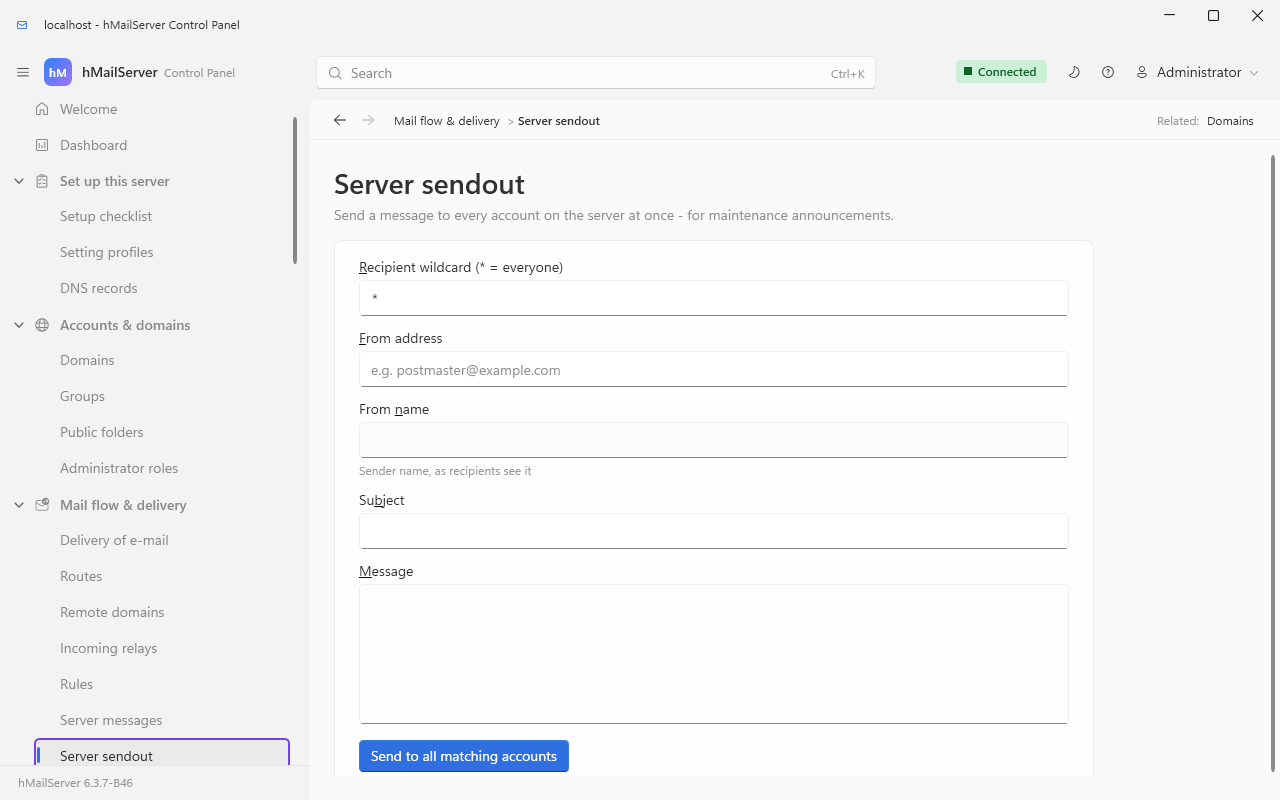
| Mail flow & delivery → Server sendout | sendout |
Send a message to every account (maintenance notices) | action only | at once |
| Spam & virus filtering → Spam filtering overview | spamoverview |
Read-only judgement of the whole spam pipeline, each row linking to its page | read-only | — |
| Spam & virus filtering → Quarantine | quarantine |
Messages held as suspected spam: release, delete, expire (needs QuarantineEnabled) |
actions only | at once |
| Spam & virus filtering → Anti-spam settings | antispam |
Thresholds, quarantine, SPF/DKIM/DMARC/ARC, host checks, greylisting, SpamAssassin, external filter engine, recipient tarpit | COM Settings.AntiSpam + INI |
COM at once; INI needs a restart |
| Spam & virus filtering → SURBL servers | surbl |
URL blocklists checked against message bodies | COM collection | at once |
| Spam & virus filtering → DNS blacklists | dnsbl |
IP blocklists checked against connecting servers | COM collection | at once |
| Spam & virus filtering → White list | spamwhitelist |
Senders exempt from spam checking | COM collection | at once |
| Spam & virus filtering → Blocked senders | blockedsenders |
Claimed sender addresses and domains refused with a score | COM collection | at once |
| Spam & virus filtering → Allow and block list (6.3.4) | senderlist |
Addresses and domains every account wants or does not - the server's list, below each account's own list and its domain's; an entry may be a URL | COM AntiSpam.SenderList
|
at once |
| Spam & virus filtering → Greylisting white list | greylistwhitelist |
Senders exempt from greylisting only | COM collection | at once |
| Spam & virus filtering → Greylisting bypass list (6.3.4) | greylistbypass |
Domains and HELO suffixes let past greylisting only when the message passes SPF, DKIM or DMARC as the entry requires | COM AntiSpam.GreyListingBypassEntries
|
at once |
| Spam & virus filtering → Domain white and black list (6.3.4) | domainpolicylist |
Sending domains this server has decided about, by envelope domain or HELO suffix: white skips greylisting and the score's refusals, black is refused at MAIL FROM
|
COM AntiSpam.DomainPolicyList
|
at once |
| Spam & virus filtering → Virus scanning overview | virusoverview |
Read-only judgement of whether the configured scanners can actually run | read-only | — |
| Spam & virus filtering → Anti-virus settings | antivirus |
ClamAV, ClamWin or a custom scanner; action on detection; what to do when a scanner cannot run | COM Settings.AntiVirus + INI |
COM at once; INI needs a restart |
| Spam & virus filtering → Blocked attachments | blockedattachments |
Attachment-name wildcards (*.exe) to strip — only when attachment blocking is on in Anti-virus settings |
COM collection | at once |
| Connections & protocols → Protocols | protocols |
Enable/disable SMTP, IMAP, POP3 and their behaviour, plus every idle timeout | COM Settings + INI |
COM at once; INI needs a restart |
| Connections & protocols → TCP/IP ports | ports |
Listening ports, their SSL bindings and a live "Listening" badge | COM Settings.TCPIPPorts
|
at once |
| Connections & protocols → Web services & autoconfiguration | webservices |
The HTTP/HTTPS listener for Thunderbird/Outlook autoconfiguration and MTA-STS policy hosting |
hMailServer.INI [Settings] (6.3.3; the database since 6.3.4) |
restart, and the page offers one |
| Connections & protocols → DNS resolver | dns |
Name servers, the Windows DNS cache, when DNSBL checks run |
hMailServer.INI [Settings] (6.3.3; the database since 6.3.4) |
restart, and the page offers one |
| TLS & certificates → SSL certificates | certs |
Certificates available to TLS ports, with parse/expiry/key-match state | COM Settings.SSLCertificates
|
at once |
| TLS & certificates → Certificates (ACME) | acme |
Automatic Let's Encrypt issuance and renewal |
hMailServer.INI [Settings] (6.3.3; the database since 6.3.4) |
restart, and the page offers one |
| TLS & certificates → Transport encryption overview | tlsoverview |
Read-only judgement of TLS versions, ciphers, ports and certificates together | read-only | — |
| TLS & certificates → SSL/TLS | tls |
TLS versions, ciphers, key-exchange groups, session resumption | COM Settings + INI |
COM at once; INI needs a restart |
| TLS & certificates → Transport security | security |
MTA-STS, DANE, DNSSEC, ARC, TLS-RPT, DMARC rua, SRS and BATV |
hMailServer.INI [Settings] (6.3.3; the database since 6.3.4) |
restart, and the page offers one |
| Access & abuse protection → Authentication | authentication |
OAuth2/XOAUTH2 token authentication, password hashing and pepper, ports without AUTH |
hMailServer.INI [Settings] (6.3.3; the database since 6.3.4) |
restart, and the page offers one |
| Access & abuse protection → Directory authentication (LDAP) | ldap |
Authenticate mailbox passwords against a directory |
hMailServer.INI [LDAP]
|
within two seconds — no restart |
| Access & abuse protection → Directory synchronisation | directorysync |
Provision mailboxes from the directory, preview then apply |
hMailServer.INI [LDAP] + COM actions |
preview and apply run inside the server on demand |
| Access & abuse protection → Administrative access | adminaccess |
Administrator password, mailbox password policy, two-factor authentication | COM + INI | COM at once; INI needs a restart |
| Access & abuse protection → Auto-ban | autoban |
Failed-logon banning, per-name lockout, logon tarpit | COM Settings + INI |
COM at once; INI needs a restart |
| Access & abuse protection → IP ranges | ipranges |
Who may connect, authenticate and relay | COM Settings.SecurityRanges
|
at once |
| Maintenance → Setting profiles (6.3.4) | profiles |
The four setting profiles - office, gateway, relay, sender - each with its difference from this server, applied with a box to tick where an entry closes a listener or weakens a check, put back, or the shipped settings kept | COM Settings.GetProfile, ApplyProfile, RevertProfile
|
as each setting's own mark says |
| Maintenance → Backup & restore | backup |
Backup contents, destination, schedule, verification and restore | COM Settings.Backup + INI |
COM at once; INI needs a restart |
| Maintenance → Performance | performance |
Caching, connection and thread tuning, message indexing, database connections; since 6.3.4 a Message store tab - storage compression, the smallest attachment held once, and what the store saves as the server last measured it (Message Storage) | COM + INI + [Database]
|
COM at once; INI needs a restart |
| Maintenance → Advanced | advanced |
Default domain, IPv6 preference, mirroring and archiving, disk-space limits, the scripting engine | COM + INI | COM at once; INI needs a restart; the script engine reloads on Save |
| Maintenance → Event scripts | scripts |
VBScript/JScript event handlers — local server only | the script file on disk | "Save & reload" reloads the engine |
| Maintenance → Server limits & expert settings | hardening |
DPAPI secrets, fsync, consistency checking, proxies, sending limits, ceilings; since 6.3.4 the Windows service account card - what the service runs as, and Grant access, Move to NT SERVICE\hMailServer and Move to LocalSystem, each after the elevation prompt (The Control Panel §5.0a) |
hMailServer.INI [Settings] (6.3.3; the database since 6.3.4), [SendingLimits], [SendingLimitsOverrides]
|
restart, except the sending limits, which are re-read within seconds |
| About | about |
Version, licence, build information | — | — |
Spam filtering overview, Virus scanning overview and Transport encryption overview change nothing. They exist because the interesting states only appear in the combination of several pages, and no editor can show a combination:
- a virus scanner that is switched on but cannot run reports an error on every message, and the server treats "every scanner errored" as no virus found — so infected mail is delivered as though it had been examined;
- a TLS port with no certificate does not fall back to plaintext, it fails to start;
- the
AEAD-ONLYcipher preset leaves TLS 1.0 and 1.1 advertised with no suite they can use; - the one control that refuses a plaintext password lives on the IP ranges page, three groups away from anything called TLS.
Every row on the three pages links to the page that owns the setting, which is also what stops them becoming a second place to change the same value.
Eight pages are the same editor pointed at a different COM collection: a list with Add…, Edit… and Delete above it (Server messages has Edit… alone), each entry added or changed in a small dialog.
| Page | COM collection | Columns | Default worth knowing |
|---|---|---|---|
| SURBL servers | AntiSpam.SURBLServers |
Active, DNS host, Expected result, Score, Refusal text | Score 5 |
| DNS block lists (DNSBL) | AntiSpam.DNSBlackLists |
Active, DNS host, Expected result, Score, Refusal text | Score 5 |
| Spam exemptions | AntiSpam.WhiteListAddresses |
Lower IP, Upper IP, Email address, Description | — |
| Blocked senders | AntiSpam.BlockedSenders |
Address or domain, Score, Description | Score 100 — above the delete threshold, so the message is refused during the SMTP conversation |
| Greylisting exemptions | AntiSpam.GreyListingWhiteAddresses |
IP address, Description | — |
| Blocked attachments | AntiVirus.BlockedAttachments |
File-name pattern, Description |
*.exe; inert unless attachment blocking is on |
| Groups | Settings.Groups |
Group name, plus a Members… button | — |
| Server messages | Settings.ServerMessages |
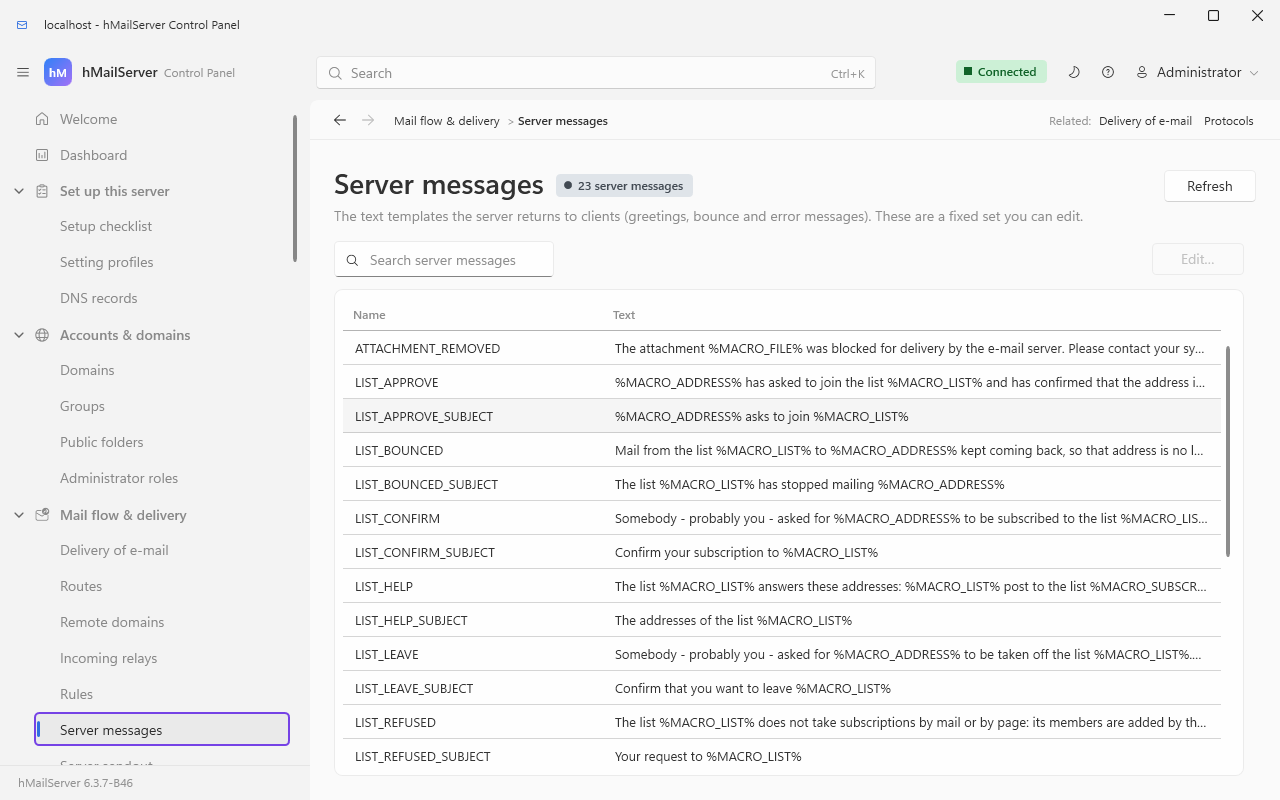
Name, Text | a fixed set — you may edit the text, not the list |
An entry on Blocked senders with an @ is one exact address; without one it is a
whole domain and its subdomains. It matches the address the sender claims, so it
stops a correspondent who keeps using one address and stops nothing that rotates them.
The remaining pages are shown here for completeness. The screenshots were captured from 6.3.7, in the light theme at 1280×800, with the sidebar as it is today; Control Panel Reference, section 5, lists the tree.
Connections & protocols → Protocols — six tabs (Services, SMTP, IMAP, POP3, ManageSieve, Timeouts) enabling or disabling the three protocol servers and tuning their behaviour:
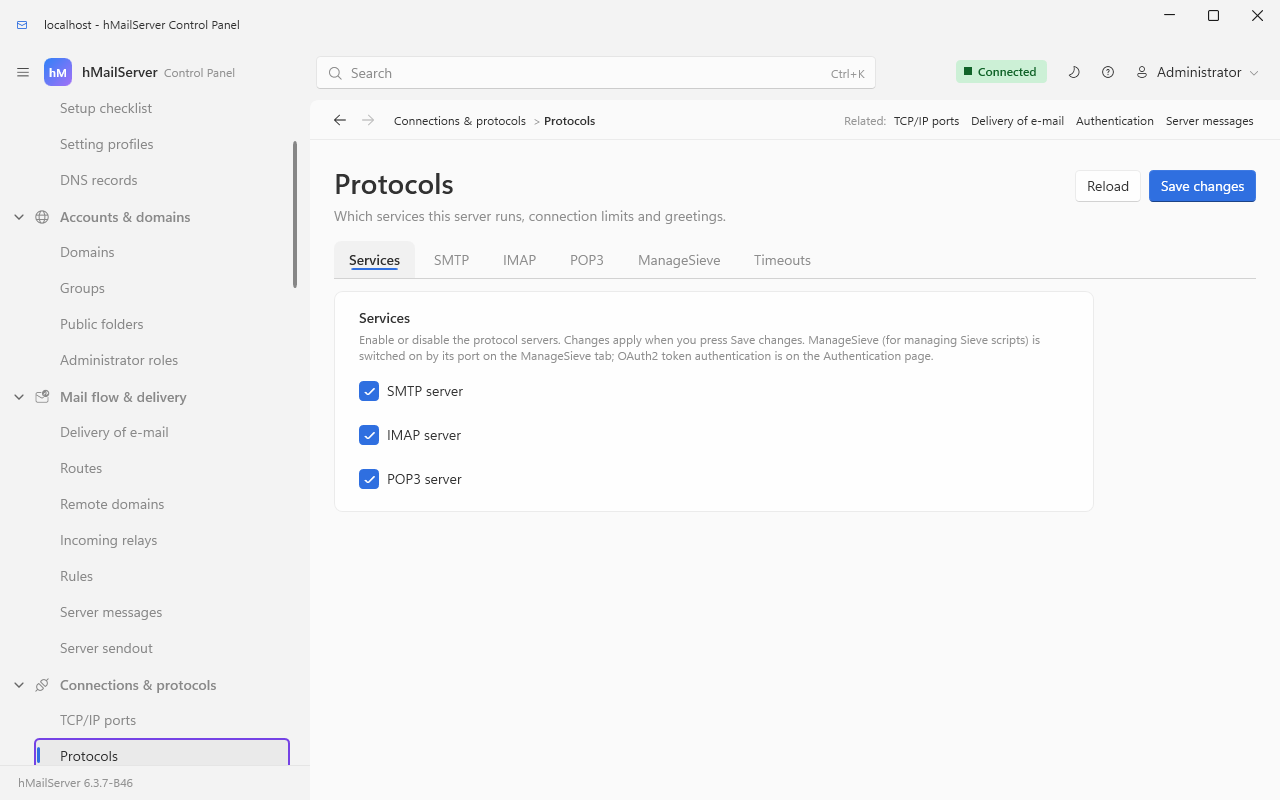
The IMAP tab also holds search limits, a change-history size and a "Recalculate folder UID counters" repair button, the POP3 tab a minimum login interval, and the Timeouts tab the eight protocol timeouts.
Maintenance → Performance — five tabs (Threads, Cache, Indexing, Message store, Database):
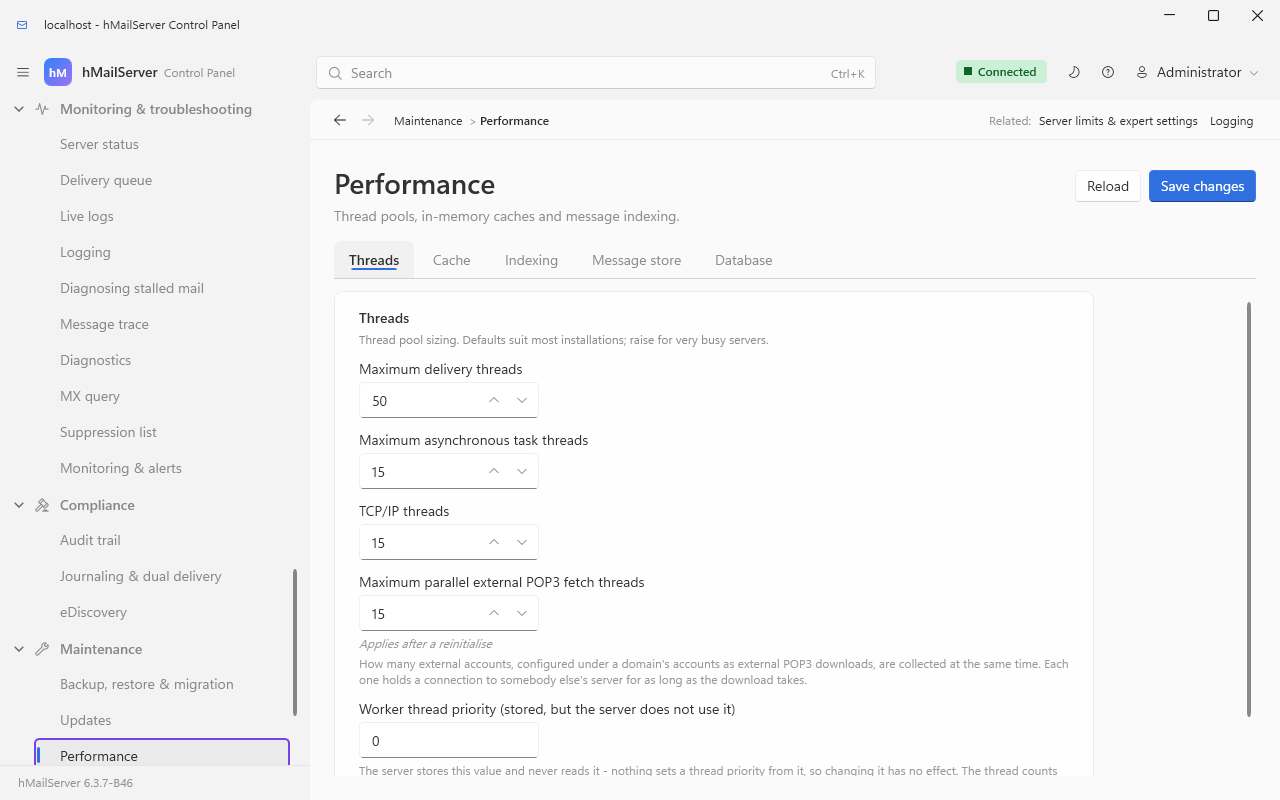
The Cache tab also shows a live hit-rate and memory read-out, and the Indexing tab the full-text index with "Index now" and "Discard and rebuild" buttons. "Worker thread priority" is stored but, as its label says, not used by the server.
Maintenance → Advanced — three tabs: General (the default domain, the IPv6 preference, the wiki the help pane's link points at, the administrator UI language), Copies of mail (mirroring, archiving and the disk-space limits) and Scripting (the scripting engine):
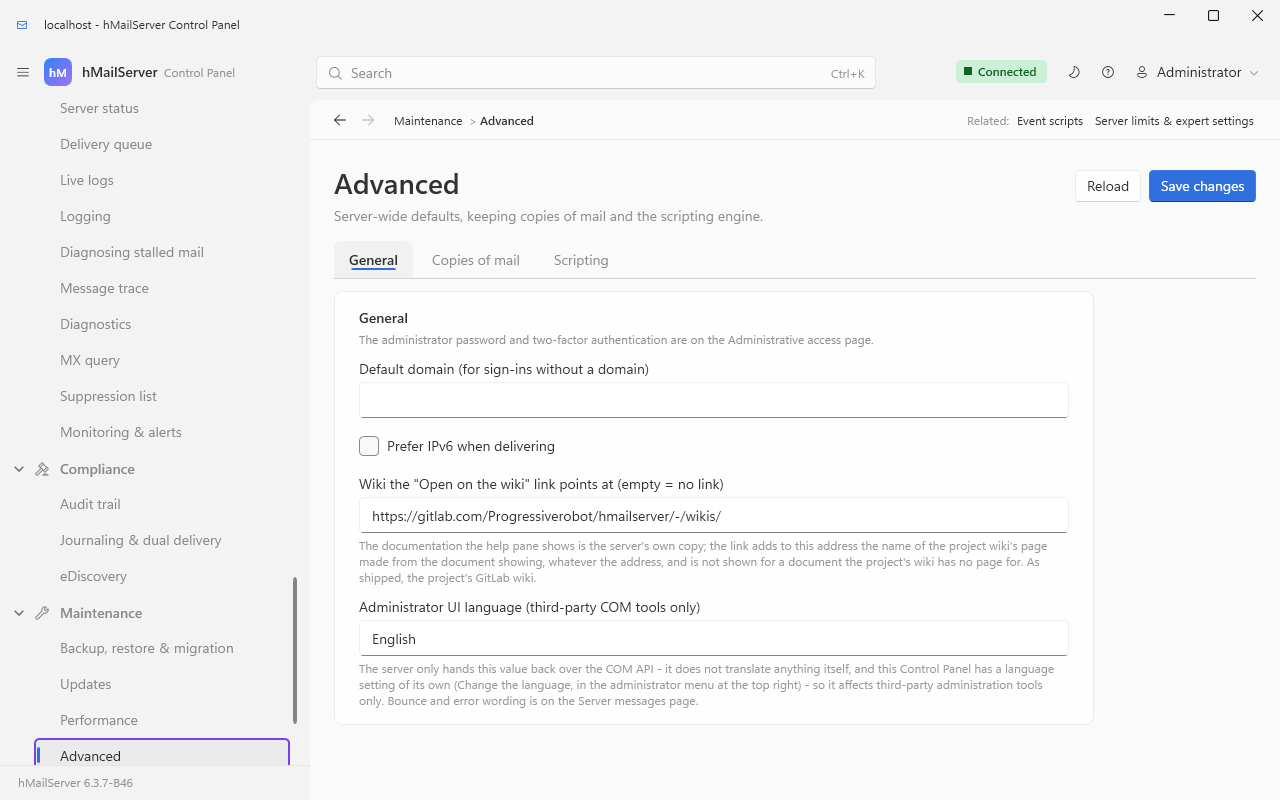
"Advanced & scripting", the page's old name, survives as a search alias. The administrator password is on Sign-in & access → Administrative access, as the General card's first line says, and the Scripting tab names Event scripts as the place the script itself is edited.
Mail flow & delivery → Server messages — the text of bounces and system messages:
Accounts & domains → Groups — account groups, used for public-folder permissions:
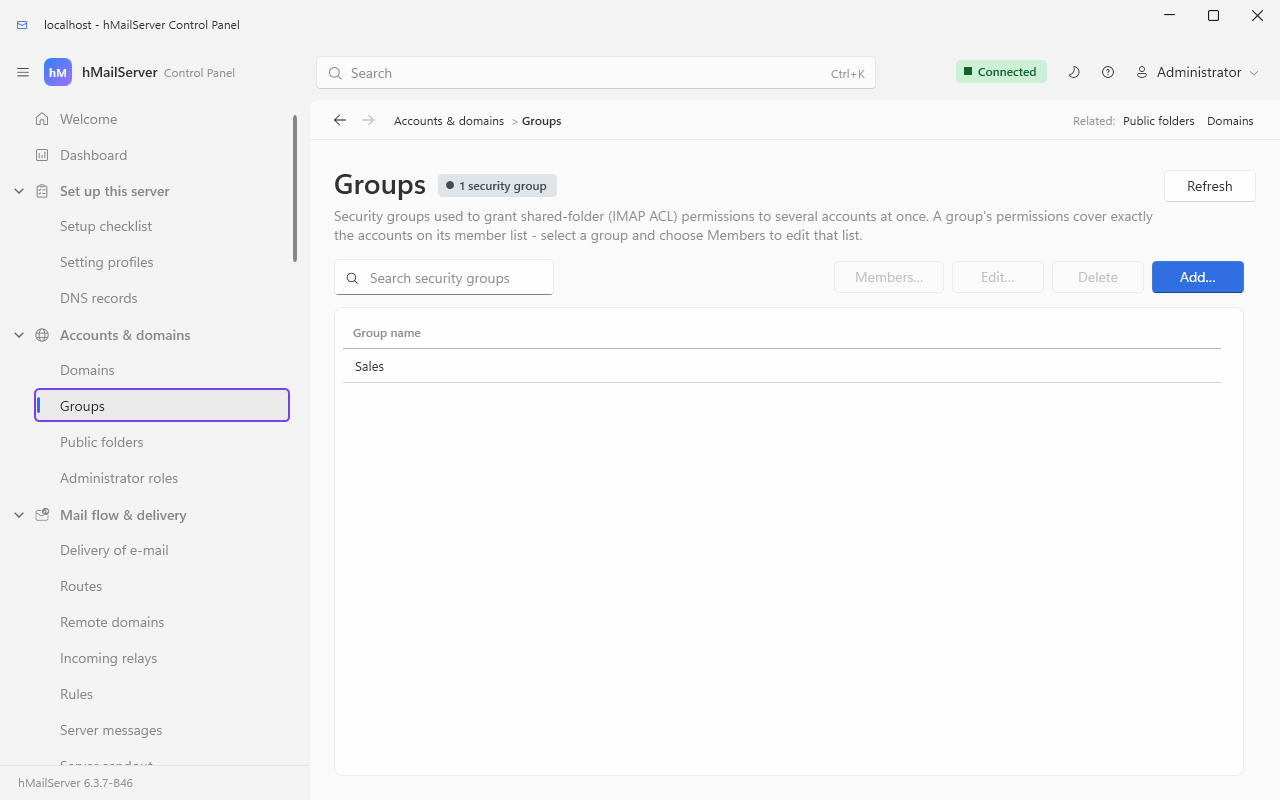
A group's permissions cover exactly the accounts on its member list; Members… edits that list for the selected group.
Mail flow & delivery → Server sendout — send a message to every account, for maintenance notices:
About — version, licence and build information:
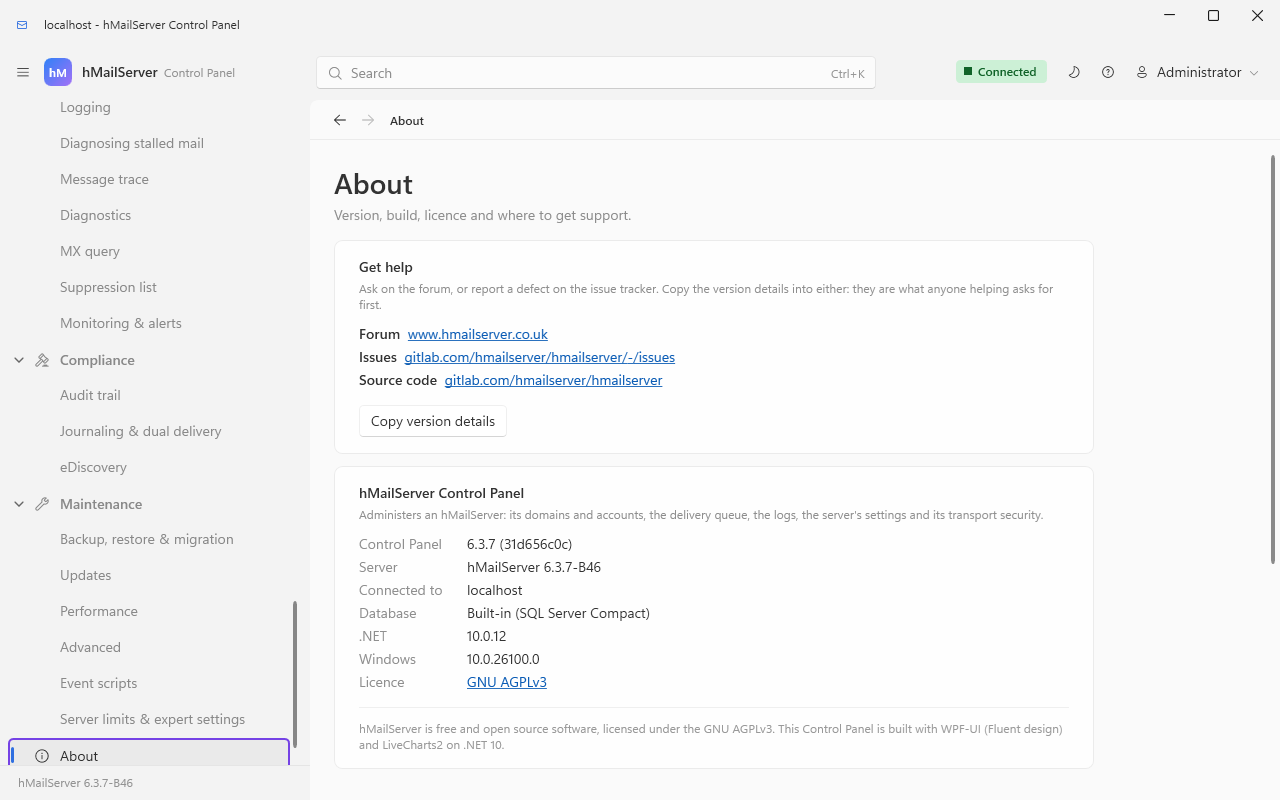
Copy version details puts the version table on the clipboard, which is what to paste into a question on the forum or an issue.
Several pages open a modal dialog rather than editing in place. These are the ones worth recognising.
Domain properties — opened with the pencil button on the domain's row of the Domains page ("Edit domain …"), or by double-clicking the row. Seven tabs in 6.3.3: General, Names, Limits, Signature, Relay, Out of office, DKIM. Fourteen in 6.3.4: General, Names, Limits, Signature, Relay, Out of office, Tagging and disclaimer, Impersonation protection, DKIM, Allow and block list, Quarantine digest, Reports received, Restricted delivery and Levels. Seventeen in 6.3.7, on a strip that scrolls: Country blocking, OpenPGP and Webhooks come before Levels.

The Limits tab also carries a message-retention policy for the domain's mailboxes.
Domain → DKIM — generate a key pair, choose the selector, canonicalisation and signing algorithm.
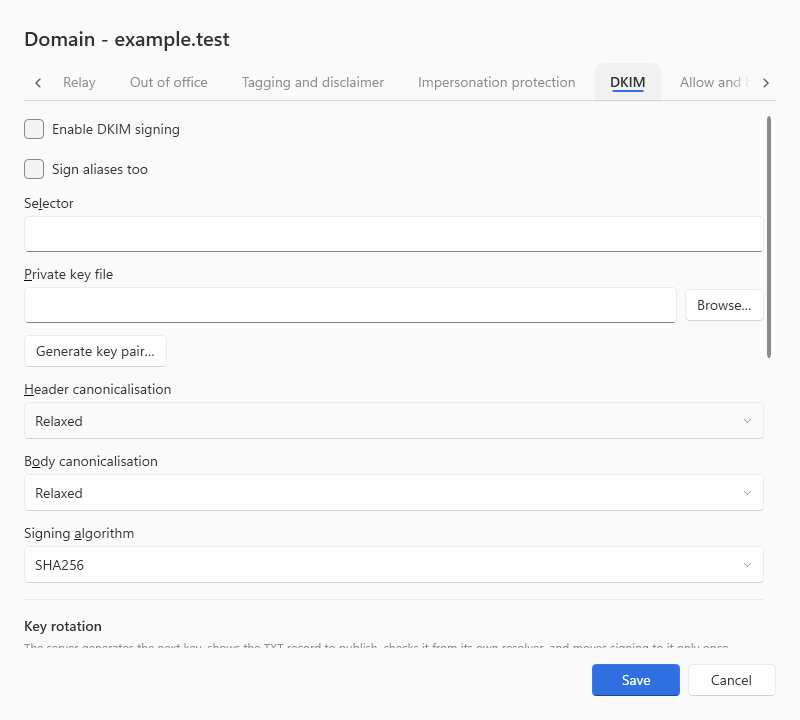
Once a key exists the tab prints the exact TXT record to publish, with a Copy DNS value button:

Generate key pair… first asks where to save the private key. The same record, checked against live DNS, is on Set up this server → DNS records, alongside SPF, DMARC, MTA-STS and TLS-RPT.
Account properties — opened with the pencil button on the account's row of the Domains page ("Edit account …"), or by double-clicking the row. Twelve tabs in 6.3.3: General, Forwarding, Auto-reply, Spam, Signature, Sieve, External, App passwords, Two-factor, Rules, Folders, Directory. Fifteen in 6.3.4: Recovery after Two-factor, the Active Directory tab renamed Windows directory, and Directory entry (the organisation directory's title, department, phones and photo) and Levels at the end; General gains restricted delivery and a read-only line saying whether the person turned zero-access encryption on. Sixteen in 6.3.7, on a strip that scrolls: Identity, before Levels, holds the account's kind (a person, a room or a piece of equipment), its external ID and whether its OpenPGP keys are published. A room's booking policy and the account's encryption at rest are not in the dialog: they are set on the Control Deck and over REST (Rooms and Equipment, Message Storage).

General also carries a password-strength meter with the password box.
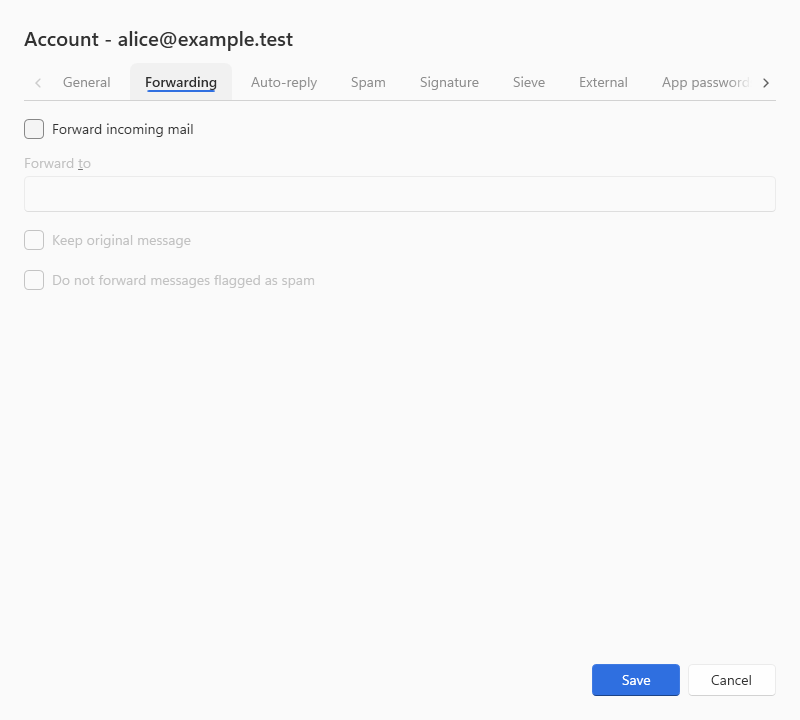


The Sieve tab holds the account's active script. Several named scripts per account are managed over ManageSieve, which is switched on by its port on the ManageSieve tab of Connections & protocols → Protocols.
Distribution list properties — opened with the pencil button on the list's row in the Distribution lists panel ("Edit distribution list …").
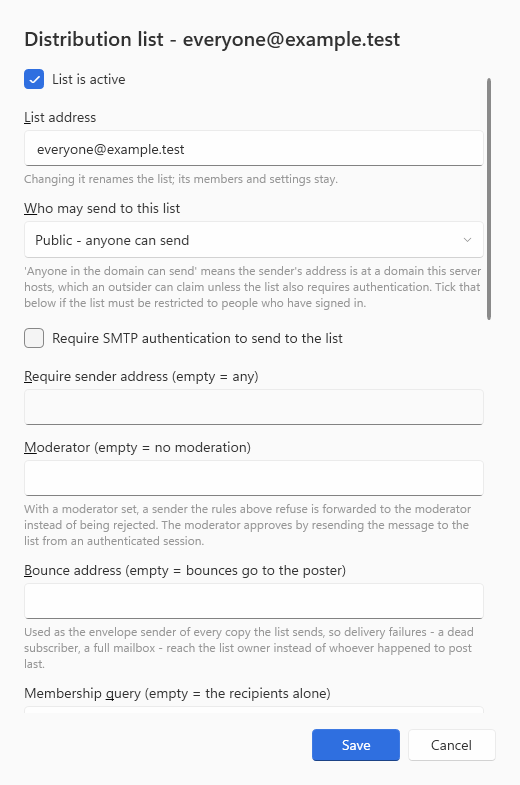
The moderator address (empty = no moderation), the bounce address, the note explaining that "anyone in the domain" only means the sender claims a hosted address unless authentication is also required, and the membership query (every active account of a domain, a pattern or the server, evaluated when a message is sent) are in the shot; the list manager's fields follow below - who may join, an archive and how long it is kept, a digest hour, a subject prefix, a footer and an owner (Mailing Lists).
TCP/IP port — opened with Properties… on the TCP/IP ports page, and titled for its port ("SMTP port 25").

Request or Require under Client certificate policy shows the field for the CA bundle that client certificates must chain to, for mutual TLS.
Two more dialogs follow the same shape and have no picture here: Route (General, Delivery, Addresses, Security, Authentication) and IP range (General, Connections, Relaying, Require auth, Protection). Both are documented field by field in Control Panel Reference, sections 7.3 and 7.7.
Every dialog is sized to its content — since 6.3.4. There are eighteen dialogs in the Control Panel, and until the redesign each one carried a width and a height in pixels, typed into its constructor: the Route and IP range dialogs were both a fixed 560 by 560, which is why a long translated caption could be clipped and a five-tab dialog could open with half a tab empty. They are now measured, within one set of dialog bounds (360 wide at the narrowest, 520 by default, 900 at the widest, and at most nine tenths of the screen's height), on a frame all eighteen share — a heading, the content, and the buttons in one place, with the Save key global to every tab. The tabs, the fields and their order are unchanged.