Repository navigation
What hMailServer Is and Is Not
This page began as a chapter of the 6.2.10 manual and has been corrected for 6.2.24, then checked and extended against the 6.2.28 source on 8 September 2026. The Control Panel's pages are grouped differently now, so the paths below use today's groups; the TLS ports 465, 993 and 995 exist only after you create them on the TCP/IP ports page (a fresh install seeds 25, 587, 110 and 143); and everything added since 6.2.10 is in Changes-Since-6210. Where a value here disagrees with the Settings Reference, which is generated from the code, the reference is right. Brought up to 6.3.4 (27 September 2026, schema 6104) on 26 September 2026; what came in 6.3.4 says so where the version matters. 6.3.5 (29 September 2026, schema 6105), 6.3.6 (6 October 2026, schema 6108) and 6.3.7, the latest release (17 October 2026, schema 6108), are not yet reflected here, but for the Linux packages each carries, which the table of what you provide gives since 22 October 2026.
hMailServer is a mail server — the software that owns an email domain. When someone
sends a message to you@yourcompany.com, their mail server looks up where
yourcompany.com receives mail and delivers it to whatever is listening there. If you
run hMailServer, that is your machine.
It does three jobs:
| Job | Protocol | What it means |
|---|---|---|
| Accept mail from the world | SMTP | Other mail servers connect and hand you messages for your users |
| Let your users read mail | IMAP and POP3 | Outlook, Thunderbird, Apple Mail and phones connect to fetch messages |
| Let your users send mail | SMTP submission | Your users hand you messages and you deliver them onward |
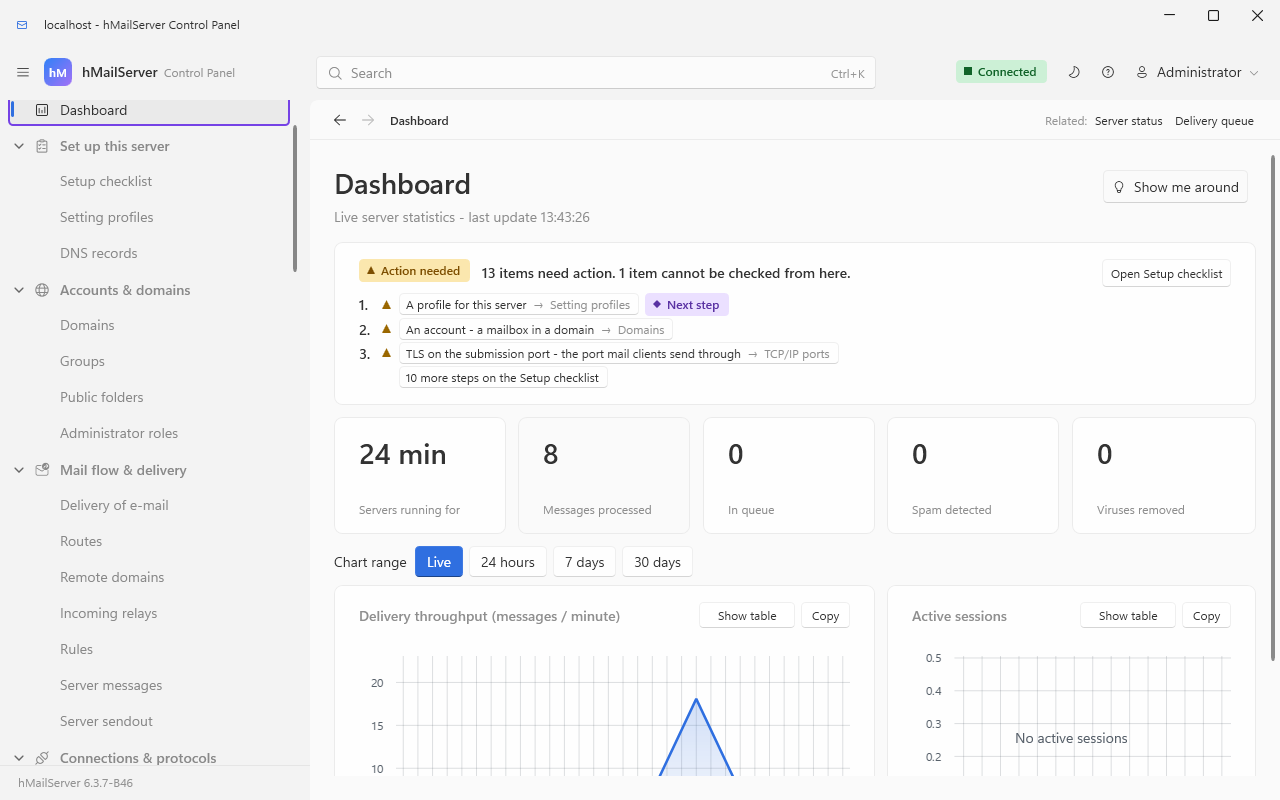
What running it looks like: the Control Panel's Dashboard, captured on 6.3.7; Control Panel Pages lists the pages.
Running your own mail server means owning the middle box below. The two on either side are somebody else's — DNS is your registrar's, and the mail clients are your users'. Almost every problem people describe as "hMailServer is broken" turns out to be in one of the two boxes it does not own.
flowchart LR
    subgraph theirs["Not yours"]
        SENDER["Someone else's mail server"]
    end
    subgraph dns["Your DNS - at your registrar"]
        MX["MX -> mail.yourcompany.com"]
        SPF["SPF"]
        DKIM["DKIM selector"]
        DMARC["DMARC"]
        PTR["PTR - your ISP sets this,<br/>not your registrar"]
    end
    subgraph yours["Your machine - hMailServer"]
        SMTPIN["SMTP 25<br/>accept mail from the world"]
        SUB["SMTP 587<br/>accept mail from your users"]
        STORE["Mailboxes:<br/>files on disk,<br/>index in the database"]
        IMAPP["IMAP 143 / 993"]
        POP3P["POP3 110 / 995"]
        OUT["Outbound delivery"]
    end
    subgraph users["Your users"]
        CLIENT["Outlook, Thunderbird,<br/>Apple Mail, a phone"]
        PORTAL["Or the webmail at /portal -<br/>a mail client in the browser<br/>since 6.3.2"]
    end

    SENDER -->|"looks up your MX"| MX
    MX -.-> SMTPIN
    SENDER --> SMTPIN
    SMTPIN --> STORE
    STORE --> IMAPP
    STORE --> POP3P
    IMAPP --> CLIENT
    POP3P --> CLIENT
    STORE --> PORTAL
    CLIENT --> SUB
    SUB --> OUT
    OUT -->|"the receiver checks these"| SPF
    OUT --> DKIM
    OUT --> DMARC
    OUT --> PTR
    OUT --> SENDER
| You provide | hMailServer provides |
|---|---|
| A machine reachable from the internet: 64-bit Windows 10 1607 / Server 2016 or later, or - since 6.3.0 - Linux on x86-64 or AArch64 (Installing on Linux; 6.3.4 and 6.3.5 carried x86-64 packages only, and 6.3.6 and 6.3.7 carry the AArch64 ones again), or a container (Running in a Container) | The SMTP, IMAP and POP3 servers, and the whole delivery pipeline |
| A host name with an A record, and an MX record pointing at it | The MTA-STS policy derived from that MX, and a live check of every record on Monitoring → DNS records |
| A PTR record — and only your ISP can set this one | Nothing can substitute for it. Google and Microsoft refuse or spam-folder outbound mail without one |
| SPF, DKIM and DMARC records in your zone | The DKIM key generation with a copyable record, the signing, and the inbound evaluation of everyone else's |
| Port 25 reachable inbound, and outbound (many consumer ISPs block outbound 25) | Nothing can work around a blocked port; a smart host is the usual answer |
| A certificate — or nothing, and let ACME get one | Built-in Let's Encrypt issuance and hourly renewal |
| Somebody who will read a log occasionally | The logs, the diagnostics, the message trace, the metrics and the stalled-mail page to read |
Start at Before You Install, then DNS for Your Domain, which has the full record-by-record table and the symptom you actually see when each one is missing.
What hMailServer is not:
-
It was not a webmail client; since 6.3.2 it is one. Your users can still read
their mail in Outlook, Thunderbird, Apple Mail or a phone over IMAP, and many will.
But the page at
/portalon the REST listener, which began in 6.2.28 as a self-service portal, became a mail client in 6.3.2: conversations, search with operators, labels, rules, snooze, scheduled and undo send, templates, an address book (CardDAV since 6.3.3, calendars over CalDAV since 6.3.4), S/MIME, offline reading, notifications, twenty languages - twenty-three since 6.3.4, three of them read right to left with the page mirrored - and a phone layout that installs as an app. (6.3.3, published 15 September 2026: rebuilt to the shape of Gmail and Outlook.com - a reading pane, a proper list, a docked compose, tabs, mute, whole-folder selection.) (6.3.4, 27 September 2026: a calendar and task list with several calendars, sharing and invitations by mail; a second account open beside the first; the last N days kept offline; OpenPGP and password-protected messages beside S/MIME; masked addresses, send-as an address proved by a code, deleted items recovered and an unread message recalled within the server; subscriptions, brand logos, Important, and emoji, pictures and tables in compose; the organisation's directory and shared address books; passkeys and single sign-on; and a folder of a hundred thousand messages paged, searched and selected whole without the page copying it - built, and not yet measured. The Webmail has the whole list.) A separate webmail such as Roundcube is no longer needed; it still works, over IMAP, if you prefer it. - It is not a spam filter you can point at someone else's mail. It filters mail it receives, for domains it hosts.
- It is not Exchange. There is no ActiveSync, no MAPI and no Teams integration, so Outlook connects over IMAP and SMTP like any other client. It is email, done properly, with the pieces of groupware that ride on standards: since 6.3.4, calendars over CalDAV shared with colleagues, groups and delegates, invitations by mail and free-busy within a domain; meeting rooms and equipment that answer the invitations they are sent by a booking policy (Rooms and Equipment); an organisation directory; delegated mailboxes announced to Outlook's Autodiscover; transport rules, journaling and message recall within the server; eDiscovery cases with legal holds (Compliance and eDiscovery); and an S/MIME certificate authority per domain.
Who should run it: a small business that wants its own mail on its own server; a developer who needs a real SMTP/IMAP endpoint for testing; a hosting provider running mail for many domains; anyone who would rather not pay per mailbox forever.
Who should not: if nobody in your organisation is comfortable editing DNS records and watching a log file occasionally, a hosted mailbox provider will serve you better. Running a mail server is not hard, but it is not zero-maintenance either.
flowchart TD
    Q1{"Is anyone in your organisation<br/>comfortable editing DNS records and<br/>reading a log file occasionally?"}
    Q1 -- no --> HOSTED["A hosted mailbox provider<br/>will serve you better.<br/>Running a mail server is not hard,<br/>but it is not zero-maintenance"]
    Q1 -- yes --> Q2{"Do you need ActiveSync, MAPI<br/>or Teams integration?"}
    Q2 -- yes --> NOTEX["Not this. hMailServer is email<br/>over the standard protocols -<br/>IMAP, SMTP, CalDAV, CardDAV"]
    Q2 -- no --> Q3{"Do you need webmail your users<br/>live in all day?"}
    Q3 -- yes --> WEBMAIL["Yes: the built-in webmail at /portal<br/>is a mail client since 6.3.2.<br/>Roundcube over IMAP still works if you prefer it"]
    Q3 -- no --> Q4{"Can you get port 25 open,<br/>inbound and outbound,<br/>and a PTR record?"}
    Q4 -- no --> SMART["You can still run it -<br/>relay outbound through a smart host.<br/>Inbound needs port 25 to reach you"]
    Q4 -- yes --> YES["Yes. Small business, developer needing<br/>a real SMTP/IMAP endpoint, hosting<br/>provider running many domains,<br/>or anyone who would rather not pay<br/>per mailbox forever"]
    WEBMAIL --> Q4
    SMART --> YES
This is Progressive Robot's fork of hMailServer, not the original hMailServer by Martin Knafve. Progressive Robot Ltd forked it in 2026 and released 6.0.0 on 12 June 2026, and the original project has since resumed development separately: it released 5.7.0 on 28 September 2026, and 5.7.1 and a 5.7.2 pre-release on 29 September. This fork is not made by Martin Knafve or by the original project, and it is not a successor to it. ForkAndOriginal.md says what each has published and what differs between them. This fork brings it up to current standards:
- Built with Visual Studio 2026, OpenSSL 4.0, Boost 1.92, 64-bit only - and, since 6.3.0, with clang or GCC on Linux for x86-64 and AArch64
- TLS 1.2/1.3, modern password hashing (PBKDF2-HMAC-SHA256, optional Argon2id or scrypt)
- MTA-STS, DANE with DNSSEC validation, ARC, DMARC, Ed25519 DKIM
- Automatic Let's Encrypt certificates built in — no manual renewal
- A modern .NET 10 administration application replacing the old WinForms tool
- A REST API, a browser administration page (the Control Deck, The Control Deck) and Prometheus metrics for monitoring
- 3,811 automated regression tests in 6.3.4 (2,302 in 6.3.3), the whole suite run against the binary before every release
Almost everything new is additive and off by default, so an installation it upgrades -
one of this fork's, or of the original hMailServer up to 5.6; the original's 5.7 releases
are not on its upgrade chain (Upgrading Guide) - behaves no differently until you turn
something on. The
exceptions, on from the first start because they are what a mail server should do in 2026,
are outbound transport security — honouring recipients' MTA-STS policies and DANE records
with DNSSEC validation (MtaStsEnabled, DaneEnforcementEnabled,
DnssecValidationEnabled) — and MTA-STS policy hosting and client autoconfiguration on the
web services listener, which stay inert until that listener is given a port. Each can be
switched off; see the Settings Reference.
The fork's design rule is that an installation it upgrades behaves no differently until you turn something on. That is a claim worth being able to check, so here is the exact shape of it:
| Category | Examples | State on a fresh install |
|---|---|---|
| Optional listeners | REST API and /portal, web services, metrics, ManageSieve |
Off. Each stays inert until its port setting is non-zero |
| Optional features | Quarantine, message trace, full-text index, archive, live update, JSON logging, OTLP export |
Off. Each is a setting that starts at 0 or empty - an hMailServer.ini key in 6.3.3, kept in the database since 6.3.4 |
| Features added in 6.3.4 | Single sign-on, SCIM, the sandbox, journaling, impersonation protection, restricted delivery, IP warm-up, gateway encryption, the list manager, setting profiles, eDiscovery, mailbox encryption at rest, storage compression, object storage, mail in to a webhook, rooms and equipment, SNMP, PST import | Off, or inert until an administrator names what they act on - an identity provider, a sandbox service, a rule, a schedule, a partner key, a case, an account, a bucket, a route, a room, a manager's address, an import directory |
| Behaviour 6.3.4 changes without a switch | A destination that answers "slow down" gets a two-minute back-off window, and a deferral this server chose no longer spends a message's retries until the message has outlived its retry schedule (Outbound Shaping); a saved setting applies when it is saved (Profiles and Environment); compromised-account detection builds each account's baseline in watch mode and only reports; IMAP answers as the RFCs say where Dovecot's imaptest found it did not (Connecting a Mail Client); MySQL and MariaDB tables become utf8mb4; a MySQL, MariaDB or SQL Server connection is encrypted when the database server offers TLS, without checking its certificate unless [Database] TlsMode asks for it |
On, each for the reason given on its page; the back-off is OutboundBackoffMinutes=0 to switch off |
| A new installation of 6.3.4, not an upgrade | A self-signed certificate, STARTTLS offered on 25, 587, 110 and 143, TLS required for authentication from the Internet range; on Windows the service runs as NT SERVICE\hMailServer rather than LocalSystem |
On for a database the installation created; an upgraded server keeps what it had, and the setup checklist flags a password taken without TLS |
| Per-account and per-domain features | App passwords, TOTP, message retention, per-domain relay, mirror folders | Off, and set per object rather than globally |
| Outbound transport security | MTA-STS, DANE, DNSSEC validation |
On — MtaStsEnabled, DaneEnforcementEnabled and DnssecValidationEnabled all default to 1, because that is what a mail server should do in 2026. Each can be switched off |
| MTA-STS policy hosting and client autoconfiguration | Serving your own policy and autoconfig
|
Enabled as a feature, but inert until the web services listener is given a port |
| Protocol extensions this server advertises | PIPELINING, CHUNKING, BINARYMIME, SMTPUTF8, DSN, IMAP COMPRESS | On, because they are advertised capabilities a client opts into rather than behaviour changes |
Everything in that table is named in the Settings Reference, which is generated from the code, and the advertised protocol keywords are listed in Capabilities and Configuration.