Repository navigation
The COM API and Scripting
This page began as a chapter of the 6.2.10 manual and has been corrected for 6.2.28; what 6.3.4 adds to the object model (section 23.3a, and the notes in 23.1, 23.2 and 23.3) was read from the IDL at master
540347500on 24 September 2026 and again at92b8f9f63on 26 September 2026 (the tag v6.3.4,51e2dbda0, changes only a help string in it), which is also where the event-script sections (23.6 to 23.10) were brought up to date for the JScript escaping fix and the JavaScript engine of the Linux builds. The Control Panel's pages are grouped differently now, so the paths below use today's groups; the TLS ports 465, 993 and 995 exist only after you create them on the TCP/IP ports page (a fresh install seeds 25, 587, 110 and 143); and everything added since 6.2.10 is in Changes-Since-6210. Where a value here disagrees with the Settings Reference, which is generated from the code, the reference is right. 6.3.7, the latest release (17 October 2026, schema 6108), is not yet reflected here.
hMailServer exposes a full COM API. Anything the Control Panel can do, a script can do - it is the same interface. The Control Panel is a COM client and nothing more.
There are two quite different things on this page and it is worth keeping them apart:
| The COM API | Event scripts | |
|---|---|---|
| Who runs it | You, from PowerShell, VBScript, C#, anything that speaks COM | The server, in-process, while mail is moving |
| When | Whenever you like | At fifteen defined points in the mail flow |
| Runs as | You | The service account: LocalSystem on an installation that began before 6.3.4, NT SERVICE\hMailServer on a new one from 6.3.4, the hmailserver user on Linux |
| Failure costs | Your script | Delivery for every message behind it |
| Turned on by | Nothing; it is always there | Settings.Scripting.Enabled |
Everything up to section 23.5 is the API. Section 23.6 onwards is event scripts.
For the full object-by-object reference - the coclasses (94 in 6.3.3, 100 in
6.3.4), every route of the REST API, and what each Settings sub-object holds - see APIs Reference.
- One type library,
hMailServer, with 94 coclasses in 6.3.3 and 100 in 6.3.4 (section 23.3a). The root isApplication(ProgIDhMailServer.Application). - Every interface is a dual
IDispatchinterface, so late binding works without registering the type library.CreateObject,New-Object -ComObjectand C#dynamicall work on a machine where only the server is installed. - Early binding - a C# interop assembly, a
Dim x As hMailServer.Account- depends on vtable order. New members are therefore always appended, never inserted, so an interop assembly built against an older release keeps working. - The installer's admintools component exists only to register the type library, so that scripts on another machine can administer this one. If you do not script remotely, you do not need it.
# Local
$app = New-Object -ComObject 'hMailServer.Application'

# Remote, over DCOM, against a machine where admintools is registered
$app = [Activator]::CreateInstance([Type]::GetTypeFromProgID('hMailServer.Application', 'mail01'))
The Control Panel connects to a remote host exactly that way, which is why it needs no agent on the far end.
$app = New-Object -ComObject 'hMailServer.Application'
$account = $app.Authenticate('Administrator', 'your-admin-password')
if (-not $account) { throw 'Authentication failed.' }
Authenticate returns an Account object, or $null on failure. Three
credentials work:
| Sign in as | Gets |
|---|---|
Administrator with [Security] AdministratorPassword from hMailServer.INI
|
Server administrator |
A mailbox address whose AdminLevel is 2 |
Server administrator |
A mailbox address whose AdminLevel is 1 |
Domain administrator: their own domain only |
Two things about this that are not obvious:
If the administrator password is empty, and no administrator TOTP secret is
enrolled, every COM session starts already authenticated as a server
administrator - COMAuthentication::AttempAnonymousAuthentication creates a
dummy Administrator account. This is the historical behaviour and it is why
setting an administrator password is the first line of Security Hardening.
A second factor on the administrator credential changes the call you must
make. With Settings.EnrolAdministratorTOTP() used (6.2.27), Authenticate
refuses the administrator outright - a stolen password is not a credential on its
own - and you must call:
if ($app.AdministratorTOTPEnabled) {           # readable BEFORE authenticating
   $app.AuthenticateWithCode('Administrator', $password, $code) | Out-Null
} else {
   $app.Authenticate('Administrator', $password) | Out-Null
}
AuthenticateWithCode is the only path that can satisfy a second factor -
a mail client has nowhere to type one, which is exactly why an account with a
factor enrolled uses an app password for IMAP, POP3 and SMTP instead.
Each interface object loads its state through a private LoadSettings() that
first asks GetIsServerAdmin(). If you are not entitled to the object, that load
does nothing, the interface's pointers stay null, and every member then returns
an error HRESULT:
You do not have access to this property / method. Ensure that hMailServer.Application.Authenticate() is called with proper login credentials.
In PowerShell that surfaces as a terminating exception; in VBScript as a
trappable error; in C# as a COMException. In 6.2.10 this was a real defect
worth remembering: fifteen methods returned false from a function whose return
type is HRESULT, and false is 0, which is S_OK - so an unauthorized
caller got "success", and five of them had not written their out-parameter, so
"success" came with uninitialized memory. If you script against the COM API,
be on 6.2.10 or later and check return values.
Since 6.3.4, two things change here. Seventy-two COM
classes that raise an error had no ISupportErrorInfo, so a refusal they made reached the caller
as a bare Exception from HRESULT: 0x800403E9; every class that raises one carries it now, and a refusal arrives
with the server's own sentence, which a checker (build/check-com-error-info.py) keeps
true. And authority is a role (schema 6047): serveradmin, domainadmin, helpdesk,
auditor or a custom one, given to an account for named domains. An account with no role
keeps exactly what its AdminLevel gave it; an account with one signs in with its own
address and password and reaches what the role's permissions reach, and COM asks the same
question REST asks (RoleManager::Allows) - Application.CurrentRole and
CurrentPermissions say what the session holds. hmailserver/docs/Roles.md.
flowchart TD
    App["Application<br/>hMailServer.Application"]

    App --> Auth["Authenticate<br/>AuthenticateWithCode<br/>AdministratorTOTPEnabled"]
    App --> Dom["Domains"]
    App --> Set["Settings"]
    App --> Rul["Rules - global"]
    App --> Sta["Status"]
    App --> Uti["Utilities"]
    App --> Dbs["Database"]
    App --> Bak["BackupManager"]
    App --> Glo["GlobalObjects"]
    App --> Lnk["Links"]
    App --> Dia["Diagnostics"]

    Dom --> D1["Domain: Name, Active, MaxSize,<br/>DKIM, relay, retention"]
    D1 --> Acc["Accounts"]
    D1 --> Ali["Aliases"]
    D1 --> Dls["DistributionLists"]
    D1 --> Dal["DomainAliases"]

    Acc --> A1["Account: Address, Password, Active,<br/>MaxSize, Size, AdminLevel"]
    A1 --> Msg["Messages"]
    A1 --> Fol["IMAPFolders"]
    A1 --> Arl["Rules - this account"]
    A1 --> Fet["FetchAccounts"]
    A1 --> Apw["AppPasswords"]
    A1 --> Sie["SieveScript, TOTPEnabled,<br/>vacation, forwarding, signature"]

    Set --> S1["AntiSpam - owns Quarantine"]
    Set --> S2["AntiVirus"]
    Set --> S3["Backup"]
    Set --> S4["Directories"]
    Set --> S5["Logging"]
    Set --> S6["Routes"]
    Set --> S7["Scripting"]
    Set --> S8["SecurityRanges"]
    Set --> S9["SSLCertificates"]
    Set --> S10["TCPIPPorts"]
    Set --> S11["ServerMessages, Groups,<br/>IncomingRelays, PublicFolders,<br/>MessageIndexing, Cache"]

    Glo --> G1["DeliveryQueue"]
    Glo --> G2["MessageTrace"]
    Glo --> G3["Languages"]
Every collection - Domains, Accounts, Rules, Criterias, Actions, all of
them - offers the same shape: Count, Item(index), ItemByDBID(id), Add(),
Refresh(), Delete(index) and DeleteByDBID(id), with ItemByName or
ItemByAddress where a name exists. Items have Save() and Delete().
Add()does not persist. It returns a new, unsaved object. Set the properties, then callSave(). A script that forgetsSave()looks as though it worked and changes nothing.
Some collections are not loaded for your COM session alone: the running server reads
the very same items while it works. They are the routes and their addresses, the
incoming relays, the DNS black lists, the SURBL servers, the remote domain
policies, the server messages, the blocked attachments, the SSL
certificates and the groups. Up to 6.3.3 setting a property on one of those items
wrote the live object every SMTP, IMAP and delivery thread was reading, while they read
it - a string replaced under a reader frees the buffer the reader is copying, a
use-after-free of the same family as the heap-corruption abort under concurrent IMAP
LIST that 6.3.4 also fixes, and a range written in
two halves could hand a session half of each. Since 6.3.4 (commit 15cfff25d):
- The first property you set makes a copy, held by your COM object, and every later set writes the copy. Reading a property back from the same object reads what you set, so a script that reads its own change before saving sees the same as before.
-
Nothing is in effect until
Save().Save()writes the copy to the database and the server reads the collection again, swapping the new item in under the collection's lock. The running server, and any COM object read from the collection before the save, keep the values they had until then. -
A property set and never saved changes nothing at all. Up to 6.3.3 it changed the
running server until the next restart while the database kept the old value; a script
that relied on that must now call
Save(). -
An object read before the save keeps what it read. After a
Save(), read the item again from its collection (ItemByDBID,ItemByName) to see the saved values. ARouteAddressesread from a route before that route's save is the old route's list. -
A route's addresses added or deleted through
Route.Addressesare in effect at once, as they always were. - A save the database refuses leaves the running item as it was; your object keeps the refused values, to be corrected and saved again. A remote domain policy is the exception: it is read back as the database holds it.
-
A save whose re-read fails still answers success, because the save succeeded, and
is reported as error
HM7390: the change is in the database and not yet in effect, until the next successful read of that collection (a reinitialise, a restart, or another save).
The Control Panel reads each item fresh, sets, saves and reads again, so it is not
affected. The other collections - TCP/IP ports, security ranges, the white list, the
greylisting lists, blocked senders and sender list entries, and everything loaded for
the COM object itself (domains, accounts, aliases, lists, rules, fetch accounts, app
passwords, folder permissions) - were never shared this way and behave as before. The
rule and every class it covers are in the repository's
ARCHITECTURE.md
("A COM change to an item of a shared collection is written onto a copy"), and
Upgrading.md
says what an upgrader's scripts now see; build/check-com-shared-copies.py holds the
shape.
Read from hMailServer.idl at 92b8f9f63, which the tag v6.3.4 changes only in one help string: six new
interfaces, which make 100 coclasses, and 509 more HRESULT declarations than 6.3.3's
1,375 (1,884 in all). An early-bound client built against 6.3.3 keeps working, because
every member is appended; recompile it to reach the new ones, and on a hand-copied
installation register the server again, elevated, so the new interfaces are known to
COM. Late-bound scripts need nothing.
| Interface | Members added in 6.3.4 (appended, so the vtable order of 6.3.3's members is kept) |
|---|---|
Application |
Roles, CurrentRole, CurrentPermissions, RoleAssignments, AssignRole, ResetPassword, UnlockAccount (administrator roles) |
Settings |
RemoteDomainPolicies; the breach check (BreachCheckEnabled, BreachCheckUrl, BreachCheckMinimumCount, BreachCheckUnreachableAction, TestBreachCheckEndpoint); the quarantine digest (QuarantineDigestBaseUrl, QuarantineDigestLinkHours); bounces (BounceProcessingEnabled, BounceHardBounceThreshold, BounceMailboxFullIsHard, BounceSuppressionAction, BounceSuppressionExpiryDays, BounceReadDeliveryReports, BounceCountRetentionDays, BounceReportWindowDays); Web Push (WebPushEnabled, WebPushSubject, WebPushVapidPublicKey, GenerateWebPushKeys); QuotaGracePercent, QuotaSendStopPercent; OpenPGP publishing (OpenPGPWebKeyDirectoryEnabled, OpenPGPKeyMaximumBytes, OpenPGPKeysPerAccount, OpenPGPRequireAddressInUserId); webhooks (WebhooksEnabled, WebhookMaxAttempts, WebhookMaxPerMinute, WebhookRetentionDays); country blocking (GeoIpDatabaseFile, GeoIpDatabaseMaxAgeDays, CountryBlockingExemptRanges, CountryPolicy); session policy (SessionIdleSeconds, SessionLifetimeSeconds, SessionOnePerDevice, SessionBindToAddress); complaints (ComplaintProcessingEnabled, ComplaintMailbox, ComplaintSuppressionThreshold, ComplaintRetentionDays); GetChangedFromDefault, GetSettingDefault; the reputation watch (ReputationWatchEnabled, ReputationWatchLists, ReputationWatchAddresses); spam traps (SpamTrapBanMinutes, SpamTrapBlockDays, SpamTrapHitRetentionDays, SpamTrapTeachSpamAssassin); HelpWikiBaseUrl; outbound shaping (OutboundBackoffMinutes, OutboundBackoffMaxMinutes, MaxOutboundConnectionsPerDestination, MaxOutboundConnectionsPerTenant); a save that applies (IniSettingApplies, IniSettingAppliesAll, PendingIniSettings); profiles (GetProfiles, GetProfile, ApplyProfile, RevertProfile, DiscardProfileSnapshot, AppliedProfile, DeclineProfiles); the attachment sandbox (SandboxEnabled, SandboxSubmitUrl, SandboxVerdictUrl, SetSandboxToken, SandboxTimeoutMinutes, SandboxTimeoutAction, SandboxMaxSizeKB, SandboxTypes, SandboxPollSeconds, SandboxScoreThreshold, SandboxCacheHours, SandboxInternalMail, SandboxMaxFiles); storage compression and de-duplication (MessageStoreCompression, MessageStoreDedupMinKB, and the read-only MessageStoreStatus, the store's last measurement as the JSON GET /api/v1/store answers) |
Domain |
Rules (a domain's own rules); the out-of-office window VacationDays; the quota policy (QuotaWarningPercent, QuotaWarningSubject, QuotaWarningText, QuotaGracePercent, QuotaSendStopPercent); the domain transforms (ExternalTagSubject, ExternalTagHeader, ExternalTagText, FirstContactTip, DisclaimerEnabled, DisclaimerPlainText, DisclaimerHTML); SenderList, QuarantineDigest, QuarantineDigestHour; DKIM rotation (DKIMRotationEnabled, DKIMRotationIntervalDays, DKIMRotationPropagationHours, DKIMRotationRetentionDays, DKIMRotationKeyBits, DKIMRotationStatus, DKIMRotationStart, DKIMRotationCheck, DKIMRotationSwitch, DKIMRotationRetire, DKIMRotationCancel); CountryPolicy; OpenPGPPublishKeys, OpenPGPPublishNewAccounts; WebhooksEnabled, WebhookSubjects; ReportMailbox; RestrictedDomains; impersonation protection (ImpersonationAction, ProtectedPersons, ProtectedPartners); SpamTraps, AddSpamTrap, RemoveSpamTrap; levels (SettingOverride, EffectiveSetting, EffectiveSettingSource) |
Account |
mailbox move (MoveTo, InUseReason, LastMove); Web Push (PushSubscriptionCount, RemovePushSubscriptions); the out-of-office policy (VacationMessageDays, VacationInternalSubject, VacationInternalMessage, VacationMessageInternalOnly); ExportArchive; devices (GetDevices, RevokeDevice); its role (RoleName, RoleDomains, RolePermissions); OpenPGPPublish, OpenPGPKeys; recovery (RecoveryAddress, which answers the address masked, RecoveryAddressVerified, RecoveryCodesUnused, ClearRecoveryAddress, ClearRecoveryCodes); the directory (DirectoryTitle, DirectoryDepartment, DirectoryPhone, DirectoryMobile, DirectoryOffice, DirectoryOptOut, DirectoryNote, DirectoryPhoto, DirectoryPhotoType); ZeroAccess; RestrictedDelivery; levels (SettingOverride, EffectiveSetting, EffectiveSettingSource); ExternalId (the identity provider's id for an account SCIM made); Kind (0 a person, the default, 1 a meeting room, 2 a piece of equipment; dispid 88, saved by Save), which makes the account answer the invitations it is sent by its booking policy - the policy itself is REST only |
Utilities |
RunReputationCheck, GetReputationReport; GetSpamTrapHits, ClearSpamTrapHits; GetJournalRules, SaveJournalRule, DeleteJournalRule; GetSessionPolicy, SetDomainSessionPolicy; LookupCountry, GeoIpDatabaseStatus; RunDkimRotation; GetWebhookSubscriptions, SaveWebhookSubscription; GetSuppressionList, AddSuppression, RemoveSuppression, GetBounceCounts, ClassifyBounce, RunBounceMaintenance; GetComplaints, GetComplaintRates; ImportOpenPGPKey, RemoveOpenPGPKey; GenerateWebPushKeyPair, WebPushDecrypt; GetAuditTrail, VerifyAuditTrail, RevertAuditedChange; EraseAddressLogLines; GetSetupChecklist; GetSampleDomain, CreateSampleDomain, RemoveSampleDomain; MoveMailbox, GetMailboxMoves; BackupArchiveIsEncrypted
|
AntiSpam |
SenderList, SendQuarantineDigests, SendQuarantineDigestsAtHour; greylisting (GreyListingBypassEntries, GreyListingSlideOnEarlyRetry, GreyListingAbuseThreshold, GreyListingAbuseLockMinutes); SMTP policy (UseSPFSoftFailScore, UseSPFTempErrorScore, UseSPFPermErrorScore, SPFTempErrorDefer, RejectMultiRcptNullSender, BanMultiRcptNullSender, BanMultiRcptNullSenderHours, DomainPolicyList, AddDomainPolicyListEntry, RemoveDomainPolicyListEntry) |
Logging |
syslog (SyslogEnabled, SyslogHost, SyslogPort, SyslogTransport, SyslogFacility, SyslogMinimumSeverity, SyslogLogSMTP, SyslogLogPOP3, SyslogLogIMAP, SyslogLogApplication, SyslogLogTCPIP, SyslogLogDebug) |
DistributionList |
Membership (a list that defines itself); the list manager (Managed, SubscribePolicy, Archive, ArchiveDays, Digest, DigestHour, ReplyToList, SubjectPrefix, Footer, Verp, Owner, SendDigest) |
DistributionListRecipient |
Delivery, HardBounces, SoftBounces, Confirmed, ResetBounces
|
BackupManager |
LoadEncryptedBackup; restoring one mailbox or one message (RestoreMailbox, RestoreMessage, DescribeMailbox, MailboxRestoreStatus) |
BackupSettings |
EncryptionPassphrase (write-only), EncryptionPassphraseSet
|
RemoteDomainPolicies, RemoteDomainPolicy (new) |
the collection (Item, Count, Add, ItemByName, ItemByDBID, DeleteByDBID, Refresh, PolicyForDomain, ClearVerificationCache, VerificationCacheSize) and one policy (ID, DomainName, Description, Active, OutboundTls, RequireInboundTls, MaxMessageSizeKB, MaxConnections, MaxMessagesPerMinute, AllowAutomaticReplies, AllowForwarding, the six Callout* properties, Save, Delete, and gateway encryption's Encrypt, EncryptKey, EncryptFallback, EncryptKeyFingerprint, EncryptKeyExpires, EncryptKeySummary) |
SenderListEntries, SenderListEntry (new) |
the collection (Item, Count, Add, ItemByName, ItemByDBID, DeleteByDBID, Refresh, Clear) and one entry (ID, Value, Blocked, Reason, Expires, ExpiresTime, Scope, Save, Delete) |
GreyListingBypassEntries, GreyListingBypassEntry (new) |
the collection (Item, Count, Add, ItemByName, ItemByDBID, DeleteByDBID, Refresh) and one entry (ID, Pattern, MatchOn, RequireSPF, RequireDKIM, RequireDMARC, Note, Save, Delete) |
Enumerations gain hStateDraining (5) in eServerState; the rule criteria eFTAttachmentName (9), eFTSensitiveContent (10), eFTAttachmentType (11), eFTExternalRecipient (12) and eFTContent (13); the rule actions eRAAddDisclaimer (11), eRAReject (12), eRARequireTLS (13), eRAQuarantine (14) and eRAWarnSender (15); and two new enumerations for remote domain policies, the outbound TLS level (eRTNone 0, eRTEncrypted 1, eRTVerified 2, eRTDane 3) and gateway encryption (eREEncryptNone 0, eREEncryptOpenPgp 1, eREEncryptSmime 2). Several features have no COM surface at all and are REST only: SCIM provisioning, SAML and OpenID Connect sign-in, passkeys, the S/MIME authority, the send API, migrations (PST import among them), IP warm-up, the attachment sandbox's held messages, outbound shaping's state, the list of settings with levels, eDiscovery (/api/v1/discovery/cases), mail in to a webhook (/api/v1/inbound-webhooks), mailbox encryption at rest, a room's booking policy, the SNMP agent's settings and the object store's settings; the API key store has never been COM-visible. APIs Reference section 4 has their routes.
$app = New-Object -ComObject 'hMailServer.Application'
$app.Authenticate('Administrator', 'your-admin-password') | Out-Null

# Add a domain
$domain = $app.Domains.Add()
$domain.Name   = 'example.com'
$domain.Active = $true
$domain.Save()

# Add an account
$account = $domain.Accounts.Add()
$account.Address  = 'alice@example.com'
$account.Password = 'a-strong-password'
$account.Active   = $true
$account.MaxSize  = 1000          # MB, 0 = unlimited
$account.Save()

# Report on every mailbox
foreach ($d in $app.Domains) {
   foreach ($a in $d.Accounts) {
      '{0,-40} {1,8} MB used' -f $a.Address, [math]::Round($a.Size, 1)   # Size is already in MB
   }
}
Output shape:
alice@example.com                             12.4 MB used
bob@example.com                              301.9 MB used
postmaster@example.com                         0.0 MB used
Account.Sizeis megabytes (bytes / 1048576, to three decimals). Dividing it by1MBagain - which older examples do - prints0for every mailbox.Message.Size, by contrast, is kilobytes, and theMessage sizerule criterion is bytes. Three units, three objects; check which one you have.
Find one account without walking every domain:
$domain  = $app.Domains.ItemByName('example.com')
$account = $domain.Accounts.ItemByAddress('alice@example.com')
Send a message from a script, without an SMTP client. Sign in, then make the
message from the Application (since 6.3.6), so that it carries your credential:
$app = New-Object -ComObject 'hMailServer.Application'
$null = $app.Authenticate('Administrator', $password)
$m = $app.CreateMessage()
$m.FromAddress = 'postmaster@example.com'
$m.From        = 'Postmaster <postmaster@example.com>'
$m.AddRecipient('Alice', 'alice@example.com')
$m.Subject     = 'Scheduled maintenance tonight'
$m.Body        = 'The server will restart at 22:00.'
$m.Save()
With an administrator password set, Save() refuses a message that carries no
credential. A hMailServer.Message created directly carries none of its own: it
takes the credential of an Application the same process holds and has signed in
on, and has none in a program that never signed in. Signed in as an account, the
message must be from an address that account may send as (its own, an alias, one
granted or verified); to send as anybody, sign in as the server administrator.
Attachments.Add and Attachment.SaveAs, which read and write files on the
server's disk, are the server administrator's alone. A .NET program keeps its
Application alive until the message is saved (GC.KeepAlive). Event scripts
running in the service need none of this
(Roles.md).
(Application.SubmitEMail() is a different thing despite the name: it is a
method with no arguments that pushes messages already sitting in the database
into delivery, for the case where a row was inserted by hand.)
Look at the delivery queue and make it try again now:
$app.Status.UndeliveredMessages          # tab-separated text, one row per message
$app.GlobalObjects.DeliveryQueue.ResetDeliveryTime()
$app.GlobalObjects.DeliveryQueue.StartDelivery()
Check a Sieve script before you store it, and set one:
$err = $app.Utilities.CheckSieveSyntax($script)     # empty string = valid
if ($err) { throw $err }
$account.SieveScript = $script                      # writes the file; no Save() needed
Prove what a rule criterion really does, with no message involved:
$app.Utilities.CriteriaMatch('*invoice*', 8, 'Your Invoice 42') # 8 = eMTWildcardRun a backup:
$b = $app.Settings.Backup
$b.BackupDomains = $true; $b.BackupSettings = $true; $b.BackupMessages = $true
$b.Destination   = 'D:\backups'
$app.BackupManager.StartBackup()
Shipped examples live in hmailserver/Addons/Utilities: StartBackup.vbs,
MakeServiceDependent.vbs, EncryptAllPasswords.vbs, LoadAllMessages.vbs,
RemoveUnusedAccounts.vbs, DecryptBlowfish.vbs.
Not everything is a first-class property. The keys that live in
hMailServer.INI are reachable generically:
$app.Settings.IniSettingNames                       # every key the server knows
$app.Settings.GetIniSetting('ManageSieveServerPort')
$app.Settings.SetIniSetting('ManageSieveServerPort', '4190')
$app.Settings.DeleteIniSetting('HttpProxy')
Up to 6.3.3 most INI settings were read at service start, so a change through this
route usually needed a restart before it did anything. Since 6.3.4 the [Settings]
keys are kept in the database, with the file's section their copy, and each says when a
save applies it - 211 of the 241 at once, 28 at a reinitialise and 2 at a restart
(IniSettingsBaseline.h); Settings.IniSettingApplies(name) answers for one key and
Settings.PendingIniSettings lists the saved ones the server does not run on yet. The
Settings Reference marks which are which.
Two Control Panel pages, both under Maintenance: Advanced, whose Scripting tab turns the engine on and chooses the language, and Event scripts, which edits the file.
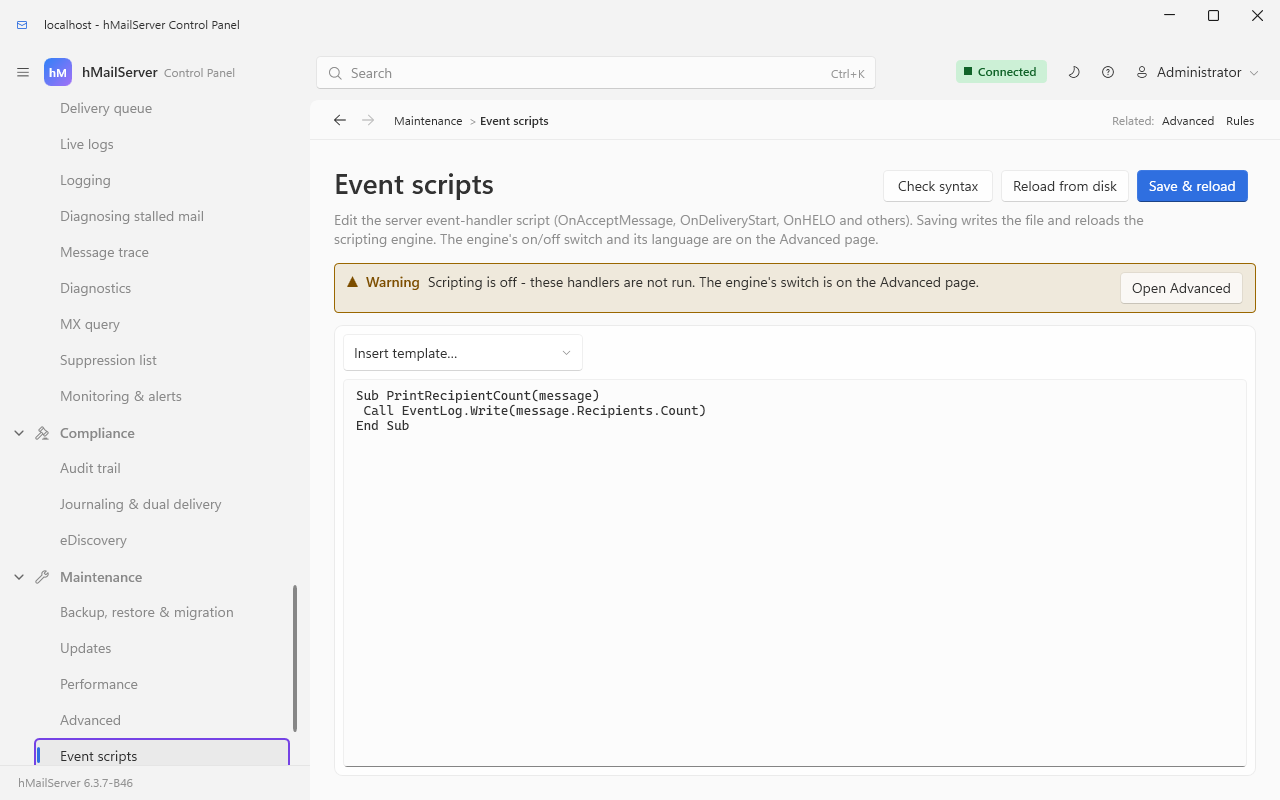
| Setting | Where | Default | Notes |
|---|---|---|---|
Settings.Scripting.Enabled |
Maintenance → Advanced → Scripting | off | Nothing fires while this is off |
Settings.Scripting.Language |
Maintenance → Advanced → Scripting | VBScript |
Or JScript on Windows; JavaScript on Linux (6.3.4). Since 6.3.4 all three words are accepted on both platforms, in any case, and stored as spelled here; any other word is refused and nothing is stored. A language the build does not run is refused when the script is loaded (below) |
Settings.Scripting.Directory |
[Directories] EventFolder in the INI |
<install>\Events |
|
Settings.Scripting.CurrentScriptFile |
derived |
<EventFolder>\EventHandlers.vbs or .js
|
One file. There is no include mechanism |
ScriptTimeout |
INI [Settings]
|
60 seconds | 0 disables the watchdog |
ScriptAllowedObjects |
INI [Settings]; editor on Maintenance → Advanced → Scripting |
* |
Section 23.9 |
Settings.Scripting.Reload() re-reads the file, CheckSyntax() compiles it and
returns the error text (empty means clean). The Control Panel's Save & reload
button writes a .bak first, then does both. Over REST the same are PUT /api/v1/settings/scripting (enabled, language), POST /api/v1/settings/scripting/reload and POST /api/v1/settings/scripting/check.
| Language | Windows | Linux | Engine | File |
|---|---|---|---|---|
VBScript |
runs | refused at load | Windows Active Scripting (vbscript.dll) |
EventHandlers.vbs |
JScript |
runs | refused at load | Windows Active Scripting (jscript.dll), ECMAScript 3 |
EventHandlers.js |
JavaScript |
refused at load | runs | QuickJS 2026-06-04 since 6.3.6 (2025-04-26 in 6.3.4 and 6.3.5), vendored as source and built into the server, ES2025 | EventHandlers.js |
Up to 6.3.3 a Linux server had no script engine at all and refused any script. From
6.3.4 the Linux builds run event scripts in JavaScript, in Fabrice Bellard's QuickJS
engine: the same fifteen events, under the same function names, with the same objects
under the same names, and a rule's Run script function action as on Windows. The Windows
builds keep VBScript and JScript, untouched, and refuse JavaScript at load; the Linux
builds refuse the other two. The setting is seeded VBScript on every platform, since
the database scripts are shared, so a Linux server switching scripting on sets
JavaScript first:
hmctl settings set scripting --set-string language=JavaScript
sudo -u hmailserver tee /var/lib/hmailserver/events/EventHandlers.js <<'EOF'
function OnAcceptMessage(client, message) {
   if (message.Subject.includes('[URGENT]') && !client.Authenticated) {
      Result.Value = 2;
      Result.Message = 'Urgent mail comes from people who have logged on.';
   }
}
EOF
hmctl settings set scripting --set enabled=true
then POST /api/v1/settings/scripting/reload. GET /api/v1/status says which languages
a build runs, under build.script_languages (["VBScript","JScript"] on Windows,
["JavaScript"] on Linux). A language the build does not run is refused when the
script is loaded - one line, HM5016 at a start or HM5710 at a reload (the earlier
script then stays in force), naming the language to use - not once per event.
What a JavaScript handler cannot do, which is the point of the engine:
-
No file system, no network, no processes. QuickJS's
stdandosmodules (quickjs-libc.c) are not in the tree, no module loader is installed (importis refused), and there is noprintorconsole.CreateObjectandnew ActiveXObjectexist only to throw aTypeError, since COM is Windows, soScriptAllowedObjects(23.9) has nothing to apply to on Linux. A handler changes only what its objects change - a message's file throughSave(), a copy throughCopy(), the event log throughEventLog.Write. -
Not every COM member is there.
Message.AttachmentsandMessage.Headersare not (read and write a header withHeaderValue(name)andSetHeaderValue(name, value), a flag withFlag(n)andSetFlag(n, on), since JavaScript has no parameterised property assignment); a fetch account and an account are read-only, and their secrets, collections and methods (Password,Save,Delete,MoveToand the rest) are not there.InternalDateis text,yyyy-mm-dd hh:mm:ss. Names are case-sensitive and spelled as the IDL spells them, so JScript'smessage.FileNameismessage.Filename.null, notNothing, stands for an object an event does not have. -
Bounded.
ScriptTimeoutbounds each run (HM7341when a handler is stopped), each run may allocate 64 MB (HM7342) and use 512 KB of stack; a fresh engine is made for every event and freed after it, as on Windows.Result.ValueandResult.Parametertake a whole Number and nothing else - a string,nullor a fraction throws, and the event goes on with theResultit had.
The member-by-member contract, a ported handler and every error code are in the repository's EventScripts.md. This wiki's copy of it is Event Scripts.
sequenceDiagram
    participant Srv as Server thread
    participant SS as ScriptServer
    participant Eng as Script engine
    participant Fn as Your handler
    Srv->>SS: FireEvent OnAcceptMessage, with the caller line and the objects
    SS->>SS: Is scripting enabled - if not, return
    SS->>SS: Is OnAcceptMessage declared in the loaded script - if not, return
    SS->>SS: Take the script text and the language together, under one lock
    SS->>Eng: New engine, then publish HMAILSERVER_CLIENT, HMAILSERVER_MESSAGE and Result
    SS->>Eng: Add the WHOLE script file, then one more line calling the handler
    Note over SS,Eng: Watchdog armed for ScriptTimeout seconds
    Eng->>Eng: Run every top-level statement in the file
    Eng->>Fn: Then call your handler
    Fn-->>Eng: Sets Result.Value and Result.Message
    Eng-->>SS: Returns
    SS->>SS: Disarm the watchdog and terminate the engine
    SS-->>Srv: The server reads Result and acts
Two consequences of that picture, both of which surprise people:
- The whole file is re-parsed and re-executed for every single event. Code outside a function runs on every message, every connection, every error. Put nothing at the top level except constants and function declarations - no database connections, no file opens, no loops.
- Nothing is shared between events. A fresh engine is created and terminated each time, so there are no globals that survive, and no state you can accumulate in memory. Use a file, or the database, or a header on the message.
On VBScript and JScript the "one more line" is source text the server builds, with the event's values - a password, a remote UID, an error text, a recipient - written into it as string literals. On JavaScript (Linux, 6.3.4) nothing is built: the handler is called with the values as values, so no quote or backslash in a value can end a string.
Up to 6.3.3 a password could run code inside the server. On Windows, with scripting
on, the language JScript and an OnClientValidatePassword handler in EventHandlers.js,
any client that could reach a sign-in - SMTP AUTH, POP3, IMAP or anything else that
checks an account's password - and name an existing, active account could have JScript of
its own run inside hMailServer.exe, with the rights of the service's account, before it
had authenticated. The server escaped the apostrophe in the value but not the backslash
before it, and JScript's escape character is the backslash, so a password ending its
string with \' ran whatever followed. With ScriptAllowedObjects at its shipped *
(23.9) that code could create WScript.Shell and run any command the service's account
may. The same shape was open to a remote POP3 server through the UID it answers
(OnExternalAccountDownload), and to a remote mail server through the error text it
refuses a delivery with and the failed recipient's address (OnDeliveryFailed), each on
a JScript server with that handler. The code was there in every release from 6.0.0 to
6.3.3. VBScript servers were not open through a password, a UID or an error text, and
the Linux builds had no script engine. The flaw is CVE-2026-100741 (CVSS 3.1 base score
9.8); the project's issue #43
is its public record.
Since 6.3.4 (commit 5a3de9001) every JScript value is escaped in one helper
(ScriptServer::EscapeForJScriptLiteral): the backslash first, then both quotes, CR,
LF, U+2028, U+2029 and NUL; OnBackupFailed's reason, which neither language escaped,
is escaped in both. What that means for you:
-
Upgrade any Windows server that runs a JScript
EventHandlers.jswith one of those handlers; until you can, switch scripting off or move the handler to VBScript, and consider narrowingScriptAllowedObjects(23.9) from*. - Your handlers now receive every value exactly as it was, backslashes included. A handler that undid the old half-escaping by hand - stripping a backslash before an apostrophe - must stop doing so.
-
A rule's Run script function name must be a plain identifier: ASCII letters, digits,
_and$, not starting with a digit, and nothing else - no brackets, no arguments, no second statement. The name was written into the call unescaped in either language, so whoever may edit a rule, a domain's own administrator included, could run code the same way. A name that is not a plain identifier is refused asHM5018each time the rule matches, and nothing is run. Check your rules' Run script function actions after the upgrade and rename any function that does not qualify.
Reporting a security problem goes through a
GitLab confidential issue
or the Service Desk address contact-project+hmailserver-hmailserver-86730559-issue-@incoming.gitlab.com,
or, since 18 October 2026, GitHub's private vulnerability reporting on the project's repository there,
https://github.com/RainbowWizard-coder/hMailServer/security/advisories/new (Security Policy).
Every handler is optional. The server checks, when the script is loaded, which of these names the file declares, and fires only those - so an absent handler costs nothing at all.
| Handler | Called as | Fires when |
Result is read? |
|---|---|---|---|
OnClientConnect |
(HMAILSERVER_CLIENT) |
Any TCP connection is accepted, before a greeting | Yes |
OnHELO |
(HMAILSERVER_CLIENT) |
The SMTP client sent HELO or EHLO | Yes |
OnClientLogon |
(HMAILSERVER_CLIENT) |
An SMTP, POP3 or IMAP client finished a logon attempt - successful or not. Client.Authenticated says which, and Client.Username names who was tried. This is the hook to build auditing or a script-side lockout on |
no |
OnClientValidatePassword |
(HMAILSERVER_ACCOUNT, "password") |
A password is being checked, before the built-in check | Yes |
OnSMTPData |
(HMAILSERVER_CLIENT, HMAILSERVER_MESSAGE) |
The DATA command arrived, before the body | Yes |
OnAcceptMessage |
(HMAILSERVER_CLIENT, HMAILSERVER_MESSAGE) |
The body has been received and is about to be queued | Yes |
OnRecipientUnknown |
(HMAILSERVER_CLIENT, HMAILSERVER_MESSAGE) |
A RCPT TO named an address this server does not host | no |
OnTooManyInvalidCommands |
(HMAILSERVER_CLIENT, HMAILSERVER_MESSAGE) |
An SMTP client sent too many invalid commands | no |
OnDeliveryStart |
(HMAILSERVER_MESSAGE) |
First step of a delivery attempt, before virus scanning | Yes |
OnDeliverMessage |
(HMAILSERVER_MESSAGE) |
After virus scanning and global rules, before the recipient split | Yes |
OnDeliveryFailed |
(HMAILSERVER_MESSAGE, "recipient", "error") |
Once per failed recipient; may fire several times per message | no |
OnExternalAccountDownload |
(HMAILSERVER_FETCHACCOUNT, HMAILSERVER_MESSAGE, "uid") |
A message was fetched from an external POP3/IMAP account. The message argument is Nothing/null when there is no message |
Yes |
OnError |
(severity, id, "source", "description") |
Anything is written to the ERROR log | no |
OnBackupCompleted |
() |
A backup finished | no |
OnBackupFailed |
("reason") |
A backup failed | no |
OnError's severity is 1 Critical, 2 High, 3 Medium, 4 Low, and its id
is the HM<nnnn> number without the prefix. Reporting an error from inside
OnError would fire it again, so the server sets a per-thread guard for the
duration of the dispatch - but a handler that raises a script error inside
OnError is still the one place a runaway is easy to write.
Result is published into the script for the events marked above. Set
Result.Value, and for the refusal cases Result.Message.
| Event | Result.Value |
Effect |
|---|---|---|
OnClientConnect |
1 |
Disconnect immediately, before the greeting |
OnHELO |
1 |
554 5.7.1 Rejected |
2 |
554 5.7.1 <Result.Message> |
|
3 |
453 4.7.0 <Result.Message> - a temporary refusal |
|
OnSMTPData |
1 / 2 / 3
|
Exactly as OnHELO
|
OnAcceptMessage |
1 / 2 / 3
|
Exactly as OnHELO. This is the usual place to reject a message |
OnClientValidatePassword |
0 |
Let the user in without checking the password |
1 |
Refuse the logon | |
anything else (default 2) |
Fall through to the normal check | |
OnDeliveryStart |
1 |
Delete the message; logged as "Action triggered by script subscribing to OnDeliveryStart" |
OnDeliverMessage |
1 |
Delete the message; the same log line, naming OnDeliverMessage
|
OnExternalAccountDownload |
1 |
Delete from the remote server immediately |
2 |
Delete after Result.Parameter days |
|
3 |
Never delete from the remote server |
Since 6.3.6 the three answers mean the same for an IMAP external account as for a
POP3 one. From 6.2.25 to 6.3.5 an IMAP account read 1 as keep and 3 as delete;
a script written to that reading is to be changed.
Everything else - OnClientLogon, OnRecipientUnknown,
OnTooManyInvalidCommands, OnDeliveryFailed, OnError, OnBackupCompleted,
OnBackupFailed - is notification only. Setting Result there does nothing.
OnClientValidatePasswordreturning0is a full authentication bypass for that account, on every protocol. It is the single most dangerous line you can write in an event script. If you use it to bridge to another directory, fail closed: return1when your lookup errors, not0.
HMAILSERVER_CLIENT - Port, IPAddress, Username, HELO,
Authenticated, EncryptedConnection, CipherVersion, CipherName,
CipherBits, SessionID. All read-only. The cipher properties are populated
only on a TLS connection.
HMAILSERVER_MESSAGE - the full Message interface: Subject, From,
FromAddress, To, CC, Date, Body, HTMLBody, Charset, Attachments,
Headers, HeaderValue(name) (read and write), Recipients,
AddRecipient, ClearRecipients, HasBodyType, Flag(eMessageFlag), Size
(KB), State, DeliveryAttempt, Filename, UID, InternalDate, Copy,
RefreshContent, Save.
HMAILSERVER_ACCOUNT (OnClientValidatePassword only) - a freshly loaded
Account, deliberately not the cached one.
HMAILSERVER_FETCHACCOUNT (OnExternalAccountDownload only) - the external
account the message came from.
Result - Value (long), Parameter (int), Message (string).
EventLog - published into every event, whether or not the event has a
Result. EventLog.Write("text") appends a line to
<log directory>\hmailserver_events.log. This is the debugger for event scripts:
there is no console, no breakpoint and no state that survives the call, so a
Write at the top of a handler is how you find out whether it ran at all.
Sub OnClientLogon(oClient)
   Call EventLog.Write("logon " & oClient.Username & " from " & oClient.IPAddress & _
                       " ok=" & CStr(oClient.Authenticated) & _
                       " tls=" & CStr(oClient.EncryptedConnection))
End Sub
produces, one tab-separated line per call:
4812 "2026-09-08 11:04:22.117" "logon alice@example.com from 203.0.113.9 ok=True tls=True"
Sub OnAcceptMessage(oClient, oMessage)
   ' Tag likely invoice fraud, but do not refuse it - a false positive here
   ' would lose real mail, and the tag lets a rule or a Sieve script file it.
   If InStr(LCase(oMessage.Subject), "urgent invoice") > 0 Then
      oMessage.HeaderValue("X-Suspicious") = "possible-invoice-fraud"
      oMessage.Save
   End If

   ' Refuse anything from one sender, with a reason the sender can read.
   If LCase(oMessage.FromAddress) = "spammer@example.org" Then
      Result.Value   = 2
      Result.Message = "This server does not accept mail from that address."
   End If
End Sub
oMessage.Save is what writes the header back to the file on disk. Without it,
the change is lost when the engine is torn down.
The Control Panel's Insert template... button on the Event scripts page
supplies three ready-made OnAcceptMessage starters: an external antivirus or
DLP call, a webhook, and an HTTP API verdict.
A rule's Run script function action calls any function in the same file:
Function StampReceivedDate(oMessage)
   oMessage.HeaderValue("X-Received-Date") = Now()
   oMessage.Save
End Function
It is invoked as StampReceivedDate(HMAILSERVER_MESSAGE), with Result
published but ignored, and the message is reloaded from disk afterwards, so
anything you save is visible to the rest of the rule set. See
Rules and Sieve. Since 6.3.4 the action names the function alone, as a plain
identifier - StampReceivedDate, not StampReceivedDate(x) or anything after it -
and any other name is refused as HM5018 each time the rule matches (23.6, The JScript
escaping fix). On Linux the function is a JavaScript one in EventHandlers.js, called
with the message as its argument.
Event scripts run inside the mail flow, on the thread that is doing the work.
| Situation | What happens |
|---|---|
| The script takes a long time | Everything behind it waits. An OnAcceptMessage that takes two seconds caps this server at one message every two seconds on that connection |
The script exceeds ScriptTimeout (default 60 s) |
A watchdog interrupts the engine. HM5019 at High severity: "The script <event> did not complete within N seconds and was interrupted. An interrupt aborts script execution, but cannot release a handler which is blocked inside a COM call." When it is OnError itself that was killed, the message goes to the log without firing OnError again |
| The script raises an error | The engine reports it; the event's Result keeps whatever it had, which for most events means "carry on" |
| The script file does not compile on reload | HM5710: the previous script stays in force, whole - contents, language and handler flags together. On a cold start it is HM5016 instead: nothing is registered until it is fixed |
| Top-level code in the file hangs | HM5021, and the load is abandoned: "Code outside a function runs when the file is loaded, so it must return promptly. The script has not been loaded." Handler discovery would otherwise run the file another fifteen times |
| An exception escapes the load | HM5017; whatever was loaded before is untouched |
| The language is one this build does not run (VBScript or JScript on Linux, JavaScript on Windows) | HM5016 at a start, HM5710 at a reload with the earlier script kept - once per load, naming the language to use (6.3.4) |
| A rule's Run script function name is not a plain identifier | HM5018 each time the rule matches; the function is not run (6.3.4) |
A JavaScript handler runs past ScriptTimeout, or past its 64 MB |
HM7341, or HM7342; the event goes on with the Result the handler had set (Linux, 6.3.4) |
A load is deliberately all or nothing. The handler flags gate
security-relevant events - OnClientLogon and OnClientValidatePassword among
them - so the server must never advertise a handler it cannot run. Keeping the
last known-good script is the conservative choice: a typo in a hot reload must
not silently switch off an anti-spam or a logon hook on a running server.
The advice is old and it is still the advice, for a reason this page can now name: an event script is code running as the service's account - LocalSystem on most Windows installations older than 6.3.4 - on the thread that delivers your mail, re-executed from the top for every event, with the power to accept a logon and to delete a message. Try it somewhere else first.
Until this setting existed, CreateObject (VBScript) and new ActiveXObject
(JScript) could instantiate any COM class on the machine:
WScript.Shell runs programs, Scripting.FileSystemObject reads and writes the
disk, ADODB.Connection opens databases. A writable script file was therefore
the same thing as a shell as LocalSystem.
The script engines ask their host before creating an object - the
IInternetHostSecurityManager mechanism Internet Explorer used to sandbox pages -
and ScriptAllowedObjects is the answer the host gives.
[Settings]
; Any class at all - the behaviour before the setting existed, and still the default
ScriptAllowedObjects=*

; Nothing beyond hMailServer's own objects
ScriptAllowedObjects=

; Exactly these, by ProgID or by CLSID in braces
ScriptAllowedObjects=WScript.Shell,MSXML2.ServerXMLHTTP,{0D43FE01-F093-11CF-8940-00A0C9054228}| Value | Meaning |
|---|---|
| absent from the file | Treated as *. A setting introduced by an upgrade must not break the scripts an installation already runs |
* |
Every class |
| empty | No class. The objects the server hands the script - HMAILSERVER_MESSAGE and the rest - are unaffected; those are published, not created |
| a comma-separated list | Only those, matched on the registered ProgID (case-insensitively) or on the CLSID |
Matching is on the ProgID the class registers, so listing the version-independent name also covers the versioned one - both register the same class.
What a refusal looks like. The class fails inside the script with the engine's own can't create object error, 429, which the script can trap like any other failure, and one application-log line names the class and the setting. It is not a crash and not a silent no-op.
The editor is on the Scripting tab of Maintenance → Advanced, pre-filled
with * so that saving the page cannot turn "any object, as shipped" into "none"
behind a running script's back. It applies after a service restart.
The three templates the Control Panel inserts use
WScript.ShellandMSXML2.ServerXMLHTTP. If you tighten this setting, those two are the names to start your list with.
ScriptAllowedObjects is a Windows setting: the JavaScript engine of the Linux builds
creates no COM object of any kind, so there is nothing for it to allow (23.6).
| Symptom | Cause | Fix |
|---|---|---|
| Every property raises "You do not have access to this property / method" | Not authenticated, or authenticated as a domain administrator reaching outside the domain | Check Authenticate returned an object, not $null
|
Authenticate returns $null for the administrator and the password is right |
A second factor is enrolled | Read AdministratorTOTPEnabled, then AuthenticateWithCode
|
| A script that "worked" changes nothing |
Add() without Save(), or a property set on an object that was released before Save()
|
Add Save(). In PowerShell, keep the object in a variable rather than chaining |
| Early-bound C# breaks after an upgrade | The interop assembly is stale | Regenerate it. Members are appended, never reordered, so a regenerate is all that is needed |
| No event ever fires |
Settings.Scripting.Enabled is off; or the language does not match the file extension; or the file declares no handler by an exact name |
Check Settings.Scripting.CurrentScriptFile names the file you are editing, then Check syntax
|
| One event fires and another does not | Handler names are matched exactly. OnErrorLog is not a handler; the name is OnError
|
|
| Events stopped firing after an edit | The reload failed and the previous script is still in force - HM5710 | Read the error log; it quotes the compile error |
| Nothing is compiled, and no error is reported, while scripting is off (6.3.6) | With scripting off the event script is not compiled at start, reinitialise or reload, and no script engine runs; switching scripting on compiles it, and a script that does not compile is reported then | Switch scripting on, then read the error log |
| Mail is slow, and the slowness scales with volume | Top-level code in the script file, executed once per event | Move it inside a function |
| HM5019 in the log | A handler hit ScriptTimeout
|
Make the handler faster, or raise ScriptTimeout. An interrupt cannot release a handler blocked inside a COM call |
CreateObject fails with 429 for a class that exists |
ScriptAllowedObjects does not list it |
Add its ProgID, or set *, then restart the service |
| A rule's Run script function stopped working after the upgrade to 6.3.4, with HM5018 | The action's name is not a plain identifier (brackets, arguments, a space) | Put the function's bare name in the action |
| A JScript handler that compared a value with a backslash in it behaves differently after 6.3.4 | Values now arrive exactly as they were; before, a backslash before an apostrophe was mangled | Remove any code that compensated for the old escaping |
| A property set over COM on a route, relay, DNS black list, SURBL server, remote domain policy, server message, blocked attachment, SSL certificate or group does nothing since 6.3.4 | The change is on the object's own copy until Save() (23.3) |
Call Save(), then read the item again from its collection |
| No script runs on Linux, and HM5016 or HM5710 names JavaScript | The language is still the seeded VBScript
|
Set the language to JavaScript and reload |
| Subject | File |
|---|---|
| Interfaces, coclasses, enumerations, help strings | hmailserver/source/Server/hMailServer/hMailServer.idl |
| Authentication, anonymous administrator, the refusal text |
Server/COM/COMAuthentication.cpp, COMAuthenticator.h
|
The LoadSettings / GetAccessDenied pattern |
any Server/COM/Interface*.cpp
|
| Event dispatch, the per-event re-execution, the watchdog, the all-or-nothing load, the JScript and VBScript escaping helpers, the rule function name check |
Server/Common/Scripting/ScriptServer.cpp and .h
|
| The JavaScript engine on Linux and what each object has there |
Server/quickjs (QuickJS 2026-06-04 since 6.3.6), Server/Common/Scripting/ScriptBinding.cpp, hmailserver/docs/EventScripts.md
|
| A COM change to a shared configuration object written onto a copy |
Server/COM/COMCollection.h (AttachSharedParent, Writable_, PublishSaved_), ARCHITECTURE.md
|
Which events exist and what Result means |
Server/Common/Scripting/Events.cpp, Server/SMTP/SMTPConnection.cpp, Server/Common/TCPIP/TCPServer.cpp, Server/Common/Util/PasswordValidator.cpp, Server/ExternalFetcher/ExternalFetchClientBase.cpp, Server/Common/Application/ErrorManager.cpp, BackupManager.cpp
|
| The object-creation policy and how a refusal is produced |
Server/Common/Scripting/ScriptObjectPolicy.cpp, ScriptSite.h
|
ScriptTimeout, ScriptAllowedObjects, EventFolder
|
Server/Common/Application/IniFileSettings.cpp |
| Shipped example scripts | hmailserver/Addons/Utilities |