Repository navigation
Security Hardening
This page began as a chapter of the 6.2.10 manual and has been corrected against the code of 6.2.28. The Control Panel's pages are grouped differently now, so the paths below use today's groups; the TLS ports 465, 993 and 995 exist only after you create them on the TCP/IP ports page (a fresh install seeds 25, 587, 110 and 143); and everything added since 6.2.10 is in Changes Since 6.2.10. Where a value here disagrees with the Settings Reference, which is generated from the code, the reference is right. Brought up to 6.3.4 (27 September 2026, schema 6104), against master 92b8f9f63 (the release is the tag v6.3.4,
51e2dbda0, which adds a last batch to that tree; Changes-Since-6210 section 4e). Brought up on 5 October 2026 to 6.3.6 (6 October 2026, schema 6108), for what 6.3.6 changes on this page. 6.3.7, the latest release (17 October 2026, schema 6108), is not yet reflected here.
Where the
[Settings]blocks on this page are set. On 6.3.3 and earlier they are keys ofhMailServer.ini, changed in the file or on the Control Panel page named beside them, and applied at the next service start. Since 6.3.4, schema 6042 makes the database the store for them: a value typed into the file for a key the database holds is reported as HM5804 at the next start and not used, its line put back where the service may write the file (underNT SERVICE\hMailServer, to which the file is read-only, the edit stays in the file - The Service Account), so each is changed on its Control Panel page, withPUT /api/v1/settings/ini/{name}, withhmctl ini set <name> <value>, or with COMSettings.SetIniSetting- and applies when it is saved for 211 of the 241 keys, the rest waiting for a reinitialise or a restart as the field says. Every setting can also be set by the server's environment (HM_SETTING_<key>,HM_PROPERTY_<name>), which then refuses an administrator's change to it (Profiles and Environment). Two exceptions stay in the file:PasswordPepper(§17.2) and the[SendingLimits]sections (§17.5). The whole change is in Settings Overview.What 6.3.4 changes on this page. Three things apply without a switch: a new installation is secure before anyone configures it - a self-signed certificate, STARTTLS on 25, 587, 110 and 143, and TLS required for authentication on the Internet range (§17.1) - and runs the Windows service as
NT SERVICE\hMailServerrather than LocalSystem (§17.3), while an upgrade keeps its listeners, ranges and account; and the JScript escaping fix closes a way for a password to run code inside the server (§17.11). Each account's second factor and the[Settings]secrets are sealed under a stored-secrets key once the installation has one (§17.2b), and the database connection is encrypted whenever the database server offers TLS (§17.12). The rest is off or inert until set: passkeys, single sign-on over OpenID Connect and SAML, SCIM provisioning, account recovery, the breach check and devices and sessions (§17.2a); administrator roles and passkeys for the administrator (§17.4); compromised-account detection (in watch mode) and country blocking (§17.5a); verified send-as, masked addresses and restricted delivery (§17.7a); and mailbox encryption at rest (Encryption and Certificates). The checklist in §17.10 has a row for each.
-
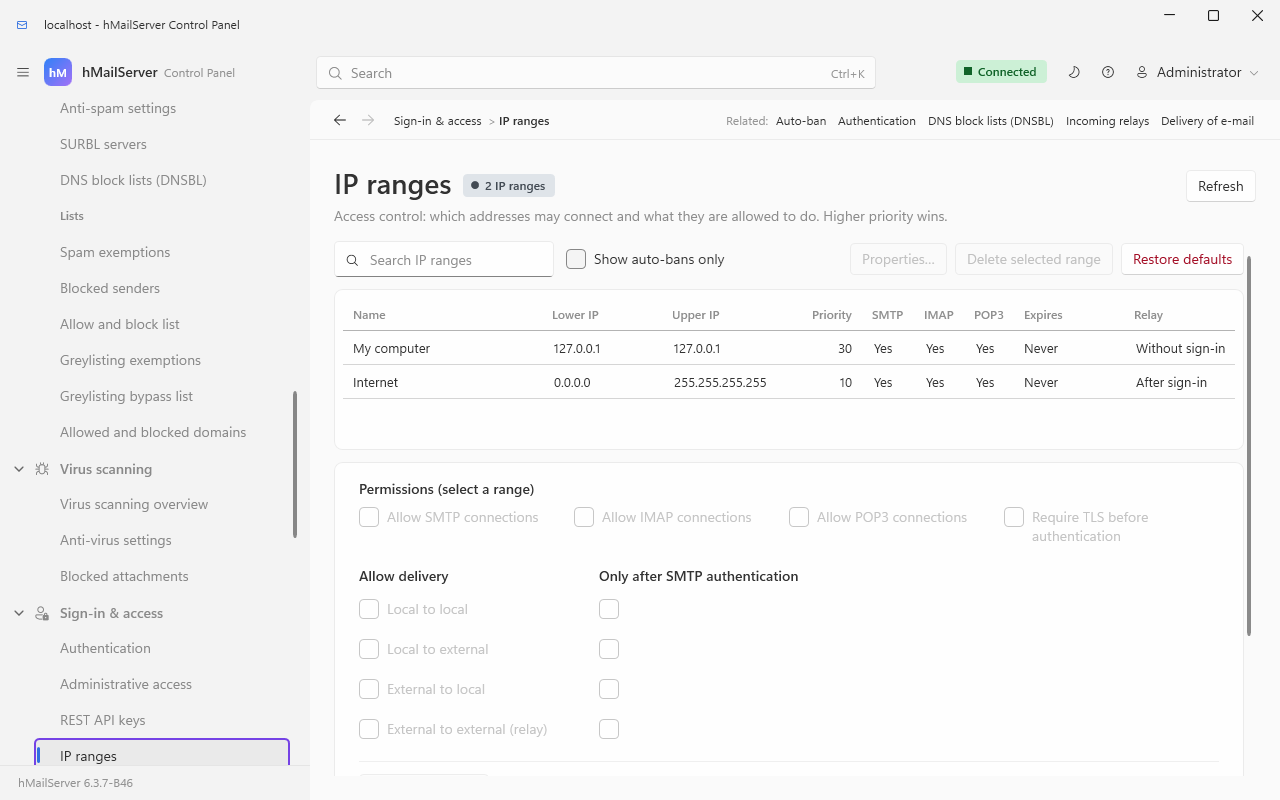
Never become an open relay. hMailServer's shipped defaults are safe; the danger is a careless IP range. Check Sign-in & access → IP ranges and make sure no external range is allowed to relay without authentication.
-
Auto-ban blocks an IP after repeated failed logins. On by default — leave it on. Tune it under Sign-in & access → Auto-ban.
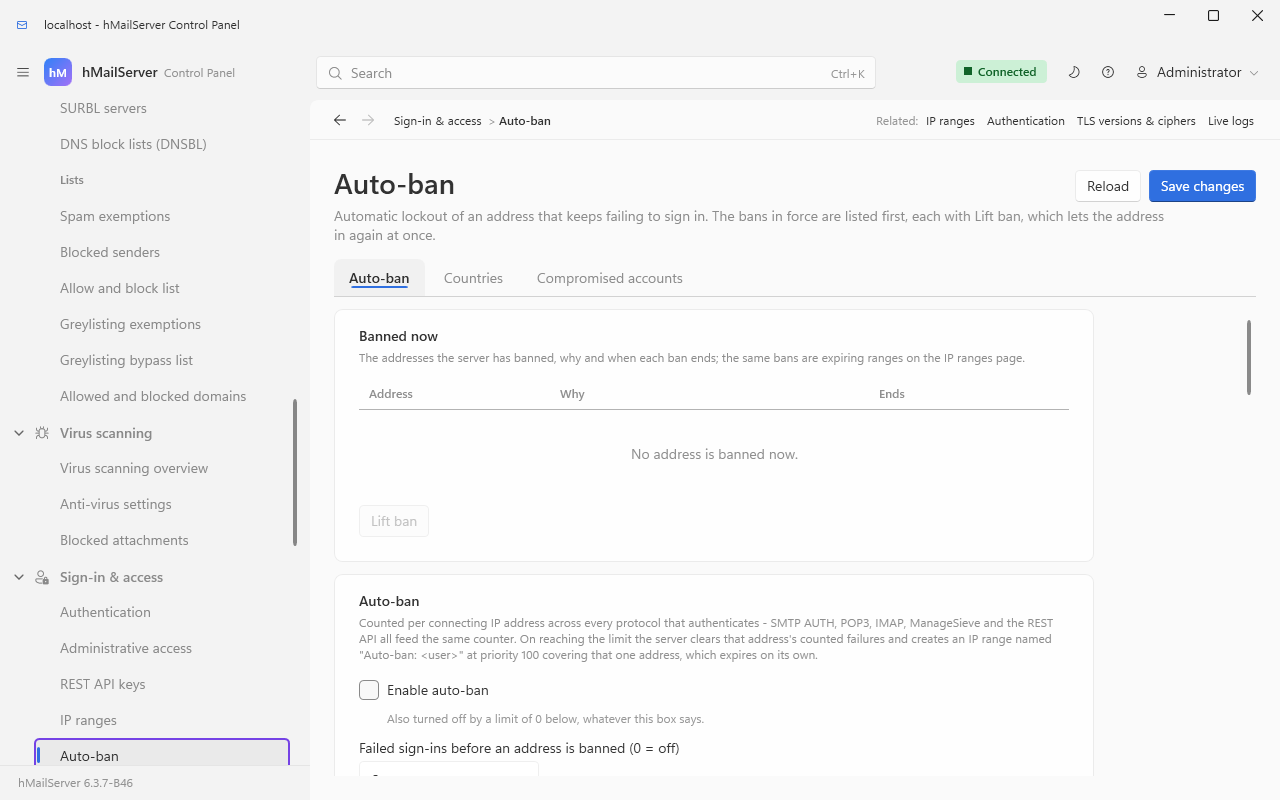
Auto-ban was once the third tab of the SSL/TLS page; by 6.2.28 it was a page of its own, now Sign-in & access → Auto-ban, with the four settings tabulated in §17.5, and the protocol-version half is Certificates & encryption → TLS versions & ciphers.
-
Require TLS. Disable plaintext logins on ports reachable from the internet — that is §9.5 of Encryption and Certificates, plus the "Require TLS for auth" range option below. A new installation since 6.3.4 starts that way: the installer (or, on Linux, the unit's first start) gives a database it created a self-signed certificate, STARTTLS on every seeded listener and "Require TLS for auth" on the Internet range, and leaves My computer as it was (SecureDefaults.md). An upgraded server is never changed; the setup checklist's Passwords only over TLS item judges it, and offers the range's change once every listener can start TLS. This wiki's copy of that document is Secure Defaults.
-
Strong passwords everywhere. Use the generator in the account dialog, and consider the password policy in §17.2.
Two decisions are made for every RCPT TO, in this order, and they are separate: may this
address relay at all, and must it authenticate first
(Server/SMTP/SMTPConnection.cpp).
flowchart TD
    A["RCPT TO arrives"] --> B["Classify the sender:<br/>local if its domain is a hosted<br/>active domain, or a route says so"]
    B --> C["Classify the recipient:<br/>local or remote"]
    C --> D{"Does the matching IP range<br/>allow this combination?"}
    D -- no --> R550["550 Delivery is not allowed to this address."]
    D -- yes --> E{"Does the range require SMTP<br/>authentication for this combination?"}
    E -- "yes, and not authenticated" --> R530["530 SMTP authentication is required."]
    E -- "no, or authenticated" --> OK["Recipient accepted, 250 2.1.5"]
The four combinations are configured independently, twice — once as "may they" and once as "must they authenticate". The two shipped ranges set them like this:
Internet (priority 10, 0.0.0.0–255.255.255.255) |
My computer (priority 30, 127.0.0.1) |
|
|---|---|---|
| Allow SMTP / POP3 / IMAP | yes / yes / yes | yes / yes / yes |
| Deliver local → local | allowed, auth required | allowed, no auth |
| Deliver local → remote | allowed, auth required | allowed, no auth |
| Deliver remote → local | allowed, no auth | allowed, no auth |
| Deliver remote → remote (relay) | allowed, auth required | allowed, auth required |
| Enable anti-spam | on | on |
| Enable anti-virus | on | on |
| Require TLS for auth | off as the create script seeds it; on once a 6.3.4 installer or first start has secured a new installation | off |
(Decoded from the rangeoptions bitmask in the hm_securityranges seed rows: 96203 for
Internet, 71627 for My computer. The bit values are in
Server/Common/BO/SecurityRange.h.)
Read that table as the open-relay defence: remote → remote requires authentication on every shipped range, and it is the only combination that requires it even from localhost. "Remote → local" is ordinary inbound mail and correctly needs no authentication.
The highest priority matching range wins. Auto-ban creates its bans at priority 100, above both shipped ranges, which is what makes a ban effective.
Two range options change behaviour elsewhere on this wiki. Clearing Enable anti-spam for a range turns off every spam test, greylisting and the recipient tarpit for it (Stopping Spam §10.1). Clearing Enable anti-virus means messages from it are never flagged for scanning (Stopping Viruses §11.1).
"Require TLS for auth" is a range option, not a port option. With it set,
AUTHis not advertised at all on a cleartext connection from that range — on SMTP, POP3, IMAP and ManageSieve alike. That matters more than it sounds: before this was fixed,EHLOofferedAUTH LOGIN PLAIN SCRAM-SHA-256and theAUTHthat followed was answered530, by which time the client had already put the base64 password on the wire.
| Mechanism | SMTP | IMAP | POP3 | Advertised when |
|---|---|---|---|---|
LOGIN |
yes | via LOGIN command |
USER/PASS
|
Always, unless AUTH is refused on this connection |
PLAIN |
yes | AUTH=PLAIN |
SASL PLAIN |
Only while the protocol's plain-text setting is on |
SCRAM-SHA-256 |
yes | AUTH=SCRAM-SHA-256 |
SASL … SCRAM-SHA-256 |
Whenever AUTH is available — independent of the plain-text setting, because the password never crosses the wire |
SCRAM-SHA-256-PLUS |
yes | AUTH=SCRAM-SHA-256-PLUS |
yes |
TLS connections only — it binds the exchange to the server certificate (RFC 5802 + RFC 5929 tls-server-end-point) |
XOAUTH2, OAUTHBEARER
|
yes | yes | yes |
OAuth2Enabled=1, and over TLS unless OAuth2RequireTLS=0
|
EXTERNAL |
yes | yes | yes | Exactly when this connection presented a client certificate that verified against the port's CA bundle and names an address (§9.4 of Encryption and Certificates) |
IMAP additionally advertises LOGINDISABLED when it will not accept LOGIN on this
connection, so a client knows before it sends the password in the clear (RFC 2595 §3.1).
DisableAUTHList (a comma-separated list of local TCP ports) suppresses AUTH entirely on
the ports you name — for example a port 25 that only takes inbound mail from other servers.
Configure this under Sign-in & access → Authentication, card Password storage.
| Value | Scheme | Suitable for a new password? |
|---|---|---|
| 0 | none — stored as typed | no |
| 1 | Blowfish — reversible | no |
| 2 | MD5 | no |
| 3 | SHA-256 | acceptable |
| 4 | PBKDF2-HMAC-SHA256 | the default |
| 5 | Argon2id | recommended, memory-hard |
| 6 | DPAPI — machine-bound, for stored secrets, not passwords | no |
| 7 | scrypt (RFC 7914) | recommended, memory-hard |
[Settings]
PreferredHashAlgorithm=5         ; 3, 4, 5 or 7. Anything else is refused and read as 4
MinimumAcceptedHashAlgorithm=4   ; refuse a logon whose stored hash is weaker. 0 = off
PasswordPepper=                  ; a server-wide secret mixed into Argon2id and scrypt hashes
PasswordHashIterations=0         ; PBKDF2. 0 = 210,000. Range 10,000 to 10,000,000
PasswordHashMemoryKB=0           ; Argon2id. 0 = 19,456 KiB. Range 4,096 to 1,048,576
PasswordHashTimeCost=0 ; Argon2id passes. 0 = 2. Range 1 to 20-
A
PreferredHashAlgorithmoutside {3, 4, 5, 7} is not silently accepted. It is reported as HM5528 and read as 4, because two of the call sites hand the value straight to the crypto layer as the scheme to store a new secret under — a 0 or a 1 there would write account passwords in a form anybody with the database can read back. -
Existing weaker hashes upgrade transparently on the next successful logon, and so
does a hash of the right scheme derived with a work factor you have since raised. The
upgrade is one-way: lowering a work factor later leaves stored hashes alone and applies
only to new ones, so backing out of an expensive setting does not rewrite every password
to something weaker. If the upgraded hash cannot be saved, the logon still succeeds on
the existing hash and the attempt is retried next time
(
Common/Util/PasswordValidator.cpp). -
MinimumAcceptedHashAlgorithmranks by strength, and Argon2id and scrypt are peers — setting it to 5 accepts either. -
PasswordPeppermust be set before accounts exist. Changing it later invalidates every existing password. It only affects Argon2id and scrypt hashes (Crypt::ApplyPepper_is called for those two schemes and no other), so PBKDF2 stays usable as the SCRAM salted password. -
Where the pepper lives decides what a restore needs. On 6.3.3 and earlier it is a
[Settings]key like the rest, mirrored intohm_inisettings, so a copy of the database and a built-in backup that includes settings both carry it - beside the hashes it is meant to be kept apart from. Since 6.3.4 it is the one[Settings]key kept out of the database: it stays inhMailServer.inionly, is never adopted into the store, and is left out of every backup; setting it over COM orPUT /api/v1/settings/ini/PasswordPepperwrites the file alone, and is refused with a sentence where the service may not write the file - underNT SERVICE\hMailServeran administrator sets it with an elevated editor and restarts the service (The Service Account) - and the first start of 6.3.4 deletes a row a 6.3.3 server stored, once the file holds the value in use. The consequence is the one to plan for: keep a copy of the file, or of this one value, with the backups. A database or an archive restored onto a machine whosehMailServer.inihas no pepper, or a different one, refuses the password of every account hashed with Argon2id or scrypt; restoring an archive taken on 6.3.3 writes its pepper into the file only when the file has none. A warm standby or a second node needs the same value in its own file (Warm Standby).
The defaults for the two work factors are the OWASP recommended minimums: 210,000 PBKDF2 iterations, and 19,456 KiB with 2 passes for Argon2id. Both are bounded at each end because both ends are a failure — below the floor is a hash an attacker brute-forces at leisure, above the ceiling is a logon the server cannot afford, since every verification runs on a connection thread.
All off until set, all in [Settings]:
PasswordPolicyMinimumLength=12
PasswordPolicyRequireMixedCase=1
PasswordPolicyRequireDigit=1
PasswordPolicyRequireNonAlphanumeric=1
PasswordPolicyRejectCommon=1        ; refuse passwords from a built-in common list
PasswordPolicyHistoryCount=5        ; refuse the last N passwords
PasswordPolicyMaximumAgeDays=0 ; 0 = passwords never expireSign-in and Identity is the whole walk; the part that bears on hardening:
| Feature | What it adds | Off, or inert, until |
|---|---|---|
| Passkeys (schema 6077) | A WebAuthn credential on the person's own device signs them in to the webmail - and the administrator in to the Control Deck - with user verification required on every assertion, so it stands in for the one-time code. Phishing-resistant: bound to this server's relying-party id | A person enrols one, proving their password again |
| Single sign-on | The webmail and the Deck sign in through the organisation's OpenID Connect issuer or SAML 2.0 identity provider (Entra ID, Okta, ADFS), ending in the same one-use ticket and browser session. An identity provider that says someone is an administrator is not obeyed: the Deck opens only for the addresses this server lists | An administrator names the issuer or identity provider |
| SCIM 2.0 provisioning (schema 6096) | The identity provider makes, renames, suspends and removes accounts at /scim/v2, under an API key whose role holds provision; a suspension or a new password ends the account's sessions and drops its connections |
A key is issued for it |
| Account recovery (schema 6076) | A recovery address, confirmed by a link, and ten one-time codes, so that a forgotten password is a half-hour link sent to the person's other mailbox rather than a ticket. The reset applies the same password policy, reuse history and breach check, and ends every browser session | A person sets an address, and the server has a public base URL for the links |
| The breach check | A new password is refused when it is in the published corpus of breached passwords, by a k-anonymity lookup that sends five characters of its SHA-1 and nothing else. Checked when a password is chosen, never at logon | breach_check_enabled |
| Devices and sessions (schema 6053) | Every client that has signed in as an account is listed - protocol, address, program, credential - and revoking one ends its browser session and live IMAP, POP3 and SMTP connections, and can turn off the app password it used. Four session policies per server and per domain: idle timeout, lifetime, one session per device, a session bound to its address | The list fills as clients sign in; the policies read 0, which keeps the ceilings the server always had |
None of these reaches IMAP, POP3 or SMTP: those still take the password, or an app password, and the protections in §17.5.
Until 6.3.4 three kinds of secret were kept as written: the administrator password as the
Windows installer wrote it (unsalted MD5), each account's TOTP second factor, and the
[Settings] keys that hold secrets. What changed
(SecretsAtRest.md):
| Secret | Since 6.3.4 |
|---|---|
The administrator password ([Security] AdministratorPassword) |
The installer has the server write it as PBKDF2 (hMailServer.exe --set-admin-password, the password in the environment, never on a command line). An older MD5 or SHA-256 value is written again as PBKDF2 at the first successful administrator sign-in - where the service can write the file; where it cannot (NT SERVICE\hMailServer, the Linux package's root-owned file) the old value stays and HM7494 says so once, and --set-admin-password from an elevated prompt (or sudo) rewrites it. A browser session started before the re-hash ends once |
Each account's TOTP second factor, and SRSSecret, BATVSecret, OAuth2HmacSecret, OAuth2IntrospectionClientSecret, OutboundOAuth2ClientSecret, OutboundOAuth2FixedToken, MetricsServerAuthToken, MetricsServerAuthPassword, ServiceAccountPassword and GssapiServicePassword
|
Sealed with AES-256-GCM under the installation's stored-secrets key (HMK1:), in the database row and in the file's line, once the installation has a key
|
The key is kept in each server's hMailServer.ini as [Security] StoredSecretsKey, under
DPAPI on Windows or the Linux key file, and never in the database or a backup; the
database records only its id. The Windows installer makes one on a new installation, and
the container's --create-database on Linux; an upgraded installation, and a package
installation on Linux, seal nothing until an administrator runs
--create-stored-secrets-key, which the setup checklist offers. Then:
# Windows, elevated, in the Bin folder
.\hMailServer.exe --export-stored-secrets-key D:\keys\hmailserver-stored-secrets.key
# Linux:  sudo hmailserver --export-stored-secrets-key /root/hmailserver-stored-secrets.key
Keep the exported file with the database backups, stored apart from them: a database
restored without the key opens no account's second factor and no [Settings] secret. The
checklist's The stored-secrets key item stays open until the key has been exported. A
second node or a warm standby takes the same key with --import-stored-secrets-key FILE
(Warm Standby, High Availability Runbook); a node without it says so as HM7495 at
every start and makes no key of its own. A key lost for good is recovered from by
--forget-sealed-secrets <key id>, which clears only what it sealed - every second factor
to enrol again, every [Settings] secret to enter again.
ProtectStoredSecretsWithDPAPI=0 keeps everything as written.
The whole of SecretsAtRest.md is on its own page, Secrets at Rest.
Since 6.3.4 a new Windows installation runs the service as NT SERVICE\hMailServer, the
service's own virtual account: no password, no account to create, and it reaches only the
folders it is granted. An upgrade keeps the account it has - LocalSystem, for an
installation that began before 6.3.4 - unless the installer's Service account page (or
/serviceaccount=virtual) moves it. The Linux packages have always run as a user of their
own (User=hmailserver). ServiceAccount.md
is the whole account; this wiki's copy of it is The Service Account.
To move a service that runs as LocalSystem: run the installer again and choose it; or use
the Move to NT SERVICE\hMailServer button on Server limits & expert settings, card
Windows service account; or, from an elevated Command Prompt in the Bin folder,
hMailServer.exe --confirm /GrantServiceAccess
hMailServer.exe --service-account virtual /Register
net stop hMailServer && net start hMailServer
running the second line only when the first ended in 0. /GrantServiceAccess gives the
account Modify on the program folder's own Data, Logs, Temp and Database, Read on its
other folders and nothing on hMailServer.INI; a folder the configuration names elsewhere,
or a certificate or key file outside those, is only reported until an administrator approves
it at the question --confirm asks. Since 6.3.6 the grant goes through a link the
administrators alone control - owned by BUILTIN\Administrators, SYSTEM or
TrustedInstaller, and nobody else may change it or remove it - the path it holds held from
that volume's root, every link on it asked about, on a fixed local drive; the grant is written
on the folder the link leads to. Any other link is still refused, the message naming who may
change it or who owns it; icacls <link> /setowner *S-1-5-32-544 /L and icacls <link> /inheritance:r /grant:r *S-1-5-32-544:(F) *S-1-5-18:(F) *S-1-5-32-545:(RX) /L give a link to
the administrators alone. Up to 6.3.5 the grant refused any junction, symbolic link or mount
point on the way (exit 1), so an upgrade over a Data, Logs or Database folder an
administrator had moved behind one failed. --service-account localsystem /Register goes back.
Who else on the computer may read the mail (6.3.6). Up to 6.3.5 the program folder's
Data, Logs, Temp, Database and Events and Bin\hMailServer.INI kept the permissions
Program Files hands down, which give BUILTIN\Users Read: every account that could sign in
to the computer could read the messages, the logs, the built-in database while the service was
stopped, the event scripts and hMailServer.INI - the database's password among it, sealed with
the machine's DPAPI key, which any account on the machine may use. 6.3.6's installer runs
hMailServer.exe /ProtectFolders at every installation and upgrade, whatever account the
service runs as, and an administrator may run it from an elevated prompt in Bin at any time:
hMailServer.exe --report-only /ProtectFolders says what it would make private and who may read
each now, and changes nothing (--report-only comes before the verb; after it, it is not read).
The six stop inheriting; every deny entry and every entry of their own is kept, SYSTEM and the
Administrators get full control and the service keeps its grant. A folder the configuration
names outside the program folder, a folder approved for the service, the backup, archive and PST
import folders, the key and certificate files the database names, and a key file with
permissions of its own in Data\Certificates, Data\DKIM or Data\ACME are checked, never
changed: a CHECK line names who may read each and the icacls that closes it. Exit codes: 0
each private, 1 one could not be made so, 2 not in an installation's Bin, 3 not run as an
administrator. A script, a backup program or a monitoring agent that read the logs or the
message store without running as an administrator needs an entry of its own
(icacls "<folder>" /grant "<account>:(OI)(CI)RX"), which later runs keep. An editor that saves
hMailServer.INI by replacing the file gives it Bin's permissions again: run /ProtectFolders
after it (The Service Account, What the other users of the computer may read).
ServiceAccountName and ServiceAccountPassword are no longer read (6.3.4):
/Register takes the account from --service-account alone, because those values are
written by hMailServer administrators and by the service, and an elevated /Register that
read them could be made to give the service LocalSystem back. On 6.3.3 and earlier they were
how the account was set, and applied at the next /Register.
What the virtual account cannot do, and what to check first.
hMailServer.INIis read-only to it, so a change of the administrator password over COM is refused, and made withhMailServer.exe /SetAdministratorPasswordfrom an elevated prompt instead; enrolling the administrator's second factor needs the service on LocalSystem for the enrolment. The live update is checked but installed by an administrator from the release page. The auto-ban's Windows Firewall rules (AutoBanFirewall) are refused (HM7460); the listeners still refuse a banned address. SQL Server with integrated authentication on the same machine needsCREATE LOGIN [NT SERVICE\hMailServer] FROM WINDOWSand adb_owneruser first. A custom virus scanner runs as the service account and must be able to read its own program and signatures (Stopping Viruses §11.2); the certificate and key files must be insideData\Certificatesor in an approved folder (Encryption and Certificates §9.2); and event scripts run with the account's rights. Change one thing at a time.
There are two, and the Control Panel's Sign-in & access → Administrative access page, Two-factor tab, carries both.
flowchart TD
    A["Administrator presents a password"] --> B{"Is a server-enforced<br/>second factor enrolled?"}
    B -- no --> C{"Is the Control-Panel-only<br/>code configured?"}
    C -- no --> IN["Access granted"]
    C -- yes --> D["Control Panel asks for a code<br/>after the server has already<br/>accepted the password"]
    D --> IN
    B -- yes --> E["The password alone is refused,<br/>everywhere"]
    E --> F["Control Panel prompts for a code,<br/>COM callers use AuthenticateWithCode,<br/>the REST API reads X-hMailServer-OTP"]
    F --> IN
-
Server-enforced (use this one). Enrolling a second factor on the administrator credential itself (
Settings.EnrolAdministratorTOTP, or the button on that tab) shows a scannable QR code; from then on the password alone is refused everywhere — the Control Panel, the REST API and COM scripts alike — and a code must be presented (Application.AuthenticateWithCode; the REST API reads it from anX-hMailServer-OTPheader, and answers a password-only request withX-hMailServer-OTP: required). The secret lives inhMailServer.INI([Security] AdministratorTotpSecret, DPAPI-protected);Settings.DisableAdministratorTOTPremoves it. -
Control-Panel-only (older, weaker). A code the Control Panel itself asks for after the server has already accepted the password. It does nothing for the REST API or for scripts. Its secret is stored under
HKLM, so turning it on or off needs the Control Panel run as administrator; the button Set up Control-Panel-only two-factor authentication… on Sign-in & access → Administrative access → Two-factor sets this one up (the sign-in card no longer carries a link).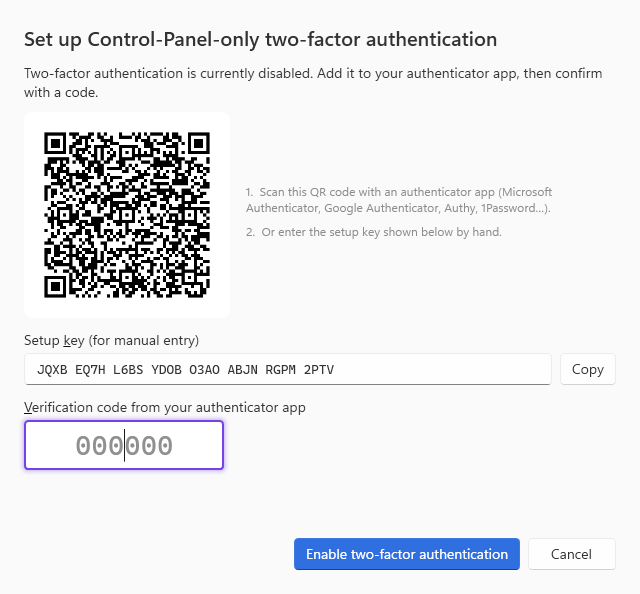
Scan the QR code with Microsoft Authenticator, Google Authenticator, Authy or 1Password and confirm with a code before you leave the dialog — the dialog rolls the enrolment back if you close it without confirming, precisely so a mis-scan cannot lock you out.
Since 6.3.4, the administrator can also enrol a passkey
for the Control Deck (its Passkeys view, /api/v1/passkeys, proving the administrator
password and code again), which stands in for the one-time code there; and administration can
be delegated by role instead of by handing out the administrator password: four built-in
roles - serveradmin, domainadmin, helpdesk (find an account, reset its password, unlock
it, read where its mail went) and auditor (read everything, change nothing) - and custom
roles, assigned to accounts in named domains, on Accounts & domains → Administrator
roles. An account with no assignment keeps exactly the authority its admin level always
gave it. API keys carry a role too.
Refusals are logged, and the two reasons are distinguished:
Administrator logon refused: the password was correct but a second factor is enrolled and no code was presented. Authenticate with a code (Application.AuthenticateWithCode).
REST API: the administrator password was accepted but the one-time code in X-hMailServer-OTP was not.
Five independent mechanisms. They close different holes, and knowing which is which is the difference between tuning and guessing.
| Mechanism | Counts by | Default | Effect when it fires |
|---|---|---|---|
| Auto-ban | connecting IP | on, 3 failures within 30 minutes, 60-minute ban | An expiring IP range at priority 100 named Auto-ban: <user>, plus a disconnect |
| Account lockout | username (canonicalised) | off | The name is refused without the password being checked, for AccountLockoutMinutes
|
| Logon tarpit | per connection | off | Each failed logon's refusal waits LogonTarpitSeconds × failures so far on that connection, capped at 30 s |
| Recipient tarpit | per session | off | Every RCPT TO past SmtpTarpitCount waits SmtpTarpitDelaySeconds for its reply |
| Submission rate limit | source IP | off |
421 Too many messages from your IP address at MAIL FROM
|
stateDiagram-v2
    [*] --> Clean
    Clean --> Counting: a logon fails, one failure row written
    Counting --> Counting: another failure below the limit
    Counting --> Clean: the housekeeping pass deletes rows older than the window
    Counting --> Banned: the limit is reached, counted failures cleared, IP range created
    Banned --> Clean: the range expires and the housekeeping pass deletes it
Counted per connecting IP address across every protocol that authenticates — SMTP AUTH, POP3, IMAP, ManageSieve and the REST API all feed the same counter. The four settings are on Sign-in & access → Auto-ban:
| Setting | Default | Trap |
|---|---|---|
AutoBanOnLogonFailure |
on | — |
MaxInvalidLogonAttempts |
3 | 0 disables auto-ban entirely, whatever the switch above says |
MaxInvalidLogonAttemptsWithin |
30 minutes | Not a sliding window. It is how long a failure record survives: a housekeeping pass running every minute deletes older rows, and only while auto-ban is enabled |
AutoBanMinutes |
60 |
0 disconnects the client but creates no range at all, so nothing is actually banned; since 6.3.6 also the length of the ban an AUTH on an Off or Honeypot SMTP port earns, and ManageSieve's pre-sign-in timeouts count towards the auto-ban as failed logons (never from the loopback address, from which a wrong password still counts) |
The button Clear logon-failure list clears counted failures only. Addresses already
banned stay banned until their Auto-ban: range expires — delete it on the IP ranges page
to release one now.
Five failures on this path are reported rather than swallowed, because each one is a way the control silently stops working:
| Code | Meaning |
|---|---|
| HM6114 | A failed logon could not be recorded, so no ban will ever trigger while this persists |
| HM6099 | The auto-ban range could not be saved, so the address has not been blocked despite reaching the limit |
| HM6113 | Spent failures could not be cleared, so the address may be re-banned immediately after its ban expires |
| HM6112 | Expired IP ranges could not be removed, so an expired ban keeps blocking the address |
| HM6115 | Expired logon failures could not be cleared, so occasional failures spread over a long period may add up to a ban |
Auto-ban cannot see a distributed attack: a botnet spending one guess per address per account never crosses any single address's threshold. Account lockout counts by the name being guessed at, which is the one thing a distributed attack cannot vary.
[Settings]
AccountLockoutThreshold=10       ; failed logons per username before a lockout. 0 = off
AccountLockoutWindowMinutes=30   ; the window they must fall inside
AccountLockoutMinutes=30         ; how long the lock lasts
Four properties worth knowing before you enable it:
- It counts by name, not by account, so failures against a nonexistent username lock that string exactly as a real account's would. Counting only real accounts would make the lockout an account-existence oracle.
- It counts the canonical name: domain aliases are resolved and the default domain applied first, so one mailbox does not get a separate budget per spelling.
- A locked name is refused before the password is checked, with the ordinary invalid-credentials reply. Nothing an attacker reads distinguishes a locked name from a wrong password. What is still measurable is timing: skipping the check also skips the Argon2id or PBKDF2 verification, so a locked name answers about as fast as a nonexistent one. That is accepted deliberately — paying the KDF to hide it would hand an attacker a memory-hard amplifier they could aim at a name they locked themselves.
- A lockout refusal is deliberately not charged to the connecting IP. Once a name is locked, the person most likely to keep trying is its owner, with the correct password, and charging those attempts to their address is how a lockout caused by a botnet gets an innocent office NAT — or a co-hosted webmail front end on loopback — banned from SMTP, IMAP and POP3 for everybody behind it.
Every one of these is 0 — off — until you set it. The values below are a starting point, not the defaults.
[Settings]
LogonTarpitSeconds=2             ; per failure on this connection, capped at 30 s. 0 = off
SmtpTarpitCount=10               ; recipients an unauthenticated session may name before...
SmtpTarpitDelaySeconds=5         ; ...each further RCPT TO waits this long, capped at 30 s
MaxSubmissionsPerIPPerMinute=30  ; MAIL FROM commands per source IP per minute. 0 = off
MaxOutboundPerDestinationPerMinute=60 ; messages this server sends per destination domain per minute- A correct password never waits. The logon tarpit multiplies by the number of failures on this connection, in 64-bit arithmetic so an absurd count cannot wrap the product into a small delay, and clamps at 30 seconds.
- The recipient tarpit exempts authenticated sessions and any range with anti-spam switched off — a legitimate MTA names a handful of recipients and never reaches the count; a dictionary attack names hundreds and pays for each.
- Both delays are timers on the connection, not threads asleep. That is why they exist at all: a sleeping thread is a denial-of-service amplifier.
-
MaxSubmissionsPerIPPerMinutecounts everyMAIL FROMfrom that IP, authenticated or not, and refuses the excess with421. It contains a compromised account. -
MaxOutboundPerDestinationPerMinutedefers rather than bounces — enhanced code4.4.5, "mail system congestion" — which keeps you the right side of large providers' rate limits. The log line isDelivery to example.com deferred due to the per-destination rate limit.
The brake on a compromised account, counted per account at submission, and stored in their own INI sections so they can be re-read without a service restart:
[SendingLimits]
MaxMessagesPerAccountPerPeriod=500
MaxRecipientsPerAccountPerPeriod=2000
PeriodHours=24                   ; clamped to 1-168
StateSaveIntervalSeconds=10      ; clamped to 1-3600

[SendingLimitsOverrides]
newsletter@yourcompany.com=5000:50000
ceo@yourcompany.com=0:0
Recipients are the stricter measure — one message to two thousand addresses is two thousand
recipients. An override replaces the global ceilings for that address; 0:0 exempts it
entirely; an optional third field sets a different period in hours. A malformed line is
ignored with a log entry, and the global limit still applies to that account. Counters
survive a restart via a state file in the data directory.
Compromised-account detection (schema 6071) judges every authenticated submission - SMTP,
the webmail's send, a scheduled draft - against the account's own history of the last 30
days, without reading the message: a surge past its busiest hour, mostly to addresses it has
never written to, at an hour it never sends at, from a network it has never used. It starts
in watch on every installation: the baseline is built and the account.compromised
alert says what enforcing would have done, and nothing else happens. In enforce
(compromise_detection_mode), a submission in that shape is kept out of the delivery queue
for review with the account's other queued mail, the account is locked until an
administrator unlocks it - IMAP, POP3, SMTP and the webmail, and a passkey or single sign-on
with them - and the alert and an account.locked webhook are raised. Reviewed on the
Deck's Held for review page and under /api/v1/review; an account can be exempted or
given its own sensitivity. Watch it for a while before enforcing: the false positive is a
person locked out of their own mail.
Country blocking (schema 6052) refuses connections by the country the address is in - a
policy per listener family (SMTP, IMAP, POP3, HTTP), applied before the greeting - and
sign-ins per domain, by allow: or block: and ISO country codes. It needs a MaxMind-format
country database you supply (GeoIpDatabaseFile); the server ships and downloads none, and
with nothing set nothing is judged by country.
Forwarding a message keeps the original envelope sender, so the next hop checks SPF for a domain that never authorised this server, and the message fails. These are the two answers. Both are on Certificates & encryption → Transport security.
[Settings]
RewriteEnvelopeFromWhenForwarding=0   ; the simple fallback: use the forwarding account's address
SRSEnabled=1
SRSSecret=<a long random string you never change>
BATVEnabled=1
BATVSecret=<a different long random string>| SRS | BATV | |
|---|---|---|
| What it does | Rewrites the envelope sender into one this server can vouch for and can undo on the way back, so bounces still reach the original sender | Signs your outbound envelope sender with a prvs tag, so a bounce for a message this server never sent can be recognised and dropped |
| Needs | SRSSecret |
BATVSecret |
| With the secret empty | Nothing is rewritten — and the plain fallback above is skipped as well, which is strictly worse than leaving SRS off | Senders are not tagged and returning bounces are not validated; the switch reads enabled and does nothing |
The Control Panel shows a live warning for each of those two states, because the switch reading "enabled" while the feature does nothing is the failure mode this page exists to prevent.
SRSSecretmust be stable. Changing it invalidates outstanding SRS addresses, which remain valid for 21 days — so bounces for recently forwarded mail will be lost.
RewriteEnvelopeFromWhenForwarding is the fallback for anyone who does not want to manage
a secret: it makes SPF pass at the next hop at the cost of the original sender's address, so
a bounce comes back to the forwarding mailbox rather than to whoever wrote the message.
While SRS is enabled it is not consulted at all.
Off by default, because nothing constrained this before 5 September 2026 and an installation may depend on that:
[Settings]
SmtpAuthenticatedSenderCheck=1
With it on, MAIL FROM in an authenticated session must be the account's own address, an
alias that resolves to it (followed up to five hops), or another mailbox whose owner has
granted this account the post (p) right on their INBOX. That is the RFC 4314 right
whose subject is sending on a mailbox's behalf, IMAP itself never enforces it, and any IMAP
client's SETACL can spell it — so it is the Send-As grant, with no new right invented.
Anything else is refused with 550 5.7.1 before a byte of the message is accepted. The null
sender is always allowed, so an authenticated client can still send a bounce.
The grant is only honoured while IMAP ACL enforcement is on: "ACL disabled" must never become "anybody may send as anybody".
-
An address at another provider, proved by a code (schema 6066). A person adds it in the
webmail (Settings, Other accounts, Send mail as); the server mails a six-digit code to it,
and once it is typed back the address is the account's to write as - a fourth kind beside
the own address, an alias and a granted mailbox, honoured by the same
SmtpAuthenticatedSenderCheck. -
Masked addresses (schema 6067): an address a person makes for one sign-up
(
bookshop.k3v9qa@example.com) which delivers to them and which they may write as; switched off, mail to it is refused as an address that never existed, not handed to the catch-all. -
Restricted delivery (schema 6084): accounts, or a whole domain, that may exchange mail
only with named domains - a school, a regulated desk. Enforced at
RCPT TOin both directions with550 5.7.1, at delivery for a list member or an alias target, and on the account's forwards and out-of-office replies. Bounces, the postmaster and the domain's own aliases always get through. See Routes and Relays.
If hMailServer sits behind a load balancer or a TLS terminator, it needs to be told the real client address — otherwise every connection appears to come from the proxy, and auto-ban, the rate limits, the IP ranges and every spam test are all reasoning about the wrong address.
[Settings]
SMTPProxyProtocolEnabled=1
SMTPProxyProtocolTrustedIPs=10.0.0.5, 10.0.0.6
SMTPXClientEnabled=0
SMTPXClientTrustedIPs=
Both are off by default and both are gated on a trusted-IP list checked against the real
TCP peer, not against anything the peer claims. XCLIENT is not even advertised to an
untrusted peer — advertising it would both invite the attempt and leak the deployment shape
— and a peer that tries it anyway gets 550.
Related, on the same page:
| Setting | Default | What it does |
|---|---|---|
AuthUserReplacementIP |
empty | Replace the client IP in Received headers for authenticated users |
AddXAuthUserHeader |
off | Add an X-AuthUser header naming the authenticated account |
AddXAuthUserIP |
on | Include the client IP in that header |
AddXOriginalRcptTo |
off | Add an X-OriginalRcptTo header |
BlockedIPHoldSeconds |
0 | How long to hold a refused connection open before closing it |
Maintenance → Server limits & expert settings collects the remaining controls.
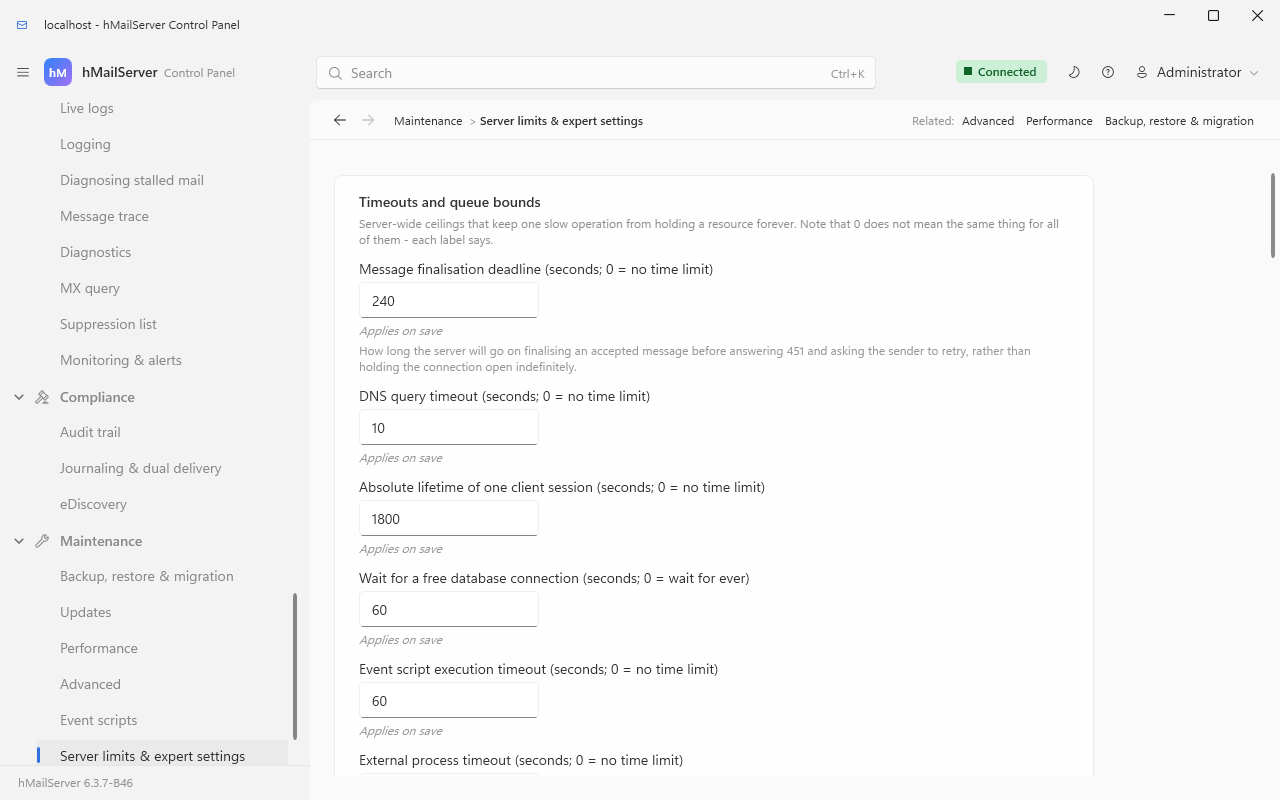
Considerably longer than the one card in view: the cards for received headers, refused connections, message-store durability, sending limits, stored-secret protection and the service account are all below it, and the front-end proxies are a card of Mail flow & delivery → Incoming relays. Since 6.3.4 each row is a stored setting rather than a line of the file, still under its INI name, with a line under it saying when a save applies it, and the service-account card has buttons of its own (§17.3).
| Setting | Default | Why you might change it |
|---|---|---|
ProtectStoredSecretsWithDPAPI |
on | Secrets in hMailServer.INI are DPAPI-protected, and since 6.3.4 the database's secrets are sealed under the stored-secrets key (§17.2b). Turning it off keeps both as written, readable by anyone who can read the file or the database |
MessageStoreFsync |
off | Flush each received message to disk before acknowledging it. Durable, slower — the honest choice if a 250 must mean the message survives a power cut |
MessageStoreConsistencyCheck |
off | Periodically cross-check message rows against files on disk; read-only, writes a report on divergence |
ClientSessionCeiling |
1800 s | Absolute lifetime of one client session. This is what guarantees a stalled scan or a hung peer cannot hold a thread for ever |
ExternalProcessTimeout |
300 s | The ceiling on a command-line virus scanner or an event-script process |
ScriptTimeout |
60 s | Event script execution |
ScriptAllowedObjects |
* |
Restrict which COM objects event scripts may create. At *, a script can create WScript.Shell and run any command the service's account may - which is what made the JScript defect of §17.11 a code-execution one |
DNSQueryTimeout |
10 s | Every DNS-backed spam check is bounded by this |
SMTPDMaxSizeDrop |
0 | Drop oversized inbound messages mid-transfer rather than reading them to the end |
Invalid command limit (maximumincorrectcommands, COM MaxNumberOfInvalidCommands) |
100, but the switch beside it is off |
Disconnect clients sending too many invalid commands (disconnectinvalidclients) is off by default, so the limit does nothing until you turn it on. Both are on the Protocols page, not this one |
Work down it; each row says what it costs when it is wrong.
| # | Do this | Where | What goes wrong if you skip it |
|---|---|---|---|
| 1 | Confirm no range allows remote → remote without authentication | IP ranges | Open relay |
| 2 | Get a certificate and set every listener's connection security | Encryption and Certificates §9.1, §9.5 | Passwords in the clear. A fresh install before 6.3.4 offers no TLS; a new 6.3.4 installation offers STARTTLS with a self-signed certificate, which mail clients warn about until it is replaced |
| 3 | Set Require TLS for auth on the Internet range | IP ranges; the checklist's Passwords only over TLS |
AUTH is offered, and used, on cleartext connections. Set already on a new 6.3.4 installation; never on an upgraded one |
| 4 | Leave auto-ban on; confirm the limit is not 0 and the duration is not 0 | Auto-ban | Unlimited password guessing with the feature switched on |
| 5 | Turn on account lockout | AccountLockoutThreshold |
A distributed attack never crosses any single IP's threshold |
| 6 | Choose Argon2id or scrypt, and set a floor | Authentication | Legacy hashes stay in use for accounts nobody logs into |
| 7 | Enrol the server-enforced administrator second factor | Administrative access | A leaked administrator password is a full compromise, including the REST API |
| 8 | Set the two tarpits and MaxSubmissionsPerIPPerMinute
|
INI on 6.3.3; stored since 6.3.4 | A compromised account can empty its rate budget in seconds |
| 9 | Set per-account sending limits | Server limits & expert settings | One compromised mailbox becomes your reputation problem |
| 10 | Turn on SmtpAuthenticatedSenderCheck
|
INI on 6.3.3; stored since 6.3.4 | One compromised account can send as every other |
| 11 | Enable SRS and set its secret if you forward | Transport security | SPF failures on forwarded mail — or, with the secret missing, worse than not enabling it |
| 12 | Move the service to NT SERVICE\hMailServer (a new 6.3.4 installation already is) |
§17.3: the installer's page, the Control Panel's button, or --confirm /GrantServiceAccess then --service-account virtual /Register
|
LocalSystem is more privilege than the server needs: a flaw reachable over SMTP is full control of the machine |
| 12a | 6.3.6: check what the computer's other users may read |
hMailServer.exe --report-only /ProtectFolders, elevated, in Bin (§17.3) |
Up to 6.3.5 every user of the computer could read the mail, the logs and the database's password; the installer closes the program's own folders, and the CHECK lines name the rest |
| 13 | Read the error log for the codes in §17.5 | Monitoring | Every one of them is a security control that has silently stopped working |
| 14 | 6.3.4: turn on the breach check | Administrative access → Password | A password from last year's breach corpus passes every length-and-digits policy |
| 15 |
6.3.4: watch compromised-account detection for a few weeks, then set it to enforce
|
the Deck, compromise_detection_mode
|
A stolen password sends until a provider throttles you |
| 16 | 6.3.4: give help-desk and read-only staff a role, not the administrator password | Administrator roles | Everybody who resets a password can also read every private key |
| 17 | 6.3.4: set the four session policies for the webmail and the Deck | the Deck, per server or domain | A browser left signed in on a shared machine stays signed in for twelve hours |
| 18 | 6.3.4: if you use single sign-on, list the Deck's administrators on this server and leave auto-provisioning off unless you mean it | the Deck's Server settings | A directory of ten thousand people becomes ten thousand mailboxes |
| 19 | 6.3.4: make the stored-secrets key if the installation has none, and export it |
--create-stored-secrets-key, --export-stored-secrets-key FILE; the checklist |
Second factors and [Settings] secrets kept as written in the database; or, with a key never exported, a restored database that opens none of them |
| 20 | Upgrade to 6.3.4 if a Windows server runs JScript event scripts | §17.11 | A client that can reach a sign-in runs code inside the service |
| 21 |
6.3.4: set [Database] TlsMode=verify-full and TlsCaFile where the database is on another machine |
§17.12 | The database's traffic, passwords and mail metadata included, readable or alterable by whoever can stand in for the database server |
Then check the three read-only overview pages — Spam filtering overview, Virus scanning overview and Transport encryption overview — which exist specifically to catch a configuration that looks enabled and is inert.
Fixed in 6.3.4; present in every release from 6.0.0 to 6.3.3. It is CVE-2026-100741
(CVSS 3.1 base score 9.8), assigned by GitLab as CVE Numbering Authority and published on
27 September 2026; the project's issue #43
is its public record. On Windows, with event
scripting on, the script language JScript and an OnClientValidatePassword handler in
EventHandlers.js, any client that could reach a sign-in - SMTP AUTH, POP3, IMAP or anything
else that checks an account's password - and name an existing, active account could have
JScript of its own run inside hMailServer.exe, with the rights of the service's account,
before it had authenticated. With ScriptAllowedObjects at its shipped *, that script could
create any COM object, WScript.Shell among them, and so run any command the service's
account may. The server built each call as source text and escaped the apostrophe but not
the backslash before it. The same shape was open to a remote POP3 server through the UID it
answers (OnExternalAccountDownload), and to a remote mail server through the error text it
refuses a delivery with and the failed recipient's address (OnDeliveryFailed), each on a
JScript server with that handler; and a rule's Run script function action wrote its function name
into the call unescaped in either language, so whoever may edit a rule, a domain's own
administrator included, could do the same. VBScript servers were not open through a password,
a UID or an error text, and the Linux builds had no script engine.
6.3.4 escapes every JScript value in one helper - every backslash, both quotes, CR, LF,
U+2028, U+2029 and NUL - so a handler receives each value exactly as it was, and refuses a
rule's function name that is not a plain identifier (ASCII letters, digits, _ and $, not
starting with a digit) as HM5018 each time the rule fires. The Linux builds' JavaScript
engine is handed values, not source text, and was never open to it
(EventScripts.md). Upgrade. Until a server
can be, turning event scripting off closes every path; switching ScriptLanguage to VBScript
closes the password, UID and error-text paths but not a rule's function name; and a
ScriptAllowedObjects narrower than * limits what an injected script could reach.
The event scripts themselves, in each language and on each platform, are Event Scripts.
Since 6.3.4 the connection is encrypted whenever the database server offers TLS
(DatabaseTls.md). MySQL and MariaDB through
MariaDB Connector/C - the client bundled on Windows, and Ubuntu's - had never used TLS,
whatever the documents said; with nothing configured they now use it when offered, without
checking the certificate, and connect without it when the server offers none. SQL Server
through the Microsoft OLE DB Driver (MSOLEDBSQL) encrypts the whole session. PostgreSQL is
unchanged. Two [Database] keys choose otherwise:
[Database]
TlsMode=verify-full          ; prefer (the default), require, verify-full or disable
TlsCaFile=C:\hMailServer\certs\database-ca.pem
prefer protects against a listener on the wire and not against someone who can stand in
for the database server; verify-full checks the chain and the name (or the address, when
Server= is one). A mode the server does not know is refused, never read as off (HM7530).
The application log says at every start what the connection got, and on Linux
hmailserver --check-database makes one connection and says the same.
Database TLS has the whole of DatabaseTls.md: what each backend did before and does now, what the database server has to do itself, and certificates that name an address.
See also: Encryption and Certificates · Stopping Spam · Stopping Viruses · Security Policy · Settings Reference · Monitoring and Health · Ports Reference · Assurance Case