Repository navigation
Stopping Viruses
This page began as a chapter of the 6.2.10 manual and has been corrected against the code of 6.2.28. The Control Panel's pages are grouped differently now, so the paths below use today's groups; the TLS ports 465, 993 and 995 exist only after you create them on the TCP/IP ports page (a fresh install seeds 25, 587, 110 and 143); and everything added since 6.2.10 is in Changes-Since-6210. Where a value here disagrees with the Settings Reference, which is generated from the code, the reference is right. The sandbox, sealed mail and the rule conditions on attachments (§11.6a to §11.6c) are new in 6.3.4 (27 September 2026, schema 6104), and §11.6d says what 6.3.4's message store changes for a scanner (nothing); the page was brought up to 6.3.4 on 26 September 2026. 6.3.5 (29 September 2026, schema 6105), 6.3.6 (6 October 2026, schema 6108) and 6.3.7, the latest release (17 October 2026, schema 6108), are not yet reflected here.
hMailServer does not scan for viruses itself. It hands each message to an engine you install — ClamAV, ClamWin, or any command-line scanner — and acts on the answer. Nothing here is enabled on a fresh install.
Open Virus scanning → Anti-virus settings:

Read this first if you already have it configured. Virus scanning → Virus scanning overview is a read-only page that answers one question the settings page cannot: will an infected message actually be caught here? It exists because the failure mode is a configuration that looks enabled and is inert — a scanner switched on with a wrong host or a missing executable does not refuse mail and does not disable itself.
VirusScanner::ScanFile_reports the error and moves on, and when every scanner has errored the verdict isNoVirusFound, which from the message's point of view is identical to having been examined and found clean (Tools/ControlPanel/Views/VirusOverviewView.cs).
Scanning happens on the delivery side, not during the SMTP conversation — the message has
already been accepted and spooled by the time any scanner sees it
(Server/SMTP/SMTPDeliverer.cpp).
flowchart TD
    A["Message spooled for delivery"] --> B{"Attachment blocking enabled?"}
    B -- yes --> B2["Matching attachments renamed to .txt<br/>and their content replaced"]
    B -- no --> C
    B2 --> C{"Was this message flagged<br/>for virus scanning?"}
    C -- no --> DELIVER["Deliver"]
    C -- yes --> D{"Any scanner enabled?"}
    D -- no --> DELIVER
    D -- yes --> E{"Message larger than<br/>the maximum size to scan?"}
    E -- yes --> DELIVER
    E -- no --> F["Take one of 10 scanner slots<br/>waiting up to 60 seconds"]
    F --> G["Scan the whole spool file with<br/>every enabled scanner in turn"]
    G --> H{"Virus found?"}
    H -- yes --> ACT["Act on it"]
    H -- no --> I["Write each MIME attachment to a<br/>temporary file and scan that too"]
    I --> J{"Virus found?"}
    J -- yes --> ACT
    J -- no --> K{"Did any enabled scanner<br/>report an error?"}
    K -- no --> DELIVER
    K -- yes --> L{"AVFailAction"}
    L -- "0, the default" --> DELIVER
    L -- 1 --> HOLD["Hold the message and retry later"]
    ACT --> M{"Action on virus found"}
    M -- "delete entire e-mail" --> DEL["Message destroyed,<br/>optional notifications sent"]
    M -- "delete infected attachments" --> STRIP["Message rebuilt from its<br/>first text part and delivered"]
Which messages are flagged for scanning. For SMTP, the flag is set when the connecting IP's matching security range has the virus-protection option — both default ranges ("Internet" and "My computer") have it. For mail this server fetches over POP3 or IMAP, the flag comes from the external account's own "use anti-virus" setting.
Two passes, deliberately. The whole spool file is scanned first; then every MIME attachment is written to a temporary file in the temp directory and scanned separately. The second pass is what matters for a scanner that does not decode MIME itself. Two failures on that path are reported rather than made fatal:
| Code | When | Consequence |
|---|---|---|
| HM6001 | The message could not be parsed for the per-attachment pass | Only the whole file was scanned; anything the scanner cannot decode itself was not examined separately |
| HM6002 | One attachment could not be written to the temp directory | That attachment was not examined; the rest of the message was |
Concurrency. At most 10 scans run at once (MaxRunningScanners). A thread that
cannot get a slot waits up to 60 seconds and then scans anyway, over the cap, writing
Scanning message without an available virus scanner slot. to the debug log. That is a
deliberate choice: bouncing or holding mail because the scanners are busy is worse than
briefly exceeding the cap.
All three can be enabled at once. VirusScanner::ScanFile_ runs them in this order —
ClamWin, custom, ClamAV — and stops at the first that reports a virus. A scanner that
errors does not stop the others; it sets a flag that section 11.5 acts on.
| ClamAV (clamd) | ClamWin (clamscan.exe) | Custom scanner | |
|---|---|---|---|
| Switch | AntiVirus.ClamAVEnabled |
AntiVirus.ClamWinEnabled |
AntiVirus.CustomScannerEnabled |
| Default | off | off | off |
| How it is reached | TCP socket, INSTREAM
|
one process per file | one process per file |
| Host / path setting |
AntiVirus.ClamAVHost (localhost), AntiVirus.ClamAVPort (3310) |
AntiVirus.ClamWinExecutable, AntiVirus.ClamWinDBFolder
|
AntiVirus.CustomScannerExecutable |
| "Infected" is | a reply matching stream…: <name> FOUND
|
exit code 1 | exit code equal to AntiVirus.CustomScannerReturnValue
|
| Timeout |
ClamMinTimeout 15 s to ClamMaxTimeout 90 s, moving with load |
ExternalProcessTimeout, 300 s |
ExternalProcessTimeout, 300 s |
| Virus name reported | the name clamd returned | always Unknown
|
always Unknown
|
| Test button | Test ClamAV connection | Test ClamWin scanner and Auto-detect ClamWin | Test custom scanner |
Shared settings, on the General tab:
| Setting | Default | What it does | What it looks like when it is wrong |
|---|---|---|---|
AntiVirus.Action |
Delete entire e-mail | See 11.4 | — |
AntiVirus.NotifySender |
off | Sends the VIRUS_NOTIFICATION server message to the envelope sender |
On: you generate backscatter. Leave it off |
AntiVirus.NotifyReceiver |
off | Sends the same notification to each recipient | On: users are told about mail they will never see |
AntiVirus.MaximumMessageSize |
0 (no limit) | Messages above this many KB are not scanned at all, silently | A generous-looking limit is a hole: a virus in a 30 MB archive is delivered unscanned with no log line |
The custom scanner's return value has a misspelled name in the database. The
hm_settingsrow iscustomviursscannerreturnvalue, notcustom*virus*…(Constants.h:50, and the seed rows in everyCreateTables*.sql). It matters only if you edit the table by hand.
sequenceDiagram
    participant H as hMailServer
    participant C as clamd
    H->>C: nINSTREAM, terminated by a newline
    loop 4096-byte chunks of the file
        H->>C: 4-byte length, big-endian
        H->>C: chunk bytes
    end
    H->>C: 4 zero bytes, end of stream
    C-->>H: stream: Eicar-Signature FOUND
    Note over H: The reply is matched against a<br/>regular expression ending in FOUND
Install ClamAV, run freshclam to download signatures, and run clamd listening on TCP
3310. Then set the host and port and press Test ClamAV connection. That button
does three things in order (Server/Common/AntiVirus/VirusScannerTester.cpp):
- sends
nPINGand requiresPONG— so "nothing is listening" is told apart from "something else is listening"; - sends
nVERSIONand reports what answered, so you know which clamd you reached; - streams a harmless sample and then the EICAR test string, both from memory, and
requires the first to come back clean and the second to come back
FOUND.
Streaming from memory rather than from a file is deliberate: a host antivirus watching the data directory deletes an EICAR file the instant it is written, and the test then reported a missing file instead of anything about clamd. The EICAR string is even held reversed in the binary so that hMailServer.exe does not itself carry it.
A success looks like:
ClamAV 1.4.2/27700/Mon Sep 8 09:12:11 2026. Result: stream: Eicar-Signature FOUND
A failure names the step that failed, for example
Unable to connect to ClamAV server at localhost:3310. or
clamd at localhost:3310 answered PING with 'HTTP/1.1 400 Bad Request' rather than PONG.
Any program that exits with a distinguishable code will do. Put %FILE% where the file to
scan belongs; without it, the file name is appended as the single quoted argument. Both
the executable and the path are quoted, so spaces in either are safe.
The Control Panel ships presets that fill in the command line and the exit code — adjust the path and the code for your version:
| Preset | Command line | Exit code meaning "infected" |
|---|---|---|
| Microsoft Defender | "C:\Program Files\Windows Defender\MpCmdRun.exe" -Scan -ScanType 3 -File "%FILE%" -DisableRemediation |
2 |
| Sophos | "C:\Program Files\Sophos\Sophos Anti-Virus\savscan.exe" -ss -archive "%FILE%" |
3 |
| ESET | "C:\Program Files\ESET\ESET Security\ecls.exe" "%FILE%" |
50 |
| Bitdefender | "C:\Program Files\Bitdefender\Endpoint Security\bdscan.exe" "%FILE%" |
1 |
| Kaspersky | "C:\Program Files (x86)\Kaspersky Lab\Kaspersky Endpoint Security\avp.com" SCAN "%FILE%" |
2 |
For an engine with no command-line interface — an HTTP or API scanner, a DLP product, a
SIEM — use an OnAcceptMessage event script instead (The COM API and Scripting), or
the HTTP filter hook described in Stopping Spam §10.9.
Whatever you configure, the service account has to be able to run it. The service runs as
LocalSystemby default; if you have moved it to a least-privilege account (Security Hardening §17.3) the scanner executable, its database directory and the temp directory all have to be reachable by that account. The symptom of getting this wrong isUnable to launch the virus scanner…reported as HM5406, once per message.
The Control Panel's three test buttons check the scanner. To check the pipeline, send yourself a message with the EICAR test file attached and watch the application log:
Virus found in message from someone@example.com. Taking actions
SMTPDeliverer - Message 4711: Message will be deleted (contained virus Eicar-Signature).
Two things routinely spoil that test on Windows:
- The host antivirus eats the EICAR file before hMailServer sees it. Exclude the mail store and the temp directory from real-time scanning — the scanner you configure here replaces real-time scanning for mail.
- Your own outbound mail is not scanned by this server if it never comes back in through SMTP from an unauthenticated range. Send it from an external address.
Action on virus found (AntiVirus.Action, default Delete entire e-mail):
| Action | What actually happens |
|---|---|
| Delete entire e-mail (0) | The message is not delivered to anybody. If Notify receiver is on, each recipient gets the VIRUS_NOTIFICATION server message; if Notify sender is on, so does the envelope sender. Logged as Message will be deleted (contained virus X).
|
| Delete infected attachments only (1) | The message is rebuilt, not edited: the first text part is kept, everything else is discarded, the VIRUS_ATTACHMENT_REMOVED server message is prepended to the body, and the subject is prefixed with the VIRUS_FOUND message ("Virus found"). Logged as Message attachments stripped (contained virus X).
|
The rebuild is worth understanding before you choose it. MessageAttachmentStripper::Strip
keeps one text part and drops the rest of the MIME structure, so an HTML alternative, inline
images and every clean attachment go with the infected one. If the message cannot be
parsed at all it is left exactly as it was, with a line in the application log saying so.
All three notification texts are editable under Mail flow & delivery → Server messages
(VIRUS_FOUND, VIRUS_ATTACHMENT_REMOVED, VIRUS_NOTIFICATION).
Do not configure a bounce for virus mail. The sender address on a virus is virtually always forged, so a notification just sends junk to an innocent third party — "backscatter", and a good way to get blacklisted. Both notification switches are off by default for exactly this reason.
This is the question the settings page cannot answer, and until AVFailAction existed the
answer was "deliver it, with one line in the error log" — indistinguishable from "scanned
and found clean".
The three settings are on Anti-virus settings → General, card When a scanner cannot
run, and stored in hMailServer.INI:
| Setting | Default | Meaning |
|---|---|---|
AVFailAction |
0 |
0 = deliver the message anyway (the historical behaviour). 1 = never deliver unscanned mail |
AVFailRetryMinutes |
15 | Minutes between scan attempts while a message is held |
AVFailMaxHolds |
16 | How many holds before the message is returned to its sender. 0 = never queue unscanned mail at all — tell the sender immediately |
At the defaults, 1 gives a message about four hours to be scanned before its sender is
told.
stateDiagram-v2
    [*] --> Scanning
    Scanning --> Delivered: a scanner answered, no virus
    Scanning --> Acted: a scanner answered, virus found
    Scanning --> Unscannable: every enabled scanner errored
    Unscannable --> Delivered: AVFailAction is 0
    Unscannable --> Held: AVFailAction is 1 and holds remain
    Held --> Scanning: retried after AVFailRetryMinutes
    Held --> Returned: AVFailMaxHolds reached
    Acted --> [*]
    Delivered --> [*]
    Returned --> [*]
Three properties of the hold counter that change how you should configure it:
- It is not the SMTP retry budget, the message's age, or the message's own try counter. It is a counter this policy keeps for itself, because incrementing the try counter would make the pass that finally scans the message skip DKIM signing — and a message that goes out unsigned fails DMARC at every receiver that checks.
- It lives in memory. A service restart gives every held message a fresh budget. At the shipped defaults (16 × 15 minutes) a nightly reboot cannot reach the budget anyway; a much longer hold window on a frequently restarted host can mean a sender is never told.
- It is bounded at 100,000 tracked messages. Beyond that, messages are still held — never delivered unscanned — but their holds are not counted, and error HM6195 is reported repeatedly while that lasts.
A hold is logged, with the message id and the hold number:
SMTPDeliverer - Message 4711: The virus scanner could not examine this message, and
AVFailAction is 1, so it has NOT been delivered. Holding it for another attempt in 15
minute(s); this was hold 3 of 16 before it is returned to the sender.
Every scanner error itself is reported as HM5406, with the failing scanner's own text — which distinguishes a timeout ("did not finish within the maximum time (ExternalProcessTimeout) and was terminated") from a launch failure ("Check that the executable path is correct and runnable by the service account") from an unreachable clamd.
Separate from virus scanning, older than it, and worth using regardless:
Virus scanning → Blocked attachments replaces an attachment whose file name matches one
of its patterns with a short note saying so, before the message is delivered. The master
switch is AntiVirus.EnableAttachmentBlocking on the anti-virus page, default off; the
list itself is on its own page.
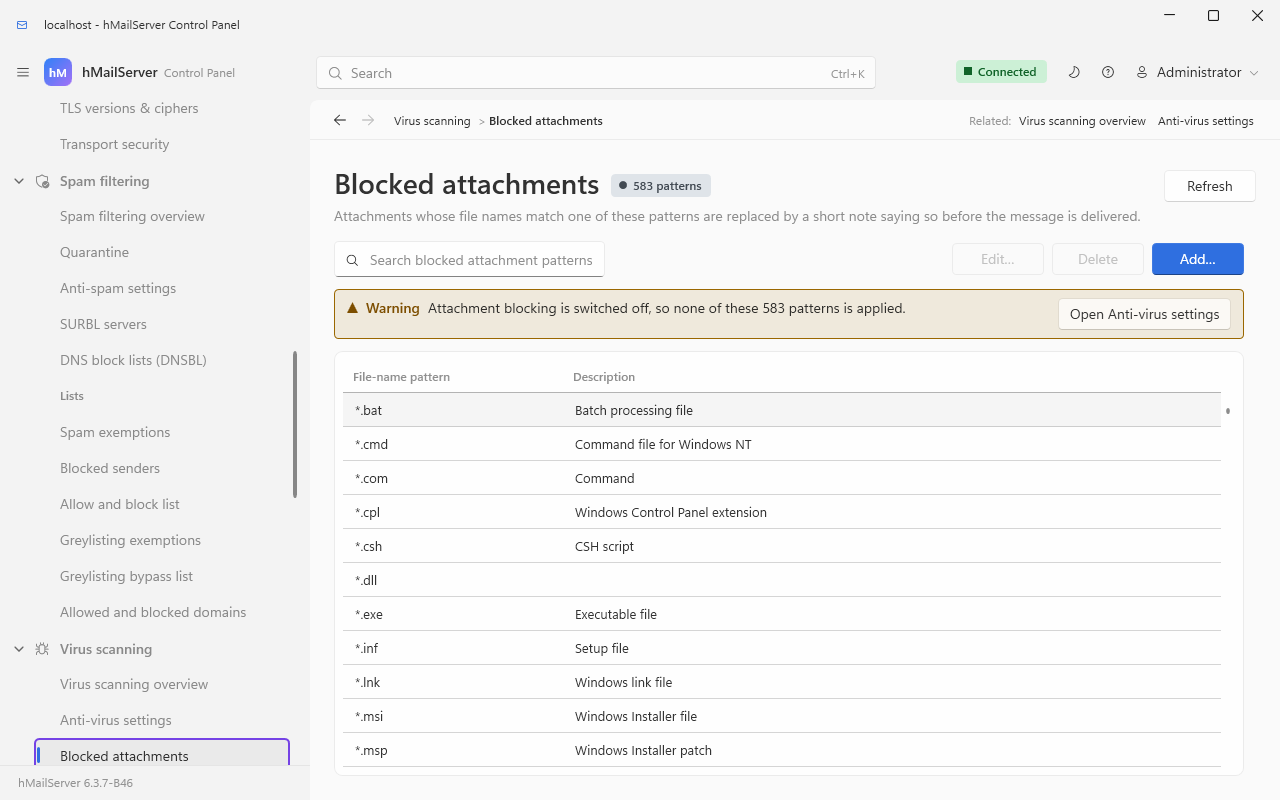
A sound starting list — no legitimate correspondent emails you an .exe:
*.exe   *.scr   *.pif   *.bat   *.cmd   *.com   *.vbs
*.js    *.jse   *.wsf   *.wsh   *.hta   *.jar   *.msi
*.msp   *.cpl   *.lnk   *.reg   *.ps1   *.iso   *.img
Two facts about how it behaves that are not obvious from the page:
-
The attachment is not deleted. Its file name has
.txtappended and its content is replaced by theATTACHMENT_REMOVEDserver message, which names the original file via the%MACRO_FILE%macro. The recipient therefore receivesinvoice.exe.txtcontaining an explanation, which is usually what you want — the mail still arrives, and the user can see what was removed and ask for it another way. - Matching is a case-insensitive wildcard over the declared file name. It does not look inside archives, and it cannot see the real type of a file whose extension lies. It is a policy control, not a scanner — which is why it is worth running alongside one rather than instead.
Schema 6091. ClamAV says whether a file is known
to be bad. What an unknown file does when it is opened takes a sandbox - a machine that
opens it and watches - and minutes. With SandboxEnabled on and both addresses set
(SandboxSubmitUrl, SandboxVerdictUrl), a message from outside whose attachment is an
executable, a script, a shortcut, an archive, a disk image, an office document or a PDF
(SandboxTypes, as shipped) is held - in no
mailbox and not in the quarantine - while the sandbox opens each file, and the answer decides:
| The sandbox says | What happens |
|---|---|
| every file clean | delivered, with an X-hMailServer-Sandbox: clean (...) header |
a file malicious, or suspicious at or above SandboxScoreThreshold (70) |
quarantined with the verdict as the reason; returned to its sender with 5.7.1 while the quarantine is off |
an error, once every file has answered, or no answer within SandboxTimeoutMinutes (15) |
SandboxTimeoutAction: delivered with a header saying so, or returned to its sender |
-
What your own users send is not uploaded to the third party - authenticated SMTP, the
webmail and the send API - unless
SandboxInternalMailis turned on. - No vendor adapter is shipped. The sandbox is any HTTP service that answers a two-route contract (a submit and a verdict), which you run or subscribe to; verdicts are remembered by the file's SHA-256, so a file seen before is not submitted again.
- The held messages are on
GET /api/v1/sandbox/heldand the Control Deck's queue page, with release and discard on the audit trail; the Control Panel's Setup checklist page says whether the configuration is complete. - It is off until you name a sandbox, and cannot be saved on while either address is empty.
Sandbox.md has the contract a sandbox service must answer.
Since 6.3.4. A message encrypted to its recipient - S/MIME or PGP/MIME, sealed end to end - carries its content as ciphertext:
- the virus scanner still scans it, and what it examines is ciphertext; a clean result is not a verdict on the message, and the application log now says the content could not be examined. It is deliberately not treated as a scanner failure, so a server set to hold unscannable mail does not hold every encrypted message. A message that arrives encrypted is not scanned: the mail client, and the person, are the last check.
- the blocked-attachment list never rewrites it: its ciphertext is one attachment by type, and replacing it would destroy the message for nothing. The log says it was left alone.
Since 6.3.4. The mail flow rules gained a condition on the
attachment name and, in the outbound content policy, one on the attachment type read
from its bytes rather than its name - a renamed .exe is still an executable - with
actions that quarantine, reject with a text, or warn the sender. A rule can therefore hold or
refuse what the blocked-attachment list would only rename. See Rules and Sieve.
Since 6.3.4. Nothing. A mailbox's messages can now be stored compressed, with large attachments kept once, encrypted at rest, or in an object store (Message Storage) - but the queue is never any of these. A message is scanned, filtered and run through the rules as plain RFC 822 in the queue, and only placed in the mailbox in the new form afterwards, so ClamAV, ClamWin, an external scanner and the sandbox read exactly what they always read. Two things to know beside it: a message the scanner deletes never reaches a mailbox, so a legal hold does not keep it (Compliance and eDiscovery); and a scanner pointed at the data directory's files from outside the server reads a compressed or encrypted container, not a message.
| Code | Source | Meaning |
|---|---|---|
| HM5406 | VirusScanner::ReportScanningError_ |
An enabled scanner errored. The detail text names the scanner and the failure |
| HM6001 | VirusScanner::Scan |
The message could not be parsed, so only the whole file was scanned |
| HM6002 | VirusScanner::Scan |
An attachment could not be written to the temp directory for scanning |
| HM6195 | SMTPDeliverer::HandleUnscannableMessage_ |
100,000 messages are already held for want of a scan; further holds are not counted |
See also: Stopping Spam · Security Hardening · Monitoring and Health · Settings Reference · Diagnosing Stalled Mail · The COM API and Scripting