Repository navigation
Rules and Sieve
This page began as a chapter of the 6.2.10 manual and has been corrected for 6.2.28. The Control Panel's pages are grouped differently now, so the paths below use today's groups; the TLS ports 465, 993 and 995 exist only after you create them on the TCP/IP ports page (a fresh install seeds 25, 587, 110 and 143); and everything added since 6.2.10 is in Changes-Since-6210. Where a value here disagrees with the Settings Reference, which is generated from the code, the reference is right. The mail flow rules of 6.3.4 (27 September 2026, schema 6104) - a domain's own rules, the attachment and content conditions and the five transport actions - are in §12.1a, and what else 6.3.4 changes for rules and Sieve (the Run script function action, a legal hold, mail handed to a webhook) is marked since 6.3.4; the page was brought up to 6.3.4 on 26 September 2026. Brought up on 5 October 2026 to 6.3.6 (6 October 2026, schema 6108), for what 6.3.6 changes on this page. 6.3.7, the latest release (17 October 2026, schema 6108), is not yet reflected here.
Two independent systems, both running during delivery.
Rules are hMailServer's own filtering engine: criteria and actions, edited in the Control Panel, and the only one of the two that can run server-wide. Sieve (RFC 5228) is the standard mail filtering language, owned by the mailbox user, edited from a mail client over ManageSieve or from the Control Panel.
They do not know about each other. They run at different points, they see the message at different stages, and when they disagree about where a message goes, Sieve wins. Section 12.0 is that ordering; everything after it is detail.
This is the whole filtering pipeline for one inbound message, drawn from the code
that executes it: SMTPConnection during the conversation, then
SMTPDeliverer::DeliverMessage and PreprocessMessage_ on the delivery thread,
then LocalDelivery::LocalDeliveryPreProcess_ once per local recipient.
flowchart TD
    subgraph S["SMTP conversation - the sender is still connected"]
        A["MAIL FROM / RCPT TO"] --> B["Pre-transmission spam tests:<br/>SPF, DNSBL, HELO, greylisting"]
        B --> C["DATA"]
        C --> D["Post-transmission spam tests:<br/>SURBL, DKIM, ARC, SpamAssassin"]
        D --> E{"Score over the<br/>delete threshold?"}
        E -- "yes, quarantine on" --> Q["Held in quarantine;<br/>sender answered 250"]
        E -- "yes, quarantine off" --> R["Refused 550 or 554"]
        E -- "no" --> F["Script event OnSMTPData"]
        F --> G["Script event OnAcceptMessage"]
        G --> H["Message queued"]
    end

    H --> I["Script event OnDeliveryStart"]
    subgraph P["Delivery thread - once per message, on every attempt"]
        I --> J["Blocked attachments, then virus scan"]
        J --> K["GLOBAL RULES"]
        K --> L["Script event OnDeliverMessage"]
        L --> M["DKIM signing, then mirroring<br/>first attempt only"]
    end

    M --> N["Split into local and external recipients"]

    subgraph LD["Local delivery - once per LOCAL recipient, on that recipient's own copy"]
        N --> O["Per-account spam overrides:<br/>mark and delete thresholds"]
        O --> T["Account auto-reply"]
        T --> U["ACCOUNT RULES"]
        U --> V["Account forwarding"]
        V --> W["Trace headers"]
        W --> X["SIEVE SCRIPT"]
        X --> Y["Domain-wide auto-reply,<br/>only if the account said nothing"]
        Y --> Z["Sieve reject, then Sieve discard"]
        Z --> AA["Sieve flags"]
        AA --> AB["Folder: global rule, then account rule,<br/>then Sieve fileinto"]
        AB --> AC["Saved to the mailbox"]
    end

    N --> AD["External delivery:<br/>relays, routes, MX"]
Five consequences worth reading twice:
| Because | It follows that |
|---|---|
| Spam scoring happens during the SMTP conversation | By the time any rule or script runs, the verdict already exists. A rule cannot make a message spam; it can only read the flag, or a header the filter wrote |
| Virus scanning happens before global rules | A rule never sees an infected message. It was deleted or stripped first (SMTPDeliverer::PreprocessMessage_) |
| Global rules run on the shared message, before the split | A Delete e-mail in a global rule destroys the message for every recipient. The same action in an account rule destroys only that recipient's copy |
| Global rules re-run on every delivery attempt | A deferred message passes through the global set again on each retry, so actions with side effects - Forward, Create copy, Reply - can fire more than once for one message. The Delivery attempts criterion exists so you can write Delivery attempts equals 1
|
| Sieve runs after account rules | A Sieve fileinto overrides the folder a rule chose. Everything else a rule did - a header it set, a copy it queued - has already happened, and Sieve cannot undo it |
Rules in the sidebar is the server-wide set: on screen "Rules", subtitle "Server-wide message rules, evaluated top to bottom.", with a Show rules for list that switches between the server's rules and a domain's. Each account has its own set on the Rules tab of its account dialog (Domains, a domain, an account).
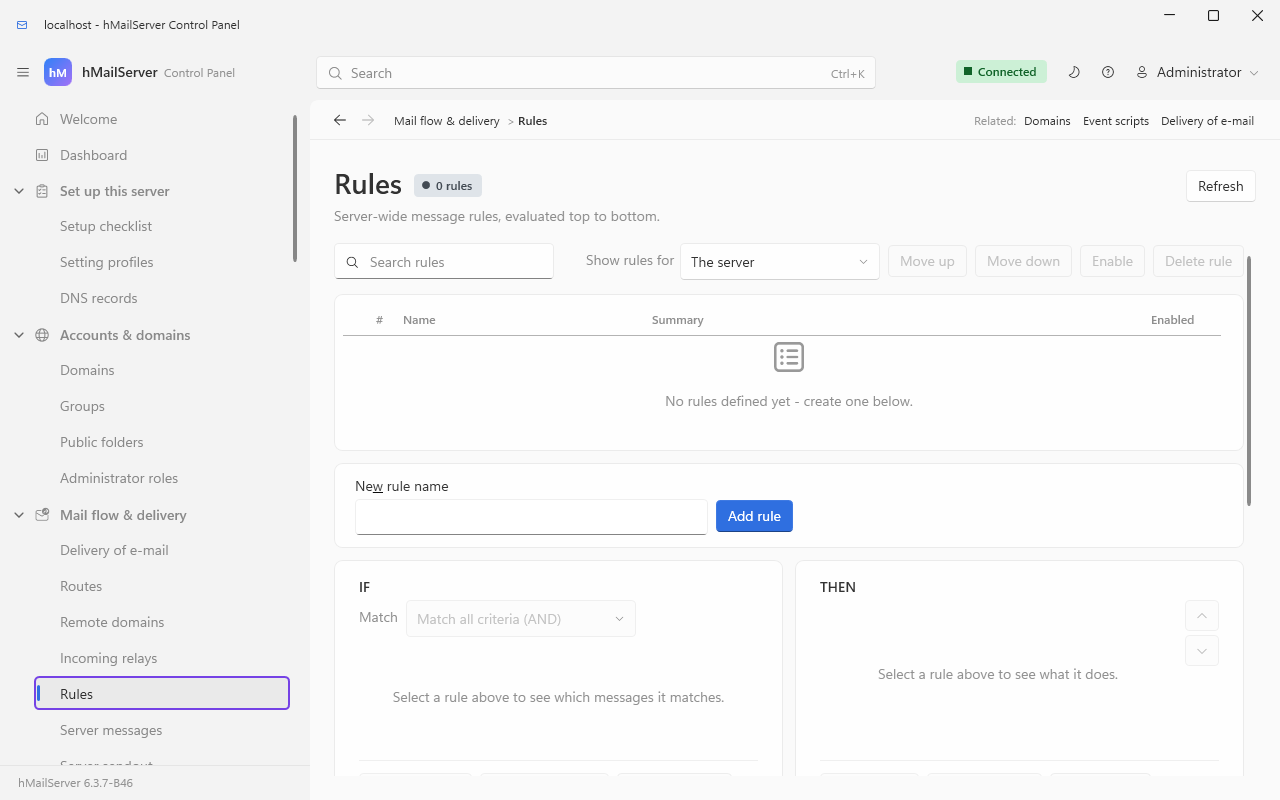
A rule is a name, an enabled flag, a match mode, an ordered list of criteria and an ordered list of actions. The match mode is the Match list at the top of the IF card: Match all criteria (AND) or Match any criterion (OR).
  Rule "Hold big attachments"                Active   Match ALL
  |
  +-- IF    Message size   is greater than   26214400
  |         Subject        does not contain  [approved]
  |
  +-- THEN  Set header value      X-Oversize: yes
            Move to IMAP folder   INBOX.Held
            Stop rule processing
Eight predefined fields, plus any header you name.
RuleApplier::MessageMatchesCriteria_ builds one string for the field and
compares it with the match value.
| Field | The string that is compared | Notes and traps |
|---|---|---|
| From | The From: header, as written |
Not the SMTP envelope sender. A message whose envelope sender is bounce@list.example but whose header says alice@example.com matches on the latter |
| To | The To: header |
Not the envelope recipient either. Mail that reached you by Bcc, by an alias or through a distribution list has no To: naming you. Use Recipient list for the envelope |
| CC | The Cc: header |
|
| Subject | The decoded Subject: header |
RFC 2047 encoded words are decoded first, so you match real text rather than =?utf-8?B?...?=
|
| Body | The plain-text body concatenated with the HTML body | One string, both parts. A phrase that spans the join is a false positive; a phrase that exists only inside an attachment is not matched at all |
| Message size | The message file's size in bytes | Not kilobytes, not megabytes. 25 MB is 26214400. The COM Message.Size property divides by 1024 and reports KB, which is where the confusion comes from |
| Recipient list | Every SMTP envelope recipient, joined with ;
|
The field that sees a Bcc, an alias expansion or a distribution list member |
| Delivery attempts | The retry count plus one, so the first attempt is 1
|
Pair with equals 1 to make a side-effecting action fire once rather than once per retry |
| Custom header | The named header's value, RFC 2047-decoded like the rest | Type the name without the colon - X-Spam-Status, not X-Spam-Status:. An absent header yields the empty string; read the warning under does not contain
|
RuleApplier::TestMatch, eight of them.
| Match type | Semantics | Case | When it surprises people |
|---|---|---|---|
equals |
The whole value equals the match value | Insensitive | |
does not equal |
The whole value differs | Insensitive | True when the field is empty. A criterion on a header the message does not have fires for any non-empty match value |
contains |
Substring search | Insensitive | |
does not contain |
No substring | Insensitive |
True when the field is empty, same trap. Subject does not contain [ok] -> Delete e-mail deletes every message that has no Subject at all |
is less than |
Both sides parsed as decimal numbers | n/a | A comma is read as a decimal point first. A non-numeric string parses as 0, so Subject is less than 5 is true for every non-numeric subject |
is greater than |
As above | n/a | As above |
matches wildcard |
* is any run, ? is exactly one character, and the whole value must match
|
Insensitive |
*invoice* matches anywhere; a bare invoice matches only a value that is exactly that word. Wildcards become a regular expression internally, but they do not go through the breaker below, so a broken one fails silently |
matches regex |
Perl syntax, and the whole value must match - this is regex_match, not a search |
Sensitive | Search habits fail here. To find a word anywhere write .*invoice.*; to ignore case write (?i).*invoice.*. Runs under the breaker below |
A regex criterion is not evaluated naively. RuleGuard::RegexCriteriaMatches
wraps it, because the criterion is attacker-adjacent: the pattern is yours, but
the value it runs against is the sender's.
stateDiagram-v2
    [*] --> Ready
    Ready --> Compiling: a message arrives
    Compiling --> Suspended: pattern will not compile - HM6042
    Compiling --> Matching: compiled
    Matching --> Ready: answered inside 250 ms
    Matching --> Suspended: took 250 ms or more - HM6043
    Matching --> Suspended: Boost abandoned the match - HM6043
    Suspended --> Ready: 300 seconds elapsed
    Suspended --> Suspended: further messages - no match, no log
- The budget is 250 ms per evaluation; the suspension window is 300
seconds (
RuleGuard.cpp,EvaluationBudgetMillisecondsandSuspensionSeconds). - A suspended pattern does not match. There is no "does not match regex" criterion, so a regex can only ever make a rule fire - suspension therefore means the rule stays quiet, never that mail is destroyed.
- Suspension is keyed on the pattern text, so a corrected pattern takes effect on the very next message rather than at the end of the window.
- Each report is emitted at most once per pattern per window, so neither a hostile stream nor a busy server turns this into a log flood.
- The same breaker, budget and error codes cover Sieve's
:regexmatch type (RuleGuard::SieveRegexMatches), and suspension is shared: a pattern suspended by a rule is suspended for scripts too.
Ten of them. Every action of a matching rule runs, in order.
| Action | Parameters | What it actually does | Available in |
|---|---|---|---|
| Delete e-mail | none | Marks the message for deletion. Global: the message is dropped and Message will be deleted. Action triggered by a global rule (<name>) goes to the application log. Account: only this recipient's copy is dropped |
Both |
| Forward e-mail | To | Queues a second message to the named address. Loop-count guarded; the copy carries an incremented X-hMailServer-LoopCount. With RewriteEnvelopeFromWhenForwarding=1 the envelope sender becomes the account's own address |
Both |
| Reply | From (name), From (address), Subject, Body | Queues a new message back to the envelope sender, stamped Auto-Submitted. Never answers mail that is itself auto-submitted, and carries the triggering message's loop count forward |
Both |
| Move to IMAP folder | IMAP folder | Names a destination; the move happens at the end of local delivery. The path separator is the IMAP hierarchy delimiter, . by default, so INBOX.Archive. #Public.Name files into a public folder, subject to the insert permission. The name may contain %YEAR%, %MONTH% and %DAY%, replaced from the server's local date, so INBOX.Archive.%YEAR%-%MONTH% files by month. A missing folder is created |
Both |
| Run script function | Script function | Calls the named function in the event script as <function>(HMAILSERVER_MESSAGE), then reloads the message from disk, so a script that edits and saves is seen by the rest of the rule set. Needs scripting enabled - see The COM API and Scripting. Since 6.3.4 the name must be a plain identifier - ASCII letters, digits, _ and $, not starting with a digit - or the function is not run and HM5018 is logged each time the rule matches; before, the name was written into the script's call as it was, so whoever could edit a rule could run code of their own. Also since 6.3.4 it works on Linux, where event scripts are JavaScript |
Both |
| Stop rule processing | none | Stops the rule set after this rule's remaining actions have run | Both |
| Set header value | Header name, Value | Rewrites the message file with that header set. %MACRO_ORIGINAL_HEADER% in the value is replaced with the header's current raw value, so you can prepend to it |
Both |
| Create copy | none | Queues a duplicate carrying X-CopyRule: <rule name> and an incremented loop count. A global rule copies the whole envelope's recipients; an account rule copies to that one account |
Both |
| Send using route | Route | Forces this message onto a named route instead of ordinary MX delivery | Global only |
| Bind to address | IP address | Forces the outbound connection to leave from this local address | Global only |
The two global-only actions are absent from the account-level dialog rather than
refused afterwards (RuleActionDialog.cs, guarded on serverLevel).
Schema 6063, with the outbound content policy beside it. The rules engine becomes what Exchange calls transport rules and Google calls routing: three collections instead of two, more conditions and five more actions.
| Collection | Where | Runs for |
|---|---|---|
| The server's (global) |
Application.Rules, /api/v1/rules, the Control Panel's Rules page, the Deck's |
every message, first |
| A domain's |
Domain.Rules, /api/v1/domains/{name}/rules, the same pages with the domain chosen at the top |
every message with a recipient in the domain or a sender it hosts, after the server's - which is how a domain administrator has rules of their own; a domain-restricted API key reaches its domain's rules and no other's |
| An account's |
Account.Rules, and since 6.3.4 /api/v1/accounts/{address}/rules
|
that account's mail, at local delivery |
New conditions. Attachment name (attachment_name): every attachment's file name,
; between them, so contains .exe, a wildcard *.zip or a regular expression reads as
"any attachment is". And four for the outbound content policy (DLP): sensitive
content (a card number by its Luhn check digit, an IBAN by the registry's lengths and check
digits, an account number by a pattern of your own); attachment type, read from the
file's first bytes rather than its name, so a renamed executable is still an executable;
external recipients (every recipient this server does not host); and readable text,
the plain and HTML parts and every text attachment, for a pattern of the rule's own. A
message sealed end to end has no readable text, so the text conditions do not match it; the
attachment type and the recipients still do.
New actions:
| Action | What it does |
|---|---|
| Add disclaimer | Appends the text to the plain and HTML parts when the rule matches, with X-hMailServer-Disclaimer naming the rule. The domain's own disclaimer stays the unconditional footer it was |
| Reject with a text | The SMTP session answers 550 5.7.1 with the text before the message is accepted, while the sender is still there to be told; with no text of its own it names the rule. The webmail's send asks the same rules before it queues. A message that meets the rule only after acceptance is dropped as a delete is, and a sender this server hosts is told it was not sent |
| Require TLS | Every external delivery of the message needs STARTTLS; a destination that offers none is deferred with a reason naming the rule, never sent in the clear |
| Quarantine | Held in the quarantine under Rule: <name> for an administrator to release or delete |
| Warn the sender | The message goes on, and a sender this server hosts is mailed a notice naming the rule; an outside sender gets nothing, since that would be backscatter |
All three collections run in SMTPDeliverer on every delivery attempt, after virus scanning
and before DKIM signing, with the same conditions and actions. The repository's
MailFlowRules.md
and OutboundContentPolicy.md
have every field.
Since 6.3.4. An eDiscovery case can put an account, or a whole domain, on legal hold
(Compliance and eDiscovery). A hold does not overrule the account's own filters, and does not
let what they drop disappear either: an account rule's Delete or Reject action, a Sieve
discard, a reject or a redirect that keeps no local copy, and a forward that keeps no copy
still keep the message out of the mailbox, but the copy is kept among the account's deleted
items and the log says the hold kept it. When that copy cannot be kept, the message is
delivered instead - a hold outranks the filter - and a Sieve reject is then not sent. A hold
does not reach the server's or a domain's rules: they decide before a message is split
between its recipients, and a Delete there drops it for everybody, held accounts included.
RuleApplier::ApplyRules walks the set in order. For each active rule it
evaluates the criteria under the match mode, and if they matched it runs every
action.
A matching rule does not stop the set. ApplyRule_ returns false
unconditionally - the "the rule matched, so stop" return is unreachable - so
processing continues into the next rule. The only thing that stops it is a Stop
rule processing action. If you are used to a first-match-wins engine, make that
the last action of every rule that should be terminal.
The same walk, drawn:
flowchart TD
    IN["The rule set for this scope,<br/>in the order it is listed"] --> LOAD{"Could the message be<br/>loaded for matching?"}
    LOAD -- no --> SKIP["The WHOLE set is skipped and the message is<br/>delivered unfiltered. Every criterion would otherwise<br/>compare against an empty string, so NotEquals and<br/>NotContains would match, and one<br/>'Subject NotContains approved, then Delete' rule<br/>would destroy the message"]
    LOAD -- yes --> ACT{"Is this rule active?"}
    ACT -- no --> NEXT["On to the next rule"]
    ACT -- yes --> MODE{"Match mode"}
    MODE -- ALL --> ALLC{"Every criterion matches?<br/>The first that does not<br/>ends this rule"}
    MODE -- ANY --> ANYC{"Any criterion matches?<br/>The first that does<br/>ends the testing"}
    ALLC -- no --> NEXT
    ANYC -- no --> NEXT
    ALLC -- yes --> RUN["Run EVERY action of this rule, in order.<br/>No action can cut the rest of them short"]
    ANYC -- yes --> RUN
    RUN --> STOP{"Was one of them<br/>Stop rule processing?"}
    STOP -- no --> NEXT
    STOP -- yes --> END["The set ends here"]
    NEXT --> LOOP["Back to 'Is this rule active?' with it.<br/>When no rule is left, the set ends"]
A rule with no criteria at all runs no actions, in either match mode: the flag that
says something matched is only ever set inside the criteria loop, so a catch-all rule
needs a criterion that is always true (RuleApplier::ApplyRules, ApplyRule_,
ApplyActions_; the load guard is RuleGuard::MessageIsUsableForRules).
When a global rule, an account rule and a Sieve script all choose a folder, the strongest wins:
   global rule folder   <   account rule folder   <   Sieve fileinto
      (weakest)                                          (strongest)
Every generated message carries X-hMailServer-LoopCount. Forward, Reply and
Create copy check it against RuleLoopLimit (COM Settings.RuleLoopLimit;
Control Panel Mail flow & delivery → Delivery of e-mail → Rules; default 5)
before generating anything.
| Guard | Applies to | What happens when it fires |
|---|---|---|
Loop count at or above RuleLoopLimit
|
Forward, Reply, Create copy, and bounce reports | Nothing is generated; HM5064, HM5065, HM5201 or HM4404 in the error log |
An Auto-Submitted header is present |
Reply and bounce reports only | Nothing is generated. Forward deliberately ignores this header, because a forward is not a generated response |
Because Forward ignores Auto-Submitted, a reply-and-forward ping-pong is bounded
by the counter and by nothing else. That is why the counter is carried forward
from the triggering message rather than restarted at 1
(RuleGuard::CarryLoopCountForward).
1. File whatever the spam filter marked, without deleting it. Global rule, match ALL:
IF    Custom header  X-hMailServer-Spam   equals             YES
THEN  Move to IMAP folder                 INBOX.Junk
      Stop rule processing
That header exists only while Add X-hMailServer-Reason header is on
(Spam filtering → Anti-spam settings). If it is off, use an account-level Sieve
spamtest instead - it reads the internal flag and needs no header at all.
2. Refuse anything over 25 MB before it fills a mailbox. Global rule, match
ALL. 25 MB is 26214400 bytes:
IF    Message size    is greater than   26214400
THEN  Delete e-mail
A message deleted here is deleted silently: the sender was already answered 250
during the SMTP conversation. To have the sender told instead, set Maximum
message size on the SMTP page so the refusal happens at DATA time.
3. Archive a mailing list by month.
IF    Custom header  List-Id   contains   announce.example.com
THEN  Move to IMAP folder      INBOX.Lists.announce.%YEAR%-%MONTH%
      Stop rule processing
The folder is created on first use, and %YEAR% and %MONTH% come from the
server's local date at delivery.
4. Copy everything for one address to a compliance mailbox. Global rule, using Recipient list rather than To so a Bcc is caught:
IF    Recipient list   contains   contracts@example.com
THEN  Create copy
Create copy at global level duplicates the whole envelope. To send a copy to a
different address, use Forward e-mail with that address instead - it
leaves the original delivery untouched.
5. Tag mail from outside the organisation, so a lookalike sender is visible. Global rule, match ALL:
IF    From      does not contain   @example.com
      From      does not contain   @partner.example
THEN  Set header value   Subject: [EXTERNAL] %MACRO_ORIGINAL_HEADER%
Read the trap in the match-type table before shipping this one. does not contain is true for an empty field, so a message with no From: header is
tagged. Here that is the harmless direction. It is the dangerous direction when
the action is Delete.
| What you see | What is happening | What to do |
|---|---|---|
| A rule is enabled and never fires | A matches regex pattern that will not compile. HM6042 in the error log names the pattern and says the rule "is active and doing nothing" |
Fix the pattern; it is retried on the next message, not at the end of the window |
| A rule fires for a while and then stops | The pattern blew the 250 ms budget and is suspended for 300 s. HM6043 names it and quotes the elapsed time and the value length | Simplify the pattern, or replace it with contains or matches wildcard
|
| A rule fires on messages that look nothing like it |
does not contain, does not equal or is less than against a field that is empty for those messages |
Add a positive criterion as well, with match mode ALL - for example contains @ on the same field |
A matches regex rule matches nothing that obviously should match |
It is a whole-value match and it is case-sensitive |
.*text.*, and (?i) for case |
| Messages arrive truncated after a Set header value rule | The in-place rewrite failed part-way. RuleGuard::ReportActionFailed reports it at High severity, naming the file |
Check disk space and antivirus locks on the data directory. Those bytes cannot be recovered |
| Filtering stopped entirely and the log has HM6040 | The message file could not be read, so the rule set was deliberately skipped rather than run against an empty message, and the mail was delivered unfiltered | Look for a scanner or backup locking the data directory. This cannot happen to a healthy message |
| A forward or a reply silently does not happen | Loop limit (HM5064, HM5065, HM5201), no recipients (HM4225, HM4235), or the generated copy could not be saved (HM6082, HM6083, HM6084) | Read the log line; each of them names the cause |
| A rule that moves mail into a public folder does nothing | The account has no insert permission there, or an account-level rule tried to create a public folder | Grant insert on the folder, or use a global rule |
The whole engine is scriptable: Application.Rules is the global set,
Account.Rules one account's - and, since 6.3.4, Domain.Rules a domain's. Over
REST the same three are /api/v1/rules, /api/v1/domains/{name}/rules and
/api/v1/accounts/{address}/rules, each with PUT and DELETE on .../{id}.
$app = New-Object -ComObject 'hMailServer.Application'
$app.Authenticate('Administrator', $password) | Out-Null

$rule = $app.Rules.Add()
$rule.Name   = 'Tag external mail'
$rule.Active = $true
$rule.UseAND = $true                       # $false = match ANY
$rule.Save()

$c = $rule.Criterias.Add()
$c.UsePredefined   = $true
$c.PredefinedField = 1                     # eFTFrom
$c.MatchType       = 6                     # eMTNotContains
$c.MatchValue      = '@example.com'
$c.Save()

$a = $rule.Actions.Add()
$a.Type       = 7                          # eRASetHeaderValue
$a.HeaderName = 'Subject'
$a.Value      = '[EXTERNAL] %MACRO_ORIGINAL_HEADER%'
$a.Save()
The enumerations, from hMailServer.idl:
eRulePredefinedField |
eRuleMatchType |
eRuleActionType |
|||
|---|---|---|---|---|---|
eFTFrom |
1 | eMTEquals |
1 | eRADeleteEmail |
1 |
eFTTo |
2 | eMTContains |
2 | eRAForwardEmail |
2 |
eFTCC |
3 | eMTLessThan |
3 | eRAReply |
3 |
eFTSubject |
4 | eMTGreaterThan |
4 | eRAMoveToImapFolder |
4 |
eFTBody |
5 | eMTRegExMatch |
5 | eRARunScriptFunction |
5 |
eFTMessageSize |
6 | eMTNotContains |
6 | eRAStopRuleProcessing |
6 |
eFTRecipientList |
7 | eMTNotEquals |
7 | eRASetHeaderValue |
7 |
eFTDeliveryAttempts |
8 | eMTWildcard |
8 | eRASendUsingRoute |
8 |
eRACreateCopy |
9 | ||||
eRABindToAddress |
10 |
RuleAction.AbortSpamFlagged (COM only - there is no editor for it) makes a
Forward or a Reply skip a message carrying the spam flag. Rule.MoveUp
and Rule.MoveDown reorder the set. Utilities.CriteriaMatch(MatchValue, MatchType, TestValue) evaluates a comparison with no message involved, which is
the quickest way to find out what a regex or a wildcard really does.
The global rules are also readable over the REST API - GET /api/v1/rules
returns them in evaluation order with their criteria and actions - and the
Control Deck's read-only Rules view renders the same data. See
APIs Reference.
Sieve is the standard mail filtering language: portable across mail servers, and what a modern client expects to be able to edit for itself.

Each account has one active script, plus any number of named scripts uploaded
over ManageSieve. They are files, not database rows (SieveStorage.cpp, under
[Directories] DataFolder):
  <DataFolder>\
    Sieve\
      _global\                    administrator-placed scripts, for include :global
        company-policy.sieve
      example.com\                one directory per domain, sanitised and lower-cased
        alice\                    one per local part
          active.sieve            THE ACTIVE SCRIPT - this is what delivery runs
          active.name             the name SETACTIVE selected, when one was
          vacation.responses      who has already had a vacation reply, and until when
          duplicate.seen          identifiers the duplicate test has seen
          scripts\
            holiday.sieve         named scripts, from ManageSieve PUTSCRIPT
            filters.sieve
Anything outside a-z 0-9 . - _ + in the domain or the local part becomes _,
so no unusual address can escape the Sieve directory.
Four ways to set the active script, all writing that same active.sieve:
| Route | Where | Syntax-checked |
|---|---|---|
| Control Panel | Account dialog, Sieve tab | Yes |
| COM |
Account.SieveScript - read/write, and no Save() is needed because it writes the file directly |
Yes, refused with the parse error |
| REST |
GET and PUT /api/v1/me/filters, as the account itself, on the self-service portal |
Yes, same wording; 256 KB cap; an empty script removes the filter |
| ManageSieve |
PUTSCRIPT then SETACTIVE
|
Yes, same check |
Deactivating a script - an empty script, or SETACTIVE with no name - also
clears that account's vacation-response records. Without that, a user who
ends a holiday, deletes the script and goes away again a week later would find
that everyone who wrote in between hears nothing, because their suppression
windows are still running.
require accepts every name in this table. The ManageSieve SIEVE capability
line advertises the subset marked yes in the last column, and the rule behind
that is deliberate: a name is advertised only once it works end to end, because a
ManageSieve client builds its user interface from that line, and an advertised
extension that quietly does nothing is worse than one that is absent.
| Extension | RFC | What it does here | Advertised |
|---|---|---|---|
fileinto |
5228 | File into a mailbox. :create (with mailbox) and :flags (with imap4flags) are accepted. fileinto :copy is refused at upload - this server stores exactly one local copy, so there is nowhere to put the second one |
yes |
envelope |
5228 | Test the SMTP envelope. Parts "from" and "to" only; anything else is refused with the part named |
yes |
copy |
3894 |
:copy on redirect - send the copy and keep the original |
yes |
relational |
5231 |
:value and :count comparisons |
yes |
subaddress |
5233 |
:user and :detail address parts. The separator is +, fixed, because a script tests arbitrary headers whose domains are not this server's |
yes |
vacation |
5230 | A real auto-reply, composed and queued, with a per-sender suppression window in a store that fails closed. :days defaults to 7; :subject, :addresses, :from, :mime and :handle are accepted |
yes |
vacation-seconds |
6131 |
:seconds instead of :days. The two are mutually exclusive and a script naming both is refused; :seconds 0 means "reply every time" |
yes |
imap4flags |
5232 |
setflag, addflag, removeflag, :flags on a storing action, and the hasflag test. Only the five system flags can be stored - \Seen \Answered \Flagged \Deleted \Draft - because the store is a fixed bitmask. A keyword is accepted, reported in the application log, and stored nowhere |
yes |
body |
5173 |
:raw (undecoded), :text (the decoded text of the text parts) and :content (decoded parts of named MIME types). Mutually exclusive; naming two is a refusal |
yes |
mailbox |
5490 |
mailboxexists, answered against the recipient's real folder list and the insert permission, plus :create on fileinto
|
yes |
regex |
draft-ietf-sieve-regex | The :regex match type. A search, unlike a rule criterion's whole-value match, and its case behaviour follows the comparator. Patterns compile at upload, so a bad one is refused with a line number; evaluation runs under the same breaker as the rules engine |
yes |
ihave |
5463 | Capability probing as a test, answered from the same list require validates against; an ihave-guarded block may use what it tested for |
yes |
environment |
5183 |
name is hMailServer, plus version, location (MDA), phase (during), host and domain (the host name minus its first label). remote-host and remote-ip are honestly absent: the sending client's identity does not reach the evaluator |
yes |
date, index
|
5260 |
date and currentdate with real zone arithmetic (:zone, :originalzone), and :index / :last to select among repeated header fields on header, address and date
|
yes |
spamtest, spamtestplus
|
5235 | The server's own verdict as a graded value, read from the internal flag and never from headers a sender could forge. "0" when the message was not classified, "10" when it was - "100" under :percent
|
yes |
duplicate |
7352 | Has this identifier been seen before. Default window 7 days; :header, :uniqueid, :handle, :seconds, :last. The seen-store fails open, the opposite of vacation's, because the common script discards on "duplicate" and a wrong "duplicate" destroys mail |
yes |
editheader |
5293 |
addheader and deleteheader, applied in script order and before redirects are queued, so forwarded copies carry them. Received and Return-Path are refused at upload - the trace of how a message travelled is not a script's to edit |
yes |
variables |
5229 |
set with its modifiers, ${} expansion, match variables captured by :matches, and the string test. Expansion happens only in a script that requires this name; without it ${a} stays verbatim |
yes |
reject, ereject
|
5429 | No local copy, and the sender gets a non-delivery report carrying the reason, with status 5.7.1. If the script also stored the message, delivery wins: the reject is cancelled and logged |
yes |
include |
6609 |
include :personal reads the account's own named scripts, include :global the administrator's Sieve\_global\. Each level has its own variable scope with global as the shared namespace, and nesting caps at three levels |
yes |
enotify |
5435, 5436 |
notify "mailto:..." with :from, :importance (1, 2 or 3) and :message. Any other URI scheme is refused at upload, naming the scheme. Notifications carry a null return path and Auto-Submitted: auto-notified, and a message that is itself auto-submitted is never notified about |
yes |
comparator-i;ascii-casemap |
4790 | The default comparator; case-insensitive | in require only |
comparator-i;octet |
4790 | Byte-exact | in require only |
comparator-i;ascii-numeric |
4790 | Leading digits read as a number; a string that does not start with a digit is "positive infinity". Refused on deleteheader
|
in require only |
virustest is deliberately absent. Infected mail is blocked or stripped
before delivery, so a script never sees a message with a virus verdict, and a
test that always answered "not scanned" would be exactly the inert capability
this list exists to prevent.
| Command | What the parser allows |
|---|---|
require |
one or more capability names, at least one; vacation-seconds implies vacation
|
if / elsif / else
|
a test and a block; else takes no test |
keep |
:flags; no positional argument |
fileinto |
:create, :flags; exactly one mailbox name. :copy refused |
redirect |
:copy; exactly one address |
discard, stop
|
no arguments at all |
setflag, addflag, removeflag
|
one flag list, no tagged arguments |
vacation |
:days (at least 1) or :seconds (not negative), :subject, :addresses, :mime, :handle, :from; one reason string. Addresses are validated at upload |
reject, ereject
|
one reason string |
set |
:lower :upper :lowerfirst :upperfirst :quotewildcard :length; a name and a value. Contradictory modifiers are refused, and a match variable cannot be set |
addheader |
:last; a field name and a value |
deleteheader |
:index :last :comparator :is :contains :matches; a field name and optionally value patterns |
notify |
:from :importance :message; one mailto: URI |
include |
:personal or :global but not both, :once, :optional; one script name |
return |
no arguments |
global |
one list of variable names; needs both include and variables
|
| Test | Tags | Notes |
|---|---|---|
true, false
|
none | |
not, allof, anyof
|
none |
not takes exactly one test |
size |
:over or :under, and a number |
|
exists |
none | one list of header names |
header |
match type, :comparator, :index, :last
|
|
address |
as header, plus :all :localpart :domain :user :detail
|
|
envelope |
as address but no :index or :last
|
an envelope has one from and one to, so there is nothing to index into |
body |
match type, :raw / :text / :content
|
at most one transform |
date, currentdate
|
match type, :zone or :originalzone, :index, :last
|
date parts: year month day date julian hour minute second time iso8601 std11 zone weekday
|
hasflag |
match type, :comparator
|
one flag list |
mailboxexists |
none - a comparator on it is an error, not something to ignore | one list of mailbox names |
spamtest |
match type, :percent (needs spamtestplus) |
one key list |
duplicate |
:handle :header :uniqueid :seconds :last
|
:header and :uniqueid are mutually exclusive; no positional arguments |
environment |
match type, :comparator
|
one item name and a key list |
string |
match type, :comparator
|
needs variables
|
ihave |
none | one list of extension names, deliberately not checked against the supported list - probing for something absent is the point |
valid_notify_method |
none | one list of method URIs |
notify_method_capability |
match type, :comparator
|
a URI, a capability name and a key list |
Match types available on the match tests: :is (the default), :contains,
:matches (wildcards * and ?, with RFC 5228 2.7.1 backslash escaping),
:regex, and :value "<op>" / :count "<op>" (both need relational).
1. File spam, file a mailing list, keep the rest. The everyday script:
require ["fileinto", "mailbox", "spamtest", "relational"];

if spamtest :value "ge" :comparator "i;ascii-numeric" "5" {
    fileinto :create "INBOX.Junk";
    stop;
}

if header :contains "List-Id" "announce.example.com" {
    fileinto :create "INBOX.Lists.announce";
    stop;
}

# No explicit keep is needed: the implicit keep files it in INBOX.
spamtest reads the internal flag, so this works with every spam header
option switched off. The graded answer here is only ever 0 or 10, because the
pipeline stores no score for mail it did not classify - so any threshold from 1
to 10 behaves identically. Write "ge" "5" and stop thinking about it.
2. An out-of-office reply that cannot loop.
require ["vacation"];

vacation
  :days 7
  :subject "Out of the office until 22 September"
  :addresses ["alice@example.com", "a.smith@example.com"]
  "I am away until 22 September. For anything urgent please write to
support@example.com.";
:addresses is not decoration. RFC 5230 4.5 sends a reply only when one of the
user's own addresses appears in the envelope or the headers, and that list is
what "the user's own addresses" means. Leave it out and mail that reached you
through a distribution list will not be answered - which is usually what you
want, and should always be a decision rather than an accident. The suppression
window is per sender, recorded in vacation.responses, and that store fails
closed: if it cannot be read, no reply is sent rather than a second one.
If both an account-level auto-reply (the Auto-reply tab) and a Sieve
vacation are configured, the account-level one wins and the domain-wide
fallback stays silent. One delivered message produces at most one auto-reply,
ever.
3. Send a copy somewhere else and keep the original.
require ["copy"];

if address :domain "from" "supplier.example" {
    redirect :copy "purchasing@example.com";
}
Without :copy, redirect cancels the implicit keep and the message leaves the
mailbox entirely. That one tag is the difference between a copy and a forward,
and it is the most common Sieve mistake there is.
4. Deal with duplicates that reach you twice.
require ["duplicate", "fileinto", "mailbox"];

if duplicate {
    fileinto :create "INBOX.Duplicates";
    stop;
}
With no tags, duplicate keys on Message-ID over a seven-day window. A message
with no Message-ID is never a duplicate and is not recorded. The store
fails open - a read failure answers "new" - because a wrong "duplicate"
destroys mail while a wrong "new" only delivers a second copy. Filing rather than
discarding, as above, makes even that harmless.
5. Mark, flag and refuse: the three endings.
require ["imap4flags", "fileinto", "reject", "editheader"];

# Mark newsletters read on arrival.
if exists "List-Unsubscribe" {
    addflag "\\Seen";
}

# Star anything from the chief executive, and record why.
if address :is "from" "ceo@example.com" {
    addheader "X-Priority-Reason" "from the CEO";
    addflag "\\Flagged";
}

# Refuse mail from one domain, and tell the sender.
if address :domain :is "from" "spammer.example" {
    reject "This address does not accept mail from your domain.";
}
reject produces a real non-delivery report to the envelope sender carrying your
reason and status 5.7.1. It rides the same machinery a quota refusal does, so
it inherits every guard: no report to a bounce, to a null sender or to
auto-submitted mail, and the RFC 3461 NOTIFY=NEVER opt-out is honoured. Do not
use it against forged senders - the report goes to whoever the envelope names.
For those, discard is the honest answer.
| What you see | What is happening | What to do |
|---|---|---|
| The script uploaded fine and nothing is filtered |
active.sieve is not what you edited. ManageSieve PUTSCRIPT stores a named script; SETACTIVE is what makes one live |
Issue SETACTIVE "name", or edit on the Control Panel's Sieve tab, which writes the active script directly |
Mail lands in INBOX and the application log says Sieve script for <address> could not be evaluated (error: ...)
|
The script did not parse at evaluation time. Delivery deliberately falls through to a normal keep rather than failing | Fix the script. This can only happen to a script placed on disk by hand: every upload route checks the syntax first |
A fileinto folder is never created |
:create was used without require "mailbox", so the whole script was refused; or the target is a public folder this account cannot insert into |
Read the refusal - it names the line. For public folders, grant insert |
setflag "important" is accepted but nothing is marked |
Only the five system flags can be stored. A keyword is reported in the application log and stored nowhere | Use \Seen, \Answered, \Flagged, \Deleted or \Draft
|
redirect empties the mailbox |
redirect without :copy cancels the implicit keep |
Add :copy, or add an explicit keep;
|
| Vacation replies stop for a sender | The window is per sender and defaults to 7 days; or vacation.responses could not be read and the store failed closed |
Both are correct behaviour. To reset every window, deactivate and re-activate the script |
A :regex test stops matching |
The breaker suspended that pattern for 300 s - HM6043 | The same fix as a rule criterion: simplify the pattern |
fileinto :copy is refused |
Deliberate. This server stores one local copy, so the second copy has nowhere to go | Use fileinto on its own, or :copy on redirect
|
The client is disconnected while editing a script, BYE after a while |
Since 6.3.6 a signed-in ManageSieve session ends after ten idle lines in a row or two minutes of waiting in all (§12.3) | Let the client sign in again; nothing is lost on the server |
Since 6.3.6 every wait has a deadline (items 29 and 37): a command line must arrive whole
within 30 seconds of the server waiting for it, which is also how long a session may sit idle
between commands; the TLS handshake after STARTTLS has 30 seconds; a literal (a script, a
SASL response) and the writing of each response 300; and a connection must complete
AUTHENTICATE within 60 seconds of being accepted, or of UNAUTHENTICATE. Up to 16
connections are served at once and up to 64 wait for a thread; before it has signed in an
address has one connection served at a time, four waiting at most (a fifth is refused with
BYE (TRYLATER)), and a connection that runs out of time before signing in counts as a
failed logon for the auto-ban - never from this computer's loopback address. A signed-in
session ends with BYE after ten lines in a row that do nothing or once it has waited two
minutes in all for its commands; an account has at most four sessions, a fifth sign-in
answered NO (TRYLATER). The figures are constants; there is no setting. A client that keeps a
session open to edit in signs in again. Until 6.3.6 the service served one connection at a
time (since 6.2.3). Ports Reference §4.4 has the whole of it.
The listener that lets a mail client - Roundcube's managesieve plugin, Thunderbird
with an add-on, sieve-connect - upload and manage scripts on its own. It is
off by default:
[Settings]
ManageSieveServerPort=4190
ManageSieveServerBindAddress=127.0.0.1
Port 0, the default, means the listener is never created. There is an editor
for both keys on the ManageSieve (RFC 5804) card, on the ManageSieve tab of the Control
Panel's Connections & protocols → Protocols page, which also shows live whether STARTTLS is
available.
Both apply after a service restart.
sequenceDiagram
    participant C as Client
    participant S as hMailServer ManageSieve
    S->>C: IMPLEMENTATION, SIEVE, STARTTLS, SASL, UNAUTHENTICATE, VERSION
    S->>C: OK
    C->>S: STARTTLS
    S->>C: OK - begin TLS negotiation now
    Note over C,S: TLS handshake
    S->>C: the capability lines again, per RFC 5804 2.2
    S->>C: OK - TLS negotiation successful
    C->>S: AUTHENTICATE PLAIN with the base64 response
    S->>C: OK
    C->>S: HAVESPACE holiday 4096
    S->>C: OK
    C->>S: PUTSCRIPT holiday, then the script bytes
    S->>C: OK, or NO with the parse error and its line number
    C->>S: SETACTIVE holiday
    S->>C: OK
    C->>S: LISTSCRIPTS
    S->>C: the quoted names, ACTIVE against one of them, then OK
    C->>S: LOGOUT
    S->>C: OK - bye
| Command | Answer | Notes |
|---|---|---|
CAPABILITY |
the capability lines, then OK
|
SIEVE carries the advertised extension list from 12.2 |
NOOP |
OK |
counts against the pre-authentication command cap |
STARTTLS |
OK, handshake, capabilities again, OK
|
refused with no certificate, with TLS already up, after authentication, and if anything was already buffered - buffered plaintext across a STARTTLS closes the connection |
AUTHENTICATE "PLAIN" ... |
OK or NO
|
the initial response as a quoted string or as a literal; both capped at 8 KB. Refused when already authenticated |
UNAUTHENTICATE |
OK |
back to unauthenticated, keeping the connection and its TLS. The failure counter deliberately survives |
LISTSCRIPTS |
one quoted name per line, ACTIVE against the active one, then OK
|
|
PUTSCRIPT "name" {n+} |
OK, or NO "<parse error>"
|
syntax-checked before it is stored. Overwriting the active script refreshes the live copy |
GETSCRIPT "name" |
{n}, the bytes, OK
|
NO (NONEXISTENT) when there is no such script |
SETACTIVE "name" |
OK |
an empty name deactivates Sieve for the account |
DELETESCRIPT "name" |
OK |
NO (ACTIVE) for the active script - RFC 5804 forbids deleting it |
RENAMESCRIPT "old" "new" |
OK |
NO (ALREADYEXISTS) when the new name is taken; the active marker follows the rename |
CHECKSCRIPT {n+} |
OK, or NO "<parse error>"
|
parses without storing |
HAVESPACE "name" <size> |
OK, or NO (QUOTA/MAXSIZE)
|
answered against the real per-script limit, not with an unconditional OK |
LOGOUT |
OK "Bye." |
| Limit | Value | What happens at it |
|---|---|---|
| Script size | 1 MB, a constant rather than a setting |
NO (QUOTA/MAXSIZE) "The script exceeds the maximum size of 1048576 bytes." The announced size is refused before a byte is read, so the connection then closes: the unread payload cannot be resynchronised. Asking HAVESPACE first gets the same refusal without losing the session |
| SASL response | 8192 bytes | Literal form: refused, and the connection closes. Inline form: refused and counted as a failed attempt |
| Failed logons per connection | 3 |
NO "Too many invalid logon attempts." then disconnect. A successful AUTHENTICATE cannot reset it, because re-authenticating on an established session is refused |
| Commands before authentication | 25 | The session closes. The listener serves connections one at a time on a single worker thread, so an unauthenticated client looping NOOP would otherwise hold the whole service |
| Script name | up to 128 characters from A-Z a-z 0-9 . - _ + and space |
NO "Invalid script name." |
| Per-account script quota | none | Only the per-script size limit exists |
-
TLS. STARTTLS is offered whenever a certificate is available, and the TLS
context comes from the same
SslContextInitializerthat configures SMTP, POP3 and IMAP. That is load-bearing: it is the only way the cipher list, the TLS version floor and the key-exchange groups cannot silently diverge from the protocols people actually read release notes about. With no certificate, STARTTLS is not advertised at all. -
Requiring TLS before a password. The listener honours the same per-IP-range
option the mailbox protocols do - Require SSL/TLS for authentication. When it
applies and the connection is still in clear text, the capability line offers
no SASL mechanism (
"SASL" "") andAUTHENTICATEis answeredNO (ENCRYPT-NEEDED)before the payload is parsed or read, so the password never crosses the wire. STARTTLS is still advertised, so the client has a way forward - and after the upgrade the capability line is reissued withPLAINin it. - Auto-ban and IP ranges are applied by the listener itself on accept, because it does not run on the shared Boost.Asio listener. Without that, the auto-ban entries written on repeated logon failures would never be enforced, and the per-connection attempt cap could be sidestepped by reconnecting.
- With no certificate and no range policy, keep it on
127.0.0.1and front it with a TLS terminator, or reach it through a tunnel.
| You want to | Use |
|---|---|
| Apply one policy to every message on the server | Global rule. Sieve is per-account only |
| Force mail onto a route, or bind an outbound connection to an address | Global rule - the only place those two actions exist |
| Let a user manage their own filters from their mail client | Sieve, with ManageSieve enabled |
| Tell the sender why their message was refused |
Sieve reject. A rule's Delete e-mail is silent |
| Auto-reply while away | Either. The Auto-reply tab is simplest; Sieve vacation is portable and gives you :addresses and :handle
|
| Match on the decoded text of a base64 part |
Sieve body :text. A rule's Body criterion sees the parsed plain and HTML bodies concatenated, not decoded MIME parts |
| Call your own code | Rule with Run script function - see The COM API and Scripting |
| Since 6.3.4: hand every message an address receives to an application - a helpdesk, a CRM | A webhook route for the address or the domain, which posts each message to a URL, parsed and signed, and retries (Mail In to a Webhook) - not a rule that runs a script |
| Take a filter with you to another mail server | Sieve. That is what it is for |
| Since 6.3.4: give a domain's administrator rules for their own domain alone | A domain rule (§12.1a) |
| Since 6.3.4: refuse, quarantine or warn about what leaves - a card number, an executable, mail marked internal going outside | A global or domain rule with the outbound content policy conditions (§12.1a) |
| Since 6.3.4: put a footer on some mail but not all | A rule with Add disclaimer; the domain's disclaimer is for all of it |
| Subject | File |
|---|---|
| Rule engine, criteria, match types, actions, loop guard | hmailserver/source/Server/SMTP/RuleApplier.cpp |
| Field and action enumerations |
Server/Common/BO/RuleCriteria.h, RuleAction.h, Server/hMailServer/hMailServer.idl
|
| Regex breaker, empty-message guard, action-failure reports |
Server/Common/Rules/RuleGuard.h and RuleGuard.cpp
|
| Where global rules run |
Server/SMTP/SMTPDeliverer.cpp - PreprocessMessage_, RunGlobalRules_
|
| Where account rules and Sieve run, and the folder precedence |
Server/SMTP/LocalDelivery.cpp - LocalDeliveryPreProcess_, EvaluateSieveScript_
|
Folder names, %YEAR% / %MONTH% / %DAY%, public folders |
Server/Common/Util/MessageUtilities.cpp |
| Sieve grammar, tags and refusals | Server/Common/Sieve/SieveParser.cpp |
| Sieve evaluation, environment, spamtest, duplicate | Server/Common/Sieve/SieveEvaluator.cpp |
| Script storage layout | Server/Common/Sieve/SieveStorage.cpp |
| ManageSieve listener, capabilities, limits |
Server/Common/Sieve/ManageSieveServer.cpp and .h
|
| End-to-end proof of each extension | hmailserver/test/RegressionTests/Sieve/ |