Repository navigation
Backup and Restore
This page began as a chapter of the 6.2.10 manual and has been corrected and extended for 6.2.28. The Control Panel's pages are grouped differently now, so the paths below use today's groups; the TLS ports 465, 993 and 995 exist only after you create them on the TCP/IP ports page (a fresh install seeds 25, 587, 110 and 143); and everything added since 6.2.10 is in Changes Since 6.2.10. Where a value here disagrees with the Settings Reference, which is generated from the code, the reference is right. Brought up to 6.3.4 (27 September 2026, schema 6104), against master 92b8f9f63 and
hmailserver/docs/Backup.md(the release is the tag v6.3.4,51e2dbda0, which adds a last batch to that tree; Changes-Since-6210 section 4e). Brought up on 5 October 2026 to 6.3.6 (6 October 2026, schema 6108), for what 6.3.6 changes on this page. 6.3.7, the latest release (17 October 2026, schema 6108), is not yet reflected here, but for the release a failed full restore is made again on: 6.3.6 or a later one.
- The built-in backup writes one 7-Zip archive per run, named
HMBackup YYYY-MM-DD HHMMSS.7z, into the destination folder you configure. - It contains an XML index (domains, accounts, settings) and, when you ask for it, the whole message store.
- It does not include your messages unless you tick the box. Many people learn this at the worst possible moment.
- It does not include
hMailServer.INI's[Database]and[Directories]sections — those are per-machine and are yours to keep. - A restore is destructive and has no transaction: it deletes every domain and every public folder before it puts the backup's back. That is why it checks everything it can before it deletes anything, and why you should rehearse it.
- Since 6.2.25 a backup can run on a schedule, with retention, and each run is verified by extracting it again and reconciling it against the index.
- Which release you run decides whether an account comes back whole. In 6.3.3 and every earlier release the XML index does not carry the webmail's or the DAV clients' per-account data — the address book, the webmail preferences, scheduled sends, file links, the S/MIME key store, the password history and message labels — and a restore deletes them. Since 6.3.4 the index carries all of them, the calendars and the first-contact memory as well, and the verified restore counts their rows back. Section 15.1a says which is which, and what to do on 6.3.3 until you upgrade.
-
Since 6.3.4 a restore refuses an unsafe archive whole - an entry with an absolute
path, a
..segment or a link with somewhere to point - before it extracts anything, and says so as HM7540; no backup the server writes has such an entry (§15.7). The Windows installer's 7-Zip is 26.03, in place of 19.00. - The stored-secrets key is in no backup (since 6.3.4). The archive carries the secrets it seals opened, so an archive restores anywhere; a database-level backup does not, and is no use without the exported key (§15.8).
| What | Where | In the built-in backup? |
|---|---|---|
Messages (.eml files) |
The data directory (default C:\Program Files\hMailServer\Data) |
Yes, with Back up messages ticked |
| Sieve scripts, vacation and duplicate state | <data directory>\Sieve\<domain>\<local part>\ |
Yes — they live inside the data directory, so they travel with the messages |
| ACME certificates and keys |
<data directory>\ACME by default (AcmeCertificateDirectory overrides it) |
Yes when they are under the data directory; no if you moved them elsewhere |
| Database | Your database server, or Database\hMailServer.sdf for the built-in one |
Its contents are exported to XML — see §15.3 for what is and is not exported |
| The live update's folder (6.3.6) |
<data directory>\Updates - the waiting installer or package, the rollback image, the apply token and outcome |
No since 6.3.6, and a restore leaves this machine's own folder as it is |
| A destination, the temp directory or the run's staging folder inside the data directory (6.3.6) | Wherever the configuration put them |
No: left out of the copy, recognised by the directory itself, and the backup log names each. Up to 6.3.5 such a destination failed every backup (HM5014), and on Linux every unattended update with it. A destination on another disk is still the better place |
hMailServer.INI |
Bin\hMailServer.INI |
[Settings] yes (mirrored into the database since schema 6011; since 6.3.4, schema 6042, the database is where those keys are stored and the file is a copy). [Database] and [Directories] no, deliberately. PasswordPepper no, since 6.3.4: it is kept in the file only, so that a copy of the database or an archive is not enough to attack the password hashes — keep a copy of the file, or of that one value, beside your backups, because a restore onto another machine needs it to sign anybody in |
| The stored-secrets key (since 6.3.4) |
[Security] StoredSecretsKey in hMailServer.INI, and the file you exported it to |
No, never. The archive does not need it - it carries the second factors and [Settings] secrets opened, and a restore seals them under the restoring server's own key - but a dump, a SQL Server backup or a copy of hMailServer.sdf does: restored without the key, every second factor and [Settings] secret in it is unopenable. Export it once (hMailServer.exe --export-stored-secrets-key FILE, elevated, or sudo hmailserver --export-stored-secrets-key FILE) and keep the file with the database backups, stored apart from them
|
| Messages in an object store (since 6.3.4) | An S3-compatible bucket or Azure Blob container, when MessageStoreBackend names one |
Yes, with Back up messages ticked: the run reads every message and blob the database names that is only in the store into the archive, and a store that cannot be read fails the backup. A restore puts the files back on the local disk. The store's own credentials are not carried (ObjectStorage.md) |
| Manually placed TLS certificates and private keys | Wherever you put them | No. The database stores the paths, not the files. Copy the files yourself |
| Manually placed DKIM private keys | Wherever you put them |
No. Same reason: hm_domains stores the path |
The last two rows are the ones that quietly ruin a restore. The certificate and DKIM rows in the database are file paths; restoring the database onto a machine where those paths hold nothing gives you a server that starts, serves no TLS and signs nothing. Keep certificates and DKIM keys inside the data directory, or back them up alongside it.
The backup's XML index is built by each business object's XMLStore. An account's record
has always carried its password hash and TOTP secret, its fetch accounts, its application
passwords, its rules and — with Back up messages on — its folders and message rows.
The tables the webmail and the DAV services added have no business object of their own,
and until the change below nothing wrote them.
One declaration, AccountStores (Server/Common/Application/AccountStores.cpp), names
every per-account table and the role of every column in it. The backup writes each
account's rows through it, under the account's own element in the index, and the restore
writes them back through the same declaration.
In 6.3.4 the declaration names 62 per-account tables (57 at master 540347500, and 9 carried and 16 exceptions at
3233b0cc4): 24 carried through it - the mailbox key of an account encrypted at rest, a room's or a piece of equipment's booking policy and its booking decisions, the address books, the contacts, the directory entry, the webmail preferences, scheduled sends, sent-file records, the S/MIME keys, the OpenPGP public keys and the in-page key ring, the zero-access key, the password history, verified send-as addresses, masked addresses, the recovery address and codes, the calendars and their objects, the first-contact memory, the quarantine digest's position, Web Push subscriptions and role assignments - and 38 declared exceptions, each with its reason in the code (the last two, added with rooms and equipment on 25 September 2026, are a resource's booking answers and its booking queue). Some are carried another way: the folders, messages, rules, app passwords and fetch accounts by the account's own record, journal rules under the domain, and the certificates a domain's S/MIME authority issued beside the authority. The rest are left out on purpose: passkeys (a credential is bound to this server's name and cannot be used on another host - enrol the device again), calendar and address-book shares (they name other accounts by an id a restore reassigns - share again), expiring and password-protected messages, deleted items still in their recovery window, recall records, sign-ins and devices, migration jobs, the compromised-account state (an exemption has to be set again after a restore), and the out-of-office memory.build/check-account-stores.pyholds the list to the create scripts. The table below is the account stores as they were at commit3233b0cc4:
| Table | What is in it | Needs |
|---|---|---|
hm_contacts |
The address book, including the vCard a CardDAV client stored under the resource name it chose | Back up domains |
hm_accountprefs |
The webmail preferences: theme, density, reading pane, notifications, language, labels and their colours, saved searches, swipe actions | Back up domains |
hm_scheduled |
Send later, and snooze | Back up domains, and Back up messages for the draft it names (see below) |
hm_files |
The record of each file sent as an expiring link — its name, owner and expiry. The bytes are a file under <data directory>\Files\<token>, copied with the rest of the data directory |
Back up domains for the record, and Back up messages (not metadata only) for the file, or the restored link names bytes the archive does not hold |
hm_smimekeys |
The account's S/MIME certificates and its wrapped private key | Back up domains |
hm_passwordhistory |
The passwords the account may not reuse | Back up domains |
hm_calendars, hm_calendarobjects
|
CalDAV calendars with their events and tasks, deleted-object tombstones included so a client's next sync is answered correctly (schema 6041, since 6.3.4) | Back up domains |
hm_knownsenders |
Who has written to the account before — the memory the domain's first-contact note is decided against (schema 6044) | Back up domains |
hm_messages.messagekeywords |
A message's IMAP keywords: the webmail's labels, the second and third stars ($Star2, $Star3), follow-up flags, mute and pin — written as a Keywords attribute beside Flags
|
Back up messages |
Four things about how they travel, each of which you could otherwise trip on:
-
Nothing identity-shaped is written. A restore gives every row a new id, so a
scheduled send's draft and folder are carried as the folder's path and the message's UID
and resolved against the folders and messages the same restore has just put back. A
reference that does not resolve — the draft was deleted, or the archive is restored
without its messages — drops that one row, counts it and names the account in
hmailserver_backup.log. -
Text a client supplied cannot break the archive. A value that is not safe as an XML
attribute (a vCard, an iCalendar object, a PEM block) is written as base64 of its UTF-8
under the column's name with
.base64appended. - The restored memory is as of the backup. A sender who first wrote after it is announced as a first contact once more; nothing is lost.
- An archive written by 6.3.3 or earlier restores exactly as it always did, with none of these rows, and gains nothing it never held by being restored onto a newer server.
What is still left out, deliberately, and named in the same declaration: per-message and
per-mailbox annotations (hm_message_metadata, RFC 5257, and hm_imap_metadata,
RFC 5464), which are keyed on ids a restore reassigns; the expunge log a QRESYNC client is
answered from, because restoring it would tell a client that messages the restore has just
put back are gone; the full-text index, which the indexer rebuilds; and the recipients of
mail still in the delivery queue.
The list cannot quietly fall behind again. build/check-account-stores.py, run by the
style workflow until 18 September 2026 and by hand since, reads the three CREATE TABLE scripts against the declaration and fails
the build when a table that cascades from hm_accounts, or has an account-id column, is in
neither list, when a column of a carried table is undeclared, or when a carried table has
no test. At 3233b0cc4 it passes 84 checks: 9 tables carried and 16 declared exceptions
account for all 23 per-account tables. test/RegressionTests/Infrastructure/BackupAccountStores.cs
holds 10 tests: one for each of the eight stores (the calendar and its objects are one),
one for the labels and one for the row count. Each makes the data through
the surface that really writes it, takes a backup, deletes the whole domain, restores, and
finds the data as it was.
None of the tables in the table above is in the archive (the calendar tables and
hm_knownsenders do not exist there at all), and Message::XMLStore writes a message's
Flags but not its keywords. Worse than absent: every one of those tables has a foreign key
to hm_accounts with ON DELETE CASCADE, and a restore deletes every domain — and so every
account — before it puts the backup's back. The accounts come back; their contacts,
preferences, scheduled sends, file links, S/MIME keys, password history and labels do not.
What to do until you run a release that carries them:
-
Back up the database itself, with your database server's own tool —
pg_dump,mysqldump, SQL Server's backup, or a copy ofhMailServer.sdfwith the service stopped. That captures all of these tables, because they are ordinary rows. The built-in backup was never a substitute for a database backup; these features are the sharpest illustration of why. - Restore from the database backup, not from the archive, when what you are recovering is a whole server. Use the built-in restore for what it is good at: moving domains, accounts and the message store between installations.
- If you must use the archive, know that a user will find their address book, labels and webmail settings gone, and tell them so before they find out themselves.
Maintenance → Backup, restore & migration configures the destination, chooses what goes in, starts a run by hand, and sets the schedule and retention.
An encrypted archive - since 6.3.4. Set a passphrase (Control Panel Backup, restore & migration → Encryption, the Deck's Backup view,
encryption_passphraseinPUT /api/v1/settings/backup, orhmctl backup passphrase set) and every archive is written as 7-Zip AES-256 with its headers encrypted, so an archive without the passphrase cannot even be listed. The passphrase is kept in the database under the machine's secret store and is never written into the archive, never on a command line or in a log, and never read back - only whether one is set. 12 to 256 printable ASCII characters. If it is lost, everything in every archive written with it is lost; keep it somewhere other than beside the backups, because a restore asks for it.
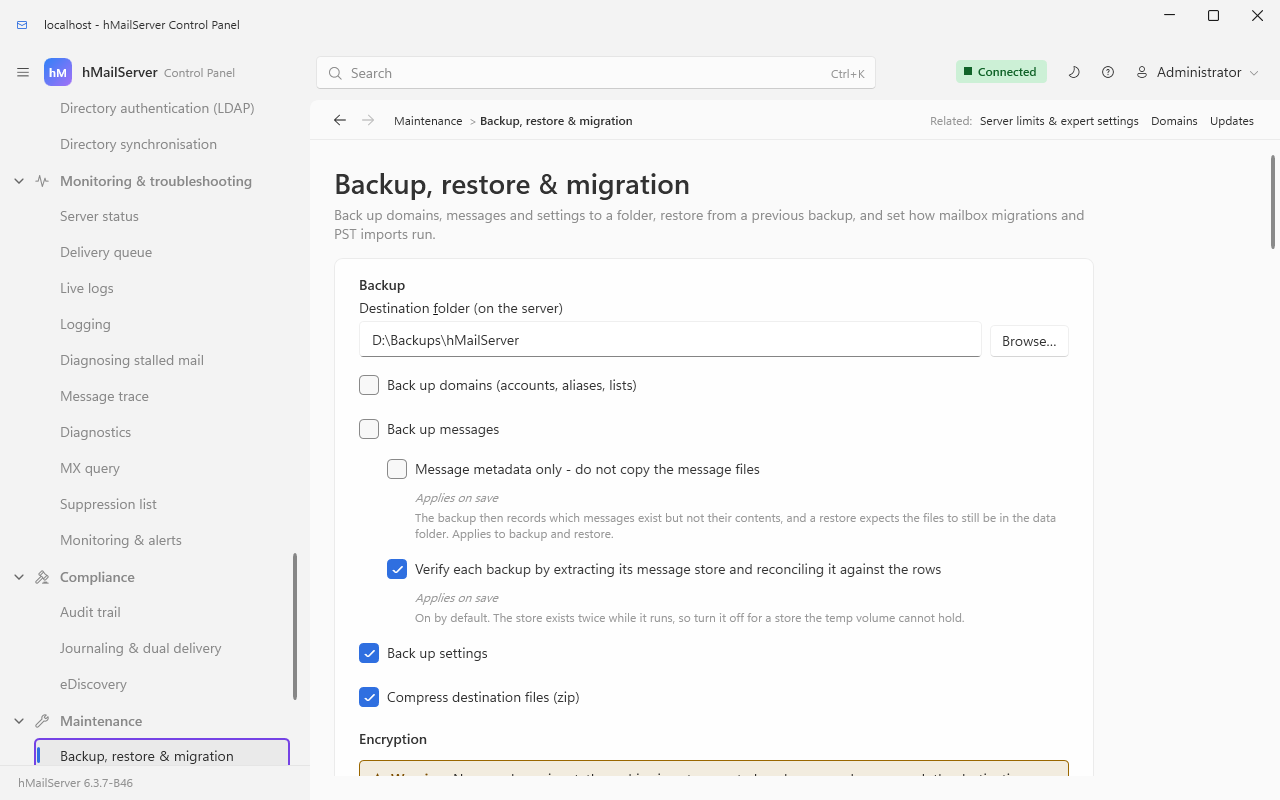
All six options of the table below are in the shot. Domains and messages are both unticked
here; a fresh install, where backupoptions is seeded 0, ticks none of the four. The
combination this section exists to warn about is Back up messages unticked while the other
three are on. The Encryption section begins at the foot of the frame; below it are the Save
settings and Start backup now buttons, then the Scheduled backups card with its Retention
section (new in 6.2.25) and the Restore card.
| Option | INI equivalent | What it changes |
|---|---|---|
| Back up domains (accounts, aliases, lists) | — | The domain tree goes into the XML index. Required for messages to mean anything: without it the message store is copied but no rows describe it |
| Back up messages | — | Copies the whole data directory into the archive. Only when Back up domains is ticked as well — the copy sits inside the domains branch of the run, so messages-without-domains stages nothing and then fails when it tries to compress a folder that was never created |
| Message metadata only - do not copy the message files | BackupMessagesDBOnly=1 |
Records which messages exist but not their contents. A restore then expects the files still to be in the data directory. Applies to backup and restore. Since 6.3.4 a save applies it at once, as Applies on save under the box says; up to 6.3.3 it applied after a service restart |
| Back up settings | — | Server settings, [Settings], security ranges, rules, TCP/IP ports, SSL certificate rows, blocked attachments, routes, incoming relays, public folders, groups, DNSBL/SURBL/white lists |
| Compress destination files (zip) | — | Compresses the message files into the archive too. Off, and every run overwrites the same DataBackup folder — see the warning below |
| Verify each backup by extracting its message store and reconciling it against the rows |
BackupVerifyRestore=1 (default on) |
§15.5 |
What the destination folder looks like after two runs, with compression on:
D:\Backups\hMailServer\
├── HMBackup 2026-09-07 020003.7z      one complete backup
└── HMBackup 2026-09-08 020004.7z      the next one
and with compression off:
D:\Backups\hMailServer\
├── HMBackup 2026-09-07 020003.7z      index only
├── HMBackup 2026-09-08 020004.7z      index only
└── DataBackup\                        ONE copy of the message store,
    ├── example.com\                   overwritten by every run
    └── ...
Tick domains and messages together, always. Every combination that leaves one of them out is either useless or fails: messages without domains stages no files; domains without messages gives you a configuration backup and no mail.
With compression off you have exactly one generation of mail, whatever retention says. The archives keep generations of the index; the
DataBackupfolder beside them is overwritten every run. The server says so in the application log when it notices the combination. If you want more than one generation of mail, switch compression on.
The XML index is written to hMailServerBackup.xml in the destination, added to the
archive, and then deleted from disk — so what you restore from is the .7z, not
an XML file. (The Control Panel's file picker defaults its filter to *.xml; choose
All files and pick the archive.)
Everything below was read from the code that writes the index. "In" means a restore puts it back; "not in" means it does not, whatever the run reported.
In the archive
| Area | Detail |
|---|---|
| Domains | Name, postmaster, AD domain, active flag, size and message-size limits, plus-addressing, per-domain anti-spam options, signatures, account/alias/list limits, DKIM selectors and key paths, domain vacation messages |
| Accounts | Address, name, active flag, password hash and its algorithm, mailbox size limit, AD binding, vacation settings, admin level, forwarding, per-account spam thresholds, signature, last logon, TOTP secret, password-changed timestamp. Since 6.3.4 the TOTP secret is carried opened and sealed again under the restoring server's stored-secrets key, so a restore onto new hardware keeps every second factor; a mailbox encrypted at rest carries its key row (hm_accountkeys) and the domain its recovery key, so the restored mail opens as it did (EncryptionAtRest.md) |
| Per account | External fetch accounts (with their passwords), app passwords (hashes), account rules. Since 6.3.4, also the address book, webmail preferences, scheduled sends, file-link records, S/MIME keys, password history, calendars and the first-contact memory (§15.1a) |
| Folders | Folder name, subscription state, create time, UIDNEXT, RFC 6154 SPECIAL-USE flags; sub-folders recursively; ACL permissions for public folders
|
| Messages | One row per message in a folder: file name, sender, state, size, retry count, IMAP flags, id and UID — plus the file itself when messages are included - as it is stored, so a compressed container, the Blobs directory of parts held once and a file encrypted at rest travel as they are. Since 6.3.4 the row also carries the message's IMAP keywords (labels, second and third stars, follow-up flags) |
| Aliases, domain aliases, distribution lists and their recipients | All of them |
| Server settings | The hm_settings property set, and the [Settings] mirror (hm_inisettings) — since 6.3.4 that table is the settings store itself, a secret among its rows (SRSSecret, OAuth2HmacSecret and the rest) is carried opened and sealed again on the way in, and PasswordPepper is left out of the archive on purpose (§15.1). The syslog, audit-trail and alert settings are hm_settings rows and travel with the rest |
| Collections | Security ranges (IP ranges), global rules, TCP/IP ports, SSL certificate rows, blocked attachments, routes and route addresses, incoming relays, public folders, groups and members, SURBL servers, DNS black lists, the anti-spam white list, blocked senders, greylisting white addresses. Since 6.3.4, also the remote domain policies (Routes and Relays §14.2a) |
| Domain transforms | Since 6.3.4: each domain's external-sender tag switches and text, its first-contact note switch and its disclaimer texts, carried on the domain's own element |
| Secrets that must be presented | Route, external-fetch and SSL private-key passwords travel in the index in a portable encoding, so a restore onto different hardware keeps them (§15.8) |
Not in the archive
| Not carried | Consequence of a restore |
|---|---|
| The delivery queue | Queued outbound messages are not under any account's folders, so no rows describe them. Their .eml files are copied with the data directory, but nothing re-queues them |
| Per-domain relay settings (host, port, username, password, "requires authentication") | Silently lost. Re-enter them on the Domains dialog after a restore |
Per-domain message retention days |
Silently reset to 0 (keep for ever) |
Greylisting triplets (hm_greylisting_triplets) |
Every sender is greylisted afresh; first delivery from each is delayed once |
Auto-ban and login-failure state (hm_logon_failures, expiring hm_securityranges rows) |
Bans lapse. Permanent IP ranges are carried |
Quarantine (hm_quarantine) |
Quarantined messages are not restorable through this path |
Message trace (hm_messagetrace) and metric history (hm_metricsamples) |
History starts again |
IMAP METADATA (hm_imap_metadata) and QRESYNC expunge records (hm_imapexpunged) |
Clients resynchronise from scratch; nothing is lost from mailboxes |
Archive index (hm_archiveindex) and the full-text index (hm_messageindex*) |
Rebuilt by their own tasks |
Password history (hm_passwordhistory) — 6.3.3 and earlier only; carried since 6.3.4 |
The reuse check starts again from the current password |
| The webmail's and DAV's per-account data — 6.3.3 and earlier only; carried since 6.3.4 | Deleted by the restore and not put back: §15.1a |
Per-message and per-mailbox annotations (hm_message_metadata, hm_imap_metadata) |
Keyed on ids a restore reassigns, so not carried in any version |
The audit trail (hm_audit), the alert rules and events (hm_alertrules, hm_alertevents) — tables new in 6.3.4 |
No business object writes them into the archive. The trail and the fired events start again; a condition you changed goes back to its shipped rule on a fresh database. Back the database up with its own tool if you need them |
[Database] and [Directories] in hMailServer.INI
|
Per-machine on purpose. Never copy the primary's INI over another machine's |
| Manually placed certificate, private-key and DKIM key files | The rows point at paths; the files are yours to copy |
| The stored-secrets key, and the database's record of which key it is (since 6.3.4) | Not needed by the archive, which carries what it seals opened; needed by a database-level backup (§15.1, §15.8) |
| The SNMP agent's passwords and community, the object store's secret key or SAS, the backup passphrase (since 6.3.4) | Entered again after a restore |
Every refusal below happens before anything in the destination is written, or deletes only the archive this run created. The previous backups are never touched until the new one is complete and has been read back.
Since 6.3.6 a message that a POP3 DELE or an IMAP EXPUNGE removes while a backup
copies the data directory is counted as gone and the backup goes on, as it was meant to from
6.2.19; up to 6.3.5 it failed the backup (HM5014, could not be copied: No such file or
directory), and with it an update a backup was taken for (UpdateBackupBeforeApply). A share
or a drive that cannot be reached is still a failure.
flowchart TD
    A["Backup starts"] --> B{"Messages included, and every message file inside the data directory?"}
    B -->|"no"| F1["Fail: All messages are not located in the data folder"]
    B -->|"yes"| C{"Destination folder exists and is reachable?"}
    C -->|"no"| F2["Fail: The specified backup directory is not accessible"]
    C -->|"yes"| D{"Domains or settings wanted, and the database pool is up?"}
    D -->|"no"| F3["Fail: no archive written, previous backups untouched"]
    D -->|"yes"| E["Read domains, accounts, aliases and lists into the index"]
    E --> G{"Did every database read actually run?"}
    G -->|"no"| F3
    G -->|"yes"| H["Copy the data directory to DataBackup - only reached when domains are included"]
    H --> I["Read the settings into the index"]
    I --> J{"Did every database read actually run?"}
    J -->|"no"| F3
    J -->|"yes"| K["Write hMailServerBackup.xml and add it to the archive"]
    K --> L{"Compression on, and messages included?"}
    L -->|"yes"| M["Add DataBackup to the archive, then delete the staged folder"]
    L -->|"no"| N["Leave DataBackup beside the archive"]
    M --> O["Verify: read the archive index back"]
    N --> O
    O -->|"unreadable, or does not describe this run"| F4["Fail and DELETE the incomplete archive"]
    O -->|"good"| P{"BackupVerifyRestore on, and there is a store to check?"}
    P -->|"yes"| Q["Extract the message store and reconcile it against the rows"]
    P -->|"no"| R["Apply retention"]
    Q -->|"store does not match what was written"| F4
    Q -->|"could not be checked"| F5["Fail, but keep the archive and say it is unverified"]
    Q -->|"matches"| R
    R --> S["Backup completed successfully"]
Three properties of that shape are worth naming, because each replaces a way the backup used to lose data:
- A database outage cannot produce a hollow archive. The collections that back a domain return empty when their query fails, and an empty collection stores no XML — so a backup taken during an outage used to be written, reported as successful, and contain no domains at all. Restoring it deleted every domain and put nothing back. The run now watches every read and refuses before writing.
- Copying the data directory never terminates the service. A message file deleted between being listed and being copied is counted as vanished and skipped (that is just mail flow); a file something else holds open is retried for up to 30 seconds and then fails the run by name; an existing destination file is overwritten. Before this, any of the three threw, and an exception escaping the work-queue task took the whole service down with no explanation in the backup log.
- Retention runs at exactly one point — past every failure path, with the new archive complete on disk — and it is never allowed to delete the archive this run produced.
Two checks, with different consequences.
| Check | What it does | On failure |
|---|---|---|
| Archive index (always) | Opens the finished archive through the same code a restore uses and confirms the index says what this run put in it | The backup fails and the incomplete archive is deleted, so it cannot masquerade as the newest good backup |
Verified restore (BackupVerifyRestore=1, the default) |
Extracts the message store to the temp directory through the restore path, and holds it to exactly the file count and byte count this run staged. Then checks every message row in the index for its file | A mismatch in files or bytes means a truncated archive: the backup fails and the archive is deleted. A store that could not be checked fails the backup but keeps the archive, saying so in the log |
| Per-account rows (since 6.3.4; part of the verified restore) | Before the files, counts per table what this run built — address books, preferences, scheduled sends, file links, S/MIME keys, password history, calendars, the first-contact memory — against what the archive's index reads back through the restorer's own copy | A table whose count differs means the index does not hold what was put in it: the backup fails and the archive is deleted. When there were rows the log says Verified restore: N row(s) across M per-account store(s) ... read back from the archive exactly as they were written.
|
Rows whose file is missing are reported, never fatal: the rows were read before the copy started and mail flow does not stop for a backup, so a small number is what a live server looks like. The backup log names the first ten and says so:
Verified restore: the message store was extracted to <temp>\... and reads back as
41822 file(s) totalling 3915773440 byte(s), exactly what this run wrote.
40977 message row(s) in the index were checked against the extracted store; 3 of them
have no file in this backup.
The cost is that the store exists twice while the check runs. The server compares
the staged size against free space in the temp directory first and skips the check —
with an explanation in the backup log — rather than failing a good backup on a small
temp volume. BackupVerifyRestore=0 skips it altogether, and the log says that too,
so a missing verification is never something you have to infer from an absent line.
The row count rides on the same step, and so has the same conditions. It runs inside
the verified restore, which runs only when the backup includes domains
and messages with their files (not Message metadata only) and BackupVerifyRestore is 1,
and which is skipped when the temp directory is too small. A backup of domains without
messages, or one with verification off, writes the per-account rows but does not count
them back — the archive index check in the first row is all it gets.
None of this is configured on a fresh install: the scheduled-backup task is not even created unless a schedule is set, so a default installation behaves exactly as every release before 6.2.25 did.
| Setting | Default | Meaning |
|---|---|---|
ScheduledBackupTime |
empty (off) |
HH:MM, 24-hour, local time. At most one backup per calendar day, taken at the first check at or after that time |
ScheduledBackupIntervalMinutes |
0 (off) |
Used only when no daily time is set. Measured against the newest archive in the destination, so it survives restarts; with no archive at all, the first backup is taken about a minute after the service starts |
ScheduledBackupKeepCount |
0 (keep all) |
How many of this server's own archives to keep |
ScheduledBackupMaxAgeDays |
0 (keep all) |
Delete archives older than this many days |
BackupVerifyRestore |
1 |
§15.5 |
BackupMessagesDBOnly |
0 |
§15.2 |
UpdateBackupBeforeApply |
1 |
The live updater takes a backup and waits for it to succeed before it applies an update |
ScheduledBackupTime wins when both schedule modes are set. Up to 6.3.3 the service read all
of these at start, so a change waited for a restart. Since 6.3.4 a save applies each of them at
once, and the Control Panel marks every one Applies on save; a schedule saved on a server that
started without one is registered by the save, as a start would register it.
Since 6.3.4, these are no longer changed by editing the file. From schema 6042 the
[Settings]keys are stored in the database andhMailServer.INIholds a copy. Set them on the Backup, restore & migration page, withPUT /api/v1/settings/ini/{name}orhmctl ini set. A line added to the file for a key the server has never stored is still taken in at the next start; a change to a key it has stored is reported as HM5804 in the error log and the stored value used, the line put back where the service may write the file (underNT SERVICE\hMailServer, to which the file is read-only, the edit stays in the file - The Service Account). A[SettingsOverride]section in the same file is the deliberate way to make the file win, and is reported as HM5807 at every start.
Retention has four rules, and each one is a way this could otherwise destroy data:
- Nothing is deleted until the replacement backup has completed successfully. Pruning first and writing afterwards is not retention, it is data loss: a destination with room for one more archive but not two would have had yesterday's deleted and today's fail to write, leaving nothing.
- The newest archive is never deleted, whatever the policy says.
-
The age rule always leaves the two newest archives alone. "Older than N days"
is a statement about the wall clock, and the wall clock is the one input that can
be wrong by years — a VM restored from a snapshot, a dead CMOS battery, a bad NTP
step. A count is immune to a wrong clock, so
ScheduledBackupKeepCountmay take the directory down to a single archive;ScheduledBackupMaxAgeDaysmay not. - Only files whose names the server generated are ever considered. The timestamp is read out of the file name, not from the file system, because copying, snapshot-restoring or re-syncing an archive resets its creation time to now — which would hand the retention pass exactly the wrong file to delete. Your own copies in the same folder are never touched.
The pre-flight refuses a scheduled run that is certain to fail, rather than claiming the single backup slot and reporting a critical error once a minute for as long as the condition lasts:
| Refusal | What it means |
|---|---|
no backup destination has been configured |
Set one on the Backup, restore & migration page |
the backup settings do not include settings, domains or messages |
The run would contain nothing |
the database is not available, and a backup taken now would not contain the domains or accounts |
Wait for the database |
the backup destination is not accessible: <path> |
An unreachable share, or a path that no longer exists |
the previous backup is still running, so this run is covered by the one already in progress |
Not an error. The slot is treated as satisfied — an interval shorter than the time a backup takes must not become a back-to-back backup loop |
a restore is running, so the backup will be taken once it has finished |
Retried in 5 minutes. A restore is exactly when the next backup matters most |
A refused run backs off 5, 10, 20, 40 and then 60 minutes, which bounds how often the
scheduler's thread waits out a dead network share while still picking the backup up
within minutes of it coming back. Refusals are logged once, then once an hour, to
both the application log and hmailserver_backup.log — the latter because that is
where somebody investigating "why is there no backup from last night" will look, and
it does not roll over daily.
Two warnings fire before anything breaks, at most once a day:
-
... has N MB free and the previous backup archive is M MB, so the next backup is likely to run out of space.The run is attempted anyway — a write failure is authoritative and leaves the existing archives alone, whereas refusing on an estimate means no backup at all. -
... the backup destination is on the same volume as the message store. A backup that fills the volume will also stop mail being accepted.Pointing the destination at a folder under the install directory is the normal way to end up here.
One mailbox, or one message - since 6.3.4. An archive in the backup destination can give back one account's mailbox - every folder and message it held when the backup was taken - or one message of it, and touch nothing else: not the account's settings, rules, contacts or calendars, and no other account. Merge adds each archived message whose file is not in the live mailbox, so merging twice adds nothing; Replace empties the account's folders first so the mailbox is the archive's, and mail that arrived since is gone (kept only for
RecoverDeletedDays, off by default). One message goes back into its folder or a named one. The archive must have been taken with domains and messages, an encrypted one needs its passphrase, and it is named from the destination's listing, never by an arbitrary path. On the Control Panel's and the Deck's Backup pages (Restore a mailbox, Restore one message), over REST (GET /api/v1/backup/archives,POST /api/v1/backup/{archive}/mailboxes/{address}/restore), over COM (BackupManager.RestoreMailbox,RestoreMessage) and withhmctl backup restore-mailbox. It runs in the backup manager's one slot, so it never overlaps a backup or a whole restore.
A whole restore deletes every domain, every account, every public folder and the whole message store on purpose, and nothing can undo it. So it runs in two phases, and the first one touches nothing:
flowchart TD
    subgraph P1["Phase one - decide. Nothing is changed."]
        A["Open the archive"] --> L{"List it (6.3.4): any entry with an absolute path,<br/>a .. segment or a link with a target?"}
        L -->|"yes"| X2["Refused whole, HM7540. Nothing extracted"]
        L -->|"no"| B{"Is it one of ours, and readable?"}
        B -->|"no"| X1["Refused. The server is untouched"]
        B -->|"yes"| C{"Was it written by an older or equal version?"}
        C -->|"newer"| X1
        C -->|"yes"| D{"Does the archive contain what you asked to restore?"}
        D -->|"no"| X1
        D -->|"yes"| E["Extract the message store to a scratch directory"]
        E -->|"fails"| X1
    end
    subgraph P2["Phase two - act. A failure here leaves a half-restored server."]
        E --> F["Delete every domain"]
        F --> G["Delete every public folder"]
        G --> H1["Copy the staged store in over the data directory (6.3.6):<br/>a file held byte for byte left, one that differs renamed aside,<br/>one the service may not replace left and named (HM5705)"]
        H1 -->|"fails"| U["The copy undone: the data directory<br/>as it was before the copy, HM5014"]
        H1 --> H2["Only then remove what the archive does not hold;<br/>at the data directory's root only the delivery queue's message files"]
        H2 --> I["Load domains, accounts, aliases and lists"]
        I --> J["Load settings"]
        J --> K["Reinitialise the server"]
    end
The caption of phase two stays true for the domains, which are deleted before the copy, and
since 6.3.6 no longer for the data directory (item 46; Backup.md, How a restore replaces the
data directory). Up to 6.3.5 the restore emptied the data directory first. On Windows every
full restore with messages then failed on an installation made new with 6.3.4 or 6.3.5, whose
own self-signed key the service's account may read and not delete: it stopped at
Data\Certificates (HM5700), failed the copy (HM5014) and ended with no domain on the
server and the backup's messages only in Temp\{GUID}\DataBackup. On Linux, from 6.3.0, it
deleted the data directory's .hmailserver-secret-key, which no archive carries, so no
LINUX1: value of hMailServer.ini opened again - from 6.3.4 the stored-secrets key's line
among them, and with it no account's second factor and no [Settings] secret (HM7495 at
each start). If a restore failed that way, the archive is as it was: upgrade to 6.3.6 or a
later release and restore again from it, then delete the staged copy its HM5014 line names; on Linux put the
key file back from a copy of the data directory, or import the stored-secrets key from its
export. Backup.md has the 6.3.4 and 6.3.5 workaround, with its two icacls lines, for a
server that cannot upgrade first.
Phase one exists because each of its four checks used to be reachable from the Control Panel's three restore tick-boxes, and each ended in a server with nothing on it:
- Restoring messages from an archive that has none (any backup taken with Back
up messages off) used to fault forty lines after the domains had been deleted.
The exception was trapped and logged, so the visible result was an empty server, no
BACKUP ERRORline and noOnBackupFailedevent. - Restoring domains from an archive that contains none deleted every domain and reported success — an absent XML node is indistinguishable from an empty collection.
- Restoring settings from an archive that contains none did the same to SSL certificates, TCP/IP ports, security ranges, global rules, blocked attachments, DNS black lists and white lists.
- An archive written by a newer hMailServer was restored into an older one without a word. The index has carried a version attribute since 2010 and nothing read it.
The order in phase two is also deliberate: domains are dropped before the data directory is restored, because dropping a domain also removes its folder from disk — do it the other way round and you restore the mail and then delete it.
What a restore will not extract (since 6.3.4). A restore extracts whatever archive it
is pointed at, as the service's account. So every way a restore opens an archive - loading
it, a whole restore, the check of the archive a backup has just written, and a mailbox or a
message restored from one - first lists its entries (7za l -slt, the headers only, with
the passphrase when they are encrypted) and refuses the whole archive, before anything in
it is extracted, when an entry has an absolute path (a leading \ or /, a drive, a UNC
path), a .. segment or a segment of nothing but dots and spaces, or is a link with somewhere
to point - a tar's symbolic or hard link, or an entry marked a symbolic link, junction or
other reparse point that carries its target. A listing an archive has written into (a name
printed with its newlines) is refused as well, and the check is made again before each later
extraction. The server never writes such an entry, so an archive that holds one was made or
changed somewhere else: the refusal names the entry in the backup log and is reported as
HM7540, and nothing on the server is changed. It is defence in depth: the 7-Zip the
Windows installer ships moved from 19.00 to 26.03 in the same release - fetched from 7-zip.org
and pinned by its SHA-256 - because 19.00 predated the fixes for CVE-2023-31102 and
CVE-2025-55188, and 26.03 itself drops a .. and a drive from what it extracts; the check
depends on neither, nor on which 7-Zip or p7zip a Linux server has
(Backup.md).
The procedure:
- Install the same version of hMailServer, at the same drive letter and directory layout. (A newer server can read an older archive; an older one refuses a newer archive.)
- Restore or recreate the
[Database]connection inhMailServer.INIand confirm the Control Panel connects. Do not copy another machine's INI wholesale. -
Maintenance → Backup, restore & migration → Restore: choose the
HMBackup … .7z, tick the categories, press Start restore. Watchhmailserver_backup.log. - Copy back anything the archive could not hold: certificate and private-key files,
DKIM keys placed outside the data directory, and - on the new machine's
hMailServer.INI-PasswordPepperif one was set. Since 6.3.4 the server that restores needs a stored-secrets key of its own only to seal; the archive's secrets come back opened either way. Since 6.3.6 a full restore keeps this installation's own self-signed certificate and key whenever the archive's key is not the same byte for byte- an archive taken on another computer, or before this installation made its pair - and
says so in the backup log (item 46). A mail client that had accepted the old server's
self-signed certificate asks again, and a TLSA record published for the old key no longer
matches. To keep the old pair, stop the service and copy
self-signed-key.pemandself-signed-certificate.pemfrom the archive'sCertificatesfolder over this installation's.
- an archive taken on another computer, or before this installation made its pair - and
says so in the backup log (item 46). A mail client that had accepted the old server's
self-signed certificate asks again, and a TLSA record published for the old key no longer
matches. To keep the old pair, stop the service and copy
- Re-enter the per-domain relay settings for any domain that had them (§15.3).
- Start the service and check Monitoring & troubleshooting → Server status, then Diagnostics.
- Send a message in from outside and read it back over IMAP; send one out.
hMailServer holds two different kinds of secret, and they behave differently.
Passwords the server verifies — mailbox passwords, app passwords, the administration password — are stored as hashes. They are in the backup, they restore anywhere, and nobody has to retype anything.
Passwords the server has to present to somebody else — route smart-host
credentials, external POP3/IMAP fetch accounts, the per-domain relay password, SSL
private-key passphrases — cannot be hashed. In the database they are protected
with machine-scoped Windows DPAPI (ProtectStoredSecretsWithDPAPI=1, the default), so
a blob written by one machine cannot be decrypted by another. The protection is
the machine.
What that means in practice depends entirely on how you move the data:
| How you move it | Do route / fetch / key passwords survive? |
|---|---|
| Through the built-in backup and restore | Yes. The server decrypts them into memory to write the index, stores them in the archive in a portable encoding, and the restore re-protects them with the new machine's DPAPI |
By copying or replicating the database itself (a .sdf file, a SQL Server restore, a warm standby sharing one database — see Warm Standby) |
No. The DPAPI blobs travel and cannot be opened. Re-enter each password on the new machine |
| Per-domain relay credentials, either way | No — those fields are not in the index at all (§15.3) |
ProtectStoredSecretsWithDPAPI=0 keeps the older, portable encoding instead: weaker
at rest, movable between machines. That is a real trade-off rather than a wrong
answer, but make it deliberately.
Since 6.3.4, five more things travel differently:
-
The second factors and the
[Settings]secrets are sealed in the database under the installation's stored-secrets key once it has one, and the key is in no backup. Through the built-in backup and restore they survive, carried opened and sealed again under the restoring server's key. By copying or restoring the database itself they survive only with the exported key, imported on the machine that restores (--import-stored-secrets-key FILE); lost with no copy anywhere,--forget-sealed-secrets KEYIDclears only what it sealed (SecretsAtRest.md). -
A mailbox encrypted at rest travels as its encrypted files with its key row and the domain's recovery key, and opens after a restore as it did - to the account's password, or the domain's recovery passphrase. A mailbox restored on another Windows machine before its first sign-in is opened through the recovery (EncryptionAtRest.md).
-
A zero-access mailbox is encrypted to the account's own OpenPGP key after the filters run. The backup carries the ciphertext and the account's public key, never a way to read it: a restored zero-access mailbox is exactly as readable as the original - by the person, with their passphrase, and by nobody else (Encryption for People).
-
A domain's S/MIME certificate authority - its root, the certificates it issued and the root's private key - is in the configuration backup, but the key travels as the envelope it is stored in, unlike the passwords above: restored on the machine that made it (on Linux, wherever the key file is), the authority works; restored anywhere else it signs nothing, the Deck says so, and it must be rotated there. A copied database behaves the same. Guard the archive as you guard the server.
-
Passkeys are not in the backup at all (§15.1a): enrol the device again.
The [Database] password in each machine's own INI is DPAPI-protected too, per
machine, and is never replicated. It causes no restore work; it is mentioned so
nobody "fixes" it by copying the primary's INI over another machine's, which breaks
that machine's database connection outright.
Take a backup now, and wait for it:
$app = New-Object -ComObject hMailServer.Application
$app.Authenticate("Administrator", "<password>") | Out-Null

# These properties write straight through - there is no Save() on this object.
$b = $app.Settings.Backup
$b.Destination              = "D:\Backups\hMailServer"
$b.BackupDomains            = $true
$b.BackupMessages           = $true
$b.BackupSettings           = $true
$b.CompressDestinationFiles = $true

$app.BackupManager.StartBackup()

# The run happens on a work queue; watch the log rather than the return value.
Get-Content "C:\Program Files\hMailServer\Logs\hmailserver_backup.log" -Tail 40 -Wait
A successful run ends with Backup completed successfully.; a failed one with a
BACKUP ERROR line naming the reason.
Check what an archive contains before restoring it:
$backup = $app.BackupManager.LoadBackup("D:\Backups\hMailServer\HMBackup 2026-09-08 020004.7z")
"{0} settings={1} domains={2} messages={3}" -f "contains:", `
    $backup.ContainsSettings, $backup.ContainsDomains, $backup.ContainsMessages
If the archive is truncated, half-copied, not one of ours, or was written by a newer
hMailServer, LoadBackup returns nothing and raises an error rather than handing back
an object that would restore nothing — and the reason is written to
hmailserver_backup.log and the application log.
Restore it, choosing the categories:
$backup.RestoreDomains  = $true
$backup.RestoreMessages = $true
$backup.RestoreSettings = $true
$backup.StartRestore()
Confirm the destination is writable. Test backup directory on Monitoring & troubleshooting → Diagnostics writes a temporary file there and deletes it again; it is the check that catches a schedule that has been failing silently. Running the whole self-test from PowerShell is in Monitoring and Health §16.8.
List what retention would consider, which is only files matching the generated name:
Get-ChildItem "D:\Backups\hMailServer" -Filter "HMBackup *.7z" |
  Sort-Object Name |
Format-Table Name, @{n="MB";e={[int]($_.Length/1MB)}}, LastWriteTimeA backup nobody has restored is a hope, not a backup. The whole drill on a scratch machine or VM:
- Install the same hMailServer version. Point
[Database]at a new, empty database (never at production). - Copy the newest archive across.
- Restore domains, messages and settings.
- Check: does the domain list match? Does an account you know log in over IMAP? Does its INBOX have the right message count? Does a message open?
- Check Monitoring & troubleshooting → Diagnostics — in particular Test message file locations, which proves the store and the rows agree.
- Write down what you had to fix by hand — certificate files, DKIM keys, per-domain relay settings — and keep that list with the backup. That list is the difference between a two-hour recovery and a two-day one.
Checked 8 September 2026 against hMailServer 6.2.28. The archive name, the run order,
the abort points and the deletion of an incomplete archive are
BackupExecuter::StartBackup and DiscardIncompleteArchive_; the tolerant tree copy
(overwrite, vanished-file count, 30-second retry budget) is CopyOneFile_ and
CopyTree_ in the same file, with the comment at the top of the file explaining what
FileUtilities::CopyDirectory used to do to the service. The two verification steps
are VerifyArchive_ and VerifyRestore_. The four backup options are
Backup::BackupOptions. What the index holds is Domain::XMLStore,
Account::XMLStore, IMAPFolder::XMLStore, Message::XMLStore,
Configuration::XMLStore, SMTPConfiguration::XMLStore,
IMAPConfiguration::XMLStore and AntiSpamConfiguration::XMLStore; the per-domain
relay fields and message retention days are members of Domain that appear in
PersistentDomain and in neither Domain::XMLStore nor Domain::XMLLoad, which is
the basis for the "not carried" rows. The two-phase restore, and the four failures it
was written to stop, are BackupRestorer (see its header) and
BackupExecuter::StartRestore. Retention's four rules are BackupRetention and
ParseArchiveName. The schedule, the pre-flight refusals, the back-off and the two
capacity warnings are BackupScheduleTask; the single-flight slot is
BackupManager::ClaimRunSlot_. LoadBackup returning nothing rather than an empty
object is BackupManager::LoadBackup. Secret handling is Crypt::ProtectSecret /
UnprotectSecret with DataProtector (CRYPTPROTECT_LOCAL_MACHINE), against
Route::XMLStore, FetchAccount::XMLStore and SSLCertificate::XMLStore, which use
the portable encoding. Sieve paths are SieveStorage::GetAccountDirectory_; the ACME
directory is AcmeClient::GetCertificateDirectory. The backup taken before an update
is UpdateCheckTask's BackupBeforeApply_. Every default in the tables is
IniFileSettings::LoadSettings. Regression coverage: BackupRestore.cs,
BackupRestoreSafety.cs, BackupVerifiedRestore.cs and ScheduledBackup.cs under
test/RegressionTests/Infrastructure.
Re-checked on 15 September 2026 against commit 3233b0cc4, the tree after 6.3.3 that became 6.3.4. The
per-account stores and the reasons for what is left out are the stores_, columns_ and
elsewhere_ arrays in Common/Application/AccountStores.cpp, called from Account::XMLStore
and Account::XMLLoad (the load last, after the folders, so scheduled sends can be resolved);
the dropped-reference line is AccountStores::XMLLoad. The keywords are the Keywords
attribute in Message::XMLStore. The row count is AccountStores::CountRows, called from
BackupExecuter::VerifyRestore_, which StartBackup calls only when domains and messages
are included, messages are not metadata-only and BackupVerifyRestore is on. The pepper is
IniSettingStore::IsFileOnlyName, honoured in IniSettingStore::XMLStore and XMLLoad.
The domain transform fields are in Domain::XMLStore; the remote domain policies are
SMTPConfiguration::XMLStore. The check is build/check-account-stores.py (84 checks
passing at that commit) and the tests are BackupAccountStores.cs (10). No XMLStore
exists for hm_audit, hm_alertrules or hm_alertevents.
Brought up to 6.3.4 (master 92b8f9f63) on 26 September 2026 from
hmailserver/docs/Backup.md, SecretsAtRest.md, ObjectStorage.md, MessageStore.md and
EncryptionAtRest.md: the listing check and HM7540 are BackupRestorer (the refusal reported
at BackupRestorer.cpp, HM7540), the 7-Zip pin is third-party-binaries.json and
build/get-installer-binaries.ps1.