Repository navigation
Encryption and Certificates
This page began as a chapter of the 6.2.10 manual and has been corrected against the code of 6.2.28. The Control Panel's pages are grouped differently now, so the paths below use today's groups; the TLS ports 465, 993 and 995 exist only after you create them on the TCP/IP ports page (a fresh install seeds 25, 587, 110 and 143); and everything added since 6.2.10 is in Changes Since 6.2.10. Where a value here disagrees with the Settings Reference, which is generated from the code, the reference is right. Brought up to 6.3.4 (27 September 2026, schema 6104), against master 92b8f9f63 (the release is the tag v6.3.4,
51e2dbda0, which adds a last batch to that tree; Changes-Since-6210 section 4e): the secure defaults of a new installation, gateway encryption, apply-on-save, the database connection (§9.11), certificates for IP addresses (§9.12) and encryption at rest (§9.13). Brought up on 5 October 2026 to 6.3.6 (6 October 2026, schema 6108), for what 6.3.6 changes on this page. 6.3.7, the latest release (17 October 2026, schema 6108), is not yet reflected here.
This page is mostly about transport - TLS between servers, between a client and this server, and since 6.3.4 between this server and its database - with what this server keeps encrypted on its own disk in §9.13. Encrypting the message so that only the person it is for can read it - S/MIME and OpenPGP in the webmail, the organisation CA, zero-access mailboxes, password-protected messages - is on Encryption for People. Encrypting mail at this server to a partner organisation's key is §9.6b below.
Mail must be encrypted in transit. You need a TLS certificate for
mail.yourcompany.com, you need at least one listener configured to use it, and — for
mail you send — you need the three outbound policies in §9.6, all of which are already
on.
What a fresh install offers depends on the release. The create scripts still seed the four listeners (25, 587, 110, 143) with connection security None and no certificate (
DBScripts/CreateTables*.sql, thehm_tcpipportsseed rows), andSTARTTLSis advertised only on a port whose security is STARTTLS-optional or STARTTLS-required (SMTPConnection.cpp, the250-STARTTLSline). Up to 6.3.3 that is what a new installation ran with: no TLS at all until a certificate was added (§9.1, §9.2) and the listeners set (§9.5). Since 6.3.4 a new installation is secured before anyone configures it: the Windows installer, after the database step - or on Linux the unit's first start after--create-database- gives a database this installation created a self-signed certificate for the machine (RSA 2048, 825 days,<data directory>\Certificates\self-signed-certificate.pem, recorded as Self-signed (made at installation)), sets the four listeners to STARTTLS (optional) with it, and sets Require TLS for auth on the Internet IP range; My computer is left as it was. An upgraded or attached database is never changed, and the container and the AppImage apply it only by hand (SecureDefaults.md). Mail clients warn about a self-signed certificate, so replacing it (§9.1) is still step one. Secure Defaults is this wiki's copy of SecureDefaults.md.
Start with the summary if the server is already running. Certificates & encryption → Transport encryption overview is a read-only page that answers "is anything on this server carrying a password in the clear, and will it still serve a valid certificate next month". It exists because the interesting states only appear in the combination of four editors: a port set to use TLS with no certificate assigned does not fall back to plaintext, it fails to start; the AEAD-ONLY cipher preset leaves TLS 1.0 and 1.1 advertised with no suite they can use; a certificate that expired last week is listed exactly like one that has not (
Tools/ControlPanel/Views/TlsOverviewView.cs).
hMailServer has an ACME v2 client built in (RFC 8555, http-01 challenge). It obtains
a free certificate, installs it, assigns it to your TLS ports, renews it before expiry and
loads it by a reinitialise of the server — the listeners restart for a few seconds, and the
sessions in flight are cut unless ShutdownDrainSeconds gives them a window, while the
service itself does not restart — with no scheduled task
(Acme.md).
Open Certificates & encryption → Automatic certificates (ACME):
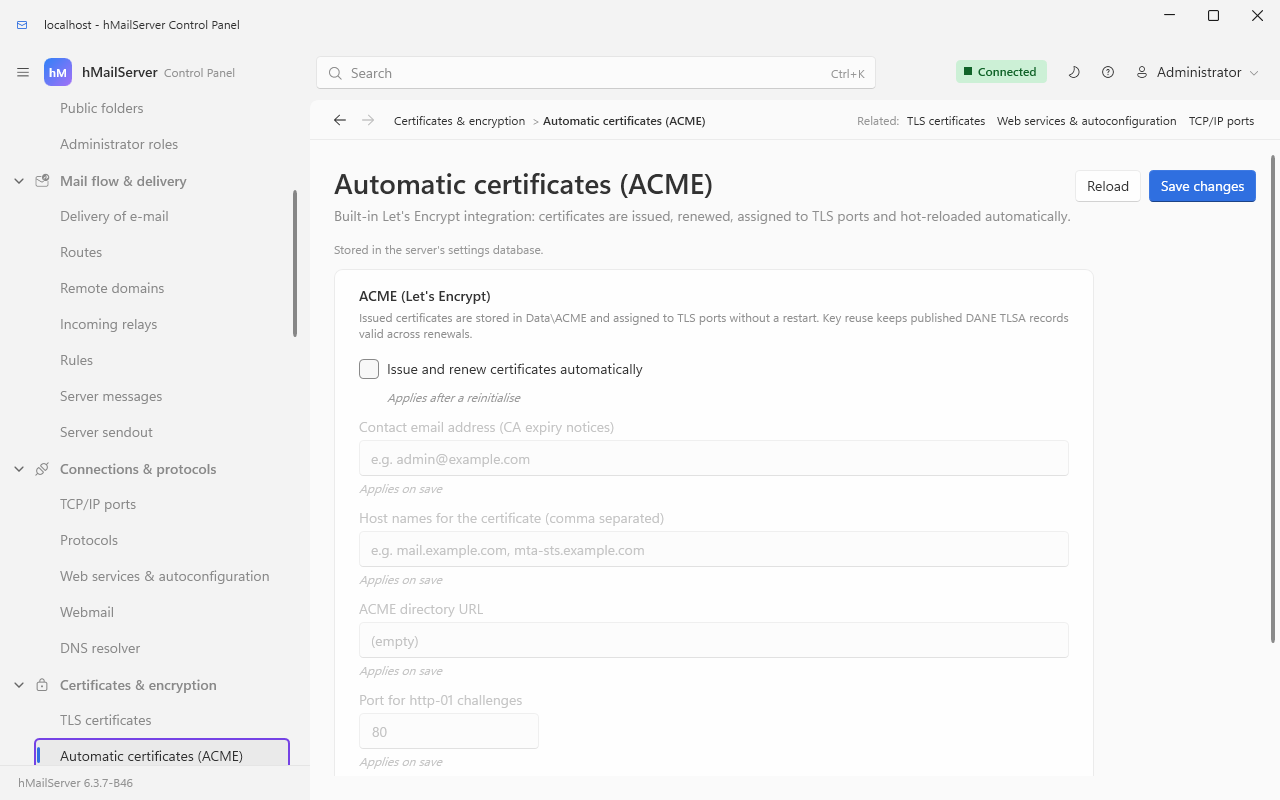
The page says "Stored in the server's settings database": since 6.3.4 these settings are kept
there under their INI names, shown here as they would read in the file's [Settings] section
(Settings Overview):
[Settings]
AcmeEnabled=1
AcmeContactEmail=you@yourcompany.com
AcmeDomains=mail.yourcompany.com,mta-sts.yourcompany.com,autoconfig.yourcompany.com
AcmeHttpPort=80
AcmeReuseKey=1| Setting | Default | Notes |
|---|---|---|
AcmeEnabled |
0 | Off. With it off, AcmeRenewalTask::DoWork returns immediately and nothing on this page can fire |
AcmeDirectoryUrl |
https://acme-v02.api.letsencrypt.org/directory |
Any RFC 8555 CA. Point it at the staging directory while you are testing |
AcmeContactEmail |
empty | Where the CA sends expiry notices |
AcmeDomains |
empty | Comma separated. Every name becomes a SAN on one certificate |
AcmeHttpPort |
80 | Where the http-01 challenge is answered |
AcmeCertificateDirectory |
empty | Falls back to <data directory>\ACME
|
AcmeReuseKey |
1 | Keep the same private key across renewals |
Editing
hMailServer.INIis how 6.3.3 takes these; since 6.3.4 it is not. Every[Settings]block on this page shows keys that, from schema 6042 (6.3.4), are stored in the database with the file as a copy. A line for a key the server has never stored is still taken in at the next start; a change to a stored key is reported as HM5804 and the stored value used, the line put back where the service may write the file (underNT SERVICE\hMailServer, to which the file is read-only, the edit stays in the file - The Service Account). Use the Control Panel page named in each section,PUT /api/v1/settings/ini/{name}orhmctl ini set, or a[SettingsOverride]section when the file genuinely has to win (reported as HM5807 at every start). Since 6.3.4 a save applies when it is saved for most keys; of the ones on this page, the ACME switch and certificate directory and the listeners' certificate files wait for a reinitialise (the Control Panel's Apply now), because they are bound into a listener or a TLS context when it starts. Each field says which (Profiles and Environment).
Requirements: port 80 must be reachable from the internet — that is how the CA
verifies you own the name — and each name in AcmeDomains must already resolve to this
server.
AcmeReuseKey=1matters if you use DANE. Keeping the same private key across renewals keeps your published3 1 1TLSA records valid. Leave it on. When it is on and aprivkey.pemalready exists, the log saysACME: Reusing the existing certificate key (keeps published TLSA records valid).Otherwise a fresh 2048-bit RSA key is generated.
sequenceDiagram
    participant S as hMailServer
    participant CA as ACME directory
    participant L as Challenge listener on port 80
    S->>CA: GET /directory
    CA-->>S: newNonce, newAccount, newOrder, renewalInfo
    S->>S: Load or create the ACME account key
    S->>CA: POST newAccount, JWS signed with the account key
    CA-->>S: 200 or 201 with the account URL
    S->>CA: POST newOrder with every configured name
    CA-->>S: 201, order URL, finalize URL, authorization URLs
    loop one per name
        S->>CA: POST-as-GET the authorization
        CA-->>S: challenges, including http-01 with a token
        S->>L: publish token and key authorization
        S->>CA: POST the challenge, empty JSON object
        loop up to 30 times, 2 seconds apart
            S->>CA: POST-as-GET the authorization
            CA-->>S: pending, valid or invalid
        end
    end
    S->>CA: POST finalize with a CSR carrying every name as a SAN
    loop up to 30 times, 2 seconds apart
        S->>CA: POST-as-GET the order
        CA-->>S: processing, valid or invalid
    end
    S->>CA: POST-as-GET the certificate URL
    CA-->>S: the PEM chain
    S->>S: Write privkey.pem.new and fullchain.pem.new,<br/>then rename key first, certificate second
    S->>S: Create or update the certificate record,<br/>assign it to TLS ports that have none,<br/>reinitialise the servers
The challenge is answered by whichever listener owns port 80. If the built-in web services
server is already listening there, it serves /.well-known/acme-challenge/<token> from a
process-wide store and no second listener is started; otherwise a transient
AcmeChallengeServer binds the port for the duration of the validation and closes it
again.
The renewal task runs once an hour, plus once at startup
(Application.cpp, where AcmeRenewalTask is scheduled). Each run asks one question:
should this certificate be renewed now?
From the release after 6.3.7 (Acme.md, GitLab work item 98) the check asks first whether the certificate names every host
AcmeDomainslists, and one that does not is due at once, whatever its dates - a name it carries that starts with*.covering one label - where up to 6.3.7 a host added to the list waited until the certificate in use was due for renewal, about sixty days for a ninety-day certificate. A save ofAcmeDomainswith such a host through the Control Panel, COM or REST starts the check at once;hmailserver --set-settingon Linux stores the value from a process of its own, which the server reads at its next reinitialise (systemctl reload hmailserver) or start. A check can also be asked for -POST /api/v1/acme/run, COMUtilities.RunAcmeCheck, or Check now on the Control Deck's Certificates page - andGET /api/v1/acme(COMUtilities.GetAcmeStatus) says what the server knows of the certificate and of its last checks without asking the CA. Every check, whatever started it, runs one at a time, orders nothing within twenty minutes of an attempt that failed, and nothing before the time a CA's rate limit gave; a name no certificate can carry - a wildcard, an IP address, a name past ASCII - is left out of the check and of the order, and named in the status'sunusable_domains.
flowchart TD
    A["Hourly renewal task"] --> B{"AcmeEnabled?"}
    B -- no --> STOP["Nothing happens"]
    B -- yes --> C{"Can fullchain.pem<br/>be read for its dates?"}
    C -- no --> REQ["Request a certificate"]
    C -- yes --> D{"Does the CA publish<br/>renewalInfo, ARI?"}
    D -- yes --> E["Ask the CA for a suggested window,<br/>pick a stable point inside it"]
    E --> F["Clamp to at most<br/>24 hours before expiry"]
    F --> G{"Is that moment past?"}
    D -- no --> H["renewAt = notBefore + two thirds<br/>of the certificate lifetime"]
    H --> I["Clamp to at most<br/>24 hours before expiry"]
    I --> G
    G -- no --> J["Deploy a certificate that was issued<br/>but never recorded, if there is one"]
    G -- yes --> REQ
    REQ --> K{"Issuance succeeded?"}
    K -- yes --> DONE["Deployed, servers reinitialised"]
    K -- no --> L{"How long until<br/>the current certificate expires?"}
    L -- "more than 7 days" --> LOG["One application-log line"]
    L -- "7 days or fewer" --> ERR["HM5992 reported as an error"]
    L -- "already expired" --> ERR
The renewal arithmetic is a fraction of the lifetime, not a fixed number of days, and that is the point. Thirty days was right while certificates lasted ninety; Let's Encrypt defaults to 64 days from February 2027, the maximum falls to 100 days in March 2027 and to 47 in March 2029 — and a fixed 30-day window against a 47-day certificate starts renewing seventeen days after issuance and never stops, which is how an operator gets rate-limited by their own CA.
So, from AcmeClient::GetRenewalTime:
lifetime  = notAfter - notBefore          (90 days assumed if notBefore is unreadable)
renewAt   = notBefore + (lifetime / 3) * 2
renewAt   = min(renewAt, notAfter - 24 hours)     floor, so a failure gets another attempt
renewAt   = max(renewAt, notBefore)               a certificate shorter than a day renews at once
For a 90-day certificate that is 60 days in, 30 days of margin. For a 47-day one it is 31 days in, 16 days of margin. Whatever the lifetime, a third of it remains to notice a failure.
When the CA implements ARI (RFC 9773, a renewalInfo endpoint in its directory) its
opinion wins, with two guards: the suggested moment is never later than 24 hours before
expiry, and the point chosen within the CA's window is derived from the certificate's own
ARI identifier rather than from a random number — so this server picks the same moment
every hour for this certificate, and a different one from the server next door, which is
what §4.2 of the RFC is actually asking for.
<data directory>\ACME\
├── account.key      the ACME account key; created on first use, never rotated
├── privkey.pem      the certificate private key; reused across renewals by default
├── fullchain.pem    the leaf certificate followed by the issuer chain
├── privkey.pem.new      transient, during a renewal only
└── fullchain.pem.new    transient, during a renewal only
The two .new files exist because the order of the writes matters. The key is written,
then the certificate, then the key is renamed into place first and the certificate
second. A half-finished renewal therefore never leaves a new key beside an old
certificate — a mismatched pair is not a degraded listener, it is a listener that refuses
to start, which would be a worse outcome than the expiry it was avoiding. If the second
rename fails anyway, that is error HM5993 and the message names both files and says the
fix is manual.
A successful run:
ACME: Certificate is missing or due for renewal. Requesting a new certificate.
ACME: Reusing the existing certificate key (keeps published TLSA records valid).
ACME: Certificate issued successfully: C:\Program Files\hMailServer\Data\ACME\fullchain.pem
ACME: Assigned the certificate to port 587 (no certificate was configured).
ACME: Restarting servers to load the new certificate.
ACME: DANE TLSA record for this certificate: _25._tcp.<mx-host>. IN TLSA 3 1 1 3b1f…
A failed one always names the failing step, then says so plainly:
ACME: Authorization for mail.example.com offers no http-01 challenge. Response: {…}
ACME: Certificate renewal FAILED. The failing step is in the lines above; the next attempt
is in one hour. The certificate currently installed has not been changed.
| Symptom in the log | Almost always means |
|---|---|
Failed to start the http-01 challenge listener. Is the port in use? |
Something else owns port 80 — IIS, another web server, or a WebServicesHttpPort set to a different port |
Challenge validation failed for <name> |
The name does not resolve to this server, or port 80 is not reachable from the internet |
Could not read the authorization (HTTP status 0) |
Outbound HTTPS to the CA is blocked |
No domains configured |
AcmeDomains is empty |
Timed out waiting for challenge validation |
The CA reached something, but not this server — check for a proxy or a stale DNS record |
If you have a certificate from another CA, go to Certificates & encryption → TLS certificates, add it, then assign it to your TLS ports under Connections & protocols → TCP/IP ports.
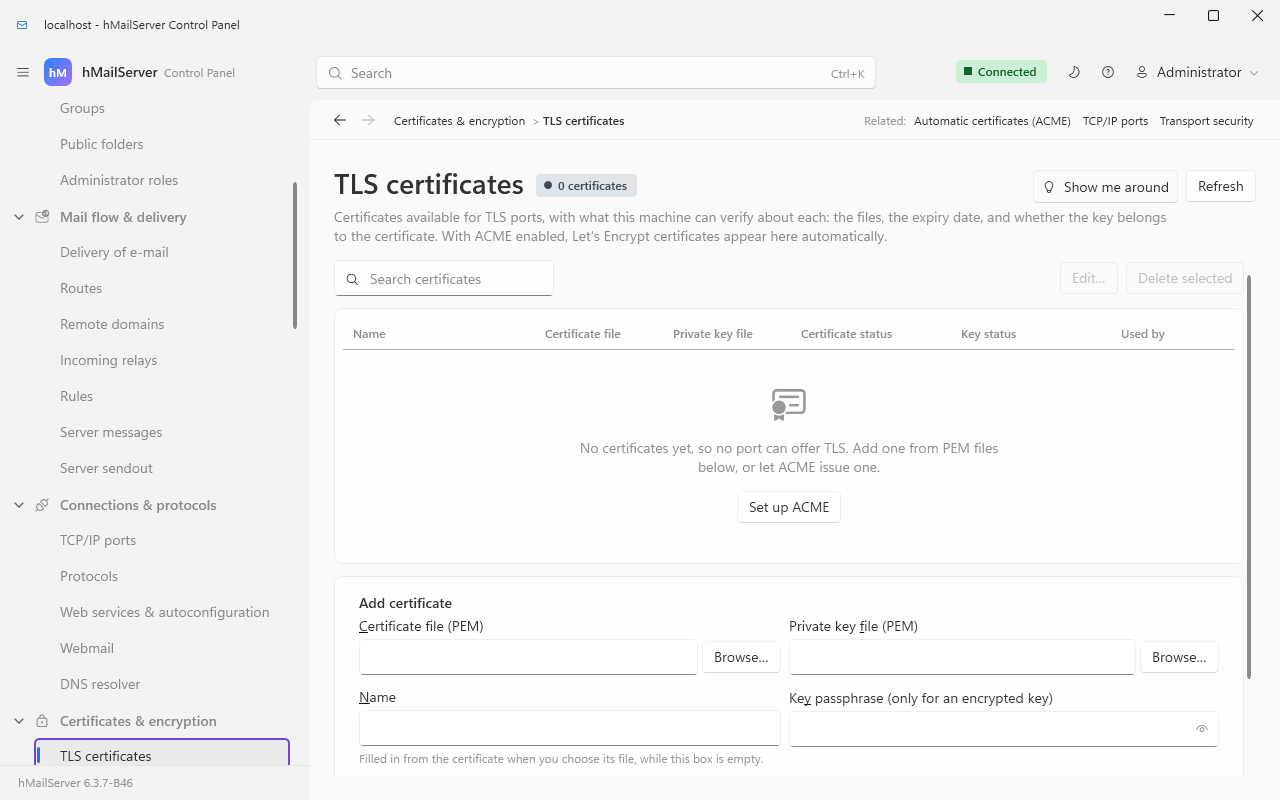
- Both files are PEM. The certificate file must contain the leaf and the issuer chain — hMailServer loads it twice, once as the certificate and once as the chain, and reports each failure separately.
- An encrypted private key is supported: give the certificate its passphrase in the Key passphrase box beside the key file. Different certificates may have different passphrases, which is why there is no single global one.
- A certificate is not checked for validity dates when it is served, only when it is verified — so an expired certificate loads without complaint and every client then refuses to connect, with no symptom on the server side. hMailServer therefore checks the dates itself at startup and reports HM5991 for a certificate that has expired or one that is not valid yet (which usually means this server's clock is wrong). It reports and carries on rather than refusing to listen, because a mail server that stops answering the moment a certificate expires is worse than one that answers with a stale certificate.
| Code | Message | Meaning |
|---|---|---|
| HM5113 |
Failed to load certificate file / …certificate chain… / …private key file
|
The path, the format or the passphrase is wrong. The port does not start |
| HM5113 | Error initializing SSL. Certificate not set. |
A TLS port has no certificate assigned |
| HM5991 | The TLS certificate … expired on … |
The listener started and is offering an expired certificate |
| HM5991 | The TLS certificate … is not valid until … |
Future-dated certificate, or the server clock is behind |
| HM5603 | Unable to enable Diffie-Hellman key agreement |
dh2048.pem is missing from the Bin directory |
Certificates & encryption → TLS versions & ciphers controls what is negotiable, for this server's own listeners and for the connections it makes when delivering.

Two things about this capture. Auto-ban, once the third tab of this page (then called
SSL/TLS), is a page of its own under Sign-in & access, and the last words of the subtitle
point to it ("brute-force lockout is on Auto-ban"), so this page carries Protocol versions,
Ciphers & verification and the Session resumption tab of the next section. And all
four protocol versions are ticked in the shot because the server it was captured on is
configured that way; the shipped default is SslVersions 24 — TLS 1.2 and 1.3 only, as the
table below says.
| Setting | Storage | Default | What it does |
|---|---|---|---|
| TLS 1.0 / 1.1 / 1.2 / 1.3 |
SslVersions bitmask |
24 = 8 + 16, i.e. TLS 1.2 and TLS 1.3 only | SSLv2 and SSLv3 cannot be enabled at all |
| Cipher list for TLS 1.2 and below | SslCipherList |
a long OpenSSL list ending …:HIGH:!aNULL:!eNULL:!EXPORT:!DES:!3DES:!MD5:!PSK;
|
Applied with SSL_CTX_set_cipher_list. Does not touch TLS 1.3
|
| TLS 1.3 cipher suites |
TlsCipherSuites13 (INI) |
empty = OpenSSL's defaults | RFC 8446 names, colon separated, e.g. TLS_AES_256_GCM_SHA384:TLS_CHACHA20_POLY1305_SHA256:TLS_AES_128_GCM_SHA256
|
| Key exchange groups |
TlsKeyExchangeGroups (INI) |
X25519MLKEM768:SecP256r1MLKEM768:X25519:secp384r1:secp256r1 |
Two post-quantum hybrids first, then the classical curves |
| Prefer server cipher order |
TlsOptions bit 2 |
off | SSL_OP_CIPHER_SERVER_PREFERENCE |
| Prioritize ChaCha20-Poly1305 |
TlsOptions bit 4 |
off | Only effective with server preference on and TLS 1.2 or 1.3 enabled |
| Verify remote certificates when delivering | VerifyRemoteSslCertificate |
on | Applies to outbound SMTP |
The defaults — TLS 1.2 and 1.3 only — are correct. Do not re-enable TLS 1.0 or 1.1 unless a specific ancient client forces you to, and then plan to replace that client.
The post-quantum default is real and it applies in both directions. The shipped group
list offers X25519MLKEM768 and SecP256r1MLKEM768 — ML-KEM hybrids — ahead of X25519 and
the NIST curves, so a modern peer negotiates a hybrid and an older one falls back with no
loss. The same list is installed on the client context, so mail this server sends uses it
too.
Six failure modes here are handled by falling back loudly rather than quietly, and each has its own error number:
| Code | Condition | What the server does instead |
|---|---|---|
| HM5990 | No TLS version is enabled at all | Falls back to TLS 1.2 + 1.3, because "TLS but no version of it" cannot be meant — turning TLS off is done per port |
| HM5720 |
TlsKeyExchangeGroups is rejected by OpenSSL, or would leave no group enabled |
Falls back to secp384r1:x25519:secp256r1
|
| HM5721 | Even that fallback is rejected | Reports loudly; OpenSSL's own defaults are in force |
| HM6120 |
TlsCipherSuites13 is rejected outright |
The list is not applied; OpenSSL's default TLS 1.3 suites stand |
| HM6121 | One or more names in TlsCipherSuites13 are unknown to this build |
The rest of the list is applied — a single typo would otherwise silently halve the suites offered |
| HM5511 |
SslCipherList is rejected |
Reported; the previous list stands |
AEAD-ONLY is a named preset, not an OpenSSL string: set SslCipherList to exactly
that word and the server applies a vetted forward-secret AEAD-only list (ECDHE/DHE with
AES-GCM or ChaCha20-Poly1305). It excludes every CBC-mode suite — the Lucky13
padding-oracle family — and static-RSA key exchange. The cost is stated plainly: TLS 1.2
clients that only speak CBC cannot connect, and TLS 1.0/1.1 are left with no usable
cipher at all, so do not enable those protocols alongside it. A misspelled preset name is
not silently ignored; it flows through to OpenSSL, which rejects a list containing no known
cipher, and HM5511 names the string.
Four settings, all on the TLS versions & ciphers page's Session resumption tab. At their defaults the server makes no OpenSSL call at all for three of them, so resumption behaves exactly as stock OpenSSL does.
| Setting | Default | What a non-default value buys |
|---|---|---|
TlsSessionTicketsEnabled |
on | Off: no tickets on any TLS version. TLS 1.2 clients fall back to the in-process cache, TLS 1.3 clients get no ticket at all |
TlsSessionCacheSize |
0 = OpenSSL's cap of 20480 | A positive value replaces the cap; -1 turns the server-side cache off entirely, leaving tickets unaffected |
TlsSessionTimeoutSeconds |
0 = OpenSSL's 300 | Bounds how long a leaked resumption secret stays useful |
TlsTicketKeyRotationSeconds |
0 = one non-rotating key for the life of the process | With rotation on, a captured ticket is decryptable for at most two intervals. 86400 is a day |
Ticket-key rotation is the one worth turning on if you care about forward secrecy: without it, every ticket a listener ever issues is sealed under one key generated at startup, and that key — recovered later from a memory dump or a hibernation file — decrypts every ticket ever recorded. Rotation is process-global, so all listeners rotate together; cross-listener resumption is still refused, because each listener has its own session-ID context.
Per port, not per server, under Connections & protocols → TCP/IP ports:
| Policy | Value | Behaviour |
|---|---|---|
| Off | 0 | Never ask for a client certificate. The default, and what every port did before this existed |
| Request | 1 | Ask, verify one if offered, log the outcome, never fail the handshake. Use it to inventory which clients could survive "require" |
| Require | 2 | The handshake fails unless the client presents a certificate chaining to the port's configured CA bundle |
A verified client certificate that names an address also makes AUTH EXTERNAL
(RFC 4422 Appendix A) available on that connection — SMTP, IMAP and POP3 all advertise it
exactly when such a certificate exists, and to nobody else.
This is per port on purpose: the population connecting to a partner-relay SMTP port and the population connecting to the public IMAP port are different populations with different certificate authorities, and a single global switch set to "require" would lock every ordinary mail client out of the server.
Nothing above changes a single connection until a listener is configured to use it.

| Connection security | Value | What it means | Typical ports |
|---|---|---|---|
| None | 0 | Plaintext only. STARTTLS is not advertised |
— |
| SSL/TLS | 1 | Implicit TLS from the first byte | 465, 993, 995 |
| STARTTLS (optional) | 2 |
STARTTLS is advertised; a client may or may not use it |
25 |
| STARTTLS (required) | 3 |
STARTTLS is advertised and the session is refused until it is used |
587, 143, 110 |
A working modern configuration:
| Port | Protocol | Security | Why |
|---|---|---|---|
| 25 | SMTP | STARTTLS optional | Other servers must be able to reach you; many still cannot do TLS |
| 587 | SMTP | STARTTLS required | Submission from your own users — never in the clear |
| 465 | SMTP | SSL/TLS | Implicit-TLS submission (RFC 8314) for clients that prefer it |
| 143 | IMAP | STARTTLS required | |
| 993 | IMAP | SSL/TLS | |
| 110 | POP3 | STARTTLS required | |
| 995 | POP3 | SSL/TLS |
Assign the certificate to every one of them. ACME does this for you for any TLS-enabled port that has no certificate configured, and since 6.3.4 for any port that holds the self-signed certificate a new installation made; a port that names a certificate somebody chose is left alone.
A TLS port with no certificate does not fall back to plaintext — it fails to start. That is HM5113, and the only other symptom is a service that came up with one listener missing. See Ports Reference for the full list of what listens where.
Two related controls live elsewhere and belong in the same decision:
-
Require TLS before AUTH is an IP range option, not a port option
(Security Hardening §17.1). On a range with it set,
AUTHis not advertised on a cleartext connection at all — all four protocols were fixed to stop advertising mechanisms they would refuse, because a client that sendsAUTH PLAINand then gets530has already put the password on the wire. -
DisableAUTHListnames local TCP ports whereAUTHshould not be offered at all, for example a port 25 that only accepts inbound mail from other servers.
These protect mail you send, and all three are on by default. Configure them under Certificates & encryption → Transport security, on its Encryption tab.
[Settings]
MtaStsEnabled=1            ; honour recipients' MTA-STS policies
DaneEnforcementEnabled=1   ; honour recipients' DANE/TLSA records
DnssecValidationEnabled=1  ; validate DNSSEC for DANE
DnssecTrustAnchors=        ; empty = the built-in IANA root anchors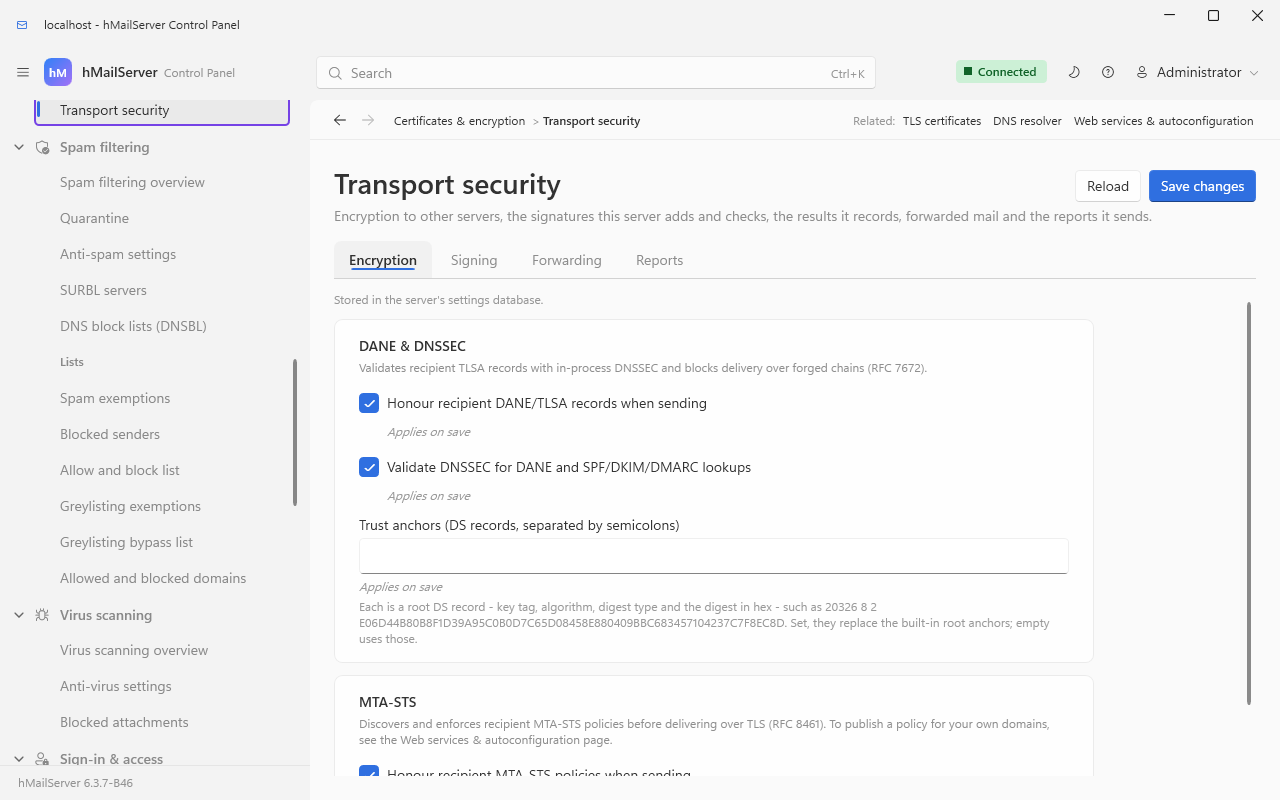
flowchart TD
    A["A message is due for a domain"] --> B{"MtaStsEnabled and this is<br/>an MX delivery, not a fixed relay?"}
    B -- no --> PLAIN["Deliver as usual"]
    B -- yes --> C["Look up the TXT record at<br/>underscore mta-sts, dot, the domain"]
    C -- "no record" --> NEG["Cache no-policy for 30 minutes"]
    NEG --> PLAIN
    C -- "record found" --> D["HTTPS GET the policy from<br/>mta-sts dot the domain,<br/>path /.well-known/mta-sts.txt"]
    D --> E{"mode?"}
    E -- none --> PLAIN
    E -- testing --> LOGONLY["Debug log only, not enforced"]
    LOGONLY --> PLAIN
    E -- enforce --> F["Drop every MX host the<br/>policy does not name"]
    F --> G{"Any host left?"}
    G -- no --> DEFER["Defer the message, 4.7.0"]
    G -- yes --> H["Require TLS with certificate<br/>verification to those hosts"]
A policy is cached until its own max_age, revalidated by re-reading the DNS record's
policy id at most once an hour, and a missing policy is negatively cached for 30 minutes.
DNS failure or a failed fetch during revalidation keeps the cached policy — RFC 8461 §5.1.
The mx: patterns match either exactly or with a leading *. that matches exactly one
label.
flowchart TD
    A["A message is due for a domain"] --> B{"DaneEnforcementEnabled and<br/>this is an MX delivery?"}
    B -- no --> PLAIN["Deliver as usual"]
    B -- yes --> C["DNSSEC-validated MX lookup<br/>for the recipient domain"]
    C --> D{"Chain status of the MX RRset"}
    D -- "insecure: the resolver proved the name<br/>lies below an unsigned delegation (6.3.6)" --> PLAIN
    D -- "bogus" --> SKIPALL["No host of the domain is used"]
    D -- "indeterminate (6.3.6): no answer,<br/>SERVFAIL, signatures missing, nothing provable" --> SKIPALL
    D -- "secure: the validated RRset<br/>decides the hosts (6.3.6)" --> E["Per host: look up the TLSA record at<br/>underscore 25, underscore tcp, the MX host"]
    E --> F{"TLSA lookup status"}
    F -- bogus --> SKIP["Skip this host"]
    F -- "indeterminate (6.3.6)" --> SKIP
    F -- "no records, with the NSEC or NSEC3<br/>proof under a signed zone (6.3.6)" --> PLAIN
    F -- "validated, DANE-EE or DANE-TA (6.3.6)" --> G["Require TLS and hold the<br/>certificate to the TLSA records"]
    F -- "validated, none usable (6.3.6)" --> TLSONLY["Require TLS to the host;<br/>no STARTTLS or a failed handshake defers"]
    SKIP --> H{"Any host left?"}
    SKIPALL --> H
    H -- no --> DEFER["Defer the message, 4.7.0,<br/>with a reason naming the lookup"]
Three things are worth stating exactly:
- The MX RRset must be DNSSEC-validated too, not just the TLSA record (RFC 7672 §2.2). A TLSA record found under a host name learned from a forged MX answer proves nothing — the attacker chose the host, so its own TLSA record validates perfectly. hMailServer therefore validates the MX RRset and checks that the host it is about to contact is one of the names that RRset published. Since 6.3.6 the validated MX RRset decides the hosts: a host the plain lookup found and the validated records do not name is not used, and the domain's own name is the host of a signed domain proven to have no MX records.
-
DANE-EE (3) and, since 6.3.6, DANE-TA (2) are honoured, through OpenSSL's own DANE
support: a DANE-TA record (selector 0 or 1, matching type 0, 1 or 2) requires the host's
certificate to chain to the anchor it names, name the MX host and be in date; a DANE-EE
record is matched against the certificate's key or the certificate alone, as before. A
validated set none of whose records is usable here (PKIX-TA, PKIX-EE, malformed) requires
TLS to the host without judging its certificate: no
STARTTLSor a failed handshake defers the delivery, never sends it in the clear. Error 5510 (the records could not be given to OpenSSL; deferred) is new. Up to 6.3.5 only DANE-EE was used, and a host with no DANE-EE record was delivered to as if it published none (CVE-2026-104704). -
Since 6.3.6 nothing fails open on a lookup that cannot tell (item 36). An MX or TLSA
lookup made with DNSSEC that comes back without signatures, without records, or not at all
(no answer,
SERVFAIL, a reply that does not parse) is read as unsigned only when the resolver can prove the name lies below an unsigned delegation, which it now asks for - one more DS query per unsigned domain, remembered for five minutes; under a signed zone, or when nothing can be proven, the lookup is indeterminate (RFC 7672 section 2.1.1): an indeterminate MX lookup leaves every host of the domain unused, an indeterminate TLSA lookup that host, and a delivery with no host left is deferred with4.7.0and a reason naming the lookup ("could not be completed, ... The message has NOT been sent"). An empty TLSA or MX answer from a signed zone counts as no records only with its NSEC or NSEC3 proof (NODATA, or NXDOMAIN with the wildcard's); an NSEC3 Opt-Out span reads as unsigned. A zone whose validated DS records name only algorithms or digests the resolver does not verify is unsigned (RFC 4035 section 5.2), where it was bogus and its mail held; a domain under a top-level name the root proves it does not have (company.local) is unsigned; a private name under a signed public domain, answered by an internal DNS server, is indeterminate - deliver to it through a route. Up to 6.3.5 the whole thing failed open except for one value:Boguswas the only status that could stop a delivery, and every other outcome, a lookup that did not complete among them, landed on the ordinary delivery path.
A server whose resolver cannot answer DNSSEC queries - it strips signatures, or a firewall
drops DNS answers longer than 512 octets - defers its mail to every domain it cannot prove
unsigned from 6.3.6, says so in each deferral, and in the application log once in ten minutes
with the cause ("DNSSEC: the root zone's keys did not validate", or could not be fetched): make
the resolver answer DNSSEC queries, or set DaneEnforcementEnabled to 0. The validating
resolver asks DNSServer, or else the system's first two IPv4 DNS servers, and, when the
system lists none, its first two IPv6 ones (passing over Windows' site-local fec0:0:0:ffff::1
to ::3). TXT lookups (SPF, DKIM, DMARC) are read as before.
Setting DnssecValidationEnabled=0 reverts to opportunistic, unvalidated TLSA use.
With DANE enforcement, a recipient whose DNSSEC chain is bogus will not receive your mail rather than receive it unencrypted — which is the point.
Deferred, not bounced (6.3.6, items 28 and 31): a host that TLSA records or an MTA-STS
policy require TLS of, and that offers no STARTTLS (or refuses EHLO), is deferred with
450 4.7.0 and a sentence naming the records or the policy, where it was refused permanently
(500 5.7.0 Server does not support STARTTLS. / 500 5.5.1) and bounced; a certificate that
does not match is deferred the same way. A host that publishes only DANE-TA records and does
not offer STARTTLS is deferred, as a host with DANE-EE records now is too; one whose
certificate does not meet its DANE-TA records is deferred where until 6.3.6 it was delivered
to as if no record were published. A route's own STARTTLS required still refuses
permanently (Routes and Relays). TLS reports count a session as a success only when its
handshake completed, and a host with a validated set of none this server can use under the
policy type tlsa.
SMTPDeliverer - Message 4711: MTA-STS policy mode 'enforce' active for example.com. TLS with certificate validation is required.
SMTPDeliverer - Message 4711: Skipping MX host mx9.example.com - not permitted by the MTA-STS policy of example.com.
SMTPDeliverer - Message 4711: Delivery to example.com deferred. No MX host matches the domain's MTA-STS policy.
SMTPDeliverer - Message 4712: DNSSEC-validated DANE TLSA records found for mx1.example.com. TLS with TLSA certificate matching is required.
SMTPDeliverer - Message 4712: DNSSEC-validated TLSA records found for mx2.example.com, none of them usable. TLS is required, without certificate matching.
SMTPDeliverer - Message 4712: TLSA records for mx3.example.com failed DNSSEC validation. Skipping this host (RFC 7672).
SMTPDeliverer - Message 4713: the DNSSEC lookup of the TLSA records of mx1.example.net could not be completed, or came without the signatures or the proof its zone owes. Skipping this host (RFC 7672).
(The texts are 6.3.6's, from SMTPDeliverer's sources at the tag; up to 6.3.5 the first said
"DANE-EE TLSA records", and the fourth did not exist - such a lookup was read as unsigned.) A
delivery with no host left is deferred, and the reason reads Delivery deferred: the DNSSEC
lookup of the TLSA records of the mail hosts of example.net could not be completed, or came
without the signatures or the proof their zone publishes, so whether they require DANE
(RFC 7672) could not be told. The message has NOT been sent; it will be retried. - or, for a
set that failed validation, Delivery blocked: the DANE TLSA records of all MX hosts failed
DNSSEC validation. A resolver that cannot validate at all is named once in ten minutes:
DNSSEC: the root zone's keys did not validate. Until they validate, no answer can be proven
unsigned, so every MX or TLSA lookup that comes back without signatures is indeterminate and
its delivery is deferred (RFC 7672 section 2.1.1).
And in the TCP/IP log, per handshake (6.3.6, through OpenSSL's DANE support):
DANE: Session 812: Certificate authenticated by a DANE-EE TLSA record (usage 3, selector 1, matching type 1) at depth 0.
DANE: Session 813: Certificate authenticated by a DANE-TA TLSA record (usage 2, selector 0, matching type 1) at depth 1.
DANE: Session 814: The certificate at depth 0 did not authenticate against the TLSA records: OpenSSL error <n>, <OpenSSL's text>. Failing TLS handshake.
Both deferral paths use the enhanced status code 4.7.0 — "other or undefined security status" (RFC 3463). Neither RFC registers a code of its own, and borrowing one that means something else would be worse than saying "refused on security grounds".
Since 6.3.4 (schema 6045). In 6.3.3 the only ways to insist on TLS to a destination are the server-wide delivery security setting, a route's own connection security, and the MTA-STS or DANE policy the domain publishes itself.
MTA-STS and DANE protect mail to a domain that publishes a policy. A remote domain policy is you saying the same for a domain that does not — a partner, a bank — under Mail flow & delivery → Remote domains. The whole record, with its limits and the backup-MX callout, is Routes and Relays §14.2a; this is its TLS half.
| Outbound TLS | What delivery to the domain requires |
|---|---|
none (default) |
Nothing beyond what the server does anyway: the delivery security setting, a route's security, and MTA-STS or DANE if the domain publishes them |
encrypted |
STARTTLS must be offered and the handshake must succeed. The certificate is not judged — the level for a partner with a self-signed or internal certificate |
verified |
Encrypted, and the certificate must chain to a trusted root and name the host connected to — what MTA-STS enforce asks |
dane |
Encrypted, and the certificate must match a DNSSEC-validated TLSA record. The TLSA lookup is made for such a domain even with DaneEnforcementEnabled=0 and even for a routed delivery; a host with no validated record is skipped, so with DnssecValidationEnabled=0 every delivery under the policy is deferred |
It can only raise the requirement. The policy, MTA-STS enforce and a usable TLSA record
combine as the strongest of the three: a domain that publishes MTA-STS enforce and is named
here at encrypted still gets certificate verification. The policy covers routed deliveries
too, because it is about the domain and not about how its server was found.
A delivery it cannot satisfy is deferred, never sent in the clear: 4.7.0, the message
stays queued, and the log line and any eventual bounce say
Delivery deferred: the remote domain policy for <domain> requires <TLS | TLS with a certificate that verifies | TLS proven by a DNSSEC-validated TLSA record> to this destination, and it could not be established. The message has NOT been sent in the clear.
A deferral rather than a bounce, as RFC 8461 §5 reasons for MTA-STS: the far end may fix its
STARTTLS before the queue gives up.
Inbound, Require TLS on mail from this domain answers 530 5.7.0 Must issue STARTTLS first at MAIL FROM when an unencrypted session names a sender at the domain — except for
an authenticated session and for a connection from a configured incoming relay, where the
hop that mattered was before the gateway and has to be secured there. The envelope sender is
the connecting server's claim, so this keeps honest partners encrypted; it does not stop
spoofing.
Since 6.3.4 (schema 6094). TLS protects the connection, which ends at the partner's first server. Gateway encryption protects the message wherever it is kept or relayed after that: on the same remote domain policy as §9.6a, Encrypt mail to this domain at this server encrypts every message to the partner domain here, to the partner's own key, whatever the sender's mail client did - what an organisation's encryption gateway (Zix, Cisco, Proofpoint, SEPPmail) does between organisations. The partner's gateway decrypts it on arrival.
| Method | What the partner receives |
|---|---|
openpgp |
PGP/MIME (RFC 3156), encrypted to the encryption subkey of the partner's OpenPGP key - RSA of 2048 bits or more, or Curve25519 - whose binding signature verifies against the primary key |
smime |
S/MIME (RFC 8551) enveloped-data, AES-256-CBC, to an RSA (2048 bits or more) or elliptic-curve (256 or more) certificate |
- One key per partner domain, pasted by the administrator and judged when the policy is saved: a paste carrying any private-key material is refused, and so is a key that cannot be encrypted to (expired, too weak, no usable subkey or key usage). The key is written and never read back; the policy shows its fingerprints - for OpenPGP both the primary's and the subkey's, which the partner should confirm.
- The whole message goes under the key, headers and body and this server's DKIM signature, and the copy is DKIM-signed afresh on the outside. The Subject is not hidden, nor are From, To, Date or the Received trace: a gateway has to route by them.
- Only the partner's copy. Other recipients of the same message get it as written. A message already encrypted end to end goes as it is; one that is only signed is encrypted, signature and all.
-
When a message cannot be encrypted (the key expired, or it is over 50 MB), the
policy's fallback decides:
refuse, the default, fails the partner's recipients with5.7.10and tells the sender it was not sent in the clear;send_unencryptedsends it as written and logs that it did. - Not done: signing at the gateway, per-recipient keys, looking keys up (WKD, LDAP), or decrypting the partner's replies - this server holds no gateway private key.
Set it on Mail flow & delivery → Remote domains in the Control Panel, the Deck's remote
domains, or encrypt, encrypt_key and encrypt_fallback on the remote-domain policy
routes. The full account is
RemoteDomains.md;
the person's own encryption is Encryption for People.
The outbound half above is about other people's policies. Publishing your own is two DNS records and one switch.
MTA-STS. MtaStsHostingEnabled defaults to 1, and the built-in web services server
serves /.well-known/mta-sts.txt for any hosted, active domain when the request's Host
is mta-sts.<domain>. It generates the body from your live MX records unless
MtaStsPolicyMx overrides them:
version: STSv1
mode: enforce
mx: mail.yourcompany.com
max_age: 604800
| Setting | Default | Notes |
|---|---|---|
MtaStsHostingEnabled |
1 | On, but inert until the HTTPS listener exists |
MtaStsPolicyMode |
enforce |
enforce, testing or none; anything else is read as enforce
|
MtaStsPolicyMaxAge |
604800 (7 days) | Clamped to 86400 … 31557600 |
MtaStsPolicyMx |
empty | Comma-separated override; empty derives the list from live MX records |
WebServicesHttpsPort |
0 | Must be set. RFC 8461 §3.3 requires the policy to be fetched over HTTPS |
If
WebServicesHttpsPortis 0 the server logs, in as many words, that the policy cannot be served and sending servers will treat the domain as having no policy. Addmta-sts.yourcompany.comtoAcmeDomainsso the HTTPS listener has a certificate for the name it will be asked for.
Then publish _mta-sts.yourcompany.com. IN TXT "v=STSv1; id=20260908000000Z" and bump the
id whenever you change the policy. See DNS for Your Domain.
DANE. Every successful ACME issuance logs the exact record to publish:
ACME: DANE TLSA record for this certificate: _25._tcp.<mx-host>. IN TLSA 3 1 1 3b1f…
That is 3 1 1 — DANE-EE, SubjectPublicKeyInfo, SHA-256 — which is why AcmeReuseKey
matters: the digest is over the key, so reusing it keeps the record valid across
renewals. Your zone must be DNSSEC-signed for the record to mean anything.
Off by default, and worth turning on the day you start diagnosing anything:
| Setting | Default | What it writes |
|---|---|---|
AuthenticationResultsEnabled |
off | One Authentication-Results header per accepted inbound message (RFC 8601), carrying the SPF, DKIM and DMARC verdicts this server reached. Only checks that actually ran are reported |
ReceivedSpfHeaderEnabled |
off | A Received-SPF header (RFC 7208 §9.1), written only when the SPF check ran |
AuthenticationResultsIdentity |
empty = this computer's name | The authserv-id: the first token of every header this server writes, always lower-cased |
The identity is load-bearing in both directions. An arriving message carrying an
Authentication-Results header that claims this identity has it removed before the
server writes its own, so a sender cannot have a verdict believed downstream in this
server's name (RFC 8601 §5). A header naming any other identity is left completely
untouched.
Two aggregate reporters, both scheduled hourly and both inert until a sender address is set. They flush their statistics either way, so switching one on does not start with an empty history.
| TLS-RPT (RFC 8460) | DMARC aggregate (RFC 7489) | |
|---|---|---|
| Address setting | TlsRptFromAddress |
DmarcRptFromAddress |
| Organisation name |
TlsRptOrganizationName, default hMailServer
|
DmarcRptOrganizationName, default hMailServer
|
| Recorded by |
ExternalDelivery, per delivery attempt, classified tlsa, sts or no-policy-found
|
SpamTestDMARC, for every message evaluated against a published policy — passes included |
| Schema | — |
DmarcRptSchemaVersion, default 1 = RFC 7489 Appendix C; 2 = RFC 9990 |
[Settings]
TlsRptFromAddress=tlsrpt@yourcompany.com
DmarcRptFromAddress=dmarc@yourcompany.com
DMARC reports are only sent to an address outside the policy domain when that address's own DNS says it wants them, so a domain cannot use its DMARC record to aim this server's reports at somebody else.
-
AcmeEnabled=1,AcmeDomainsnamingmail.,mta-sts.andautoconfig.— port 80 reachable. - Create ports 465, 993 and 995; set 587, 143 and 110 to STARTTLS-required and 25 to STARTTLS-optional. Confirm every one has a certificate.
- Check Transport encryption overview — it will tell you if anything still carries a password in the clear.
- Leave
MtaStsEnabled,DaneEnforcementEnabledandDnssecValidationEnabledat 1. Since 6.3.4, name the partners that must never get mail in the clear as remote domain policies atencryptedorverified(§9.6a), and, where a partner gives you its gateway key, encrypt to it (§9.6b). - Set
WebServicesHttpsPortand publish_mta-stsin DNS. - Publish the TLSA record the ACME log prints, if your zone is signed.
- Turn on
AuthenticationResultsEnabled, and setTlsRptFromAddressandDmarcRptFromAddress. - Diary the first renewal: it will be two-thirds of the way through the certificate's life,
and the log line to look for is
ACME: Certificate issued successfully. -
6.3.4: where the database is on another machine, set
[Database] TlsMode=verify-fullandTlsCaFile(§9.11). - 6.3.4: make and export the stored-secrets key if the installation has none, and decide which mailboxes, if any, are to be encrypted at rest (§9.13).
Since 6.3.4. Until then the connection to MySQL and MariaDB through MariaDB Connector/C -
the client this server bundles on Windows, and the one Ubuntu packages - was never
encrypted, whatever the documents said: an account made with REQUIRE SSL refused the
server, and every other one was reached in plaintext, passwords, queries and rows alike.
Found by the test lab on 25 September 2026, and measured, not read
(DatabaseTls.md).
Now the same four words on every backend, in [Database] beside Server:
TlsMode |
What the connection does |
|---|---|
(empty, the default) / prefer
|
TLS whenever the database server offers it, and the connection without it when it offers none - or when the TLS it offers cannot be agreed on, one attempt with TLS and one without. The certificate is not checked |
require |
TLS or no connection; the certificate is not checked. Protection against a listener on the wire, not against someone who can stand in for the server |
verify-full |
TLS or no connection, the chain checked against TlsCaFile (or, when that is empty, the system's trust store) and the name - or the address, when Server= is one - against Server=
|
disable |
No TLS. SQL Server's providers still encrypt the login |
TlsCaFile is a PEM file of CA certificates, read by verify-full alone; keep its path to
ASCII. A mode the server does not know is refused and reported (HM7530), never read as off,
and verify-ca is refused by name; a TlsCaFile that is not there refuses the connection
(HM7531) rather than falling back to the system's store. SQL Server through the Microsoft OLE
DB Driver (MSOLEDBSQL) now encrypts the whole session; PostgreSQL is unchanged, and its own
PostgreSQLSslMode and PostgreSQLSslRootCert win when set. The application log says at
every start what the connection got; on Linux hmailserver --check-database makes one
connection and says the same, and in a container HM_DB_TLS_MODE and HM_DB_TLS_CA write the
two keys (Running in a Container).
Database TLS has the whole of DatabaseTls.md, with the certificates for an address of §9.12.
Since 6.3.4, on Linux. An HTTPS endpoint this server connects to by its address - an object
store, a webhook, an identity provider, the update feed at https://192.0.2.10/ - presents a
certificate with the address in an iPAddress entry, which is where RFC 5280 puts it and the
only place a public CA may. The Linux check read dNSName entries and the common name and
never that one, so such a certificate was refused; it is accepted now, and no server name
(SNI) is sent for an address. Windows always accepted it.
Since 6.3.4. Three things, each off, or inert, until something is done:
-
The stored secrets. Each account's TOTP second factor and the
[Settings]secrets (SRSSecret,BATVSecret,OAuth2HmacSecretand the rest) are sealed with AES-256-GCM under the installation's stored-secrets key - made by the Windows installer on a new installation, and on an upgraded or packaged Linux installation by--create-stored-secrets-key. The key is in each server'shMailServer.ini, never in the database or a backup: export it and keep it apart from the backups (Security Hardening §17.2b, SecretsAtRest.md, copied here as Secrets at Rest). -
Mailbox encryption at rest (schema 6099). Switched on per account, once the domain's
recovery key has been made (its passphrase is kept by the administrator and never stored
by this server), every message stored in the account's folders from then on is encrypted
to an X25519 key of the account's own, with AES-256-GCM, as the message store's last stage.
Mail that arrives while nobody is signed in is encrypted all the same; reading it needs the
private half, which the account's own password opens at sign-in and which closes
MailboxKeyIdleMinutes(15) after the last use. It protects the disk, a snapshot, a backup and a database dump once the account has signed in with its password after the switch - until then the key waits under this machine's own secret store, which on Linux is the key file inside the data directory. It does not protect the mail from the running server, which reads it while the key is open: a person who needs that wants a zero-access mailbox (Encryption for People), and the two are never on one mailbox. App passwords are refused for such a mailbox, an administrator's password reset is refused while the key is closed and goes through a recovery with the domain's passphrase, and it cannot be combined with a TOTP second factor. It is on REST and the Control Deck, with no webmail card and no Control Panel page;--encrypt-storeand--decrypt-storerewrite what was stored before the switch. Off on every account as shipped (EncryptionAtRest.md). - An encrypted backup archive: 7-Zip AES-256 with the headers encrypted, under a passphrase kept in the database and never in the archive (Backup and Restore §15.2).
The message store's compression (MessageStoreCompression, off as shipped) is not
encryption: it deflates and de-duplicates, and every reader sees the message as it arrived.
See also: Encryption for People · Security Hardening · Ports Reference · DNS for Your Domain · Stopping Spam · Settings Reference · Monitoring and Health · Capabilities and Configuration