Repository navigation
Monitoring and Health
This page began as a chapter of the 6.2.10 manual and has been corrected and extended for 6.2.28. The Control Panel's pages are grouped differently now, so the paths below use today's groups; the TLS ports 465, 993 and 995 exist only after you create them on the TCP/IP ports page (a fresh install seeds 25, 587, 110 and 143); and everything added since 6.2.10 is in Changes Since 6.2.10. Where a value here disagrees with the Settings Reference, which is generated from the code, the reference is right. The parts new in 6.3.4 (27 September 2026, schema 6104), were brought up to master 92b8f9f63 on 26 September 2026 (the release is the tag v6.3.4,
51e2dbda0, which adds a last batch to that tree; Changes-Since-6210 section 4e): syslog, the new metric families, eleven alert conditions, the audit trail and its put-back and roles, per-domain spam and storage in the reports, the places mail can now wait (§16.1a), and the SNMP agent (§16.7c). 6.3.5 (29 September 2026, schema 6105), 6.3.6 (6 October 2026, schema 6108) and 6.3.7, the latest release (17 October 2026, schema 6108), are not yet reflected here.
-
Point a health check at
/readyz. It is the one signal that distinguishes "the process is up" from "this server can actually accept and deliver mail", because it is proved by a real database round trip rather than by a flag. - Alert on the delivery queue's oldest message, not its depth. A deep queue draining normally is a busy server; a shallow queue whose oldest message is four hours old is a destination nobody is getting mail to.
-
Alert on certificate expiry.
hmailserver_tls_certificate_expiry_secondsminustime()is how many seconds of TLS you have left, and expiry is the failure that takes every protocol down at once, on a schedule, silently.
Everything else on this page is detail behind those three.
The Control Panel's Monitoring & troubleshooting group is the human-facing half of everything below. Every page here reads the running service over COM, so it shows what the server thinks right now, not what a log said earlier.
| Page | What it shows | Reach for it when |
|---|---|---|
| Dashboard (top level) | Uptime, messages processed, in-queue count with a Backlog badge, spam blocked, viruses removed, plus throughput and session charts. The live view refreshes every 2 seconds; the 24-hour, 7-day and 30-day ranges read the stored metric history (§16.6) | You want one screen that says whether today is normal |
| Server status | A computed Configuration checks card first; then the version and architecture, the state, when the servers last started and how long they have run, the database's type, host, name and schema version, the counts since the service started, the sessions connected now and the auto-ban ranges in force. While a newer release is waiting, a line under the header says so, with Open Updates | First look after any change, and after every restart |
| Delivery queue | Every message waiting to go out: ID, created, from, recipients, state (delivering now, due, or the next try), tries. Buttons: View source, Trace message, Remove, Deliver all now, Deliver now, Refresh | Mail is not arriving at the far end |
| Diagnosing stalled mail | The built-in version of Diagnosing Stalled Mail, with a one-click debug-logging toggle | Mail is accepted and then does not move |
| Message trace | What happened to a message — accepted, delivered, failed, quarantined — searchable by address or by queue id. Empty and inert unless MessageTraceEnabled=1
|
"Did we ever receive it, and what did we do with it?" |
| Live logs | A real-time, colour-coded tail of what the server is writing | You are reproducing a problem right now |
| Diagnostics | The built-in self-test (§16.8) | Anything is broken and you do not yet know what |
| MX query | An MX lookup through the server's own resolver | You suspect DNS rather than mail |
| Suppression list, Journaling and dual delivery, Audit trail | Since 6.3.4: addresses a domain no longer sends to because they bounced (removable by hand); the journal rules; every administrative change, with Put back (§16.7b) | "Why is mail to this address refused?", "who changed that?" |
Since 6.3.4, the Control Deck's Logs page can also
follow one connection live: it lists every connection the server has open now - the SMTP,
POP3 and IMAP sessions it answers and the ones it opens itself - and the last ones that ended,
each with the id its log lines carry, and Follow shows every line logged for that one as it
is written (GET /api/v1/logs/sessions, /api/v1/logs/sessions/{id}?after=&wait=). The server
keeps the last 4,096 log entries in memory for it; nothing survives a restart.
Besides the delivery queue and the quarantine, a message can be waiting in one of these, each with its own place to look:
| Where it waits | Why | Where to look |
|---|---|---|
| Held for review | Compromised-account detection in enforce kept an account's submission out of the queue |
The Deck's Held for review, /api/v1/review (Security Hardening) |
| Held for the sandbox | An attachment from outside is being opened by the sandbox service | The Deck's queue page, GET /api/v1/sandbox/held (Stopping Viruses) |
| A destination's back-off window, or a connection or tenant ceiling | The destination asked this server to slow down, or the per-destination or per-tenant share is full | The Deck's queue page, GET /api/v1/queue/shaping (Outbound Shaping) |
| An IP warm-up ceiling | A new outbound address has reached today's ceiling for a large provider | The Deck's queue page, /api/v1/warmup/{id}/history (Outbound Shaping) |
| A drain | The server is draining for maintenance or an update: listeners closed, the queue paused |
GET /api/v1/server/drain; /readyz answers 503 not ready: draining (Upgrading hMailServer) |
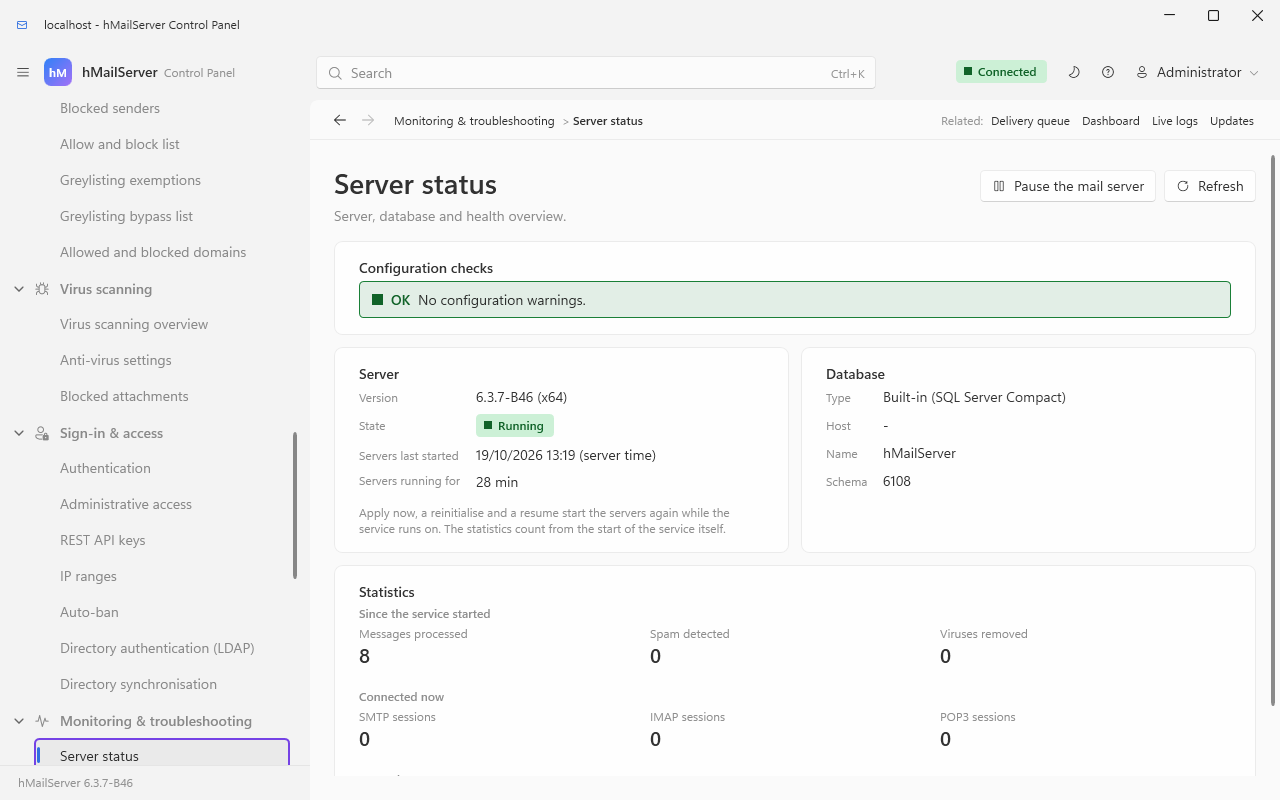
Server status. The Configuration checks card at the top is computed in the Control
Panel from what the server reports, and it is the part worth reading first: a missing
HostName, an IP range that allows remote-to-remote delivery without requiring
authentication (an open relay), and a 127.0.0.1 range that has been auto-banned. The
number of auto-ban ranges in force is a count, not a warning: it is under Banned now in
the Statistics card.
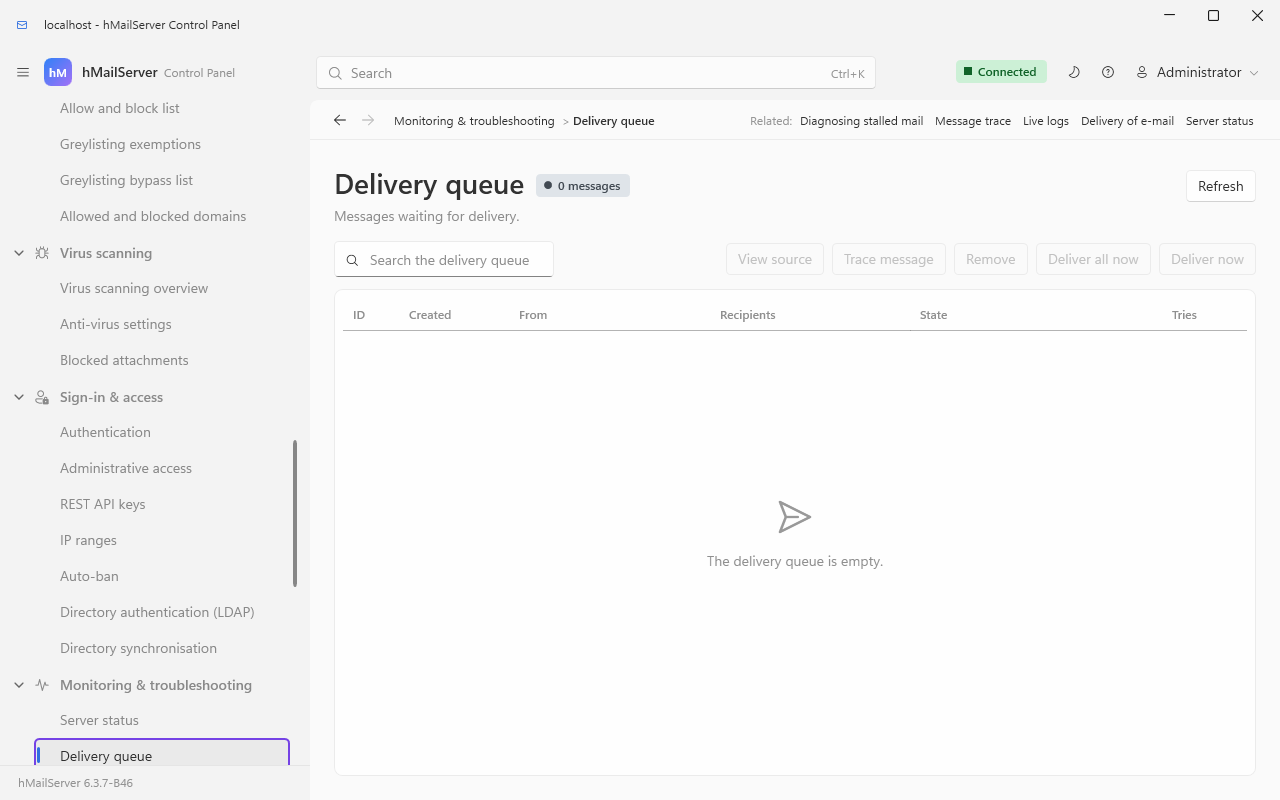
The delivery queue. State and Tries are the two columns that matter. State reads
Delivering now, Due for delivery, or Next try in … (or at …): a message whose try
count is climbing is being deferred by the far end, and one whose next try is an hour away
is waiting out Minutes between retries. Both of those are
normal. A queue in which every message shares one destination domain is not.
Logs live in the Logs directory (C:\Program Files\hMailServer\Logs by default).
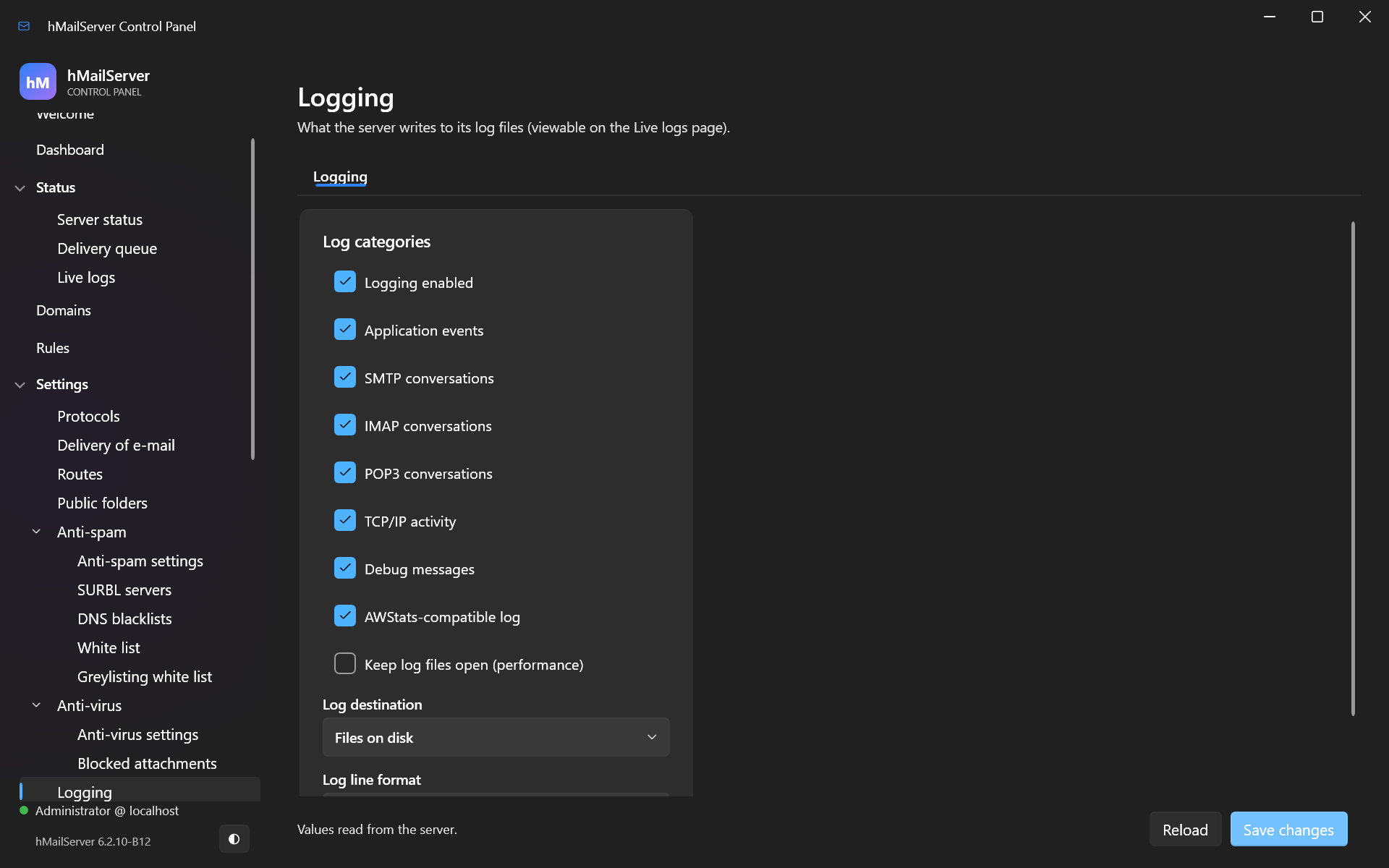
Monitoring & troubleshooting → Logging controls what is written.
hMailServer writes several different files, and knowing which one to open saves most of the time you would otherwise spend on a problem:
| File | Holds | Rotates |
|---|---|---|
hmailserver_<date>.log |
Everything: application lines, and the protocol conversations unless they are split out | Daily, by name |
ERROR_hmailserver_<date>.log |
Only entries the server itself classed as an error. Read this first. Its mere existence is a diagnostic — the built-in self-test fails when any ERROR* file is present |
Daily, by name |
hmailserver_SMTP_<date>.log, hmailserver_IMAP_<date>.log, hmailserver_POP3_<date>.log
|
The per-protocol conversations, when SepSvcLogs=1
|
Daily, by name |
hmailserver_backup.log |
Every backup and restore run, line by line — see Backup and Restore | Never. One growing file; LogDeleteDays matches it by name but only deletes a file nothing has written to for that many days |
hmailserver_events.log |
Event-script output | Never, as above |
hmailserver_awstats.log |
The AWStats-format feed, when AWStats logging is on | Never, as above |
hMailServer_messagestore_consistency.report |
The most recent message-store consistency scan: one line per message whose file is missing, as messageid<TAB>account<TAB>expected-path
|
Overwritten each run |
The settings that govern all of this:
| Setting | Default | What it does | What it looks like when it is wrong |
|---|---|---|---|
LogLevel |
9 |
Bit mask of which log types are written | Set too low and the log you are grepping is simply not being produced |
| Debug messages (Logging page) | off | Adds the LOG_DEBUG lines, including the accept-pipeline stage timings |
Left on: a busy server fills the disk in days, and a full disk stops mail (§16.9) |
SepSvcLogs |
0 |
Splits SMTP, IMAP and POP3 into their own files | Off, so a search for one protocol wades through all three |
LogDeleteDays |
0 |
Deletes files named hmailserver_*.log or ERROR_hmailserver_*.log whose last write is older than this many days, and nothing else in the directory. 0 keeps everything for ever |
Left at 0 on a server with debug logging on — the usual cause of a full log volume |
JsonLogging |
0 |
Writes JSON lines, for ingestion into Elasticsearch, Loki or Splunk | Overridden while Logging.LogFormat is NCSA: your pipeline gets NCSA lines and no error |
SlowQueryLogMilliseconds |
0 (off) |
Logs, and counts in hmailserver_db_slow_queries_total, any database statement slower than this |
Off, so a database that has become slow leaves no trace but the latency histogram |
WindowsEventLogLevel |
2 |
How much also goes to the Windows event log | — |
Turn debug logging on to diagnose, and off again afterwards. The stage-timing lines Diagnosing Stalled Mail depends on are debug lines; the slow ones (ten seconds or more) are written at application level as well, so a server with only application logging still records the important half.
The keys in this table and in §16.3, §16.6 and §16.7 are
[Settings]keys, and since 6.3.4 editing the file no longer changes them. From schema 6042 they are stored in the database andhMailServer.INIis a copy. A line added for a key the server has never stored is taken in at the next start; a change to a stored key is reported as HM5804 and the stored value used, the line put back where the service may write the file (underNT SERVICE\hMailServer, to which the file is read-only, the edit stays in the file - The Service Account). Change them on the Control Panel page named beside each, withPUT /api/v1/settings/ini/{name}, or withhmctl ini set; a[SettingsOverride]section is the deliberate way to make the file win (reported as HM5807 at every start). Since 6.3.4 a save takes effect when it is saved for most keys; a listener's port, bind address and certificate files (the metrics listener's among them) wait for a reinitialise, and each field says which.
Since 6.3.4 — 6.3.3 has no syslog export.
Every entry the server logs can also be sent as RFC 5424 to a syslog collector over UDP, TCP or TCP with TLS; on Linux, a server running as a systemd service with no collector named writes to the journal instead. It is a copy: the files above are written exactly as before, and nothing here can stop a line reaching them.
The settings are hm_settings rows, not hMailServer.INI keys, so a Control Panel on
another machine and a configuration backup both see them. On Windows they are the
syslog (RFC 5424) card on Monitoring & troubleshooting → Logging; on Linux, where
there is no Control Panel, they are twelve keys of PUT /api/v1/settings/logging and the
Deck's Settings page. They are read when the sink starts — at the next service start or
reinitialise — not when they are saved.
| What | REST key | Default | Notes |
|---|---|---|---|
| Send log entries to syslog | syslog_enabled |
off | |
| Collector host | syslog_host |
empty | Empty is not "off": on Linux under systemd it selects the journal; on Windows nothing is sent |
| Collector port | syslog_port |
514 |
6514 is the registered port for TLS |
| Transport | syslog_transport |
udp |
udp, tcp or tls
|
| Facility | syslog_facility |
2 (mail) |
0 to 23; 16 to 23 are local0 to local7
|
| Least severe entry sent | syslog_minimum_severity |
6 (informational) |
0 emergency to 7 debug |
| Categories |
syslog_log_smtp, syslog_log_pop3, syslog_log_imap, syslog_log_application, syslog_log_tcpip, syslog_log_debug
|
SMTP, POP3, IMAP and application on; TCP/IP and debug off | Stored as one bit mask. Errors are sent whatever these say |
What arrives, and what to rely on:
-
The message id is the category (
SMTPD,IMAPD,APPLICATION, …), or the error number on an error line that carries one, somsgid == HM5165is a filter a collector can express. Structured data underhmailserver@32473carries the thread, and the session and client address on a conversation line. - UDP truncates each message to 1,024 bytes, cutting the text and never the header. TCP and TLS frame each message with its length (RFC 5425 §4.3) and truncate nothing below 65,000 bytes. TLS verifies the collector's certificate against the machine's trust store and the configured host name — point the host setting at the name in the certificate, not at an IP address — and presents no client certificate.
- A collector that is down costs log lines, not mail. Entries go to a background thread over a queue of 4,096 that drops the oldest when full; a stream that will not connect backs off from one second to a minute; one application-log line marks the start of an outage and one its end, with the number dropped. Nothing is retried from disk.
-
The journal gets extra fields:
HMAILSERVER_CATEGORY,HMAILSERVER_MSGID,HMAILSERVER_THREAD,HMAILSERVER_SESSIONandHMAILSERVER_CLIENT, sojournalctl -u hmailserver HMAILSERVER_SESSION=41follows one conversation. - Not sent: the AWStats log, the backup log and the event-script log.
The start of the sink is itself logged:
Syslog: sending RFC 5424 log entries to <host>:<port> over UDP, facility 2. or
Syslog: writing log entries to the systemd journal. A server that logs neither has the feature off. Over COM the same twelve settings
are properties of Settings.Logging; a change made that way is not recorded in the audit
trail (§16.7b), because those twelve setters install no actor — build/check-audit-choke-point.py
names all twelve. The repository's hmailserver/docs/Syslog.md has working rsyslog
configurations for all three transports.
One small HTTP listener serves both the Prometheus exposition and three Kubernetes-style health probes. It is off until you give it a port.
[Settings]
MetricsServerPort=9100
MetricsServerBindAddress=127.0.0.1
Configure it under Monitoring & troubleshooting → Monitoring & alerts, on its Metrics tab; since 6.3.4 these are settings stored in the database under their INI names (Settings Overview). The service reads these at start, so restart it.

Four rules decide what the listener will serve — the port, the bind address, the credential and the TLS pair — and they are worth understanding before you expose it, because three of them fail silently by design. The credential has two spellings, so it takes two rows:
| Setting | Default | Effect | What it looks like when it is wrong |
|---|---|---|---|
MetricsServerPort |
0 |
0 means the listener is never created |
No port, no probes, no metrics — and no complaint anywhere |
MetricsServerBindAddress |
127.0.0.1 |
An IP literal only, parsed with inet_pton. 0.0.0.0, 127.0.0.1, :: and a specific IPv6 address all work |
A host name or localhost is rejected: the log says MetricsServer: Invalid bind address, the listener does not start, and the probes go with it. A refused health check against a running service is nearly always this |
MetricsServerAuthToken |
empty | Sent by the scraper as Authorization: Bearer <token>
|
Absent on a non-loopback bind: /metrics answers 503, not 401, and the body names the settings that would open it. The probes keep answering, so failover keeps working and this shows up as missing dashboards rather than as an outage |
MetricsServerAuthUsername + MetricsServerAuthPassword
|
empty | HTTP Basic. When both schemes are configured, either one satisfies the check | As above |
MetricsServerCertificateFile + MetricsServerPrivateKeyFile
|
empty | Both set makes the whole port HTTPS, probes included | Set but unusable (missing file, mismatched key): the listener still starts and still serves the probes in the clear, and /metrics answers 503. It never downgrades the exposition to plaintext |
:: serves both address families (the listener clears IPV6_V6ONLY); a specific
IPv6 literal serves IPv6 only. "Loopback" means the whole of 127.0.0.0/8 and ::1,
not just 127.0.0.1.
This is the whole dispatch, drawn from the request handler:
flowchart TD
    A["TCP connection accepted"] --> B{"TLS configured?"}
    B -->|"yes"| C["TLS handshake"]
    B -->|"no"| D["Read request header block"]
    C -->|"fails"| X["Close, no reply. Never falls back to HTTP"]
    C -->|"succeeds"| D
    D --> E{"Request path"}
    E -->|"/livez"| L["200 alive"]
    E -->|"/readyz"| R{"Running AND database answering?"}
    E -->|"/healthz"| H["JSON body, 200 or 503"]
    E -->|"/metrics"| M{"May metrics be served in this configuration?"}
    E -->|"anything else"| N["404"]
    R -->|"yes"| R1["200 ready"]
    R -->|"no"| R2["503 not ready, plus the reason"]
    M -->|"non-loopback bind, no credential"| M1["503 metrics unavailable"]
    M -->|"TLS asked for, could not be prepared"| M1
    M -->|"available"| M2{"Credential correct, or none required?"}
    M2 -->|"no"| M3["401, and the refusal counter increments"]
    M2 -->|"yes"| M4["200, the exposition"]
The three probes are answered before any branch that can refuse. That ordering is
deliberate and load-bearing: a Kubernetes httpGet probe, an ELB or ALB health check
and a Docker HEALTHCHECK have nowhere to keep a bearer token, and an authenticated
probe would report a healthy server as failing and get it killed or fenced out of a
cluster.
Nothing on the request path touches the database or the disk. A second thread — the refresher — owns every database read and every certificate read, publishes the results into a small cache, and the request thread copies out of that cache under a mutex that is never held across I/O:
sequenceDiagram
    participant S as Scraper
    participant W as Listener thread
    participant C as Cache
    participant R as Refresher thread
    participant DB as Database
    R->>DB: select * from hm_dbversion
    DB-->>R: one row
    R->>C: publish probe result and success tick
    S->>W: GET /metrics
    W->>C: read counters, queue figures, certificate series
    W->>C: set the flag asking for a queue refresh
    C-->>W: values
    W-->>S: 200, the exposition
    R->>C: is a queue refresh wanted, and is it due?
    R->>DB: count, and min of messagecreatetime, over hm_messages
    DB-->>R: depth and oldest
    R->>C: publish depth and oldest age
The refresher's cadences, all fixed in the code: the database probe every 5 s,
backing off to 30 s after a probe that failed; the delivery-queue aggregates at
most every 10 s, and only when a scrape has asked for them since the last
refresh; the certificate files every 5 minutes. Reading /metrics therefore
costs no database work at all, and an installation with the port open and nothing
scraping it pays nothing for the two queue queries.
One exception since 6.3.4. The two message-store gauges added for the reports (§16.4) are one aggregate over
hm_messages, cached for an hour byReports::CachedStoreTotalsand read through that same cache by the metric-history sampler and by every scrape alike. Nothing refreshes it in the background: whichever caller finds the figure older than an hour recomputes it on its own thread. The sampler asks once a minute and a Prometheus scrape usually more often, so about once an hour — with the history on or off — a scrape can runselect sum(messagesize), count(*) from hm_messageson the listener thread itself: on a large store, a slow answer to that one scrape and to any probe queued behind it. Every other scrape copies the cached figure.
Two more properties to design a monitoring system around:
- It is a single accept loop serving one connection at a time. Probes are cheap and are answered first, but a scrape and a probe still serialise behind each other. Keep the probe interval and its timeout comfortably apart — a request's header read is bounded at 5 s and a response write at 15 s — and do not point a sub-second health check at it.
-
Monitoring traffic is never counted in the mail TLS metrics. A failed handshake
on this port, a port scan, a plain-HTTP request to an HTTPS port: none of it moves
hmailserver_tls_handshake_failures_total, which describes TLS on the mail protocols and is what interoperability alerts are built on. A scraper that cannot handshake is already reported by Prometheus's own syntheticup == 0.
Refused credentials are counted, not logged: one line per attempt would fill the
application log with something nobody can act on, so
hmailserver_metrics_unauthorized_requests_total turns "somebody is probing the
monitoring port" into a rate you can alert on. Nothing about what was presented is
recorded anywhere.
Thirty metric families in 6.3.3, and thirty-eight in 6.3.4 (the two message-store gauges
below, and the six country-blocking, complaint and spam-trap families in the table at the end
of this section), counted as the # TYPE lines the server writes. The SNMP agent of §16.7c
answers from these same counters and adds none.
Counters are monotonic since server start — a restart resets them, which is what the
start timestamp is for.
Mail flow
| Metric | Type | Meaning, and the trap in it |
|---|---|---|
hmailserver_processed_messages_total |
counter | One per delivery pass started, not one per message received. A message deferred three times and then delivered counts four. Rate it; do not read it as inbound volume |
hmailserver_messages_delivered_total |
counter | Delivery passes that completed with no failed recipient |
hmailserver_messages_deferred_total |
counter | Passes rescheduled for a later attempt: a temporary failure at the far end, greylisting, or a message held back because the virus scanner could not examine it (AVFailAction=1) |
hmailserver_messages_bounced_total |
counter | Delivery-failure notifications actually queued to the sender. One NDR can cover several failed recipients, so this is not a recipient count |
hmailserver_delivery_queue_messages |
gauge | Rows in hm_messages in the delivering state. Refreshed at most every 10 s |
hmailserver_delivery_queue_oldest_message_age_seconds |
gauge | Age of the oldest queued message; 0 when the queue is empty or the timestamp could not be read. The single most useful mail-flow signal on this page
|
hmailserver_spam_messages_total |
counter | Messages classified as spam, on the SMTP accept path and on external fetch |
hmailserver_viruses_removed_total |
counter | Viruses removed during delivery preprocessing |
hmailserver_store_bytes |
gauge |
Since 6.3.4. Total size of the messages in hm_messages, in bytes. Recomputed at most once an hour, so it steps rather than moves; see the note in §16.3 about what the recomputation costs |
hmailserver_store_messages |
gauge |
Since 6.3.4. Number of rows in hm_messages — every message in every folder, plus the delivery queue — recomputed with the gauge above |
hmailserver_domain_messages_received_total{domain} |
counter | Per locally hosted domain, counted once per message per domain rather than per recipient. Only present when MetricsPerDomainEnabled=1
|
hmailserver_domain_messages_sent_total{domain} |
counter | As above, for mail accepted from each hosted domain |
Added in 6.3.4 - each emitted only once its feature is in use:
| Metric | Type | Meaning |
|---|---|---|
hmailserver_country_blocked_total |
counter | Connections and sign-ins refused by a country policy since the server started |
hmailserver_country_blocked_by_country_total{country} |
counter | The same, by ISO country code |
hmailserver_domain_complaint_rate{domain} |
gauge | A hosted domain's complaint rate over the feedback loops' seven-day window, in parts per million |
hmailserver_domain_complaint_window_messages{domain} |
gauge | The messages the rate is measured against |
hmailserver_domain_complaints{domain} |
gauge | The complaints in the window |
hmailserver_spam_trap_hits_total |
counter | Messages addressed to a declared spam trap |
Only domains this server hosts are ever labelled, so no amount of inbound mail from strangers can mint time series. The pair is still opt-in, because an installation hosting several thousand domains should choose to pay for the cardinality rather than discover it.
Sessions, authentication and TLS
| Metric | Type | Meaning, and the trap in it |
|---|---|---|
hmailserver_sessions{protocol} |
gauge | Concurrent sessions; protocol is smtp, imap or pop3
|
hmailserver_auth_success_total |
counter | Successful mailbox authentications |
hmailserver_auth_failures_total |
counter | Failed ones. A rising rate against a flat success rate is a password-guessing run; pair it with Sign-in & access → Auto-ban |
hmailserver_tls_handshakes_total |
counter | Completed TLS handshakes on the mail protocols |
hmailserver_tls_handshake_failures_total |
counter | Failed ones. A step change after a certificate replacement means a client population that cannot chain to the new issuer |
hmailserver_tls_certificate_expiry_seconds{certificate} |
gauge |
notAfter as a Unix timestamp, per configured certificate, re-read every 5 minutes. Where two certificates share a name the earliest expiry wins; at most 128 series, soonest first. Absent entirely when no certificate is configured, so alert on the value, and only alert on absent() if you know you have one |
hmailserver_metrics_unauthorized_requests_total |
counter | Requests to /metrics refused for a missing or wrong credential. Always 0 when no credential is configured, so any value above zero is worth reading |
When no certificate row exists, the server falls back to the ACME certificate at
<data directory>\ACME\fullchain.pem and labels it ACME (automatic). That is
exactly the install shape where a silent renewal failure is the thing worth alerting
on.
The server itself
| Metric | Type | Meaning, and the trap in it |
|---|---|---|
hmailserver_start_time_seconds |
gauge | Unix timestamp at which the listener started. Uptime is time() - hmailserver_start_time_seconds; restarts are changes(hmailserver_start_time_seconds[1h])
|
hmailserver_build_info{version,architecture,database_schema_version} |
gauge | Always 1; the information is in the labels. The schema version is the compiled-in requirement, which the server refuses to start without matching, so it is the running schema by construction |
hmailserver_state{state} |
gauge | One series per state — unknown, stopped, starting, running, stopping — exactly one of which is 1. Alert on hmailserver_state{state="running"} == 0 rather than on a magic number |
hmailserver_workqueue_depth{queue} |
gauge | Tasks accepted but not yet started, per queue |
hmailserver_workqueue_blocking_tasks_waiting{queue} |
gauge | Tasks marked as possibly blocking that are waiting for a slot. These hold no worker thread. A number that stays above zero means the AsyncQueueReservedThreads cap is doing its job and something those tasks depend on is slow |
hmailserver_messagestore_missing_files |
gauge | Messages whose backing file was missing at the last consistency scan. Always 0 unless MessageStoreConsistencyCheck=1, which is off by default |
hmailserver_command_processing_seconds |
histogram | Time to handle one protocol command line. Bucket bounds, in seconds: 0.0001, 0.00025, 0.0005, 0.001, 0.0025, 0.005, 0.01, 0.025, 0.05, 0.1, 0.5, 1.0 |
The queue label takes one of seven values, all created at startup: Server queue,
Maintenance queue, Asynchronous task queue, Name lookup queue, IOCPQueue,
SMTP delivery queue, External fetch queue. Cardinality is therefore fixed. The one
to watch is Asynchronous task queue — it finalises received messages and sends
the final 250, so depth there is mail waiting to be acknowledged.
The database
| Metric | Type | Meaning, and the trap in it |
|---|---|---|
hmailserver_database_connected |
gauge |
1 when the database answered a real round trip recently. It used to mean "the pool holds connection objects", which stayed true throughout an outage; an alert on == 0 could not fire. It can now |
hmailserver_database_probe_success_timestamp_seconds |
gauge | When the database last answered. The conventional Prometheus form, and what an alert expression wants |
hmailserver_database_probe_age_seconds |
gauge | The same fact measured on the server's own monotonic clock, so it survives the scraper and the mail server disagreeing about the time. /readyz reports 503 once this passes 20 s |
hmailserver_db_connections{state} |
gauge | Pool occupancy: busy and available. available pinned at zero with busy at the pool size is saturation, and every mail path is then waiting out DBConnectionAcquireTimeout
|
hmailserver_db_query_seconds |
histogram | Statement execution time, all backends. Bucket bounds, in seconds: 0.001, 0.0025, 0.005, 0.01, 0.025, 0.05, 0.1, 0.25, 0.5, 1.0, 5.0, 10.0 |
hmailserver_db_slow_queries_total |
counter | Statements slower than SlowQueryLogMilliseconds. 0 while that setting is 0
|
Both histograms emit the full _bucket, _sum and _count set, so
histogram_quantile works from the first scrape whether or not any traffic has
arrived yet. They were once declared as summaries carrying only _sum and _count,
from which the only derivable figure was a mean — and a mean latency hides exactly the
tail you care about. _sum and _count keep their old names and meaning, so anything
already computing a mean still works.
Three paths, no credential in any configuration, HTTP/1.0 responses that close the connection.
| Path | 200 when | 503 when | Body | Use it for |
|---|---|---|---|---|
/livez |
Always, if the listener answered at all | Never | alive |
Liveness restarts. It checks nothing on purpose: a database outage must not get a healthy process killed |
/readyz |
State is Running and the database has proved within the last 20 s that it can answer |
Otherwise |
ready, or not ready: <reason>
|
Load-balancer and VIP routing |
/healthz |
Same conditions as /readyz
|
Same | {"status":"ok|unavailable","state":"...","database":"up|down","uptime_seconds":N} |
Dashboards and human debugging |
Readiness is the server state plus three conditions on the database, and each of those three exists because of a way the previous answer was wrong:
flowchart TD
    A["GET /readyz"] --> B{"Server state is Running?"}
    B -->|"no"| B1["503 - not ready: server not in running state"]
    B -->|"yes"| C{"Connection pool holds connections?"}
    C -->|"no"| C1["503 - not ready: database not connected"]
    C -->|"yes"| D{"Did the last probe succeed?"}
    D -->|"no"| D1["503 - not ready: database did not answer the last readiness probe"]
    D -->|"yes"| E{"Was that success within 20 seconds?"}
    E -->|"no"| E1["503 - not ready: database readiness probe has not completed recently"]
    E -->|"yes"| F["200 - ready"]
The third condition is the one that is easy to leave out and expensive to omit. A
probe against a database that has stopped answering does not necessarily fail — it
can simply not come back, for as long as DBConnectionAcquireTimeout allows (60 s by
default). Without a staleness ceiling, /readyz would keep a node in a load
balancer's rotation for a full minute after the database went away, and every message
routed to it in that minute is rejected or deferred. Twenty seconds is four probe
intervals, so a single slow round trip cannot trip it.
Start-up is a refused connection, not a 503. The metrics listener is brought up
only after the server state has already gone to Running — it is the first of the
optional listeners, ahead of the REST API and the web services — so there is nothing
listening until the server is ready. Shutdown is a 503 first, then a refusal: the
state goes to Stopping before anything is torn down, so /readyz reports 503 while
ShutdownDrainSeconds runs and in-flight sessions finish, and only then does the
listener come down. Both read as unhealthy to a load balancer, which is all that
matters — see High Availability Runbook.
Checking them by hand:
# Liveness and health, from the server itself
Invoke-RestMethod http://127.0.0.1:9100/livez
Invoke-RestMethod http://127.0.0.1:9100/healthz | ConvertTo-Json

# Readiness, keeping the status code when it is 503 (Invoke-RestMethod throws on 5xx)
try   { (Invoke-WebRequest http://127.0.0.1:9100/readyz -UseBasicParsing).Content }
catch { $_.Exception.Response.StatusCode.value__; $_.ErrorDetails.Message }
A healthy /healthz looks like this:
{"status":"ok","state":"running","database":"up","uptime_seconds":864317}and an unhealthy one like this, with 503 as the status code:
{"status":"unavailable","state":"running","database":"down","uptime_seconds":41}Session counts are deliberately not in that body. /healthz is open and
unauthenticated in every configuration, including the one where /metrics is closed
precisely so that session counts are not readable from the network; publishing them
here would have handed out what the other rule refuses. They are
hmailserver_sessions on /metrics, behind whatever protection that has.
The server keeps its own short history, so the Control Panel's dashboard can show 24 hours, 7 days and 30 days without a Prometheus anywhere.
| Setting | Default | Effect |
|---|---|---|
MetricsHistoryDays |
7 |
Days of history kept in hm_metricsamples. 0 switches the feature off, and the dashboard says so rather than showing an empty chart |
One row per metric per minute, plus a sample at service start so the history shows a
restart as the drop in every counter that it is. Pruning runs on the first pass and
then hourly. Fourteen metrics are stored in 6.3.3, and sixteen in 6.3.4 — the
names are the exposition's without the hmailserver_ prefix, with the label folded into the
name:
sessions_smtp, sessions_imap, sessions_pop3, processed_messages_total,
messages_delivered_total, messages_deferred_total, messages_bounced_total,
spam_messages_total, viruses_removed_total, auth_success_total,
auth_failures_total, tls_handshakes_total, tls_handshake_failures_total,
messagestore_missing_files — and, since 6.3.4, store_bytes and
store_messages, which the reports' storage section reads (§16.6a). Those two start
their history on the day the server running them first samples; nothing before that can
be reconstructed.
Read it over COM as JSON — here, the last 24 hours in 15-minute buckets (0 for the
bucket size returns every sample):
$app = New-Object -ComObject hMailServer.Application
$app.Authenticate("Administrator", "<password>") | Out-Null
$app.Utilities.GetMetricHistory("processed_messages_total", 1440, 15)
This is not a replacement for Prometheus — one row a minute, no labels, no histograms — but it survives a restart, needs nothing installed, and answers "was it like this yesterday?" on a server nobody has instrumented.
Since 6.3.4.
GET /api/v1/reports is an index: the sections, what each is counted from, the state of
the three sources with how far back each can see, and the list of questions this server
cannot answer. GET /api/v1/reports/{section} answers one section. The Deck has a
Reports view that draws the summary with a bar chart per day, and hmctl report
(§16.9a) prints any section or saves it as CSV. There is no Control Panel page.
| Section | Counted from | What it says, and its limit |
|---|---|---|
traffic |
the message trace | Deliveries in and out, and failures, per day and per local domain |
failures |
the message trace | Failures grouped by the SMTP status code the attempt ended with |
senders, recipients
|
the message trace | The addresses that sent or received the most, with their failures |
mailboxes |
hm_messages |
The largest mailboxes as they are now — a size, not a history |
volume |
the metric history, and since schema 6062 the daily per-domain sample | Processed, delivered, deferred, bounced, spam and viruses per day, server-wide, with by_domain rows of spam and viruses per domain; named a domain, the per-domain rows alone |
storage |
the metric history, and the daily per-domain sample | The message store's size per day and its growth over the window, with by_domain rows of each domain's size; the series begins when the server first samples store_bytes (§16.6) |
quota |
the store | Every mailbox with a limit, nearest its limit first, as a share of it, with where it is warned and where it stops sending (Your First Domain and Mailbox) |
summary |
all of the above | Every section a credential may see, in one answer; the ones it may not are listed as omitted, with the reason |
Query parameters: from and to as YYYY-MM-DD, both inclusive, defaulting to the last
30 days and never more than 366; domain, one domain this server hosts; top, 1 to 200
rows for the three ranked sections (default 10); format=csv for the same table as
text/csv (refused for summary). Every section is a read, so a read-only key is enough;
a key restricted to named domains sees only its own domains and is refused 403 for another;
since schema 6062 it gets the per-domain rows of volume and storage for its own domains.
Three things decide whether a report means anything, and the answer says each one in its
note:
-
The message trace is off by default (
MessageTraceEnabled=0). While it is off, the four sections counted from it are empty — which is not the same as nothing having happened. It records only deliveries and failures: a message refused atRCPTappears as a failure, one still queued not at all, and there is no spam or virus event in it. -
Processed, delivered, deferred and bounced cannot be given per domain. Those four
counters carry no domain; the
trafficsection, from the message trace, is the per-domain count of deliveries. Spam and virus counts and storage growth can be, since schema 6062 added a daily per-domain sample (hm_domainsamples), which starts the day it was first taken. - Only hosted domains are counted. The other end of each conversation is somebody else's domain and is never reported as one of yours.
Since 6.3.4, the reports a domain receives - the DMARC aggregate and TLS-RPT reports other servers send about it - are a different thing, read from the domain's report mailbox and charted on the Deck's DMARC page (DNS for Your Domain §8.6).
A report makes at most three grouped queries; the trace query is capped at 100,000 grouped
rows and the answer says truncated when it reaches the cap. A cell starting with =, +,
- or @ is prefixed with an apostrophe in CSV, so a report of senders cannot run a formula
in a spreadsheet.
If you would rather push than be scraped, three OTLP/HTTP signals can be configured independently. Each is a no-op until its own endpoint is set.
| Setting | Default | Effect |
|---|---|---|
OtelMetricsEndpoint |
empty | OTLP metrics endpoint |
OtelMetricsInterval |
60 |
Seconds between exports, clamped to 5–3600 |
OtelEndpoint |
empty | OTLP traces only — one span per delivery attempt, with milestone events and the terminal outcome, joined to the trace named by the message's own traceparent
|
OtelLogsEndpoint |
empty | OTLP logs |
The pushed metric names are the Prometheus names verbatim, so a dashboard built
against a scrape works against the push and the other way round. Twelve counters,
sessions as one gauge with a protocol attribute,
hmailserver_messagestore_missing_files, and the per-domain counters when they are
enabled. The histograms and the database and queue gauges are scrape-only.
Since 6.3.4 (schema 6043). 6.3.3 has no alerting of its own: use the Prometheus rules in §16.9.
Eleven conditions the server already notices are rows in hm_alertrules in 6.3.4 (six when
alerting arrived; the five added after are the last rows of the table). Once a minute
AlertTask evaluates the scheduled ones and sends what is waiting; whatever noticed a
condition only writes an event row, so an alert about the delivery queue is never itself
submitted into the stuck queue.
| Condition | On as shipped | Raised by | Threshold |
|---|---|---|---|
backup.failed |
yes | a backup that failed, and a scheduled backup that could not run | — |
certificate.expiring |
yes | the notAfter of every configured certificate, read once a minute | 7 days |
disk.low |
no | the free-space warning band, and again below the floor; cleared on recovery | — |
queue.stalled |
no | a work queue whose every thread has been in the same task past AsyncQueueStallThreshold
|
— |
autoban.storm |
no | auto-bans in the last hour | 25 |
minidump.written |
no | a crash dump newer than the last one recorded, in the log directory | — |
complaints.rate.high |
yes | a hosted domain's complaint rate over the feedback loops' seven-day window (inert while complaint processing is off; a domain that sent fewer than 100 messages is not judged) | 1,000 per million |
dkim.rotation.stalled |
yes | a DKIM rotation whose next key's record has not been seen for the threshold, or a rotation that is stuck | 7 days |
account.compromised |
yes | compromised-account detection, at submission - in watch mode it says what enforcing would have done |
— |
account.password-reset |
yes | a password reset completed through an account's recovery address | — |
reputation.listed |
yes | the reputation watch finding an outbound address of this server on a blocklist | — |
Nothing is mailed until two settings are set: alert_sender_address (a rule with no
sender sends nothing) and a recipient — the rule's own address, or alert_recipient for
all of them. That is what makes "on" safe in a stock install. The settings are hm_settings
rows in the server group of GET/PUT /api/v1/settings, which is where the Deck's Settings
page shows them; there is no Control Panel page and no Deck view for the rules
themselves, and hmctl has no alert verbs (hmctl api reaches the routes).
| Setting | Default | Meaning |
|---|---|---|
alerts_enabled |
on | The master switch |
alert_recipient |
empty | Where alerts and the digest go |
alert_sender_address |
empty | What they are sent from |
alert_digest_enabled |
on | Whether rules marked for the digest wait for it |
alert_digest_hour |
7 | The hour, UTC, the digest is sent; a digest with nothing in it is not sent |
alert_max_per_hour |
20 | Past this many single alerts in an hour, everything goes into the digest |
alert_webhook_max_attempts |
5 | Webhook attempts before an event is dead-lettered (1 to 20) |
Four things stop it flapping: a state condition already raised is not raised again; an
occurrence (a failed backup, a dump) inside the rule's cool-down is recorded but held for the
digest; the hourly ceiling above; and the digest itself — five of the first six shipped rules
are marked for it, backup.failed being the one that is sent at once.
Webhooks. A rule whose actions is 2 (webhook) or 3 (mail and webhook) POSTs one JSON
object per event, with X-hMailServer-Timestamp, X-hMailServer-Signature: sha256=<hex>
— HMAC-SHA256 over the timestamp, a full stop and the raw body, under the rule's secret —
and X-hMailServer-Event. A rule that calls a webhook is refused without an address and
without a secret; the secret is write-only and the rule listing says only
webhook_secret_set. Only https, or plain http to a loopback address, is used. A failed
first attempt is retried on the next pass, then after 1, 5 and 15 minutes — so the default
five attempts span about twenty-two minutes — and 60 minutes apart after that if you raise
the maximum. After the last attempt the event is dead-lettered: kept, no longer retried,
and reported in the error log as HM6543.
| Route (the administrator password, or since 6.3.4 an account whose role holds the permission; an API key of any scope gets 401) | Does |
|---|---|
GET /api/v1/alerts/rules |
Every rule |
PUT /api/v1/alerts/rules/{condition} |
Change a rule, or create one for a condition nothing ships (201); a field left out keeps its value |
GET /api/v1/alerts/events?limit= |
What has fired, newest first, with the webhook's state |
POST /api/v1/alerts/test |
Raise a condition through the same rule, cool-down and ceiling a real one meets: {"condition":"disk.low"}; answers raised:false when the rule is off, missing, or already raised |
POST /api/v1/alerts/run |
Run one pass now instead of waiting for the minute |
The walk-through, with signature-checking code in Python and JavaScript, is
hmailserver/docs/AlertsAndAuditTrail.md in the repository.
Since 6.3.4 (schema 6043).
One row per administrative change in hm_audit: who (Administrator over COM,
administrator or key:<id> over REST), over which interface (COM, REST or Deck),
from which address (empty for COM, which cannot see one), what (object type and name,
created, updated or deleted), and the detail — for a setting, the value it had and the
value it was given. A value is recorded as (changed) rather than as itself when the name of
its column or setting contains password, passwd, secret, privatekey, apikey,
token, totp, hash, salt, pepper, credential, keyfile or passphrase — a name
match, so a column called key alone is not hidden. The server's own writes —
delivery, retention, greylisting, the index — are never recorded.
Each row carries the SHA-256 of the row before it and of itself, so editing a row or deleting one breaks the chain where it happened. That makes tampering detectable, not impossible: whoever can write the table can recompute the whole chain.
Route (the administrator password, or an account whose role holds view_audit - the auditor role - and reaches every domain; an API key of any scope gets 401) |
Does |
|---|---|
GET /api/v1/audit?actor=&object_type=&action=&since=&until=&limit=&offset= |
Newest first; actor is a substring (key: finds every API key); since/until in seconds since the epoch; limit 1 to 1,000, default 100 |
GET /api/v1/audit/verify |
{"intact","rows_checked","first_broken_id","reason"} — the reason says whether a row was edited or one before it removed |
POST /api/v1/audit/{id}/revert |
Since 6.3.4. Put a setting's change back: the old value is written through the same setter, so the put-back is itself a row. Refused (409) for a row that is not a setting's change, a secret's row, a value the trail cut at 120 characters, and a setting this version no longer has; needs manage_settings
|
The Deck's Audit trail view reads both, with filters, paging and Verify the chain, and
Put back on every row that qualifies. Since 6.3.4 the Control Panel has the
same page, Compliance → Audit trail, over Utilities.GetAuditTrail,
VerifyAuditTrail and RevertAuditedChange. When a change was made under a role, the row's
detail ends [role: <name>].
audit_trail_enabled (on) and audit_retention_days (0, keep everything) are in the same
settings group as the alerts; switching recording off is itself recorded.
In 6.3.4 most of the gaps below are closed: domain aliases, incoming relays,
both white lists, blocked senders, folder permissions and remote domain policies are recorded
tables, and so are roles, sender lists, spam traps, setting levels, the S/MIME authorities,
migrations and warm-up schedules; the [Settings] keys are recorded where every route to them
ends (IniSettingStore::WriteSetting), with the value they had. What the repository's
AlertsAndAuditTrail.md still lists as not recorded: reads; a restore's contents (the
request is one row); creating or revoking a REST API key; releasing or deleting a quarantined
message; creating, renaming or deleting a public folder; the server's own writes; and a change
nobody made through an interface. The list as it stood at 3233b0cc4, which is what a
6.3.3-era reader of this page was told, follows:
-
Changes to five collections are missed, because the table names it watches are spelt
differently from the tables the server writes: domain aliases (
hm_domain_aliases), incoming relays (hm_incoming_relays), the anti-spam white list (hm_whitelist), greylisting white addresses (hm_greylisting_whiteaddresses) and blocked senders (hm_blocked_senders). -
Folder permissions (
hm_acl) and remote domain policies (hm_remotedomainpolicies) are not watched at all. -
The 238
[Settings]keys that moved intohm_inisettingsat schema 6042 are not recorded — onlyhm_settingsvalues are. - The twelve syslog properties over COM carry no actor, so a change made to them from the Control Panel is not recorded; the same change over REST is.
- Reads are not recorded, only changes; and one save can be several rows (a rule and its criteria each write their own).
build/check-audit-choke-point.py reports the COM gaps (13 at that commit: the twelve
syslog setters and RemoteDomainPolicies.DeleteByDBID), but no workflow runs it yet. The
trail, the rules and the events are not in the built-in backup (Backup and Restore
§15.3).
Since 6.3.4. Off as shipped, and answering nobody until a manager's address is listed.
For a monitoring system that speaks SNMP and not Prometheus or OpenTelemetry, the server has
a read-only SNMP agent answering the mail MIB (RFC 2789, MTA-MIB) and the standard SNMP
groups from the same counters /metrics serves: there is no second set of counters, and
an object /metrics has no counter for is answered noSuchObject, not made up. It speaks
SNMPv3 with the User-based Security Model for one user, at authPriv only -
HMAC-SHA-256 authentication and AES-128 privacy - and, as an option that stays off even when
the agent is on, SNMPv2c. SNMPv1 is not answered, a Set is answered noAccess, and nothing is
ever sent unasked: no traps, no informs
(Snmp.md).
Setting (hm_settings) |
REST key | Default | What it means |
|---|---|---|---|
SnmpEnabled |
snmp_enabled |
off | The whole agent. Off, no socket is opened |
SnmpPort |
snmp_port |
161 |
The UDP port |
SnmpBindAddress |
snmp_bind_address |
empty, every address | Bind it to 127.0.0.1 for a local collector, or to an address on a management network |
SnmpAllowedAddresses |
snmp_allowed_addresses |
empty | Addresses and CIDR ranges, at most 64. Empty answers nobody. Name the managers one by one: UDP does not prove a source address |
SnmpV3User |
snmp_v3_user |
empty | The one SNMPv3 user |
SnmpV3AuthPassword, SnmpV3PrivPassword
|
snmp_v3_auth_password, snmp_v3_priv_password (write-only) |
empty | 8 to 64 ASCII characters each |
SnmpV2cEnabled, SnmpV2cCommunity
|
snmp_v2c_enabled, snmp_v2c_community (write-only) |
off, empty | SNMPv2c. The community crosses the network in the clear; an answer is never more than eight times its request, so the agent is no amplifier |
SnmpContact, SnmpLocation
|
snmp_contact, snmp_location
|
empty |
sysContact and sysLocation
|
The settings are rows of hm_settings, on /api/v1/settings (the server group), the Control
Deck's Settings page under Server and hmctl settings, and as HM_PROPERTY_Snmp... in
the environment. There is no COM property and no Control Panel page for any of them. Each
is read when the agent starts - at the next service start or Reinitialize - so a save waits
for that. The passwords and the community are stored protected, never read back, and not
carried by a backup: enter them again after a restore. Its enterprise arc is RFC 5612's
documentation number, not one registered to this project.
On the manager, with Net-SNMP 5.9 or later and the credentials in ~/.snmp/snmp.conf
(defSecurityLevel authPriv, defAuthType SHA-256, defPrivType AES):
$ snmpget mail.example.com SNMPv2-MIB::sysUpTime.0 1.3.6.1.2.1.28.1.1.3.1
$ snmpwalk mail.example.com 1.3.6.1.2.1.28
If another program holds the port - the operating system's own SNMP service, on Windows or
Linux, listens on 161 when it is installed - the agent logs HM7420 and the server runs on
without it. On Linux the packaged unit's CAP_NET_BIND_SERVICE, which it has for port 25,
lets it bind 161. A container publishes it as UDP (-p 161:161/udp), and each container
needs a host name of its own, since two started with one fixed host name are one SNMP
engine.
The whole of Snmp.md - the engine and its boot count, the bounds on a request, every MTA-MIB object and what feeds it, and what is tested - is on its own page, The SNMP Agent.
Monitoring & troubleshooting → Diagnostics runs ten checks against the running server and reports each in plain language. Run this first when something breaks.
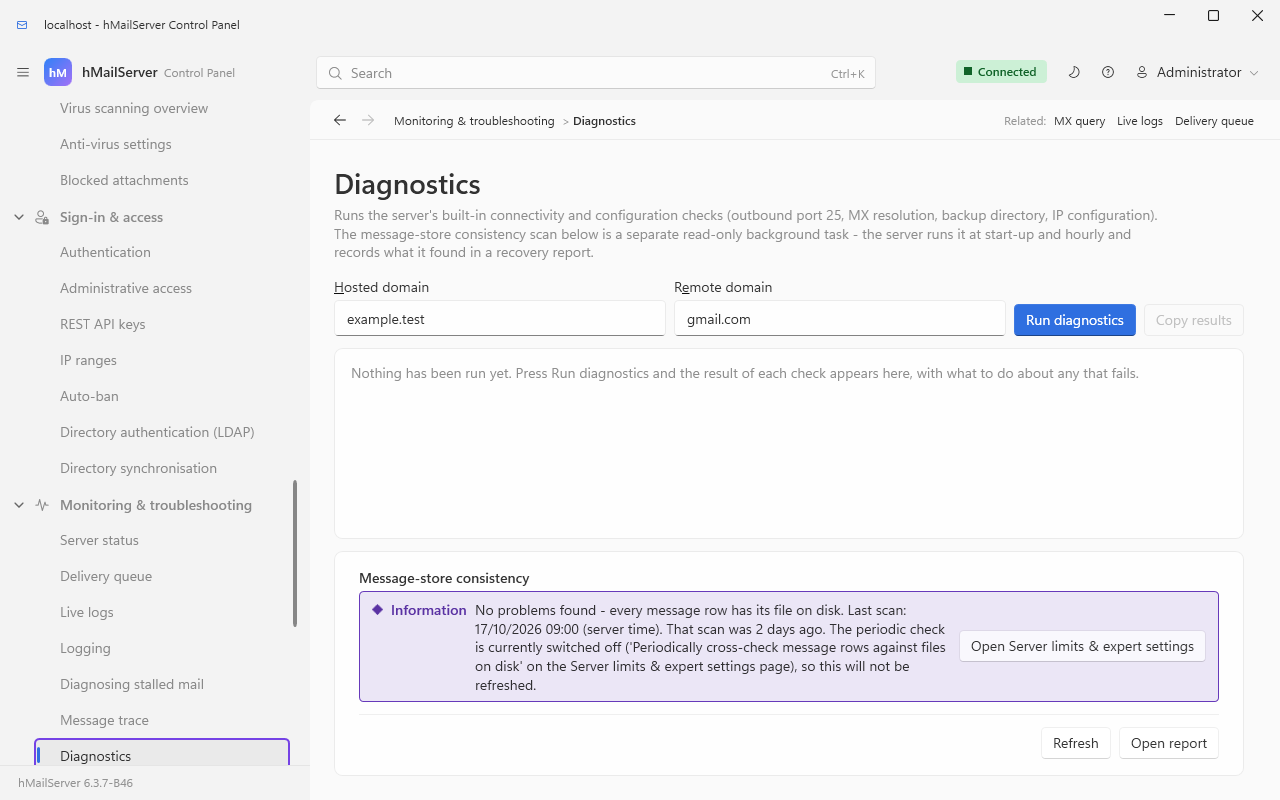
Two things to take from a capture with nothing in its results pane. The two boxes above it are the ones the note under the table is about — three of the ten tests are skipped in silence when they are empty — and Copy results puts the whole result on the clipboard, which is what to paste into an issue. The Message-store consistency card below the results reports the last scan and says whether the periodic check is on.
| Test | What it actually does | Fails when |
|---|---|---|
| Server details | Reports version, logical processors, physical memory and database type | Never — it is information, not a check |
| Installation paths (6.3.0) | Lists hMailServer.ini, the registry InstallLocation (32-bit view), every [Directories] key, the directories derived from the program folder, and every path-shaped [Settings] and [Database] value but [Database] TlsCaFile, each marked exists, MISSING or not set
|
Any configured path does not exist, or ProgramFolder and the registry anchor name different directories — the exact failure of a moved installation (Relocating an Installation walks the repair) |
| Test IPv6 | Asks whether the operating system offers IPv6 | Never — it reports either way |
| Test outbound port | Connects to the configured smart host, or to the test domain on port 25 when no smart host is set, using the configured delivery bind address and connection security | Outbound 25 is blocked by your ISP, cloud firewall or local firewall; or the smart host's name, port or TLS mode is wrong |
| Test backup directory | Writes a small temporary file into the configured backup destination and deletes it again | No destination is configured, or the service account cannot write there. This is the check that catches a backup schedule which has been failing silently |
| Test MX records | Resolves MX for the local domain you named, through the server's own resolver | Your public DNS is wrong, or the resolver is not answering — see the DNSServer warning in Diagnosing Stalled Mail
|
| Test local connect | Connects on port 25 to each host in your own MX records, in turn | Hairpin NAT does not work, port 25 is not forwarded, or the MX points somewhere else entirely |
| Test message file locations | Confirms that every message row's file lives under the data directory, and that paths are stored relative | Messages exist outside the data directory, or full paths are stored — either makes the built-in backup refuse to run |
| Test IP range configuration | Counts the expiring (auto-ban) IP ranges and looks for one that bans 127.0.0.1
|
Localhost has been auto-banned, which breaks local submission and anything that talks to the server through loopback |
| Error logs | Counts ERROR* files in the log directory |
Any exist. Deliberately strict: an error log is a thing to read, not a thing to have |
Three of these need a domain first: Test MX records and Test local connect use the local domain box, and Test outbound port uses the test domain box when no smart host is configured. Leave those boxes empty and the tests are skipped silently rather than failing.
The same tests over COM, which is what an unattended check would use:
$app = New-Object -ComObject hMailServer.Application
$app.Authenticate("Administrator", "<password>") | Out-Null
$d = $app.Diagnostics
$d.LocalDomainName = "example.com"
$d.TestDomainName  = "example.com"
$r = $d.PerformTests()
for ($i = 0; $i -lt $r.Count; $i++) {
    $t = $r.Item($i)
    "{0,-30} {1}" -f $t.Name, $(if ($t.Result) { "OK" } else { "FAILED" })
    if (-not $t.Result) { $t.ExecutionDetails }
}Scrape configuration. On a non-loopback bind you must supply the credential:
scrape_configs:
  - job_name: hmailserver
    scrape_interval: 30s
    scrape_timeout: 10s
    metrics_path: /metrics
    authorization:
      credentials: "<the value of MetricsServerAuthToken>"
    static_configs:
      - targets: ["mail.example.com:9100"]
Use scheme: https when MetricsServerCertificateFile and
MetricsServerPrivateKeyFile are set — the whole port is HTTPS then, probes included.
Keep scrape_timeout well under scrape_interval: the listener serves one connection
at a time.
Alerting rules. Each of these is written against a metric described above, and each has a reason to exist rather than a threshold picked for tidiness:
groups:
  - name: hmailserver
    rules:
      - alert: HMailServerDown
        expr: hmailserver_state{state="running"} == 0 or up{job="hmailserver"} == 0
        for: 2m
        annotations:
          summary: "hMailServer is not in the running state"

      - alert: HMailServerDatabaseUnreachable
        expr: hmailserver_database_connected == 0
        for: 2m
        annotations:
          summary: "The database has not answered a readiness probe recently"

      - alert: HMailServerQueueStalling
        expr: hmailserver_delivery_queue_oldest_message_age_seconds > 3600
        for: 15m
        annotations:
          summary: "The oldest queued message is more than an hour old"

      - alert: HMailServerDeferralsRising
        expr: rate(hmailserver_messages_deferred_total[15m]) > rate(hmailserver_messages_delivered_total[15m])
        for: 30m
        annotations:
          summary: "More delivery passes are being deferred than are succeeding"

      - alert: HMailServerCertificateExpiringSoon
        expr: hmailserver_tls_certificate_expiry_seconds - time() < 14 * 86400
        annotations:
          summary: "A configured TLS certificate expires in under 14 days"

      - alert: HMailServerAuthFailureSpike
        expr: rate(hmailserver_auth_failures_total[5m]) > 1
        for: 10m
        annotations:
          summary: "Sustained authentication failures - check Access and abuse protection, Auto-ban"

      - alert: HMailServerWorkQueueBacklog
        expr: hmailserver_workqueue_depth{queue="Asynchronous task queue"} > 20
        for: 5m
        annotations:
          summary: "Messages are queuing behind the accept pipeline"

      - alert: HMailServerMetricsProbed
        expr: rate(hmailserver_metrics_unauthorized_requests_total[5m]) > 0
        annotations:
          summary: "Something is presenting bad credentials to the metrics port"

      - alert: HMailServerDbPoolSaturated
        expr: hmailserver_db_connections{state="available"} == 0
        for: 5m
        annotations:
          summary: "Every pooled database connection is busy"
Grafana. The repository ships a dashboard —
hmailserver/docs/grafana-dashboard.json
— already wired to the metric names above. Import it and pick your Prometheus data
source; the $instance variable selects the server.
| Row | Panels |
|---|---|
| Health | Server state, Database, Uptime, Missing message files, TLS certificate expiry |
| Mail flow | Delivery outcomes (delivered, deferred and bounced rates), Delivery queue depth and oldest message, Messages processed / spam blocked / viruses removed, Active sessions |
| Authentication and TLS | Authentication outcomes, TLS handshakes |
| Latency and database | Command processing latency (p50/p95/p99), Database query latency (p50/p95/p99), Database connection pool, Slow queries |
A five-minute smoke test after any change to this configuration:
# 1. Is the listener even there? A refused connection here is almost always
#    an invalid MetricsServerBindAddress - check the application log.
Test-NetConnection 127.0.0.1 -Port 9100

# 2. Do the probes answer without a credential? They must, in every configuration.
Invoke-RestMethod http://127.0.0.1:9100/livez
Invoke-RestMethod http://127.0.0.1:9100/healthz

# 3. Does the exposition answer, and how many lines is it?
$m = Invoke-RestMethod http://127.0.0.1:9100/metrics
($m -split "`n").Count

# 4. Spot-check the three signals that matter most.
($m -split "`n") |
Select-String -Pattern '^hmailserver_state\{state="running"\}|^hmailserver_database_connected |^hmailserver_delivery_queue_oldest_message_age_seconds 'Since 6.3.4 — a reader on 6.3.3 has neither client.
Two command-line clients speak the REST API, so a check that used to need a Control Panel
or a COM script is now a line in a shell. hmctl is one Python 3 file that the Linux
.deb and .rpm install as /usr/bin/hmctl; the HmailServer PowerShell module beside
it is the same vocabulary in PowerShell's grammar. Both work against a Windows server, a
Linux server or one on another machine, because both go over HTTP rather than DCOM.
For this page, three of their verbs matter:
| Command | What it reads | The route behind it |
|---|---|---|
hmctl status |
What the server says about itself: version, state, the processed, spam and virus counters, the session counts, and what this build can do | GET /api/v1/status |
hmctl log list and hmctl log tail <name> --lines N
|
The log files on the server by name, size and time, then the last N lines of one — without a share to the log directory |
GET /api/v1/logs, GET /api/v1/logs/{name}
|
hmctl backup status and hmctl backup start
|
The backup settings as configured, and a backup run now |
GET /api/v1/backup, POST /api/v1/backup
|
hmctl report sections, hmctl report <section> --from --to --domain --top --csv
|
What can be reported and from what, then one section (§16.6a) as a table with its note, or as the server's own CSV |
GET /api/v1/reports, GET /api/v1/reports/{section}
|
Neither client has verbs for the alerts or the audit trail (§16.7a, §16.7b); hmctl api GET /api/v1/audit reaches them with the administrator password, which is the only credential
those routes accept.
--insecure is refused anywhere but the loopback, so a check run from a monitoring host
has to trust the certificate properly. Neither client replaces the metrics listener: for a
Prometheus scrape, use /metrics as this page describes it.
The browser Control Deck at / reads the same things without a shell — the log list
with any file's last 200 or 2,000 lines, the server-wide settings, the certificates and the
rules — and since 6.3.4 it does so in twenty
languages as well as English. Since 6.3.4 it also has the Reports and
Audit trail views described above.
Checked 8 September 2026 against hMailServer 6.2.28, and re-checked on 15 September 2026
against commit 916dec6a1: not one metric family, help text, bucket bound, probe
condition, reason string or default on this page has changed since. What did change in
MetricsServer.cpp between the two dates is the Linux port and nothing an operator reads
— the listener is stopped through AcceptLoop's two halves now, because Linux does not
wake a thread blocked in accept() when another thread closes the listening socket, which
used to make a stop hang on Linux for as long as the process lived. The metric families, their help
text, types and order are MetricsServer::BuildMetricsBody_; the histogram bucket
bounds are CommandLatencyBounds and DatabaseLatencyBounds in ServerStatus.cpp;
the state series are StateSeriesTable. The probe dispatch, the "probes first"
ordering and the 503-rather-than-401 decision are MetricsServer::HandleClient_,
BuildMetricsUnavailableResponse_ and IsLoopbackAddress_; the readiness conditions
and their exact reason strings are IsDatabaseAnswering_ and IsReady_; the
/healthz body, and the deliberate absence of session counts from it, are
BuildHealthBody_. The refresher's cadences (5 s, 30 s after a failure, a 20 s
staleness ceiling, 10 s for the queue, 5 minutes for certificates), the 8 KB request
cap, the 5 s read deadline and the 15 s write deadline are the constants at the top of
MetricsServer.cpp; the 128-series certificate ceiling and the ACME fallback are
RefreshCertificateExpiryCache_. The counters' call sites are
SMTPDeliveryManager::DoWork (processed, one per delivery pass) and
SMTPDeliverer::DeliverMessage and SubmitErrorLog_ (delivered, deferred, bounced).
The seven work-queue names are Application's constructor plus IOService,
SMTPDeliveryManager and ExternalFetchManager. Every default in the tables is
IniFileSettings::LoadSettings. The metric history is MetricsHistoryTask and the
OTLP push is OtelMetricsExporter::BuildExportJson_. The nine self-tests are
Diagnostic::PerformTests and the Test* classes beside it. The log file names are
Logger::GetCurrentLogFileName, and what LogDeleteDays will and will not delete is
LogRetentionTask::DoWork. The Dashboard's two-second refresh is
DashboardView.xaml.cs. There is regression coverage for the parts that would
otherwise fail silently: HealthProbes.cs, MetricsSecurity.cs, MetricsReadiness.cs,
PrometheusConventions.cs, MetricsHistory.cs, PerDomainMetrics.cs,
DatabaseMetrics.cs, DeliveryMetrics.cs and MessageStoreConsistency.cs, all under
test/RegressionTests/Infrastructure.
The sections added for the tree after 6.3.3 were checked against commit 3233b0cc4 on
15 September 2026. The two store gauges and their cache are MetricsServer::BuildMetricsBody_
and Reports::CachedStoreTotals (StoreCacheSeconds = 3600), sampled by MetricsHistoryTask.
Syslog is SyslogFormatter and SyslogSink (QueueLimit = 4096, UdpByteLimit = 1024,
TcpByteLimit = 65000, the journal chosen by RunningUnderSystemd_), its defaults the
EnsureLong calls in Configuration::EnsureSettingDefaults_, its REST keys the LoggingRows table in
RestApiSettings.cpp. The reports are RestApiReports.cpp (the SECTIONS table, the
366-day window, top 1 to 200) over Reports.cpp (MaxTraceRows = 100000), refused to a
domain-restricted key in Authorize_. The alerts are AlertManager (WebhookBackoffMinutes,
SaveRule's refusals, SendMail_ needing a sender) with the six rules and nine settings
seeded by Upgrade6042to6043*.sql; the audit trail is AuditTrail (the AuditedTables list
whose five misspellings are named above, IsSecretName, the 1,000-row page cap), and every
alert and audit route is administrator-only through IsApiKeyRoute_ in RestApiServer.cpp.
The Windows regression gate on that commit ran 2,410 tests: 2,402 passed, none failed,
8 skipped. The Linux suite on 00bec4412, the same server: 1,606 tests, 1,326 passed, 0 failed, 280 skipped.
Re-read for the tree at master 540347500 on 24 September 2026 for the six metric
families added since (listed in §16.4, emitted beside the others), the eleven alert rules
(CreateTables*.sql seeds them), the audit trail's put-back and role access
(AlertsAndAuditTrail.md, Roles.md) and the per-domain report sample (Reports.md,
schema 6062). The suite there has 3,390 [Test] attributes (2,302 at 6.3.3); the Linux suite
last ran on the tree of 17 September (1,725 results, 1,439 passed, 286 skipped, none failed)
and has not run since its CI host became unavailable on 18 September. The rest of this page
was not re-read line by line.
Brought up to 6.3.4 (master 92b8f9f63) on 26 September 2026: the labels now say what
is in 6.3.4, the metric families were counted again (38 # TYPE names, as at 540347500),
the alert conditions are still the eleven the create scripts seed, and §16.7c is new, from
hmailserver/docs/Snmp.md. The Windows suite at that commit has 3,698 [Test] attributes, and
3,811 at the tag v6.3.4 (51e2dbda0), the release.