Repository navigation
Database Schemas
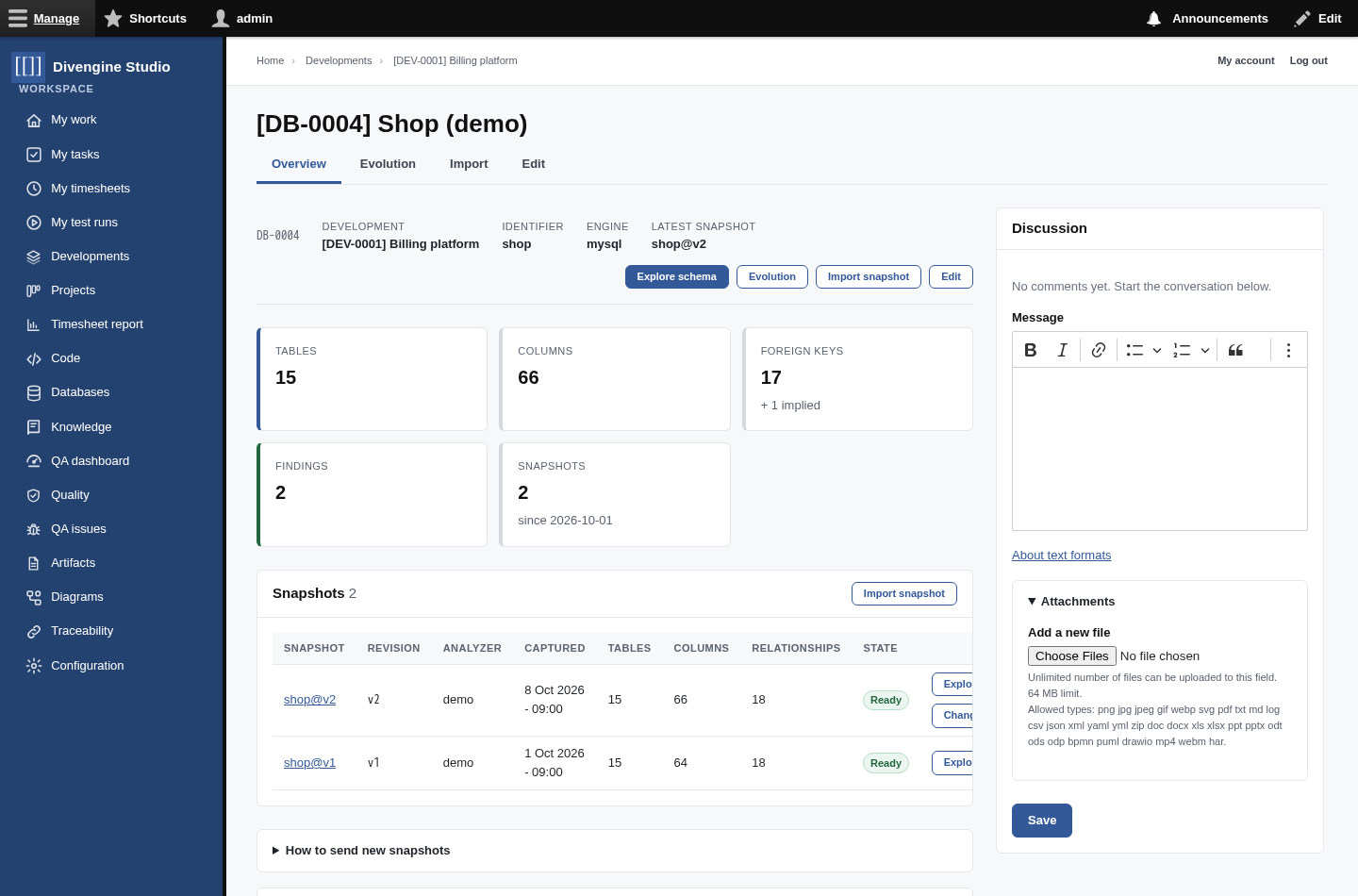
Requirements say what the system does; the database says what it remembers. Database schemas bring the structure of a Development's databases into Studio: every table, column, key and relationship, how they change over time, and an interactive map to explore them. People and AI agents read it right next to the requirements, the code and the tests.
Two promises:
- Structure only, never data. Studio stores names, types, keys, indexes and relationships. Not a single row.
- Any analyzer. Studio does not care which tool looked at your database. SchemaSpy works out of the box; any other tool can send the same information in the Divengine contract.
flowchart LR
    DB[("Your database<br/>MySQL, PostgreSQL…")] --> A["Analyzer<br/>SchemaSpy · your own tool"]
    A -- "SchemaSpy XML<br/>or Divengine contract" --> I["Studio importer<br/>checks · hashes · keeps"]
    I --> S["Snapshot<br/>immutable"]
    S --> E[Schema explorer]
    S --> V[Evolution]
    S --> M[AI agents · MCP]
- A Studio Manager registers the database in a Development: a name and an identifier,
the name analyzers use for it (for example
shop). - An analyzer describes the schema and sends a snapshot: from the Import page, from the command line, or from CI over HTTP.
- Studio checks it, computes its identity from the content, and keeps it as an immutable snapshot. Sending the same schema again changes nothing; a new schema is a new snapshot.
- Everybody in the Development can explore it, see what changed between snapshots, and connected agents can read it through MCP.
On a Development, open the Databases tab and click Register database.
| Field | |
|---|---|
| Name | How people call it. It also gets a code like DB-0001, so [[DB-0001]] links work in any text. |
| Identifier | The name analyzers use in their snapshots (database.code in the contract). Letters, digits, dot, dash and underscore. |
| Engine | MySQL, PostgreSQL… Filled from the first snapshot when you leave it empty. |
| Description | What this database is for. |
🔒 Once a database has snapshots, its identifier and engine are fixed: the history was captured under them. For another database, register another one.
From the screen: the Import tab takes SchemaSpy's XML (it writes it next to its HTML
report, e.g. mydb.mydb.xml) or a contract JSON. Add a revision (a commit, a release, a
migration) to name the snapshot.
From the command line:
vendor/bin/drush divengine:database-import shop.shop.xml --revision=$(git rev-parse HEAD)
# First time, register it on the fly in a Development:
vendor/bin/drush divengine:database-import shop.json --development=DEV-0001
From CI, over HTTP: create a user with the Database analyzer role, add it as a member of the Development, and post the file:
curl -u analyzer:PASSWORD -H "Content-Type: application/json" --data-binary @snapshot.json \
  "https://studio.example.com/api/divengine/database/import?database=DB-0001&revision=$GIT_SHA"
The answer tells you what happened:
| Status | Means |
|---|---|
imported |
A new snapshot. |
idempotent |
That exact snapshot was already there. Nothing changed. |
unchanged |
The schema is the same as the latest snapshot, so nothing was imported (force=1 imports anyway). |
| error | The file is not a valid snapshot; the message says why. |
So you can run it after every migration or deploy: Studio only keeps the moments where the schema really changed.
Explore schema opens an interactive map of the snapshot.
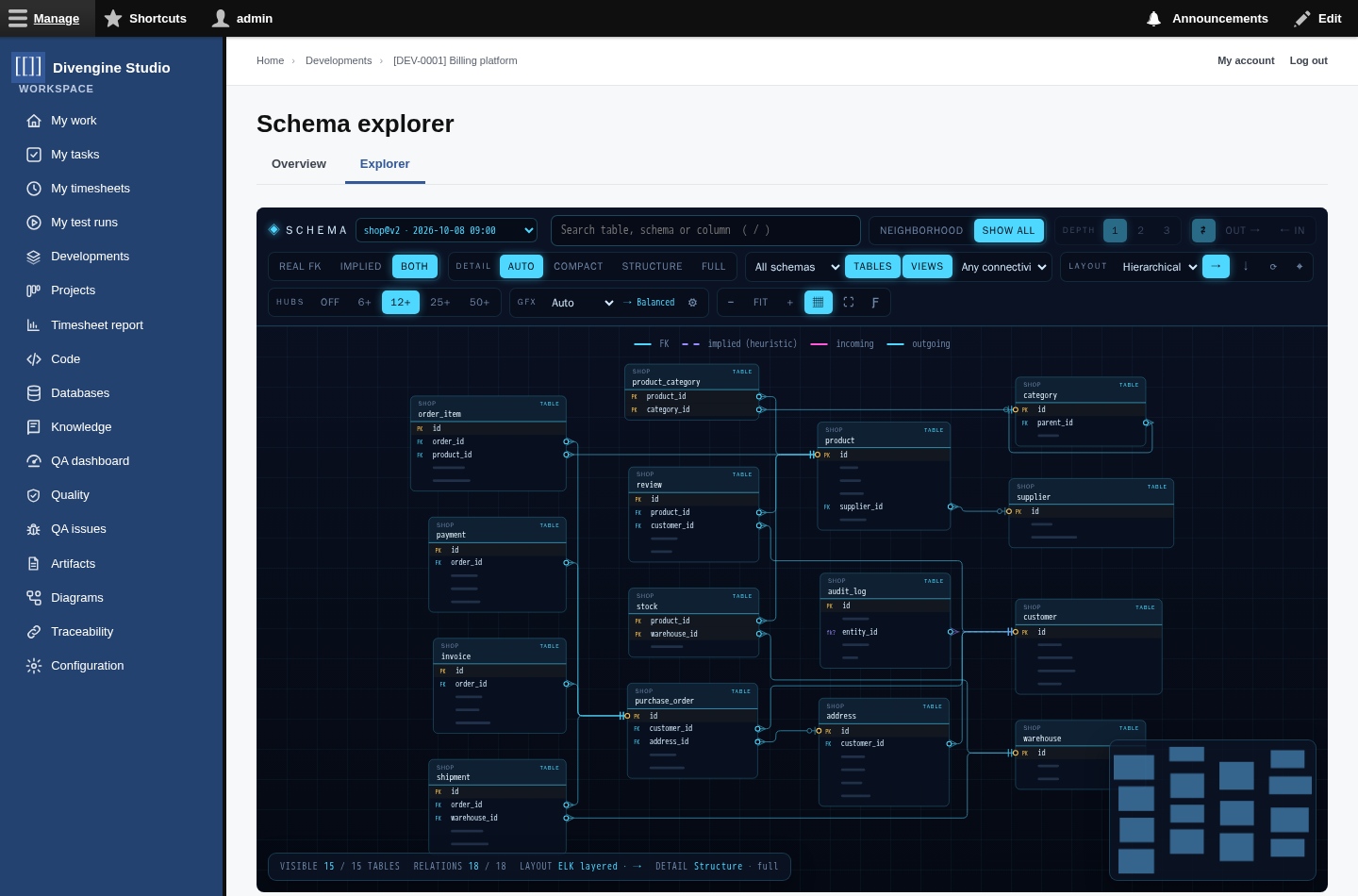
- Tables and their columns, with primary keys (PK), foreign keys (FK), unique columns and types. Relationships go from the exact column to the exact column, with crow's feet for "many" and "one".
- Real and implied relationships: solid lines are foreign keys the database enforces; dashed lines are relationships the analyzer guessed from names. Show one kind, the other, or both.
- Big schemas stay usable. With more than 120 tables the explorer starts from the neighbourhood of the most connected table. Search a table or a column, pick a depth (1–3 hops), a direction (references, referenced by), or Show all when you really want everything.
- Layouts: Hierarchical (who depends on whom), Organic (clusters) and Radial (around a table). Tables without relationships are packed in a grid apart.
-
Hubs: a table referenced by many others (like
users) would draw a fan across the map; above the threshold its incoming lines are folded into a counter. Expand them on demand. - Zoom with meaning: zoomed out you see names; closer, the key columns; closer still, every column with its details. The minimap shows where you are.
- Move tables by hand; the explorer remembers your arrangement for that view in your browser.
- Graphics quality adapts to your computer (Auto), or choose Low…Ultra.
Click a table to see its details in the inspector, explore from it, or Open record for its page.

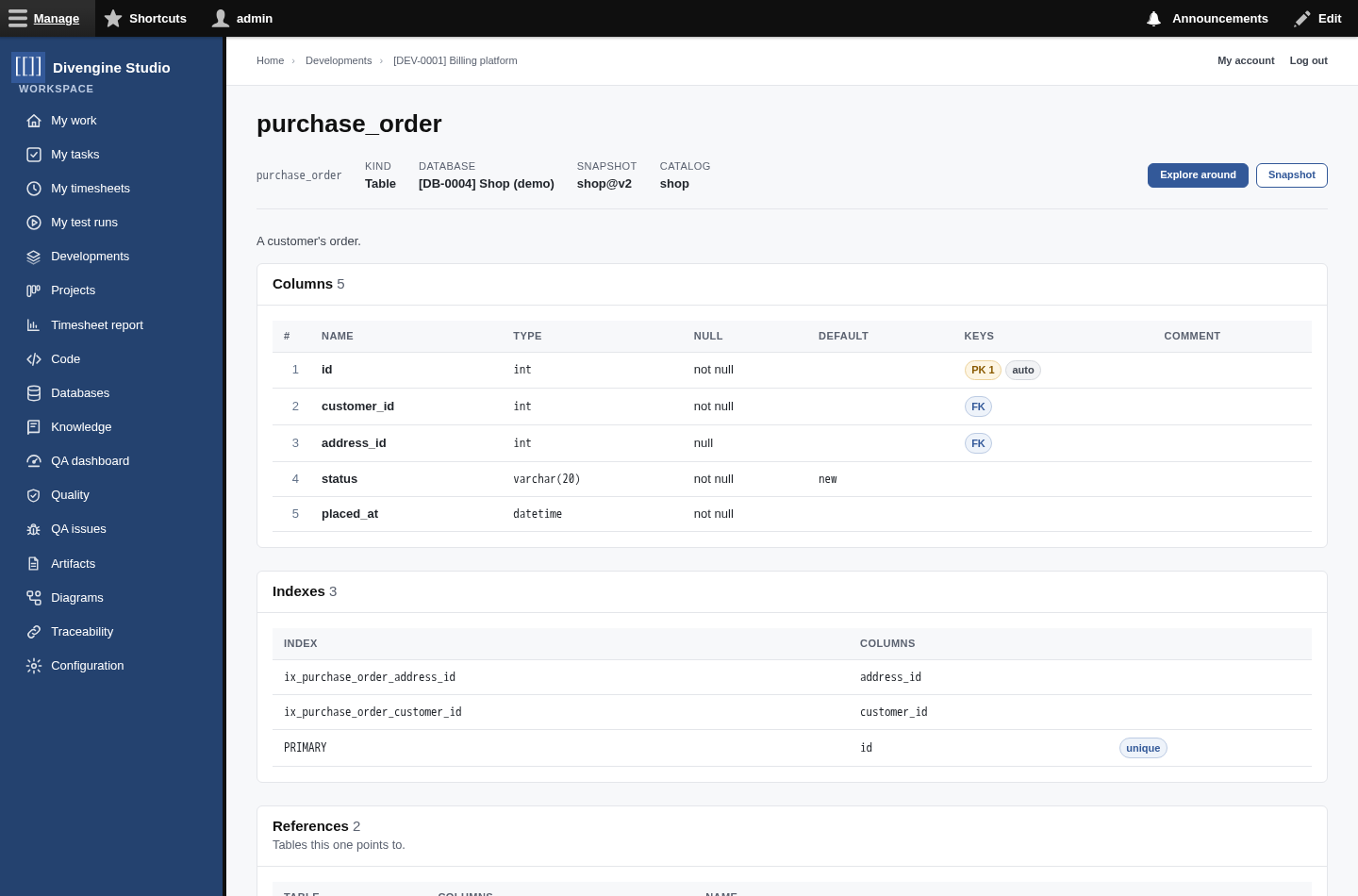
Every table has its own page: columns with types, nullability, defaults and keys; indexes; the tables it references and the tables that reference it; findings; and the SQL of views.
Evolution compares two snapshots, FROM and TO, and tells you exactly what changed in the structure: tables, columns, primary keys, indexes, foreign keys, implied relationships and routines.
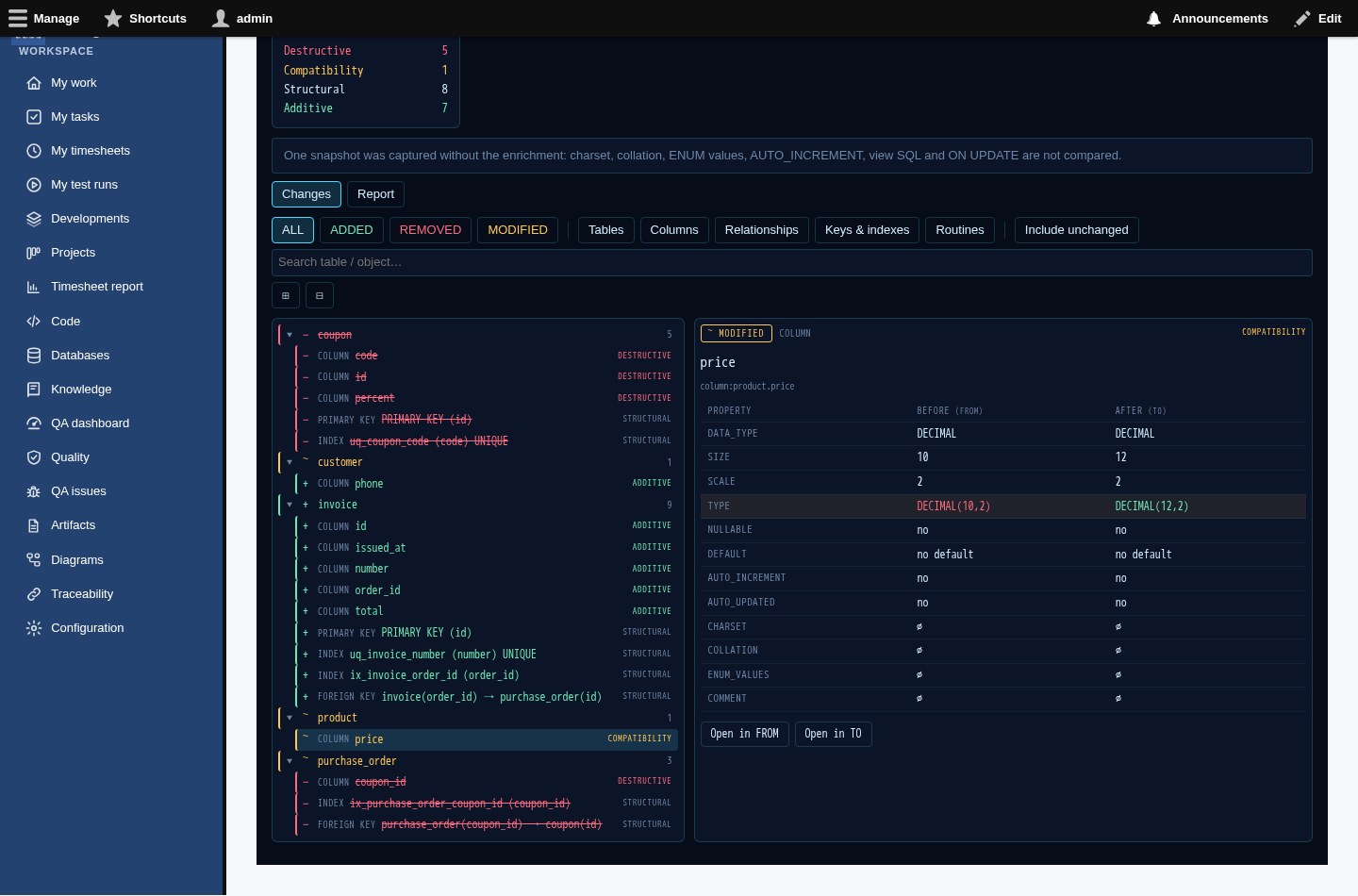
- Each change is added, removed or modified, with the properties before and after.
- A technical impact helps reading it: destructive (something was removed), compatibility (a type, nullability or default changed, or a NOT NULL column appeared without default), structural (keys, indexes, relationships), additive (new things) and cosmetic (comments, order).
- Renames are not guessed: a renamed column is shown as removed + added, which is what the database sees.
- Report, Export JSON and Export Markdown give you the same diff to attach to a change request or a review.
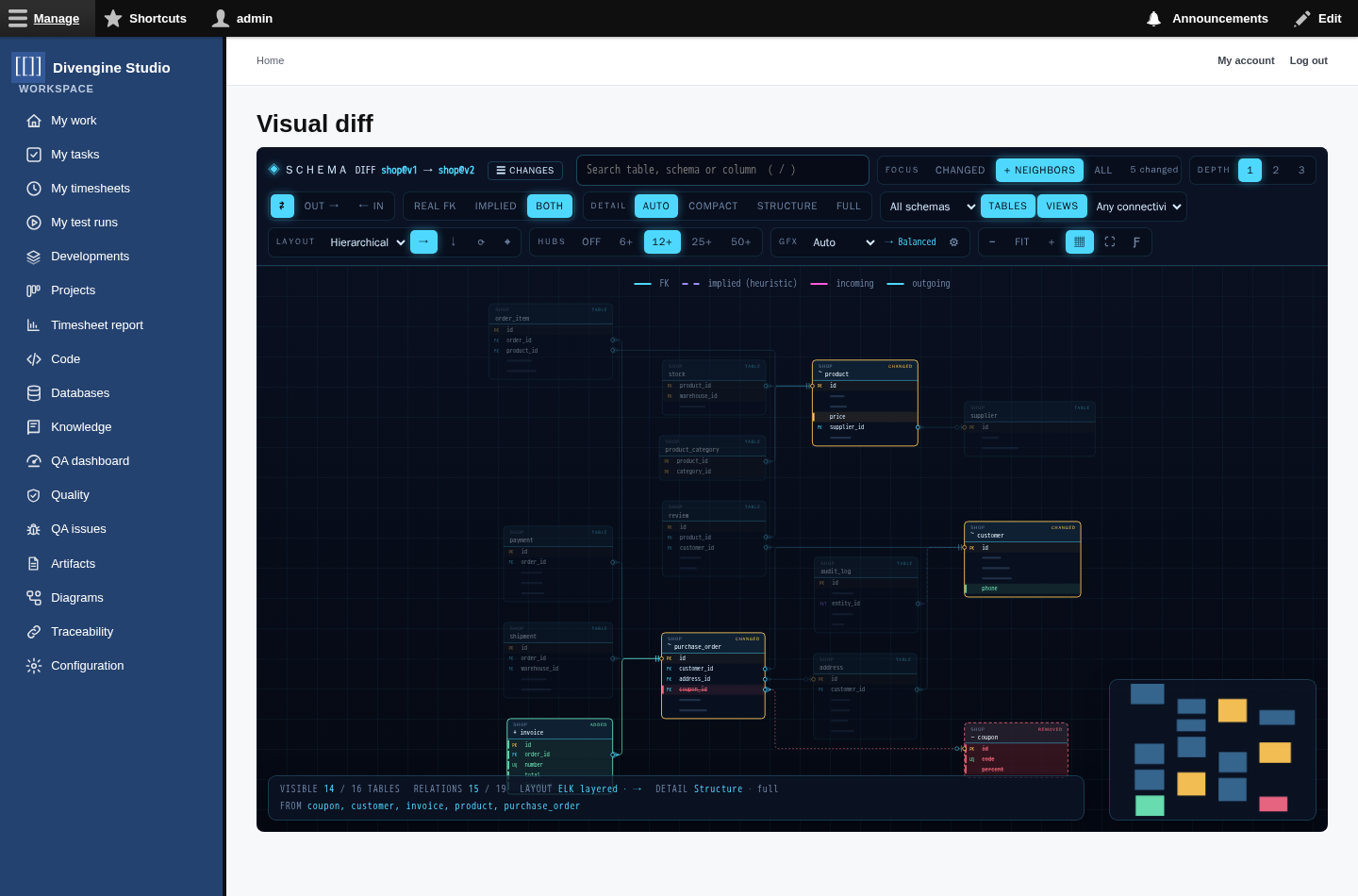
Open visual diff draws both snapshots together in the explorer: new tables in green, changed ones in amber, removed ones as red ghosts, with the changed columns marked.
After each import, a few deterministic rules look at the facts and point out things worth a look:
| Rule | Looks for |
|---|---|
TABLE_NO_INDEX |
A table without any index. |
TABLE_ORPHAN |
A table with no real foreign key in or out. |
TABLE_SINGLE_COLUMN |
A table with just one column. |
TABLE_INCREMENTING_COLUMNS |
phone1, phone2… a possible denormalization. |
COLUMN_DEFAULT_NULL_STRING |
A default that is the text 'NULL' instead of no default. |
They are signals, not verdicts. Recompute findings on a snapshot runs them again.
With the MCP connection, agents get five tools, limited to what their account can see:
| Tool | Does |
|---|---|
database_databases |
Lists the databases (optionally of one Development) with their latest snapshot. |
database_tables |
Lists the tables of a snapshot; filter by table or column name. |
database_table |
Describes one or more tables: columns, keys, indexes, relationships both ways. |
database_findings |
The findings of a snapshot. |
database_changes |
What changed between two snapshots (by default, the last two). |
sequenceDiagram
    actor You
    participant AI as Agent
    participant S as Studio (MCP)
    You->>AI: "Write the query for unpaid orders of a customer"
    AI->>S: database_table(shop, "purchase_order, payment, customer")
    S-->>AI: columns, keys, relationships
    AI-->>You: a query that uses the real columns and joins
| Permission | Allows |
|---|---|
| Explore database schemas | See the databases of your Developments, their snapshots, tables, the explorer and evolution. Content editors, Project Managers and the MCP agent have it. |
| Manage database schemas | Register databases, import snapshots, recompute findings. Studio Managers. |
| Import database snapshots | Only push snapshots over HTTP, into Developments the account is a member of. The Database analyzer role. |
| Administer database schemas | Delete databases and snapshots that have history (site administrators). |
Produce the contract JSON (see the
contract and the demo
tests/fixtures/demo_shop_v1.json in the module) and send it with any of the ways above. Or, if your
tool already has its own format, a developer can add an adapter: a small service that turns that
format into the contract (SchemaSpy's adapter is the example). Nothing else in Studio changes.

Getting started
Knowledge
- Knowledge base
- Artifacts
- Traceability
- Diagrams
- Discussions & attachments
- Code Source
- Code docs
- Database schemas
Work
Process
Quality
- Test management
- Running tests (for testers)
- QA issues
- Dashboard & reports
- Verifying requirements with tests
Administration
Under the hood