Repository navigation
Traceability
A trace is an explicit, typed link between two records: this use case refines that requirement. Traces are what turn a pile of artifacts into a map you can navigate.
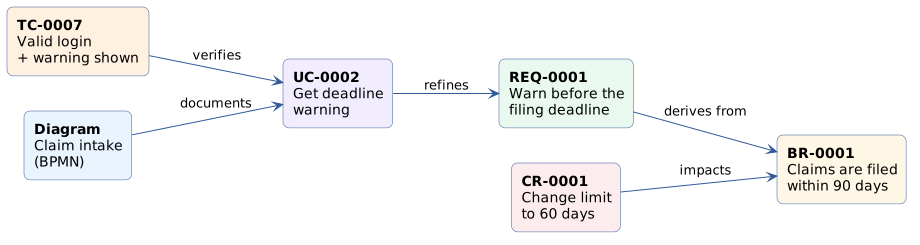
PlantUML source (rendered live by the PlantUML for GitHub extension)
@startuml
skinparam backgroundColor transparent
skinparam defaultFontName Verdana
skinparam shadowing false
skinparam rectangle {
  BackgroundColor #ffffff
  BorderColor #335999
  RoundCorner 12
}
skinparam ArrowColor #335999
left to right direction
rectangle "<b>BR-0001</b>\nClaims are filed\nwithin 90 days" as BR #fff7e6
rectangle "<b>REQ-0001</b>\nWarn before the\nfiling deadline" as REQ #e9f9ef
rectangle "<b>UC-0002</b>\nGet deadline\nwarning" as UC #f1ecfe
rectangle "<b>TC-0007</b>\nValid login\n+ warning shown" as TC #fff1e0
rectangle "<b>CR-0001</b>\nChange limit\nto 60 days" as CR #fdecee
rectangle "<b>Diagram</b>\nClaim intake\n(BPMN)" as D #eaf4ff
REQ --> BR : derives from
UC --> REQ : refines
TC --> UC : verifies
CR --> BR : impacts
D --> UC : documents
@enduml
Reading the picture above: the requirement derives from a business rule, a use case refines the requirement, a test case verifies the use case, a diagram documents it, and a change request impacts the business rule. If someone asks "what happens if we change the 90-day rule?", you can answer by following the arrows backwards. That's impact analysis, without spreadsheets.
| Part | Meaning |
|---|---|
| Source and target | Any two records: artifacts, diagrams, change requests, activities, milestones, tests… |
| Relation | What the link means (see below). Each relation reads forward ("verifies") and backward ("is verified by"). |
| Confidence | Low, medium or high: how sure you are about the link. |
| Rationale | Why the link exists, in your own words. Optional, but priceless. |
| History | Traces are revisioned like everything else. |
| Relation | Reads backwards as | Use it when… |
|---|---|---|
| Derives from | Is the origin of | A requirement comes from a business rule or goal. |
| Refines | Is refined by | The source adds detail without changing intent. |
| Realizes | Is realized by | A system use case makes a business use case real. |
| Represents | Is represented by | A system actor stands for a business worker. |
| Satisfies | Is satisfied by | A design element fulfils a requirement. |
| Implements | Is implemented by | Code or a component implements something. |
| Verifies | Is verified by | A test proves the target holds. |
| Validates | Is validated by | Confirms the target meets its intended use. |
| Tests | Is tested by | A test exercises the target. |
| Documents | Is documented by | A diagram or document explains the target. |
| Impacts | Is impacted by | A change request or decision affects the target. |
| Depends on | Is a dependency of | The source can't work without the target. |
| Conflicts with | Conflicts with | Both can't hold as stated. 😬 |
| Mitigates | Is mitigated by | Something reduces a risk. |
| Supersedes | Is superseded by | The source replaces the target (same kind). |
| Produces / Consumes | Is produced / consumed by | Activities and their work products. |
| Includes / Extends / Generalizes | — | UML relationships between use cases. |
| References | Is referenced by | A plain mention, nothing stronger. |
| Relates to · Blocks · Duplicates | Relates to · Is blocked by · Is duplicated by | Between project tasks only. |
On any record page, scroll to the Traces section and click Add trace. Pick the relation, the other record and (optionally) a rationale. The trace appears on both records, read in the right direction on each side.

Traces are free-form, but not anything goes. Studio refuses links that make no sense:
- No duplicates: the same link can't exist twice.
- No crossing Developments: a record of one Development can't be traced to a record of another.
- Change requests impact things: inside a Development, only change requests use Impacts.
- No loops in includes and generalizes.
- Tests only verify: test plans, suites, cases and runs are linked to requirements, use cases, change requests and work products only with Verifies (more in Verifying requirements with tests).
- You only see traces whose both ends you're allowed to see.
Traceability in the sidebar lists every trace you can see, filterable by relation and confidence. Handy for audits, or for spotting links someone created with low confidence.

Writing [[REQ-0001]] in a text creates a mention (a link and a "Mentioned in" entry on the
requirement), not a trace. Traces are deliberate, typed relationships; mentions are prose. See
Knowledge base.
Studio also tells you about the traces that are missing. For example, an approved requirement that nothing refines, realizes or implements gets a warning on its page:
⚠️ Approved but not refined downstream: no system use case covers it and no trace refines, realizes or implements it.
These gaps also feed the readiness check. Remember the motto: explicit, never inferred. Studio won't assume two things are related because they share a word.

Getting started
Knowledge
- Knowledge base
- Artifacts
- Traceability
- Diagrams
- Discussions & attachments
- Code Source
- Code docs
- Database schemas
Work
Process
Quality
- Test management
- Running tests (for testers)
- QA issues
- Dashboard & reports
- Verifying requirements with tests
Administration
Under the hood